
Finding out your X (Twitter) account is suspended feels like getting kicked out of a party you didn’t even know was getting rowdy. One minute you are scrolling through your feed, and the next, you are staring at a red banner telling you that your access is gone. It is a stressful situation, especially if you use your account for work, networking, or keeping up with friends. The good news is that a suspension is not always the end of the road.
In this guide, we are going to look at why these things happen and exactly what you need to do to fix it. Whether it was a mistake by a bot or a genuine slip-up on your part, there are clear steps to follow. We will walk through the appeal process, the different types of bans, and how to handle the situation if the first response you get is a “no.” If you want to recover suspended twitter account access, you need a plan that works with the current 2026 platform rules.
Why Did X (Twitter) Suspend Your Account?
X uses a mix of AI and human moderators to keep the platform clean. Most of the time, they are looking for bots or people trying to game the system. However, regular people often get caught in these automated sweeps. Understanding the “why” is the first step because you cannot write a good appeal if you do not know what they think you did wrong.
Spam and Platform Manipulation
The most common reason for a sudden ban is being flagged as a bot. If you follow 500 people in ten minutes, post the same link twenty times, or use repetitive hashtags, the system thinks you are a script. They call this “platform manipulation.” It is basically their way of saying you are making the site less fun for everyone else by acting like a machine.
Safety Violations and Abusive Behavior
X has strict rules about how people treat each other. If you get into a heated argument and say something that could be seen as a threat or harassment, you might get reported. Even if you were just joking with a friend, the AI might not see the sarcasm. Hateful conduct and sharing private information (doxxing) are also high-priority triggers for an immediate ban.
Accidental Flags and Automated Errors
Sometimes, you did absolutely nothing wrong. Maybe you logged in from a new VPN location, or your account was hacked and used to send out junk mail while you were asleep. Automated systems make mistakes every single day. If your account was locked for seemingly no reason, it is likely a false positive that can be cleared up with a bit of proof.
Policy Violation Overview
|
Violation Type |
Severity |
Common Trigger |
Recovery Chance |
|
Spamming |
Medium |
Repeating links, bulk following |
High |
|
Abusive Conduct |
High |
Targeted harassment, threats |
Low to Medium |
|
Security Issue |
Low |
Login from unknown IP/Country |
Very High |
|
Impersonation |
High |
Using a celeb name without “Parody” |
Medium |
Understanding the Types of X Account Restrictions
Before you start panicking, you need to know exactly what kind of trouble you are in. X does not always go straight to the “death penalty” for an account. They have a ladder of punishments. Identifying your specific restriction tells you if you can fix it yourself in two minutes or if you need to prepare for a weeks-long battle with support.
The Temporary Lock
This is usually a security measure. You will see a screen asking you to verify your phone number or email. This happens when X thinks your account might have been hacked or if you are behaving a bit too much like a bot. Once you pass the “human test” (like a CAPTCHA or a text code), you are usually back in business immediately.
Read-Only Mode
Think of this as “Twitter Jail.” You can log in and see your timeline, but you cannot post, like, or repost anything. Your followers cannot see your new content because you are essentially muted. This usually lasts for a set time, like 12 hours or 7 days. Once the timer runs out, your account returns to normal automatically.
Permanent Suspension
This is the big one. Your profile is gone, your followers can no longer see your page, and you are told you are not allowed to make new accounts. While it sounds “permanent,” it is actually more of a “permanent unless you win an appeal” situation. This is the stage where you have to prove your case to a human reviewer to recover suspended twitter account access.
Read Also: How to Download Twitter Videos Without Watermark
Comparison of Account Restrictions
|
Restriction Type |
Visible to Others? |
Actions Allowed |
How to Fix |
|
Locked |
Yes (Existing posts) |
None |
SMS/Email verification |
|
Read-Only |
Yes |
Browsing only |
Wait for the timer |
|
Suspended |
No |
None |
Formal Appeal Form |
Step-by-Step Guide to Recover Your Suspended Twitter Account
If you are facing a full suspension, you need to be methodical. Do not just scream into the void or tweet from a second account at the support team. That rarely works and can actually get your second account banned for “ban evasion.” Follow these logical steps to give yourself the best shot at a successful recovery.
Step 1: Check for Direct Verification Options
The first thing you should do is try to log in on a desktop computer. Sometimes the mobile app does not show the “Verify your account” button properly. If you see an option to receive a phone call or a text message, do it immediately. This is the fastest way to recover suspended twitter account status if the system was just suspicious of your login location.
If the simple verification does not work, you need to go to the official Help Center. There is a specific form titled “Appeal an account suspension or locked account.” You must be logged into the suspended account to use this form. If you cannot log in at all, the form has a section where you can explain that your credentials are also failing.
Step 3: Map the Exact Policy Violation
Look at the email X sent you. It usually mentions a specific rule, like “Violating our rules against ban evasion” or “Hateful conduct.” Read that specific policy on their website. When you write your appeal, you need to speak their language. If they say you were spamming, your goal is to show how your posts were actually helpful or directed at friends, not random strangers.
Step 4: Write a Compelling, Honest Appeal
This is your most important task. In the text box, do not be aggressive. Use a tone that is calm and professional. If you actually did break a rule by mistake, admit it. Say something like, “I realize now that my recent posts were too frequent and looked like spam. I have read the rules and it won’t happen again.” If you were hacked, explain that you have since changed your password and secured your email.
Step 5: Submit and Wait for the Review Timeline
Once you hit submit, you will get a ticket number. Keep this. X might send an automated email asking you to “reply to this email to confirm you still have access.” Do not ignore this! If you do not reply to that confirmation email, they will close your case before a human even looks at it. Now comes the hard part: waiting.
Recovery Process Checklist
|
Step |
Action Item |
Priority |
|
1 |
Attempt SMS/Email verification |
Immediate |
|
2 |
File the official Appeal Form |
High |
|
3 |
Reply to the confirmation email |
Critical |
|
4 |
Audit third-party app permissions |
Medium |
|
5 |
Clean up your profile (if possible) |
Low |
Insider Tips for a Successful Account Appeal
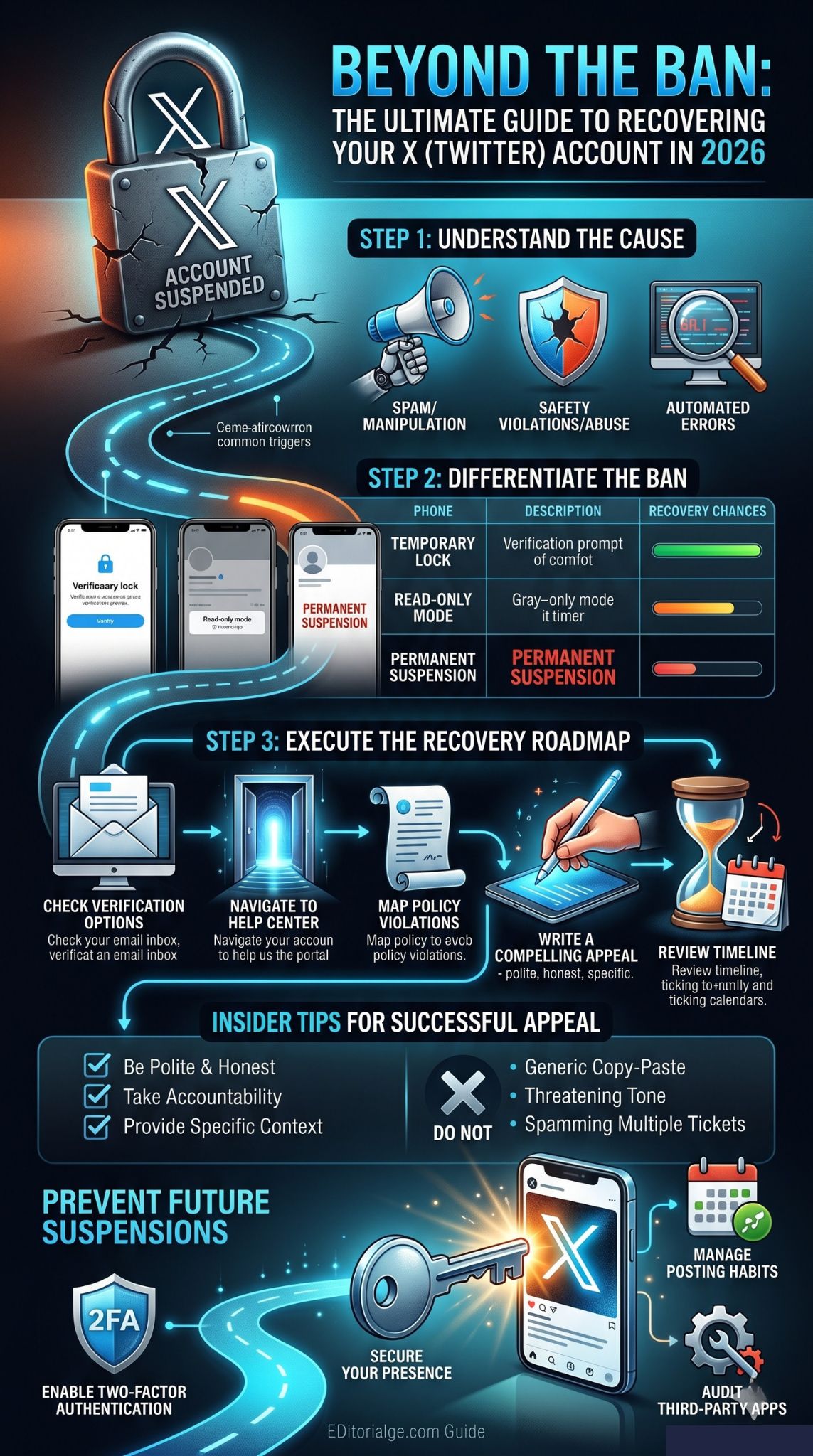
Getting a human to actually read your appeal is the goal. Most first-level responses are automated, but a well-written request can trigger a secondary review. You want to make it as easy as possible for the moderator to say “yes” and move on to the next ticket. Here is how to stand out from the thousands of angry people hitting their inbox every hour.
Be Polite and Take Accountability
The person reading your appeal is just an employee. If you call them names or threaten them, they will deny your request in two seconds. Be the most reasonable version of yourself. A little humility goes a long way. Even if you think the suspension is total nonsense, pretending to be a cooperative user is a better strategy than being a “keyboard warrior.”
Avoid Generic Copy-Paste Responses
There are plenty of “appeal templates” online. Do not use them. X has filters that recognize these templates instantly. If your appeal looks like a form letter, they will treat it like one. Write in your own voice. Explain your specific situation, mention how long you have had your account, and talk about the community you have built.
Provide Context for Potential Mistakes
Algorithms are bad at understanding context. If you used a word that is technically a “bad word” but were using it in a friendly way with a cousin, explain that. If you posted a link to your own store five times because it was your launch day, explain that you were excited and didn’t realize it triggered the spam filter. Giving them a “human” reason for the activity helps them override the AI’s decision.
Success Strategy Factors
|
Factor |
What to Do |
Why it Works |
|
Tone |
Professional/Calm |
Avoids immediate dismissal by staff |
|
Content |
Specific details |
Proves you are a real person, not a bot |
|
History |
Mention account age |
Shows long-term value to the platform |
|
Solution |
Offer to delete posts |
Gives the moderator a “win-win” option |
How Long Does Twitter Account Recovery Take?
One of the most frustrating parts of this process is the silence. X does not have a “live chat” for support, and they definitely do not have a phone number you can call. You are at the mercy of their ticket queue. In 2026, the response times have fluctuated as the company changes its internal staffing levels.
Generally, a simple lock is fixed in minutes. A formal appeal for a suspension usually takes between 3 to 10 business days. However, during high-traffic times (like after a major policy change or a global event), it can take up to a month. If you haven’t heard back in two weeks, it is usually okay to send one follow-up reply to your original ticket email, but do not start a brand new ticket.
Estimated Wait Times
|
Issue Type |
Estimated Time |
|
Phone Verification |
1 – 5 Minutes |
|
Password Reset / Hacked |
24 – 48 Hours |
|
Standard Appeal |
7 – 14 Days |
|
Complex Legal/Safety Appeal |
30+ Days |
What to Do If Your Appeal Is Denied
It is a gut punch when you get that email saying, “Your account will not be reinstated.” Most people give up here, but you don’t have to. A “no” today is not necessarily a “no” forever. Policies change, and sometimes you just got a grumpy reviewer on a bad day.
Filing a Follow-Up Appeal
You can appeal again. Wait a week or two and try a different angle. Maybe this time, focus more on the security aspect if you suspect you were hacked. Or, if you were banned for “hateful conduct,” show that you have deleted the offending tweets and are willing to take a “probationary” period. Persistence sometimes pays off when the support queue clears out and a fresh set of eyes sees your case.
Auditing Connected Third-Party Apps
Sometimes, the reason you keep getting banned is a “zombie” app. If you gave a “Get Free Followers” app access to your account three years ago, it might still be posting spam in the background. If you can still get into your settings, go to “Security and Account Access” and revoke everything you don’t use daily. This shows X that you are taking steps to fix the root cause of the problem.
Alternative Recovery Paths
|
Option |
Process |
Best For |
|
Second Appeal |
Re-file after 14 days |
Persistent users |
|
BBB Complaint |
File via Better Business Bureau |
US-based users |
|
DSA Request |
Use EU digital rights forms |
European users |
|
Developer Support |
Appeal via API portal |
App creators |
How to Protect Your X Account from Future Suspensions
Once you finally recover suspended twitter account access, you never want to go through this again. It is like being on thin ice; you need to be extra careful for a few months while the system “re-learns” that you are a good user. Strengthening your security and changing your habits will keep the ban-hammer away.
Enable Two-Factor Authentication (2FA)
If you don’t have 2FA on, you are asking for trouble. Most “unexplained” suspensions are actually hackers using your account to shill crypto or phishing links. Use an app like Google Authenticator or Authy. It takes ten seconds to set up and basically guarantees that no one can get into your account even if they have your password.
Manage Your Posting Habits Wisely
Avoid the “churn.” Don’t follow and unfollow hundreds of people to get their attention. Don’t tag 50 celebrities in a post they don’t care about. If you are sharing a link, try to wrap it in a unique sentence every time so it doesn’t look like a copy-paste job. Basically, just act like a person having a conversation rather than a billboard.
Security and Safety Checklist
|
Feature |
Action |
Frequency |
|
2FA |
Enable Authenticator App |
Once |
|
Password |
Use a unique, long phrase |
Every 6 months |
|
Connected Apps |
Revoke unknown access |
Every 3 months |
|
Email Security |
Enable 2FA on your email too |
Vital |
Final Thoughts
Losing your X account is a major headache, but the path to getting it back is usually just a matter of staying calm and following the rules. Start with the easy fixes like phone verification before moving on to the formal appeal process. Remember that being polite and clear in your communication is your secret weapon. The goal is to prove you are a valuable, human part of the community.
By staying persistent and keeping your account secure with 2FA, you can avoid these issues in the future. If your first appeal doesn’t work, don’t lose hope—many people have to try a few times before they find a reviewer who understands their situation. Keep this guide handy, follow the steps, and you will have the best possible chance to recover suspended twitter account access and get back to your timeline.
FAQs
Can I create a new account if my Twitter is permanently suspended?
Technically, no. X calls this “suspension evasion.” If they link your new account to your old one via your phone number, IP address, or device ID, they will ban the new one too. It is always better to try and fix the original account first.
Does X ever reverse permanent suspensions after a long time?
Yes. Sometimes X does “amnesty” runs where they reinstate thousands of accounts that were banned under old rules. Also, as AI gets better at identifying mistakes, they may re-review old cases. It is worth checking in once or twice a year.
What is the “Better Business Bureau” trick for account recovery?
Some users in the US have had success filing a formal complaint with the BBB. Since X is a business, they are sometimes required to respond to these complaints. This can occasionally get your appeal escalated to a higher-level human support agent.
Why is my appeal taking so long to get a response?
In 2026, X has a smaller support team than in previous years. They prioritize safety issues (like death threats or self-harm) over spam issues. If your ban was for spam, you might be at the bottom of a very long list.
Can I pay someone to recover my account?
No. Anyone on Instagram or Telegram claiming they can “hack” X to get your account back is a scammer. They will take your money and disappear. Only the official X support team has the power to unsuspend an account.