
A smartwatch is no longer just a device for tracking steps, checking workouts, or monitoring health metrics. For many people, it has become a convenient way to stay connected without constantly reaching for a phone.
A message arrives while your phone is in your bag, sitting on your desk, or charging in another room. Instead of stopping what you are doing, you can glance at your wrist and respond within seconds.
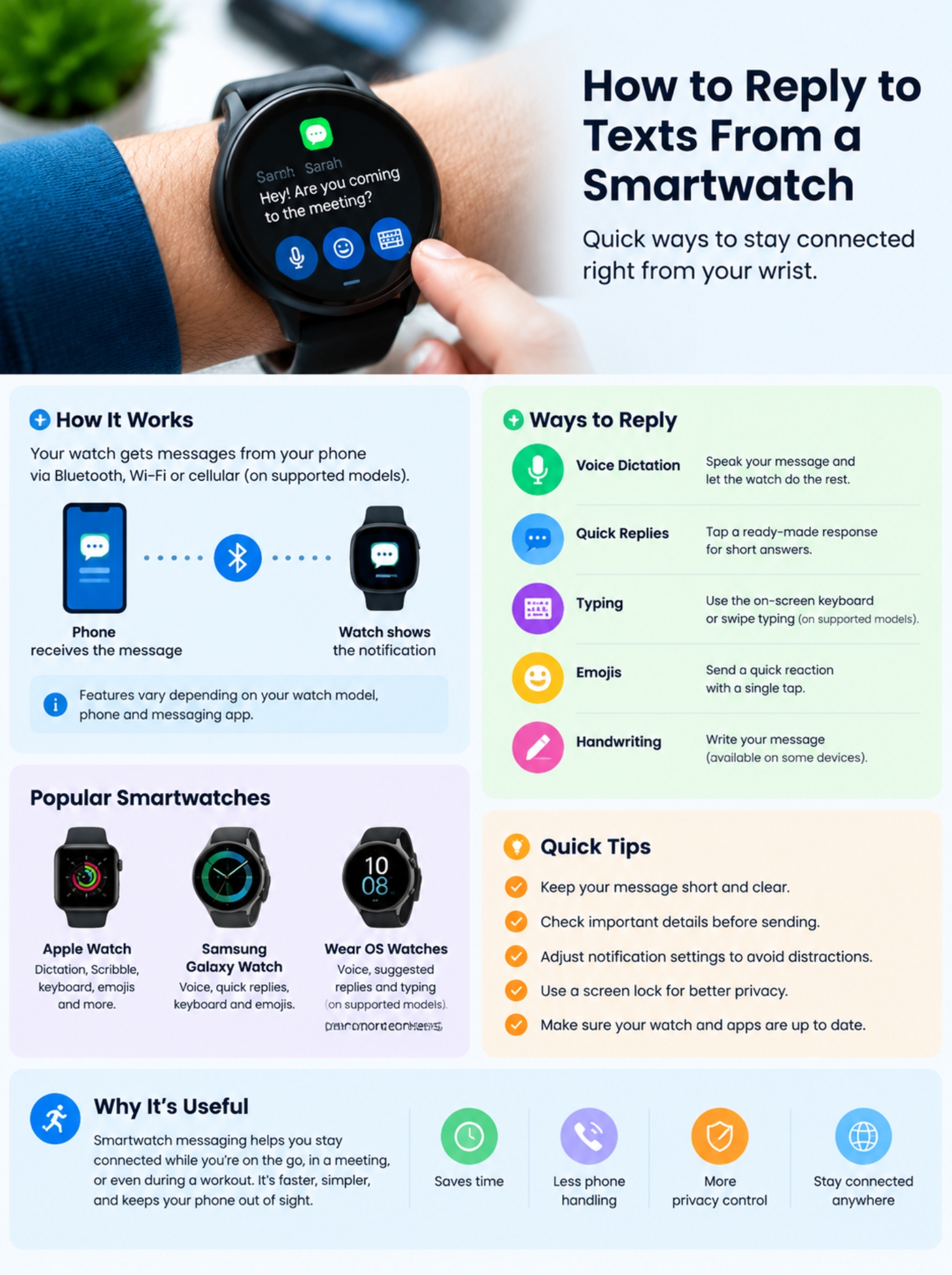
Learning how to reply to texts smartwatch users receive is easier than many people expect. Most modern smartwatches offer several ways to respond. You can speak your message, choose a quick reply, type on a small keyboard, or send an emoji.
The best method depends on the situation. A short reply like “I’ll call you later” takes only a tap. A longer message is usually faster when you dictate it using your voice.
Apple Watch, Samsung Galaxy Watch, Google Pixel Watch, and other Wear OS devices all support smartwatch messaging, but their features are not exactly the same. Your experience depends on the watch model, phone connection, operating system, and messaging app.
This guide explains how smartwatch text replies work, the easiest ways to respond, what each platform supports, and what to do when your watch receives messages but does not show a reply option.
Read Also: How to Fix Android Touch Screen Not Responding
How Smartwatch Text Replies Work
A smartwatch usually works as an extension of your smartphone rather than a complete replacement.
When someone sends you a text message, your phone receives it first. The watch then displays the notification through Bluetooth, Wi-Fi, or a cellular connection, depending on the device.
Some smartwatches with LTE support can send messages even when your phone is not nearby. However, they require a compatible mobile plan and carrier support.
|
Feature |
How It Works |
|
Incoming messages |
Phone sends notifications to the watch |
|
Reply options |
Voice, keyboard, emojis, quick replies |
|
Connection types |
Bluetooth, Wi-Fi, cellular |
|
Main requirement |
Compatible phone, watch, and messaging app |
|
Limitations |
Features vary by device |
Wear OS watches allow users to reply to supported messages through voice input, suggested responses, and typing options on compatible devices. Google notes that available features depend on the watch model and software version.
Apple Watch also supports multiple reply methods, including dictation, Scribble handwriting, emojis, prepared responses, and keyboard input on supported models.
How to Reply to Texts Smartwatch Users Receive
The exact steps may look slightly different depending on your smartwatch brand, but the overall process is similar.
Basic Steps
- Wait for the message notification.
- Tap the notification on your watch.
- Open the conversation.
- Select Reply.
- Choose your preferred input method.
- Review the message.
- Tap Send.
|
Step |
What Happens |
|
Message arrives |
Watch vibrates or shows an alert |
|
Notification opens |
Message content appears |
|
Reply option appears |
Available response methods are shown |
|
Message sends |
Watch confirms the action |
For example, on Wear OS, users can open a message notification, tap Reply, and choose between voice input, suggested messages, or typing when supported.
Different Ways to Reply From a Smartwatch
Smartwatch screens are small, so manufacturers provide several ways to answer messages. Each option works better in different situations.
|
Reply Method |
Best For |
Advantage |
|
Voice dictation |
Longer messages |
Fast and hands-free |
|
Quick replies |
Short answers |
One-tap response |
|
Keyboard typing |
Private messages |
More control |
|
Emojis |
Casual chats |
Quick expression |
|
Handwriting |
Supported devices |
Natural input |
There is no single best reply method. A person answering a message during a walk may prefer voice input, while someone sitting in a meeting may choose a silent quick reply.
Reply Using Voice Dictation on a Smartwatch
Voice dictation is usually the fastest way to answer a message from your wrist.
Instead of tapping tiny letters, you simply speak. The smartwatch converts your speech into text and prepares the message.
For example:
“I’m leaving now. I’ll reach in 15 minutes.”
The watch turns your spoken words into a written reply that you can review before sending.
How to Send a Voice Reply
- Open the incoming message.
- Tap the microphone option.
- Speak your response clearly.
- Check the converted text.
- Press Send.
Voice replies are available on many Wear OS and Apple Watch models, but language support and accuracy can vary depending on the device and region.
|
Benefits of Voice Replies |
Limitations |
|
Faster than typing |
Noise can affect accuracy |
|
Useful while moving |
Names may be misunderstood |
|
Good for longer messages |
Requires checking before sending |
Tips for Better Voice Replies
- Speak clearly and naturally.
- Keep sentences short.
- Review important details before sending.
- Avoid dictating private messages in crowded places.
Voice replies work best when you need to answer quickly but do not want to interact with a tiny screen.
Use Quick Replies for Everyday Messages
Most smartwatch conversations do not require a long response.
Someone asks:
“Are you coming?”
A simple:
- “On my way”
- “Yes”
- “I’ll be there soon”
is often enough.
Quick replies are short, ready-made responses that you can send with a single tap.
Common examples include:
- “I’ll call you later.”
- “Sounds good.”
- “Thanks!”
- “Can’t talk right now.”
- “See you soon.”
|
Situation |
Useful Quick Reply |
|
Meeting |
“I’ll reply later.” |
|
Travel |
“I’m on my way.” |
|
Confirmation |
“Got it.” |
|
Missed call |
“I’ll call you back.” |
Quick replies save time because they match how people usually use smartwatches: short, practical communication.
However, not every smartwatch and messaging app supports customizable quick replies. Availability depends on the platform and software version.
Typing Messages on a Smartwatch Keyboard
Typing on a smartwatch used to feel frustrating, but newer models have improved significantly.
Some modern smartwatches offer:
- Touchscreen keyboards
- Swipe typing
- Word suggestions
- Handwriting input
Still, typing is not always the fastest option. A watch display is much smaller than a smartphone screen.
Typing works best when:
- You need privacy.
- You are in a quiet place.
- You need to enter a specific name or word.
- You want to edit the message before sending.
|
Typing Method |
Best Use |
|
Full keyboard |
More detailed replies |
|
Swipe typing |
Faster input |
|
Handwriting |
Quiet situations |
|
Predictive text |
Reducing typing effort |
Wear OS supports keyboard input on compatible watches, including models that use keyboard apps such as Gboard.
How to Reply to Messages on Apple Watch
Apple Watch remains one of the most popular smartwatches for messaging.
When a message arrives, users can reply using:
- Dictation
- Scribble handwriting
- Emojis
- Suggested responses
- Keyboard input on supported models
Apple allows users to compose messages using different input methods depending on the Apple Watch model and language settings.
Steps to Reply on Apple Watch
- Tap the message notification.
- Scroll to the bottom.
- Tap Reply.
- Choose an input option.
- Send the message.
|
Apple Watch Feature |
Best Use |
|
Dictation |
Longer messages |
|
Quick responses |
Common replies |
|
Scribble |
Quiet environments |
|
Keyboard |
Detailed typing |
|
Emoji |
Casual conversations |
Apple Watch Keyboard Limitations
The keyboard is not available on every Apple Watch model. It also depends on language support and software availability.
Users who frequently type messages may find newer models with larger displays easier to use.
How to Reply to Messages on Wear OS Smartwatches
Wear OS powers many popular smartwatches, including devices from Google, Samsung, and other manufacturers. The messaging experience can vary depending on the watch model, smartphone, and apps you use.
Most Wear OS watches allow users to reply through:
- Voice dictation
- Suggested responses
- Keyboard typing on supported devices
- Emojis
The process is usually simple:
- Open the message notification.
- Tap Reply.
- Select your preferred reply method.
- Send the message.
Google explains that Wear OS users can reply to supported messages through voice input, suggested replies, and typing options when available. However, not every watch supports every feature.
|
Wear OS Reply Feature |
Availability |
|
Voice replies |
Available on compatible watches |
|
Suggested replies |
Available for supported apps |
|
Keyboard typing |
Depends on watch model |
|
Emoji replies |
Available on many devices |
|
Handwriting |
Available only on some models |
A newer Wear OS watch with a larger display usually provides a smoother messaging experience because typing and navigation become easier.
Replying to Messages on Samsung Galaxy Watch
Samsung Galaxy Watch models running Wear OS provide several ways to respond to messages.
Users can reply through:
- Voice-to-text
- Suggested messages
- Samsung Keyboard
- Emojis
Samsung has improved the messaging experience on newer Galaxy Watch models by adding better typing options and improving interaction with Android phones.
How to Reply on Galaxy Watch
- Tap the incoming message.
- Open the reply options.
- Select voice, keyboard, or suggested response.
- Tap Send.
|
Galaxy Watch Method |
Best For |
|
Voice input |
Longer replies |
|
Suggested responses |
Quick answers |
|
Keyboard |
Private conversations |
|
Emojis |
Casual messages |
The available features may differ depending on whether the watch is connected to a Samsung phone or another Android device.
Can You Reply to WhatsApp Messages From a Smartwatch?
WhatsApp messaging on smartwatches has improved, but support is different across platforms.
WhatsApp on Wear OS
Wear OS provides stronger WhatsApp support compared with many other smartwatch platforms.
Compatible Wear OS watches can:
- Receive WhatsApp notifications
- View conversations
- Reply using available input methods
Users can often respond through:
- Voice messages converted into text
- Emojis
- Keyboard input
- Quick responses
However, the exact experience depends on the watch model and WhatsApp version.
WhatsApp on Apple Watch
Apple Watch users can receive WhatsApp notifications, but the experience is different from Apple’s built-in Messages app.
Apple Messages supports deeper integration because it is part of Apple’s ecosystem. WhatsApp functionality depends on the features currently supported by WhatsApp and watchOS.
|
Platform |
WhatsApp Reply Experience |
|
Wear OS |
Better direct reply support |
|
Apple Watch |
Notification-based features vary |
|
Basic fitness trackers |
Usually notification-only |
If WhatsApp replies are your main priority, check compatibility before choosing a smartwatch.
Why Your Smartwatch Receives Texts but Cannot Reply
A common problem is seeing incoming messages but not finding a reply button.
This usually happens because of settings, compatibility, or software issues.
|
Possible Cause |
Solution |
|
App does not support replies |
Use a compatible messaging app |
|
Notifications are restricted |
Adjust notification settings |
|
Software is outdated |
Update watch and phone |
|
Connection issue |
Reconnect devices |
|
Permissions blocked |
Allow required access |
Try these troubleshooting steps:
1. Check Your Connection
Make sure:
- Bluetooth is turned on.
- Your watch is connected to your phone.
- The companion app is running correctly.
2. Update Your Devices
Older software may not support newer messaging features.
Update:
- Smartphone operating system
- Smartwatch software
- Watch companion application
3. Check Messaging App Support
Not every app allows replies from every smartwatch.
Some apps may only show:
- Message notifications
- Sender names
- Message previews
without offering a reply option.
Do You Need a Phone Nearby to Reply From a Smartwatch?
It depends on the type of smartwatch you use.
Bluetooth Smartwatches
Most smartwatches connect through Bluetooth.
These watches usually require your phone to be nearby.
Cellular Smartwatches
LTE-enabled smartwatches can send messages without your phone nearby.
However, they require:
- Cellular hardware
- Supported carrier service
- Active smartwatch plan
|
Watch Type |
Phone Required? |
|
Bluetooth smartwatch |
Usually yes |
|
Wi-Fi smartwatch |
Sometimes |
|
Cellular smartwatch |
No, with active service |
A cellular smartwatch can be useful for runners, travelers, and people who prefer leaving their phone behind occasionally.
Smartwatch Message Privacy Tips
Replying from your wrist is convenient, but privacy matters.
A message preview appearing on your watch screen can reveal information to people nearby.
For example, a personal message may appear during:
- A meeting
- Public transport
- A classroom
- A workplace
Small privacy changes can prevent accidental exposure.
Improve Message Privacy
Turn Off Message Previews
Instead of displaying the entire message, your watch can show only:
- Sender name
- App icon
- Notification alert
Use a Screen Lock
A passcode protects your smartwatch if someone else handles it.
Control Notifications
You do not need every app sending alerts to your wrist.
Choose only important notifications.
|
Privacy Setting |
Benefit |
|
Hide previews |
Keeps messages private |
|
Screen lock |
Prevents unauthorized access |
|
Notification control |
Reduces distractions |
Best Smartwatch Reply Method for Different Situations
Different reply methods work better in different situations.
|
Situation |
Best Reply Method |
|
Walking outdoors |
Voice reply |
|
Quick confirmation |
Preset response |
|
Office meeting |
Silent quick reply |
|
Longer message |
Voice dictation |
|
Private conversation |
Keyboard typing |
A smartwatch is designed for quick communication. For long conversations or detailed explanations, a phone remains more comfortable.
Common Mistakes When Replying From a Smartwatch
Smartwatch messaging is convenient, but a few mistakes can make it frustrating.
Sending Voice Replies Without Checking
Voice recognition is better than before, but errors still happen.
Always check:
- Names
- Numbers
- Dates
- Important details
before sending.
Writing Too Much
A smartwatch is not designed for long messages.
Short replies are usually faster and easier.
Keeping Too Many Notifications Active
Too many alerts can make your smartwatch distracting.
Review notification settings regularly and disable apps you do not need.
The Future of Smartwatch Messaging
Smartwatch messaging continues to improve as companies develop better voice recognition, smarter suggestions, and more useful software features.
Future improvements may include:
- More accurate voice-to-text
- Better suggested replies
- AI-assisted writing
- Real-time translation
- More personalized responses
The goal is simple: making communication faster without requiring users to constantly check their phones.
|
Future Feature |
Possible Benefit |
|
Better AI suggestions |
Faster replies |
|
Improved voice recognition |
Fewer mistakes |
|
Translation tools |
Easier multilingual conversations |
|
Context-based responses |
More natural messaging |
However, as smartwatches become more intelligent, privacy and data protection will remain important considerations.
FAQs About Replying to Texts From a Smartwatch
Can I reply to texts from a smartwatch without my phone?
Yes, but only with certain models. Cellular smartwatches with an active mobile plan can send replies without a nearby phone. Bluetooth-only watches usually need a connected smartphone.
Why does my smartwatch show messages but not a reply option?
This usually happens because the messaging app does not support smartwatch replies, the watch software is outdated, or notification permissions are limited.
Can I reply to messages in another language from my smartwatch?
Many modern smartwatches support multiple languages for voice input and keyboards. However, availability depends on the watch model, region, and software support.
Are smartwatch voice replies accurate?
Voice recognition has improved significantly, but accuracy depends on background noise, pronunciation, language support, and internet connection requirements.
Always check important messages before sending.
Can I create my own quick replies on a smartwatch?
Some smartwatch platforms allow users to customize quick responses through companion apps. Others only provide built-in reply suggestions.
Final Thoughts
Smartwatches have changed how people handle everyday messages. Instead of reaching for a phone every time a notification appears, you can now check and respond directly from your wrist.
The easiest way to reply to texts smartwatch users receive is usually through voice dictation or quick replies. Voice works best for longer messages, while preset responses are perfect for simple confirmations.
Typing has improved, especially on newer watches with larger displays, but it is still better suited for short conversations.
The right reply method depends on your smartwatch, your apps, and your daily routine. Once you understand the options available, smartwatch messaging becomes faster, simpler, and much more useful.
As wearable technology continues to improve, better voice recognition, smarter suggestions, and stronger app support will make replying from your wrist feel even more natural.