
TikTok moves fast. A video can go viral in the morning, land on Instagram Reels by lunch, and pop up on YouTube Shorts before dinner.
That’s why so many creators search for download tiktok no watermark 2026. They want a clean file they can reuse, edit, back up, or send to a client.
Fair enough.
But there’s a line you need to respect.
A TikTok watermark isn’t just a logo slapped on the video. It points viewers back to the platform and often to the original creator. If you remove that watermark from someone else’s clip and repost it as your own, you’re asking for trouble. That can mean copyright claims, account strikes, angry creators, or damage to your brand.
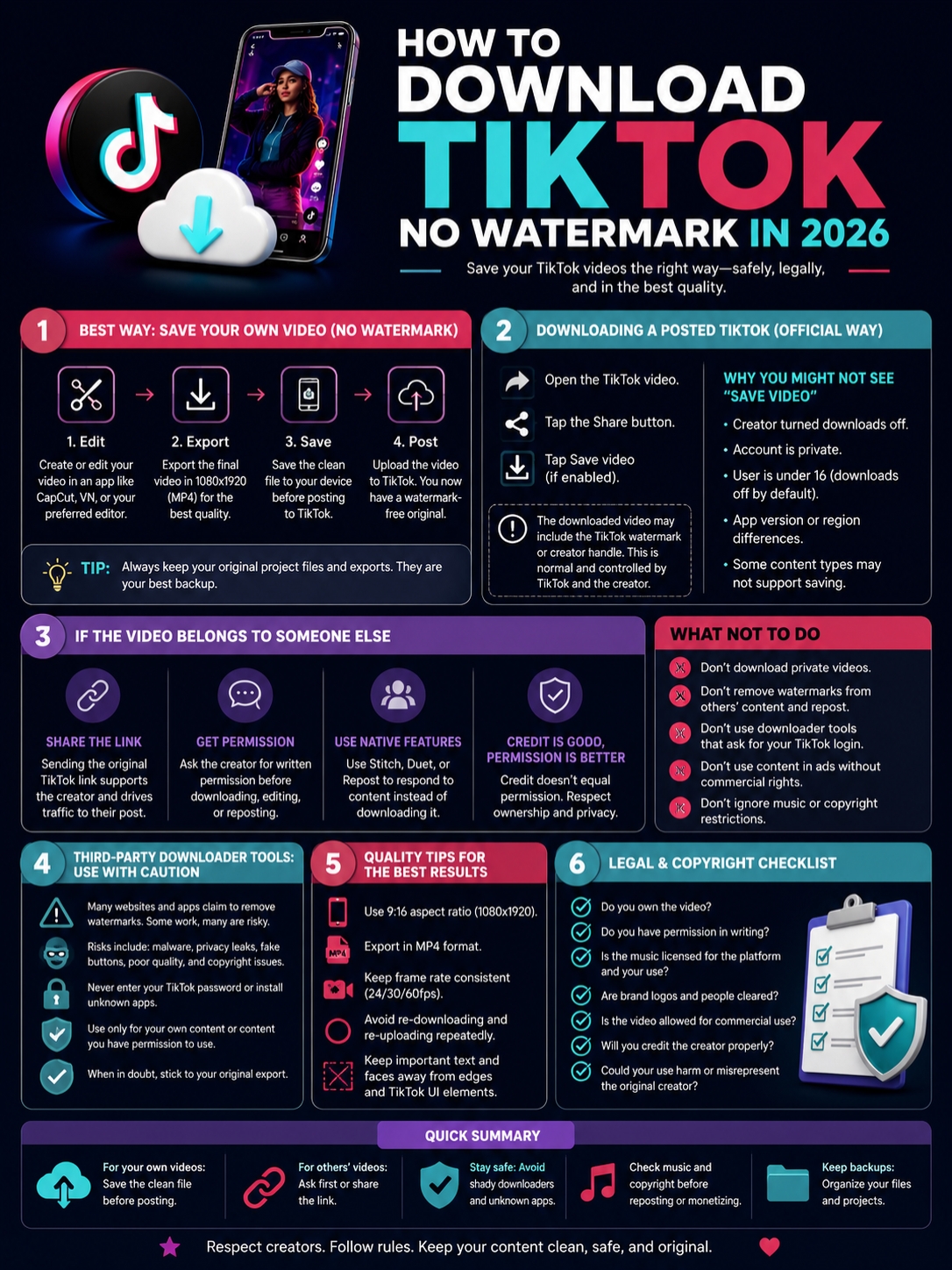
The safest move is simple: save a clean copy of your own video before you post it.
If the video belongs to someone else, get permission or share the original TikTok link. Don’t turn someone else’s work into your “content.”
This guide shows the safe way to download TikTok videos without a watermark in 2026, how creators should store clean files, what to avoid, and when watermark removal crosses into risky territory.
Download TikTok No Watermark 2026: What People Really Mean
Most people searching for “download TikTok without watermark” want one of three things.
They want to save their own video. They lost the original file and need a clean copy. Or they want to download another creator’s video.
Those are very different situations.
Saving your own work is normal. Backing up your content is smart. Taking someone else’s video, removing the watermark, and reposting it is a bad idea.
|
Search Intent |
What It Usually Means |
Safest Move |
|
Save my own TikTok without watermark |
You want a clean creator copy |
Export before posting |
|
Download my posted TikTok |
You lost the original file |
Check your editor, gallery, or cloud first |
|
Download someone else’s TikTok |
You want a public video file |
Ask permission or share the link |
|
Remove watermark for reposting |
You want to reuse a clip elsewhere |
Only do it with owned or licensed content |
|
Download a private TikTok |
You want restricted content |
Don’t try it |
TikTok gives creators control over downloads. If a creator turns downloads off, TikTok won’t show the normal Save video option for other users.
That setting matters. It tells you the creator doesn’t want people saving that video through TikTok’s own tools.
So don’t treat “public” as “free to use.” A public TikTok can still include copyrighted music, original editing, a person’s face, a private setting, a brand, or a story the creator owns.
The Best Way to Save Your Own TikTok Without a Watermark
The cleanest way to get a TikTok without a watermark is to save the clean version before publishing.
That’s it.
Don’t wait until the video is live. Don’t rely on random downloader sites. Don’t assume TikTok will always keep your draft safe.
Create the video. Save the final file. Then post it.
|
Method |
Best For |
Watermark Risk |
Quality Risk |
|
Export from a video editor |
Creators, brands, agencies |
Very low |
Low |
|
Save before posting in TikTok |
Quick creator backup |
Low to medium |
Medium |
|
Download posted TikTok |
Personal backup |
Medium to high |
Medium |
|
Screen record preview |
Emergency use only |
Medium |
High |
|
Third-party downloader |
Last resort for owned content |
Varies |
Varies |
Edit Outside TikTok First
Here’s the workflow I’d recommend to any creator, editor, or social media manager.
Edit your video in a proper tool first. Use CapCut, VN, Canva, Adobe Premiere Pro, DaVinci Resolve, Final Cut Pro, or whatever editor fits your workflow.
Then export a clean master file.
That master file becomes your original. You can upload it to TikTok, Instagram Reels, YouTube Shorts, Facebook Reels, Pinterest, or LinkedIn without downloading it back from TikTok later.
This saves time. It also protects video quality.
A clean master file helps you:
- Repost the video on another platform
- Send a clean version to a client
- Add new captions
- Change the hook
- Swap the music
- Create a shorter cut
- Archive your best work
If your goal is download tiktok no watermark 2026, don’t start with a downloader. Start with a better posting habit.
Keep a Simple Backup Folder
You don’t need a complicated system.
Create one folder for each video project. Save everything connected to that post.
Keep:
- Raw clips
- Clean final MP4
- TikTok version
- Caption text
- Thumbnail or cover image
- Music license note
- Client approval message
- Published TikTok link
This habit feels small until a video takes off. Then you’ll be glad you saved the clean file.
It also helps when a client asks for edits, a platform compresses your video, or a post disappears.
How to Download a Posted TikTok Video the Official Way
TikTok has a built-in save option when downloads are allowed.
Open the video, tap the Share button, and look for Save video. If the creator allows downloads, TikTok should show the option.
If it doesn’t appear, the creator may have disabled downloads, the account may be private, or the video may have restrictions.
|
Official TikTok Option |
What It Does |
What to Know |
|
Save video |
Downloads the video to your device |
Only appears when downloads are allowed |
|
Save photo |
Downloads a photo post |
Also depends on permissions |
|
Copy link |
Copies the TikTok URL |
Best for sharing with credit |
|
Favorites |
Saves inside your TikTok account |
Not a download |
|
Share to other apps |
Sends the post or link elsewhere |
Depends on settings |
A saved TikTok often includes TikTok branding or the creator handle. That’s normal. The watermark keeps attribution attached when the video travels outside the app.
If the video is yours and you need a clean file, check these places before using any third-party tool:
- Phone gallery
- CapCut projects
- TikTok drafts
- Google Drive
- Dropbox
- Laptop folders
- WhatsApp or Telegram files
- Client folders
- Old editing exports
Most creators don’t lose the video forever. They just forget where the original file lives.
Why the Save Video Button May Be Missing
The Save video button can disappear for several reasons.
|
Reason |
What It Means |
|
Creator turned downloads off |
TikTok won’t show the save option |
|
Account is private |
Downloads are restricted |
|
User is under 16 |
TikTok limits download settings |
|
App version differs |
Features may appear in different places |
|
Video type or privacy setting |
Some posts may not support saving |
A missing save button doesn’t always mean something is broken. Often, it means the creator or TikTok has restricted downloads.
Respect that.
Trying to bypass download restrictions puts you in a risky spot, especially if the video belongs to someone else.
What to Do If the TikTok Belongs to Another Creator
This is where many online guides get careless.
They jump straight into “paste the link here” advice and ignore the creator’s rights. That’s not good advice.
If the video belongs to someone else, don’t treat a no-watermark downloader as permission.
A TikTok video may include:
- Original footage
- A creator’s voice
- Music
- Text overlays
- Editing choices
- A person’s face
- A private space
- A brand or product
You can’t strip the watermark and pretend none of that matters.
|
What You Want to Do |
Safer Option |
|
Show the video to a friend |
Send the TikTok link |
|
Save it for later |
Add it to Favorites |
|
React to it |
Use Stitch or Duet if available |
|
Use it in a blog post |
Embed or link to the original |
|
Repost it on a brand page |
Get written permission |
|
Use it in an ad |
Get clear commercial rights |
|
Remove watermark and repost |
Avoid unless you own or licensed it |
Credit Helps, But It Doesn’t Replace Permission
“Credit to the owner” is not a magic shield.
Credit is polite. Permission is legal protection.
A creator may not want their face, voice, child, home, client, product, or personal story reposted on another page. They may also care about where the video appears and how it gets edited.
For business use, get clear approval.
Ask:
- Can we repost this video?
- Which platforms can we use it on?
- Can we edit or crop it?
- Can we use it in ads?
- How long can it stay live?
- How should we credit you?
- Is payment required?
Keep the written approval. A DM is better than nothing. A contract is better for paid campaigns.
Read Also: How to Use TikTok Filters Other Users Have
Use TikTok’s Built-In Tools
If you want to respond to another creator, use TikTok’s native features when possible.
That may include:
- Stitch
- Duet
- Repost
- Share link
- Embed
- Comment reply video
These tools keep the original creator connected to the content. They also reduce the chance that your post looks stolen.
For publishers and bloggers, embedding the TikTok is usually cleaner than downloading and uploading the clip as a new file.
Third-Party TikTok Downloaders: What You Should Know
Search results for download tiktok no watermark 2026 are packed with third-party downloader sites.
They usually promise the same things: no watermark, HD MP4, fast download, no signup, mobile support, and unlimited use.
Some may work. Some may not. The bigger issue is trust.
Many downloader pages are loaded with ads, pop-ups, fake buttons, notification prompts, and misleading links. One wrong tap can send you to an app install, a scam page, or a suspicious file.
|
Risk |
What Can Happen |
Safer Habit |
|
Fake buttons |
You click an ad instead of the file |
Avoid cluttered pages |
|
Malware |
Your device gets infected or slowed down |
Don’t install unknown apps |
|
Privacy risk |
A tool asks for login or permissions |
Never enter TikTok credentials |
|
Copyright risk |
You misuse someone else’s video |
Use only owned or licensed content |
|
Quality loss |
The downloaded file looks soft |
Use the original export |
|
Broken tools |
TikTok changes may stop them working |
Keep your own clean files |
Safety Checklist Before Using Any Downloader
If you use a third-party downloader for your own video or licensed content, stay cautious.
Follow these rules:
- Never enter your TikTok password.
- Don’t install unknown APK files.
- Don’t allow browser notifications.
- Don’t click huge ad-style download buttons.
- Don’t download private videos.
- Don’t give account access to any tool.
- Don’t upload sensitive client content.
- Scan files before opening them on desktop.
- Keep proof of permission if the video isn’t yours.
- Use the original file whenever you can.
The safest answer isn’t flashy. It’s practical.
A clean export from your own editor beats a random watermark remover almost every time.
How to Keep TikTok Video Quality High
A watermark-free video is useless if it looks blurry.
Short-video apps compress files. If you download from TikTok, upload to Instagram, download again, then upload to YouTube Shorts, the video can lose sharpness each time.
That’s why you should avoid the reupload loop.
|
Quality Factor |
Best Practice |
|
Aspect ratio |
Use 9:16 for TikTok, Reels, and Shorts |
|
Resolution |
Export at 1080 × 1920 when possible |
|
Format |
Use MP4 |
|
Captions |
Keep editable caption files |
|
Audio |
Use licensed or platform-approved music |
|
Storage |
Save raw clips and final exports |
|
File naming |
Use clear names with date and platform |
Don’t Recycle a Downloaded File Again and Again
Here’s a common mistake.
A creator posts a video on TikTok. Then they download that TikTok. Then they upload it to Instagram Reels. Then they download the Reel. Then they upload that version to Shorts.
By the end, the file looks tired.
Use one clean master file instead.
Upload that file separately to each platform. Your video will look sharper, and your workflow will stay cleaner.
Watch the Safe Zones
TikTok adds buttons, captions, usernames, comments, and search elements around the video. Instagram and YouTube do the same in their own way.
Keep important text and faces away from:
- Bottom caption area
- Right-side buttons
- Top interface area
- Lower third
- Extreme edges
This matters for tutorials, news explainers, product demos, and infographic-style videos.
Your best line should not sit under a like button.
Copyright, Music, and Creator Rights
A TikTok video often carries more than one layer of rights.
You may own the footage but not the music. You may have permission from the creator but not from the person shown in the clip. You may have approval for organic posting but not for paid ads.
This is where brands and publishers need to be careful.
|
Content Type |
What to Check |
|
Your own video |
Do you own all clips and assets? |
|
Client video |
Do you have approval to edit and repost? |
|
Music |
Is it licensed for the platform? |
|
Brand logo |
Are you allowed to use it? |
|
Other creator’s face |
Did they agree to reuse? |
|
Paid ad use |
Do you have commercial rights? |
Music Can Cause Trouble
TikTok has a large music ecosystem. But a sound that works inside TikTok may not be safe everywhere else.
If you download your own TikTok without a watermark and post it as a YouTube Short, Instagram Reel, or ad, check the music.
This matters even more for brand content.
TikTok has commercial music rules for branded or promotional posts. If your video promotes a product, service, or business, you may need music cleared for commercial use.
So don’t only think about the watermark. Think about the full video.
Why This Matters More in 2026
Short-form video is no longer a side format. It drives entertainment, news, shopping, education, and creator marketing.
DataReportal’s Digital 2026 Global Overview Report says there are 5.66 billion active social media user identities worldwide. It also lists TikTok among the top social apps by worldwide active users.
The same report says the typical TikTok Android user spends about 1 hour and 37 minutes per day on the app and opens it around 10 times per day on average.
That kind of attention explains why creators care so much about clean video files.
|
2026 Trend |
What It Means for Creators |
|
Short video remains competitive |
Clean source files matter |
|
Cross-posting is normal |
One master file saves time |
|
Creator rights get more attention |
Permission matters |
|
Brand use keeps growing |
Music rights need checking |
|
Editing tools are everywhere |
File organization matters |
|
Downloader sites are crowded |
Safety matters |
This is the real reason people search for download tiktok no watermark 2026.
They don’t just want a file. They want control.
They want one video they can use across platforms without looking messy, stolen, or low quality.
Best Workflow for Creators, Brands, and Editors
Here’s the clean workflow.
Record first. Edit properly. Export a master file. Then publish.
Don’t treat TikTok as your storage system.
|
Step |
What to Do |
Why It Works |
|
1 |
Record original clips |
You control the source footage |
|
2 |
Edit in a dedicated app |
You get cleaner exports |
|
3 |
Export a master MP4 |
You keep a no-watermark file |
|
4 |
Save captions separately |
You can edit faster later |
|
5 |
Upload to TikTok |
TikTok becomes the publishing channel |
|
6 |
Upload the same master elsewhere |
You avoid compression damage |
|
7 |
Archive everything |
You protect future work |
For Solo Creators
Keep it simple.
Create folders by month.
Example:
- 2026-01 TikTok Videos
- 2026-02 TikTok Videos
- 2026-03 TikTok Videos
Then name files clearly:
- morning-routine-clean-master.mp4
- morning-routine-tiktok-caption.txt
- morning-routine-reels-version.mp4
- morning-routine-thumbnail.jpg
You don’t need a perfect system. You need a system you’ll actually use.
For Brands and Agencies
Use a stricter process.
Before reposting or removing a watermark, confirm:
- Who owns the video
- Who appears in the video
- Who owns the music
- Whether the video can be edited
- Whether it can be used in ads
- Where it can be posted
- How long the rights last
- How credit should appear
A vague “yes, you can repost” may work for a casual share. It’s not enough for a paid campaign.
Get clear rights before you publish.
Final Thoughts
The safest way to download tiktok no watermark 2026 is to plan before you post.
Save a clean master file. Store it properly. Upload that file to each platform instead of downloading your own TikTok later.
If the video belongs to you, keep the original. If it belongs to someone else, ask permission or share the link. If you use a third-party downloader, avoid shady sites, fake buttons, login requests, and unknown app installs.
|
Main Lesson |
Best Practice |
|
Want a clean file? |
Export before posting |
|
Lost your original video? |
Check your editor, gallery, and cloud |
|
Need another creator’s video? |
Ask permission |
|
Posting for a brand? |
Check music and commercial rights |
|
Want better quality? |
Use one clean master file |
|
Want to stay safe? |
Avoid unknown download tools |
A watermark-free TikTok file can help creators, editors, and brands work faster. But it should never become a shortcut for stealing credit or ignoring privacy.
Uncommon FAQs About Downloading TikTok Without Watermark
Most basic guides answer the same few questions. These are the ones creators and editors actually run into.
|
Question |
Short Answer |
|
Can I download a private TikTok without watermark? |
No. Don’t bypass privacy settings. |
|
Is watermark removal legal for my own video? |
Usually lower risk, but use the original file. |
|
Can I use a downloaded TikTok in ads? |
Only with full rights. |
|
Why is Save video missing? |
Downloads may be disabled. |
|
Do no-watermark tools reduce quality? |
Some do. Original exports are better. |
Can I Download a Private TikTok Without a Watermark?
No.
Private content is private for a reason. If someone lets you view a private video, that does not give you permission to download, edit, or repost it.
Don’t try to bypass privacy settings.
Can I Remove the Watermark From My Own TikTok?
If it’s your own video, look for the original file first.
Watermark-removal tools often blur, crop, or patch the video. That can make the final result look worse.
A clean export from your editing app will almost always look better.
Can I Use a No-Watermark TikTok in a YouTube Shorts Compilation?
Only if you have permission or a strong legal basis.
Compilation channels often reuse large parts of other people’s videos. That creates copyright and credit problems.
When possible, ask permission, use short credited clips, or embed the original source in related content.
Can I Download TikTok Audio Separately?
Be careful.
TikTok audio may include copyrighted music, creator voiceovers, remixes, TV clips, or commercial sounds.
If you plan to use the audio outside TikTok, check the rights first. This matters for monetized videos, brand pages, client work, and ads.
Why Does My Downloaded TikTok Look Blurry?
The file may have been compressed by TikTok, your phone, another app, or the downloader.
Repeated downloads and uploads make the problem worse.
Go back to the original export whenever possible.
Should I Trust TikTok Downloader Apps?
Be cautious.
Some tools work. Others are full of ads, fake buttons, pop-ups, or permission requests.
Don’t install unknown apps. Don’t enter your TikTok login. Don’t upload private or client-sensitive files.
What Should I Do If a Client Sends Only a TikTok Link?
Ask for the original video file.
A TikTok link works for review, but it’s not ideal for editing, resizing, or creating a clean brand version.
Ask the client to send the file through Google Drive, Dropbox, WeTransfer, CapCut, or their editing app.