
You open your Instagram inbox, but the Notes row has disappeared. There’s no “Leave a note” option above your messages, and you can’t see the updates your friends are talking about.
The problem gets even more confusing when Notes work on one Instagram account but not another, even though both accounts are on the same phone.
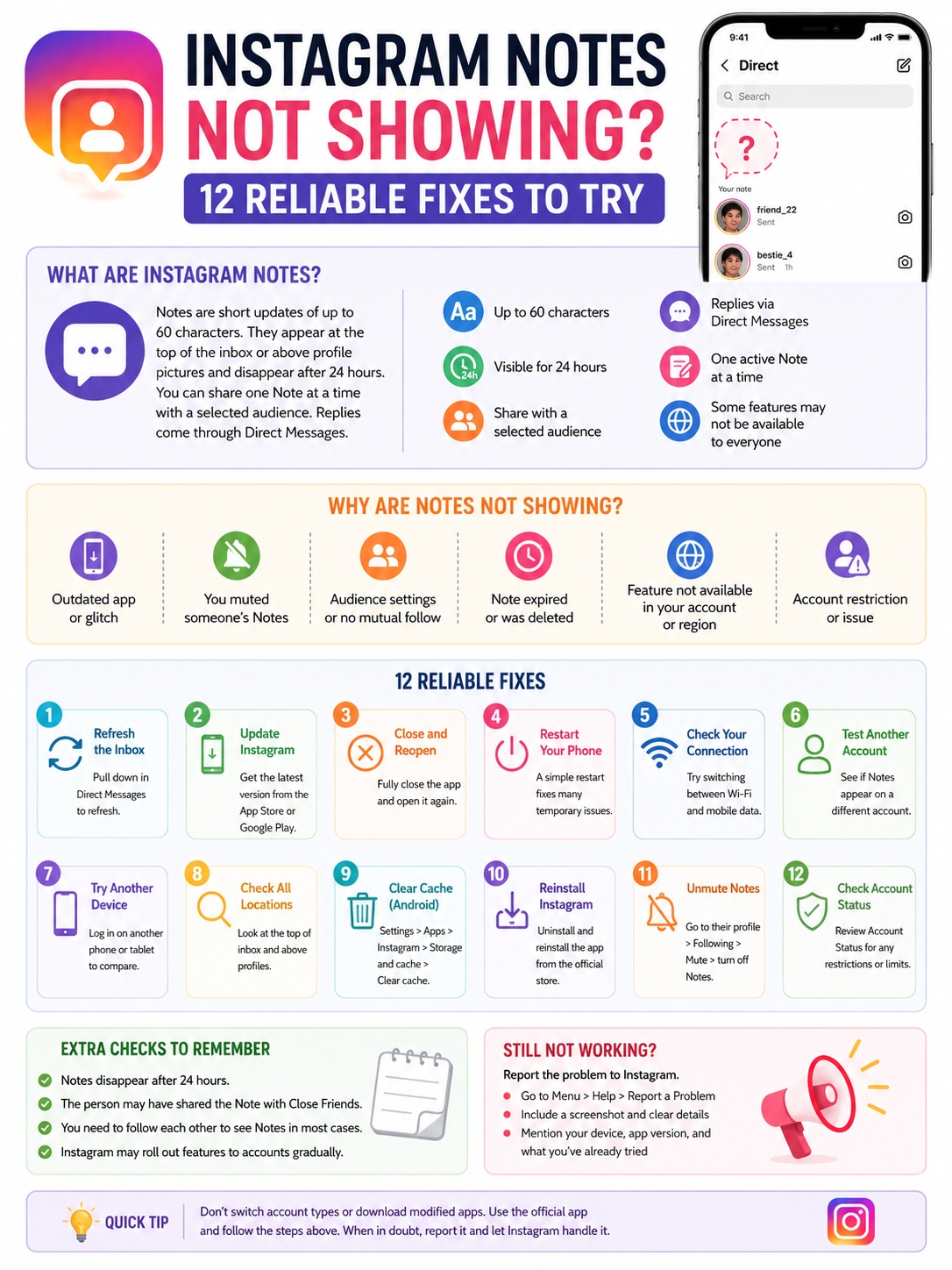
The instagram notes not showing issue can happen for several reasons. The app may need an update. Your inbox may not have loaded properly. You might have muted someone’s Notes without realizing it. The Note may have expired, or Instagram may not have enabled the same features for every account.
That last point matters. Not every missing Note means Instagram is broken.
Instagram Notes are short updates of up to 60 characters. They can stay visible for 24 hours, and users can share them with a selected audience. Instagram also says some Notes features and interactions may not be available to everyone.
The quickest way to solve the problem is to work out what’s missing before changing settings. Is the entire Notes section gone? Can you see Notes from most people but not one friend? Do Notes work on another account?
Once you know that, the right fix is usually much easier to find.
What Instagram Notes Are and Where They Appear
Instagram Notes are short, temporary updates that sit close to the messaging experience rather than the main photo feed.
A Note might contain a quick thought, a question, an emoji, a song, or a casual update. People often use them to start conversations without publishing a full Story or feed post.
You’ll usually see Notes:
- At the top of the Direct Messages inbox
- Above profile pictures in the inbox
- Above someone’s profile picture on their profile
- Beside your own profile picture when the “Leave a note” option is available
Instagram allows one active Note at a time. Posting a new one replaces the current Note. Notes disappear after 24 hours unless the user deletes or replaces them sooner.
Replies don’t appear publicly. They open as private messages between the two accounts.
|
Notes Feature |
How It Works |
|
Character limit |
Up to 60 characters |
|
Visibility |
Up to 24 hours |
|
Active Notes |
One at a time |
|
Main location |
Inbox or above profile pictures |
|
Audience |
Selected followers or Close Friends |
|
Replies |
Sent through Direct Messages |
|
Availability |
Some features may differ by account or region |
The 24-hour limit causes plenty of confusion. Someone may have posted a Note earlier in the day, but it could be gone by the time you check.
Why Are Instagram Notes Not Showing?
There isn’t one answer that fits every account.
Start by looking at the pattern. The details often reveal the cause.
If the entire Notes section has disappeared, the problem may involve the app, your internet connection, your phone, or the account itself.
If you can see Notes from other people but not one specific person, the cause is more likely to involve muting, audience settings, the follow relationship, or the 24-hour time limit.
|
What’s Happening |
Likely Cause |
|
The entire Notes row is missing |
App, account, network, or availability issue |
|
“Leave a note” has disappeared |
Account availability or temporary app problem |
|
One person’s Notes are missing |
Muting, audience choice, or expiration |
|
Notes work on another account |
The issue is probably account-specific |
|
Notes work on another device |
The problem may be on the original phone |
|
A Note suddenly disappeared |
It expired, was deleted, or was replaced |
|
DMs and other features also fail |
Connection, app, or Instagram service problem |
The most useful clue is whether the issue follows the account or the device.
When Notes fail on every account on one phone, look at the app, cache, network, or phone software.
When Notes fail on only one account, repeatedly reinstalling Instagram may not help. The account itself deserves more attention.
How to Fix Instagram Notes Not Showing
Start with the easiest fixes. Don’t jump straight to reinstalling the app or changing your account type.
Instagram’s own troubleshooting guidance starts with app updates, restarts, connection checks, reinstalling, and reporting technical problems. Apple and Google recommend a similar order when mobile apps stop working properly.
|
Fix |
What It Checks |
When to Try It |
|
Refresh the inbox |
Temporary loading failure |
Notes worked recently |
|
Update Instagram |
Old or faulty app version |
An update is available |
|
Close and reopen the app |
Frozen app process |
The interface feels stuck |
|
Restart the phone |
Temporary device problem |
Several features act strangely |
|
Change networks |
Wi-Fi or mobile data issue |
Content loads inconsistently |
|
Test another account |
Account-level issue |
You use more than one account |
|
Test another device |
Phone-specific issue |
Another trusted device is available |
|
Reinstall Instagram |
Damaged local app files |
The simpler fixes didn’t work |
1. Refresh the Instagram Inbox
Open Instagram and tap the Messages icon.
Pull down on the inbox until the refresh symbol appears. Wait a few seconds, leave the messaging screen, and open it again.
This sounds basic, but it’s worth doing. Instagram’s feed, Stories, and inbox don’t always refresh at the same time. Your feed might work while the top section of your inbox remains stuck.
Also check whether the Notes row appears after you open a conversation and return to the main inbox.
2. Update Instagram
Instagram changes often. A missing feature can sometimes come down to an old app version.
On Android:
- Open Google Play Store.
- Tap your profile picture.
- Select Manage apps and device.
- Open Updates available.
- Update Instagram if it appears.
On iPhone:
- Open the App Store.
- Tap your account photo.
- Open App Updates.
- Tap Update beside Instagram.
App updates often include bug fixes, interface changes, security improvements, and feature support. Once the update finishes, close Instagram fully and reopen it.
Restarting the phone after a large update can also help the new version load cleanly.
3. Close Instagram Completely
Leaving Instagram and returning to the Home Screen doesn’t always shut the app down.
On Android, open the recent apps screen and swipe Instagram away. You can also open the Instagram app settings and tap Force stop.
On iPhone, open the App Switcher and swipe the Instagram preview upward.
Wait a few seconds before reopening the app.
This clears a frozen session without changing your account or deleting anything.
4. Restart Your Phone
A phone restart clears temporary processes that may be affecting Instagram’s messaging interface.
It’s especially useful when other Instagram features are also slow, blank, or unresponsive.
Restart the phone, open Instagram, and go straight to your inbox. Don’t open several other apps first.
Apple and Google both recommend restarting a device before moving to more disruptive app fixes.
Read Also: How to Add Music to an Instagram Post in 2026
5. Switch Between Wi-Fi and Mobile Data
A weak connection may load posts and Reels but struggle with messages, Notes, or profile updates.
Turn off Wi-Fi and open Instagram using mobile data. Then try the opposite by connecting to a stable Wi-Fi network.
Check that Instagram has permission to use mobile data.
On Android, the option is usually under:
Settings > Apps > Instagram > Mobile data
On iPhone, open:
Settings > Cellular or Mobile Service > Instagram
Temporarily turn off any VPN, proxy, private DNS service, or aggressive data-saving mode. These tools don’t always cause the problem, but removing them briefly helps rule out a blocked connection.
6. Test Another Instagram Account
Switch to another account on the same phone, provided you already have one.
If Notes appear on the second account, the app and phone are probably working. The issue is more likely tied to the original account.
This is one of the most useful tests because it prevents unnecessary troubleshooting. If one account has Notes and the other doesn’t, clearing the cache may still be worth trying, but an account-level difference becomes the stronger possibility.
Instagram says some Notes features aren’t available to everyone. Features can also vary by account or region.
Don’t create several new accounts just to test this. One existing account is enough.
7. Try the Account on Another Device
Sign in on another trusted phone or tablet when possible.
If Notes appear there, the original device or installation is probably the problem.
If Notes remain missing on the second device but another account can see them, the problem is more likely connected to the affected account.
Remember to log out when testing on someone else’s device.
8. Check More Than One Location
Instagram changes its layout regularly.
Notes may appear at the top of the Direct Messages inbox, but they may also show above profile pictures on user profiles.
Check both areas before deciding the feature is completely missing.
Old tutorials and screenshots can be misleading because Instagram frequently moves buttons, labels, and features during interface tests.
Fix Instagram Notes Not Showing on Android or iPhone
Android and iPhone handle app storage differently.
Android usually gives you a direct option to clear an app’s temporary cache. iPhone users normally need to update, restart, offload, or reinstall the app.
|
Device |
Best Local Fix |
What to Watch For |
|
Android |
Clear Instagram’s cache |
Don’t tap Clear storage by mistake |
|
Android |
Reinstall Instagram |
Confirm your login details first |
|
iPhone |
Update Instagram and iOS |
Install updates from official settings |
|
iPhone |
Delete and redownload Instagram |
Some local app data may be removed |
|
Both |
Reinstall only after simple fixes |
Repeated reinstalls rarely solve account issues |
9. Clear Instagram’s Cache on Android
Instagram stores temporary files to help the app load faster. Those files can sometimes become outdated or damaged.
The menu path varies by phone, but it usually looks like this:
- Open Settings.
- Tap Apps.
- Select Instagram.
- Open Storage and cache.
- Tap Clear cache.
- Reopen Instagram.
Clearing the cache doesn’t delete your Instagram account. It removes temporary local files, which the app will rebuild as you use it.
Be careful not to tap Clear storage or Clear data unless you’re ready for a broader reset. That option can sign you out and remove locally stored app information.
10. Reinstall Instagram
Try reinstalling only after updating, restarting, checking the network, and clearing the Android cache.
On Android, uninstall Instagram and download it again from Google Play.
On iPhone, delete Instagram and redownload it from the App Store.
Before you remove the app:
- Check that you know your password.
- Confirm that you can receive two-factor authentication codes.
- Make sure your recovery email or phone number still works.
- Save any unfinished drafts or local work.
Your published posts, followers, and server-stored messages stay connected to your Instagram account. However, some locally saved app data may be removed.
One reinstall is enough. If Notes work on another account but not yours, repeating the process several times is unlikely to change anything.
When One Person’s Instagram Notes Are Missing
If the Notes section is working but one friend’s updates never appear, don’t reset the whole app.
Your phone probably isn’t the problem.
You may have muted that person’s Notes, or they may be sharing with an audience that doesn’t include you.
|
Possible Cause |
What to Check |
|
Their Notes are muted |
Open their profile and check Mute settings |
|
The Note was for Close Friends |
Ask whether you’re on the list |
|
You don’t follow each other |
Check the mutual follow relationship |
|
The Note expired |
Notes last up to 24 hours |
|
They deleted it |
Ask whether it was removed |
|
They posted a new Note |
The new one may have replaced it |
11. Unmute Their Notes
Instagram lets you mute Notes separately from posts and Stories.
To check:
- Open the person’s profile.
- Tap Following.
- Select Mute.
- Find Notes.
- Turn the Notes switch off if it’s enabled.
This explains why you may still see someone’s feed posts and Stories while their Notes remain hidden.
The person won’t be notified when you mute or unmute them.
Check Their Audience Settings
Instagram Notes aren’t always shared with every follower.
A person may post a Note for Close Friends or another limited audience. You may not see it when:
- You aren’t on their Close Friends list.
- The required follow relationship doesn’t apply.
- They removed you from the selected audience.
- The Note has already expired.
- They deleted or replaced it.
A quick test with a trusted mutual friend can help. Ask them to post a simple Note to an audience that should include you.
If you see the test Note, your account is probably working.
Check Account Availability and Restrictions
When the feature remains missing after device troubleshooting, check the account itself.
Instagram’s Account Status area can show removed content and some features an account isn’t allowed to use. It may also offer a review or appeal option.
|
What You Find |
What It Suggests |
|
Notes work on every other account |
The issue is tied to one account |
|
Notes fail on every account |
Check the app, device, or network |
|
Account Status shows restrictions |
Follow Instagram’s review steps |
|
Account Status looks clear |
Availability or a technical bug is still possible |
|
The feature differs by location |
Regional availability may be involved |
12. Review Account Status
The exact menu path may change, but the option is usually found inside Instagram’s settings or support area.
Try this:
- Open your profile.
- Tap the menu icon.
- Find Account Status.
- Review any removed content or feature restrictions.
- Use the appeal or resolution option if Instagram provides one.
Account Status won’t explain every missing Notes problem. Still, it’s worth checking because reinstalling the app won’t remove an account restriction.
Don’t Change Your Account Type Without a Good Reason
Many troubleshooting guides tell users to switch from a business account to a personal account to unlock Notes.
Instagram’s current Notes guidance doesn’t say that Notes require a personal account. Changing account type may affect insights, contact buttons, professional tools, and business features.
There’s little reason to disrupt your setup without clear evidence that the account type is causing the problem.
Test another account and check Account Status first.
Report the Problem to Instagram
When nothing else works, send Instagram a technical report.
A useful report includes more than “Notes are missing.” Add details that help separate an account issue from a phone or app problem.
|
Detail to Include |
Why It Helps |
|
Screenshot of the inbox |
Shows exactly what’s missing |
|
Phone model |
Highlights device-specific problems |
|
Android or iOS version |
Gives system context |
|
Instagram version |
Confirms whether the app is updated |
|
Affected account |
Identifies where the issue happens |
|
Test on another account |
Helps isolate account problems |
|
Test on another device |
Helps isolate phone problems |
|
Date the issue began |
May connect it to an app update |
The reporting path usually looks like this:
- Open your Instagram profile.
- Tap the menu icon.
- Open Help or the support section.
- Tap Report a problem.
- Choose the technical problem option.
- Describe what happened.
- Attach a screenshot.
- Include diagnostic information if Instagram offers the option.
You could write:
“Instagram Notes are missing from the top of my inbox. I updated and reinstalled the app, restarted my phone, tested Wi-Fi and mobile data, and checked another account. Notes work on the other account but not on this one.”
Never include your password, login code, backup code, or account recovery code.
Popular Fixes That Usually Waste Time
Search results are full of random solutions that don’t match Instagram’s official troubleshooting advice.
Some may appear to work by coincidence, but that doesn’t make them reliable.
|
Weak Fix |
Better Option |
|
Switching account type repeatedly |
Check Account Status |
|
Following and unfollowing many people |
Test with one mutual friend |
|
Resetting the whole phone |
Reinstall Instagram first |
|
Installing a modified Instagram app |
Use Google Play or the App Store |
|
Paying someone to activate Notes |
Report the problem inside Instagram |
|
Sharing login or recovery codes |
Keep authentication details private |
|
Reinstalling the app several times |
Compare accounts and devices |
Turning on Activity Status is another popular suggestion. Instagram’s current Notes guidance doesn’t list Activity Status as a requirement for viewing or posting Notes.
There’s no strong reason to change that privacy setting unless you want to use it for another purpose.
Final Thoughts
The instagram notes not showing problem becomes much easier to handle once you know whether it affects the phone, the account, or one person’s updates.
|
Situation |
Best Next Step |
|
All Notes are missing |
Update, restart, and test the connection |
|
Notes fail on one phone |
Clear cache or reinstall Instagram |
|
Notes fail on one account |
Check Account Status and availability |
|
One person’s Notes are missing |
Check muting and audience settings |
|
Nothing solves the problem |
Send Instagram a detailed report |
Start with a refresh and an app update. Then restart the phone and test both Wi-Fi and mobile data.
Android users can clear Instagram’s cache. iPhone users can delete and redownload the app after trying the simpler steps.
When Notes work on another account, stop treating the phone as the main suspect. Focus on Account Status, availability, and an in-app technical report.
When only one person’s Note is missing, check the audience, mute settings, follow relationship, and 24-hour limit.
The key is to test one thing at a time. Random setting changes often create more confusion. A few careful checks usually tell you where the real problem sits.
Frequently Asked Questions
|
Question |
Quick Answer |
|
Can Notes work on only one account? |
Yes, availability can differ by account |
|
Are Instagram Notes available to everyone? |
Some Notes features may not be |
|
Does Activity Status need to be on? |
Instagram doesn’t list it as a requirement |
|
Can business accounts use Notes? |
Instagram doesn’t say Notes require a personal account |
|
Does clearing cache delete messages? |
It removes temporary files, not the account |
|
Can Notes disappear while DMs still work? |
Yes, the Notes interface can fail separately |
Why Do Instagram Notes Work on One Account but Not Another?
That usually points to an account-level difference rather than a phone-wide problem.
Instagram says some Notes features aren’t available to everyone. Account restrictions, regional differences, or feature testing may also affect what appears.
Use another account only as a test. It doesn’t prove the exact cause, but it tells you where to focus.
Does Instagram Activity Status Need to Be On for Notes?
Instagram’s current instructions don’t list Activity Status as a requirement for creating or viewing Notes.
Turning it on isn’t a verified fix.
Can Business and Creator Accounts Use Instagram Notes?
Instagram doesn’t state that Notes are limited to personal accounts.
Don’t switch account types just because a random tutorial says it will unlock the feature. You may lose or change access to professional tools without fixing anything.
Why Can My Friend See a Note That I Can’t?
The author may have shared it with Close Friends or another audience that includes your friend but not you.
You may also have muted the person’s Notes, or the Note may have expired before you checked.
Will Clearing Instagram’s Cache Delete My Direct Messages?
Clearing the Android cache removes temporary files stored on the phone.
It doesn’t delete your Instagram account or normal server-stored messages. Clearing storage or app data is a larger reset, so don’t confuse the two options.
Why Did My Instagram Note Disappear?
Instagram Notes last for up to 24 hours.
A Note may also disappear because you deleted it or posted a new one. Instagram allows one active Note at a time, so a new Note replaces the old one.
Can Instagram Notes Disappear While Direct Messages Still Work?
Yes.
Notes sit inside the messaging interface, but the Notes section can fail to load while regular conversations continue working. Refresh the inbox, update the app, and restart your phone.
How Long Does Instagram Take to Fix a Reported Problem?
Instagram doesn’t promise a fixed response time for individual technical reports.
Keep the app updated and check the account from time to time. Avoid sending the same report repeatedly in a short period.