
A photo can tell a story on its own. Add the right song, though, and the whole mood changes.
A travel photo can feel nostalgic. A product image can feel more energetic. A casual photo dump can suddenly look like a carefully planned visual story.
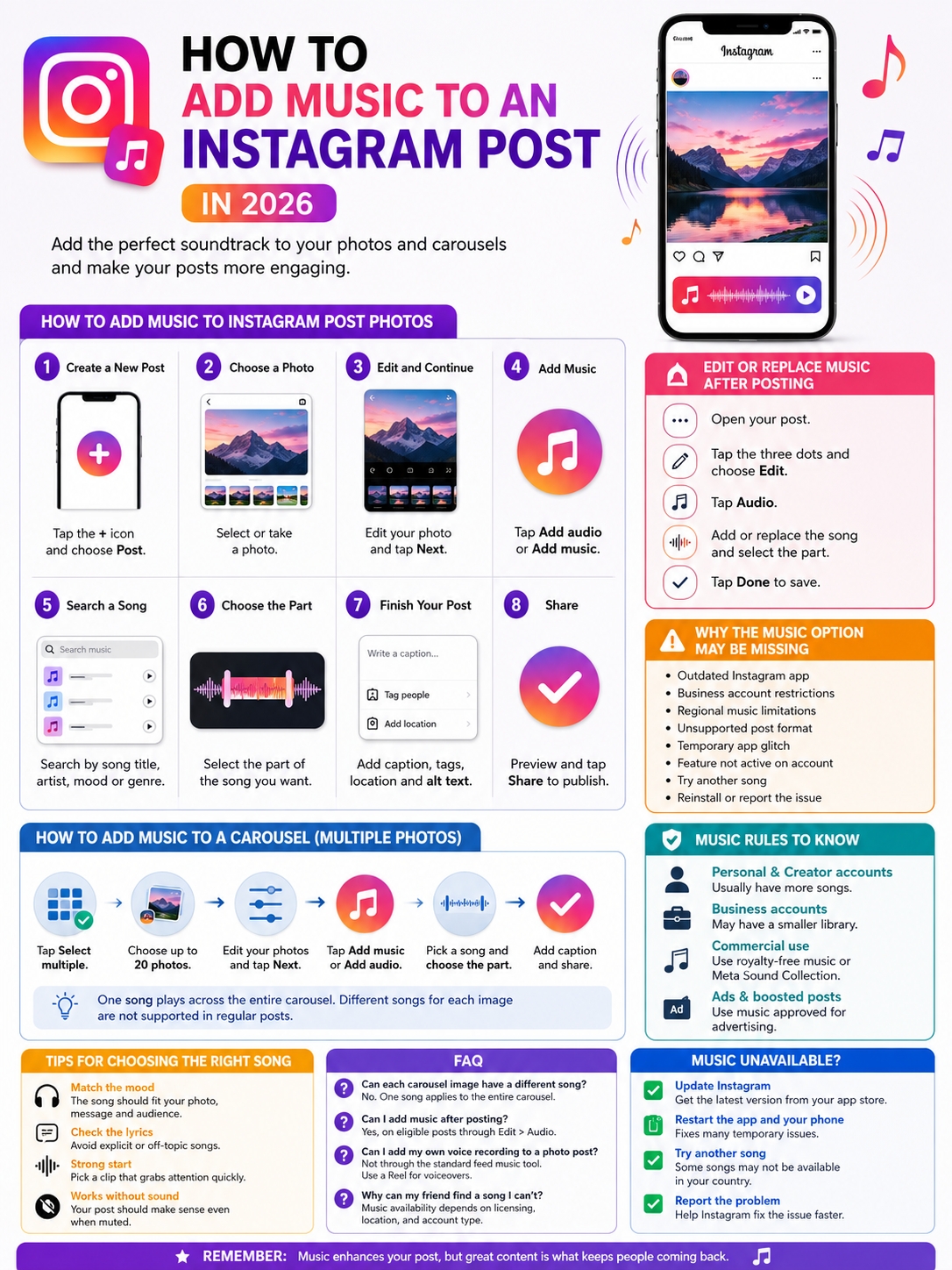
Instagram now makes it easy to add music to Instagram post photos without turning them into Reels. You can attach a song to a single photo or use one track across a photo carousel.
You can also edit the music after publishing on eligible posts. That’s useful if you forgot to add a song, chose the wrong part, or need to replace audio that Instagram later muted.
The process is simple, but the feature still has a few limits. Song availability can change based on your country, account type, post format, and music rights. Business accounts often have fewer mainstream songs. Desktop users may also miss controls that appear in the mobile app.
Here’s how the feature works in 2026 and what to do when Instagram music doesn’t show up.
What Instagram Feed Music Supports in 2026
Instagram feed music adds a licensed song clip to a regular photo post. The photo still appears in the Feed and on your profile grid, but viewers can hear the selected track when they open the post with sound turned on.
This isn’t the same as adding music to a Reel or Story. Reels include extra tools for video editing, voiceovers, original audio, timing, and effects. Feed music works more like a soundtrack placed behind a still image.
Instagram supports music on single-photo posts and carousels made from multiple photos. A mixed carousel containing both photos and videos may not show the same music option.
|
Feature |
Current Support |
|
Single feed photo |
Supported for eligible accounts |
|
Photo-only carousel |
Supported |
|
Standard carousel limit |
Up to 20 photos or videos |
|
Mixed photo and video carousel |
Music option may not appear |
|
Song source |
Instagram’s licensed music library |
|
Edit music after publishing |
Available on eligible posts |
|
Full desktop controls |
Not consistently available |
|
Commercial music |
Restricted for some accounts |
For the smoothest experience, use a single photo or a photo-only carousel. When you need to combine video, music, narration, and transitions, a Reel usually gives you better control.
How to Add Music to Instagram Post Photos
The mobile Instagram app offers the most reliable way to add audio. Button names can vary slightly between devices, but the steps are usually the same.
|
Step |
What to Do |
|
1 |
Open Instagram and tap Create |
|
2 |
Choose Post |
|
3 |
Select or take a photo |
|
4 |
Edit the image |
|
5 |
Tap Add audio or Add music |
|
6 |
Search for a track |
|
7 |
Choose the section you want |
|
8 |
Finish the post and share |
Create a New Feed Post
Open Instagram on your Android phone or iPhone.
Tap the plus icon or Create button. Choose Post from the available options.
Select a photo from your phone. You can also take a new picture with Instagram’s camera.
Tap Next when you’re ready.
Read Also: How to See Old Stories on Instagram After 24 Hours
Edit the Photo
Crop the image, apply a filter, or adjust the brightness, contrast, warmth, and saturation.
Try not to over-edit. Music can add plenty of mood on its own, so the photo doesn’t need to do too much.
Tap Next again to reach the final publishing screen.
Tap Add Audio or Add Music
Look for Add audio or Add music.
Instagram uses both labels in different versions of the app. They lead to the same music library.
Tap the option and search by:
- Song title
- Artist
- Album
- Genre
- Mood
- Keyword
Preview a few choices before making a decision. A song may sound great by itself but clash with the image or caption.
Choose the Best Part of the Song
After selecting a song, Instagram opens an audio timeline.
Drag the selector until you find the part you want to use. Some songs also let you change the clip length.
The available duration can vary, so rely on the controls shown inside the app instead of following an old fixed limit from a past tutorial.
Pick a section that gets to the point quickly. A strong lyric, beat, or instrumental hook usually works better than a long, quiet opening.
Finish the Post
Once the music sounds right, tap Done.
Then complete the rest of the post:
- Write your caption.
- Tag people if needed.
- Add a location.
- Add alt text.
- Review the audience settings.
- Preview the audio.
- Tap Share.
The published post should show the song title and artist near the top.
That’s the basic way to add music to Instagram post photos in 2026.
How to Add Music to an Instagram Carousel
A carousel lets you place several photos or videos inside one feed post. People swipe through the slides at their own pace.
Instagram allows up to 20 items in a standard carousel. The platform also supports one shared song across a carousel made from photos.
|
Carousel Feature |
How It Works |
|
Maximum number of items |
Up to 20 |
|
Photo-only carousel music |
Supported |
|
Song placement |
One song covers the whole post |
|
Different song for each photo |
Not supported |
|
Mixed video carousel |
Music control may disappear |
|
Desktop creation |
Carousel music may not be available |
To create a photo carousel with music:
- Open Instagram and tap Create.
- Choose Post.
- Tap Select multiple.
- Pick the photos in the order you want.
- Tap Next.
- Edit the photos.
- Continue to the final publishing screen.
- Tap Add music or Add audio.
- Search for a song.
- Choose the section you want.
- Add the caption and publish.
One song plays across the entire carousel. Instagram doesn’t let you assign a different track to each photo through the standard carousel editor.
The music should match the whole collection, not just the first slide. This matters because viewers control how quickly they swipe.
For a travel carousel, a steady cinematic or acoustic track may work well. For a fashion or product post, something with a stronger rhythm may feel more natural.
When you need precise timing or several audio changes, turn the photos into a Reel or edited video.
How to Add or Replace Music After Posting
Older Instagram tutorials often say you must delete and republish a post if you forget the music. That advice is no longer accurate for many accounts.
Instagram now lets eligible users add or replace audio through the post-editing menu.
|
Action |
Where to Find It |
|
Open the post menu |
Tap the three dots |
|
Enter editing mode |
Tap Edit |
|
Open the music controls |
Tap Audio |
|
Add or replace a track |
Search and select a song |
|
Save the change |
Tap Done |
Follow these steps:
- Open the published post.
- Tap the three-dot menu.
- Select Edit.
- Tap Audio.
- Search for a song.
- Choose the section you want.
- Tap Done to save it.
The Audio button may not appear on every post. Access can depend on your app version, region, account type, and post format.
Before deleting a successful post, update Instagram and check the editing menu again. Deleting and reposting removes the original likes, comments, shares, and publication date.
How to Replace Music That Instagram Has Muted
A song can disappear after you publish it. This often happens when Instagram’s licensing rights change.
The image usually stays visible, but the audio may show an Audio unavailable warning.
|
Problem |
What You Can Do |
|
Audio unavailable notice |
Tap the notice |
|
Original track has been muted |
Choose Replace audio |
|
Song rights have changed |
Select another licensed track |
|
Replacement already used |
Another change may not be available |
To replace muted music:
- Open the affected post.
- Tap Audio unavailable.
- Choose Replace audio.
- Select another song.
- Choose the part you want.
- Tap Done.
Instagram says this replacement option can normally be used only once for muted audio. Take a moment to choose the new track carefully.
A muted song doesn’t usually mean Instagram has removed the entire post. The photo or carousel can stay online without the original audio.
How to Choose Music That Fits the Post
A trending song can attract attention, but it won’t automatically improve your content.
The song should suit the image, caption, audience, and message. When it feels forced, people notice.
|
Post Type |
Music Style That Often Works |
|
Travel photos |
Cinematic, regional, acoustic, or upbeat |
|
Product launch |
Clean, bold, energetic, or modern |
|
Food content |
Warm, playful, relaxed, or rhythmic |
|
Personal milestone |
Nostalgic, emotional, or celebratory |
|
Fashion carousel |
Confident, stylish, or beat-driven |
|
Educational graphic |
Light instrumental or subtle audio |
|
Serious update |
Minimal music or no song |
Check the Lyrics First
A catchy melody can hide lyrics that are explicit, sad, political, or completely unrelated to your post.
Read the lyrics before using a song for a business, family, educational, or sensitive post.
One awkward line can change the meaning of the whole image.
Pick a Strong Starting Point
The clip should establish its mood quickly.
Good options include:
- A recognizable lyric
- A clear beat
- A memorable instrumental section
- A smooth build
- A strong opening note
Avoid sections that begin with several seconds of silence.
Don’t Depend on Sound
Many people scroll with their phones muted.
Your photo and caption should still make sense without the music. Don’t place important dates, prices, instructions, or warnings only in the lyrics.
Music should support the message, not carry it.
Music Rules for Personal, Creator, and Business Accounts
Instagram’s music library isn’t the same for everyone.
Personal accounts often have the widest choice. Creator accounts may also have strong access. Business accounts usually face more restrictions because popular songs aren’t always licensed for commercial use.
|
Account or Content Type |
Likely Music Access |
|
Personal account |
Usually broad, depending on location |
|
Creator account |
Often broad, but not guaranteed |
|
Business account |
Popular tracks may be limited |
|
Promotional content |
Extra restrictions may apply |
|
Paid advertisement |
Requires approved commercial music |
|
Unsupported region |
Some songs may be unavailable |
A song appearing in Instagram’s library doesn’t give a business permission to use it in every campaign.
Music rights can change based on:
- The account type
- The viewer’s country
- The post format
- Whether the content is promotional
- Whether the post will become an ad
- The song’s licensing agreement
Use Meta Sound Collection for Commercial Posts
Meta Sound Collection includes more than 14,000 royalty-free tracks and sound effects.
Meta presents the collection as a safer option for supported commercial content and advertising placements.
Businesses should also consider:
- Original music they own
- Properly licensed tracks
- Royalty-free music
- Audio supplied through Meta’s advertising tools
Check the license before reusing a track outside Instagram. A song cleared for one platform or placement may not be cleared for YouTube, TikTok, a website, or a television ad.
Be Careful When Boosting a Post
An organic post may use music that isn’t approved for advertising.
That can stop you from boosting the post or using it as an ad.
Meta Ads Manager offers royalty-free tracks for certain single-image Feed, Story, and Reel ads. However, the tool doesn’t work in exactly the same way when you turn an existing organic post into an ad.
When you already know a post may be promoted, choose commercially cleared music from the beginning.
Why the Instagram Music Option Is Missing
The missing music button is a common problem. It doesn’t always mean Instagram has removed the feature.
The issue may come from the app, your account, the song, the country, or the post format.
|
Possible Cause |
What to Try |
|
Outdated Instagram app |
Install the latest update |
|
Regional music restriction |
Search for another track |
|
Business account limitation |
Use commercial or royalty-free music |
|
Unsupported post format |
Test a single photo |
|
Account-specific feature access |
Try another account |
|
Temporary app error |
Restart the app and phone |
|
Damaged app data |
Reinstall Instagram |
|
Ongoing technical problem |
Report it through the app |
Update the App
Open the Apple App Store or Google Play Store and search for Instagram.
Install any available update.
Then:
- Close Instagram.
- Restart your phone.
- Open the app again.
- Create a new single-photo post.
- Check for the Add audio button.
Testing a basic photo post can help you work out whether the problem comes from the carousel format.
Try Another Account
Log into a second Instagram account on the same phone.
If music appears on one account but not the other, the problem is probably linked to account settings, location, licensing, or account type.
Search for a Different Song
Sometimes the feature works, but one specific song has disappeared.
Try:
- Another song by the same artist
- A different recording
- An instrumental version
- A royalty-free track
- A similar song from another artist
Music rights change often. A missing song doesn’t always mean the whole library is broken.
Report the Problem
Go to:
Profile > Menu > Settings and activity > Help > Report a problem
Include a screenshot and explain exactly what’s missing.
It also helps to mention:
- Your phone model
- Your operating system
- Your Instagram app version
- Your account type
- The post format
- The steps you already tried
“Add audio is missing from the final photo-post screen” gives Instagram more useful information than “Music doesn’t work.”
Does Adding Music Improve Instagram Reach?
Instagram doesn’t promise extra reach just because a post includes music.
A good soundtrack may encourage someone to spend more time with a photo or carousel. It can also make a post feel more emotional, polished, or memorable.
Still, music can’t rescue weak content.
|
Factor |
Likely Effect |
|
Relevant song |
Strengthens mood and storytelling |
|
Random trending track |
May feel forced |
|
Strong first image |
Helps stop the scroll |
|
Useful carousel |
Can earn saves and shares |
|
Clear caption |
Adds value without sound |
|
Music alone |
Doesn’t guarantee more reach |
Start with the content itself.
Ask whether the first image catches attention. Check whether the caption gives people a reason to care. Make sure the post fits the audience.
Then use music as a finishing touch.
Some posts work better without it. A serious announcement, memorial, detailed infographic, or sensitive update may feel stronger in silence.
Final Thoughts
Instagram gives photo posts more flexibility than it did a few years ago.
You can add a soundtrack to one photo, use a single song across a photo carousel, replace muted music, and sometimes edit the audio after the post is already live.
|
Best Practice |
Why It Helps |
|
Use the mobile app |
It has the strongest music controls |
|
Check the lyrics |
Avoids embarrassing mismatches |
|
Use photo-only carousels |
Gives you the most reliable workflow |
|
Review commercial rights |
Protects business and ad use |
|
Keep the caption useful |
The post should work without sound |
|
Update Instagram |
New features may need the latest version |
The steps are simple. Create the post, tap Add audio, pick a song, choose the strongest section, and preview it before sharing.
The real skill lies in choosing a track that feels natural.
Don’t use music just because the feature is there. Use it when it adds emotion, personality, or context.
Once you understand the account limits and licensing rules, it’s easy to add music to Instagram post photos without turning every image into a Reel.
Frequently Asked Questions
These questions cover some of the less obvious parts of Instagram feed music.
|
Question |
Quick Answer |
|
Can music be added after publishing? |
Yes, on eligible posts |
|
Can each carousel image use a different song? |
No |
|
Can you add a voiceover to a photo post? |
Not through the normal feed music tool |
|
Why does another account have more songs? |
Licensing, location, and account type differ |
|
Can carousel music be added on desktop? |
The feature may be unavailable |
|
Can muted music be replaced? |
Yes, usually once |
|
Does music replace alt text? |
No |
Can You Add Music After Publishing an Instagram Post?
Yes, on eligible posts.
Open the post, tap the three dots, choose Edit, and look for Audio. From there, you can add or replace the song.
The option may not appear for every account or post.
Can Each Carousel Slide Have a Different Song?
No.
Instagram applies one song to the entire carousel. Use a Reel or edited video when you need different music for each image.
Can You Add a Voiceover to a Static Photo?
Not through the normal feed music option.
To add narration, turn the photo into a video or Reel. Instagram’s Reel editor supports voiceovers, music, original audio, and sound effects.
Why Can My Friend Find a Song That I Can’t?
You may have different account types, locations, licensing rights, or versions of the app.
Business accounts often see fewer mainstream songs than personal accounts.
Can You Add Music From a Desktop Computer?
The mobile app remains the safest choice.
Instagram’s desktop tools don’t always include the full music library or carousel music controls available on Android and iPhone.
Can Scheduling Tools Add Instagram Music?
Many third-party scheduling platforms can’t add Instagram’s licensed music during automatic publishing.
Some tools send a phone notification instead. You then open Instagram, add the music manually, and finish the post.
Does Music Replace Alt Text?
No.
Music creates mood. Alt text explains what appears in the image for people using screen readers.
Every important image should still have clear, useful alt text.