
Maybe a coworker keeps checking how quickly you reply. Perhaps a relative asks why you were online late at night. Or maybe there’s one person you still want to talk to, but you’d rather keep your activity private.
The good news is that you can hide WhatsApp last seen one person without blocking them or switching off Last Seen for everyone.
WhatsApp has a privacy option called My contacts except…. It lets you choose specific contacts who can’t see your Last Seen time. Everyone else can keep seeing it, depending on your settings.
There’s one important detail, though. Last Seen and Online are separate controls. Hiding your Last Seen doesn’t always hide the word “online” when you’re using WhatsApp.
To stay properly hidden from that person, you need to adjust both settings.
WhatsApp describes Last Seen as the most recent time someone used the app. Online means WhatsApp is open and connected to the internet. It doesn’t mean the person has read your message.
|
Privacy option |
What it shows |
|
Last Seen |
The last time you used WhatsApp |
|
Online |
That WhatsApp is open and connected |
|
My contacts except… |
Everyone in your contacts except selected people |
|
Blocking needed? |
No |
|
Messages affected? |
No |
Can You Hide WhatsApp Last Seen From Just One Person?
Yes, you can.
WhatsApp currently gives you four choices for Last Seen visibility:
- Everyone
- My contacts
- My contacts except…
- Nobody
To hide your Last Seen from one person, choose My contacts except… and select that contact.
This option works well when you want privacy without making a big deal out of it. You don’t need to block the person, delete the chat, or remove them from your phone.
The contact should usually be saved in your address book so WhatsApp can show them in the exclusion list. If their name doesn’t appear, save the number first and check that WhatsApp has access to your contacts.
What This Setting Doesn’t Change
Hiding Last Seen doesn’t:
- Block messages
- Stop WhatsApp calls
- Delete the conversation
- Remove the contact
- Hide your profile photo
- Hide your About text
- Hide Status updates
- Turn off blue ticks
- Always hide your Online status
WhatsApp manages these features separately. That means changing one privacy setting won’t automatically change the others.
|
Setting |
Who can see your Last Seen? |
Best for |
|
Everyone |
Anyone allowed under WhatsApp’s rules |
Maximum visibility |
|
My contacts |
People saved in your contacts |
Everyday privacy |
|
My contacts except… |
Saved contacts except selected people |
Hiding from one or more people |
|
Nobody |
No one |
Full Last Seen privacy |
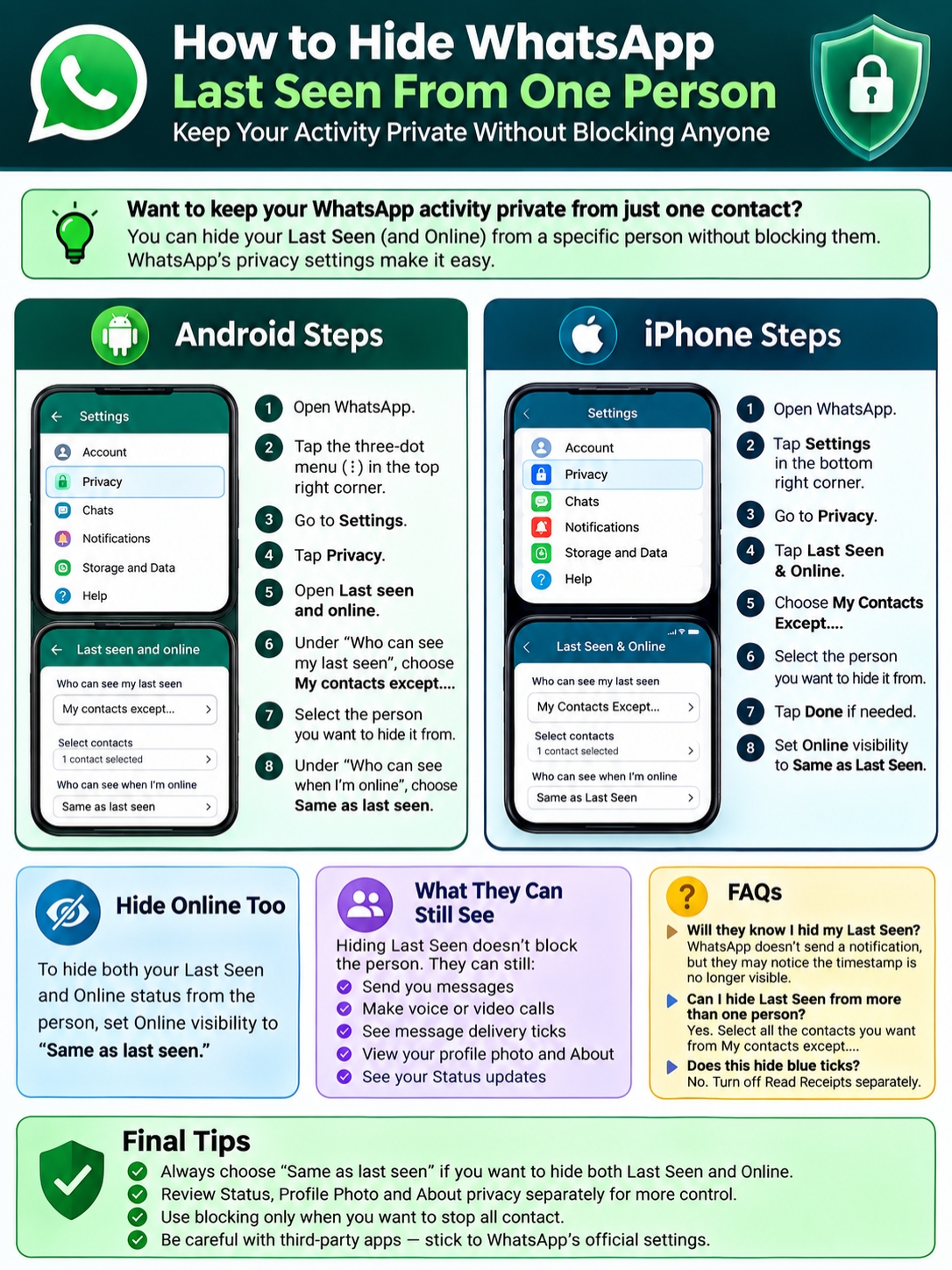
How to Hide WhatsApp Last Seen One Person on Android
The steps on Android are simple.
- Open WhatsApp.
- Tap the three-dot menu in the top-right corner.
- Select Settings.
- Tap Privacy.
- Open Last seen and online.
- Under Who can see my last seen, choose My contacts except….
- Select the person you want to hide it from.
- Confirm your choice.
- Under Who can see when I’m online, choose Same as last seen.
That last step matters. Without it, the person may still see you Online even though your Last Seen is hidden.
WhatsApp’s Android path is:
More options > Settings > Privacy > Last seen and online
Make Sure You Pick the Right Number
A person may have more than one WhatsApp account. They might use a personal number, a business number, or a second SIM.
Open the chat, tap their name, and check the phone number. Make sure you excluded the number linked to the conversation you care about.
Hiding one account won’t automatically hide your activity from another account owned by the same person.
|
Android step |
What to choose |
|
Open settings |
Three dots > Settings |
|
Open privacy |
Privacy |
|
Find activity controls |
Last seen and online |
|
Hide from one person |
My contacts except… |
|
Hide Online too |
Same as last seen |
How to Hide Last Seen From One Person on iPhone
The iPhone steps are almost the same, but you’ll open Settings from the bottom of the app.
- Open WhatsApp.
- Tap Settings.
- Select Privacy.
- Tap Last Seen & Online.
- Choose My Contacts Except….
- Select the contact.
- Tap Done if it appears.
- Set Online visibility to Same as Last Seen.
WhatsApp may slightly change button names or menu positions between updates. The core privacy options, however, remain the same.
If you can’t find the setting, update WhatsApp through the App Store. Older versions may show a different layout or may not include the latest privacy controls.
|
iPhone step |
What to choose |
|
Open settings |
WhatsApp > Settings |
|
Open privacy |
Privacy |
|
Find activity controls |
Last Seen & Online |
|
Hide from one contact |
My Contacts Except… |
|
Hide Online too |
Same as Last Seen |
Hide Online Status From the Same Person
This is the part many people miss.
If you only hide Last Seen, the selected contact may still see “online” when you open WhatsApp.
To hide both, use this setup:
- Who can see my last seen: My contacts except…
- Excluded contact: Select the person
- Who can see when I’m online: Same as last seen
Once you choose Same as last seen, WhatsApp uses the same audience for both Last Seen and Online.
So, if one person is excluded from Last Seen, they’re also excluded from seeing when you’re Online.
Read Also: How to Schedule a WhatsApp Message on Android
Online Doesn’t Mean You Read Their Message
This is worth clearing up.
When someone sees you Online, it only means WhatsApp is open and connected. It doesn’t prove you opened their chat or read what they sent.
Blue ticks are controlled by Read Receipts, which is a separate setting.
If you turn off Read Receipts, people usually won’t see blue ticks in one-to-one chats. You’ll also lose access to their read receipts.
|
Last Seen setting |
Online setting |
What the excluded person sees |
|
My contacts except… |
Same as last seen |
Neither Last Seen nor Online |
|
My contacts except… |
Everyone |
They may still see Online |
|
Nobody |
Same as last seen |
No one sees either |
|
My contacts |
Same as last seen |
Allowed contacts see both |
What Can the Excluded Person Still See?
Hiding Last Seen doesn’t cut the person off.
They can usually still:
- Send you messages
- Make voice or video calls
- See delivery ticks
- See blue ticks if Read Receipts are on
- View your profile photo
- Read your About text
- See your Status updates
- Interact with you in shared groups
These details depend on your other privacy settings.
For example, if your profile photo is set to My contacts, the person may still see it. If your Status audience includes them, they can still view your updates.
WhatsApp lets you control each of these separately.
Will WhatsApp Tell Them?
WhatsApp doesn’t describe any alert or chat notification that appears when you exclude someone from Last Seen.
Still, they may notice.
If they could see your Last Seen before and suddenly can’t, they might guess that you changed your privacy settings. The app won’t announce it, but the missing timestamp may give it away.
|
Feature |
Hidden automatically? |
Separate setting needed? |
|
Last Seen |
Yes |
No |
|
Online |
No |
Choose Same as last seen |
|
Profile photo |
No |
Change Profile photo privacy |
|
About |
No |
Change About privacy |
|
Status |
No |
Change Status privacy |
|
Blue ticks |
No |
Turn off Read Receipts |
|
Calls and messages |
No |
Block if needed |
Why the Setting May Not Be Working
The setting usually works right away. If the person can still see your activity, one of these issues is probably causing it.
Online Is Still Set to Everyone
This is the most common mistake.
Go back to:
Settings > Privacy > Last seen and online
Then change Online visibility to Same as last seen.
You Selected the Wrong Account
The person may use more than one WhatsApp number.
Check the number in the chat and make sure you excluded the correct one.
The Contact Doesn’t Appear
If you can’t find the person in the exclusion list:
- Save their number
- Add the correct country code
- Allow WhatsApp to access contacts
- Refresh or reopen the app
- Check that you’re using the right WhatsApp account
Missing profile information can also result from contact-sync problems, privacy changes, connection issues, or blocking.
Your App Is Out of Date
Update WhatsApp through Google Play or the App Store.
An outdated app may show older menus or may not display newer privacy options correctly. Use the official app rather than a modified version or unofficial APK.
|
Problem |
Likely reason |
What to do |
|
They still see Online |
Online is set to Everyone |
Choose Same as last seen |
|
Contact is missing |
Number isn’t saved or synced |
Save and refresh contacts |
|
Wrong person excluded |
They use several numbers |
Check the chat number |
|
Menu looks different |
Old app or platform difference |
Update WhatsApp |
|
You can’t see their Last Seen |
Their settings or reciprocity rules |
Check both sides |
You May Lose Access to Their Last Seen Too
WhatsApp privacy works both ways.
If you hide your Last Seen or Online information, you may also lose access to the same information from other users.
So, if you exclude someone, don’t expect to keep seeing their Last Seen while hiding yours.
A Missing Last Seen Doesn’t Prove You’re Blocked
People often jump to this conclusion, but there are several possible reasons why Last Seen or profile information may disappear.
The person may have:
- Changed their privacy settings
- Excluded you
- Turned off Last Seen for everyone
- Lost internet access
- Changed numbers
- Blocked you
Your contacts may also need to resync.
WhatsApp keeps blocking signs unclear on purpose, so one missing detail isn’t enough to confirm anything.
|
What you notice |
What it might mean |
|
Last Seen disappears |
Privacy change, sync issue, connection problem, or blocking |
|
Profile photo disappears |
Privacy change, photo removal, or blocking |
|
Messages show one tick |
Phone offline, no connection, or blocking |
|
Several signs appear together |
Blocking is possible, but not certain |
Other Privacy Settings You Should Check
Last Seen is only one part of your WhatsApp privacy.
If you want stronger control, review the other options too.
Hide Your Status Updates
WhatsApp Status has its own audience settings.
You can choose:
- My contacts
- My contacts except…
- Only share with…
Excluding someone from Last Seen won’t hide your Status from them. You need to change Status privacy separately.
Hide Your Profile Photo
Go to:
Settings > Privacy > Profile photo
You can choose who sees it, including My contacts except… or Nobody.
Hide Your About Information
Your About text has its own privacy control.
Open:
Settings > Privacy > About
Then choose the audience you want.
Block the Person When You Want Contact to Stop
Blocking is a bigger step.
A blocked contact can’t normally send you direct WhatsApp messages or calls. Blocked contacts also can’t see your Last Seen, Online status, Status updates, or future profile-photo changes.
Blocking makes sense when you no longer want communication. It’s not necessary when you only want to hide your activity.
Report Spam, Scams, or Abuse
Use the Report option when someone sends:
- Spam
- Threats
- Scam links
- Abusive messages
- Impersonation attempts
Blocking stops contact. Reporting sends relevant account or message information to WhatsApp for review.
|
Situation |
Best option |
|
One person watches your activity |
My contacts except… |
|
You want to hide Online too |
Same as last seen |
|
You only want to hide Status |
Change Status privacy |
|
You want to hide your photo |
Change Profile photo privacy |
|
You want messages and calls to stop |
Block |
|
You receive scams or abuse |
Report and block |
|
You want to review everything |
Use Privacy Checkup |
Final Thoughts
The easiest way to hide WhatsApp last seen one person is to use WhatsApp’s built-in My contacts except… option.
On Android, go to:
WhatsApp > Three-dot menu > Settings > Privacy > Last seen and online
On iPhone, go to:
WhatsApp > Settings > Privacy > Last Seen & Online
Choose My contacts except…, select the person, and set Online visibility to Same as last seen.
That final step is easy to overlook, but it makes a real difference. Without it, the person may still see you Online.
Also remember that profile photos, About information, Status updates, and blue ticks have their own controls. Check those settings separately when you want more privacy.
Use blocking only when you want direct contact to stop. Report the account if the situation involves scams, threats, spam, or abuse.
|
Final check |
Best setting |
|
Hide Last Seen from one person |
My contacts except… |
|
Hide Online from that person |
Same as last seen |
|
Keep messages and calls open |
Don’t block |
|
Hide Status |
Change Status privacy separately |
|
Hide profile details |
Review Profile photo and About |
|
Stop all contact |
Block |
|
Handle scams or abuse |
Report and block |
Frequently Asked Questions
Can I Hide Last Seen From More Than One Person?
Yes.
Choose My contacts except… and select as many contacts as you want. You don’t have to create separate settings for each person.
Do I Need to Delete the Contact?
No.
Keep the number saved if you still want to message or call them. Deleting the contact can also make it harder to manage contact-based privacy settings later.
Can I Hide Last Seen From an Unsaved Number?
The easiest and clearest method is to save the number first.
The My contacts except… list works with selectable contacts. Once the number is saved, you can exclude it directly.
Does Hiding Last Seen Hide Blue Ticks?
No.
Blue ticks come from Read Receipts. You’ll need to turn that setting off separately.
Will It Hide My Status Updates?
No.
Open Status privacy and exclude the person there as well.
Yes.
Changing Last Seen privacy doesn’t remove either of you from shared groups.
Does It Work on WhatsApp Web?
WhatsApp Web and linked devices use the same account. The safest approach is to manage Last Seen and Online from the main mobile app, where WhatsApp provides the full privacy menu.
Does It Work on WhatsApp Business?
WhatsApp Business also includes privacy controls, although the menu layout may vary slightly.
Check:
Settings > Privacy > Last seen and online
Use the same My contacts except… approach if the option appears in your version.
Can a Tracking App Reveal Hidden Last Seen Data?
Be careful with apps that claim they can secretly track WhatsApp activity.
They may ask for risky permissions, collect personal data, or expose your account to scams. They aren’t part of WhatsApp’s official privacy system.
Stick to the official app and its built-in tools.
Why Can I See Online but Not Last Seen?
The person may have restricted Last Seen while leaving Online visible.
Other causes include privacy settings, contact-saving rules, sync issues, connection problems, or blocking.