
You’ve probably seen websites that promise to turn any YouTube link into an MP4 in seconds.
Paste the link. Click a button. Download the file.
It sounds easy, but there’s a catch. Many of those tools don’t follow YouTube’s rules, and some downloads may also break copyright law.
The safer option is to use a method that YouTube or the copyright owner actually allows.
You can download YouTube videos legally in several ways. YouTube Premium lets you save eligible videos for offline viewing. Some regions also offer official mobile downloads without Premium. Creators can download their own uploads through YouTube Studio or Google Takeout. You can also ask a copyright owner to send you a file directly.
The key is knowing what type of download you’re getting.
An official YouTube download usually stays inside the YouTube app or website. It isn’t a normal MP4 that you can move, edit, upload, or share anywhere you like.
This guide explains the legal options and shows how they work on Android, iPhone, iPad, Windows, macOS, Linux, Chromebook, smart TVs, and game consoles.
This article offers general information, not legal advice. Copyright rules differ by country.
What Makes a YouTube Download Legal?
Two separate issues decide whether a download is allowed.
First, YouTube has rules about how people access and copy videos from its platform.
Second, copyright law controls how the actual video can be copied, reused, edited, or shared.
YouTube’s Terms of Service say users may not download, reproduce, distribute, change, or reuse content unless YouTube provides a download feature or the user has permission from the relevant rights holder.
The terms also ban attempts to bypass tools that limit copying.
|
Situation |
Usually Allowed? |
What Matters |
|
Using YouTube’s official Download button |
Yes |
The account, video, plan, and region must qualify |
|
Downloading your own uploads |
Yes |
You must control the channel |
|
Exporting your channel with Google Takeout |
Yes |
You must use the correct Google or Brand Account |
|
Getting a file directly from the creator |
Usually |
The creator must own the required rights |
|
Downloading licensed stock or course content |
Usually |
You must follow the licence |
|
Using a third-party ripping site |
Risky |
It may break YouTube’s terms |
|
Copying a film, song, or show without permission |
Usually not |
Personal use alone doesn’t make it legal |
A video being public doesn’t mean it is free to copy.
YouTube explains that original videos are generally protected by copyright as soon as they are created. The creator, production company, broadcaster, studio, or another rights holder may control how that video can be used.
Watching permission and copying permission are not the same thing.
How to Download YouTube Videos Legally
There isn’t one method that works for every situation.
The right option depends on whether you’re watching a video offline, downloading your own upload, backing up a channel, or reusing someone else’s work.
|
What You Want to Do |
Best Legal Option |
What You Get |
|
Watch videos during travel |
YouTube Premium or another eligible offline option |
Offline access inside YouTube |
|
Use Premium Lite |
Download eligible videos where the feature is available |
Offline access inside YouTube |
|
Use a free regional download feature |
Tap Download in the mobile app |
Offline access inside YouTube |
|
Save a movie you bought or rented |
Download through the YouTube mobile app |
Protected offline access |
|
Download your own upload |
YouTube Studio |
MP4 file |
|
Back up a full channel |
Google Takeout |
Exported video files |
|
Edit another creator’s footage |
Ask for permission and the source file |
A normal file from the owner |
Use YouTube Premium
YouTube Premium is the simplest official option for most viewers.
It lets you download eligible videos for offline playback on mobile devices. Premium members can also download videos on computers through supported browsers.
The video stays tied to YouTube. You won’t normally find it sitting in your Downloads folder as a regular MP4.
That means you can watch it offline, but you can’t freely move it into VLC, Premiere Pro, Final Cut Pro, or another app.
Check Whether Premium Lite Includes Downloads
YouTube expanded Premium Lite in 2026 to include downloads and background playback for most eligible videos in markets where the plan is available.
The exact feature set can vary by country. Music videos, Shorts, search, and browsing may still include ads or other limits.
Before subscribing, check the membership page in your own account. Don’t assume Premium Lite works the same way everywhere.
Look for Free Mobile Downloads in Supported Regions
YouTube also allows official mobile downloads in selected countries and regions.
That list includes Bangladesh, India, Indonesia, Malaysia, Pakistan, the Philippines, South Africa, Sri Lanka, Thailand, Vietnam, and several other markets.
This means some users may see a Download button even without Premium.
Not every video qualifies. Music, paid content, restricted videos, and some licensed uploads may still require Premium or may not support downloads at all.
Download YouTube Videos on Android
Android users can download eligible videos through the official YouTube app.
|
Step |
What to Do |
|
1 |
Open the YouTube app |
|
2 |
Sign in to the right Google Account |
|
3 |
Open the video |
|
4 |
Tap Download |
|
5 |
Choose a video quality |
|
6 |
Open You > Downloads to watch it offline |
The position of the Download button may change slightly depending on the app version, account, country, or video.
If you don’t see the button, the video probably isn’t available for offline viewing on your account.
Manage Storage and Mobile Data
Open YouTube’s settings and find Background and downloads.
From there, you may be able to:
- Download only over Wi-Fi
- Choose a default quality
- Remove individual videos
- Delete all offline downloads
- Check storage use
- Turn automatic or recommended downloads on or off
Higher-quality video takes up more space.
YouTube says the app may stop accepting new downloads when less than 5% of the device’s storage remains.
Keep the downloaded content inside the app. Moving, renaming, or trying to extract YouTube’s internal files may stop them from working.
Read Also: How to Recover Deleted YouTube Videos
How Long Do Android Downloads Last?
The answer depends on the account, country, and type of download.
Premium downloads usually remain available for up to 29 days before the device must reconnect to the internet.
Some regional downloads require the app to reconnect every 48 hours.
YouTube uses that connection to confirm that the video is still available and that your account still has access.
Download YouTube Videos on iPhone and iPad
The process is almost the same on iPhone and iPad.
|
Step |
What to Do |
|
1 |
Open or update the YouTube app |
|
2 |
Sign in to your eligible account |
|
3 |
Open the video |
|
4 |
Tap Download |
|
5 |
Select a quality |
|
6 |
Open your profile and choose Downloads |
The file won’t appear in the Photos app.
It also won’t show up as a normal video in the Files app.
|
Limitation |
What It Means |
|
Not stored in Photos |
You can’t edit it like a camera video |
|
Not stored as a normal file |
Other media apps can’t open it |
|
Linked to your account |
Switching accounts may hide it |
|
Requires occasional internet access |
YouTube must verify availability |
|
Can disappear |
Removed or restricted videos may stop working |
A YouTube offline download gives you temporary access. It doesn’t give you ownership of the video.
Download YouTube Videos on Windows, Mac, Linux, and Chromebook
YouTube supports Premium downloads on computers through selected browsers.
|
Platform |
Supported Official Route |
|
Windows |
Chrome, Edge, Firefox, or Opera |
|
macOS |
Chrome, Edge, Firefox, or Opera |
|
Linux |
Chrome, Edge, Firefox, or Opera |
|
Chromebook |
Chrome or the Android app, where supported |
Steps for Desktop Downloads
- Open YouTube in a supported browser.
- Sign in to your eligible account.
- Open the video.
- Click Download below the player.
- Choose a quality.
- Open Downloads from YouTube’s menu.
The downloaded video stays inside YouTube’s browser storage.
|
Question |
Answer |
|
Will it appear in the Downloads folder? |
No |
|
Can VLC open it? |
Not through the standard Premium feature |
|
Can you copy it to a USB drive? |
Not as a normal video file |
|
Can you edit it? |
No |
|
Will another browser automatically see it? |
Not always |
|
Can clearing browser data remove it? |
Yes, it may |
This option works well for flights, travel, weak internet, or short outages.
It isn’t designed for archiving or editing.
Download Your Own YouTube Videos
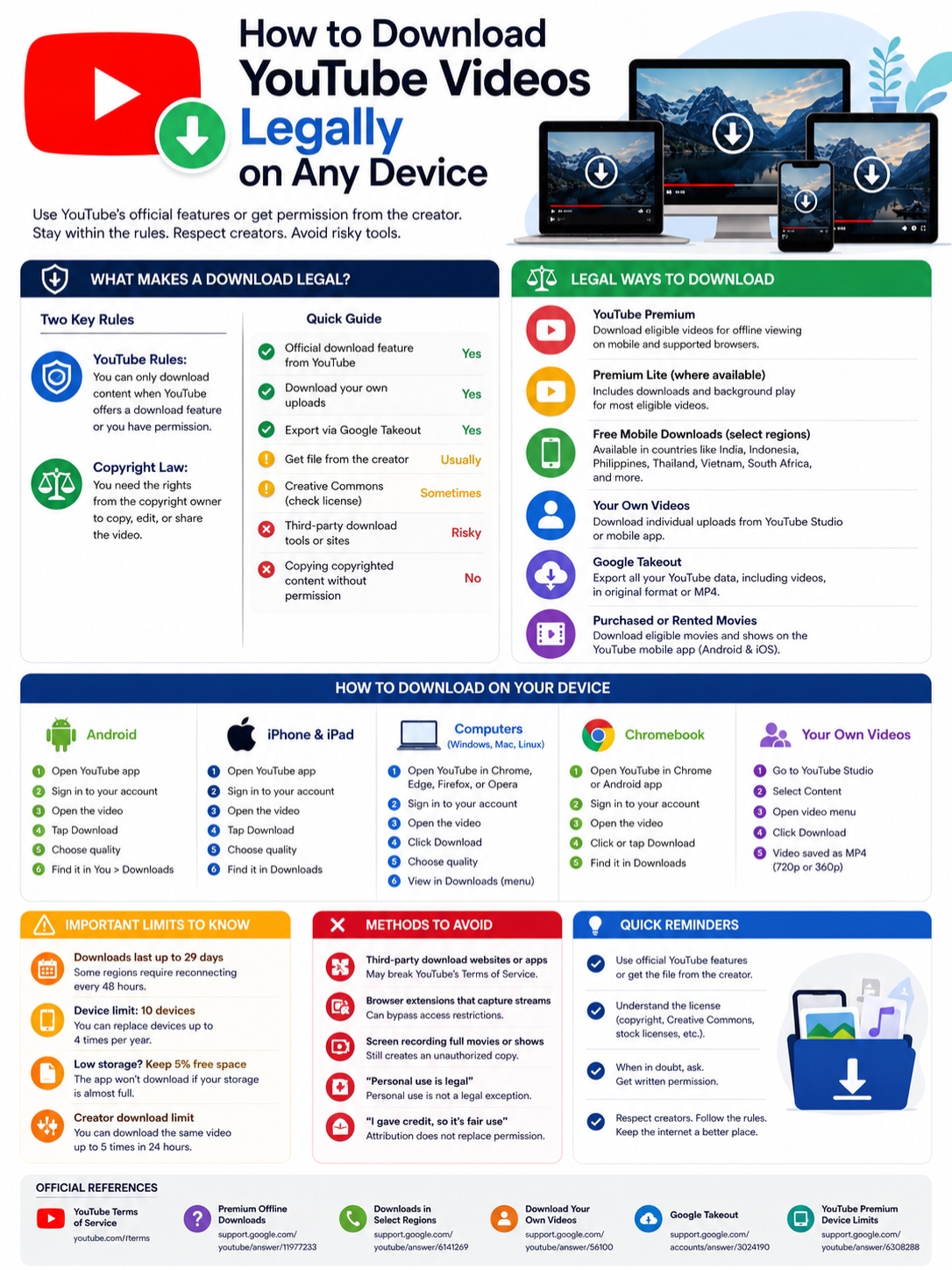
Creators have more freedom because they own or control their uploads.
You can download YouTube videos legally from your own channel through YouTube Studio, the YouTube mobile app, or Google Takeout.
|
Method |
Best For |
File Type |
|
YouTube Studio |
One or a few uploads |
MP4 |
|
YouTube mobile app |
Saving one upload to a phone |
Downloaded file |
|
YouTube Studio app |
Managing creator videos |
Downloaded file |
|
Google Takeout |
Full channel backup |
Export archive |
Download a Video Through YouTube Studio
On a computer:
- Open YouTube Studio.
- Select Content.
- Find the video.
- Open the options menu.
- Click Download.
On Android, iPhone, or iPad, open your uploads in YouTube or YouTube Studio. Find the video, open its menu, and choose Save to device if the option appears.
YouTube says creator downloads are usually provided as MP4 files in 720p or 360p, depending on the video.
The same uploaded video can also be downloaded up to five times within 24 hours.
A download may not be available if:
- YouTube removed the video
- The video has a copyright strike
- It has a Community Guidelines strike
- It uses certain pre-approved audio
- You reached the daily download limit
One important point: the Studio download may not match your original upload quality.
Keep the original camera files and final editing exports somewhere safe. YouTube shouldn’t be your only backup.
Back Up a Channel With Google Takeout
Google Takeout works better when you need a full channel archive.
- Sign in to the Google Account that owns the channel.
- Open Google Takeout.
- Deselect products you don’t need.
- Select YouTube and YouTube Music.
- Choose the data you want.
- Pick an export method.
- Create the export.
- Download the archive when Google sends the link.
Google says exported YouTube videos come in their original format or as MP4 files with H.264 video and AAC audio.
Check your Brand Account before starting.
A Google login can control more than one YouTube channel. If you select the wrong identity, some videos may be missing from the export.
Download Purchased or Rented Movies
YouTube also allows offline viewing for eligible films and TV programmes bought or rented through the platform.
|
Rule |
What to Know |
|
Supported devices |
Android and iOS |
|
Premium required |
Not always |
|
Normal MP4 provided |
No |
|
Same account required |
Yes |
|
Rental time limits |
Yes |
|
Permanent availability guaranteed |
No |
Open the purchase inside the YouTube app and look for the Download option.
Availability depends on the title, country, device, licensing agreement, and account used for the purchase.
Buying a film doesn’t give you its copyright.
It also doesn’t give you permission to upload it elsewhere, edit it, redistribute it, or use it in a public project.
Permission, Creative Commons, and Public-Domain Videos
Sometimes you need the actual file, not just offline playback.
That’s common when you’re editing a video, preparing a presentation, publishing a documentary, building a course, or creating content for a client.
In that case, ask the copyright owner for permission and request the original file.
|
Rights Basis |
What to Check |
|
Written permission |
Editing, publishing, commercial use, and attribution |
|
Creative Commons |
Licence type and credit requirements |
|
Public domain |
Whether the entire work is truly public domain |
|
Stock licence |
Platform, audience, and commercial limits |
|
Client or employer ownership |
Who owns the footage under the contract |
|
“Free to use” claim |
Whether the uploader owns everything in the video |
Ask for Clear Permission
A vague “sure, go ahead” may not cover everything you plan to do.
Ask whether you can:
- Download the file
- Edit it
- Publish it elsewhere
- Use it commercially
- Add subtitles or translations
- Use it in advertising
- Share it with a client
- Monetize the final project
Also check whether the creator owns the music, images, stock footage, and other material inside the video.
The safest option is for the creator to send:
- The original file
- A Google Drive or Dropbox link
- A media-kit download
- A licensed stock link
- A written permission statement
That’s much cleaner than pulling the video from YouTube with an unofficial tool.
Use Creative Commons Content Carefully
YouTube allows creators to publish certain videos under a Creative Commons Attribution licence, often called CC BY.
CC BY 4.0 allows people to copy, adapt, share, and use the material commercially.
You still have to:
- Credit the creator
- Link to the licence
- Mention any changes
- Avoid suggesting endorsement
- Check for other rights
A Creative Commons label doesn’t always cover everything inside the video.
The uploader may have used music, images, or clips that they don’t have the right to relicence.
Check the description, credits, and original sources before using the material.
There’s another catch. A Creative Commons licence may give you copyright permission, but that doesn’t automatically make every third-party downloader acceptable under YouTube’s rules.
Ask the creator for the file whenever possible.
Download Methods That Can Cause Problems
Many third-party downloaders use the same reassuring claims.
“Personal use is legal.”
“Credit is enough.”
“Education makes it fair use.”
Those statements leave out important details.
|
Claim or Method |
Why It Can Be Misleading |
|
“It’s only for personal use” |
Personal use isn’t an automatic exception |
|
“I’ll give credit” |
Credit doesn’t replace permission |
|
“It’s for school” |
Education alone doesn’t guarantee fair use |
|
“I only used ten seconds” |
No universal safe time limit exists |
|
“It’s already public” |
Public access isn’t public ownership |
|
“No copyright intended” |
A disclaimer creates no legal rights |
|
Link-converter website |
It may break YouTube’s terms |
|
Full screen recording |
It still creates a copy |
YouTube’s terms make the basic rule fairly clear: use an official download feature or get the required permission.
Fair Use Isn’t a Free Pass
Fair use is a US legal principle. Other countries may use fair dealing or different exceptions.
US courts look at four factors:
- Why and how the material was used
- The type of copyrighted work
- How much was copied
- Whether the use harms the market for the original
Criticism, teaching, commentary, research, and news reporting may support a fair-use claim.
None of them guarantees it.
There is no fixed number of seconds, percentage, or clip length that is always safe.
The context matters.
Download Limits and Common Problems
Most download issues come from account settings, storage, video eligibility, internet access, or device limits.
|
Problem |
Likely Reason |
What to Do |
|
Download button is missing |
The video or account isn’t eligible |
Try another video and check your plan |
|
Download won’t start |
Weak connection or low storage |
Change networks and free space |
|
Video won’t play offline |
Verification period ended |
Reconnect to the internet |
|
Download disappeared |
Video was removed or restricted |
Open the watch page |
|
Downloads are missing |
Wrong Google Account |
Switch accounts |
|
New device won’t work |
Device limit reached |
Use an existing authorized device |
|
Creator download is unavailable |
Strike, removal, audio restriction, or limit |
Check YouTube Studio |
|
Takeout archive is incomplete |
Wrong Brand Account |
Export again from the right channel |
YouTube Premium and YouTube Music Premium currently support offline features on up to ten devices.
When you add an eleventh device, YouTube may remove the oldest one.
YouTube allows up to four device replacements per year.
Reinstalling the app may count as a new device, so try the simple fixes first:
- Check the Google Account.
- Confirm the membership is active.
- Update the app or browser.
- Reconnect to the internet.
- Free up storage.
- Restart the device.
- Test another video.
- Remove and download the video again.
Can You Download Videos on a Smart TV or Game Console?
YouTube works on most modern TVs, streaming devices, and consoles.
Offline downloading is another matter.
YouTube’s official download guides focus on phones, tablets, and supported desktop browsers. They don’t list smart TVs or consoles as offline-download devices.
|
Device |
YouTube Streaming |
Official Offline Download |
|
Android TV or Google TV |
Yes |
Not listed |
|
Apple TV |
Yes |
Not listed |
|
Fire TV |
Yes |
Not listed |
|
Roku |
Yes |
Not listed |
|
Samsung or LG TV |
Yes |
Not listed |
|
PlayStation |
Yes |
Not listed |
|
Xbox |
Yes |
Not listed |
For a trip or internet outage, download the video to a supported phone, tablet, or computer before you disconnect.
Don’t expect to move a YouTube app download onto a television as a normal file.
Final Thoughts
|
Your Goal |
Best Option |
|
Watch videos without internet |
Use YouTube’s Download button |
|
Use Premium Lite |
Check whether downloads are included locally |
|
Save a purchased movie |
Use the Android or iOS app |
|
Download your own upload |
Use YouTube Studio |
|
Back up a full channel |
Use Google Takeout |
|
Edit another creator’s video |
Get permission and the original file |
|
Use Creative Commons footage |
Follow the licence and verify all rights |
|
Share a video |
Send the YouTube link |
The safest way to download YouTube videos legally is to stay within YouTube’s official tools or get the file from the rights holder.
Use Premium, Premium Lite, or a regional offline feature when you only want to watch without an internet connection.
Use YouTube Studio or Google Takeout for your own uploads.
When someone else owns the content, ask for written permission and request the source file.
Don’t assume that personal, educational, or non-commercial use automatically makes a download legal. Those details can matter, but they don’t override YouTube’s rules or copyright law by themselves.
A YouTube link gives you permission to watch.
It doesn’t give you ownership.
Frequently Asked Questions
Can I keep a YouTube Premium download forever?
No. Premium downloads depend on your membership, account, video availability, and periodic online checks.
Can I download a YouTube video for a classroom?
Possibly, but educational use alone doesn’t make every download legal.
Use an official YouTube feature, stream or embed the video, ask for permission, or check whether a copyright exception applies in your country.
Is screen recording safer than using a downloader?
Not necessarily.
Screen recording still creates a copy of the video. Copyright law and YouTube’s rules may still apply.
Can I edit a YouTube Premium download?
No. The download stays inside YouTube.
Ask the creator for a licensed source file if you need to edit the footage.
Can I use a CC BY YouTube video commercially?
CC BY 4.0 can allow commercial use.
You must follow the licence, give proper credit, mention changes, and check whether any third-party material or other rights limit the use.