
Maybe it held a client address, a payment receipt, a family photo, or a voice note you hadn’t saved. Whatever disappeared, the first few minutes matter.
You may be able to recover deleted WhatsApp messages, but only if another copy still exists. That copy could be in a Google Account backup, an iCloud backup, an old phone, the other person’s chat, or Android’s notification history.
Here’s the catch: WhatsApp doesn’t keep a recycle bin for chats. Its support team also can’t pull deleted conversations from its servers and send them back to you.
Before you uninstall anything, check your backup date. A rushed reinstall or a fresh backup could wipe out the version you need.
Can You Really Recover Deleted WhatsApp Messages?
Sometimes, yes.
But recovery depends on what happened and when your last backup ran.
A backup works like a snapshot. It records the chat history available at the moment WhatsApp creates it.
Suppose WhatsApp backed up your chats at 2 a.m. You deleted a conversation at noon. That 2 a.m. backup may still contain the missing messages.
But if WhatsApp runs another backup at 9 p.m., it may save the already-deleted version. The older copy can then be replaced.
|
What Happened |
Recovery Chance |
Best Option |
|
A backup exists from before the deletion |
Good |
Restore the backup |
|
You just tapped “Delete for me” |
Good for five seconds |
Tap Undo |
|
The chat remains on an old phone |
Good |
Use chat transfer |
|
The other person still has the messages |
Good for getting a copy |
Ask them to resend or export |
|
Android notification history was enabled |
Limited |
Check notification previews |
|
Photos were saved outside WhatsApp |
Limited |
Check Photos, Gallery, or Files |
|
The newest backup was made after deletion |
Poor |
Look for another copy |
|
No backup or copy exists anywhere |
Very poor |
Avoid “guaranteed” recovery tools |
WhatsApp gives you about five seconds to undo a Delete for me action. Tap Undo before the prompt disappears, and the message returns.
After that, you’ll need another copy.
Check Your Backup Before Doing Anything Else
Don’t start by uninstalling WhatsApp.
First, find out whether your backup is useful.
On Android
Open:
WhatsApp > More options > Settings > Chats > Chat backup
On iPhone
Open:
WhatsApp > Settings > Chats > Chat Backup
Look at the date and time.
The backup must be newer than the missing messages but older than the moment you deleted them.
|
What to Check |
Why It Matters |
|
Backup date and time |
Shows whether the deleted chat may be included |
|
Phone number |
It must match the number used for the backup |
|
Google or Apple Account |
You need the same account that created the backup |
|
Newer messages |
An old restore may remove them |
|
Free storage |
WhatsApp needs room for chats and media |
|
Internet connection |
A weak connection can interrupt restoration |
|
Encryption details |
You may need a password, passkey, or encryption key |
|
Old phone |
It may contain a newer copy than the cloud backup |
One detail trips up many people: WhatsApp doesn’t merge an old backup with your current chats.
If you restore a backup from Monday, messages received on Tuesday may disappear from the app.
Save anything recent before you continue. Take screenshots, forward key messages, download documents, or export conversations you need to keep.
An exported chat is only a readable copy. You can open it as a text file, but you can’t import it back into WhatsApp as a live conversation.
How to Recover Deleted WhatsApp Messages on Android
Android gives you two official options:
- Restore from a Google Account backup.
- Transfer chats directly from an old phone.
Start with whichever copy is newer and still contains the missing chat.
|
Android Method |
What You Need |
Main Limitation |
|
Google Account restore |
A backup from before deletion |
Replaces current chat history |
|
Old-phone transfer |
The chat must still exist on the old phone |
Won’t restore something deleted there |
|
Undo |
You must act within five seconds |
Very short window |
|
Notification history |
It had to be enabled earlier |
Shows previews, not full chats |
|
Another participant’s copy |
The other person still has the chat |
Doesn’t rebuild your original database |
Restore From a Google Account Backup
Follow these steps:
- Open WhatsApp and check the backup date.
- Confirm which Google Account created the backup.
- Save any newer messages you want to keep.
- Uninstall WhatsApp.
- Reinstall it from Google Play.
- Open the app.
- Verify the same phone number.
- Choose the correct Google Account if asked.
- Tap Restore.
- Keep the phone connected while messages and media download.
Text messages usually return first. Photos, videos, and voice notes may take longer.
Don’t assume the restore failed just because media doesn’t appear straight away.
Don’t Back Up the Deleted Version
This is the biggest mistake people make.
They open Chat Backup and tap Back up before checking the date. That can replace the older backup with a new copy that no longer contains the deleted chat.
Check first. Back up later.
Can You Restore Android Database Files Manually?
You’ll still find tutorials telling you to rename files such as msgstore.db.crypt14.
That method isn’t a reliable choice for most users now.
Android storage rules have changed. WhatsApp’s encryption and file structure also change over time. Moving or renaming the wrong file can leave WhatsApp unable to read it.
Worse, you could overwrite the only copy that still works.
Stick with Google Account restoration or WhatsApp’s phone-transfer tool unless you have specialist help and a complete copy of the WhatsApp folder.
Transfer Chats From an Old Android Phone
This option works well when the old phone still has the conversation.
On the old phone:
- Open WhatsApp.
- Go to Settings > Chats > Transfer chats.
- Tap Start.
On the new phone:
- Install WhatsApp.
- Verify the same number.
- Choose Transfer from old phone.
- Follow the QR code and on-screen steps.
Keep both phones nearby, unlocked, and connected to the same network when prompted.
Direct transfer moves what still exists on the old device. It can’t bring back a chat deleted from both phones.
How to Recover Deleted WhatsApp Messages on iPhone
WhatsApp uses iCloud for chat backups on iPhone.
You should restore through WhatsApp itself. Don’t erase the whole iPhone unless you’re deliberately trying to restore the entire device from an older Apple backup.
|
iPhone Requirement |
What to Confirm |
|
Backup date |
It must come from before the deletion |
|
Apple Account |
It must match the account used for backup |
|
Phone number |
It must match the WhatsApp backup |
|
iCloud Drive |
It needs to be switched on |
|
WhatsApp iCloud access |
WhatsApp must have permission |
|
Free storage |
The iPhone needs room for the restore |
|
Encryption details |
You may need a passkey, password, or key |
Restore WhatsApp From iCloud
Follow these steps:
- Open WhatsApp > Settings > Chats > Chat Backup.
- Check the latest backup date.
- Save any newer chats or files you still need.
- Delete WhatsApp from the iPhone.
- Reinstall it from the App Store.
- Open WhatsApp.
- Verify the same phone number.
- Sign in with the same Apple Account.
- Tap Restore Chat History.
- Leave the iPhone connected to Wi-Fi while the restore finishes.
If WhatsApp can’t find the backup, check iCloud Drive.
Go to:
Settings > [your name] > iCloud > Drive
Make sure Sync this iPhone is on. Also confirm that WhatsApp has permission to use iCloud.
iCloud Usually Keeps One Current WhatsApp Backup
You normally won’t see a list of older WhatsApp backups.
When WhatsApp creates a new iCloud backup, it replaces the earlier version. If the new backup ran after the chat disappeared, the older copy may already be gone.
That’s why the timestamp matters so much.
WhatsApp Backup and iPhone Backup Are Different
WhatsApp’s iCloud chat backup stores your WhatsApp history.
A full iPhone backup covers much more, including device settings, apps, and other data.
Restoring the whole iPhone is a much bigger step. Apple may require you to erase the device first. You could also lose newer data from other apps.
Use WhatsApp’s own restore option before considering a full-device restore.
How to Recover Messages Without a Cloud Backup
No cloud backup doesn’t always mean nothing can be saved.
You may still recover part of the conversation from another phone, another person, a notification, or a media folder.
|
Alternative |
What It May Recover |
What It Won’t Do |
|
Undo |
A message you just deleted |
Work after five seconds |
|
Old phone |
Chats still stored there |
Restore chats deleted from that phone |
|
Other participant |
Messages, files, photos, and audio |
Rebuild your original chat history |
|
Exported chat |
A readable record |
Import back into WhatsApp |
|
Notification history |
Some received-message previews |
Recover full conversations |
|
Photos or Gallery |
Saved media files |
Restore the message around them |
Ask the Other Person
This is often the fastest fix.
Deleting a chat from your phone doesn’t usually remove the other person’s copy.
Ask them to:
- Forward the messages
- Resend photos or videos
- Share voice notes again
- Send screenshots
- Export the conversation
- Copy and paste important text
- Resend documents
You won’t get your original database back, but you may recover the information that matters.
Check Android Notification History
Some Android phones save recent notifications.
On Google Pixel devices, open:
Settings > Notifications > Notification history
This only works if you enabled the feature before the message disappeared.
Notification history may show a short WhatsApp preview. It won’t usually show an entire conversation, large messages, voice notes, documents, or full photo content.
It may also miss messages from muted chats or notifications with hidden previews.
Think of it as a last clue, not a proper backup.
Check Photos, Gallery, and Files
A deleted WhatsApp message doesn’t always delete the media file saved on your phone.
Check:
- Google Photos
- Apple Photos
- Gallery
- Downloads
- Recently Deleted
- WhatsApp Images
- WhatsApp Video
- Cloud storage folders
- Email attachments
You may find the missing photo, document, or video even when the chat itself is gone.
Why WhatsApp Backup Restoration Fails
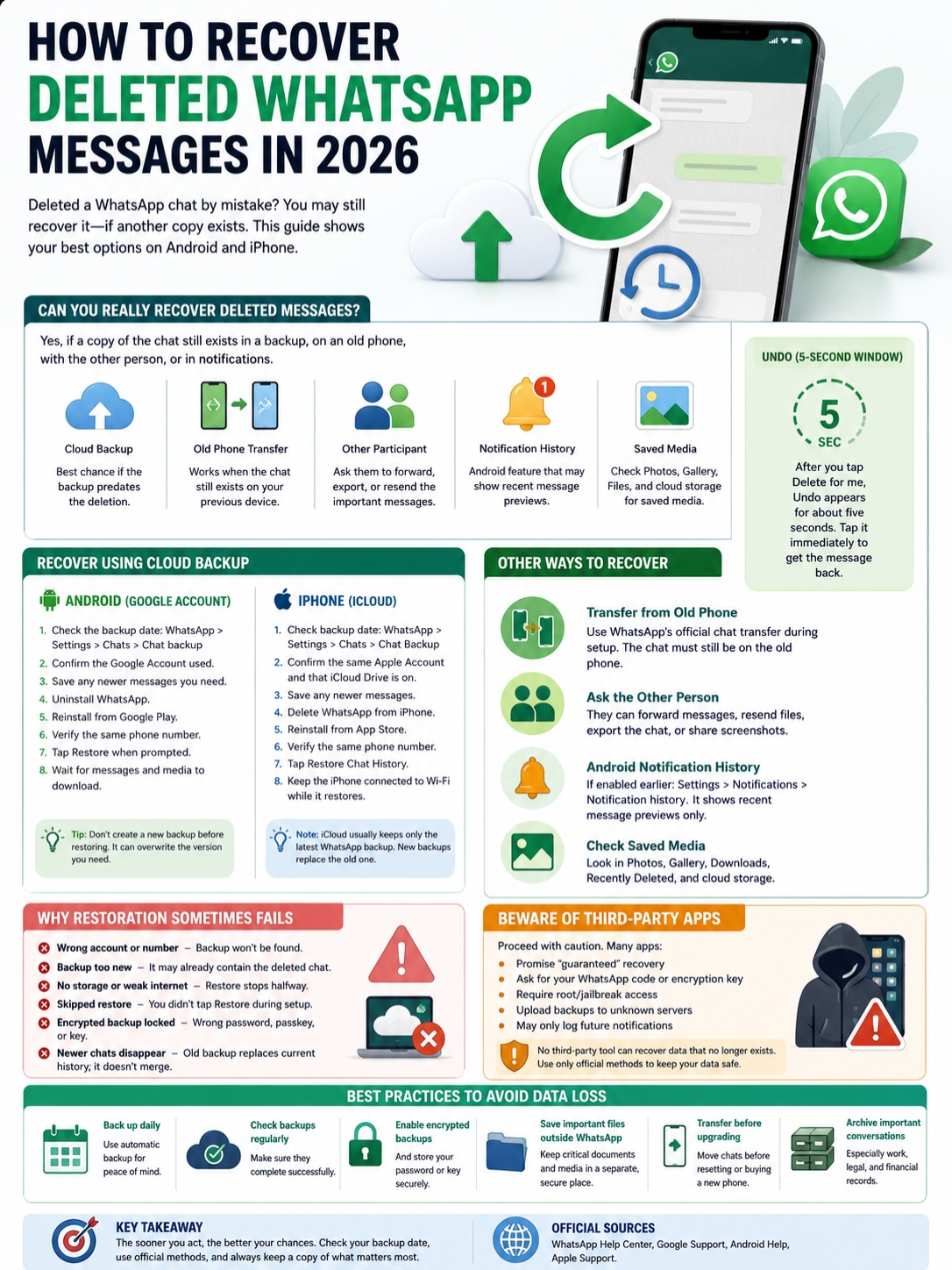
A backup can exist and still refuse to restore.
The cause is usually simple: the wrong account, the wrong number, not enough storage, or a missing encryption password.
|
Problem |
Likely Cause |
What to Do |
|
No backup found |
Wrong Google or Apple Account |
Sign in to the original account |
|
Backup doesn’t match |
Different phone number |
Verify the number used for backup |
|
Deleted chat is still missing |
Backup ran after deletion |
Look for another copy |
|
Restore option never appeared |
Setup was skipped or account wasn’t detected |
Reinstall and try again |
|
Restore stops halfway |
Weak internet or low storage |
Free space and change networks |
|
Text returns but media doesn’t |
Media is still downloading |
Keep WhatsApp connected |
|
Backup is locked |
Wrong password, passkey, or key |
Use the original credential |
|
New messages disappear |
Old backup replaced current history |
Restore saved copies manually |
Check the Phone Number
WhatsApp backups are tied to a phone number.
A backup created with one number won’t normally restore under another. If you changed numbers, the safer approach is to use WhatsApp’s Change Number feature on the old phone before creating a new backup.
Check the Cloud Account
On Android, use the same Google Account that made the backup.
On iPhone, use the same Apple Account connected to iCloud.
People often have several accounts on one phone. Make sure you’re checking the right one.
Check Your Storage
A large backup needs enough free space to download and rebuild.
Delete unwanted files or move them elsewhere before trying again. Don’t delete the WhatsApp backup itself while freeing space.
Check Your Encryption Password or Key
End-to-end encrypted backups may use:
- A passkey
- A password
- A 64-digit encryption key
Without the correct credential, WhatsApp can’t open the backup for you.
If you still have access to WhatsApp on the old phone, check the encrypted-backup settings before uninstalling the app.
Should You Trust Third-Party Recovery Apps?
Be careful.
Many recovery apps promise far more than they can deliver. Some are just notification loggers. Others ask for deep access to your phone or cloud backup.
|
Warning Sign |
Why It’s Risky |
|
“Guaranteed recovery” |
No tool can restore data that no longer exists |
|
Requests your WhatsApp code |
Someone could take over your account |
|
Requests your encryption key |
It exposes your backup |
|
Requires rooting or jailbreaking |
It weakens phone security |
|
Uploads your backup to a server |
Your private chats leave your control |
|
Works only after installation |
It may only log future notifications |
|
Demands payment before scanning |
Payment doesn’t prove recovery is possible |
Never share your six-digit WhatsApp registration code.
Don’t upload an encrypted backup to a website you don’t trust. And avoid tools that ask you to disable device security.
A recovery program can only work with data that still exists somewhere. It can’t recreate a deleted chat from nothing.
How to Prevent WhatsApp Message Loss
The best time to plan for recovery is before something goes missing.
|
Protection Step |
What to Do |
|
Backup frequency |
Use daily backups for important accounts |
|
Check backup dates |
Review them every few weeks |
|
Enable encryption |
Protect sensitive backups |
|
Save credentials |
Store the password or key securely |
|
Keep cloud space free |
Make sure backups can finish |
|
Save important files elsewhere |
Don’t rely on WhatsApp alone |
|
Transfer before resetting |
Move chats before wiping an old phone |
|
Keep old phone temporarily |
Erase it only after checking the new one |
|
Archive business records |
Save contracts and approvals separately |
For work chats, invoices, medical records, legal documents, and family media, WhatsApp should never be the only copy.
Save important files to a secure folder, cloud drive, document system, or password manager.
Recover Deleted WhatsApp Messages Without Making Things Worse
The safest way to recover deleted WhatsApp messages is to restore a backup made before the deletion.
On Android, that usually means a Google Account backup or a direct transfer from an old phone. On iPhone, it means restoring WhatsApp’s iCloud chat backup.
Check the backup date before you uninstall the app. Don’t create a new backup over the version you need. Save newer messages first, and make sure you know the original phone number, cloud account, and encryption details.
Without a backup, old phone, recipient copy, saved notification, or separate media file, full recovery probably isn’t possible.
Act early. Check the timestamp. And don’t trust any tool that promises to bring back data that no longer exists.
FAQs About Deleted WhatsApp Messages
Can I Restore Only One Deleted WhatsApp Chat?
No. WhatsApp restores the whole backup available for that account.
You can’t choose one chat from the backup or merge it with your current history.
Can I Import an Exported Chat Into WhatsApp?
No.
An exported chat is a text archive. You can read it and keep the attached files, but you can’t turn it back into a normal WhatsApp conversation.
Can WhatsApp Web Restore Deleted Messages?
No.
WhatsApp Web and linked devices aren’t separate backup systems. Restoration happens through the main phone.
A linked computer may help only when the missing message is still visible there.
Can I Recover Messages From Someone I Blocked?
Blocking a contact doesn’t change your backup.
If the chat existed in a backup made before deletion, restoring that backup may bring it back. You don’t need to unblock the person first.
Can I Recover a Backup From an Old Phone Number?
Backups are linked to the number used when they were created.
When possible, change the number inside WhatsApp on the old phone, then create a fresh backup before moving to the new number.
Can I Recover an Overwritten Backup?
Usually not.
New Google Account and iCloud backups replace older WhatsApp backups. Once the useful copy is overwritten, your remaining options are an old phone, the other participant, exported records, notifications, or saved media.
Will Restoring WhatsApp Bring Back Deleted Photos?
It may, if the photos were included in the backup.
Media often returns after the text messages. Give WhatsApp time to finish downloading.
Also check Apple Photos, Google Photos, Gallery, Downloads, and Recently Deleted. The file may still exist outside WhatsApp.
Can WhatsApp Support Recover My Chats?
No.
WhatsApp support can explain the restore process, but it can’t retrieve a deleted conversation that isn’t stored in a backup or on another device.