
You changed your TikTok username. Then the regret kicked in.
Maybe you spotted a typo. Maybe the handle looks awkward. Maybe it no longer fits your brand, business, or creator name. Now you want to change tiktok username early before the 30-day wait ends.
Here’s the truth: TikTok does not give regular users a simple “change it again now” button. TikTok’s Help Center says you can change your username once every 30 days. Your username also becomes part of your profile link, so changing it affects how people find and share your account.
That sounds frustrating. But you still have a few smart options.
You can clean up your display name. You can update your bio. You can tell followers what happened. You can contact TikTok if the issue involves hacking, impersonation, verification, or a serious brand problem.
What you should not do is trust random “phone date trick” tutorials. Most are old, unreliable, or risky.
This guide breaks down what works, what doesn’t, and how to avoid getting stuck again.
Can You Change TikTok Username Early?
For most people, no. You usually can’t change your TikTok username before the 30-day limit ends.
TikTok states that usernames can be changed once every 30 days. It also says your username forms your profile link. So this is not just a cosmetic setting. It affects your public handle and URL.
|
Key Question |
Clear Answer |
|
Can regular users change TikTok username early? |
Usually no. TikTok allows one username change every 30 days. |
|
Does TikTok offer a public bypass? |
No official public bypass exists for regular users. |
|
Does changing username change your profile link? |
Yes. TikTok says your profile link changes too. |
|
Can you change your display name instead? |
Yes, if the 7-day nickname limit allows it. |
|
Can verified accounts ask TikTok for help? |
Yes. TikTok tells verified users to contact support for username changes. |
Username vs. Nickname
TikTok has two names on your profile.
Your username is your @handle. It is unique. People use it to tag you, search for you, and visit your profile link.
Your nickname, also called your display name, is the name people see on your profile and around the app. TikTok allows nicknames up to 30 characters. You can change your nickname once every 7 days.
This difference matters.
If your @username is locked, your nickname can still save the look of your profile while you wait.
For example:
- Username: @maria_cooks_928
- Nickname: Maria Cooks
- Bio: Temporary handle. Same creator.
That looks much better than leaving the whole profile messy.
How to Change TikTok Username the Normal Way
Once the 30-day window ends, changing your username is easy.
TikTok’s official steps are simple: open your profile, tap Edit profile, tap Username, enter your new handle, and tap Save.
|
Step |
What to Do |
Why It Matters |
|
1 |
Open TikTok and tap Profile |
Make sure you’re using the right account. |
|
2 |
Tap Edit profile |
This opens your public profile settings. |
|
3 |
Tap Username |
This changes your @handle, not your display name. |
|
4 |
Type the new username |
Check spelling carefully. |
|
5 |
Tap Save |
Your profile link may change after this. |
Check Everything Before You Save
Do not rush this part. One typo can lock you into another 30-day wait.
Before you tap Save, ask yourself:
- Is the spelling right?
- Is it easy to read?
- Is it easy to say out loud?
- Does it match your brand or creator name?
- Does it avoid random numbers?
- Does it work on other social platforms?
- Are you ready to update your old TikTok links?
This matters even more for creators, businesses, journalists, public pages, and online shops.
Your TikTok link may appear in your Instagram bio, YouTube description, email signature, website, media kit, or QR code. If your username changes, those links may need an update too.
How to Change TikTok Username Early: Safe Things You Can Do
People search change tiktok username early because they want a quick fix. That makes sense. A bad handle can look unprofessional fast.
But the safest fix is not a secret hack. It’s smart cleanup while you wait.
|
Safe Option |
Works Before 30 Days? |
Best Use |
|
Change nickname/display name |
Yes, if allowed |
Fix the visible name fast |
|
Update bio |
Yes |
Explain the temporary handle |
|
Change profile photo |
Yes |
Help people recognize the account |
|
Pin an update video |
Yes |
Tell followers what changed |
|
Contact TikTok support |
Sometimes |
Serious account or identity issues |
|
Wait for the timer |
Yes |
Best option for normal username mistakes |
Change Your Display Name First
This is the fastest safe move.
Let’s say your locked username is ugly:
@sarahbakes_7392
You can still make your display name clean:
Sarah Bakes
Then add a short bio:
“Temporary handle. Same creator. Final username coming soon.”
Now your profile looks intentional. Not perfect, but clear.
Clean Up Your Bio
Your bio should remove confusion, not add more of it.
Use a short line like:
- “Temporary username. Same account.”
- “New handle coming soon.”
- “Official account for [Brand Name].”
- “Username update pending.”
- “Same creator, new handle soon.”
Keep it simple. A long explanation can look messy.
Pin a Quick Update Video
If people know you by your old username, post a short update.
You don’t need a big announcement. Just say it plainly:
“Quick note: my username is temporary right now. Same account, same content. I’ll switch to the final handle when TikTok lets me change it.”
Pin the video to your profile for a few weeks.
This helps followers understand that the account is still yours.
Should You Contact TikTok Support?
You can contact TikTok support, but don’t expect support to remove the 30-day limit for a simple typo.
TikTok is more likely to review serious cases. These include hacked accounts, verified accounts, impersonation, and brand identity problems.
TikTok also says verified users should contact TikTok if they want to change the username on a verified account. A username change may also affect verification status.
|
Situation |
Should You Contact TikTok? |
Why |
|
Simple typo |
Usually no |
TikTok may still keep the 30-day rule. |
|
You changed your mind |
Usually no |
This is not a strong support case. |
|
Account was hacked |
Yes |
Secure the account and report it. |
|
Verified account |
Yes |
TikTok gives verified accounts a support path. |
|
Impersonation issue |
Yes |
It affects identity and safety. |
|
Business or legal issue |
Yes |
Brand ownership may need review. |
When Support Is Worth Trying
Contact support if the issue is bigger than regret.
Good reasons include:
- Someone changed your username without permission.
- Your account was hacked.
- Another account is pretending to be you.
- Your verified account needs a brand correction.
- Your business handle creates a serious identity issue.
- A username problem affects your public brand, newsroom, shop, or organization.
TikTok also recommends basic safety steps for account protection. You should verify your email and phone number, turn on 2-step verification, check trusted devices, review account security activity, and use Security Checkup.
Read Also: How to Fix TikTok Not Working on WiFi
What to Say to TikTok Support
Keep your message short and honest.
You can write:
“Hello TikTok Support, I recently changed my username and need help because [brief reason]. My account is [personal/business/verified]. My current username is [current username]. The correct username should be [desired username], if available. Please let me know if this can be reviewed.”
Do not claim your account was hacked if it was not. That can create more checks and more delays.
Why You Should Avoid the Phone Date Trick
You may see videos that say: “Change your phone date 30 days ahead, open TikTok, and change your username again.”
It sounds easy. It is also not a smart plan.
TikTok’s official rule still says one username change every 30 days. TikTok does not list a phone-date workaround. Apple also warns users not to manually change time settings just to alter app behavior, such as timers.
|
Claimed Shortcut |
Why It’s a Bad Idea |
|
Change phone date 30 days ahead |
TikTok may still use server-side timing. |
|
Turn off automatic date and time |
It can affect your phone and other apps. |
|
Clear cache to unlock username |
Cache may fix glitches, not policy limits. |
|
Use third-party tools |
Risky and unofficial. |
|
Log in from another device |
Account limits usually follow the account, not the device. |
Why the Trick Often Fails
Many app limits work on the server side.
That means TikTok does not need to trust your phone’s clock. Your device may show a future date, but TikTok can still know when you last changed your username.
Why It Can Cause Other Problems
Wrong time settings can break or confuse other parts of your phone.
They may affect:
- Login codes
- Calendar reminders
- App sessions
- Banking apps
- Email sync
- Subscriptions
- Security checks
- Authenticator apps
That’s a lot of trouble for a TikTok handle.
If the username change matters, wait for the official timer or contact support for a real account problem.
What Happens After You Change Your TikTok Username?
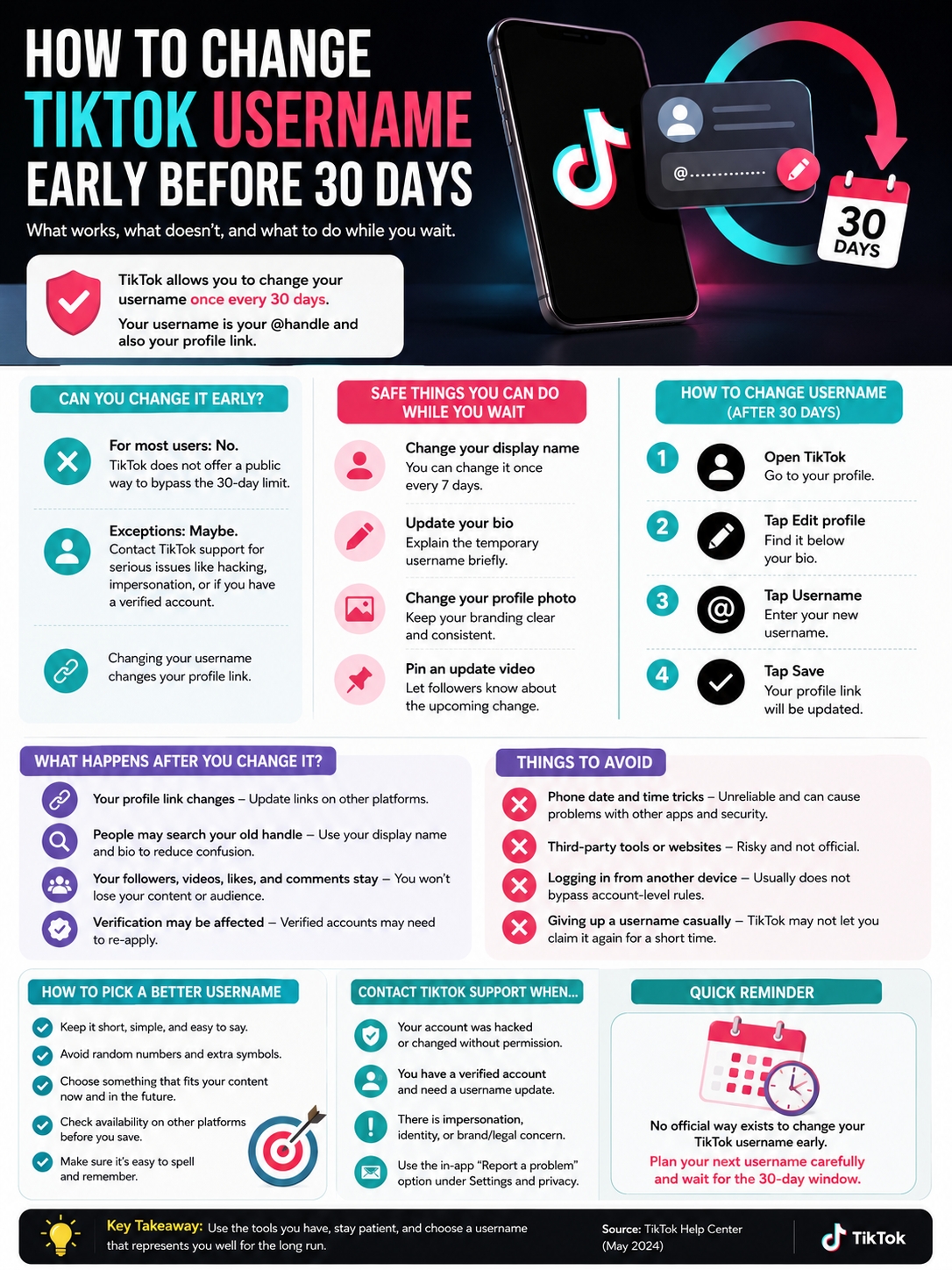
Changing your TikTok username does not delete your followers, videos, likes, or comments.
But it does change how your profile appears. It also changes the link people use to reach your account.
|
Area |
What Changes? |
What You Should Do |
|
@handle |
Your public username changes |
Tell followers if the change is big. |
|
Profile link |
Your TikTok URL changes |
Update old links. |
|
Search behavior |
People may search the old handle |
Use your display name and bio clearly. |
|
Brand identity |
Your account may look different |
Match your name and photo across platforms. |
|
Verification |
Verified accounts may be affected |
Contact TikTok before changing. |
Update Your Old Links
After the username change, check every place where your TikTok link appears.
Look at:
- Website author bio
- Contact page
- Instagram bio
- YouTube channel links
- Facebook page
- LinkedIn profile
- X/Twitter bio
- Pinterest profile
- Email signature
- Media kit
- QR codes
- Link-in-bio tools
For a casual account, this may not matter much. For a creator or business, it matters a lot.
A broken TikTok link can mean lost followers, lost traffic, and missed leads.
Tell Your Audience
If your account is small, you may not need a formal post.
But if people know your old handle, post a short update:
“New username, same account. Save the new handle so you don’t lose me.”
That’s enough. Don’t overdo it.
How to Pick a Better TikTok Username Next Time
The easiest way to avoid searching change tiktok username early again is to choose the next handle with care.
A good TikTok username should be short, clear, and easy to remember. It should fit your content today without trapping you tomorrow.
|
Username Style |
Example |
Best For |
|
Real name |
@sarahkhan |
Personal brands |
|
Name + niche |
@sarahbakes |
Creators with a clear topic |
|
Brand name |
@northline.studio |
Businesses and agencies |
|
Verb + name |
@cookwithmaya |
Food, education, tutorials |
|
Location + niche |
@dhakafoodguide |
Local pages |
|
Simple variation |
@sarahkhan.co |
When the clean name is taken |
Make It Easy to Say
A good username should pass the “say it out loud” test.
Weak:
@maya_bakes_0097x
Better:
@mayabakes
Random numbers can work for personal accounts. But for brands, shops, and serious creator pages, they often look sloppy.
Don’t Make It Too Narrow
Avoid usernames that trap you in one tiny topic.
For example:
@iphonecasequeen
That may work if you only post iPhone case content. But what happens when you expand into tech accessories, apps, or creator gear?
A broader handle gives you more room.
Better options:
- @maya.tech
- @mayagear
- @techwithmaya
- @mayareviews
Check Other Platforms First
Before you save the new username, search the same handle on:
- YouTube
- Threads
- X/Twitter
- Domain registrars
Matching handles build trust. They also make you easier to find.
If the exact username is not available everywhere, pick the closest clean version.
Troubleshooting Common TikTok Username Problems
Sometimes the issue is not the 30-day timer. It may be formatting, availability, app bugs, or account security.
TikTok allows letters, numbers, underscores, and periods in usernames. But it does not allow periods at the end.
TikTok also says if you give up a username, you may not be able to add that username to another account for a short time.
|
Problem |
Likely Reason |
Best Fix |
|
Username unavailable |
Someone has it, or TikTok is holding it |
Try a clean variation. |
|
Period at the end fails |
TikTok does not allow ending periods |
Remove or move the period. |
|
Save button does not work |
App glitch or weak connection |
Update the app and try again. |
|
Old username cannot be reclaimed |
TikTok may hold it temporarily |
Wait or choose another handle. |
|
Account looks compromised |
Unknown device or activity |
Secure the account and contact support. |
If the Username Is Taken
Do not panic. Try clean variations.
Good options include:
- Add your niche: @namefitness
- Add your brand word: @name.studio
- Add your location: @namebd
- Use one underscore: @name_official
- Use one period: @name.co
Avoid spammy-looking usernames.
Skip:
- Too many underscores
- Long random numbers
- Fake “official” tags
- Misspelled brand names
- Symbols TikTok does not allow
If Your Account Was Hacked
Secure the account before anything else.
Check your email and phone number. Turn on 2-step verification. Remove unknown devices. Review account activity. Then report the issue to TikTok.
If someone changed your username without permission, mention that clearly in your support request.
Final Thoughts
Trying to change tiktok username early is annoying, especially when the mistake is small. But TikTok’s rule is clear: regular users can change a username once every 30 days.
So don’t waste time on shaky tricks. Don’t change your phone date. Don’t trust random third-party tools. Don’t make fake hacking claims.
Use the tools you do have. Change your display name. Clean up your bio. Pin a quick update. Secure your account if something looks wrong. Contact TikTok only when the issue is serious.
Then, when the timer ends, choose the next username carefully.
|
Final Takeaway |
Best Move |
|
Need a quick profile fix |
Change your display name. |
|
Need the @username changed |
Wait for the 30-day window. |
|
Account was hacked |
Secure it and contact TikTok. |
|
Verified account needs a new name |
Contact TikTok before changing it. |
|
Tempted by date tricks |
Avoid them. They are not official. |
|
Want to avoid this again |
Check spelling, branding, and platform match first. |
Your TikTok username is more than a small profile setting. It is your public handle, search identity, and profile link.
Treat it like part of your brand.
Uncommon FAQs About Changing TikTok Username Early
Most guides repeat the same basic answers. These questions cover the details people usually miss.
|
FAQ Topic |
Short Answer |
|
Early username change |
Not normally allowed before 30 days. |
|
Display name fix |
Useful while waiting. |
|
Verified account risk |
Username changes may affect verification. |
|
Old username |
It may not be reusable right away. |
|
Inactive username |
TikTok usually cannot reassign it. |
Can I change TikTok username early if I made a typo?
Usually, no. A typo does not remove the 30-day limit. Use your display name and bio as a temporary fix until TikTok lets you change the username again.
Does changing my TikTok display name change my username?
No. Your display name and username are different. Your username is your @handle and profile link. Your display name is the name people see on your profile and across TikTok.
Can I get my old TikTok username back?
Maybe, but not always right away. TikTok says if you give up a username, you cannot add it to an account for a short period.
Can TikTok give me an inactive username?
Usually, no. TikTok says it cannot reassign usernames in most cases. It suggests using a variation with numbers or underscores instead.
Does changing TikTok username affect verification?
It can. TikTok says a verified account owner may need to re-apply for verification after changing a username. TikTok for Artists also warns that verified accounts may lose verification after a username change.
Can I change TikTok username from desktop?
TikTok’s official username instructions focus on the mobile app. The safest route is to use the TikTok app: Profile, Edit profile, Username, Save.
Will I lose followers after changing my username?
No, changing the username does not create a new account. Your followers should stay. But some people may not recognize the new handle, so a short update post can help.
Can I use spaces in a TikTok username?
No. TikTok allows letters, numbers, underscores, and periods. Spaces are not part of the allowed username format.
Someone may already have it. TikTok may also hold a username for a short time after someone gives it up. Try a simple variation instead of forcing a messy handle.
Can a business account change TikTok username early?
TikTok’s public username rule still says one change every 30 days. Business accounts do not get a public self-service bypass in the standard username settings.