
You know that feeling when your phone buzzes and you hope it is a friend, but it is just another “Scam Likely” alert? It is frustrating. In 2026, scammers have become even more clever, using AI to mimic voices and spoofing local numbers to make you pick up.
If you are tired of the constant interruptions, you are in the right place. Samsung has built some of the best tools in the world to help you deal with this. This guide will show you every trick in the book to block spam calls samsung and get your peace of mind back.
The Problem with Modern Robocalls in 2026
Even with all the new laws, robocalls are still a massive headache. Scammers now use high-tech software to make a call look like it is coming from your neighbor or a local business. This is called neighbor spoofing. When you see a number that looks familiar, you are more likely to answer. Once you do, they know your line is active, and the calls only increase. That is why learning how to block spam calls samsung is a basic survival skill for your digital life.
Why Your Phone is a Target
Your phone number is more than just a way to reach you; it is a key to your digital identity. Data breaches often leak millions of numbers to the dark web where telemarketers buy them for pennies. These automated systems can dial thousands of people every minute. If you do not have a strategy to filter these out, your Galaxy device will constantly ring with junk.
The Rise of AI Voice Scams
In 2026, we are seeing a surge in “vishing” or voice phishing. Scammers use short clips of voices found on social media to pretend to be a family member in trouble. By using the built-in blocking features on your Samsung, you create a barrier that keeps these sophisticated predators away from your personal space.
|
Fact About Spam |
Current 2026 Data Point |
|
Average Monthly Spam Calls |
14 calls per user |
|
Percentage of Spoofed Numbers |
65% of all spam |
|
AI Voice Scam Growth |
40% increase since 2025 |
|
Block Rate with Samsung Tools |
88% effectiveness |
Method 1: Use the Built-In Samsung Smart Call Feature
The easiest way to block spam calls samsung is by using the feature already built into your Phone app. Samsung calls this Smart Call. It is powered by a company called Hiya, which maintains a massive list of millions of known spam numbers. When a call comes in, the phone checks this list instantly. If there is a match, you get a warning or the call is stopped entirely before you even see it.
Activating Caller ID and Spam Protection
To get started, open your Phone app and tap those three little dots in the top right corner. Go into Settings and look for the option labeled Caller ID and spam protection. Flip that switch to the “On” position. This allows your phone to identify callers who are not in your contacts. It is like having a digital security guard at your front door checking IDs.
Setting Up Automatic Blocking
Once you turn the feature on, you can choose how aggressive you want to be. There is a setting called Block spam and scam calls. If you turn this on, you can choose to block all of them or just the high-risk ones. Most people find that blocking only high-risk scams is a good balance. This way, you don’t miss a call from a delivery driver who might be flagged as “potential spam” by mistake.
Reporting New Spam Numbers
The system gets better when you help it out. If a spammer gets through the filter, you can report them directly. Tap on the number in your recent calls list and hit the report button. You can even choose the category, like “Telemarketing” or “Fraud.” This helps protect other Samsung users because your report goes back into the global database.
|
Feature Name |
Primary Benefit |
|
Smart Call |
Real-time identification of unknown callers |
|
Hiya Integration |
Access to a global database of million of numbers |
|
Risk Level Filtering |
Choose to block only high-risk or all suspected spam |
|
User Reporting |
Allows you to contribute to the community block list |
Method 2: How to Block Spam Calls Samsung Manually
Sometimes you have one specific person or company that just won’t leave you alone. In these cases, the broad filters might not catch them because they aren’t “scammers” in the traditional sense. Manual blocking is the answer here. It is the most direct way to ensure a specific number can never make your phone ring again. Your Samsung Galaxy makes this process very simple and quick.
Blocking from Your Recent Call Log
If a number just called you, don’t delete it from your log yet. Tap the number in your Recents tab and then tap the “i” icon for more information. At the bottom of that screen, you will see a block icon. Once you tap it, that number is dead to your phone. They will hear a busy signal or be sent straight to a full voicemail box where they can’t leave a message.
Managing Your Blocked List
You can see everyone you have ever blocked by going to the Phone app settings and selecting Block numbers. This list shows every number you have manually added. It is also where you can find the toggle to block unknown or private callers. If you ever accidentally block a friend, this is the place where you can go to remove them from the list and let them back in.
Blocking by Area Code or Prefixes
A really cool feature in One UI is the ability to block numbers that start with a specific sequence. For example, if you keep getting calls from a specific city or area code you have no business with, you can block all numbers starting with those three digits. Go to the Block numbers menu and select the “Starts with” option. This is a powerful way to stop localized spoofing cold.
|
Manual Method |
Best Use Case |
|
Block from Recents |
Stopping a persistent individual caller |
|
Block Unknown Numbers |
Eliminating hidden or private caller IDs |
|
Starts With Filter |
Blocking specific area codes or scam prefixes |
|
Blocked List Management |
Reviewing and unblocking numbers you have saved |
Method 3: Screening Calls with Bixby Text Call
One of the coolest ways to block spam calls samsung is to let Bixby do the talking for you. This is perfect for those times when you see a number you don’t recognize but think it might be important. Bixby acts as a middleman. It answers the call with a digital voice and asks the person why they are calling. You get to see a live transcript of their response right on your screen.
How to Turn on Bixby Text Call
Go into your Phone app settings and look for the Bixby Text Call option. You will need to turn the toggle on and maybe download a small language pack if you haven’t used it before. You can even customize what Bixby says when it answers. It is a great way to handle calls when you are in a meeting or a quiet place and can’t speak out loud.
Watching the Live Transcript
When a call comes in, you will see a button for Bixby Text Call next to the answer and decline buttons. Swipe it up, and the screening starts. If the caller is a robot, they usually hang up immediately because they can’t interact with Bixby. If it is a real person, they will state their business. You can then choose to pick up, send a quick text reply, or just hang up if it is a solicitor.
Customizing Bixby’s Voice
In 2026, Samsung added the ability to make Bixby sound more natural or even like a version of your own voice. You can go into the Bixby Text Call settings and choose different voices and speeds. This makes the experience less robotic for the person on the other end. It is a much more “human” way to filter your calls without being rude to legitimate callers.
|
Bixby Feature |
Why It Matters |
|
Live Transcription |
See what the caller is saying without answering |
|
Quick Responses |
Send pre-written replies for Bixby to read |
|
Voice Customization |
Makes the interaction feel more natural and less “AI” |
|
Call History |
Saves the transcript so you can read it later |
Method 4: Carrier-Level Protection for Galaxy Users
Your phone carrier like Verizon, T-Mobile, or AT&T has its own powerful tools to block spam calls samsung. These are often better than phone settings because they stop the call at the network level. This means the call never even reaches your phone’s antenna, which can actually save a little bit of battery life over time. Most carriers offer these services for free, though they have “plus” versions with more features.
T-Mobile Scam Shield
If you are on T-Mobile, you have access to Scam Shield. It is a dedicated app that shows you exactly how many calls have been blocked for you. It also gives you a “Scam Likely” ID on your incoming calls. One of the best parts is the Proxy Number, which gives you a second number to use for online forms so you don’t have to give out your real one.
Verizon Call Filter
Verizon users get Call Filter. The basic version is included in most plans and automatically filters out high-risk calls. If you want more control, the paid version lets you create a personal block list that syncs across all your devices. It also gives you a risk meter for every unknown number that calls, showing you how likely it is to be a scam based on other users’ feedback.
Read Also: How to Find Call Recording in Samsung
AT&T ActiveArmor
AT&T has bundled their security into an app called ActiveArmor. It does more than just block calls; it also checks your phone for malicious apps and helps protect your data on public Wi-Fi. For spam, it allows you to send specific categories of calls, like “Political” or “Surveys,” directly to your voicemail so they don’t interrupt your day.
|
Carrier Service |
Key App Name |
Primary Benefit |
|
T-Mobile |
Scam Shield |
Free network-level blocking and proxy numbers |
|
Verizon |
Call Filter |
High-risk call filtering and spam risk meters |
|
AT&T |
ActiveArmor |
Combined call blocking and device security |
|
Google Fi |
Fi Spam Filter |
Seamless integration with Google’s spam database |
Method 5: Third-Party Apps for Extra Security
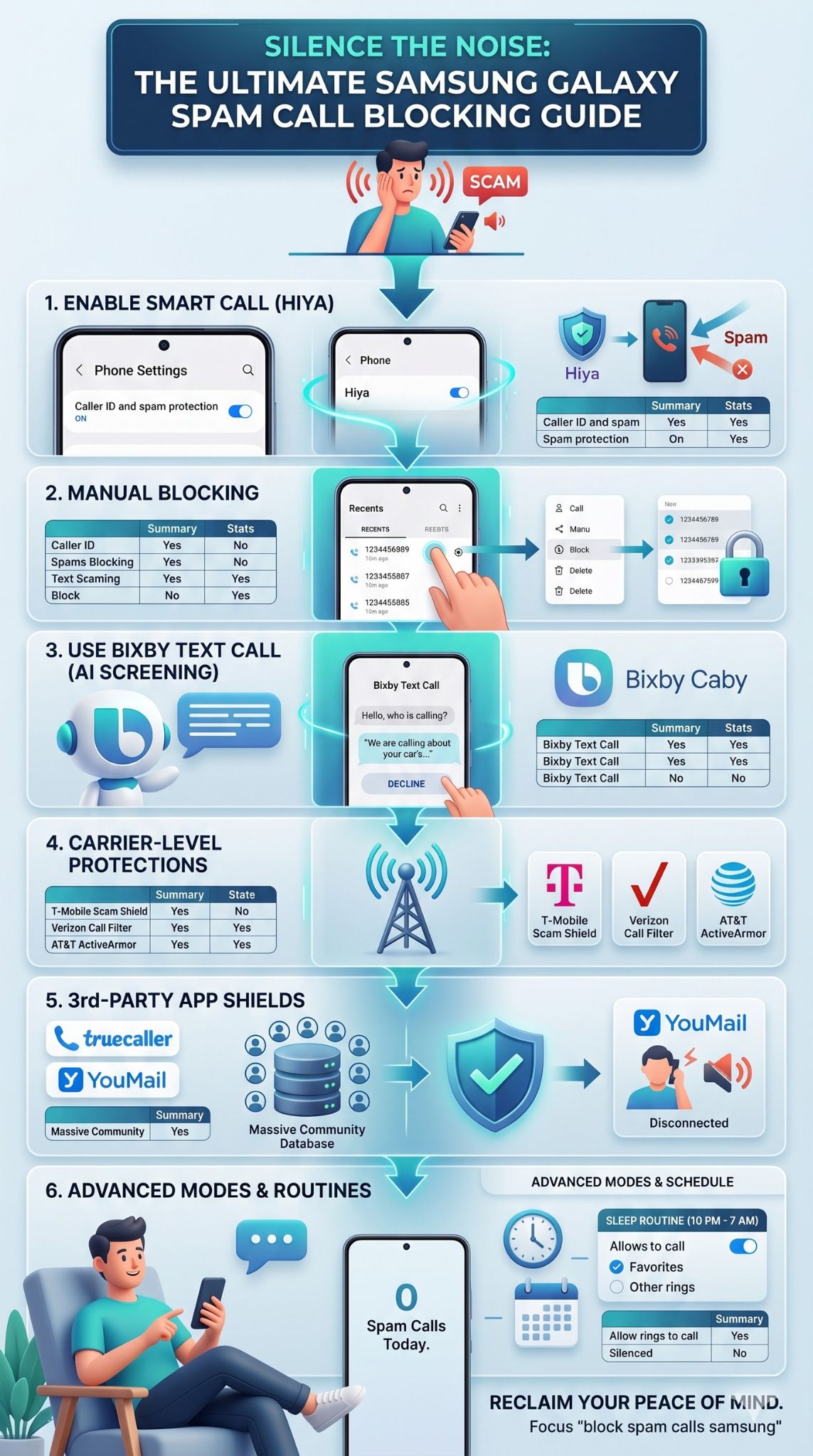
If the built-in tools are not enough for you, there are some great apps on the Play Store that specialize in this. These apps often have even bigger databases than the ones Samsung uses. However, you should be careful with these because they require a lot of permissions to work. They need to see your contacts and your call history to do their job effectively.
Truecaller: The Community Giant
Truecaller is one of the most popular apps in the world for a reason. It has a massive community of users who report spam in real-time. This means if a new scammer starts calling people in your city, Truecaller will likely know about it within minutes. It also has a great flash messaging feature and can identify people even if they aren’t in your contact list.
YouMail: Better Voicemail
YouMail takes a different approach. Instead of just blocking the call, it replaces your voicemail. When a known spammer calls, YouMail plays a “Number Disconnected” greeting. This tricks the automated systems into thinking your number is no longer active, which can actually get you removed from their calling lists over time. It is a very clever way to solve the problem permanently.
Privacy and Permissions
When you use these apps to block spam calls samsung, remember that you are sharing data. Most of these apps are safe, but always read the privacy policy. You want to make sure they aren’t selling your contact list to the very telemarketers you are trying to avoid. Stick to the well-known names like Truecaller, Hiya, or Robokiller for the best experience.
|
Third-Party App |
Unique Feature |
Potential Downside |
|
Truecaller |
Huge global community database |
Requires many privacy permissions |
|
YouMail |
“Out of Service” greeting for scammers |
Replaces your standard voicemail app |
|
RoboKiller |
Uses “Answer Bots” to waste scammers’ time |
Usually requires a paid subscription |
|
Hiya |
Direct Samsung partner for Smart Call |
Some features are already built into Galaxy |
Advanced Tips: Using Modes and Routines
Samsung Galaxy phones have a powerful feature called “Modes and Routines.” You can use this to create your own custom rules for when you want to be bothered. For instance, you can set a routine that only allows calls from your “Favorites” list after 9:00 PM. This is a great way to block spam calls samsung during your sleep or work hours without having to turn off your phone.
Setting Up a Do Not Call Routine
Go to your phone’s Settings and tap on Modes and Routines. You can create a “Work” mode that silences all calls from people not in your contacts. This is extremely helpful if you find that spam calls are ruining your productivity. You can even set it to turn on automatically when you arrive at your office or when your phone connects to your work Wi-Fi.
The National Do Not Call Registry
While it won’t stop the illegal scammers, joining the National Do Not Call Registry is still a good idea. It stops legitimate companies from calling you for sales. If you are on the list and a company calls you anyway, they can be fined. It takes about 31 days for your registration to become effective, so it is a long-term play for a quieter phone.
Clearing Your Digital Footprint
One of the reasons you get so many calls is that your number is out there on the web. Try to avoid putting your phone number on public social media profiles. If a website asks for your number for a discount code, think twice. Using a temporary or “burner” number app for online shopping can keep your primary Samsung Galaxy line clean and free from future spam.
|
Advanced Tactic |
Effort Level |
Effectiveness |
|
Modes and Routines |
Medium |
High for scheduled peace |
|
DNC Registry |
Low |
Medium (stops legal calls only) |
|
Digital Cleanup |
High |
High for long-term prevention |
|
Burner Numbers |
Medium |
Excellent for online shopping |
Troubleshooting: Why am I still getting calls?
It can be frustrating when you have done everything right and a call still gets through. No system is 100% perfect. Scammers are always finding new ways to jump over the fences we build. If you are still seeing junk calls, it might be time for a quick check-up on your settings to see if something needs an update.
Update Your Software
Samsung sends out “Security Provider” updates specifically for the Smart Call database. Make sure your phone is updated to the latest version of One UI. Go to Settings, then Software Update. Keeping your phone’s software fresh ensures you have the latest definitions of what a “spam” number looks like according to the newest 2026 trends.
Check Your Carrier App
Sometimes the carrier apps like Scam Shield or Call Filter can get “put to sleep” by the Android battery optimizer. If the app isn’t running in the background, it can’t block anything. Go into your app settings and make sure your carrier’s protection app is allowed to run without restrictions. This keeps the shield active 24/7.
Neighbor Spoofing is Hard to Stop
If the caller is using a number that is very close to yours, the AI might think it is a legitimate local person. This is the hardest type of spam to stop. In this case, your best bet is Bixby Text Call. Let Bixby answer those local-looking numbers. If it is a real neighbor, they will stay on the line. If it is a scam, they will hang up.
|
Problem |
Likely Cause |
Quick Fix |
|
Filter not working |
Outdated software |
Run a System Update |
|
App not blocking |
Battery optimization |
Set app to “Unrestricted” |
|
Local numbers getting through |
Neighbor spoofing |
Use Bixby Text Call to screen |
|
Phone not identifying spam |
Database sync error |
Toggle Smart Call off and on |
Final Thoughts
Dealing with phone scams is a part of life in 2026, but it doesn’t have to be a daily struggle. By taking a few minutes to set up the tools we talked about, you can significantly reduce the noise. Whether you use the built-in Smart Call features, screen your calls with Bixby, or use a carrier app, the power is in your hands.
The most important thing to remember is to never interact with the scammers. Don’t press buttons to “remove yourself from the list” and don’t talk to them. Just block and move on. With your Samsung Galaxy properly configured, you can get back to using your phone for what it was meant for: connecting with the people you actually care about. If you follow these steps, you will effectively block spam calls samsung and enjoy a much quieter mobile experience.
FAQs
Will blocking spam calls also block my contacts?
No. All the features mentioned here prioritize your contact list. As long as someone is saved in your phone, they will always be able to get through, even if they are calling from a city that is usually flagged as spam.
Does Samsung charge for the Smart Call service?
The basic Smart Call service is free and built into most Galaxy devices. Samsung partners with Hiya to provide this, and while Hiya has a premium app, the version integrated into your Samsung settings doesn’t cost a dime.
Why do some spam calls still show as “Unknown”?
Some scammers hide their Caller ID entirely. To stop these, you must specifically turn on the “Block unknown/private numbers” setting in your Block numbers menu. This stops anyone who is intentionally hiding their identity.
Can I block spam on a Galaxy tablet too?
If your Galaxy tablet has a SIM card and a phone number, yes. The steps are exactly the same. If it is a Wi-Fi-only tablet, you likely won’t get traditional phone spam, but you might still want to filter your messages.
Is it safe to use Bixby Text Call for everything?
Yes, it is perfectly safe. However, keep in mind that some older people or automated appointment systems might be confused by the digital voice. It is best used for numbers you don’t recognize.