
If you have ever found yourself staring at your phone, wondering who exactly is scrolling through your page, you are definitely not alone. The curiosity about who viewed tiktok profile pages is universal. Whether you are a casual creator posting funny moments with friends, a small business trying to build a brand, or just someone keeping an eye on an ex, the desire to know who is looking at your content is a natural part of using social media.
In the early days of social media platforms, this kind of transparency was rare. You put your content out into the digital void, and unless someone left a comment or a like, you had no idea if they had stopped by. Over the years, platforms have experimented with different ways to show user footprints. LinkedIn is famous for telling you exactly who looked at your resume, while Instagram keeps grid lurkers completely anonymous but exposes everyone who views a temporary story. TikTok has taken a fascinating middle ground with a feature that gives you some insight, but with a few very specific privacy catches.
In this comprehensive guide, we are going to break down everything you need to know about tracking your profile visitors. We will cover the exact steps to enable the feature, explain the rules and restrictions the platform has put in place, dive into why you might not be seeing everyone, and discuss the very real dangers of relying on third-party apps that promise to reveal your secret admirers. By the end of this article, you will have a complete understanding of how the system works and how to use it to your advantage while keeping your digital privacy intact.
The Short Answer: Can You See Who Views Your TikTok?
The short answer is yes, you can see who viewed your TikTok profile, but there is a catch. The platform offers a built-in feature called Profile View History. When this feature is activated, you gain access to a list of users who have visited your main page. However, it is not an all-seeing eye.
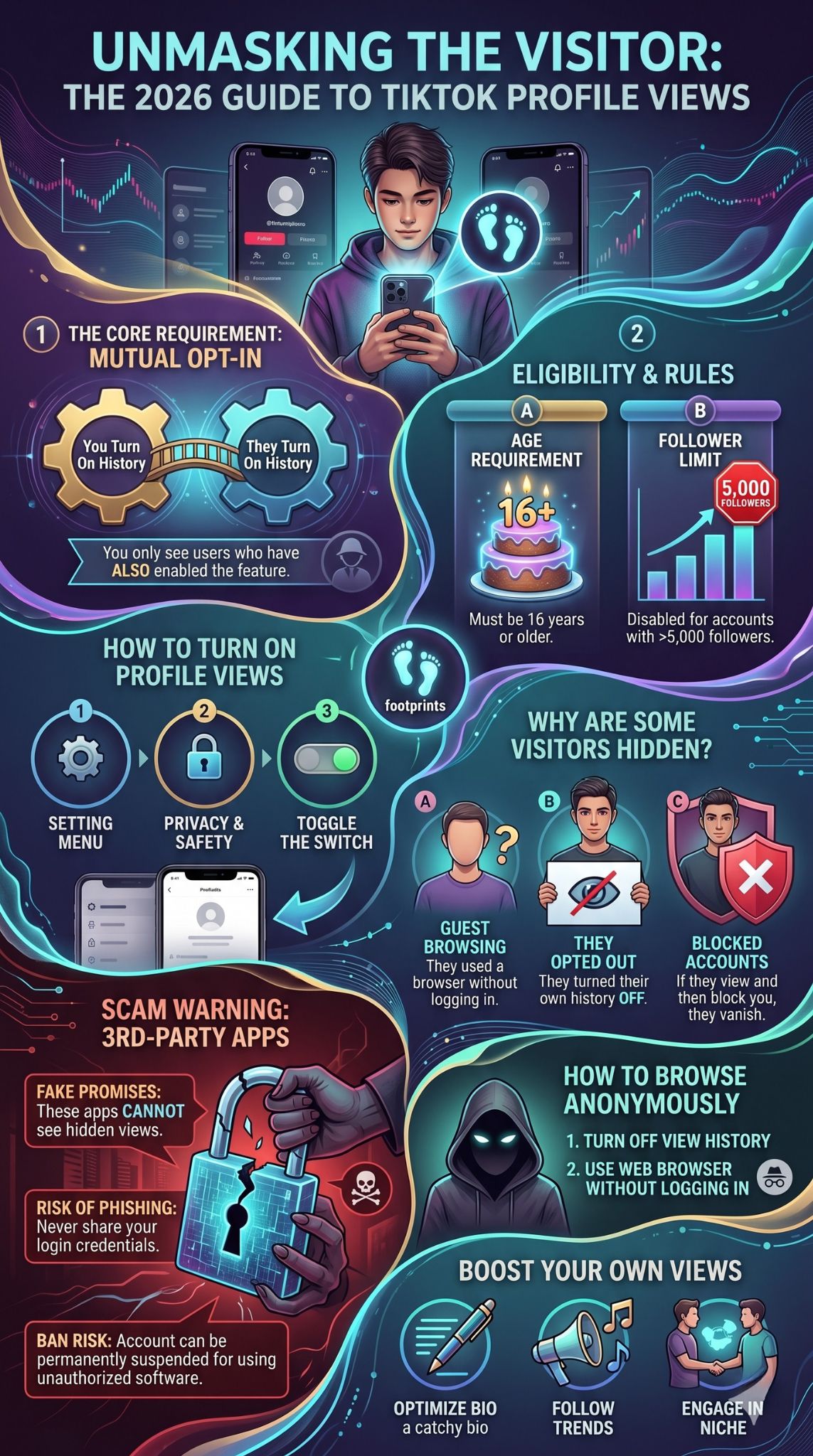
The system operates on a principle of mutual consent. You can only see the names of the people who have visited your page if they also have the exact same feature turned on. If a user has decided to keep their viewing history private, they will remain completely invisible to you, no matter how many times they refresh your page.
This two-way street approach is a clever way to balance the curiosity of creators with the privacy demands of everyday users. It means you have to be willing to be seen if you want the privilege of seeing others. If you are comfortable with your username showing up in other people’s visitor lists, you can easily unlock this data for your own account.
Understanding TikTok Profile View History
Before you go diving into your account settings to flip the switch, it helps to understand exactly what this feature is, how the algorithm handles the data, and whether your account even qualifies to use it. The platform has set up several guardrails to protect younger users and high-profile creators from an overwhelming amount of data.
What Is Profile View History?
Profile View History is an official, built-in setting located within the privacy menu of the app. It acts as a digital guestbook for your account. When it is turned on, the app tracks the accounts that navigate away from the main video feed and intentionally click on your username to view your main grid, bio, and follower counts.
It is important to differentiate between video views and profile views. When you post a video, you can see how many thousands of people watched it, but you cannot see a list of their names. Video consumption remains largely anonymous unless they interact with the post. Profile View History only applies when someone takes that extra step to visit your personal page.
The 30-Day Rule Explained
When you turn on the feature, you will not get a lifetime history of everyone who has ever looked at your page since the day you downloaded the app. The system only retains and displays data for the past thirty days.
This rolling thirty-day window means your visitor list will constantly update. If someone visited your page thirty-one days ago, their name will automatically drop off the list. This keeps the data relevant and relatively fresh, giving you an idea of who is currently interested in your content rather than who accidentally clicked your name two years ago.
Age and Follower Requirements for Access
Not everyone on the platform has access to this tool. The developers implemented strict limitations to ensure the feature is used safely and does not break the app’s servers for massive celebrities.
First, you must be at least sixteen years old. The platform has been under intense global scrutiny regarding how it handles the data and privacy of minors. By restricting this feature to users sixteen and older, they prevent younger teens from the potential social pressures or stalking behaviors that might arise from tracking profile visits.
Second, you must have fewer than five thousand followers. This rule often surprises people, especially creators who are trying to grow their audience. The logic here is mostly technical and practical. If a mega-influencer with ten million followers had this feature turned on, generating a list of every single person who clicked their page daily would be an enormous, useless data dump. The feature is designed for everyday users and micro-influencers to see genuine social connections, not for celebrities to track millions of fans. Once you cross the five thousand follower threshold, the feature is automatically disabled for your account.
How to Turn On Profile View History Step by Step
If you meet the age and follower requirements and you are ready to participate in the mutual exchange of profile views, turning the feature on is incredibly simple. The developers have actually provided three different ways to access the toggle switch, depending on where you are currently navigating within the app.
Method 1: Enabling via Your Settings
The most traditional way to enable the feature is to dig into your main privacy menu. This method works perfectly whether you are starting with a brand new account or adjusting settings on an old one.
First, open the application on your mobile device and ensure you are logged in. Tap on the icon in the bottom right corner of the screen to go to your main page.
Once you are looking at your own grid, look up to the top right corner. You will see a menu button that looks like three horizontal lines. Tap those lines to open a pop-up menu at the bottom of your screen.
From that menu, select the option labeled Settings and privacy. This will take you to a new page with a long list of options. Tap on the section labeled Privacy.
Scroll down through the privacy options until you find a section dedicated to safety and interactions. There, you will see an option called Profile views. Tap on it, and you will be presented with a simple toggle switch. If the switch is gray, the feature is off. Tap it so it turns green, and you have successfully enabled your history.
Read Also: How to Delete a TikTok Account Permanently in 2026
Method 2: Enabling via Your Inbox Notifications
If you are the type of user who spends a lot of time checking comments and messages, you might find it easier to turn the feature on directly from your inbox. The app often prompts users to turn this on if they receive a lot of traffic.
Start by tapping the Inbox icon located at the bottom of your screen. This is where all your notifications live. Look at the top of your inbox for a section called Activities. Tap into that section.
If someone has recently visited your page and the app wants to encourage you to turn the feature on, you might see an alert specifically mentioning profile views. You can tap directly on this notification.
Alternatively, look for a general header that says Profile views. Tapping this will take you to a screen where your visitor list would normally appear. Since the feature is off, the page will be empty, but there will be a settings gear icon at the very top. Tap that gear icon, and a menu will pop up from the bottom of the screen allowing you to toggle the history setting on.
Method 3: Enabling Directly from Your Profile Page
The fastest and easiest way to turn the feature on is to do it right from your own homepage. This bypasses the long menus entirely.
Navigate to your main page by tapping the icon in the bottom right corner. Look at the top of your screen, near your username. You should see a small icon that looks like a pair of footprints.
Tap on those footprints. This action directly opens the visitor history page. If you have never turned it on before, the screen will explain how the feature works and present you with a button to turn it on immediately.
If you have used it before but turned it off, you can simply tap the gear icon in the top right corner of this screen to access the toggle switch and flip it back to green.
Why Can’t I See Everyone Who Viewed My Profile?
Once you turn the feature on, you might eagerly check your footprint icon only to find a very short list, or sometimes nobody at all. This can be confusing, especially if you know for a fact that a friend or a coworker just looked at your page. Why does the system hide certain people from your view? There are several technical and privacy-related reasons why a visitor might not trigger a notification.
The Mutual Opt-In Catch
As mentioned earlier, the biggest hurdle is the mutual consent requirement. This is the number one reason why your list might seem shorter than your actual traffic.
If your best friend navigates to your page, but they have their own history setting turned off, they will browse your content completely invisibly. The system respects their choice to remain anonymous. You will never know they were there, and they will never show up on your thirty-day list.
Many users prefer to keep this setting turned off permanently because they want the freedom to look at any account they choose without leaving a digital trail. Because the default setting for every new account is off, a vast majority of the user base is currently browsing anonymously without even realizing they had a choice.
They Might Be Browsing as a Guest
Another common reason you might not see someone on your list is that they do not actually have an account, or they are not currently logged in.
The platform allows people to watch videos and view pages through standard web browsers on computers or phones without ever creating an account. If someone sends a link to your page to their mother, and she clicks it to look at your videos on her tablet without logging in, she is browsing as a guest.
Because she has no account, the system has no username to record or display to you. Guest views are entirely anonymous and will never populate on your visitor list.
Accounts That Blocked You
The social dynamics of the platform also play a role in what data you can see. If another user views your page and then immediately decides to block your account, the system will instantly sever all data connections between the two of you.
Even if they had their history setting turned on when they visited, the act of blocking you scrubs their name from your records. You will not see any evidence that they were there, ensuring that the block functions as a complete digital separation.
Third-Party Apps to See Profile Views: Safe or Scam?
When people realize that the official feature does not show them absolutely everyone, they often turn to search engines looking for a workaround. A quick search for who viewed tiktok profile will bring up dozens of websites, browser extensions, and mobile applications claiming they can bypass the platform’s security and reveal every single person who has ever looked at your page, regardless of their privacy settings.
The truth about these third-party tools is incredibly important to understand for your own digital safety.
The Dangers of Unofficial Viewer Apps
Let us be completely clear: any third-party app that claims to show you hidden profile views is a scam.
The social media company stores all user data on highly secure, encrypted servers. They do not have a public pathway that allows random app developers to pull private viewing data. The architecture of the platform simply does not allow outside software to see information that the platform itself has intentionally hidden.
These fake apps operate using a few different deceptive strategies. Some of them will simply generate a random list of names pulled from your followers or from popular accounts, presenting them to you as actual visitors. It is an illusion designed to make you think the app works.
Other apps are much more malicious. They will promise to reveal your hidden stalkers, but only after you complete a survey, watch a series of lengthy advertisements, or pay a weekly subscription fee. They are designed to extract money and advertising revenue from your curiosity, providing absolutely nothing of value in return.
Protecting Your Account Data
The most dangerous third-party apps are the ones that require you to log in with your official username and password to use their fake service.
By typing your credentials into an unofficial app, you are directly handing your login information to unknown developers. This is a massive security risk. These developers can use your credentials to hijack your account, change your password, and use your established following to post spam or cryptocurrency scams.
Furthermore, simply connecting a sketchy third-party app to your account can trigger automated security protocols on the main platform. The system may detect unusual unauthorized access and permanently ban your account for violating their terms of service regarding artificial engagement and unauthorized software.
If you want to know who is looking at your page, stick strictly to the official tools provided within the app itself. The risk of losing your account to a phishing scam is never worth satisfying a moment of curiosity.
How to Browse TikTok Profiles Anonymously
Now that you understand how the tracking system works, you might realize that you have accidentally been leaving a trail of footprints on other people’s pages. If you want to take back your privacy and ensure that nobody can see when you look at their content, you have a few easy options.
Turning Off Your Own View History
The easiest way to become a digital ghost on the platform is to simply turn off the Profile View History feature in your own settings.
You can follow the exact same steps outlined earlier in this guide to navigate to your privacy menu. When you find the toggle switch, just tap it so it turns gray. The moment you turn it off, you become completely invisible to everyone else. You can visit anyone’s page, as many times as you want, and your name will never appear on their thirty-day list.
The trade-off, of course, is that your own footprint icon will go blank. You will lose the ability to see who is visiting your page. For many users who prioritize privacy over analytics, this is a very fair trade.
Using TikTok Without Logging In
If you want to be absolutely certain that your browsing habits cannot be tied to your identity, you can choose to consume content without logging into an account at all.
You can open a web browser on your computer, use an incognito window, and navigate to the main website. You can search for specific usernames, watch their public videos, and read their bios without leaving any trace. Because you are not logged into a verified account, the system cannot track you as a specific individual.
This method is highly effective for anonymous browsing, though it does limit your ability to like videos, leave comments, or save content to customized folders.
Strategies to Increase Your TikTok Profile Views
If you are a creator, an artist, or a small business owner, finding out who viewed tiktok profile pages is usually just the first step. The ultimate goal is usually to get more people to visit your page in the first place. Increasing your page traffic means more followers, more engagement, and a larger community. Here are some proven strategies to drive more traffic to your main grid.
Optimizing Your Bio and Profile Picture
Your main page is your digital storefront. If a user sees one of your videos on their feed and likes it enough to click your name, your page needs to immediately tell them who you are and why they should follow you.
Start with a high-quality, recognizable profile picture. If you are building a personal brand, use a clear, well-lit headshot. If you run a business, use a clean version of your logo.
Next, optimize your written bio. You have a very limited number of characters, so every word counts. Clearly state what kind of content you make. Are you a comedy account, a cooking channel, or a fitness expert? Make it obvious. Include a call to action, encouraging them to hit the follow button or directing them to a link in your bio if you have a website or an online store.
Participating in Trending Audio and Challenges
The algorithm heavily favors content that utilizes trending sounds, popular songs, and viral challenges. By participating in these trends, you drastically increase the chances of your videos appearing on the main discovery feed of users who do not follow you.
When a non-follower sees your video on their feed and finds it entertaining, their natural next step is to click your username to see if you have more videos like it. Every viral video acts as a funnel, directing massive amounts of new traffic directly to your main page.
Keep an eye on the discovery tab to see what sounds are currently popular in your specific niche, and put your own unique spin on the trend.
Engaging with Your Niche Community
Social media requires being social. You cannot just post videos and walk away if you want to build an audience. You need to actively engage with other users, particularly those who make content similar to yours.
Spend time watching videos from creators in your niche. Leave thoughtful, funny, or insightful comments on their posts. Do not just leave generic emojis; write something that adds value to the conversation.
When you leave great comments on popular videos, other users will see your comment, appreciate your humor or insight, and click on your profile picture to see who you are. This strategy is one of the most organic and effective ways to drive highly targeted, interested viewers straight to your page.
Final Thoughts
Navigating the landscape of social media privacy can often feel like walking a tightrope. Platforms are constantly balancing the desire of creators to understand their audience with the fundamental right of users to browse content without feeling constantly monitored.
The approach taken here with the mutual opt-in system is a uniquely fair compromise. It puts the power entirely in the hands of the individual user. You get to decide exactly what kind of digital footprint you want to leave behind. If you are a creator focused on growth and community building, turning the feature on provides a fun, insightful look into who is genuinely interested in your brand. It allows you to see the real faces behind the view counts.
On the other hand, if you are a private person who uses the app purely for entertainment and prefers to observe from the shadows, you can simply leave the setting off and enjoy absolute anonymity.
The most crucial takeaway is to respect the boundaries established by the platform. Do not fall victim to the deceptive promises of third-party scam applications that claim to break these privacy rules. They are never worth the risk to your personal data and account security. By understanding the official tools available to you, you can take full control of your digital presence, knowing exactly who can see you and when you remain unseen.
Frequently Asked Questions (FAQs)
Even with a comprehensive understanding of the system, users often have highly specific questions about edge cases and unusual scenarios. Here are the answers to some of the most frequently asked questions regarding privacy and visitor tracking on the platform.
Does TikTok notify someone when you view their video?
No, the platform does not send out notifications when someone simply watches a video on their main feed. Video views are tallied up into a total view count, but the identities of the viewers are kept anonymous. The only way a creator knows you specifically watched their video is if you choose to interact with it by leaving a like, writing a comment, sharing it with a friend, or adding it to your favorites. If you just watch a video and scroll past, you remain completely invisible.
Can someone see I viewed their profile if I turn the setting off right after?
This is a common tactic people try when they want to snoop but realize they left their history setting on. Unfortunately, the system updates very quickly. If you visit a page with your setting turned on, your footprint is instantly logged on their end. If you panic and turn your setting off a minute later, it might be too late if they happened to check their list in that brief window. However, generally speaking, turning the setting off scrubs your name from historical lists, meaning you will disappear from their view once you toggle the switch to gray.
Why did my profile views suddenly disappear?
If you check your footprint icon and see that a long list of names has suddenly vanished, there are a few possible explanations. The most likely reason is the thirty-day rolling window. If a large group of people visited your page thirty-one days ago, they will all drop off the list simultaneously.
Another possibility is that you accidentally turned the feature off in your settings. Double-check your privacy menu to ensure the toggle is still green. Finally, if the app recently underwent a major software update, temporary glitches can sometimes clear the cache of visitor data.
Does TikTok tell you how many times someone viewed your profile?
No, the history list is very basic. It simply provides a chronological list of the usernames that have visited your page within the last month. It does not provide a tally of how many individual times a specific person visited. Whether an ex-partner looked at your page once or refreshed it fifty times in a single afternoon, their name will only appear on the list once, near the top, indicating their most recent visit.