
You open TikTok, scroll for a bit, tap a few hearts, and move on. Nothing serious. But later, a thought hits you. “Wait… who can see all this?” That’s usually when people start searching for how to hide liked videos on TikTok.
It’s not about hiding something strange. It’s just privacy. Most of us don’t want every small interaction turning into a public record of our interests.
The good thing is, TikTok gives you control over it. You just have to know where to look. The settings aren’t hard, but they’re easy to miss if you’ve never checked them before.
Let’s go through it step by step in a simple, no-confusion way.
Can People See Your Liked Videos on TikTok?
This is where most confusion starts. The truth is, it depends. Some accounts allow others to view liked videos. Some don’t. And in a lot of cases, TikTok already keeps them hidden by default, especially for younger or newer accounts.
But you shouldn’t assume anything. TikTok changes things quietly from time to time, and not every account looks the same. So instead of guessing, it’s better to check your own settings once.
Quick breakdown
|
Account type |
What usually happens |
|
Public profile |
Settings decide visibility |
|
Private profile |
More restricted access |
|
Teen accounts |
Often limited by default |
|
Updated app |
May show “Only you” option |
At the end of the day, your settings decide what people see, not just your account type.
What “Liked Videos” Actually Means
Every time you tap that heart button, TikTok saves it in your liked videos list. Simple action, but it adds up fast. And it’s not just a list. TikTok uses those likes to understand what you enjoy and shape your For You Page.
People often mix it up with favorites or reposts, but they’re not the same thing.
- Likes show what caught your attention
- Favorites are your private bookmarks
- Reposts are what you share publicly
- Watch history tracks what you’ve seen
Once you understand that difference, privacy settings start to make a lot more sense.
Simple comparison
|
Feature |
What it does |
Who can see it |
|
Likes |
Saves interest |
Depends on settings |
|
Favorites |
Private save list |
Only you |
|
Reposts |
Public sharing |
Others |
|
Watch history |
Viewing record |
Private |
So when people try to hide liked videos on TikTok, they’re really just controlling one part of their activity.
How to Hide Liked Videos on TikTok (Step-by-Step)
Let’s keep this simple. No complicated terms. Just follow along.
TikTok hides this option inside privacy settings. It’s not on your profile page directly, so it can feel a bit buried.
Read Also: How to Schedule TikTok Posts Like a Pro in 2026
Here’s what you do:
- Open TikTok
- Go to your Profile
- Tap the menu icon in the top corner
- Open Settings and privacy
- Tap Privacy
- Look for Liked videos
- Set it to Only you (if available)
Once you do this, your liked videos are no longer visible to other people. That’s it. No extra steps.
Quick summary table
|
Step |
What you do |
|
1 |
Open app |
|
2 |
Go to profile |
|
3 |
Open settings |
|
4 |
Tap privacy |
|
5 |
Find liked videos |
|
6 |
Set to only you |
If you can’t find the option, don’t panic. Some accounts simply show a different layout.
iPhone vs Android: Does It Look Different?
Not really, but small things can throw you off. On iPhone, everything usually looks cleaner and more structured. You’ll find privacy options grouped neatly.
On Android, it depends on your device and app version. The menu might feel slightly different, but the option is still there.
Simple comparison
|
Device |
Experience |
|
iPhone |
Clean layout, easy navigation |
|
Android |
Slight variation, still same options |
|
Both |
Same privacy control |
If something looks missing, it’s usually just a version difference, not a missing feature.
Why People Hide Liked Videos
Most people don’t think about privacy until they need it. Maybe you liked something random. Maybe your interests changed. Or maybe you just don’t want others reading too much into your activity.
That’s normal. You’re not trying to erase anything. You’re just choosing what stays visible.
Common reasons
|
Reason |
What it means |
|
Privacy |
Keep things personal |
|
Clean profile |
Professional look |
|
Avoid judgment |
Less social pressure |
|
Personal control |
Your data, your choice |
It’s really about comfort more than secrecy.
What Changes After You Hide Liked Videos
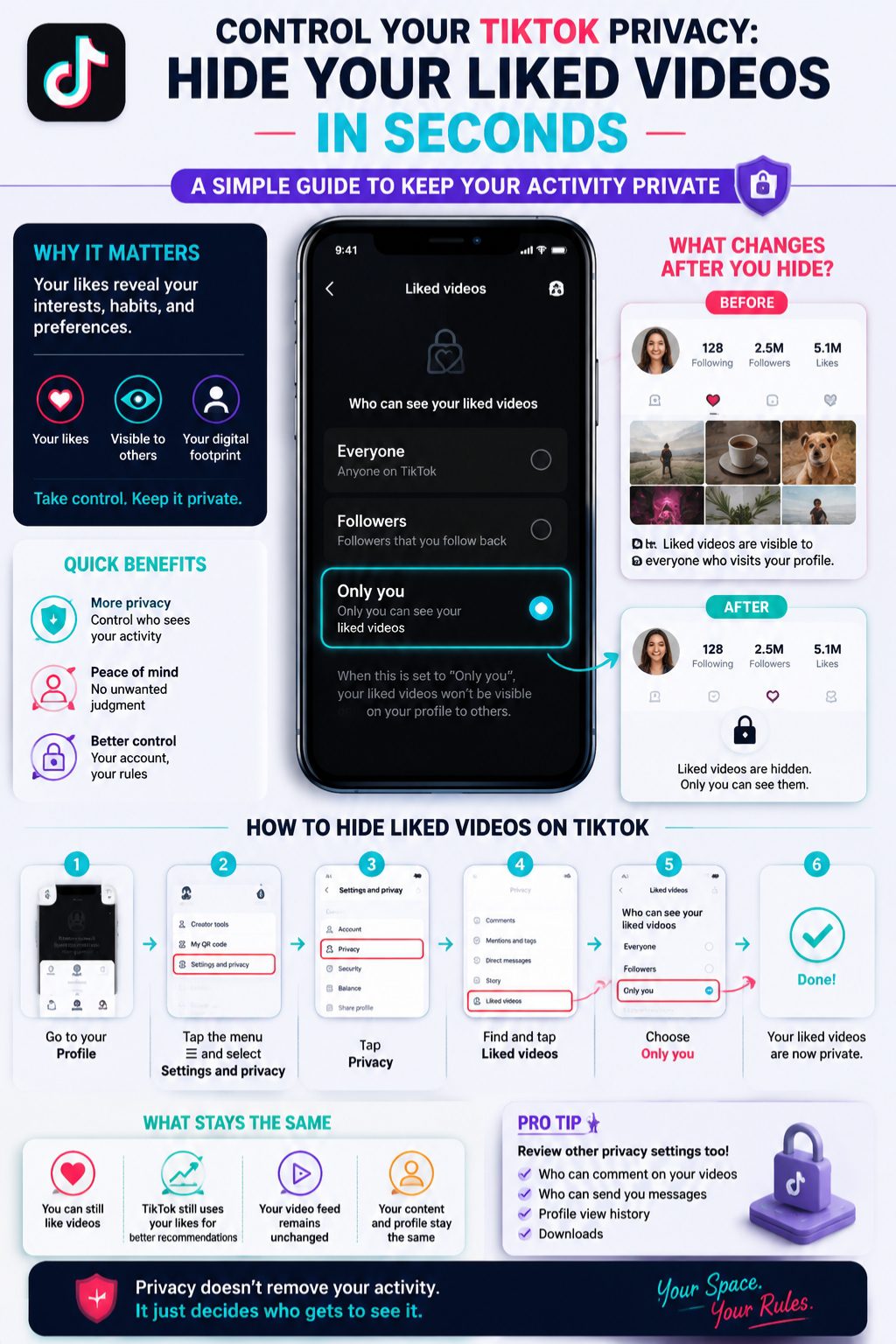
Here’s the important part: nothing gets deleted. Your likes are still there. TikTok still remembers them. Your feed still adapts. The only thing that changes is visibility. Other people can’t browse your liked videos anymore.
What stays the same
- Your liked videos remain saved
- TikTok still uses them for recommendations
- You can still view everything
What changes
- Others can’t see your liked tab
- Your profile looks cleaner
Simple breakdown
|
Area |
Result |
|
Profile visibility |
Hidden |
|
Personal access |
Unchanged |
|
Algorithm |
Still active |
|
Data |
Not removed |
So think of it like closing a window, not deleting a room.
How to Unlike Videos (If You Want a Clean Slate)
Sometimes hiding isn’t enough. You might want to clean things up too. To unlike a video, just open it and tap the heart again. That’s it. TikTok doesn’t offer a bulk delete option for likes, so you’ll have to do it one by one if you want a full cleanup.
Quick table
|
Action |
How it works |
|
Unlike one video |
Tap heart again |
|
Remove many |
Manual process |
|
Bulk remove |
Not available |
It’s simple, just a bit time-consuming.
Can People Still Know What You Like?
Partly yes, but not in the way most people think. Even if your liked videos are hidden, creators may still see that you liked their content. And TikTok itself still uses that behavior behind the scenes to shape your feed.
But strangers visiting your profile won’t see your liked videos list if you’ve set it to private.
Visibility snapshot
|
Activity |
Others see it? |
|
Liked videos tab |
No |
|
Individual likes |
Sometimes |
|
Profile activity |
No |
|
Recommendations |
No |
So your profile stays private, even if engagement still exists in the background.
If You Can’t Find the Setting
This happens more often than you’d think. Sometimes the option moves. Sometimes it disappears temporarily. Sometimes it never shows depending on your account.
Try this:
- Update TikTok
- Restart the app
- Search inside settings
- Log out and back in
- Reinstall if needed
Common issues
|
Problem |
Fix |
|
Missing option |
Update app |
|
Confusing layout |
Check carefully |
|
Glitch |
Restart |
|
Account restriction |
Most of the time, it’s just an outdated version.
Extra Privacy Settings Worth Checking
If you care about privacy, don’t stop at likes. TikTok has a few other settings that matter just as much.
Look at:
- Who can see your profile views
- Who can comment on your videos
- Who can see your following list
- Whether reposts are visible
- Whether downloads are allowed
Simple checklist
|
Setting |
What to do |
|
Likes |
Set to private |
|
Comments |
Restrict if needed |
|
Profile views |
Optional off |
|
Downloads |
Turn off if private |
Small changes, big difference.
Final Thoughts
Learning how to hide liked videos on TikTok takes less time than scrolling through a single video feed. But it makes your profile feel more under control.
Once you switch it to “Only you,” you don’t have to worry about people digging through your activity. You can just use the app normally, without thinking twice.
At the end of the day, it’s not about hiding who you are. It’s about deciding what others get to see. And that’s a pretty simple win.
FAQs
Can I hide liked videos from one person only?
No. TikTok doesn’t allow single-person privacy control.
Will hiding likes change my For You Page?
No. Your recommendations stay the same.
Are liked videos private by default?
Sometimes yes, but it depends on account type and region.
Can creators still see my likes?
Yes, in some cases they can see engagement notifications.
Does hiding likes delete them?
No. Everything stays saved in your account.