
Opening an Instagram message shouldn’t mean you have to reply on the spot.
Maybe you’re at work. Maybe the message needs a careful answer. Or maybe you simply don’t feel like talking yet. None of that stops Instagram from showing the sender that you’ve read the message.
That little Seen label can create more pressure than it should.
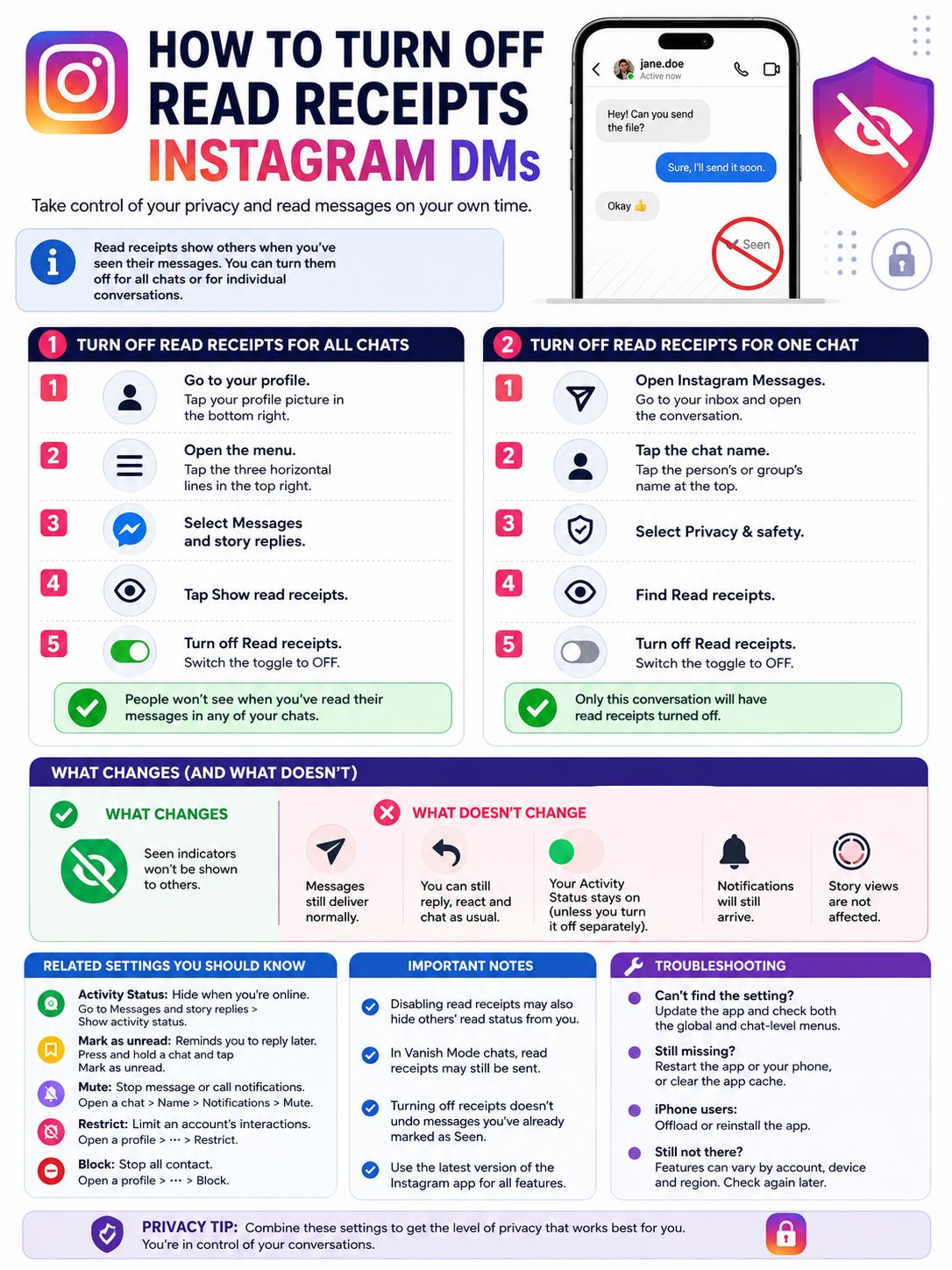
Thankfully, you can now turn off read receipts Instagram DMs through the app’s built-in settings. You can disable them for every conversation or switch them off for one specific chat.
There’s no need to use airplane mode, read messages from notification previews, or install a shady third-party app. Instagram added proper read receipt controls to Direct Messages in 2024, and those controls remain part of its current messaging settings.
Here’s how they work, where to find them, and what they don’t hide.
What Instagram Read Receipts Actually Mean
A read receipt tells the sender that you opened their message.
On Instagram, this normally appears as Seen underneath the latest message in a conversation. In group chats, Instagram may also show which participants have viewed a message.
Turning read receipts off does not stop messages from arriving. It does not mute the conversation, block the sender, or remove the chat from your inbox.
It only hides the signal that tells another person you’ve viewed their message.
|
Feature |
What It Does |
|
Read receipt |
Shows that you opened a message |
|
Seen label |
Displays your read status inside the chat |
|
Global setting |
Controls receipts across all chats |
|
Chat-level setting |
Controls receipts in one conversation |
|
Activity Status |
Shows when you’re online or recently active |
|
Mark as unread |
Adds a reminder in your own inbox |
Read receipts can be useful. They let someone know you received an address, meeting time, file, or urgent update.
They can also make casual messages feel urgent when they aren’t.
Seeing a message and being ready to answer it are two different things. Instagram’s read receipt controls give users a little breathing room between the two.
How to Turn Off Read Receipts Instagram for All Chats
The global setting is the easiest option when you want the same privacy rule across your entire inbox.
You only need to change it once for the selected Instagram account.
|
Step |
What to Tap |
|
1 |
Profile picture |
|
2 |
Three-line menu |
|
3 |
Messages and story replies |
|
4 |
Show read receipts |
|
5 |
Turn off Read receipts |
Open Your Instagram Profile
Launch Instagram and tap your profile picture in the bottom-right corner.
Before changing anything, check that you’re using the right account. This matters if you switch between personal, creator, business, or client profiles.
Instagram settings may not automatically carry across every account connected to the same app.
Open the Main Menu
Tap the three horizontal lines in the top-right corner.
Instagram has renamed this settings page several times. Depending on your app version, you may see Settings and activity, Settings and privacy, or a menu without either label.
Don’t worry about the page title. The setting you need is under Messages and story replies.
Select Messages and Story Replies
Scroll through the menu and tap Messages and story replies.
This section contains controls linked to Direct Messages, Story responses, online activity, and read receipts.
Tap Show Read Receipts
Select Show read receipts.
You should now see a switch called Read receipts.
Turn the Switch Off
Tap the switch to disable it.
Once it’s off, people in your normal Instagram conversations should no longer see the usual read indicator when you open their messages.
You can turn it back on whenever you like by following the same path.
This is the cleanest way to turn off read receipts Instagram across your account. You don’t have to remember to adjust each conversation one by one.
How to Turn Off Read Receipts for One Instagram Chat
You may not want to disable receipts everywhere.
For example, you might keep them on for work conversations but switch them off in one personal chat. Instagram lets you do that too.
|
Step |
What to Tap |
|
1 |
Instagram Messages |
|
2 |
The conversation |
|
3 |
Person or group name |
|
4 |
Privacy & safety |
|
5 |
Turn off Read receipts |
Open Instagram Messages
Go to your Instagram inbox.
Depending on your app layout, you may need to tap the Messages icon from the home screen or open the dedicated Messages tab.
Choose the Conversation
Open the chat you want to change.
One practical tip: change the setting before opening a new message when possible. Instagram does not say that disabling receipts will remove a Seen label that has already appeared.
Tap the Name at the Top
Tap the person’s name, username, or group name at the top of the conversation.
This opens the chat details page.
Open Privacy and Safety
Tap Privacy & safety.
The wording may appear as Privacy and safety on some devices. The menu is the same.
Turn Read Receipts Off
Find Read receipts and switch it off.
That setting will apply to the selected conversation rather than your entire inbox.
Repeat the same steps for any other chats you want to manage separately.
This is useful when you don’t mind read receipts in most conversations but want more space in a particular one.
What Changes After You Turn Read Receipts Off?
The biggest change is simple. The sender should stop seeing the normal Seen indicator when you open their messages.
Everything else continues to work.
You can still receive DMs, send replies, react to messages, share posts, and make calls. The conversation stays active unless you change another setting.
|
Feature |
Does Read Receipt Setting Change It? |
|
Seen indicator |
Yes |
|
Message delivery |
No |
|
Replies |
No |
|
Reactions |
No |
|
Notifications |
No |
|
Active Status |
No |
|
Typing indicator |
Not directly |
|
Story views |
No |
|
Calls |
No |
People May Still Work Out That You Read the Message
Turning receipts off hides the official read marker. It doesn’t make your activity invisible.
A sender may guess that you saw the message if you:
- Reply to it
- React with an emoji
- Mention its contents later
- Share something related to it
- Appear online immediately afterward
The setting removes one signal. It does not erase every clue.
Read Also: How to Hide Likes on Instagram in 2026
It Doesn’t Hide Your Online Status
Read receipts and Activity Status are separate settings.
Even with receipts switched off, people may still see:
- A green activity dot
- Active now
- A recent activity time
- Other signs that you’re using Instagram
To hide that information, go to:
Profile > Menu > Messages and story replies > Show activity status
Turn Activity Status off separately.
It May Also Hide Other People’s Read Status From You
Some current app tests suggest that when you turn receipts off, you may also stop seeing whether the other person has read your messages.
Instagram’s public help pages focus mainly on hiding your own read activity. They do not explain every variation of the interface.
Check the affected chat after changing the setting if seeing the other person’s read status matters to you.
Old Seen Labels May Stay Visible
Do not rely on this feature to reverse a receipt that has already been sent.
If you opened a message before switching the setting off, Instagram may have already marked it as read.
The safest approach is to adjust the setting first, then open the message.
Read Receipts vs Active Status, Mark as Unread, Mute, and Restrict
Instagram places several useful privacy and inbox tools close together. That makes them easy to confuse.
They do very different jobs.
|
Setting |
Main Purpose |
What It Does Not Do |
|
Read receipts |
Hides when you view messages |
Does not hide online status |
|
Activity Status |
Hides when you are active |
Does not remove Seen labels |
|
Mark as unread |
Reminds you to reply later |
Does not undo a read receipt |
|
Mute |
Stops or reduces alerts |
Does not hide your activity |
|
Restrict |
Limits one account’s interactions |
Does more than hide receipts |
|
Block |
Stops normal contact |
Ends most account interaction |
Mark as Unread Is Only a Reminder
Instagram lets you mark a conversation as unread after opening it.
This can help when you read a message quickly but need to reply later. The unread dot brings the conversation back to your attention.
It does not change what the sender sees.
If the message already showed as Seen, marking it unread won’t erase that status.
Think of it as a to-do marker, not a privacy setting.
Muting a Chat Only Changes Notifications
Muting is useful when someone sends too many messages or when a group chat becomes noisy.
It can stop message or call alerts without blocking anyone.
It does not hide Seen indicators. It also does not hide your Activity Status.
Restrict Gives You More Distance
Restrict is a stronger option for uncomfortable or unwanted interactions.
Instagram says a restricted person cannot see when you’re online or whether you’ve read their messages. Their future messages may also move to Message Requests rather than your main inbox.
Restriction also affects comments and other interactions, so it is not a simple read receipt toggle.
Use it when you want to limit a person, not just delay a reply.
Blocking Stops Contact
Blocking goes much further.
A blocked user can no longer interact with you normally through Instagram. Use it when you want to stop contact rather than simply hide your message activity.
Important Limits You Should Know
Turning off receipts gives you more privacy, but it does not cover every part of Instagram.
A few features continue to reveal that you were active or interacted with content.
|
Situation |
What to Expect |
|
Normal DMs |
Read receipt control should apply |
|
Activity Status |
Must be disabled separately |
|
Story views |
Your name may still appear |
|
Message reactions |
Show that you interacted |
|
Replies |
Confirm that you read the message |
|
Vanish Mode |
May still use viewing indicators |
|
Third-party tools |
Not needed and potentially risky |
Story Views Work Separately
Watching an Instagram Story has nothing to do with DM read receipts.
If you view someone’s Story, your account may still appear in their viewer list.
Turning off DM receipts will not change that.
Reactions Still Give You Away
A heart, emoji, quoted response, or direct reply clearly shows that you saw the message.
Read receipts only hide passive viewing. Once you interact, the sender knows you opened the conversation.
Vanish Mode May Behave Differently
Vanish Mode is designed for disappearing messages.
Instagram may still show viewing activity inside that mode because messages vanish after participants see them and leave the chat.
Do not assume the standard read receipt setting works the same way in disappearing-message conversations.
Third-Party Unseen Apps Aren’t Worth the Risk
You may find apps, extensions, and websites that claim to let you read Instagram DMs invisibly.
Some ask for your password. Others request notification access, browser permissions, login cookies, or account tokens.
That is a lot of access to hand over for a feature Instagram already provides.
Use the official setting instead. It is simpler and far safer.
Why Can’t You Find the Read Receipt Setting?
If the option is missing, don’t assume Instagram removed it.
The app may be outdated, the menu may have moved, or you may be checking the wrong account.
|
Possible Cause |
What to Try |
|
Old Instagram version |
Update the app |
|
Wrong menu |
Check Messages and story replies |
|
Global option missing |
Check inside a specific chat |
|
Temporary glitch |
|
|
Android cache issue |
Clear the app cache |
|
iPhone app issue |
Offload or reinstall the app |
|
Multiple accounts |
Switch to the correct account |
|
Regional or account differences |
Check again after updating |
Update Instagram
Start with the simplest fix.
Open Google Play or the Apple App Store and install any available Instagram update.
New messaging controls often depend on the latest app build. Old versions may show different labels or hide options that newer versions support.
Check Both Locations
Look for the setting in both places.
For every chat:
Profile > Menu > Messages and story replies > Show read receipts
For one chat:
Conversation > Name at the top > Privacy & safety > Read receipts
The individual chat option may appear even when you cannot find the global one.
Restart the App
Close Instagram completely, then open it again.
If that doesn’t help, restart your phone.
A simple restart can refresh account settings and fix a menu that failed to load properly.
Clear Instagram’s Cache on Android
The wording varies by phone, but the usual path is:
Phone Settings > Apps > Instagram > Storage and cache > Clear cache
Clearing the cache removes temporary files. It should not delete your account.
Avoid choosing Clear storage or Clear data unless you are ready to sign in again.
Offload or Reinstall Instagram on iPhone
iPhone users can offload or delete and reinstall Instagram.
Before doing that, make sure you know your password and can access your two-factor authentication method.
That includes your phone number, email, authenticator app, or backup codes.
Check the Correct Account
Instagram lets you switch between several profiles without logging out.
Open the profile page and confirm which account is active. You may have changed the setting for one profile while checking messages on another.
A Better Way to Manage Instagram DM Pressure
Read receipts are only one part of inbox privacy.
A few small changes can make Instagram feel much less demanding.
|
What You Want |
Best Setting |
|
Read messages without showing Seen |
Turn off read receipts |
|
Hide when you’re online |
Turn off Activity Status |
|
Remember to reply later |
Mark the chat as unread |
|
Stop message alerts |
Mute the chat |
|
Limit one person |
Restrict the account |
|
Stop contact |
Block the account |
|
Reduce random DMs |
Adjust Message Request controls |
For broad privacy, turn off read receipts and Activity Status together.
For a work or creator account, a mixed setup may work better. Keep receipts on where quick confirmation matters, but disable them in conversations that don’t need an instant response.
There’s no single perfect setup. The right choice depends on how you use Instagram and who usually messages you.
Final Thoughts
Instagram’s read receipt controls are easy to miss, but they make DMs much less stressful.
To disable receipts everywhere, use:
Profile > Menu > Messages and story replies > Show read receipts > Off
To disable them in one conversation, use:
Messages > Conversation > Name at the top > Privacy & safety > Read receipts > Off
|
Your Situation |
Best Option |
|
You want privacy in every DM |
Use the global switch |
|
You only want privacy in one chat |
Use the chat-level switch |
|
People can still see you online |
Turn off Activity Status |
|
You need a reminder to reply |
Mark the chat as unread |
|
One person is making you uncomfortable |
Restrict or block them |
|
The setting is missing |
Update the app and check both menus |
You don’t need airplane mode, notification tricks, or outside apps to turn off read receipts Instagram DMs.
Use Instagram’s own settings, change them before opening a new message when possible, and remember that online status, Story views, reactions, and replies remain separate signals.
Frequently Asked Questions
|
Question |
Quick Answer |
|
Can you disable receipts for one person? |
Yes |
|
Does Instagram send them a notification? |
No notification is documented |
|
Does Mark as unread erase Seen? |
No |
|
Does it hide Active Status? |
No |
|
Can you turn receipts back on? |
Yes |
|
Does it hide Story views? |
No |
Does Instagram Tell Someone When You Turn Off Read Receipts?
Instagram does not document any alert or chat notification that tells people you changed the setting.
The other person may eventually notice that their messages no longer show Seen, but Instagram does not appear to announce the change.
Can You Turn Off Read Receipts for Only One Person?
Yes.
Open the conversation, tap the name at the top, choose Privacy & safety, and disable Read receipts.
That leaves your other conversations unchanged.
Can You Turn Read Receipts Back On?
Yes.
Go back to the same setting and switch it on again.
The change should apply to messages you open afterward. Do not expect it to rebuild a complete history of messages viewed while receipts were disabled.
Does Turning Off Activity Status Also Turn Off Read Receipts?
No.
Activity Status shows when you are online or recently active. Read receipts show when you viewed a message.
You must change each setting separately.
Can Mark as Unread Remove a Seen Label?
No.
Mark as unread places a reminder on the chat in your own inbox. It does not undo the sender’s read receipt.
Can You Still See When Someone Reads Your Messages?
Possibly not.
In some versions of the app, disabling read receipts may also stop you from seeing the other person’s read status.
Instagram does not explain every interface variation, so check the conversation after changing the setting.
Why Does One Account Have the Option While Another Doesn’t?
The accounts may be running different feature versions, or one may need an app refresh.
Update Instagram, restart the app, and check both the global and chat-level menus.
Also confirm that you are using the same account where you changed the setting.
Can You Turn Off Read Receipts on Instagram.com?
Instagram’s official instructions focus on the mobile app.
The website may offer fewer messaging controls. Use the current Android or iPhone app when the setting does not appear in your browser.