
We have all been there at some point. You update your cover photo or post a major life update, and a familiar curiosity kicks in. You start wondering exactly who viewed your Facebook profile today. It is a completely normal question to ask. People have been searching for an answer since the platform first launched way back in 2004. As we navigate social media in 2026, things have changed a lot, but our basic human curiosity remains exactly the same. We still want to know who is looking at our online lives.
You will find thousands of articles, browser extensions, and mobile apps claiming they have the secret formula. Some promise hidden source codes, while others demand your login details in exchange for a detailed list of your secret admirers. We are going to cut through the noise and give you the absolute truth. You will learn what the platform actually allows, what scams you need to avoid, and how to safely manage your digital footprint without falling for cheap tricks.
The Short Answer on Who Viewed Facebook Profile
Let us cut right to the chase because you are probably tired of looking for a straight answer online. The definitive truth is that you cannot see who views your personal Facebook page. The platform does not give regular users access to this specific data under any circumstances. You might see friends interacting with your posts, but passive profile visitors remain completely hidden from your view. Facebook has kept this strict rule in place for nearly two decades without budging.
|
Fact Check |
Reality in 2026 |
|
Built-in Tracking Tool |
Does not exist for personal profiles |
|
Official Policy |
Meta strictly prohibits sharing visitor data |
|
Passive Viewers |
Completely anonymous and untrackable |
|
Post Engagement |
Visible (Likes, Comments, Shares) |
Official Policy vs User Wants
Facebook explicitly states in its help center that it does not provide a feature to track profile views. The company has never offered this tool and has no plans to release one. Millions of users ask for this feature every single year in feedback forums. They want the same transparency they get on platforms like LinkedIn. However, Meta holds firm on its stance. The company prioritizes internal data collection for advertising over satisfying individual user curiosity.
The Technical Reality of Your Account
From a technical standpoint, Facebook servers record every single click and page load. The system knows exactly who looks at your page, how long they stay, and what photos they click. This data powers their complex algorithms and targeted ad network. But the user interface you interact with blocks this specific information. The API simply does not export profile visitor logs to the end user. Your dashboard only shows active interactions, leaving the passive lurkers completely invisible to you.
Why Facebook Keeps Profile Views Private
You might wonder why a data-hungry company refuses to share this specific metric with you. The main reason Facebook keeps this secret comes down to user behavior and overall platform engagement. If people knew their names were recorded every time they clicked on a profile, they would immediately stop browsing freely. The fear of looking like a stalker would ruin the user experience. Keeping things anonymous keeps everyone clicking, scrolling, and spending more time on the app.
|
Reason for Privacy |
Impact on Platform |
|
Browsing Freedom |
Users view more pages without fear of being caught |
|
Advertising Revenue |
More time spent browsing means more ads served |
|
Legal Compliance |
Avoids violating global data protection laws |
|
User Retention |
Prevents anxiety and arguments between users |
Protecting Engagement and Browsing Freedom
Facebook wants you to spend hours on its app. That means going down rabbit holes of mutual friends, looking at vacation photos, and clicking on recommended profiles. Imagine the immediate anxiety if every person you clicked on received a notification about your visit. Engagement would drop off a cliff. People would only visit pages of their closest friends. By keeping profile visits completely anonymous, Facebook encourages unrestricted exploration. This directly translates to more ad revenue for the company.
Digital privacy rules in 2026 are incredibly strict compared to the early days of social media. Governments around the world have cracked down on how tech giants handle personal data. Releasing a feature that exposes user browsing habits to other individuals would trigger massive legal headaches for Meta. They would need complex consent forms allowing users to opt out of being tracked. That would make the feature useless anyway. Facebook avoids this legal minefield entirely by simply hiding the data.
Debunking Common Myths About Profile Tracking
The internet is full of persistent rumors about secret ways to track your profile visitors. Because Facebook does not offer a native tool, people invent their own theories and share them across forums and videos. Most of these methods sound highly technical and convincing to the average user. However, when you actually break down the coding and algorithms behind them, they fall apart completely. Let us look at the most common myths you need to stop believing today.
|
Common Myth |
The Actual Truth |
|
InitialChatFriendsList |
Shows messaging activity, not profile views |
|
BUDDY_ID Search |
Lists active chat contacts only |
|
People You May Know |
Based on mutual data points and synced contacts |
|
3rd Party Websites |
Cannot access Facebook’s internal server data |
The Page Source Code Trick
You have probably seen a tutorial claiming you can right-click your profile, view the page source, and search for a term like InitialChatFriendsList. The rumor says the numbers next to this code are the profile IDs of your biggest stalkers. This is completely false. Those numbers belong to the people you interact with most frequently through Facebook Messenger. It reflects your own outgoing messaging habits and active chat sidebar, not incoming profile views.
The People You May Know Algorithm
It always feels suspicious when a random acquaintance suddenly pops up in your suggested friends list. Many people assume this means the person was secretly searching for them. In reality, the friend suggestion algorithm relies on a massive web of overlapping data points. It looks at mutual friends, shared Facebook groups, and uploaded phone contacts. If you sync your phone contacts, the app cross-references numbers to find connections. It is just the algorithm connecting the dots, not an alert about a profile visitor.
The Danger of Third-Party Apps and Extensions
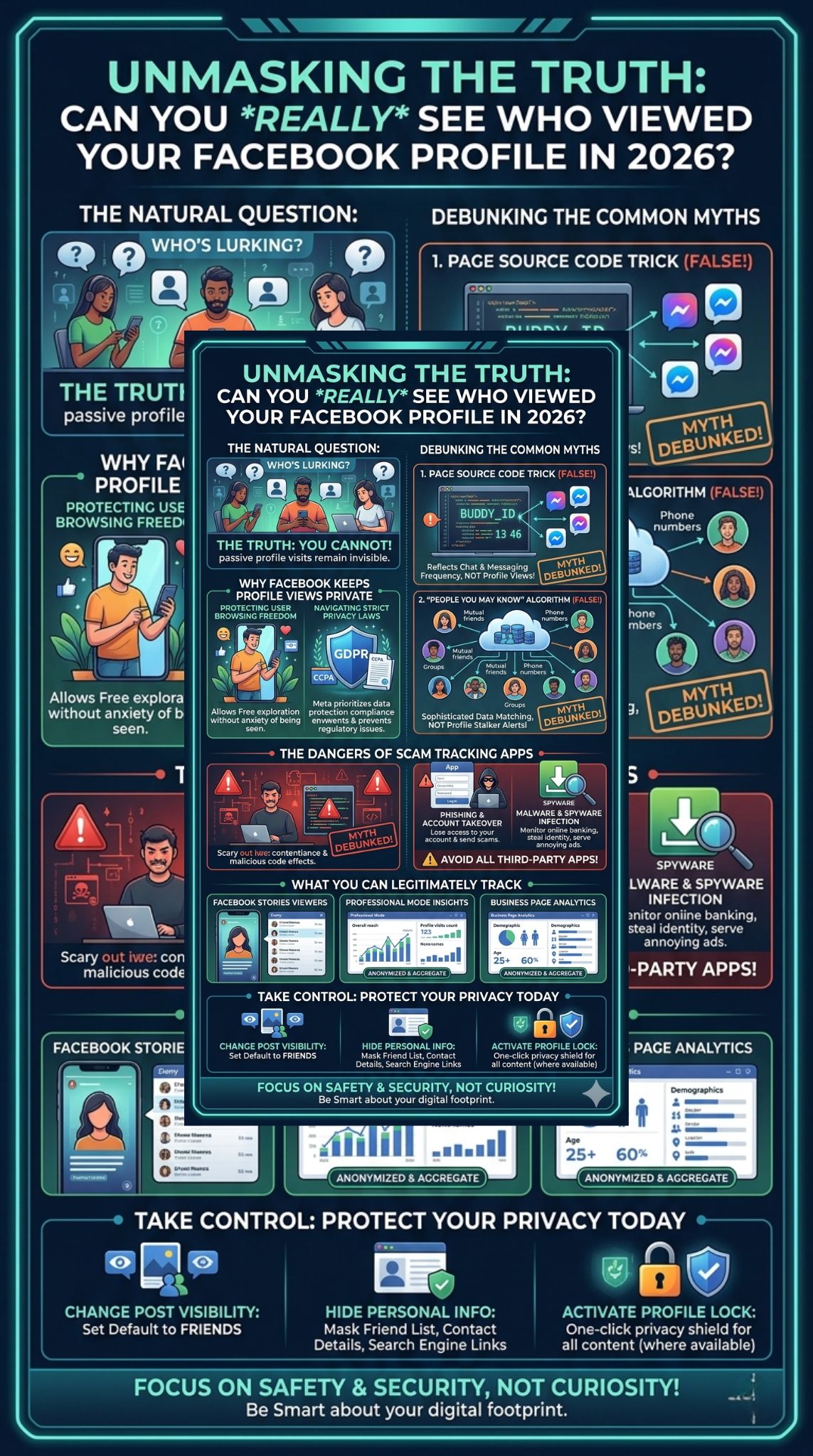
Because so many people search for ways to see who viewed your Facebook profile, scammers have built a massive shadow industry around it. You can easily find dozens of apps and browser extensions promising to reveal your secret visitors. They use flashy graphics and fake reviews to look legitimate. You must avoid these tools at all costs. They are incredibly dangerous and are designed specifically to steal your personal information or hijack your digital life.
|
Threat Type |
How It Harms You |
|
Phishing Scams |
Steals your login email and password |
|
Account Takeover |
Locks you out and sends spam to your friends |
|
Spyware |
Monitors your web browsing and keystrokes |
|
Adware |
Injects malicious advertisements into your browser |
Phishing and Account Takeovers
The vast majority of profile tracker apps are simple phishing scams. When you download the tool, it will ask you to log in with your Facebook credentials to sync the data. The moment you type your password, the scammers capture it. They can then log into your account, change your password, and lock you out. They use stolen accounts to run fraudulent ads, send scam messages to your family, or hold your digital identity for ransom.
Malware and Spyware Risks
Even if a tracking app does not steal your password directly, it likely hides malicious software. Browser extensions that claim to reveal visitors often ask for broad permissions. They want the ability to read and change all your data on the websites you visit. This means the extension can monitor your online banking, capture your private emails, or inject fake virus alerts into your browser. Facebook blocks these apps from accessing real visitor data, so their only actual purpose is to infect your device.
What You Can Actually Track on Facebook in 2026
While the main profile visitor list remains locked away, Facebook does not leave you completely in the dark. The platform offers several legitimate ways to track how people interact with your specific content. You just have to know where to look. These features focus on active engagement rather than passive browsing. If you want to measure your audience or see who is paying attention to your daily updates, you can use these built-in tools safely.
|
Facebook Feature |
What You Can See |
|
Facebook Stories |
Exact names of friends who viewed the story |
|
Professional Mode |
Aggregate data on reach and profile visits |
|
Business Pages |
Detailed demographics and engagement metrics |
|
Standard Posts |
Likes, comments, and specific share counts |
Facebook Stories Viewers
Facebook allows you to see exactly who views your temporary content. When you post a Story, it stays live for twenty four hours. During that time, you have full access to a list of viewers. Just open your active story and swipe up on the screen. You will see a detailed list of friends who watched that specific photo or video. If your story is public, you will see your friends names, plus an anonymous count of non-friends who tuned in.
Professional Mode Insights
Facebook recently pushed Professional Mode for everyday users who want to build an audience. If you turn this on, you unlock a professional dashboard full of analytics. You can see your overall post reach, new follower counts, and general profile engagement. You will see a metric showing total profile visits over a specific time period. However, this data remains entirely anonymous. You get the raw numbers to help you grow, but no names are attached to those numbers.
Facebook Page Analytics
If you run a dedicated Facebook Business Page, you get the most robust data available on the platform. Page administrators can track page views, link clicks, and detailed audience demographics like age and location. This information helps businesses understand their market. Yet, just like personal profiles, Meta strictly anonymizes this data. You can see that fifty people from New York viewed your page today, but you will never know their individual identities.
How to Protect Your Facebook Privacy Today
If you are reading about profile tracking because you are worried about a specific person monitoring you, you need to take action. You have complete control over your digital footprint on the platform. Facebook offers deep privacy settings that let you lock down your information. You do not need to rely on third-party apps to feel safe. By spending five minutes adjusting your default settings, you can easily stop unwanted lurkers from seeing your personal life.
|
Privacy Action |
Resulting Protection |
|
Default Sharing |
Changing to “Friends” hides posts from strangers |
|
Friend List Visibility |
Prevents outsiders from mapping your network |
|
Search Engine Linking |
Stops your profile from showing up on Google |
|
Profile Lock |
Instantly secures all content from non-friends |
Adjusting Profile Visibility
Head straight to your Facebook settings and open the privacy checkup tool. This is your command center. You should immediately change your default post sharing from Public to Friends. You can also restrict the visibility of all your past posts with one click. Make sure to hide your friend list, phone number, and email address. You can even turn off the setting that allows search engines like Google to link directly to your Facebook profile.
Utilizing the Profile Lock Feature
Many regions now have access to the Facebook Profile Lock feature. This is the ultimate tool for peace of mind. When you turn it on, it acts as a massive privacy shield. Only your confirmed friends can click on your full-size profile picture or see your timeline posts. Anyone who is not on your friend list will just see a blue badge and a highly restricted summary page. It is the easiest way to ensure strangers cannot scroll through your digital history.
Final Thoughts
The truth about who viewed your Facebook profile is simple but frustrating for many. You cannot track your passive visitors, and no magical app or hidden code will change that reality in 2026. Meta keeps this data locked down to protect user engagement and avoid massive privacy lawsuits. Instead of wasting time and risking your account security on fake tracking apps, focus on what you can control. Check your story viewers, utilize professional mode insights, and lock down your privacy settings to keep unwanted eyes away from your personal updates.
FAQs
Can law enforcement see who viewed my Facebook profile?
No, generally not even law enforcement can request a list of passive profile viewers. While police can subpoena Facebook for messaging logs, login locations, and account data during an investigation, Meta does not compile or hand over passive profile viewing history because the platform does not log it in a format intended for individual user tracking.
Do IP tracking links work to catch profile visitors?
Some users try to post external links on their timeline that log the IP addresses of anyone who clicks them. While this will show you the IP address and general city of someone who clicked the specific link, it does not tell you who viewed your Facebook profile itself. It only tracks people who actively clicked that specific external trap.
Will changing my account to a Business Page show me profile viewers?
No. Converting a personal profile to a Business Page or turning on Professional Mode will give you access to aggregate numbers, like total page views per week. However, it will never show you the specific names or profiles of the people making up those numbers.
Why do some of my friends always show up at the top of my feed?
The Facebook algorithm ranks your feed based on your own historical interactions. If you frequently like, comment, or message certain friends, the system prioritizes their content at the top of your feed. It does not mean those friends are constantly viewing your profile; it means you have a high interaction score with them.