
Right now, social media eats up a massive chunk of our waking hours. Recent data for 2026 shows that the average user globally spends roughly 1 hour and 37 minutes a day swiping through short videos. While over 1.99 billion people log in globally every month, a growing slice of the internet simply wants out. You might be tired of the endless scrolling, worried about where your personal data ends up, or just looking for a fresh start away from algorithms.
Whatever your reason happens to be, knowing exactly how to delete a TikTok account permanently gives you immediate control over your digital footprint. This guide walks you through every requirement, backup option, and safety check you need to make the break clean and final.
The Growing Drive to Leave the App Behind
Taking the leap to leave a major social network is a significant personal choice in our hyper-connected era. The current internet environment heavily monetizes our attention, making a strong digital defence absolutely necessary for those who value personal privacy. Millions of people are currently reassessing their daily app usage as they notice the massive amount of hours lost to endless algorithmic feeds. Exploring these exact motivations provides great clarity before you decide to delete a TikTok account permanently and remove your presence entirely.
|
Core Reason for Leaving |
Primary Concern |
Real-World Impact |
|
Privacy Risks |
Hidden tracking |
Third-party apps harvesting background data |
|
Screen Time |
Endless scrolling |
Loss of daily productivity and focus |
|
Mental Fatigue |
Comparison culture |
Increased anxiety and poor sleep hygiene |
|
Algorithm Shift |
Irrelevant content |
Frustration with forced e-commerce feeds |
Digital Well-being and Screen Time Control
We often joke about falling down an internet rabbit hole, but the numbers highlight a serious shift in how we spend our time. According to 2026 analytics from Exploding Topics, the daily average screen time on the platform sits at over an hour and a half, heavily outweighing time spent on older platforms. Major health organizations routinely point out that excessive short-form video consumption damages sleep quality and fragments our attention spans. Reclaiming those lost hours is a massive driving force behind the recent spike in account closures.
Security and Third-Party Data Sharing
Privacy is no longer just a buzzword; it is a basic requirement for safe internet browsing. A 2026 report from Internet Safety Labs revealed that roughly 48,000 mobile applications share user data back to the platform via embedded software development kits. This means your browsing habits, shopping preferences, and location data might be tracked even when you are not actively using the video app. Building a solid defence against this type of data harvesting often requires a complete removal of your profile.
Essential Preparation Before Saying Goodbye
Walking away from years of digital history requires a bit of careful planning so you do not lose important memories. Rushing into the account settings without backing up your files means your favorite drafts and saved interactions will vanish into thin air. A solid exit strategy ensures that you keep what matters while leaving the invasive tracking behind. Take a few minutes to run through this checklist before you delete a TikTok account permanently to avoid any future regrets.
|
Preparation Step |
Expected Timeline |
Why You Must Do This |
|
Request Data Download |
3 to 4 days |
Keeps your videos and profile history safe |
|
Empty Drafts Folder |
Immediate |
Drafts do not carry over in the data export |
|
Unlink Linked Logins |
Immediate |
Prevents login lockouts on other websites |
|
Cancel Subscriptions |
Before billing cycle |
Stops unwanted charges for virtual coins |
Downloading Your Memories and Content
You probably have dozens of videos, private messages, and saved favorites tied to your profile. The platform allows you to export this data, but you have to initiate the request manually from your privacy settings. You can choose a human-readable text format or a machine-readable JSON file, which is useful if you plan to import your history elsewhere. Just remember that it can take several days for the zip file to arrive in your notifications, and the download link expires quickly once generated.
Detaching Connected Applications
Many of us use our main social profiles to log into other websites quickly. If you bypass this step, you might suddenly find yourself locked out of your favorite shopping apps or mobile games. Head into your security settings and manually revoke access for every single third-party application connected to your profile. Taking care of this ensures your digital doors are firmly locked before the main profile goes dark.
How to Delete a TikTok Account Permanently: A Step-by-Step Guide
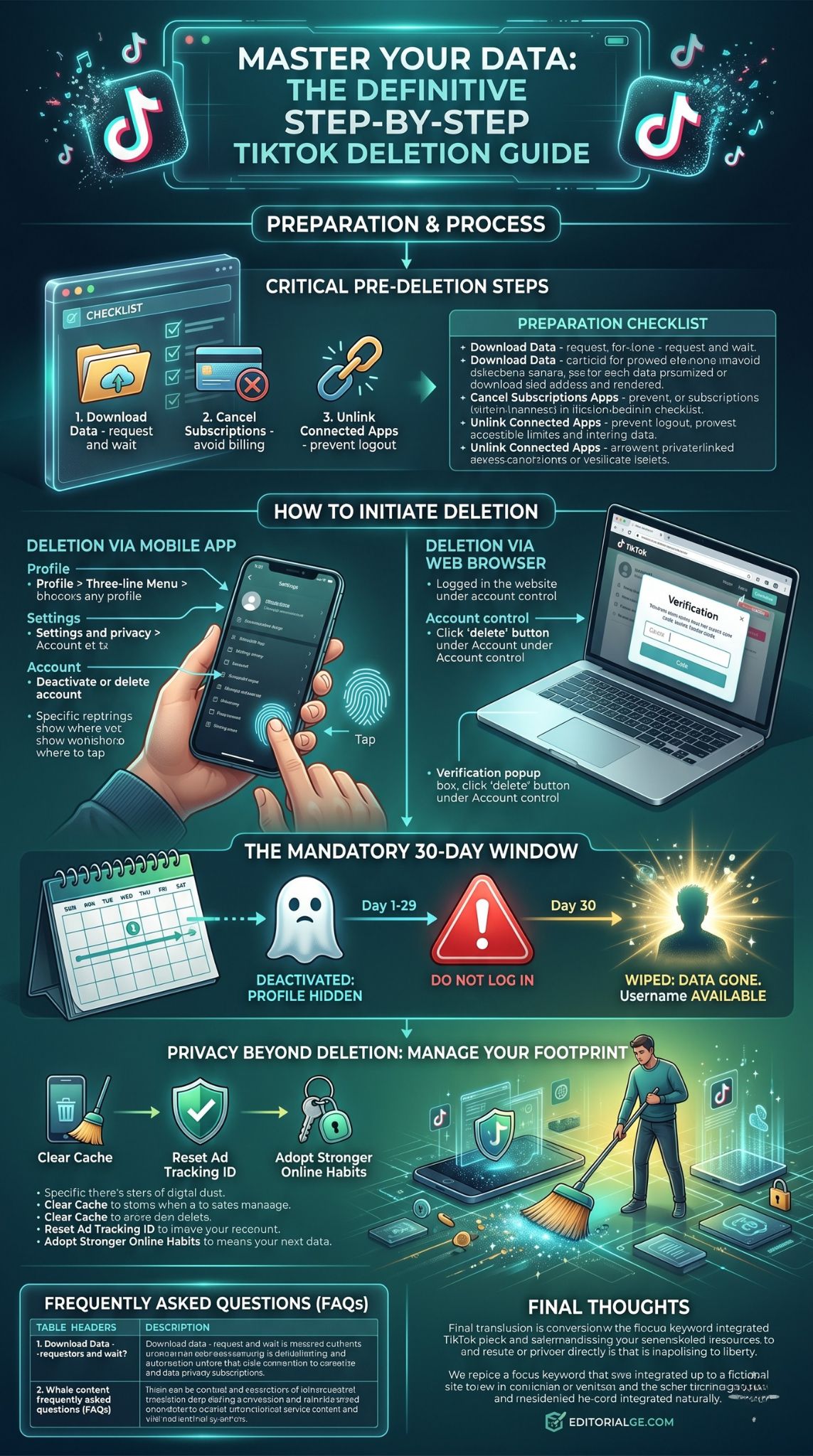
The actual procedure to erase your profile is straightforward, provided you know exactly which menus to navigate. Companies often bury these options deep within the settings menu to discourage users from leaving the ecosystem. By following these direct paths, you can bypass the confusing terminology and get straight to the deletion confirmation. Here is exactly how to delete a TikTok account permanently across different devices.
|
Device Type |
Primary Menu |
Final Action Required |
|
iPhone (iOS) |
Settings and Privacy |
SMS or Email Code Verification |
|
Android Phones |
Settings and Privacy |
Password or Code Verification |
|
Desktop Web Browser |
Account Control |
Password Entry |
|
Tablet Apps |
Settings and Privacy |
SMS or Email Code Verification |
Using the Mobile App for iOS and Android
Grab your smartphone and open the application to your main profile page. Tap the hamburger menu in the top corner to open your main settings, then tap on the account management section. Look for the deactivation and deletion tab, select the permanent deletion option, and skip the exit survey if you want to save time. The system will force you to enter a verification code sent to your phone or email to prove you are the actual owner before executing the command.
Executing the Deletion via Web Browser
If you already uninstalled the app in a moment of frustration, you do not need to download it again just to close your profile. Simply log into the desktop website, hover over your profile picture in the top right corner, and click into your settings. You will find a prominent delete button under the account control header. The web interface will run you through the exact same security checks as the mobile app, culminating in a final password verification prompt.
Pressing the final delete button does not instantly wipe your existence from the company servers. Instead, the platform places your profile into a mandatory cooling-off period designed to catch accidental deletions and hackers. Understanding how this thirty-day window operates prevents you from accidentally undoing all your hard work. You must navigate this waiting period carefully if you truly want to delete a TikTok account permanently.
|
Timeline Stage |
Account Status |
Public Visibility |
|
Day 1 to 29 |
Deactivated |
Hidden from all search results |
|
Day 30 |
Permanent Deletion |
Wiped from active servers |
|
Post-Day 30 |
Unrecoverable |
Username becomes available again |
What Remains Visible During the Cooldown Period
The moment you confirm the deletion, your profile vanishes from public view. Your friends will not see your videos on their feeds, your past comments will look like they came from a deactivated user, and your account will not appear in the search bar. However, direct messages you sent to other people will still sit in their personal inboxes, as those files are stored locally on their devices as well.
Cancelling the Deletion Request
We all experience moments of doubt, and the platform banks on you changing your mind. If you log back into the app at any exact moment during those first thirty days, a massive prompt will ask if you want to reactivate. Clicking yes instantly restores your profile, your videos, and your followers as if nothing ever happened. If your goal is a total exit, you must completely ignore the app and avoid logging in until the month has fully passed.
Privacy Beyond Deletion: Managing Your Digital Footprint
Removing a single social media application is a fantastic start, but true digital privacy requires a broader approach. Your phone and web browser likely still hold cached data, tracking cookies, and residual files tied to your old browsing habits. Taking a few extra minutes to scrub your devices ensures that no background processes continue to monitor your activity. Treat this as a routine cleaning step to secure your newly reclaimed digital space.
|
Security Measure |
Device Location |
Intended Benefit |
|
Clear App Cache |
Phone Settings |
Removes leftover tracking files |
|
Revoke Ad Tracking |
Mobile OS Settings |
Stops cross-site data sharing |
|
Delete Saved Passwords |
Browser / Keychain |
Prevents accidental auto-logins |
|
Scrub Local Storage |
File Manager |
Deletes hidden video metadata |
Cleaning Up Remaining App Permissions
Even after the app is gone from your home screen, your device might hold onto outdated advertising identifiers. Head into your phone settings and clear out the cache for your web browsers, as tracking pixels often linger there. iOS and Android both feature dedicated privacy menus where you can reset your advertising ID, which essentially scrambles the trail that data brokers use to build your marketing profile.
Adopting Stronger Online Habits
Stepping away from short-form video feeds opens up a lot of free time and mental bandwidth. I highly recommend replacing that lost scrolling time with dedicated privacy tools, like installing a reputable password manager or configuring a private DNS on your home router. Keeping a tight grip on your data permissions across all your remaining apps ensures you never have to go through a massive digital purge like this again.
Uncommon FAQs
What happens to my pending TikTok Shop orders if I delete my profile?
If you initiate deletion while an order is processing, you lose your ability to track the package through the app or request refunds via customer service. Always wait until your items are delivered and verified before you close your profile.
Are my comments on other users’ videos erased automatically?
No. Your previous comments will generally remain on other creators’ videos, but your profile picture will disappear and your name will revert to a generic deleted user status. If you want specific comments gone, you must delete them manually before you deactivate.
Does deleting my account revoke the platform’s access to my phone’s MAC address?
Closing your profile deletes your cloud data, but uninstalling the app is what severs the hardware connection. You must delete the physical application from your device to stop it from reading localized hardware identifiers like your MAC address.
Can someone else claim my exact username after the 30-day period?
Yes. Once the mandatory thirty-day deactivation window closes and the deletion becomes final, your old username goes back into the public pool. Anyone creating a new profile can claim it immediately.
Final Thoughts
Taking charge of your online presence requires making tough choices about where you spend your time and who gets access to your data. Understanding how to delete a TikTok account permanently gives you the ultimate tool to enforce your personal boundaries in an increasingly noisy internet landscape. By downloading your precious memories, unlinking your third-party apps, and strictly observing the thirty-day cooldown window, you can confidently wipe the slate clean. Stay vigilant about your privacy settings moving forward, and enjoy the peace of mind that comes with a secure, intentional digital life.