
If you spend time on social media, you already know the drill. You post a photo, set your phone down, and wait for the notifications to roll in. Watching numbers go up feels great, but what happens when a post flops? It can sting, leaving you wondering if your content is actually any good. A few years ago, developers introduced a game-changing feature to help ease that exact anxiety. Now, learning how to hide likes on Instagram is one of the quickest ways to curate a healthier, stress-free scrolling experience.
You have total control over what metrics you see and share. Whether you want to take the pressure off a personal selfie or you run a brand account aiming for authentic engagement over vanity metrics, tweaking these settings takes just a few seconds. I will show you exactly how the process works in 2026, step by step, for both your own uploads and the content on your feed.
Why You Should Care About How to Hide Likes on Instagram
Figuring out how to hide likes on Instagram is about much more than just tapping a few buttons in an app menu. It shifts your entire focus away from a digital popularity contest and puts it back onto sharing genuine moments and creative ideas. When you stop obsessing over the numbers, you give yourself the freedom to post weird, niche, or unpolished content that you actually care about. Social media developers implemented this feature specifically because mental health advocates warned about the dangers of endless online comparison. By removing the public tally, you take back your power and decide what your content is actually worth.
|
Aspect |
Description |
|
Mental Health Focus |
Reduces anxiety and the pressure to achieve high engagement metrics. |
|
Authentic Sharing |
Encourages posting niche or personal content without fear of judgment. |
|
User Control |
Gives you the freedom to toggle metrics on or off whenever you want. |
|
Feed Customization |
Lets you hide numbers on other people’s posts to stop comparison habits. |
The Mental Health Aspect
We all fall into the trap of comparing our everyday lives to someone else’s highlight reel. When you see a celebrity or a friend rack up thousands of likes while your recent upload barely breaks twenty, it is easy to feel inadequate. Hiding the numbers breaks that cycle of negative self-talk. It forces you to look at the actual photo or video rather than judging its value based on a tiny number at the bottom of the screen.
Focusing on Quality over Quantity
Without the looming pressure of engagement numbers, creators and everyday users tend to experiment more. You might post a detailed carousel about a niche hobby or share a blurry, candid photo from a fun night out simply because it makes you happy. You stop chasing trends just for the sake of clicks. This leads to a more vibrant, interesting, and personal feed that truly reflects who you are.
How to Hide Likes on New Instagram Posts Before Sharing
If you are gearing up to publish a brand new photo, carousel, or video, you can set your preferences before it even hits your followers’ feeds. You do not have to wait for the post to go live and frantically scramble to change the settings. The platform allows you to bury the like count right from the final caption screen. This ensures nobody ever sees the running tally from the exact second your content goes public. Doing this upfront creates a much smoother posting workflow and gives you immediate peace of mind.
|
Action Step |
Location in App |
|
Create Post |
Tap the plus icon and select your media. |
|
Go to Caption Screen |
Hit next until you reach the final posting page. |
|
Find Advanced Settings |
Scroll to the very bottom of the caption page. |
|
Toggle Setting |
Turn on the hide like and view counts option. |
Step-by-Step Guide for New Posts
Open the app and tap the plus icon at the bottom of your screen to start a new post. Choose your photo or video, apply whatever filters you like, and tap next to land on the caption screen. Write your caption, add your hashtags, and tag your friends as you normally would.
Instead of hitting share right away, scroll all the way down to the bottom of the page. You will spot a menu item called Advanced Settings. Tap that menu. At the top of the next page, you will see a toggle switch labeled Hide like and view counts on this post. Tap the switch to turn it on. Hit the back arrow, tap share, and you are done. Your post is now live without a public scorecard.
How to Hide Likes on Existing Instagram Posts
Maybe you posted an amazing vacation photo yesterday, but today you feel a little self-conscious about the low engagement. You do not need to delete the photo and ruin your grid just to escape the numbers. The app makes it incredibly simple to go back in time and adjust the privacy settings on any piece of content you have ever published. You can clean up your entire profile retroactively without losing the comments or the actual backend engagement data. It is a quick fix that takes only two taps.
|
Step |
Instruction |
|
Navigate to Profile |
Tap your profile picture in the bottom right corner. |
|
Select the Post |
Tap on the specific photo or video you want to adjust. |
|
Open Options |
Tap the three dots in the top right corner of the post. |
|
Hide the Count |
Select the hide like count option from the popup menu. |
Adjusting Settings for Already Published Content
Head over to your profile by tapping your little display picture in the bottom right corner. Scroll through your grid and tap on the post that is bothering you. Once the post opens, look at the top right corner directly above the photo. You will see three small dots.
Tap those dots to open up your post options menu. Scan down the list until you find the option that says Hide like count. Tap it. The change happens instantly. Anyone looking at that post will now just see that it was liked by one specific user and others, rather than a total number. If you change your mind next week, you can follow these exact same steps and simply choose Unhide like count.
How to Hide Likes on Other People’s Instagram Posts
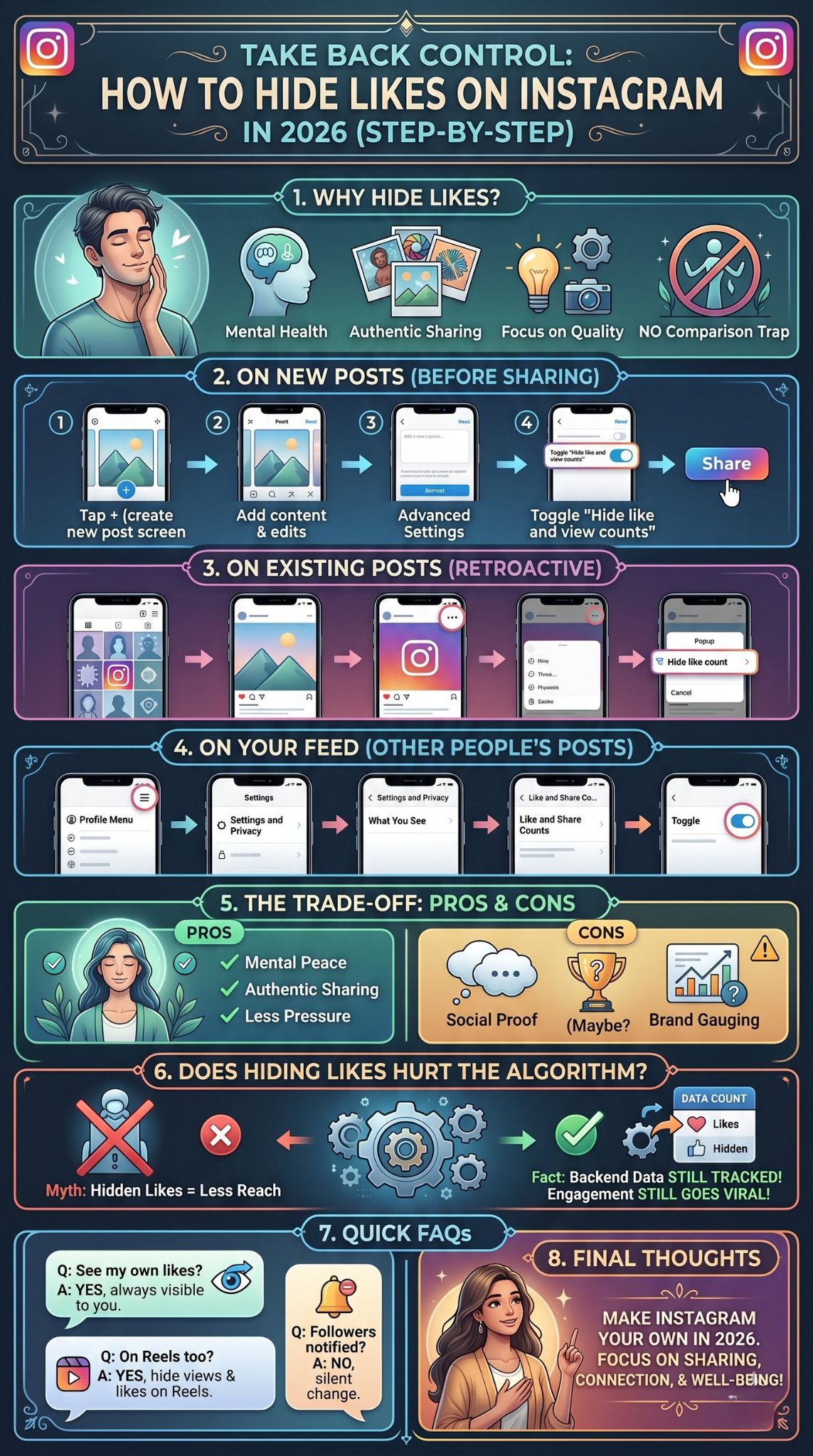
Taking the numbers off your own content is only half the battle when you are trying to clean up your digital life. Scrolling through your home feed and seeing massive engagement on posts from influencers, brands, or old classmates can still trigger serious comparison issues. Thankfully, the platform lets you scrub these numbers from your entire viewing experience. You can turn your feed back into a simple visual gallery rather than a ranked leaderboard. It is highly recommended if you find yourself feeling drained after a scrolling session.
|
Menu Location |
Setting to Change |
|
Profile Menu |
Tap the three horizontal lines (hamburger menu). |
|
Settings and Privacy |
Open the main app settings dashboard. |
|
What You See |
Locate this specific section in the menu. |
|
Like and Share Counts |
Toggle the switch to hide numbers across your feed. |
Taking Control of Your Feed
Go to your personal profile page. Look at the top right corner and tap the three horizontal lines, often called the hamburger menu. This opens your main dashboard. Tap on Settings and privacy.
Scroll down through the options until you spot a category header called What you see. Right under that, tap on Like and share counts. You will find a single toggle switch on this page. Turn it on. From this moment forward, as you scroll through your home feed, the explore page, or even search results, you will not see the total number of likes on anyone else’s posts.
The Pros and Cons of Hiding Your Instagram Likes
Deciding whether to keep your metrics public or tuck them away is a highly personal choice. What works perfectly for a casual user looking to share pet photos might completely backfire for a small business trying to establish trust. There is no one correct way to use social media, but understanding the trade-offs can help you make a smart decision. Before you rush to flip every toggle switch in your settings menu, you should weigh both sides of the coin.
|
Feature |
Pros |
Cons |
|
Hidden Metrics |
Reduces performance anxiety and stress. |
Removes instant social proof for businesses. |
|
Focus |
Shifts audience attention to content quality. |
Makes the app feel slightly less interactive. |
|
Freedom |
Encourages posting diverse and niche topics. |
May confuse brand sponsors looking for quick stats. |
Benefits of Hiding Likes
The biggest win is the mental relief. You no longer tie your personal value to a digital metric. It also forces your followers to actually engage with your art, your joke, or your story based on its own merit, rather than liking it just because five hundred other people already did. This builds a much more authentic community in the comment section. People reply because they genuinely care about the post, not because they are jumping on a viral bandwagon.
Drawbacks of Hiding Likes
If you run a creator account or a brand page, hidden numbers can sometimes work against you. High engagement is a form of social proof. When a potential customer lands on your page and sees a product post with thousands of likes, it builds immediate trust. Hiding those numbers might make your page look less established at a quick glance. Furthermore, some users genuinely enjoy the gamified aspect of social media, and turning off the scores can make the app feel a little lifeless to them.
Does Hiding Likes Affect Your Instagram Algorithm Ranking?
A massive rumor floating around the internet is that if you hide your metrics, the app will secretly punish your account by limiting your reach. I can tell you right now that this is completely false. The front-end display settings you choose have absolutely zero impact on the backend mechanics of the app. The system operates on data, and it continues to collect that data regardless of what you let the public see. You can customize your privacy settings without ever worrying about destroying your engagement strategy.
|
Algorithm Factor |
Impact of Hiding Likes |
|
Backend Tracking |
Unaffected. The system still counts every interaction. |
|
Explore Page Reach |
Unaffected. High-quality posts still go viral. |
|
Follower Feed Placement |
Unaffected. Posts are shown based on user interest. |
|
Front-End Display |
Affected. Numbers are hidden from the public view. |
The Truth About the Instagram Algorithm in 2026
The algorithm does not care if your numbers are visible to your followers. It only cares about how people interact with your post. When someone double-taps your photo, leaves a comment, saves your post, or shares it to their story, the system logs that action.
If your post gets a lot of these interactions quickly, the algorithm will push it to more feeds and potentially the explore page. You still get all the algorithmic benefits of a highly engaged post. The only difference is that the people scrolling past will not know exactly how viral the post is. You get to keep your privacy while still growing your account.
Final Thoughts
Taking charge of your digital environment is incredibly important in 2026. Knowing exactly how to hide likes on Instagram gives you a powerful tool to protect your mental space and curate a feed that actually brings you joy. You do not have to participate in the endless race for digital validation if you do not want to. Whether you choose to turn off the numbers on a single vulnerable post or wipe them from your entire feed entirely, the power is literally in your hands. Test it out for a week and see how it changes your relationship with your phone. You might just find that social media becomes fun again.
Frequently Asked Questions (FAQs)
Even with a straightforward process, social media settings can get confusing as apps constantly update their layouts. Users frequently run into weird glitches or have highly specific questions about how these privacy features interact with other parts of the platform. I have rounded up some of the most common and uncommon questions people ask when they start tinkering with their account settings.
|
FAQ Topic |
Short Answer |
|
Reels Compatibility |
Yes, the feature works on short-form video content too. |
|
Missing Feature |
Update your app, clear your cache, or check regional restrictions. |
|
Account Privacy |
Hiding metrics does not make your overall profile private. |
|
Follower Alerts |
No, your followers do not get notified about your setting changes. |
Can I hide views on Instagram Reels too?
Yes, you absolutely can. The settings apply to Reels just like they do to standard static photos and carousels. When you turn on the toggle to hide your metrics, it strips both the like count and the play count from public view on your short-form videos.
Why is the “hide likes” feature missing on my account?
If you cannot find the toggle switches in your advanced settings, you might be dealing with an outdated app. Head to your app store and download the latest update. Sometimes, professional or business accounts experience weird glitches where the feature disappears temporarily. If that happens, switching back to a personal account for a few minutes can sometimes force the menu to reset and show the option.
What is the difference between hiding likes and making my account private?
These are two entirely separate privacy functions. If you make your account private, only people you manually approve can see your photos, videos, and stories. Strangers cannot view your grid at all. Hiding your metrics keeps your account fully public, meaning anyone in the world can still find and view your content, but they simply cannot see the numerical engagement score attached to those posts.
Do my followers get notified when I change these settings?
No, the app operates silently when it comes to display preferences. Your friends, family, and followers will not receive a push notification or a direct message telling them you changed your settings. The only way they will ever find out is if they happen to look at your post and realize the number is missing.