
We have all been there. Your thumb slips, you hit “Delete for Me” instead of “Delete for Everyone,” or you accidentally clear an entire chat history while trying to free up phone storage. That sinking feeling in your stomach hits hardest when you realize you never set up Google Drive or iCloud sync. Suddenly, you are frantically searching the internet for a way to reverse time.
Losing a crucial work document, a thread with financial details, or irreplaceable voice notes from a loved one is incredibly stressful. But before you panic and assume your data is gone forever, take a breath. While it’s true that the app doesn’t have a magical “undo” button for this specific scenario, the way modern smartphones handle memory gives you a fighting chance. In this guide, we’ll walk through exactly how to recover deleted WhatsApp messages without backup, cutting through the internet myths and focusing on what actually works on Android and iOS devices today.
Understanding WhatsApp Data Storage and Deletion
When dealing with digital data loss, knowing exactly how your smartphone’s brain works is your biggest advantage. Hitting the delete button doesn’t act like a digital shredder; it acts more like an eraser on a whiteboard, leaving the underlying ink faintly visible until you write something new over it. Let’s break down what’s actually happening inside your phone’s memory.
|
Storage Characteristic |
What It Means for You |
Recovery Impact |
|
Data Marking |
“Deleted” space is simply marked as “available.” |
High. Messages exist until overwritten. |
|
Overwriting |
New data (photos, apps, messages) replaces old data. |
Negative. New activity destroys lost chats. |
|
Background Syncing |
Devices pull data from networks constantly. |
Risk. Background updates can overwrite data. |
Where Do Deleted Messages Actually Go?
When you delete a message or an entire chat thread, your smartphone doesn’t immediately scrub the data from its internal memory flash drive. Instead, the operating system simply flags the storage space previously occupied by those messages as empty. The actual data fragments—the text strings, the image files, and the voice notes—remain physically parked in the memory sectors of your device. They stay in this hidden, unallocated space until the phone needs that specific spot to save a new TikTok video, a system update, or incoming texts. Once that new data is written over the old data, the original messages are permanently wiped.
The Golden Hour for Message Recovery
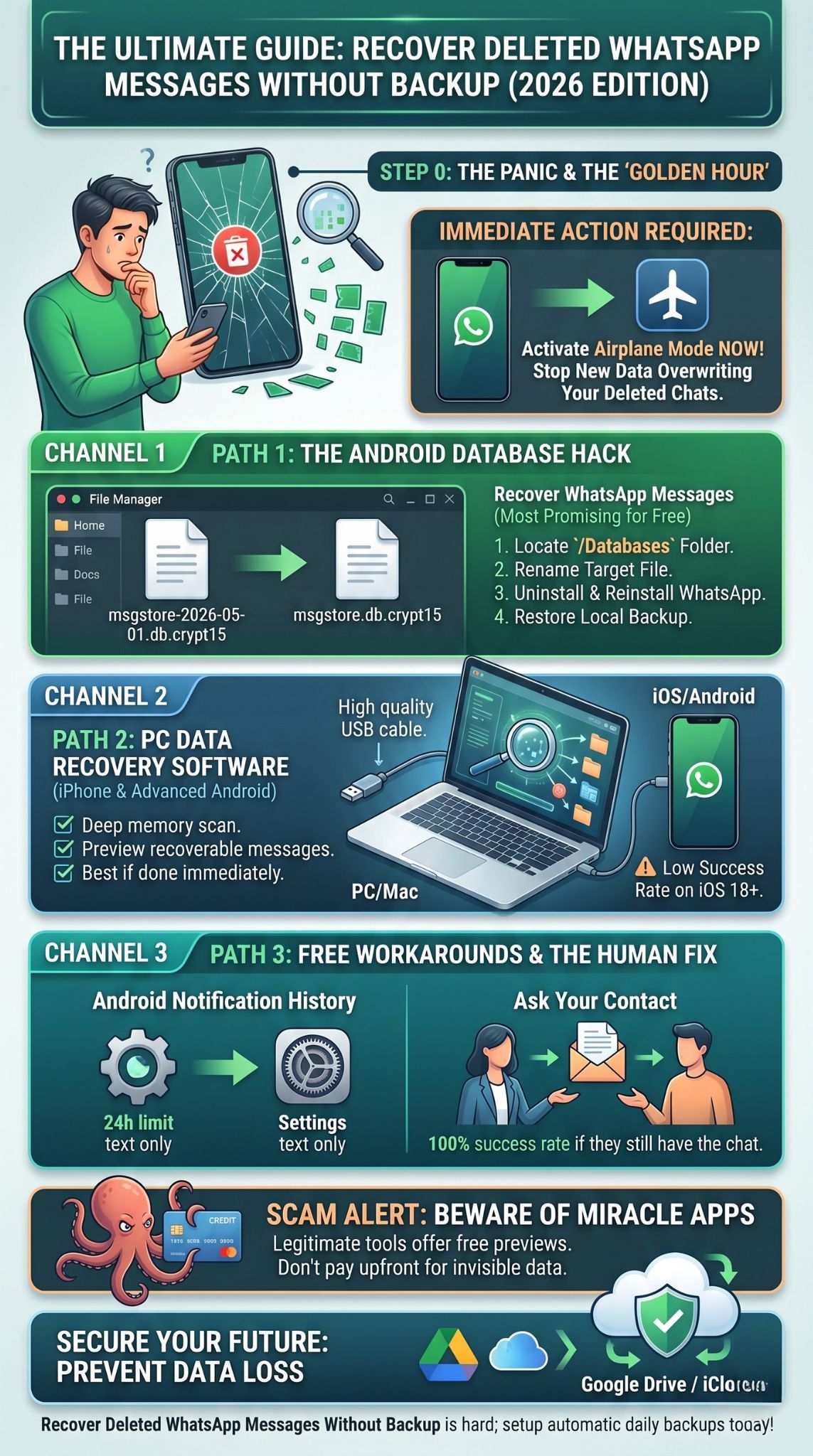
Because your deleted data is sitting in a vulnerable state, time is absolutely critical. Data recovery experts call the immediate aftermath of file loss the “golden hour.” If you want to successfully recover deleted WhatsApp messages without backup, your first move is damage control: turn on Airplane Mode right now. By doing this, you disconnect from cellular networks and Wi-Fi. You stop new WhatsApp messages from landing, pause background app updates, and block your phone from downloading temporary cache files. The less your phone does, the safer your deleted message fragments are. Don’t take photos, don’t download files, and don’t browse the web until you’ve tried recovering your chats.
Can You Truly Recover WhatsApp Messages Without a Cloud Backup?
You will find a mountain of conflicting advice online regarding message recovery, and a lot of it is outdated or simply false. We need to ground our expectations in the reality of 2026 software architecture. The app’s developer explicitly states that without an official cloud backup, your messages cannot be restored through their servers. Here is why that happens, and where the loopholes exist.
|
Backup Type |
Storage Location |
Accessibility |
Recovery Potential |
|
Cloud Backup |
Google Drive / iCloud |
High (Official) |
100% (If up to date) |
|
Local Backup |
Internal Phone Storage |
Moderate (Android only) |
High (For recent 7 days) |
|
Raw Storage |
Unallocated Memory |
Low (Requires Software) |
Variable (Depends on overwriting) |
End-to-End Encryption and Data Security
WhatsApp uses end-to-end encryption by default. This means your messages are locked with a unique cryptographic key that only exists on your device and the device of the person you’re texting. The company does not keep a readable copy of your messages on its servers once they are delivered. Because of this privacy feature, you can’t just email customer support and ask them to hand over your deleted chats. They literally don’t have them.
The Difference Between Cloud Backups and Local Backups
Many users mistakenly believe that a backup only exists if it’s saved to the cloud. This is a massive misconception, especially for Android users. While cloud backups are the easiest way to transfer data to a new phone, the Android version of the app also generates automatic local backups. These local backups are saved silently directly to your device’s internal storage every single night. Even if you refused to link a Google account, you probably have a hidden, locally stored backup file sitting on your phone right now.
Method 1: Utilizing the Local Database (Android Only)
If you own an Android device, you have a massive advantage over iPhone users. The Android operating system allows users to dig into the internal file system and manually interact with application data. Because WhatsApp automatically creates a local backup of your chats every day at 2:00 AM (keeping up to seven days of history), you can trick the app into reading an older file.
|
Android Local Recovery Step |
Action Required |
Importance |
|
Locate Folder |
Navigate to Android/media/com.whatsapp/ |
Critical. This is where backups live. |
|
Identify Target File |
Find msgstore-YYYY-MM-DD.1.db.crypt15 |
Critical. Pick the date before deletion. |
|
Rename File |
Change to msgstore.db.crypt15 |
Critical. Tricks the app into reading it. |
|
Reinstall App |
Delete and reinstall WhatsApp |
Necessary to trigger the restore prompt. |
Prerequisites for Local Recovery
For this manual trick to work, a couple of things need to line up perfectly. First, the message you deleted must have been received before the last automatic local backup occurred. For example, if you got a text at 10:00 AM and accidentally deleted it at 11:00 AM today, it won’t be in the 2:00 AM local backup from last night. Secondly, you need a basic file manager app installed on your phone.
Step-by-Step Guide to Accessing Local Files
Grab your Android phone and open your default “My Files” or “File Manager” app. Navigate to your device’s Internal Storage. Look for a folder named Android, then tap media, followed by com.whatsapp. Inside, you’ll see the WhatsApp folder. Open it, and finally, tap on Databases. (If you are running an older Android version like Android 10, the path might just be Internal Storage > WhatsApp > Databases).
Renaming the Database File Correctly
Inside this Databases folder, you’ll see several files. Look for one named exactly msgstore.db.crypt15 (the number at the end might be crypt14 depending on your app version). This file is your current, active database. Rename this file to something like msgstore.db.crypt15.backup to save it just in case.
Next, look at the files with dates in their names, formatted like msgstore-YYYY-MM-DD.1.db.crypt15. These are your historical backups. Find the dated file for the day before you deleted your messages. Tap and hold it to rename it. Delete the date from the name so it reads exactly msgstore.db.crypt15. Do not change the crypt number.
Reinstalling and Restoring Your Chats
Once you’ve renamed that file, exit your file manager. Uninstall WhatsApp from your phone completely. Go to the Google Play Store, download a fresh copy, and open it. Enter your exact phone number to verify. During the setup screens, the app will scan your storage, notice the file you just renamed, and ask if you want to restore a local backup. Tap “Restore.” It will extract the older database, successfully allowing you to recover deleted WhatsApp messages without backup from the cloud.
Method 2: Leveraging Third-Party Data Recovery Software
If the local backup method fails, or if you use an iPhone, you have to turn to third-party data recovery software. iPhones don’t allow you to browse local application folders due to Apple’s strict security rules. This is where you need specialized desktop software to bypass standard operating system limits and hunt for raw data.
|
Software Feature |
Pros |
Cons |
|
Bit-Level Scanning |
Finds data that file managers can’t see. |
Takes a long time; drains battery. |
|
Selective Restore |
You pick exactly which chats to save. |
Usually requires a paid license to export. |
|
iOS Compatibility |
Bypasses standard Apple sandboxing. |
Lower success rate on iOS 18+ without jailbreak. |
How Professional Recovery Tools Work
When a file is deleted, professional recovery software acts like a digital bloodhound. You install a program (like Wondershare Dr.Fone or Gbyte) on your Windows or Mac computer, plug your phone in, and the software runs a bit-level scan of your phone’s memory drive. It ignores the standard file system and searches for raw SQLite database fragments. When it finds these orphaned bits of code, it stitches them back together into a readable text format.
The Challenges of iPhone Recovery and Sandboxing
Apple uses a security architecture known as “sandboxing.” Every single app lives in its own isolated bubble, and you can’t poke around inside those bubbles. Because of this heavy file encryption, recovering deleted WhatsApp messages without backup on an iPhone is notoriously tough. You absolutely have to use a computer to bridge the gap. Be aware that success rates on the newest iOS versions are quite low unless you act within minutes of deleting the text.
General Steps for Using Recovery Software
To try this, download a reputable data recovery program to your computer. Launch it, select the “WhatsApp Recovery” module, and plug your smartphone in with a good-quality USB cable. On Android, you’ll need to turn on “USB Debugging” in your developer settings. On iPhone, tap “Trust This Computer” when prompted. Click start and let the software scan your device. It will eventually pull up a preview window showing you any deleted chats it managed to scrape from the memory.
How to Spot and Avoid Recovery Scams
Desperation breeds scams, and the app store is full of them. Avoid any mobile app downloaded outside of official stores claiming it can do a deep memory scan straight from your phone—it can’t. Legitimate software will always offer a free trial or a free scan. They let you preview the recoverable messages for free, and you only pay a license fee if you actually see your lost chats and want to save them to your PC. If a tool demands your credit card before showing you proof of your data, run the other way.
Method 3: The Notification History Workaround (Android)
If you just need to read a few text messages that vanished recently, Android has a brilliant built-in feature that acts as a perfect loophole. This method relies on how your phone handles push notifications, bypassing the chat app entirely.
|
Workaround Spec |
Detail |
|
Time Limit |
Logs are kept for exactly 24 hours. |
|
Content Limit |
Text only; usually caps at 100 characters. |
|
Media Support |
None. Cannot recover photos, videos, or voice notes. |
|
Prerequisite |
Feature must be toggled “ON” prior to deletion. |
How to Access Notification Log on Android
Modern Android devices include a feature called “Notification History.” When your phone gets a text, it generates a system-level alert. Even if your friend uses “Delete for Everyone” or you wipe the chat yourself, the original text of that message was already captured by your phone’s notification log.
Open your Android Settings. Go to “Notifications,” then tap on “Notification History” (or “Advanced Settings” depending on your phone brand). If this toggle is switched on, you’ll see a list of every alert your phone received over the last 24 hours. Scroll down to the WhatsApp icon, expand the menu, and read the deleted text right there on the screen.
Limitations of the Notification History Method
This is a fantastic, free hack, but it has strict boundaries. First, you had to have the Notification History feature turned on before the message arrived. Second, it only captures plain text, and usually only the first few sentences of a long paragraph. You absolutely cannot use this to recover photos, videos, or documents. Finally, Android wipes this log clean every 24 hours.
Method 4: Exploiting Linked Devices Sync Delays
The way we use chat apps changed heavily when multi-device support rolled out. If you use WhatsApp Web on your office computer or have the Desktop app on your laptop, you might have a tiny window to save your lost data thanks to connection lag.
|
Sync Dynamics |
How it Works |
Recovery Trick |
|
Primary Device |
Phone sends delete command to server. |
Sever phone internet immediately. |
|
Server Relay |
Server pushes delete command to linked devices. |
Server holds command until devices connect. |
|
Linked Device |
Laptop/PC syncs and deletes message. |
Block PC internet to read cached messages. |
Checking WhatsApp Web or Desktop Applications
Data syncs across your linked devices, but it isn’t always instant. Sometimes there’s a slight delay, especially if your laptop was asleep or disconnected from Wi-Fi when you deleted the text on your phone. If the deletion command hasn’t reached your computer yet, the text is still sitting in the desktop app’s cache.
Steps to Secure Unsynced Messages
If you realize you messed up, act fast. Turn off your phone’s Wi-Fi and cellular data immediately to stop it from talking to the server. Then, sprint to your computer. Before you wake the computer up or let it connect to the network, turn off your router or put the PC in Airplane Mode. Open the desktop chat app. If you beat the sync delay, your deleted messages will still be right there on the screen. Grab your phone, snap some pictures of the computer monitor, or copy-paste the text into a Word document.
Method 5: The Export Request Method
Sometimes the smartest technical fix is just being human. We get so caught up in file directories and software scans that we forget we are talking to another person who likely still has the data.
|
Export Request Details |
Explanation |
|
Success Rate |
100% (Assuming the contact hasn’t deleted it). |
|
Media Inclusion |
Yes, allows full photo and video export. |
|
Format Received |
.txt file containing the conversation log. |
|
Effort Level |
Very low (just requires sending a text). |
Communicating with Your Contact
Unless the other person also deleted the chat on their end, your entire conversation history is sitting perfectly intact on their phone. Swallow your pride, send them a quick text explaining that your phone glitched or you accidentally wiped your app, and ask if they can send the history to you. It’s infinitely faster than messing with local databases.
How to Export a WhatsApp Chat with Media
Make it easy for them by explaining exactly how to do it. Tell them to open your chat, tap your name at the top of the screen to open “Contact Info,” and scroll all the way to the bottom. They just need to tap “Export Chat.” The app will ask if they want to “Include Media.” If you need your photos back, tell them to say yes. The app bundles the whole chat into a zip file that they can email or Telegram right over to you.
Securing Your Future Chats
Going through the anxiety of trying to recover deleted WhatsApp messages without backup should be a wake-up call. Digital data is fragile. To make sure you never have to play file-manager detective again, fix your settings today.
|
Backup Strategy |
Setup Process |
Benefit |
|
Daily Cloud Backup |
Settings > Chats > Chat Backup > Daily |
Ultimate hands-off protection. |
|
Include Videos |
Toggle “Include Videos” ON |
Saves heavy media files automatically. |
|
Manual Export |
Contact Info > Export Chat |
Creates physical, offline copies for safety. |
Setting Up Automatic Google Drive or iCloud Backups
Take two minutes right now to automate this. Open your app, go to Settings, tap Chats, and hit Chat Backup. Link your Google Account or Apple ID. Change the backup frequency from “Off” or “Monthly” to “Daily.” You should also decide if you want to include videos; they eat up storage space quickly, but losing them hurts the most. Once that’s running, you can sleep soundly knowing your data is duplicated.
Exporting Critical Conversations Periodically
For chats containing legal agreements, business deals, or sentimental photos from family members, don’t just rely on the cloud. Get into the habit of manually exporting those specific conversations once a month. Email the .txt files to yourself or save them on a hard drive. If your cloud account ever gets hacked or your phone dies entirely, you still have the hard copies.
Final Thoughts
The panic of losing your data is overwhelming, but you aren’t completely out of options. As we’ve explored, knowing how to recover deleted WhatsApp messages without backup comes down to acting fast, understanding your phone’s operating system, and managing your expectations. Android users have a solid lifeline with the local database trick, while iPhone users must lean on immediate software scans or synced desktop apps. Whatever method you try, remember the golden rule of data: the moment you realize something is gone, stop using your phone. And once you’ve salvaged what you can, take three minutes to turn on automatic cloud syncing so you never have to go through this stress again.
Frequently Asked Questions (FAQs)
Is it possible to recover deleted WhatsApp messages from months ago without a backup?
Realistically, no. The longer a space sits empty on your phone, the higher the chance it gets overwritten by a new photo or app update. While a local Android database holds up to seven days of history, trying to recover a chat from three months ago without a cloud backup is almost entirely impossible today.
Can I recover deleted WhatsApp photos and videos without a backup?
It is extremely difficult. Text files are tiny and can hide in unallocated memory for a while. Photos and videos are massive. Because they take up so much physical room on your phone’s drive, they are usually the very first things to get corrupted or overwritten when new data enters the device.
Are free WhatsApp recovery apps safe to use?
Be very careful. Many completely free recovery apps on third-party sites are malware designed to scrape your personal data. Legitimate recovery requires complex coding, and real tools charge a fee to export data. If an app demands deep access to your storage for “free,” it’s likely a security risk.
Why did my local backup fail to restore my deleted messages?
A few things usually go wrong here. You might have left the date in the renamed crypt file, or changed the crypt extension number (e.g., changing crypt15 to crypt14). Alternatively, the text you wanted to recover might have been received and deleted on the exact same day, meaning it missed the 2:00 AM automatic backup cycle completely.
Can WhatsApp Support retrieve my messages for me?
No. Due to end-to-end encryption, the company does not store your conversation logs on their central servers. They physically cannot access or restore your lost chats.