
We have all been there. You are sitting down for dinner or in the middle of a deep work session when your pocket starts buzzing. You look down, see a local number, and think it might be the pharmacy or a delivery driver. Instead, it is a recorded voice telling you about a health insurance plan you never asked for. It is frustrating, intrusive, and honestly, a bit exhausting. In 2026, the sheer volume of these calls has reached a boiling point.
The good news is that you do not have to just sit there and take it. You can take back control of your device. This guide walks you through every single step to block spam calls iphone users need to know to finally get some peace and quiet.
Why Spammers Keep Finding Your Number
It feels like no matter how many numbers you block, three more pop up the next day. This happens because your phone number is essentially a digital asset that is constantly being traded. Data brokers are the biggest culprits. They scrape your information from public records, social media, and even those digital coupons you sign up for at the grocery store. Once your number is in a database, it gets sold to telemarketing firms and, unfortunately, offshore scammers who do not follow any laws.
Another reason for the endless ringing is a trick called neighborhood spoofing. Scammers use software to make their caller ID match your area code and the first three digits of your own number. They know you are much more likely to pick up if the call looks like it is coming from someone nearby. Even if you block that specific number, the scammer just generates a new one for the next call. It is a game of digital whack-a-mole that you cannot win by manual blocking alone.
|
Feature |
Description |
Impact Level |
|
Data Brokers |
Companies that sell your personal info to marketers. |
High |
|
Local Spoofing |
Making fake numbers look like your local area code. |
Very High |
|
Auto-Dialers |
Computers that call thousands of numbers per second. |
Extreme |
|
Data Breaches |
Your info leaked from hacked websites or apps. |
Moderate |
Built-In iOS Features to block spam calls iphone Permanently
Apple has actually built some pretty incredible tools directly into your phone to help you deal with this. You do not always need to buy a fancy app to see a massive improvement. The most powerful tool is tucked away in your settings and can stop about 90% of spam instantly. It is designed for people who are tired of the constant interruptions and want a scorched-earth approach to unknown callers.
Silence Unknown Callers
This is the nuclear option for anyone who wants to block spam calls iphone effectively. When you turn this on, your phone will not ring if the caller is not in your contacts, your recent outgoing calls, or Siri Suggestions. The call goes straight to voicemail. You will see a notification in your missed calls list, but your life will not be interrupted by a ringing phone. It is perfect if you are okay with people leaving a message if they really need you.
Manual Blocking in Recents
If a specific number is harassing you, the old-school manual block is still useful. Open your phone app, go to your recents, and tap the little blue information icon next to the number. Scroll down and hit Block this Caller. This is a permanent fix for that specific number, preventing them from calling or texting you ever again. It is a great way to handle persistent debt collectors or specific telemarketing firms that refuse to take no for an answer.
Use Focus Modes for Filtering
Focus Modes are not just for sleeping or working; they are excellent for communication control. You can set up a custom Focus that only allows calls from your Favorites or specific contact groups. During the hours you have this active, every other call is silenced. This is a more nuanced way to manage your time without completely shutting off your phone to the world.
|
iOS Tool |
Best For |
Ease of Use |
|
Silence Unknown Callers |
Stopping all non-contacts from ringing. |
5/5 |
|
Manual Block |
Stopping one specific persistent harasser. |
5/5 |
|
Focus Modes |
Scheduled peace and quiet during work/sleep. |
4/5 |
|
Siri Suggestions |
Identifying callers found in your emails. |
3/5 |
Carrier Level Protection for 2026
Your phone carrier is actually your first line of defense. Companies like AT&T, Verizon, and T-Mobile have a massive interest in stopping spam because it clogs up their networks. By 2026, the STIR/SHAKEN technology has become the industry standard. This is a fancy way of saying carriers now verify if a call is actually coming from the number it claims to be. If it fails the test, the carrier can flag it or block it before it ever hits your iPhone.
AT&T ActiveArmor
AT&T users have access to ActiveArmor, which is built into the network. It automatically blocks calls from known fraudsters. You can also use the app to flag telemarketers as Spam Risk on your screen. This helps you decide in a split second whether to pick up or let it go to voicemail. The advanced version even offers public Wi-Fi protection and identity monitoring.
Verizon Call Filter
Verizon’s Call Filter is very similar and highly effective. It uses a massive database to assign a risk level to every incoming call. If a call is marked as high risk, you can set the app to block it automatically. For those on a paid plan, you get a much more detailed caller ID that tells you exactly who is calling, even if they are not in your contacts.
Read Also: How to Unsend iMessages on iPhone in 2026
T-Mobile Scam Shield
T-Mobile might have the most aggressive spam protection with Scam Shield. It is totally free for their customers and includes Scam Block. You can turn this on by dialing #662# on your keypad. Once it is on, T-Mobile kills the call at the network level if it matches a known scammer’s signature. This means your phone never even lights up.
|
Carrier App |
Key Feature |
Cost |
|
AT&T ActiveArmor |
Network-level fraud blocking. |
Free/Paid |
|
Verizon Call Filter |
Risk meters for every call. |
Free/Paid |
|
T-Mobile Scam Shield |
Scam Block (dial #662#). |
Free |
|
Spectrum/Xfinity |
Verified caller ID tags. |
Free |
Top Third-Party Apps to Stop Robocalls
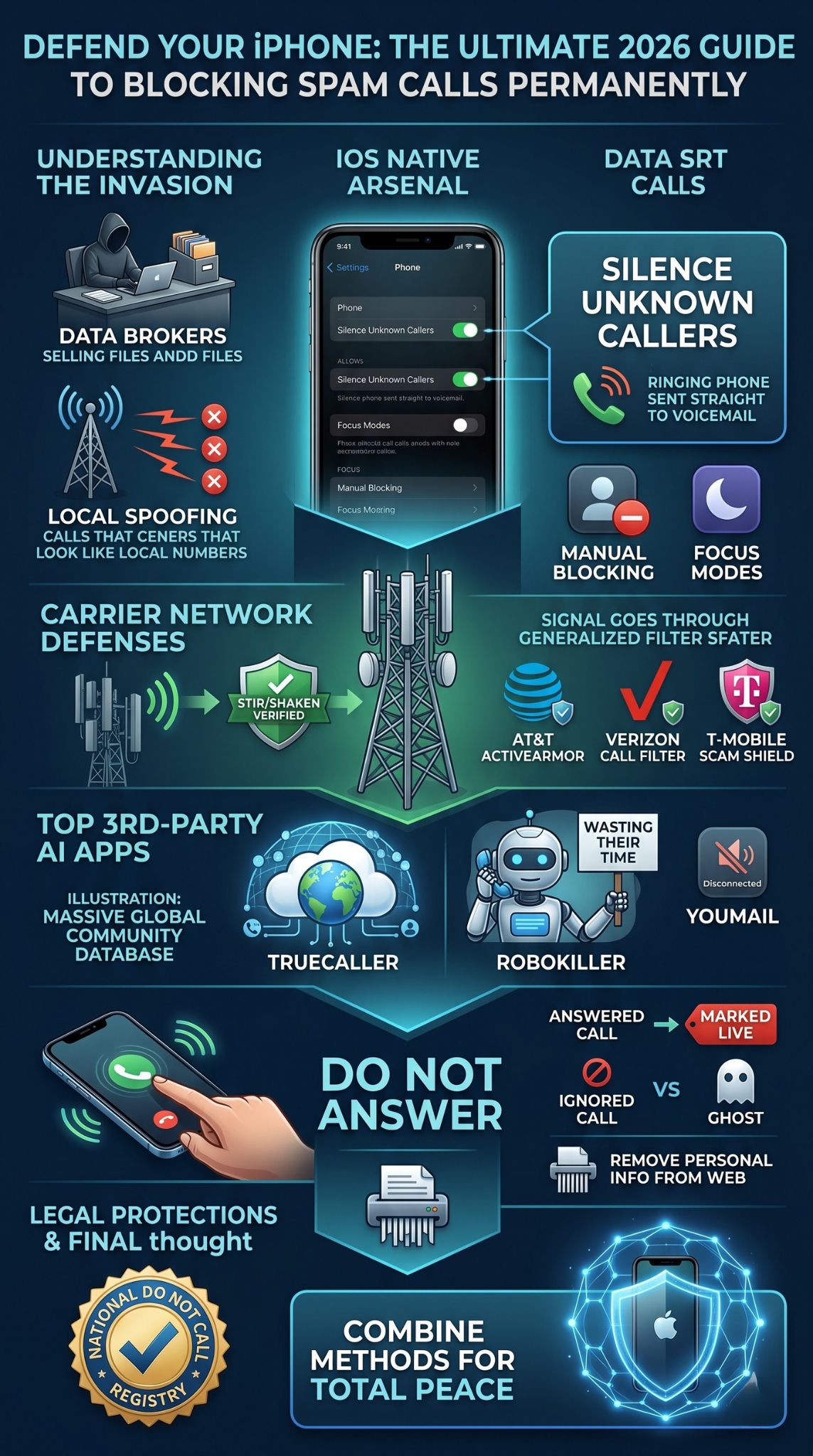
Sometimes you need a little extra muscle, and that is where the App Store comes in. Third-party apps often have larger, community-sourced databases than the carriers. These apps are particularly good if you want to block spam calls iphone users get from international sources or sophisticated new AI bots. These apps work by integrating directly with the iOS Call Blocking & Identification settings.
Truecaller Community Power
Truecaller is basically the Wikipedia of phone numbers. With millions of users reporting spam in real-time, their list is updated every few seconds. When a call comes in, the app checks the community database. If a hundred people have already marked that number as a solar panel scam, your phone will tell you exactly that. It is incredibly accurate for identifying local businesses too.
RoboKiller and Answer Bots
If you want to fight back, RoboKiller is the way to go. It does not just block calls; it uses Answer Bots to pick up and talk to the scammers. These bots are designed to sound like real, confused people. They waste the telemarketer’s time and money. It is a satisfying way to get a little revenge while keeping your phone quiet.
YouMail for Visual Voicemail
YouMail takes a different approach by replacing your standard voicemail. When a known spammer calls, YouMail plays a No Service tone. This tricks the automated dialer into thinking your phone number is disconnected. Eventually, they take you off their list. It is a brilliant long-term strategy for reducing the number of calls you get in the first place.
|
App Name |
Unique Selling Point |
Best For |
|
Truecaller |
Massive community database. |
General ID |
|
RoboKiller |
Wastes the spammer’s time. |
Revenge |
|
YouMail |
Plays “Out of Service” tones. |
List Removal |
|
Hiya |
Great integration with iOS. |
Simplicity |
Behavioral Changes to Stay Off the Radar
Technology is great, but your own habits are just as important. Think of your phone number like your home address; you should not just give it out to anyone. Every time you enter a giveaway or fill out a random survey online, you are likely putting your number into a marketing funnel. The best way to block spam calls iphone in the long run is to stop giving the spammers the ammunition they need.
The Golden Rule of Unknown Numbers
The most important thing you can do is stop answering calls from numbers you do not recognize. If you answer, even for a second, the scammer’s system marks your number as live. This makes your number much more valuable, and they will sell it to other scammers. Let it go to voicemail. If it is your doctor or a legitimate business, they will leave a message, and you can call them right back.
Removing Your Info from Data Brokers
You can also take a proactive approach by removing your name from data broker sites. Companies like Whitepages and Spokeo are required to let you opt-out. It takes some time to do it manually, but there are services that will do it for you. Once your info is scrubbed from these sites, it is much harder for new telemarketers to find you in the first place.
|
Habit |
Why it Works |
Difficulty |
|
Don’t Answer |
Stops “Live Number” flagging. |
Easy |
|
Use Burner Numbers |
Protects your real number. |
Medium |
|
Opt-out Requests |
Removes info from databases. |
Hard |
|
Registry Check |
Legal requirement for businesses. |
Easy |
Legal Tools and the Do Not Call Registry
We should also talk about the legal side of things. The National Do Not Call Registry is a real thing, and you should definitely be on it. While it won’t stop a criminal in another country from calling you, it will stop legitimate American companies from harassing you. If a company calls you after you have been on the list for 31 days, they can face massive fines.
The registry is free and never expires. You just have to go to the official government website and put your number in. It is a simple step that eliminates the low-level marketing calls, leaving you with only the illegal ones to deal with using your iPhone’s built-in tools. It is not a magic bullet, but it is a necessary piece of the puzzle for anyone trying to block spam calls iphone permanently.
|
Registry Fact |
Detail |
|
Official Site |
DoNotCall.gov |
|
Wait Time |
31 days for full effect. |
|
Expiration |
Never (unless disconnected). |
|
Exceptions |
Charities and Political calls. |
Final Thoughts
Stopping the constant flow of junk calls is not about doing one big thing; it is about doing several small things correctly. By combining the Silence Unknown Callers feature with carrier-level protection and a solid third-party app, you can turn your iPhone back into a tool that serves you, rather than a nuisance that interrupts you. Do not forget to register your number on the Do Not Call list and, most importantly, stop picking up the phone for strangers. If you stay consistent with these steps, you really can block spam calls iphone permanently and get back to enjoying your day without the digital noise.
FAQs
Can spammers see if I have blocked them?
No, spammers have no way of knowing if you blocked them using the iOS manual block feature. To them, the call simply rings or goes to voicemail as usual. They usually just move on to the next number in their list.
Why do I still get spam texts even after blocking the number?
Blocking a number for calls should block their texts too, but many scammers use different “short codes” or email addresses to send spam texts. You need to enable Filter Unknown Senders in your Message settings to keep these out of your main inbox.
Does it cost money to block spam calls on iPhone?
Most of the best tools are completely free. The built-in iOS features and basic carrier apps do not cost a dime. You only pay if you want premium features from third-party apps, like AI call screening or advanced identity protection.
Is neighborhood spoofing illegal?
Yes, under the Truth in Caller ID Act, it is illegal to spoof a number with the intent to defraud or cause harm. However, it is very difficult for the government to catch these people because many of them operate outside of the country.
Will blocking spam also block my emergency contacts?
Not if you do it right. As long as your friends, family, and emergency contacts are saved in your Contacts app, they will always be able to reach you, even if you have Silence Unknown Callers turned on.