
We have all been there. You are scrolling through your phone, trying to remember a specific joke, a piece of advice, or a news thread you liked back in 2018. You know it is there somewhere in your history, buried under thousands of other interactions. But the more you scroll, the more it feels like you are trying to find a needle in a digital haystack. The platform has changed a lot lately, and the old way of just clicking your profile and scrolling forever does not really work anymore.
If you want to see old liked tweets without losing your mind, you need a better strategy. This guide breaks down the most effective ways to dig up your digital past in 2026.
The Reality of Accessing Old Data on X in 2026
The way we interact with social media data has shifted massively over the last couple of years. Privacy is now the main focus, and the platform formerly known as Twitter has locked down a lot of the features that used to be wide open. Today, your likes are private by default for most users, which changes the tools we use to find them. You are no longer just looking at a public list; you are essentially querying a private database of your own behavior. Understanding these backend changes helps you realize why simple scrolling often fails and why you need to use more technical methods to get the job done.
|
Feature |
2022 Status |
2026 Status |
|
Public Likes Tab |
Visible to everyone |
Private by default |
|
API Access |
Mostly free for apps |
Restricted/Paid |
|
Archive Speed |
24-hour turnaround |
Up to 72 hours |
|
Mobile Scrolling |
Limited to ~3,200 tweets |
Still limited by cache |
The Death of the Infinite Scroll
In the early days, you could theoretically scroll back forever if you had enough patience. Now, the app uses aggressive caching to save data and improve performance. This means the app will often stop loading older likes after you hit a certain threshold, usually around a few thousand entries. If your goal is to see old liked tweets from five or six years ago, the native mobile app is likely your worst enemy. It is designed for the “now,” not for historical research.
Why Privacy Settings Matter
With the shift to private likes, third-party crawlers can no longer see what you have liked unless you give them explicit permission through an API key. This is great for your privacy but a bit of a hurdle for data recovery. If you are trying to use a web tool to find your old engagement, you will almost certainly have to log in and authorize deep permissions. Knowing this helps you stay safe from sketchy sites that promise “instant results” without proper authorization.
Why You Might Need to See Your Old Likes
There are plenty of reasons to go on a digital archeology dig. For some, it is about professional reputation management. You might want to make sure your likes from ten years ago do not conflict with your current career or public image. For others, it is purely about information retrieval. Many of us used the like button as a “read later” or “save” button long before the actual bookmark feature was reliable. Finding those old resources can be a huge boost to your productivity or personal projects.
|
Motive |
Description |
Benefit |
|
Reputation |
Auditing old interactions |
Avoids “cancel culture” risks |
|
Knowledge |
Finding saved tutorials |
Recovers lost information |
|
Nostalgia |
Reliving old memories |
Connects with old friends |
|
Cleanup |
Deleting irrelevant likes |
Refines your current algorithm |
Professional Auditing
In 2026, companies often look at your digital footprint more closely than your resume. If you are entering a high-stakes industry, seeing your old history is the first step to cleaning it up. You might have liked something a decade ago that was considered a joke then but is seen differently now. Being able to see old liked tweets allows you to curate your online persona so it reflects who you are today, not who you were in high school.
Recovering “Lost” Resources
Before X introduced robust bookmarks, the like button was the primary way people saved content. If you were following a DIY thread, a coding tutorial, or a series of historical facts, those likes are now your only map back to that content. Since the search engine on the platform can be finicky, using your like history is often the fastest way to verify a source you remember seeing years ago.
Read Also: How to Download Twitter Videos Without Watermark
Method 1: Requesting and Using Your X Archive
If you are serious about seeing every single thing you have ever double-tapped, the data archive is the only foolproof way. This is a massive file that the platform generates specifically for you, containing every post, DM, and like associated with your account. It takes the longest to get, but it provides the most detail. You are not at the mercy of an algorithm or a loading screen because the data sits right on your computer.
|
Archive Step |
Action Required |
Time Estimate |
|
Request |
Go to Settings > Account > Data |
2 Minutes |
|
Verification |
Enter password and SMS code |
1 Minute |
|
Processing |
Wait for the platform to build the file |
24 – 72 Hours |
|
Download |
Click the link in your email |
5 – 30 Minutes |
|
Exploration |
Open the .html file in a browser |
Instant |
How to Request Your Data
To start the process, you need to navigate to your settings menu. Look for the section titled “Your Account” and select “Download an archive of your data.” The platform will ask you to verify your identity, which is a crucial security step to prevent hackers from stealing your entire history. Once you confirm, you hit the request button. In 2026, the wait time is a bit longer than it used to be due to the sheer volume of data users generate now, so do not expect it to be ready in an hour.
Once your download is ready, you will get a zip file. Inside, you will find a file usually named “Your archive.html.” When you open this, it launches a local website in your browser. This is the best way to see old liked tweets because it has a dedicated search bar that works offline. You can filter by date, keyword, or even the type of media (like videos or images). It is essentially a private, high-speed version of the platform that lives on your hard drive.
Method 2: Mastering Advanced Search Operators
You do not always need a massive download to find a specific post. If you have a general idea of when a tweet was posted or who wrote it, you can use built-in search operators. These are special commands you type into the search bar to filter results. While you cannot directly search “my likes” in the standard search bar, you can search for the posts you likely interacted with by narrowing down the timeframe and the author.
|
Operator |
Syntax |
Result |
|
From |
from:username |
Shows tweets from that person |
|
Since |
since:2019-01-01 |
Shows tweets after that date |
|
Until |
until:2019-12-31 |
Shows tweets before that date |
|
Keyword |
“exact phrase” |
Finds the specific wording |
|
Filter |
filter:links |
Only shows tweets with URLs |
Using Date Ranges to Narrow the Field
The most powerful tool at your disposal is the date filter. If you want to see old liked tweets from a specific era, say the summer of 2020, you can use the since and until operators together. For example, typing from:interesing_user since:2020-06-01 until:2020-08-31 will show you everything that specific person posted during those months. If you remember liking a specific thread of theirs, this method finds it in seconds without you having to scroll through years of fluff.
Combining Filters for Precision
You can stack these operators like building blocks. If you are looking for a recipe you liked that contained the word “pasta” and a link, you would search pasta filter:links. If you remember it was from a specific year, add the date range. This does not show you only your likes, but since your likes are usually from people you follow or topics you care about, the post you are looking for will usually be in the top few results.
Method 3: Utilizing Trusted Third-Party Tools
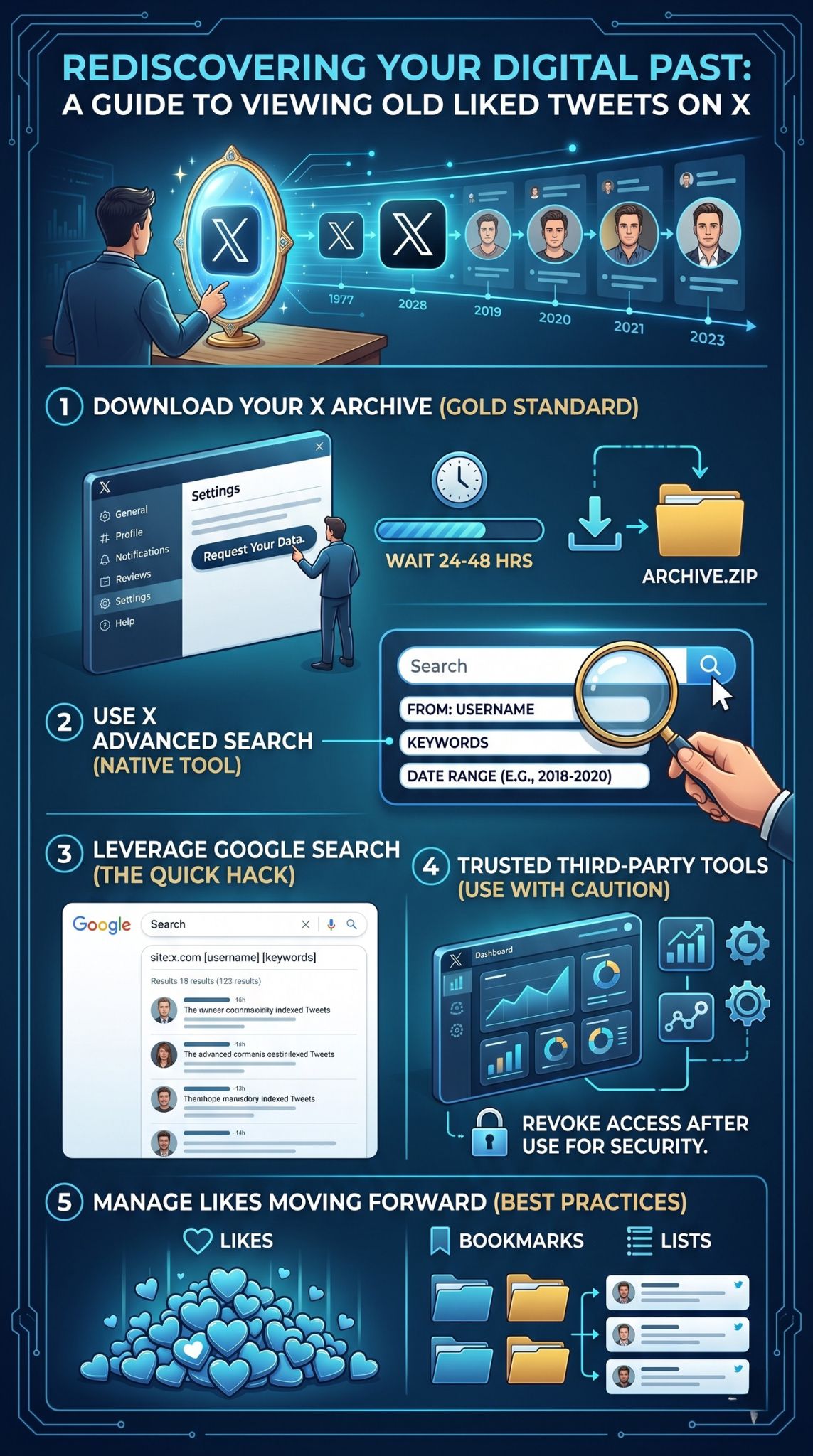
While many apps have disappeared because of high API costs, a few professional-grade tools still exist for people who need to manage their data. These are especially useful if you want to see old liked tweets and then perform an action, like unliking them in bulk or exporting them to a spreadsheet. You should always choose tools that have a long-standing reputation in the tech community to ensure your account remains secure.
|
Tool Name |
Key Feature |
Best For |
|
Circleboom |
Advanced sorting and deleting |
Cleaning up an old profile |
|
TweetBinder |
Historical data analytics |
Research and reports |
|
Wayback Machine |
Viewing deleted content |
Finding “ghost” tweets |
|
Followerwonk |
Searchable bios and activity |
Finding influencers |
Why Professional Tools Are Better Than Free Ones
In the current digital landscape, if a tool is free, you are probably the product. High-quality services like Circleboom have to pay X for API access, so they usually charge a small fee. The benefit is that they offer a dashboard where you can see old liked tweets in a grid view, sort them by the number of retweets they got, or find likes from accounts that no longer exist. It is a much more “pro” experience than trying to use the native search bar.
Safety First: Revoking Permissions
Whenever you use a third-party tool, you have to “Authorize” it to see your account. This is a standard procedure, but you should not leave that door open forever. Once you have found the old tweets you were looking for, go back into your X settings under “Security and account access” and then “Apps and sessions.” Revoke the access for any tool you are no longer using. This keeps your account safe from potential future breaches of those third-party services.
Method 4: The Google “Site” Search Hack
Google is often better at searching X than X is at searching itself. Because Google’s bots are constantly crawling the web, they index billions of posts. You can use a specific search command to force Google to only look at the platform’s domain. This is a great shortcut when you remember a specific phrase but the platform’s internal search is giving you unrelated “suggested” content instead of what you actually asked for.
|
Search Command |
Purpose |
Example |
|
site:x.com |
Limits results to X |
site:x.com “marketing tips” |
|
site:twitter.com |
Search older indexed pages |
site:twitter.com “2015 memories” |
|
intitle: |
Finds keywords in the title |
site:x.com intitle:”breaking news” |
How to Find Your Own Interaction Footprints
While Google won’t show you a private “likes” list, it is excellent for finding posts where you replied or were mentioned. Often, we like a tweet and then leave a short reply. By searching site:x.com “your_username” “keyword”, you can find the conversation threads you were part of years ago. Usually, if you find the reply, the tweet you liked is right above it. This “side door” approach is surprisingly effective for seeing old liked tweets that you engaged with more deeply.
Using the Google Cache
Sometimes a tweet is deleted but still exists in Google’s memory. If you find a search result that looks like the post you liked but the link is broken, click the three little dots next to the result and look for “Cached.” This will show you a snapshot of what that page looked like when Google last saw it. It is a bit like time travel and can help you recover information from accounts that have since been deactivated.
Managing Your Likes for the Future
After you have gone through the trouble of digging up your history, you probably want to make sure you never have to do it again. The way we save information online is evolving, and there are much better tools available now than the simple heart icon. By changing your habits today, you can make your future digital archeology much easier.
|
Management Tool |
Purpose |
Advantage |
|
Bookmarks |
Private saving |
Does not affect the algorithm |
|
Lists |
Categorizing users |
Creates custom timelines |
|
Readwise |
Exporting data |
Syncs tweets to Notion/Evernote |
|
Screenshots |
Hard copies |
Permanent record of deleted posts |
Moving from Likes to Bookmarks
In 2026, the bookmarking feature is much more robust than it was at launch. Bookmarks are private by design and do not broadcast your interests to the world. More importantly, they are easier to sort. If you want to see old liked tweets in the future, start moving your truly “valuable” content into your bookmarks folder. It is a more intentional way to save information and keeps your likes tab from becoming a cluttered mess of memes and random interactions.
Using Sync Services
If you find a lot of high-value threads or articles, consider using a service like Readwise. These tools can automatically pull your likes or bookmarks into an organized database like Notion or Obsidian. This way, you have a searchable, permanent record of everything you have found interesting. You won’t need to worry about account deactivations or platform changes because the data exists in your own personal knowledge management system.
Troubleshooting Common Data Retrieval Issues
Sometimes, despite your best efforts, you might hit a wall. There are several technical and policy-based reasons why some data just won’t show up. Knowing these can save you hours of frustration trying to find something that might not exist anymore.
Why Some Likes Are “Ghosted”
You might remember liking a post, but it doesn’t show up in your archive or search. This often happens if the original poster has “soft blocked” you, or if their account is currently in a limited state. If a user goes private after you liked their tweet, that interaction becomes invisible to everyone except you and the author. Furthermore, if the platform’s safety filters flag a post as “sensitive,” it might be hidden from general search results, even if it is in your history.
Dealing with Deleted Content
The biggest hurdle to seeing old liked tweets is deletion. If an author deletes their post, it is removed from the platform’s servers. Your “like” count will go down, and the record of that engagement will vanish from your live profile. While the data might still be in your downloadable archive if you requested it before the deletion, it won’t be there if you request a new one. This is why many power users take screenshots of important information.
Final Thoughts
Tracking down your digital history can feel like a chore, but it is one of the best ways to reclaim your online life. Whether you choose to download your full archive or use clever search operators, the data is there if you know where to look. Being able to see old liked tweets gives you a chance to reflect on how much you have grown, find lost resources, and ensure your public profile matches your current values. In a world where our digital footprints are permanent, being your own archivist is a vital skill. Take the time to secure your data now, and you will never have to worry about losing a great memory or an important piece of information again.
Frequently Asked Questions
Can I see who liked my old tweets from years ago?
Yes, but only if those users still have active accounts and haven’t hidden their likes. You can view the engagement on any of your old posts by clicking the “View post engagement” button. However, keep in mind that many accounts from five or ten years ago might be deactivated or suspended, which will hide their names from the list.
Is there a limit to how many likes I can see?
On the mobile app, you are usually limited to the last 3,200 interactions due to technical constraints. To see old liked tweets beyond that limit, you must use the desktop version of the site or, even better, download your full data archive.
Will unliking an old tweet notify the person?
No. Notifications are only triggered for new likes. If you go back and unlike a post from 2017, the user will not receive a ping on their phone. The only thing that changes is the total like count on that specific post will drop by one.
Can I search my likes by date on the mobile app?
The mobile app does not currently offer a “search by date” feature for likes. You can only scroll. For date-specific searches, you need to use the desktop advanced search or the offline archive method.
No, the ability to see your own likes and download your data archive is available to all users, regardless of whether they have a paid subscription. Premium users just have more options to hide their likes from others.