
Before diving into the recovery process, it helps to understand how the system works behind the scenes. Snapchat built this feature to encourage daily engagement, turning casual chatting into a fun, high-stakes game. Losing a long-standing Snapstreak can feel like a punch to the gut. You and your best friend have been sending daily snaps for hundreds, maybe even thousands of days, only for life to get in the way.
Suddenly, the fire emoji disappears from your chat list, replaced by a devastating emptiness. If you are panicking and frantically searching the internet for a way to fix this, you can take a deep breath. It is completely possible to recover old Snapchat streaks, and this guide will walk you through every single step.
Understanding Snapchat Streaks and Why They Disappear
What is a Snapstreak?
A Snapstreak begins when you and a friend send direct photo or video snaps to each other for three consecutive days. Once you hit that three-day mark, a fire emoji appears next to your friend’s name, accompanied by a number indicating how many days the streak has been alive. To keep the streak going, both of you must send a snap within a twenty-four-hour window. Chat messages, voice notes, stickers, and group snaps do not count toward this requirement. You must use the Snapchat camera to capture a fresh photo or video and send it directly to that specific person. The psychology behind this feature is brilliant. It creates a daily ritual and a sense of shared accomplishment. When a number reaches the high hundreds, it becomes a digital monument to your friendship, showcasing your dedication to staying in touch.
Common Reasons for Losing a Streak
People lose their streaks for all kinds of mundane reasons. The most common culprit is simply forgetting. Life gets busy, you have a heavy workload at school or the office, and the twenty-four-hour window slips by without you noticing. Another frequent issue involves time zone changes. If you travel internationally, the shift in hours can easily throw off your internal snapping clock, causing you to miss the deadline without even realizing it.
Sometimes, the problem is entirely technical. Bad internet connections can prevent a snap from delivering, even if you hit the send button before the timer runs out. Server outages on Snapchat’s end can also cause widespread panic as millions of users find themselves unable to send their daily pictures. Finally, hardware issues like a broken camera or a dead smartphone battery right before the daily deadline can prematurely end your digital commitment.
The Official Method to Recover Old Snapchat Streaks
For years, users had to jump through complex hoops and fill out lengthy support tickets to get their streaks back. Today, Snapchat has finally listened to its massive user base and streamlined the entire process right inside the application.
Step-by-Step Guide to In-App Recovery
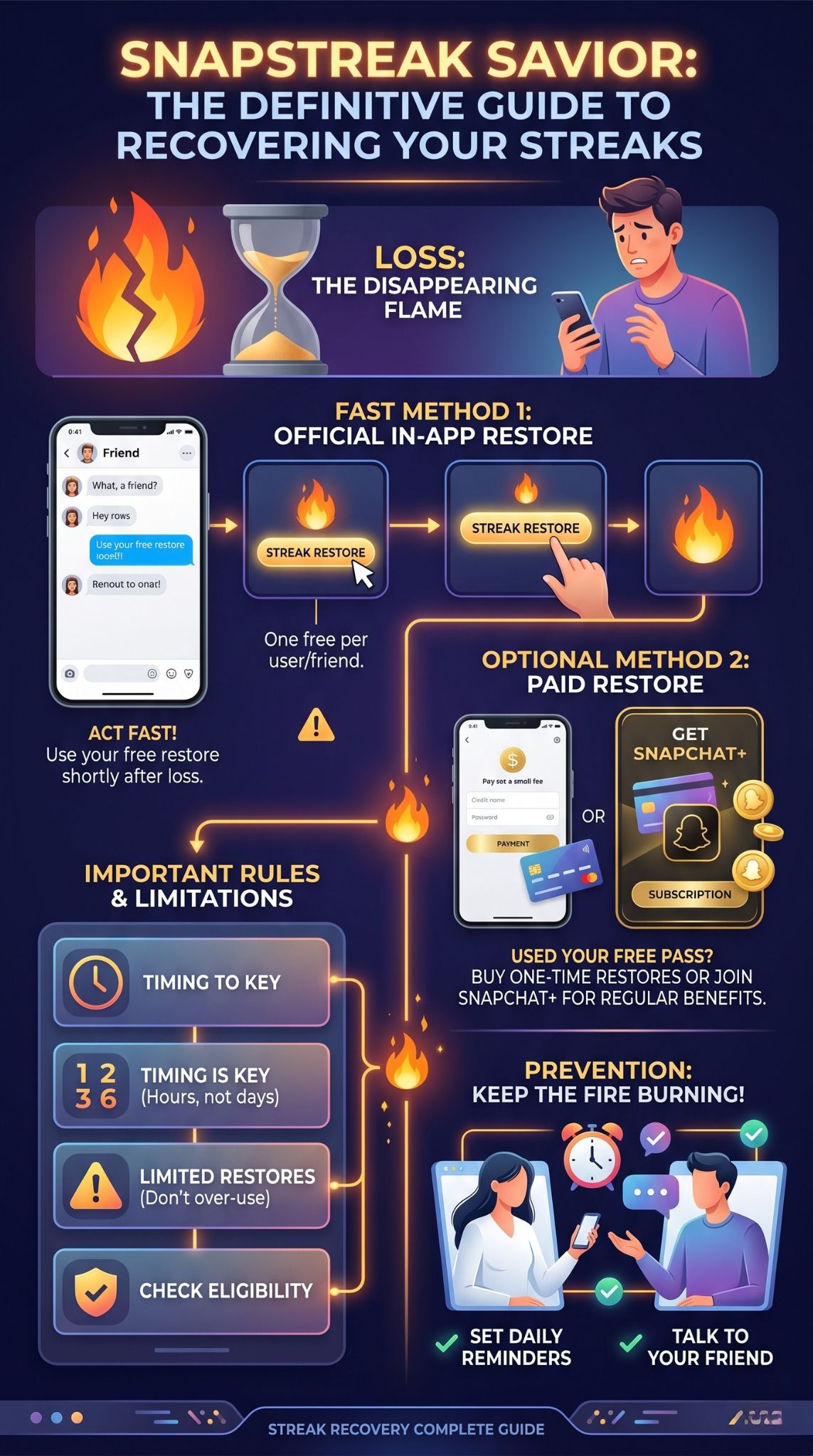
If you open your chat feed and realize the fire emoji is gone, the first thing you should look for is a restore button. Snapchat recently rolled out an in-app feature that allows you to salvage a broken streak with just a few taps. Next to the name of the friend whose streak you lost, you might see a special restore badge. Tap on this badge immediately. The app will then prompt you to confirm that you want to use a streak restore. Standard accounts usually get one free restore to use in emergencies. Once you confirm, the fire emoji will instantly reappear, and your day count will return to exactly where it was before the disaster struck. If you do not see the restore button right away, make sure your app is updated to the very latest version in your phone’s app store, as older versions do not support this feature.
Using the Snapchat Support Website
If the in-app button is nowhere to be found, your next best option is the official support website. Open your Snapchat settings by tapping your profile icon in the top left corner, then tapping the gear icon in the top right. Scroll down to the support section and tap on the help center option. Use the search bar to look for the phrase regarding losing a snapstreak. You will find an article explaining the rules, and buried within that article is a link to contact support.
You will need to fill out a detailed digital form. The form requires your username, your friend’s username, your email address, your phone number, and the exact date you noticed the streak was missing. You will also need to state how long the streak was before it vanished. Be as honest and accurate as possible. If the loss was caused by an app glitch or a massive server outage, be sure to mention that in the description box, as the support team is much more forgiving when the fault lies with their own technology rather than user error.
Important Rules and Limitations for Streak Recovery
While it is easier than ever to recover old Snapchat streaks, there are strict boundaries in place to prevent people from abusing the system. Understanding these rules will save you a lot of frustration.
The 24-Hour Rule Explained
To maintain a streak, you and your friend must send a snap to each other within twenty-four hours of the last exchange. However, when it comes to restoring a broken streak, time is heavily against you. You usually only have a small grace period after the fire emoji disappears to use the in-app restore function or submit a support ticket. If you wait a week or a month to try and get an old streak back, your request will almost certainly be denied. The system is designed to forgive brief lapses in memory or short technical glitches, not to revive connections that have been entirely dormant for weeks. Therefore, the moment you realize a streak is gone, you need to take immediate action.
How Many Times Can You Restore a Streak?
Snapchat is a business designed around daily active users; they want you to log in naturally every day. Regular free accounts are generally given a single free pass to restore a broken streak without spending money. Once you use that free opportunity, you are out of luck for future mistakes unless you are willing to open your wallet. You cannot continually rely on support tickets either. If the customer service team sees that you are submitting forms every other week to restore the very same streak, they will eventually stop granting your requests. The recovery feature is meant to be a rare lifeline, not a regular habit.
Paid Streak Restoration: Is It Worth It?
Because streaks mean so much to the community, Snapchat eventually realized they could monetize people’s attachment to their high numbers. This led to the introduction of paid restorations, changing the landscape of snapstreak recovery.
How the Paid Feature Works
If you have already used your one free restore, tapping the restore button next to a broken streak will now prompt a payment screen. The app will ask you to pay a small financial fee, usually processed through standard in-app purchases linked to your Apple App Store or Google Play account. The transaction is seamless, taking only a matter of seconds to complete. Once the payment clears, your streak is resurrected as if nothing ever happened. It is a brilliant, albeit slightly controversial, business move by the company. It preys a little bit on the fear of missing out, but it also gives devoted users a guaranteed way out of a highly frustrating situation.
Cost and Availability for Snapchat Plus Users
The cost of restoring a streak individually is relatively low, typically sitting well under a dollar per restoration depending on your region, but those micro-transactions can add up quickly if you are incredibly forgetful. This is where Snapchat Plus comes into play. Premium subscribers who pay the monthly fee for Snapchat Plus often receive extra perks regarding streaks. While the exact benefits shift based on regular app updates, Plus users frequently get more leeway, such as additional free restores per month. If you find yourself constantly breaking streaks with multiple friends, the monthly subscription cost might actually save you money compared to buying individual restorations piece by piece.
Tips to Prevent Losing Your Snapstreaks in the Future
Recovering a streak is stressful and potentially costly, so the best strategy is to never lose it in the first place. Building solid digital habits will keep your fire emojis burning brightly for years to come.
Setting Reminders
The most foolproof way to maintain a streak is to automate your memory. Do not rely entirely on your brain to remember a mundane digital task during a chaotic workday or a busy school schedule. Use the alarm app on your phone to set a daily reminder at a specific time when you know you will be free, like right after dinner or right before getting into bed. Name the alarm something specific so you do not just turn it off and instantly forget why it rang. There are even third-party applications designed specifically to track your daily digital habits, though a simple repeating phone alarm is usually more than enough to get the job done.
Communication with Your Friends
A streak is a two-way street. You absolutely cannot keep it alive by yourself. If you know you are going into a situation where you might not have internet access, like a remote camping trip or a very long international flight, communicate with your streak partners beforehand. Send your daily snap early in the morning before you lose cellular service, and remind them to send theirs back promptly. Some extremely dedicated people even share their account passwords with trusted friends to keep streaks alive during long vacations, though this violates the platform terms of service and poses significant security risks, so it is highly discouraged. Simply talking to your friends and establishing a reliable daily routine together is a much safer and far more effective strategy.
Troubleshooting Common Recovery Issues
Sometimes, despite your absolute best efforts, the recovery process does not work smoothly. You might encounter digital roadblocks that require a little extra troubleshooting on your end.
What to Do If the Support Form Fails
If you submit a support ticket to recover old Snapchat streaks and receive a robotic, automated rejection email, do not give up immediately. Automated systems often reject claims that lack specific details or trigger certain keywords. You can usually reply directly to that rejection email or head back to the website to submit a brand new ticket. This time, provide overwhelming context. Explain exactly what time the streak was lost, mention any specific error codes you saw pop up in the app, and firmly but politely ask for a human representative to manually review the case. Persistence can sometimes override an initial rejection, especially if the fault genuinely lied with a server outage on their end that they can verify.
Dealing with App Glitches
Technology is never flawless. Sometimes your app might totally freeze exactly as you try to hit the restore button, or the screen might just go completely blank. If this happens, your first step is to force close the application completely. Do not just minimize it to your home screen; physically swipe it away in your app switcher so it stops running in the background. If reopening the app does not fix the glitch, check your phone’s storage space, as a completely full hard drive can cause Snapchat to misbehave and drop features. The next logical escalation is to clear the cache within the Snapchat settings menu. If absolutely all else fails, delete the app from your phone entirely, restart your mobile device, and reinstall a fresh copy from the app store. This extensive process often clears out hidden corrupted files that are blocking the streak restoration process.
Frequently Asked Questions (FAQs)
Does sending a chat message keep a streak alive?
No, typing words in the chat box does not count toward your daily requirement. You must use the camera within the application to take a fresh picture or record a video and send it directly to your friend.
Can I recover a streak that has been gone for a whole month?
It is highly unlikely. The recovery tools, both the free ones and the paid premium ones, are designed to work shortly after the streak is broken. Once too much time has passed, the backend data is usually permanently reset and cannot be salvaged.
Do group chats count towards maintaining a streak?
Unfortunately, they do not. Snapping a picture and sending it to a large group will not maintain your individual streaks with the specific people inside that group chat. You must send direct, individual snaps to keep the fire emoji going.
What does the hourglass emoji mean next to a name?
The hourglass emoji is your final warning from the application. It appears next to your friend’s name when your twenty-four-hour window is almost entirely up. If you see this icon, you need to send a snap immediately to prevent the streak from breaking.
Does my friend also need to pay if I restore the streak?
No, they do not. If one person uses the restore feature, whether through a free pass or a paid financial transaction, the streak is repaired for both users simultaneously. Only one person needs to initiate and complete the process.
Final Thoughts
Losing a long-standing Snapstreak can be frustrating, but it’s rarely the end of the world. Whether you use the quick in-app restore button, submit a support ticket, or opt for a paid restoration, you have reliable ways to recover your lost flames.
The most important rule? Act fast. Recovery tools are designed for immediate action, so don’t wait to fix a broken streak. Use your free restores wisely, set daily alarms to prevent future mishaps, and remember that Snapstreaks are ultimately just a fun way to stay connected. Keep communicating, establish a solid routine with your friends, and keep those digital fires burning!