
Telegram is useful, fast, and honestly, a little too easy to connect with people sometimes. You sign up with your number, join a few groups, sync your contacts, and suddenly you start wondering who can actually see your personal number. That is why learning how to hide Telegram number settings properly is not just a small privacy trick. It is basic digital hygiene.
Telegram gives users control over who can see their phone number and who can find them using that number. People may also contact you if they know your phone number, if you message them first, if you share a group with them, or if you use a public username.
The good news is simple. You do not need to delete your account, leave groups, or stop using Telegram. You just need to know which settings to change and which small mistakes to avoid.
|
Article Snapshot |
Details |
|
Main topic |
Telegram phone number privacy |
|
Best setting |
Phone number visibility: Nobody |
|
Best discovery setting |
Who can find me by number: My Contacts |
|
Best for |
Regular users, group members, freelancers, admins, creators |
|
Extra privacy step |
Turn off contact sync and delete synced contacts if needed |
|
Main warning |
Hiding your number does not make you fully anonymous |
Quick Answer: How to Hide Telegram Number
You can hide your Telegram number by going to Telegram Settings, opening Privacy and Security, tapping Phone Number, and changing who can see your number. The safest setting for most privacy-focused users is Nobody. After that, check the option for who can find you by your number and set it to My Contacts.
Telegram is one of the most widely used messaging apps in the world. That matters because many users join public groups, channels, and communities with people they do not personally know. A privacy setting that feels small can become important when your account is visible in different spaces.
|
Setting |
Recommended Choice |
Why It Matters |
|
Who can see my phone number |
Nobody |
Hides your number from most users |
|
Who can find me by my number |
My Contacts |
Limits phone-number-based discovery |
|
Username |
Optional |
Lets people contact you without your number |
|
Contact sync |
Off, if privacy matters |
Reduces automatic contact matching |
|
Two-step verification |
On |
Protects your account if your number is exposed |
What This Setting Actually Does
This setting controls number visibility inside Telegram. If you choose Nobody, other users should not be able to open your profile and see your phone number, unless there are special cases such as saved contacts or exceptions.
What This Setting Does Not Do
It does not remove your number from someone else’s phone book. It does not stop people from contacting you through a username. It also does not hide your account from people in the same group if they can see your name, profile photo, or username.
Why People Want to Hide Telegram Number From Contacts
Most users do not think about Telegram privacy until something feels uncomfortable. Maybe an old contact finds them. Maybe a client messages them on a personal account. Maybe a stranger from a group opens their profile. These are normal reasons to check privacy settings.
Telegram is often used for work, study, communities, channels, crypto groups, local groups, and private chats. One number can quickly become connected to many different parts of life. That is why many people prefer to hide Telegram number visibility and use a username instead.
|
Situation |
Privacy Concern |
Better Setting |
|
Public groups |
Strangers may check your profile |
Hide phone number |
|
Work chats |
Clients may see personal number |
Use username |
|
Old contacts |
Past contacts may find you |
Limit discovery |
|
Community admin role |
Members may message privately |
Use username and limit calls |
|
Personal safety |
Too much profile exposure |
Review all privacy settings |
Privacy From Saved Contacts
Your contact list may include people you no longer speak with. It may also include delivery workers, old clients, classmates, sellers, or one-time contacts. If you do not want all of them connecting your number with your Telegram account, limiting visibility makes sense.
Privacy in Groups and Channels
Telegram groups can be huge. Some are friendly, some are chaotic, and some include people you have never met. Hiding your number helps you take part in a discussion without giving away a personal contact detail.
Separating Work and Personal Life
Freelancers, journalists, students, small business owners, and community managers often use Telegram for practical reasons. But giving every professional contact access to a personal number is not always smart. A username is usually cleaner.
How Telegram Phone Number Privacy Works
Telegram has two related phone number controls. One controls who can see your number. The other controls who can find you using your number. These sound similar, but they are not the same thing.
Telegram allows users to control number visibility and number-based discovery. In simple terms, you can decide whether your number appears on your profile and whether people can find your account using your number.
|
Privacy Option |
Meaning |
Best For |
|
Everybody |
Anyone who interacts with you may see your number |
Rarely recommended |
|
My Contacts |
Only saved contacts can see your number |
Balanced privacy |
|
Nobody |
Your number is hidden from most users |
Strong privacy |
|
Find by number: Everybody |
Anyone with your number may find you |
Open discoverability |
|
Find by number: My Contacts |
Only contacts can find you by number |
Safer choice |
Who Can See My Phone Number
This option decides whether your number appears on your Telegram profile. The usual choices are Everybody, My Contacts, and Nobody. If privacy is your main concern, Nobody is the best option.
Who Can Find Me by My Number
This option controls discovery. Someone may not see your phone number on your profile, but they may still find your account if they already have your number and your settings allow it. For most users, My Contacts is the safer setting.
Username Is a Separate Privacy Choice
Telegram usernames are public. A username lets people find and message you without having your phone number. That is useful for business, groups, or public communication, but it also means people can search for you.
Read Also: How to Schedule Messages on Telegram in 2026
Step-by-Step Guide to Hide Telegram Number on Android and iPhone
The menu names are mostly similar on Android and iPhone, though the button locations may look different. Android users usually enter settings from the side menu. iPhone users usually tap Settings from the bottom bar.
The process is simple. Open privacy settings, go to the phone number section, change visibility, and then check discovery settings. Do not skip the second part because visibility and discovery are different.
|
Device |
Main Path |
Best Setting |
|
Android |
Menu > Settings > Privacy and Security > Phone Number |
Nobody |
|
iPhone |
Settings > Privacy and Security > Phone Number |
Nobody |
|
Desktop |
Settings > Privacy and Security > Phone Number |
Nobody |
|
Web/Other app versions |
Menu layout may vary |
Look for Privacy and Security |
On Android
Open Telegram and tap the three-line menu. Go to Settings, then Privacy and Security. Tap Phone Number. Under who can see your phone number, select Nobody if you want the strongest privacy.
After that, check who can find you by your number. Set it to My Contacts if you do not want random people discovering your Telegram account just because they have your phone number.
On iPhone
Open Telegram and tap Settings. Go to Privacy and Security, then tap Phone Number. Choose Nobody under number visibility. Then check the discovery setting and choose My Contacts.
iPhone users should also check whether contact sync is active. If you previously synced your phone book, Telegram may have already matched your account with people you know.
On Telegram Desktop
Open Telegram Desktop and go to Settings. Find Privacy and Security, then open Phone Number. Change the visibility setting to Nobody. If the desktop layout looks different, update the app and check again.
Best Settings to Hide Telegram Number Properly
The best setup depends on how you use Telegram. A private user, a freelancer, and a public group admin may not need the same level of privacy. Still, most people who want to hide Telegram number visibility should start with Nobody.
The strongest setup is simple: hide the number, limit discovery, review contact sync, and use a username only when needed. Username links let people contact you without knowing your phone number, which is useful for public profiles or business communication.
|
User Type |
Phone Number Visibility |
Find by Number |
Username |
|
Private user |
Nobody |
My Contacts |
Avoid or keep simple |
|
Freelancer |
Nobody |
My Contacts |
Use professional username |
|
Group admin |
Nobody |
My Contacts |
Use username |
|
Student |
My Contacts or Nobody |
My Contacts |
Optional |
|
Business user |
Nobody |
My Contacts |
Recommended |
Maximum Privacy Setup
Use this if you join groups, manage channels, work with unknown people, or simply do not want your number floating around.
Recommended setup:
- Who can see my phone number: Nobody
- Who can find me by my number: My Contacts
- Profile photos: My Contacts
- Calls: My Contacts or Nobody
- Groups and channels: My Contacts
- Forwarded messages: Nobody or My Contacts
- Two-step verification: On
Balanced Privacy Setup
This works if you only use Telegram with friends and family. Set number visibility to My Contacts and discovery to My Contacts. It keeps things simple while blocking random visibility.
Public or Business Setup
If you run a public channel, business page, or group, hide your number and use a username. This lets people reach you without exposing your personal number. Do not put your phone number in your bio unless you really want it public.
Should You Turn Off Telegram Contact Sync?
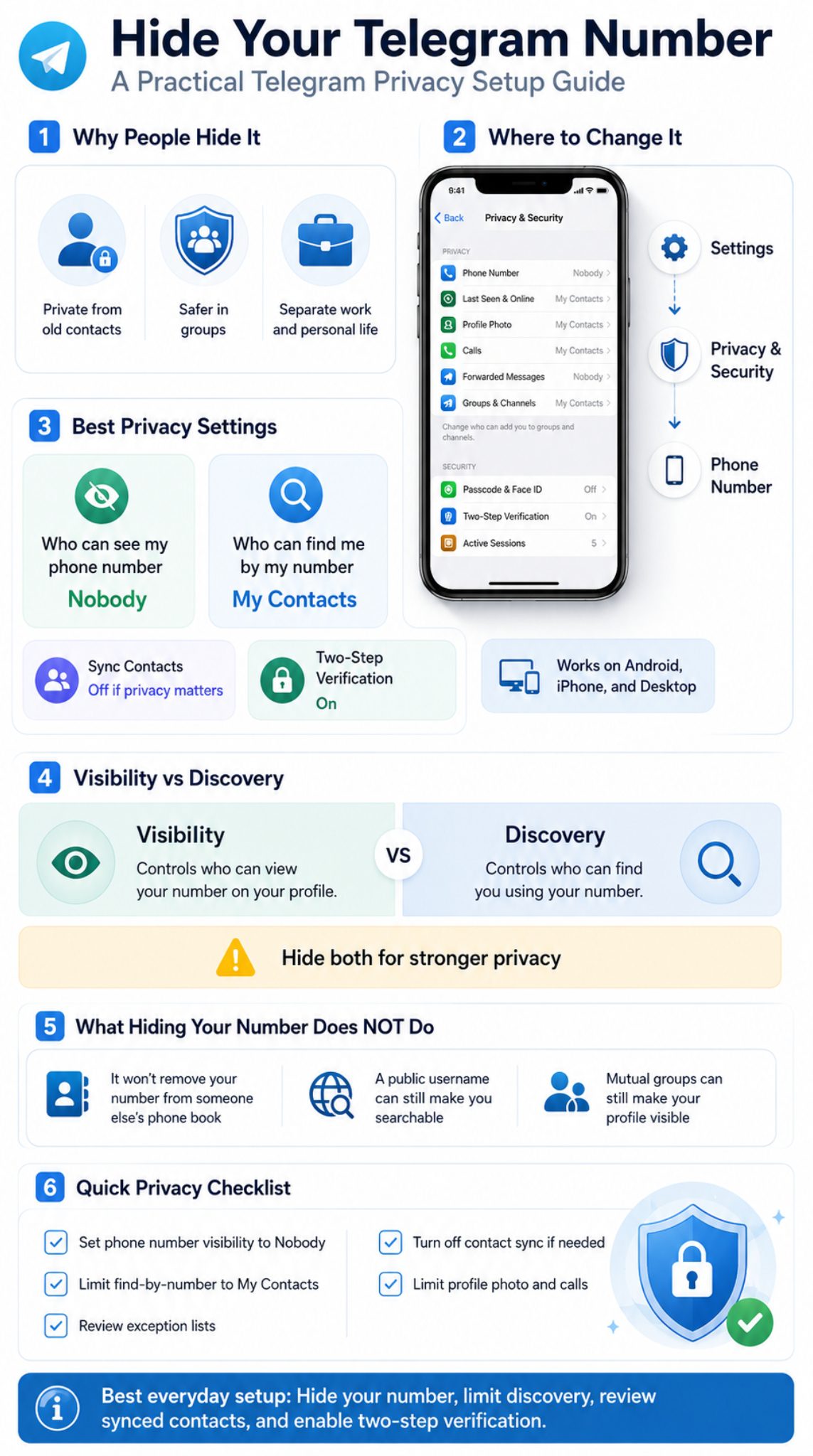
Contact sync is convenient, but it can create privacy confusion. Telegram uses your contact list to help you find people you know. That sounds helpful, but not everyone wants their phone book connected to Telegram.
If your goal is to hide Telegram number details from contacts, contact sync deserves attention. Turning off visibility is one part. Managing synced contacts is another.
|
Contact Sync Choice |
What Happens |
Best For |
|
Sync on |
Telegram can match your phone contacts |
Convenience |
|
Sync off |
New phone contacts are not auto-synced |
Better privacy |
|
Delete synced contacts |
Removes uploaded contact data |
Privacy cleanup |
|
Keep only trusted contacts |
Reduces unwanted matching |
Balanced use |
When Contact Sync Is Useful
Contact sync is helpful when you want Telegram to show which friends already use the app. It saves time and makes the app easier to use. For family and close friends, this is usually fine.
When Contact Sync Becomes a Problem
It becomes a problem when your phone book is messy. If you saved clients, temporary contacts, service numbers, sellers, or old acquaintances, contact sync can connect you with people you did not intend to bring into your Telegram circle.
How to Clean It Up
Go to Privacy and Security and look for contact-related options. Turn off Sync Contacts if you do not want future syncing. Then use Delete Synced Contacts if you want to remove contacts already uploaded to Telegram.
Can People Still Find You After You Hide Your Number?
Yes, in some cases. This is where many users get confused. Hiding your phone number does not mean hiding your full Telegram profile. Your name, username, mutual groups, and profile photo settings still matter.
People who do not know your phone number may still find you if you share a group or if you have a public username. So, number privacy is important, but it is not the same as full anonymity.
|
How Someone May Find You |
Does Hiding Number Stop It? |
What to Check |
|
Username search |
No |
Remove or change username |
|
Same group |
No |
Profile photo, name, group privacy |
|
Phone number search |
Mostly, if limited |
Find by number setting |
|
You message first |
No |
Be careful who you message |
|
Saved contact list |
Not always |
Contact and exception settings |
They Can Find You by Username
A username is useful, but it makes you searchable. If your username includes your real name, brand name, or common online handle, people may still identify you even without your number.
They Can See You in Mutual Groups
If you join a group, members can usually see your Telegram name and profile photo depending on your settings. They may not see your number, but they may still recognize you.
They Can Contact You If You Message First
If you message someone first, you open a direct communication line. That does not automatically mean your phone number becomes visible, but it does make your account reachable.
Common Mistakes When Trying to Hide Telegram Number
Most Telegram privacy mistakes are small. People change one setting and forget the others. Or they hide the number but keep a public username with their real name. Or they leave old exceptions active.
The best approach is to treat privacy as a group of settings, not one switch. Number visibility is important, but it works better when combined with profile, contact, and security controls.
|
Mistake |
Why It Matters |
Better Move |
|
Only hiding number |
Discovery may still be open |
Check find-by-number setting |
|
Ignoring username |
People can still search you |
Use a careful username |
|
Keeping old exceptions |
Specific users may still see details |
Review Always Allow |
|
Leaving contact sync on |
More contacts may match with you |
Turn off sync if needed |
|
Ignoring profile photo |
Strangers may identify you |
Limit profile photo visibility |
Hiding the Number but Leaving Discovery Open
If you choose Nobody for visibility but allow too many people to find you by number, your privacy is only half done. Always check both settings.
Forgetting Exceptions
Telegram allows custom exceptions. That is useful, but it can also backfire. Someone you allowed months ago may still have access. Review the Always Allow and Never Allow lists.
Using the Same Public Username Everywhere
If your Telegram username matches your Instagram, X, website, or business profile, people can connect the dots. That may be fine for public work. It is not ideal for private use.
Extra Telegram Privacy Settings Worth Checking
Phone number privacy is only one layer. Telegram has several settings that help reduce unwanted attention. You do not need to lock everything down, but you should know what each setting does.
Related privacy controls such as last seen status, profile photos, forwarded messages, group invitations, calls, and two-step verification can help protect more than just your number.
|
Privacy Setting |
Recommended Choice |
Why It Helps |
|
Last seen and online |
My Contacts or Nobody |
Limits activity tracking |
|
Profile photos |
My Contacts |
Reduces recognition by strangers |
|
Calls |
My Contacts or Nobody |
Stops unwanted calls |
|
Forwarded messages |
Nobody or My Contacts |
Stops profile link exposure |
|
Groups and channels |
My Contacts |
Stops random group adds |
|
Two-step verification |
On |
Adds account protection |
Last Seen and Online
This controls who can see when you were active. If you are trying to avoid unwanted attention, set it to My Contacts or Nobody.
Profile Photos
A public profile photo can reveal more than a phone number. It may show your face, workplace, location, family, or personal style. Keep it limited if privacy matters.
Forwarded Messages
When someone forwards your message, Telegram can attach a link back to your profile depending on your settings. Restricting this can reduce unwanted profile visits.
Two-Step Verification
Two-step verification adds another layer of protection to your account. It helps make sure your phone number alone is not enough to access your Telegram account.
Final Thoughts
To hide Telegram number visibility properly, do not stop after one setting. Set phone number visibility to Nobody, limit phone-number discovery to My Contacts, review exceptions, and clean up contact sync if needed.
Telegram gives users useful controls, but those controls work best when you understand the difference between visibility and discoverability. Your number may be hidden, but your username, profile photo, mutual groups, and contact behavior can still make you findable.
The safest everyday setup is simple. Hide the number, use a careful username only when needed, limit profile visibility, and enable two-step verification. That gives you privacy without making Telegram difficult to use.
|
Final Checklist |
Done |
|
Set phone number visibility to Nobody |
|
|
Set find-by-number to My Contacts |
|
|
Review Always Allow and Never Allow lists |
|
|
Turn off contact sync if needed |
|
|
Delete synced contacts if needed |
|
|
Limit profile photo visibility |
|
|
Restrict calls and group invites |
|
|
Enable two-step verification |
Frequently Asked Questions About Telegram Number Privacy
Can I hide my Telegram number from only one person?
Yes. Use Telegram’s exception settings. You can keep a general setting for most people and add specific users to Never Allow. This is useful when you do not want to block someone but also do not want them seeing your number.
Will my contacts get notified if I hide my Telegram number?
Hiding your number does not usually send a notification to contacts. It only changes what they can see based on your privacy settings. However, contact syncing and “joined Telegram” notifications are separate issues.
Can someone see my Telegram number if we are in the same group?
Being in the same group does not automatically reveal your phone number. But group members may still see your name, username, and profile photo depending on your settings.
Should I remove my Telegram username for better privacy?
Remove it if you do not want people finding you through global search. Keep it if you need a clean way for people to contact you without sharing your phone number.
Does blocking someone hide my phone number from them?
Blocking can stop unwanted contact, but your phone number visibility still depends on your privacy settings and whether that person already has your number saved. Use blocking together with phone number privacy settings.
Can bots see my phone number on Telegram?
Bots generally cannot see your phone number unless you share it with them directly. Be careful with buttons or forms that ask you to share contact details.
Can I use Telegram without a normal SIM number?
Telegram has supported account creation through anonymous numbers from Fragment. This is a niche option and not necessary for most users who simply want to hide their number from contacts.