
Blocking someone on Snapchat can happen for many reasons. Maybe you needed space. Maybe someone annoyed you. Maybe you tapped the wrong option by mistake. Then, a few days later, you want to reverse it and cannot find the person anywhere.
That is normal. When you block someone, Snapchat does not keep their profile in your regular chat list or search flow the same way. You have to go through the blocked list inside Settings.
This guide explains how to unblock on Snapchat, what happens after you unblock someone, whether you need to add them again, and what to do if the person still does not show up. I will also cover privacy settings, old chats, Snapstreaks, and safety tips, because unblocking is not only about tapping one button.
How to Unblock on Snapchat
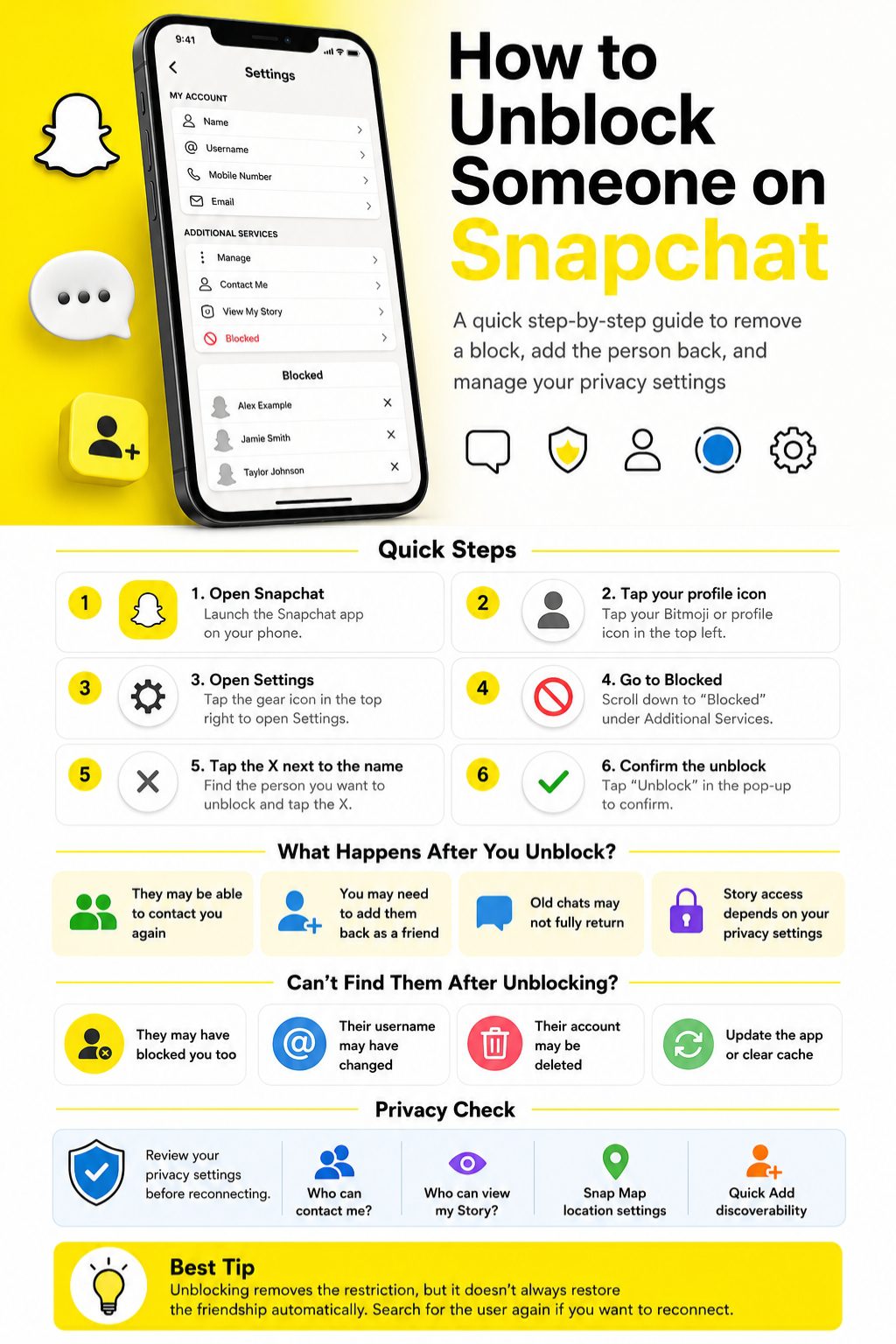
If you only need the fast version, open Snapchat, go to your profile, tap the Settings gear, scroll to Blocked, and tap the X next to the person’s name. Confirm the action, and that user will be removed from your blocked list.
This works on both iPhone and Android, although small layout changes may appear depending on your Snapchat app version. After unblocking, you may still need to add the person again before you can chat normally.
Unblocking someone does not always restore the old friendship, old chats, or a lost Snapstreak. It simply removes the block.
Fast Steps to Unblock Someone
- Open Snapchat.
- Tap your profile icon or Bitmoji.
- Tap the Settings gear.
- Scroll down and tap Blocked.
- Tap the X next to the person’s name.
- Confirm that you want to unblock them.
|
Step |
What to Do |
Why It Matters |
|
1 |
Open Snapchat |
You need the mobile app for the easiest process |
|
2 |
Go to your profile |
Settings are accessed from your profile page |
|
3 |
Open Settings |
The blocked list is inside account settings |
|
4 |
Tap Blocked |
This shows people you have blocked |
|
5 |
Tap X |
This removes the person from the blocked list |
|
6 |
Confirm |
Snapchat asks you to confirm before changing it |
What Blocking Someone on Snapchat Actually Does
Before you unblock someone, it helps to understand what blocking does. Blocking is stronger than removing a friend or muting notifications. It limits how that person can find you, contact you, and interact with your private Snapchat activity.
When someone is blocked, they usually cannot send you Snaps, start chats with you, or view your private Stories. They may also have trouble finding your profile from their account.
Still, Snapchat privacy has layers. Public content, friend settings, contact settings, and Story settings can all affect what someone can or cannot see.
Blocking Is Not the Same as Removing a Friend
Removing a friend takes someone off your friend list. Blocking goes further. It cuts off contact more strongly and makes your account harder for them to reach.
If you only want less interaction, removing or muting may be enough. If the person is bothering you, harassing you, or making you feel unsafe, blocking is the stronger choice.
Blocking Is Also Different from Reporting
Reporting is for harmful behavior. If someone is threatening you, impersonating someone, sending spam, or breaking Snapchat rules, reporting is more useful than simply blocking.
Blocking protects your space. Reporting alerts Snapchat that something may be wrong.
|
Action |
Best For |
What It Does |
|
Block |
Stopping contact |
Limits messages, profile access, and private Story access |
|
Remove Friend |
Ending a friend connection |
Takes them off your friend list |
|
Mute |
Reducing noise |
Stops alerts or Story updates without removing them |
|
Report |
Safety or rule violations |
Sends a concern to Snapchat for review |
How to Unblock on Snapchat on iPhone and Android
The steps to unblock on Snapchat are almost the same on iPhone and Android. Snapchat may move some settings around over time, but the blocked list is still found through the app’s Settings area.
The key is not to search for the person first. Many users make that mistake. If someone is blocked, they may not appear normally in search. Go to the blocked list instead.
Make sure your Snapchat app is updated if the option does not appear where expected.
How to Unblock on Snapchat on iPhone
Open Snapchat and tap your profile icon in the top-left corner. Then tap the gear icon to open Settings.
Scroll down until you find Blocked. Tap it, find the person’s name, tap the X next to it, and confirm the unblock action.
After that, go back to search if you want to add them again.
Read Also: How to Use Snapchat AI Effectively in 2026
How to Unblock on Snapchat on Android
Open Snapchat and tap your profile icon or Bitmoji. Tap the Settings gear, then scroll until you see Blocked.
Open the blocked list, find the account you want to unblock, and tap the X beside the name. Confirm the action when Snapchat asks.
Android menus can look slightly different based on device size and app version, but the path is usually very similar.
What the Confirmation Means
The confirmation step matters because it prevents accidental unblocking. Once you confirm, that person is no longer blocked from your account.
This does not always mean they are your friend again. It only means Snapchat has removed the block.
|
Device |
Path |
Extra Note |
|
iPhone |
Profile > Settings > Blocked > X |
Update the app if Blocked is missing |
|
Android |
Profile > Settings > Blocked > X |
Layout may vary slightly by app version |
|
Both |
Confirm unblock |
You may need to add the person again |
What Happens After You Unblock Someone on Snapchat?
After you unblock someone, they may be able to find you, send a friend request, send messages, or view certain content depending on your privacy settings. This is why unblocking should not be treated as a small change if the person was blocked for a serious reason.
Snapchat does not usually send a direct alert saying you unblocked them. But the person may notice if your profile appears again or if they can interact with you.
Think of unblocking as reopening the door. Whether the person can walk through that door depends on your friend status and privacy controls.
Does Snapchat Notify Them?
Snapchat does not normally send a notification when you unblock someone. They will not usually get a pop-up saying they have been unblocked.
Still, they may figure it out indirectly. For example, they may search your username and see your profile again.
Can They Message You Right Away?
That depends. If you are still friends, messaging may work more easily. If you are no longer friends, they may need to add you or wait for you to accept them.
Your Contact Me setting also matters. If your account allows only friends to contact you, unblocking alone may not open direct messaging.
Can They See Your Story?
If your Story is friends-only, they usually need to be your friend again. If you post public content, blocked and unblocked visibility can work differently from private Story visibility.
It is smart to check Story settings after unblocking someone.
|
After Unblocking |
What May Happen |
What Controls It |
|
They can search for you |
Possible |
Account status and privacy settings |
|
They can message you |
Depends |
Friend status and Contact Me setting |
|
They can view Stories |
Depends |
Story privacy and public content settings |
|
They are your friend again |
Not always |
You may need to add each other |
Do You Need to Add Someone Again After Unblocking?
In many cases, yes. Unblocking removes the restriction, but it may not fully restore the old connection. The person may not automatically return to your friends list.
This is one of the biggest points people miss. They unblock someone and expect the chat to return like nothing happened. Snapchat does not always work that way.
If you want to reconnect, search for the person’s username and send a friend request. If they need to accept it, you will have to wait.
Search by Username First
A Snapchat username is more reliable than a display name. Display names can change and many people use similar names.
If you remember the exact username, type it carefully. Even a small spelling mistake can show the wrong results.
Use Contacts or Snapcode
If you cannot remember the username, check your phone contacts if you have contact syncing enabled. You can also ask the person for their Snapcode.
A Snapcode is often easier than guessing a username.
Wait for Acceptance
If their privacy settings require mutual friendship, they may need to accept your request before full messaging works again.
Do not keep sending repeated requests if they do not respond. That can come across as pushy.
|
Reconnection Method |
Best Use Case |
Limitation |
|
Username search |
You know the exact username |
Typos can hide the account |
|
Display name search |
You remember their name |
Many users may have similar names |
|
Phone contacts |
Their number is saved |
Requires contact access |
|
Snapcode |
They share it with you |
You need the code first |
|
Friend request |
You want to reconnect |
They may need to accept |
Why You Can’t Find Someone After Unblocking Them
Sometimes you follow the steps correctly, but the person still does not appear. That does not always mean the unblock failed. There are several possible reasons.
The person may have blocked you too. They may have deleted their account. They may have changed their username. Snapchat may also need time to refresh search results.
Start with simple checks before assuming something is wrong.
They May Have Blocked You
If the other person blocked you, you may not be able to find or add them from your account. Unblocking them from your side does not remove their block on you.
This is common after arguments or privacy concerns.
Their Account May Be Deleted or Deactivated
If the account no longer exists, it will not show in normal search. A deleted or deactivated account can look similar to a blocked account from your side.
In that case, you cannot add them back unless they return to Snapchat.
The App May Need a Refresh
Close Snapchat and reopen it. Check your internet connection. Try switching between Wi-Fi and mobile data.
If the app is acting strangely, clear Snapchat’s cache. Snapchat says clearing cache can help with troubleshooting and does not delete Memories, Snaps, or Chats.
|
Problem |
Possible Reason |
What to Try |
|
User does not appear |
They blocked you |
You cannot fix this from your side |
|
Username not found |
Name changed or typed wrong |
Check spelling or ask for Snapcode |
|
Add button missing |
Privacy or account issue |
Try again later |
|
Settings not loading |
App glitch |
Restart app or clear cache |
|
Blocked list missing |
Old app version |
Update Snapchat |
Privacy Settings to Check After You Unblock Someone
This is the part many guides skip. Learning how to unblock on Snapchat is easy, but managing what happens afterward is more important.
If you unblock someone, check who can contact you, who can view your Story, who can see your location, and whether your account appears in friend suggestions.
These settings help you reconnect without giving away more access than you want.
Check Who Can Contact You
Go to Snapchat Settings and review Contact Me. If you only want friends to message you, keep the setting limited.
This is useful if you unblock someone but do not want random messages or unwanted calls.
Review Story Visibility
Check who can view your Story. Friends-only is safer for personal content. Custom settings give more control if you want to hide Stories from certain people.
Public content works differently, so do not assume private and public visibility are the same.
Review Snap Map and Location Sharing
Location is sensitive. If you do not want someone to see where you are, check Snap Map settings and use Ghost Mode.
Also review device-level location permissions. App settings and phone settings can both matter.
|
Privacy Area |
What to Check |
Why It Matters |
|
Contact Me |
Who can message or call you |
Prevents unwanted contact |
|
Story visibility |
Friends, custom, or public |
Controls who sees your posts |
|
Snap Map |
Location sharing and Ghost Mode |
Protects real-world privacy |
|
Find Friends |
Discoverability settings |
Controls how people find you |
|
Public Profile |
Public Story access |
Public content may be visible more widely |
What Happens to Old Chats, Snaps, and Snapstreaks?
Unblocking someone does not guarantee that everything goes back to the way it was. Old chats, saved messages, Snaps, and Snapstreaks have their own rules.
Snapchat messages often delete automatically unless they are saved or set to stay longer. That means some old content may not return after you unblock someone.
If a Snapstreak ended while the person was blocked, unblocking does not automatically restore it.
Old Chats May Not Come Back
Some chats may still appear if they were saved or still available. Others may be gone because of Snapchat’s deletion settings.
Do not unblock someone expecting a full chat history to return.
Saved Messages Depend on Chat Settings
Snapchat lets chats delete after viewing, after 24 hours, after 7 days, or never, depending on settings and conversation type.
If neither person saved a message, it may not be recoverable later.
Snapstreaks May Need Restore
If a streak ended, check whether Snapchat shows a Restore option beside the chat. If no restore option appears, the streak may have ended too long ago.
Unblocking someone is not the same as restoring a streak.
|
Item |
Does Unblocking Restore It? |
Notes |
|
Friendship |
Not always |
You may need to add each other again |
|
Old chats |
Not guaranteed |
Depends on saved and deletion settings |
|
Snaps |
Usually not |
Opened or expired Snaps may not return |
|
Snapstreak |
No automatic restore |
Look for Restore if eligible |
|
Story access |
Depends |
Controlled by privacy settings |
Unblock on Snapchat vs Unlock a Snapchat Account
These two phrases sound similar, but they mean very different things. This matters because many users search the wrong term and land on the wrong help page.
To unblock on Snapchat means you blocked another person and now want to remove that block. To unlock a Snapchat account means your own account has been locked and you want access back.
If you are trying to reconnect with a person, you need the blocked list. If you cannot log into your own account, you need account recovery or the official unlock process.
Unblocking a Person
This is done inside Snapchat Settings under Blocked. It changes your relationship with another account.
Use this when you blocked someone and want to reverse it.
Unlocking Your Own Account
This is different. A locked account may happen because of suspicious activity, rule violations, third-party apps, or security issues.
Snapchat warns users to use only legitimate account recovery or appeal options.
Why This Difference Matters
If your issue is with another user, do not waste time on account unlock pages. If your issue is login access, the blocked list will not help.
Use the right term and you will solve the problem faster.
|
Term |
Meaning |
Where to Go |
|
Unblock on Snapchat |
Remove someone from your blocked list |
Snapchat Settings > Blocked |
|
Unlock Snapchat account |
Regain access to your own account |
Snapchat account recovery or appeal |
|
Remove friend |
Take someone off your friends list |
Chat or profile options |
|
Report account |
Flag harmful behavior |
In-app report tools |
Safety Tips Before You Unblock Someone
Unblocking can be harmless if it was a mistake. But if you blocked someone for safety, stress, harassment, or unwanted attention, pause before changing it.
You do not owe anyone access to your Snapchat. Social apps should feel manageable, not stressful.
Before you unblock someone, think about why you blocked them in the first place. Then adjust privacy settings before restarting contact.
Ask Yourself Why You Blocked Them
Was it a misunderstanding, or was the person crossing a line? That difference matters.
If it was a simple mistake, unblocking is fine. If it involved threats, pressure, or harassment, keeping the block may be healthier.
Set Boundaries Before Reconnecting
You can unblock someone without giving them full access to your life. Keep location sharing off, limit Story visibility, and choose who can contact you.
Boundaries are easier to set before the conversation restarts.
Report Harmful Behavior When Needed
If someone sends threats, scams, spam, or abusive content, reporting may be the better step. Blocking alone may protect you, but reporting helps Snapchat review the behavior.
Do not engage with someone who makes you feel unsafe.
|
Situation |
Best Action |
Why |
|
Blocked by mistake |
Unblock |
Simple correction |
|
Minor disagreement |
Unblock if ready |
Reconnect only if comfortable |
|
Harassment |
Keep blocked or report |
Safety comes first |
|
Spam or scam |
Report and block |
Protects you and others |
|
Unwanted location access |
Use Ghost Mode |
Keeps your location private |
Common Mistakes When Trying to Unblock Someone
Most Snapchat unblock problems come from small misunderstandings. People search for the username first, expect old chats to return, or forget that privacy settings still control contact.
The process is simple once you know where to look. The blocked list is the key.
Avoid these mistakes and the process becomes much smoother.
Searching Before Checking the Blocked List
If someone is blocked, they may not show up the way a normal account does. Go to Settings first.
This saves time and avoids confusion.
Expecting Everything to Reset
Unblocking is not a full relationship reset. It does not promise restored chats, restored streaks, or automatic friendship.
Think of it as removing a restriction, not restoring history.
Ignoring Privacy Settings
If your privacy settings are strict, the person may still not be able to message you after being unblocked.
That can be a good thing if you want control. It can also confuse users who expect instant contact.
|
Mistake |
Why It Causes Confusion |
Better Move |
|
Searching the name first |
Blocked users may not appear |
Open Settings > Blocked |
|
Expecting old chats |
Messages may expire or delete |
Check saved chats only |
|
Assuming friendship returns |
Unblocking may not re-add them |
Send a friend request |
|
Ignoring privacy |
Contact may still be limited |
Review Contact Me and Story settings |
|
Mixing unblock and unlock |
These are different issues |
Use the correct help path |
Final Thoughts
Learning how to unblock on Snapchat is simple once you know where the option lives. Open your profile, go to Settings, tap Blocked, and remove the person from the list.
The bigger question is what happens next. You may need to add them again. They may need to accept your request. Old chats may not come back. A Snapstreak may not return unless Snapchat shows a restore option. Privacy settings also decide who can message you, view your Story, or see your location.
So yes, the button is easy. The choice deserves a little thought.
If you blocked someone by accident, unblock them and move on. If you blocked them because they made you uncomfortable, check your privacy settings first and do what protects your peace.
FAQs
Can I unblock someone on Snapchat after 24 hours?
Yes, if the person appears in your blocked list, you can unblock them from Settings. Snapchat does not usually require you to wait 24 hours to unblock someone.
Is there a limit to how many people I can unblock on Snapchat?
Snapchat does not clearly publish a normal user-facing daily unblock limit. If something does not work, wait a while, update the app, and try again.
Can I unblock someone who deleted their Snapchat account?
You may remove them from your blocked list if they still appear there. But if their account is deleted or unavailable, you may not be able to search for or add them again.
Can someone see my public Snapchat content if I blocked them?
Public content can work differently from private friend-only content. Review your Public Profile and Story settings if this matters to you.
Why did the person disappear from my blocked list?
They may have deleted their account, changed account status, or the app may not be loading properly. Restart Snapchat and check again.
Will unblocking someone bring back our Bitmoji friendship profile?
Not always. Friendship profiles depend on whether you are friends and what data or chat history is still available.
Can I unblock someone and block them again later?
Yes. If you change your mind or feel uncomfortable, you can block them again from their profile or friendship options.
Does unblocking someone restore their birthday, charms, or friend emojis?
Not automatically. Charms, emojis, and friendship features depend on your current friend status, interaction history, and Snapchat settings.
Can I unblock someone from another phone?
Yes, if you log into your Snapchat account on that phone. The blocked list belongs to your account, not only one device.
Why can someone still not send me Snaps after I unblock them?
Your Contact Me setting may allow only friends to contact you. They may need to add you again, or you may need to accept their request.
Can I unblock someone without adding them back?
Yes. Unblocking only removes the block. You do not have to add the person back unless you want to reconnect.
Should I unblock someone just to check their profile?
That depends on your reason for blocking them. If the person made you feel unsafe or pressured, it is better to keep the block and protect your privacy.