
You’re ready to post. The video looks good. The caption is done. Then Instagram refuses to show the song you want.
Maybe the Music sticker is gone. Maybe the audio says it’s not available in your region. Maybe your business account only shows odd background tracks instead of popular songs.
The instagram music not available issue is frustrating, but it’s usually not random. It often comes down to app bugs, account type, country restrictions, or music licensing.
The good news? You can fix many of these problems in a few minutes. This guide walks you through the real causes and the safest fixes.
Why Instagram Music Is Not Available
Instagram Music works through licensed music deals. That means Instagram does not own every song you see in the app. It gets permission from rights holders, and those permissions can change by country, account type, and content use.
So, two accounts can see different songs on the same phone. A personal account may show trending music. A business account may only show limited tracks. A song may work in one country but not another.
|
Problem |
What It Usually Means |
Best First Move |
|
Music sticker is missing |
App bug, old version, or feature limit |
Update Instagram |
|
Song says unavailable |
Regional music restriction |
Try another track |
|
Business account has fewer songs |
Commercial music limits |
Use approved music options |
|
Reels audio won’t load |
Cache or connection issue |
Clear cache |
|
Audio disappears after posting |
Song license changed or got removed |
Replace the audio |
|
Music works on one account only |
Account-level difference |
Check account type |
Music rights are the biggest reason
Most users think Instagram Music is just another app feature. It isn’t.
Every popular song has owners. Labels, publishers, artists, and rights groups may all be involved. Instagram needs the right licenses to show that music inside Stories, Reels, and other features.
That’s why one song may appear today and vanish next week. It’s also why a song may work for a casual Story but not for a brand video.
Country rules matter too
Instagram features can vary by country. Music is one of the most common examples.
A track may be licensed in the United States but not in Bangladesh. Another song may work in the U.K. but not in India. If Instagram does not have music rights for your region, you may see an error.
That doesn’t mean your phone is broken.
Business accounts face extra limits
If you manage a brand, shop, website, or service page, Instagram may limit your music library. This happens because business content can count as commercial use.
A personal birthday Story and a product promotion are not the same thing. Music rights treat them differently.
Quick Checks Before You Change Settings
Before you switch account type or reinstall the app, run a few quick checks. They help you find the real issue faster.
|
Quick Check |
Why It Helps |
|
Search another song |
Confirms if one track is blocked |
|
Try Stories and Reels |
Checks if only one feature is broken |
|
Test another account |
Shows if the problem is account-specific |
|
Change internet connection |
Rules out network trouble |
|
Update the app |
Fixes feature bugs |
|
Restart the phone |
Clears small system glitches |
Search for more than one song
Don’t test only one track.
Search for:
- A trending song
- An older song
- A local artist
- “Happy”
- “Calm”
- “Cinematic”
If some songs appear, Instagram Music is working. The missing song is likely blocked, removed, or unavailable for your account.
If no songs appear at all, the issue may be with the app, cache, region, or account type.
Check both Stories and Reels
Instagram Music appears in different places:
- Stories Music sticker
- Reels Audio tool
- Saved audio
- Original audio
- Profile music
- Direct message stickers
Sometimes one feature breaks while another works. For example, Reels audio may load fine, but the Music sticker may disappear from Stories.
Test both before you decide what to fix.
Instagram Music Not Available: Fixes to Try First
If you see instagram music not available, start with the simple steps. These fix many common issues without changing your account.
|
Fix |
Best For |
Difficulty |
|
Update Instagram |
Missing features and bugs |
Easy |
|
Restart the app |
Temporary loading errors |
Easy |
|
Restart your phone |
System or network glitches |
Easy |
|
Log out and back in |
Account sync issues |
Easy |
|
Clear cache |
Blank search or slow loading |
Medium |
|
Reinstall Instagram |
Persistent app problems |
Medium |
1. Update Instagram
Open the App Store or Google Play. Search for Instagram. If you see an update, install it.
Instagram changes Reels, Stories, stickers, templates, and audio tools often. An old version may not load the music library properly.
After updating:
- Close Instagram.
- Restart your phone.
- Open Instagram again.
- Create a test Story.
- Tap the sticker icon.
- Look for Music.
Then test Reels audio too.
2. Restart the app
Don’t just go back to the home screen. Close Instagram completely.
On iPhone, swipe up and close it from the app switcher. On Android, open recent apps and swipe Instagram away.
Then reopen the app and test music again.
This clears small loading errors.
3. Restart your phone
A phone restart can fix more than you think. It resets memory, refreshes network behavior, and clears small app conflicts.
It takes less than a minute, so try it early.
4. Log out and log back in
Sometimes your account session gets stuck.
Go to:
Profile > Menu > Settings and privacy > Log out
Then sign in again.
This may help if:
- You recently changed account type
- Music works on another phone
- Music works on another account
- Your app updated but the feature still does not show
Fix Instagram Music on Business and Creator Accounts
If Instagram Music works on your personal account but not on your business page, the account type is probably the reason.
|
Account Type |
Music Access |
Best For |
|
Personal |
Usually broad music access |
Casual users |
|
Creator |
Often better for public figures and creators |
Influencers, bloggers, artists |
|
Business |
Often more limited music access |
Brands, shops, service pages |
|
Business with approved music |
Safer for promotions and ads |
Campaigns and product content |
Should you switch to a Creator account?
You can switch account type inside Instagram settings.
Go to:
Profile > Menu > Settings and privacy > Account type and tools > Switch account type
Then choose Creator or Personal if it fits your real use.
This may bring back more songs for some users. But don’t switch only to bypass music limits if you run a business page.
Why business pages need caution
Popular songs are often licensed for personal use inside apps. That does not always mean a brand can use them for promotion.
If your Reel sells a product, promotes a service, highlights a campaign, or supports a sponsored post, treat it as commercial content.
Use safer options instead:
- Meta Sound Collection
- Approved ad music tools
- Original voiceover
- Royalty-free licensed music
- Sounds you recorded yourself
- Music your brand has licensed
When switching account type makes sense
Switching may work well if you are:
- A personal creator
- A blogger
- An artist
- A public figure
- A coach or educator posting non-ad content
- Someone who does not rely on shopping or business tools
Read Also: How to Repost Instagram Stories with Credit
When switching is not worth it
Avoid switching if you need:
- Instagram Shopping
- Business contact buttons
- Ad tools
- Brand analytics
- Product promotion features
- Agency management tools
- Commercial campaign workflows
Losing useful business tools just to access a few songs may not be a smart trade.
Fix Region Restrictions
Region restrictions are one of the most common reasons behind missing Instagram Music.
If a song is not licensed in your country, Instagram may block it. You may see a message like “This song is not available in your region.”
|
Region Issue |
What It Means |
Best Fix |
|
One song blocked |
Track lacks local license |
Choose another song |
|
Many songs missing |
Music library is limited in your region |
Use original or approved audio |
|
Music vanished after travel |
Location signals changed |
Log out, update, and wait |
|
VPN causes weird results |
Instagram sees mixed location data |
Turn VPN off |
|
Followers can’t hear audio |
Song blocked in their region |
Use more universal audio |
Don’t depend on VPN tricks
Many online tips say, “Use a VPN.” That may work for some users for a short time, but it’s not reliable.
A VPN can confuse Instagram because your account may send mixed signals:
- Your IP says one country
- Your SIM says another
- Your app store says another
- Your past login history says another
For creators and businesses, this is risky. Even if the song appears for you, your audience may still not hear it.
Pick music your audience can access
If your followers come from several countries, choose safer audio.
Good options include:
- Original audio
- Voiceover
- Natural background sound
- Royalty-free music
- Meta Sound Collection
- Licensed music with clear usage rights
This is a better plan for global pages, publishers, brands, and travel creators.
Clear Cache or Reinstall Instagram
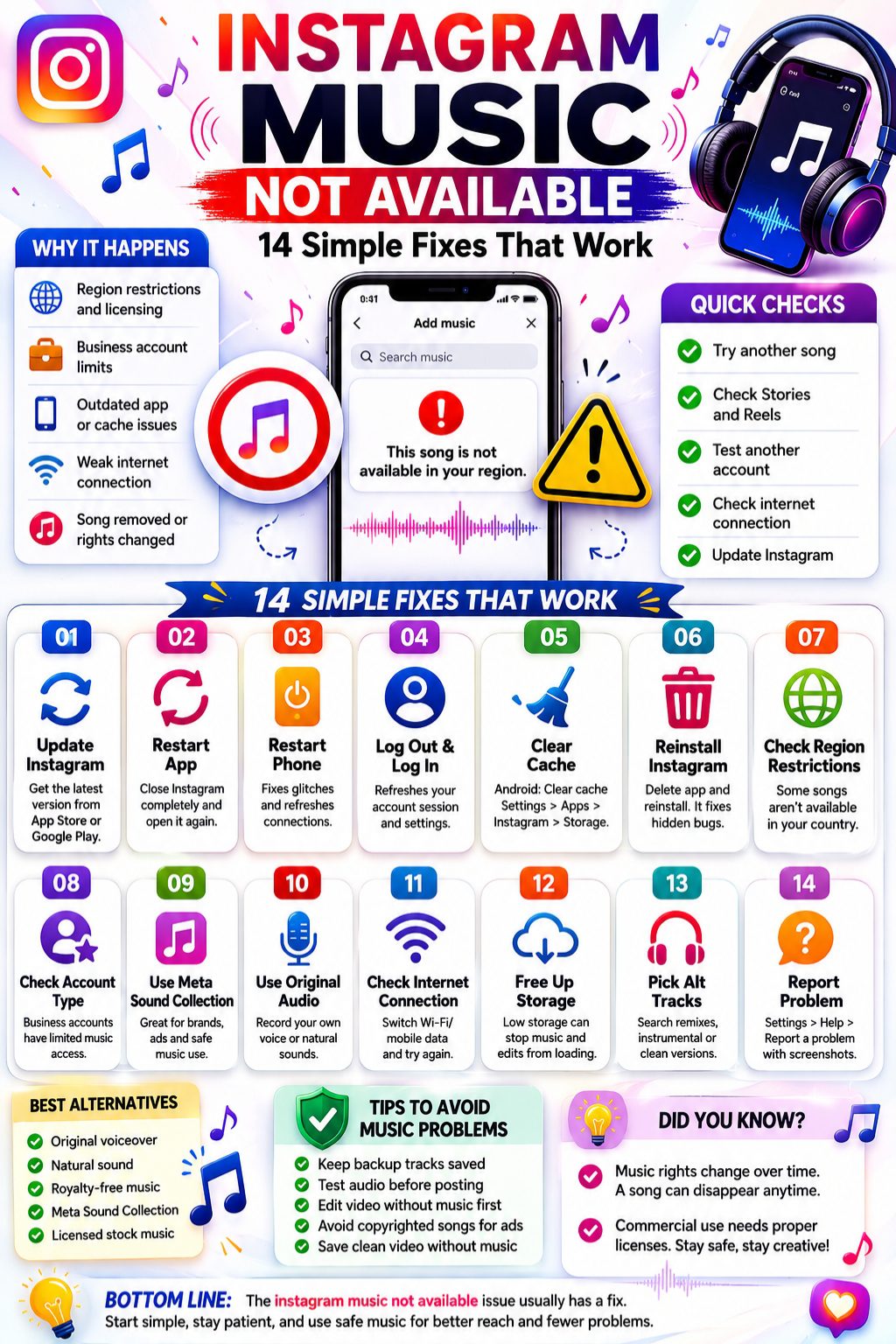
If your account type and region look fine, the app may be the problem.
Instagram stores temporary files on your phone. These help the app load faster. But old cache can also break audio search, stickers, uploads, and Reels tools.
|
Device |
Best Fix |
|
Android |
Clear Instagram cache |
|
iPhone |
Delete and reinstall Instagram |
|
Low-storage phone |
Free space and restart |
|
Repeated crashes |
Reinstall the app |
|
Music search keeps spinning |
Clear cache and switch network |
Clear Instagram cache on Android
Follow these steps:
- Open Settings.
- Tap Apps.
- Choose Instagram.
- Tap Storage or Storage & cache.
- Tap Clear cache.
- Reopen Instagram.
Avoid tapping Clear data unless you are ready to log in again.
Reinstall Instagram on iPhone
iPhone does not offer a simple cache button for Instagram.
Use this method:
- Press and hold the Instagram app.
- Tap Remove App.
- Tap Delete App.
- Restart your iPhone.
- Reinstall Instagram from the App Store.
- Log in again.
This does not delete your Instagram account. Your posts, followers, messages, and profile stay online.
Free up phone storage
If your phone is almost full, Instagram may struggle to load music, videos, drafts, and audio previews.
Delete large videos, unused apps, and old downloads. Then restart your phone and test the Music sticker again.
What to Do When One Song Is Missing
Sometimes Instagram Music works, but one specific song does not appear. That usually means the track is restricted, removed, or unavailable for your account.
|
Song Problem |
Likely Reason |
What to Do |
|
One song missing |
License issue |
Search another version |
|
Song plays but can’t be used |
Reuse is restricted |
Pick another audio |
|
Reel audio says unavailable |
Track removed or blocked |
Replace the sound |
|
Popular tracks missing |
Business account limit |
Use approved music |
|
Audio gets muted |
Copyright issue |
Replace with safe audio |
Search alternate versions
Try searching for:
- Song title
- Artist name
- Remix
- Clean version
- Instrumental version
- Cover version
- Audio from another Reel
Sometimes the original track is missing, but another version works.
Replace muted audio
If Instagram removes or mutes your audio, don’t keep reposting the same clip with the same song.
Use:
- A track from your available Instagram library
- Original voiceover
- Royalty-free music
- Meta Sound Collection
- Natural sound from your video
This saves time and lowers the chance of repeat issues.
Safe Music Options for Reels and Stories
If Instagram Music still doesn’t work, your content can still perform well.
Music helps, but it’s not everything. Strong hooks, clean edits, captions, voiceover, and natural sound can carry a Reel.
|
Option |
Best For |
Risk Level |
|
Original voiceover |
Tutorials, explainers, reviews |
Low |
|
Natural sound |
Travel, food, events |
Low |
|
Meta Sound Collection |
Brand and ad content |
Low |
|
Licensed stock music |
Business videos |
Low if license is clear |
|
Trending Reels audio |
Creator content |
Medium |
|
Popular copyrighted songs |
Brand promotions |
Higher risk |
Use your own voice
Voiceover is one of the safest and strongest options.
It works well for:
- Tutorials
- Product demos
- News explainers
- Travel videos
- Food clips
- Reviews
- Behind-the-scenes posts
It also makes your content feel more personal.
Use natural sound
Natural audio can feel more real than music.
Think of:
- Rain
- Street noise
- Coffee pouring
- Keyboard typing
- Crowd sound
- Cooking sounds
- Ocean waves
- Product packaging
This works well for lifestyle, food, travel, and event content.
Use Meta Sound Collection
Meta Sound Collection gives creators and businesses access to safer music and sound effects for Facebook and Instagram.
It may not always have viral chart songs. But it is a smart choice for brand Reels, paid content, product posts, and ads.
How to Stop Instagram Music Problems Later
You can’t control every song license. But you can build a safer posting workflow.
|
Tip |
Why It Helps |
|
Keep Instagram updated |
Prevents app bugs |
|
Save working audio |
Makes posting faster |
|
Keep backup tracks |
Helps when one song disappears |
|
Use original audio often |
Reduces copyright trouble |
|
Avoid risky songs for ads |
Protects brand content |
|
Test audio before posting |
Catches errors early |
|
Save clean video files |
Lets you replace music fast |
Build a backup music list
Save 10 to 20 tracks that work on your account.
Group them by mood:
- Funny
- Calm
- Fast
- Emotional
- Travel
- Fitness
- Product demo
- News
- Luxury
- Cinematic
This helps when Instagram suddenly removes a song you planned to use.
Keep a no-music version of your video
Always save a clean video without music.
If Instagram blocks your chosen song, you can quickly add another track without editing the whole video again.
This is especially useful for creators, publishers, and brand pages that post often.
Final Thoughts
The instagram music not available problem can be annoying, but it usually has a clear cause. Start with the basics. Update Instagram. Restart your phone. Try another song. Clear the cache. Reinstall the app if needed.
If you run a business page, be extra careful. Popular songs may not be safe for promotions, ads, or product content. Use Meta Sound Collection, approved ad music, original audio, or properly licensed tracks instead.
Instagram Music can make your Reels and Stories more engaging. But music rights still matter. Once you understand that, fixing the issue becomes much easier.
Uncommon FAQs About Instagram Music Not Available
|
Question |
Quick Answer |
|
Why does my friend have a song I don’t? |
Your region, account type, or rollout may differ |
|
Can business accounts use trending songs? |
Not always; commercial rights may apply |
|
Does VPN fix Instagram Music? |
It’s unreliable and risky for brands |
|
Why did old Story music stop playing? |
The song may no longer be licensed |
|
Will reinstalling delete posts? |
No, your account stays online |
Why does Instagram Music work on one account but not another?
Instagram may treat accounts differently. Your account type, region, age settings, app version, and music-library access can all affect what you see.
Why are only unknown songs showing on my business account?
That often happens because business accounts have limited access to popular music. Instagram may show safer tracks instead of mainstream songs.
Can I switch from Business to Creator to get music back?
Yes, it may help. But only switch if it fits your account. If you use the account for business promotion, you still need proper music rights.
Why can I hear a song but not use it?
Listening and reusing are different. Instagram may let you hear a track in someone else’s Reel but block you from using it in your own post.
Why did Instagram remove music from my old Reel?
The song may have been removed, blocked, or restricted after you posted. Music rights can change over time.
Is Instagram Music missing because I’m shadowbanned?
Usually, no. Missing music is more often tied to licensing, account type, region, app bugs, or cache problems.
Can I add music to Instagram ads?
Yes, but only use music that is approved inside Meta’s ad tools or music your brand has licensed. Don’t assume every organic Reel song is safe for ads.
Does deleting Instagram delete my account?
No. Deleting the app only removes it from your phone. Your profile, followers, posts, and messages remain on Instagram.
Why does Instagram Music disappear after travel?
Your phone, SIM, IP address, app store country, and account history may send mixed location signals. Update the app, log out, log back in, and wait for things to settle.
What if Instagram Music still doesn’t work?
If you tried every fix and still see the same error, the issue may be a licensing or rollout limit. Use original audio, Sound Collection, or another approved track.