
Reposting a Story looks simple until you start wondering, “Am I allowed to share this?” or “Will the original creator get proper credit?” That small tap can either build trust or make someone feel like their content was taken without care.
If you want to repost instagram stories, the safest way is to use Instagram’s built-in sharing tools, keep the original username visible, and ask permission when the content feels personal, private, sensitive, or commercial. This matters even more for brands, creators, influencers, and social media managers who use Stories for engagement, customer proof, or community building.
Instagram Stories are temporary by design. Regular Stories disappear from Feed, profile, and Direct after 24 hours unless the creator adds them to Highlights. That makes reposting fast, but speed should not replace credit or consent. Instagram also gives users sharing controls, so not every Story can or should be reshared.
This guide explains how Story reposting works, how to credit creators properly, what to do when you are not tagged, and what mistakes to avoid.
What Does It Mean to Repost Instagram Stories?
To repost an Instagram Story means sharing someone else’s Story to your own Story. It may be a customer review, a creator tip, a friend’s update, an event moment, or a public post you want your followers to see.
The cleanest repost happens inside Instagram. When the app gives you a native repost or sharing option, it usually keeps the original account attached. That helps viewers know where the content came from.
A repost is not the same as downloading, screen recording, cropping, and uploading someone’s content as your own. That can remove context and make the post look like original content from your account.
|
Item |
What It Means |
Credit Risk |
|
Tagged Story repost |
Sharing a Story where someone mentioned you |
Low if username stays visible |
|
Public Story reshare |
Sharing a public Story through Instagram’s tool |
Low to medium |
|
Screenshot repost |
Uploading a captured Story manually |
Medium to high |
|
Screen recording |
Recording and uploading a video Story |
High if permission is missing |
|
Third-party repost app |
Using an outside tool to repost |
Depends on app safety and attribution |
Why Credit Matters When You Repost Instagram Stories
Credit is not just a nice extra. It tells your audience who created the original content. It also sends profile visits, recognition, and possible engagement back to the person who posted it first.
For casual users, credit keeps things respectful. For brands, it protects reputation. Nobody wants a customer, photographer, or creator saying, “You used my Story without asking.”
Clear credit also makes the repost more useful. Viewers can tap the username, follow the creator, check the original context, or understand why the Story matters.
Reposting Is About Trust, Not Just Sharing
I’d treat every repost like borrowing someone’s words in public. You may be allowed to share it, but you still want the original person to feel respected.
This is especially true when the Story includes faces, children, private locations, personal opinions, customer reviews, health details, or paid creator work.
Can You Repost Any Instagram Story?
No, you cannot safely repost every Instagram Story. Some Stories are easy to reshare because the creator tagged you. Some public Stories may show a reshare option. Private Stories need more care.
Instagram lets users manage who can share their Stories. The official settings include controls under Sharing and reuse, where users can choose who can share Stories to Stories or turn that sharing off.
Instagram has also expanded public Story resharing in some cases, letting users share public Stories even when they were not tagged. Still, availability can vary by account, region, app version, and privacy settings.
|
Story Type |
Can You Repost It? |
Best Practice |
|
You are tagged |
Usually yes |
Use Add to Your Story |
|
Public Story |
Sometimes yes |
Use Instagram’s reshare option if available |
|
Private Story |
Avoid without permission |
Ask first |
|
Sensitive Story |
Be careful |
Get clear approval |
|
Expired Story |
No native repost |
Ask creator to repost or send it |
|
Disabled sharing |
No |
Respect the setting |
Stories You Are Tagged In
This is the easiest repost method. When someone mentions your username in their Story, Instagram can notify you through Direct Messages. Their username is visible in the Story, and people who can see it can tap through to the mentioned profile.
Usually, you will see an option such as Add to Your Story. Tap it, edit your Story, and share it.
Still, the option may not appear if the creator has disabled sharing, the Story expired, or the account settings block resharing.
Public Stories You Are Not Tagged In
Instagram’s public Story reshare feature makes it easier to repost instagram stories without screenshots. But the option may not appear for every user, every region, or every account at the same time.
If the Story is public and the creator allows sharing, you may see a repost or share option. Use that instead of taking screenshots.
If the option is missing, do not force it. Ask the creator to tag you or send a quick permission message.
Private Account Stories
Private Stories are different. A private account limits who can see its content. Even if you follow that person, it does not mean they want their Story shown to your audience.
Ask before sharing. A simple “Can I repost this and tag you?” is enough in most cases.
How to Repost Instagram Stories When You Are Tagged
When someone tags you, Instagram gives you the smoothest path. It keeps the repost inside the app and usually preserves the creator’s handle.
This is the method Instagram users should try first. It is simple, clear, and less likely to create credit problems.
Before posting, check the layout. Make sure the creator’s username is easy to see. Do not cover it with stickers, polls, captions, link buttons, or GIFs.
|
Step |
Action |
Why It Matters |
|
1 |
Open Instagram DMs |
Tagged Story alerts usually appear there |
|
2 |
Tap Add to Your Story |
Opens the Story editor |
|
3 |
Add short context |
Helps your audience understand the repost |
|
4 |
Keep credit visible |
Protects creator recognition |
|
5 |
Share to Story |
Publishes it to your audience |
Step 1: Open Your Instagram Direct Messages
Open Instagram and go to your Direct Messages. If someone tagged you in a Story, you will usually find the mention notification inside your chat with that person.
Do not wait too long. Stories normally disappear after 24 hours unless saved to Highlights. Once the Story expires, the quick repost option may disappear too.
Step 2: Tap Add to Your Story
Tap the Add to Your Story option. Instagram will open the Story editor and place the original Story inside your Story screen.
You can resize it, move it, add text, add stickers, or add your reaction. Keep it clean. The goal is to share the original post, not bury it under clutter.
Step 3: Add Your Own Context
A repost works better when you add a reason. You can say:
“Thanks for sharing this.”
“Loved this moment.”
“Great tip from @username.”
“Customer love from @username.”
“Useful reminder for anyone planning this.”
Short context makes the repost feel intentional.
Step 4: Keep the Original Credit Visible
Instagram often links back to the original account in the repost. Do not hide it.
Place your text around the username. If the Story is busy, add a small credit line in a visible corner. The creator should not have to zoom in to find their name.
Step 5: Publish to Your Story
Once the Story looks clean, share it to Your Story, Close Friends, or another available audience option.
For brands, I’d also recommend replying to the original Story with a thank-you message. It is a small step, but it makes the creator feel seen.
How to Repost Instagram Stories With Credit If You Are Not Tagged
This is where many people get stuck. You see a great Story, but your name is not mentioned. Can you still share it?
In 2026, the answer may be yes for some public Stories, depending on account settings and feature availability. Instagram has been moving toward more native resharing options because native tools keep credit attached better than manual reposts.
Still, availability can vary. If your app does not show the option, ask permission.
|
Method |
Best For |
Credit Quality |
|
Native public reshare |
Public Stories with sharing enabled |
Strong |
|
Ask creator to tag you |
Brand mentions, events, creator posts |
Strong |
|
Ask permission and upload manually |
Special cases only |
Depends on your credit |
|
Screenshot without asking |
Not recommended |
Weak |
|
Third-party repost tool |
Use with caution |
Varies |
If a public Story shows a reshare option, use it. That is the cleanest route when you are not tagged.
This keeps the repost inside Instagram and helps preserve attribution. It is also better for the creator because viewers can still identify the source.
Read Also: How to Hide Likes on Instagram Posts in 2026
Option 2: Ask the Creator to Tag You
This is my favorite method for brands and professionals. Send a short DM:
“Love this Story. Would you mind tagging us so we can reshare it with credit?”
This keeps everything clean. It also gives the creator control.
Option 3: Ask Permission Before Manually Sharing
Manual reposting means you take a screenshot, download, or record the content and then upload it yourself. Use this only when you have permission.
Ask clearly. Then credit clearly.
A good permission message can be:
“Hi, we loved your Story. Can we repost it on our Story and tag you as the creator?”
For business use, save the approval. It may help later if there is confusion.
The Right Way to Give Credit on an Instagram Story Repost
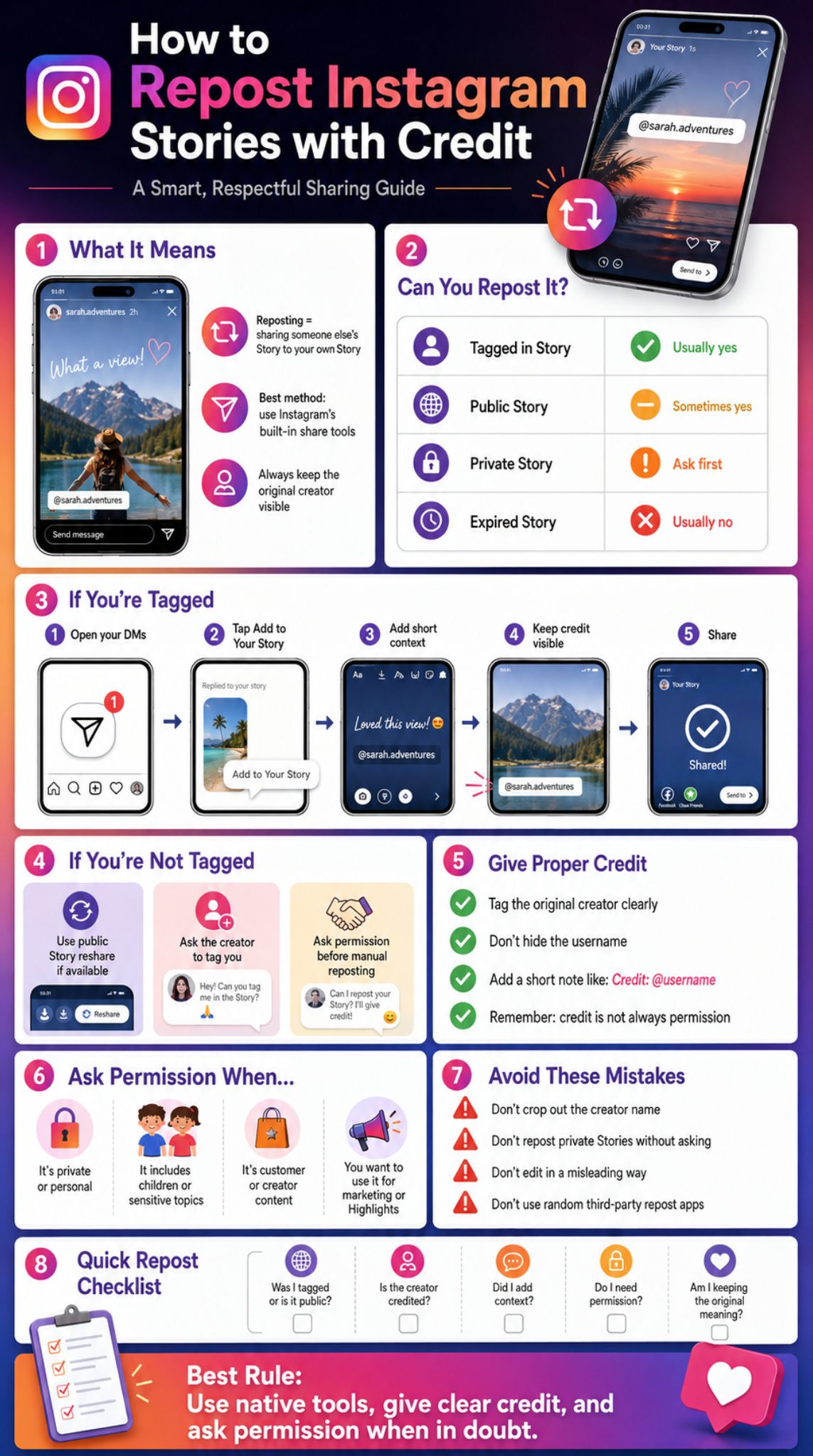
Credit should be visible, honest, and easy to tap. Do not make it tiny. Do not hide it behind a sticker. Do not place it where the Story interface covers it.
A proper credit line is simple. Mention the creator’s username and, when possible, use Instagram’s tag sticker or text mention.
Instagram users can mention someone in a Story by typing @ followed by the username and selecting the person. That mention creates a tappable path to the person’s profile.
|
Credit Style |
Example |
Best Use |
|
Simple credit |
Credit: @username |
General reposts |
|
Friendly credit |
Loved this from @username |
Casual Stories |
|
Brand credit |
Shared with permission from @username |
Customer content |
|
Creator credit |
Original Story by @username |
Creator work |
|
Event credit |
Captured by @username |
Event moments |
Tag the Original Creator Clearly
Use the creator’s handle in a visible place. If the Story is from a photographer, artist, creator, customer, or business partner, credit them by username.
For example:
Credit: @username
Shared from @username
Original Story by @username
Thanks for sharing, @username
Do not use vague credit like “source: Instagram.” That tells viewers nothing.
Do Not Hide the Username
Some people add a tag but make it tiny, move it off-screen, or hide it behind a sticker. That is not real credit.
If viewers cannot see or tap the creator’s name, the credit is mostly useless.
Add Context Instead of Copying Blindly
A repost without context can feel random. A short line helps your audience understand why you shared it.
Try:
“Helpful tip from @username.”
“Our customer @username shared this today.”
“Great event moment from @username.”
“Worth saving this reminder from @username.”
Credit Is Not Always Permission
This is the part many people miss. Credit and permission are not the same.
Credit tells people who made the content. Permission means the creator agreed to let you use it.
For personal, private, commercial, or sensitive content, ask first.
When Should You Ask Permission Before Reposting Instagram Stories?
Ask permission whenever the Story feels personal, private, or useful to your business. This is not about being scared. It is about being professional.
Instagram’s terms make it clear that users keep ownership of the content they post. The platform may have a license to host and display content, but that does not mean another user or brand can freely use someone’s Story however they want.
That means credit is smart, but permission is safer.
|
Situation |
Permission Needed? |
Why |
|
Customer product photo |
Yes |
It may be used as brand proof |
|
Private party Story |
Yes |
Audience was limited |
|
Child in Story |
Yes |
Sensitive personal content |
|
Creator artwork |
Yes |
Intellectual property risk |
|
Paid partnership content |
Yes |
Commercial and disclosure issues |
|
Public meme |
Still be careful |
Original source may be unclear |
|
Tagged brand mention |
Usually smart |
Builds trust with customer |
Ask Permission for User-Generated Content
User-generated content is powerful for brands. A customer wearing your product or reviewing your service can build trust fast.
But that customer did not automatically agree to be part of your marketing. Ask before reposting, especially if you plan to save the Story to Highlights.
Ask Permission for Private or Sensitive Content
Be careful with weddings, family events, children, health topics, workplace content, political opinions, personal losses, or emotional moments.
A Story may feel casual to the poster, but your repost can push it to a much bigger audience.
Ask Permission Before Using a Repost for Marketing
There is a difference between saying “thanks for the mention” and using someone’s Story to sell a product.
If the repost supports a campaign, testimonial, launch, offer, or ad, ask first.
Ask Permission Before Saving It to Highlights
A normal Story disappears after 24 hours. A Highlight can stay on your profile for months or years.
If you want to keep someone’s Story in a Highlight, get approval.
What Not to Do When You Repost Instagram Stories
Bad reposting usually comes down to one thing: treating someone else’s content like free material.
That can annoy creators, confuse viewers, and make a brand look careless. It can also create copyright or privacy problems.
A safe rule is simple: post content you created yourself, content you have permission to use, or content Instagram clearly allows you to reshare through its own tools.
|
Mistake |
Why It’s a Problem |
Better Choice |
|
Covering creator name |
Removes credit |
Keep handle visible |
|
Cropping Story heavily |
Changes context |
Share native repost |
|
Reposting private Story |
Breaks trust |
Ask permission |
|
Using content in ads |
Commercial risk |
Get written approval |
|
Using unknown repost apps |
Privacy risk |
Use Instagram tools |
|
Removing watermark |
Looks dishonest |
Keep creator identity |
Do Not Remove or Cover the Original Creator’s Name
This is the fastest way to upset someone. If the creator’s name is hidden, your repost can look like your own content.
Even if you did not mean harm, the effect is bad.
Do Not Repost Private Stories Without Permission
Private content is shared with selected people. Your repost may expose it to people the creator never intended.
When in doubt, ask.
Do Not Edit the Story in a Misleading Way
Do not crop a Story to change the meaning. Do not add text that makes it look like the creator endorsed something they did not endorse.
This matters for brands, news pages, political content, reviews, and creator partnerships.
Do Not Use Someone’s Content in Ads Without Approval
A Story repost is not the same as an ad license. If you want to use someone’s content in paid promotion, get clear permission.
A DM may be fine for a simple Story repost, but ads usually need more formal approval.
Do Not Depend on Random Third-Party Apps
Some repost apps may ask for account access or login details. That can create security issues.
Use Instagram’s native tools when possible.
Why Can’t I Repost Instagram Stories? Common Problems and Fixes
Sometimes the repost button just does not appear. That does not always mean Instagram is broken.
The cause may be privacy settings, expired Stories, disabled resharing, account type, app version, or feature rollout. Instagram’s settings let users limit or turn off Story sharing, so respect that if the option is unavailable.
|
Problem |
Likely Reason |
Fix |
|
No Add to Story button |
You were not tagged |
Ask creator to tag you |
|
Story disappeared |
24-hour limit passed |
Ask creator to repost |
|
Public Story won’t share |
Sharing disabled |
Respect setting or ask |
|
Private account Story |
Account privacy |
Ask permission |
|
App looks different |
Feature rollout or update issue |
Update Instagram |
|
Tag not tappable |
Mention may be wrong |
Ask creator to check username |
You Were Not Tagged in the Story
If you were not mentioned, the traditional Add to Your Story option may not appear.
Try the public reshare option if the Story is public. If that is not available, ask the creator to tag you.
The Account Is Private
Private accounts have stronger sharing limits. Even if you follow them, you should not assume you can share their Story.
Ask first.
The Creator Turned Off Sharing
Instagram lets users control Story sharing. If they turned it off, take the hint.
You can still ask, but do not pressure them.
The Story Expired
Stories normally disappear after 24 hours unless added to Highlights. If the Story is gone, you cannot use the original repost option.
Ask the creator to repost it, send it, or tag you again.
Your Instagram App Is Outdated
Update the app. Then close and reopen Instagram.
If the feature still does not show, it may not be available to your account yet.
Repost Instagram Stories: Best Practices for Brands and Creators
If you manage a brand page, reposting Stories can be a smart way to show real people using your product, visiting your event, or talking about your service.
Instagram remains one of the world’s largest social platforms. Its large global audience makes Story reposting useful for community building, customer proof, event promotion, and creator partnerships.
That reach makes reposting useful. It also makes careless sharing more visible.
|
Goal |
Repost Strategy |
Extra Tip |
|
Build trust |
Share customer Stories |
Ask permission |
|
Show community |
Repost event moments |
Tag people clearly |
|
Support creators |
Reshare useful tips |
Add creator credit |
|
Drive engagement |
Add polls or questions |
Keep it relevant |
|
Save social proof |
Use Highlights |
Get approval first |
Use Reposts to Build Social Proof
Customer Stories can show real use. They feel more natural than polished ads.
A reposted Story can show a product in someone’s home, a meal at a restaurant, a travel moment, or a real event experience.
Create a Simple Permission Workflow
Brands should keep the process simple:
Ask permission in DM.
Thank the creator.
Tell them where you will share it.
Tag them visibly.
Do not change the meaning.
Save approval if it is commercial content.
This protects both sides.
Keep a Consistent Credit Style
Use the same credit format across your Stories. For example:
Shared with permission from @username
Customer Story from @username
Original post by @username
Consistency makes your brand look more professional.
Know When Not to Repost
Not every mention deserves a repost. Skip content that is blurry, off-brand, controversial, private, low-quality, or confusing.
Your Story feed should still feel curated.
Quick Checklist Before You Repost Instagram Stories
Before you tap share, pause for ten seconds. That quick check can save you from awkward DMs later.
This is especially important for business accounts, media pages, public figures, influencers, and agencies. A messy repost may look small, but it can damage trust.
Use this checklist every time you repost instagram stories, especially when the content came from a customer, creator, or private person.
|
Question |
Yes Means |
No Means |
|
Is the Story public or are you tagged? |
Safer to share |
Ask permission |
|
Is creator credit visible? |
Good attribution |
Fix before posting |
|
Did you add context? |
Better engagement |
Add a short line |
|
Is the content sensitive? |
Ask first |
Do not rush |
|
Are you saving it to Highlights? |
Get approval |
Share only for 24 hours |
|
Is it for marketing? |
Permission needed |
Avoid commercial use |
|
Does the repost change meaning? |
Risky |
Keep original context |
A Fast Rule That Works
If it is casual and you are tagged, repost with visible credit.
If it is public but you are not tagged, use Instagram’s native reshare tool if available.
If it is private, personal, or commercial, ask first.
Make the Creator Feel Good About the Repost
The best reposts make creators happy they shared with you. Tag them clearly, thank them, and do not make their content look like yours.
That is how you turn a simple repost into a better relationship.
Final Thoughts
The best way to repost instagram stories is not complicated. Use Instagram’s native tools, keep the original creator visible, add useful context, and ask permission when the content is personal or commercial.
A repost should feel like appreciation, not content grabbing. That is true for friends, creators, brands, agencies, and media pages.
If you are tagged, use Add to Your Story. If you are not tagged, look for the public reshare option or ask the creator to tag you. If you want to use someone’s Story for marketing, Highlights, ads, or testimonials, get clear approval first.
Good credit is simple. Good permission is even better. Together, they make Story reposting safer, cleaner, and more respectful.
Frequently Asked Questions About Repost Instagram Stories
Can someone see if I repost their Instagram Story?
If you use Instagram’s native repost or mention-based sharing, the creator may see your interaction, mention, or Story view depending on their settings and the way you reposted it. If you manually screenshot and upload, Instagram may not send the creator a repost notification, which is why clear credit matters.
Can I repost an Instagram Story after 24 hours?
Usually no, because regular Stories disappear after 24 hours unless the creator adds them to Highlights. If the Story has expired, ask the creator to repost it, tag you again, or send the original content with permission.
Can I repost a Story to my Highlights?
You can save your own Story to Highlights, but using someone else’s Story in your Highlight needs more care. Since Highlights can stay visible much longer than 24 hours, ask permission before saving customer, creator, or private content.
Is it okay to repost a customer review from Instagram Stories?
Yes, but a brand should ask permission first. A customer review can become marketing material once your business shares it, so credit the customer clearly and avoid changing the meaning.
Why can my friend repost my Story but someone else cannot?
Your Story sharing settings may limit who can reshare your Stories. Instagram allows users to manage sharing and reuse settings, including options for who can share Stories to Stories.
Can I repost a Story with music?
Sometimes the repost may not carry the same audio, or the music may be limited by region, licensing, or account type. If music disappears after reposting, use Instagram’s available music tools or share the Story without trying to force the original audio.
Should I tag the creator even if Instagram already shows their username?
Yes, it is a good habit. If the original username is already visible, keep it visible. You can also add a short credit line if the Story is important, commercial, or creator-made.