
One person keeps watching your posts. Someone sends weird messages. A stranger comments too much. An ex keeps showing up. Or maybe you just want someone off your profile without making it a big thing.
That’s when it helps to know how to block on TikTok silently.
Here’s the good part: TikTok does not send a notification when you block someone. They won’t get a pop-up saying, “You’ve been blocked.” But that doesn’t mean they’ll never notice. If they search for your account, try to message you, or check your videos, they may figure it out.
So the goal is simple. Block them quietly. Avoid leaving clues. Then fix your privacy settings so they can’t keep reaching you through comments, DMs, mentions, tags, or another account.
This guide breaks it down in plain English.
Why People Want to Block Someone on TikTok Quietly
TikTok feels casual, but it can get personal fast.
People use it to post daily moments, follow creators, send messages, search for advice, react to videos, and stay connected. So when someone unwanted keeps showing up, it can feel uncomfortable.
You might want to block someone because they’re annoying. Or creepy. Or rude. Or too familiar. You might not even have a “big” reason.
That’s fine.
You don’t owe everyone access to your online life.
|
Reason for Blocking |
What Usually Happens |
Best Extra Setting |
|
Someone keeps commenting |
They appear under many posts |
Limit comments or filter keywords |
|
Someone sends unwanted DMs |
They keep entering your inbox |
Restrict direct messages |
|
A stranger keeps watching |
Their attention feels invasive |
Turn off profile view history |
|
An ex checks your posts |
You want distance |
Block and go private |
|
A spam account follows you |
It may post links or scams |
Block and report |
|
Someone uses multiple accounts |
One block may not stop them |
Tighten all privacy settings |
Blocking Is Not Rude
A lot of people feel guilty about blocking.
Don’t.
Blocking is not an attack. It’s a boundary. TikTok gives you the tool for a reason.
You get to choose who can view your videos, follow you, comment, message you, tag you, or show up in your space. If someone makes the app stressful, you can remove their access.
No speech needed. No warning needed. No dramatic exit.
Just block and breathe.
A Silent Block Can Still Be Noticed
TikTok won’t notify the person. That part is true.
But they may still notice later.
They might suspect it if:
- Your profile no longer appears in search
- They can’t message you
- Your videos disappear from their view
- They can’t follow you
- They can’t comment on your posts
- A mutual friend can still see your profile, but they can’t
- They check your account from another profile
So yes, you can block quietly. But you can’t always stop someone from guessing.
That’s why it helps to block the right way.
What Happens When You Block Someone on TikTok?
When you block someone, TikTok cuts the connection between your account and theirs.
They should no longer be able to view your posts, search for your profile, send you direct messages, follow you, or interact with your content from that blocked account.
TikTok also says the person you block won’t be notified. Any past connection between both accounts gets removed too.
|
What Changes After Blocking |
What It Means |
|
They don’t get a block alert |
TikTok does not directly notify them |
|
They can’t view your posts from that account |
Your content is blocked from their profile |
|
They can’t find your profile in search |
Your account becomes hidden from them |
|
They can’t send you direct messages |
DM access stops |
|
Prior connection is removed |
Following/follower connection is removed |
|
You may still see them in limited places |
Shared spaces like Duets or group chats may still show them |
What They May See After You Block Them
They usually won’t see a clear “blocked” message.
Instead, things may look missing.
They may notice:
- Your profile doesn’t appear
- Your videos are gone
- Your username can’t be searched
- The message thread doesn’t work normally
- The follow button is unavailable
- They can’t comment or interact
That’s why you should avoid a final message before blocking. A sudden angry DM followed by silence makes the block easier to spot.
If you want quiet, keep it clean.
Blocking Has a Few Limits
Blocking is strong, but it’s not perfect.
TikTok notes that blocked users may still appear in some shared spaces. For example, you might see them in a multi-host LIVE, a Duet posted by someone else, or a shared group chat.
That doesn’t mean the block failed. It just means some TikTok features involve more than two accounts.
If the person harasses, threatens, impersonates, or stalks you, don’t only block. Save proof and report them too.
How to Block on TikTok Silently: Step-by-Step
The fastest way to block on TikTok silently is through the person’s profile.
TikTok changes small design details from time to time, so your app may look a little different. But the main steps are usually the same.
|
Step |
What to Do |
Why It Matters |
|
1 |
Open TikTok |
Use the app for the cleanest process |
|
2 |
Go to the person’s profile |
Find them from search, comments, DMs, or followers |
|
3 |
Tap Share or More options |
This opens account actions |
|
4 |
Tap Block |
Starts the block process |
|
5 |
Confirm Block |
Applies the block |
|
6 |
Check privacy settings |
Helps stop future contact from other accounts |
Step 1: Find Their Profile
Open TikTok and go to the account you want to block.
You can find it from:
- A comment they left
- A direct message
- Your followers list
- Your following list
- Search
- A mention
- A tag
- A shared video
Try not to engage with anything before blocking. Don’t like a video. Don’t reply to a comment. Don’t send a final message.
Just open the profile and handle it.
Step 2: Open the Profile Menu
On their profile, tap the Share button or the More options button.
This button is usually near the top of the profile page. Depending on your app version, the icon may look slightly different.
Find the Block option in the menu.
Step 3: Tap Block and Confirm
Tap Block.
TikTok will ask you to confirm. Confirm it.
Once done, that account should no longer be able to view your posts, search your profile, message you, follow you, or interact with your videos.
Step 4: Don’t Make a Public Moment Out of It
This matters more than people think.
If your goal is to stay quiet, don’t post about the block. Don’t make a vague video. Don’t write a caption that hints at it. Don’t ask mutual friends to pass the message.
A silent block works best when it stays boring.
No drama. No fuel. No reaction.
Before You Block: Reduce Clues They Might Notice
If you want to block someone quietly, take a minute before you tap Block.
This is especially useful if you recently viewed their profile, watched their videos, or checked their comments.
|
Privacy Check |
What to Do |
Why It Helps |
|
Profile view history |
Turn it off before visiting their profile |
Reduces profile-visit clues |
|
Post view history |
Turn it off if available |
Reduces video-view clues |
|
Activity status |
Turn it off if needed |
Hides active signals |
|
Final message |
Don’t send one |
Avoids conflict |
|
Screenshots |
Save evidence before blocking |
Helps if you need to report |
|
Public posts |
Review sensitive videos |
Stops easy viewing from other accounts |
Turn Off Profile View History First
TikTok has a Profile view history feature. If it’s on for both accounts and both accounts meet TikTok’s conditions, someone may see that you viewed their profile.
So before you visit their profile to block them, turn it off.
Go to:
Profile > Menu > Settings and privacy > Privacy > Profile views > Turn off Profile view history
It takes a few seconds and gives you more privacy.
Turn Off Post View History Too
Some TikTok accounts also have Post view history.
If you have this feature, turn it off before watching their videos or checking their profile.
Go to:
Profile > Menu > Settings and privacy > Privacy > Post views > Turn off Post view history
Not everyone sees the same TikTok features. Some tools depend on your region, age, account type, and app version.
Save Proof Before You Block
If the person has threatened you, harassed you, impersonated you, or sent abusive messages, save evidence first.
Take screenshots of:
- Their username
- Their profile
- Messages
- Comments
- Dates and times
- Threats
- Fake accounts
- Video links
- Captions or replies
Once you block, some details may become harder to access. Save proof first, then block and report.
Use Privacy Settings After You Block
Blocking one account helps. But if the person is persistent, they may try another account.
That’s why you should adjust your privacy settings after the block.
|
Privacy Tool |
Safer Setting |
Why It Helps |
|
Private account |
Turn on |
Only approved followers can view your content |
|
Direct messages |
Friends or No one |
Blocks random DMs |
|
Comments |
Friends or followers |
Reduces public contact |
|
Comment filters |
Turn on |
Hides spam, abuse, and keyword-based comments |
|
Mentions and tags |
Limit to friends |
Stops unwanted tagging |
|
Duet and Stitch |
Limit or turn off |
Stops others from reusing your content |
|
Downloads |
Turn off |
Reduces saving and reposting |
Make Your TikTok Account Private
If your account is public, someone can use another account to check your posts.
A private account gives you more control. People must request to follow you, and you decide who gets in.
To make your account private:
Profile > Menu > Settings and privacy > Privacy > Private account
Turn it on.
This is one of the best moves after you block on TikTok silently, especially if you’re trying to stop someone from watching from a backup profile.
Read Also: How to Change TikTok Username Without Waiting 30 Days
Limit Direct Messages
DMs are often where unwanted contact keeps going.
Go to:
Profile > Menu > Settings and privacy > Privacy > Direct messages
Choose who can message you.
For more privacy, choose Friends or turn messages off. If you use TikTok for networking, Friends may be a good middle ground.
Tighten Your Comment Settings
TikTok lets you control who can comment on your posts. You can also filter comments before they show up publicly.
Go to:
Profile > Menu > Settings and privacy > Privacy > Comments
Helpful options include:
- Allow comments from friends only
- Filter all comments
- Filter spam and offensive comments
- Add keyword filters
- Review filtered comments before approval
Keyword filters work well if someone uses the same insult, nickname, phrase, or personal detail again and again.
Limit Mentions and Tags
A person may not be able to message you after a block, but they might try to tag or mention you from another account.
Go to:
Profile > Menu > Settings and privacy > Privacy > Mentions and tags
Choose who can mention or tag you.
Friends only is usually safer than Everyone.
This setting is especially useful for creators, journalists, public pages, and anyone who gets random attention.
Blocking vs Other TikTok Privacy Options
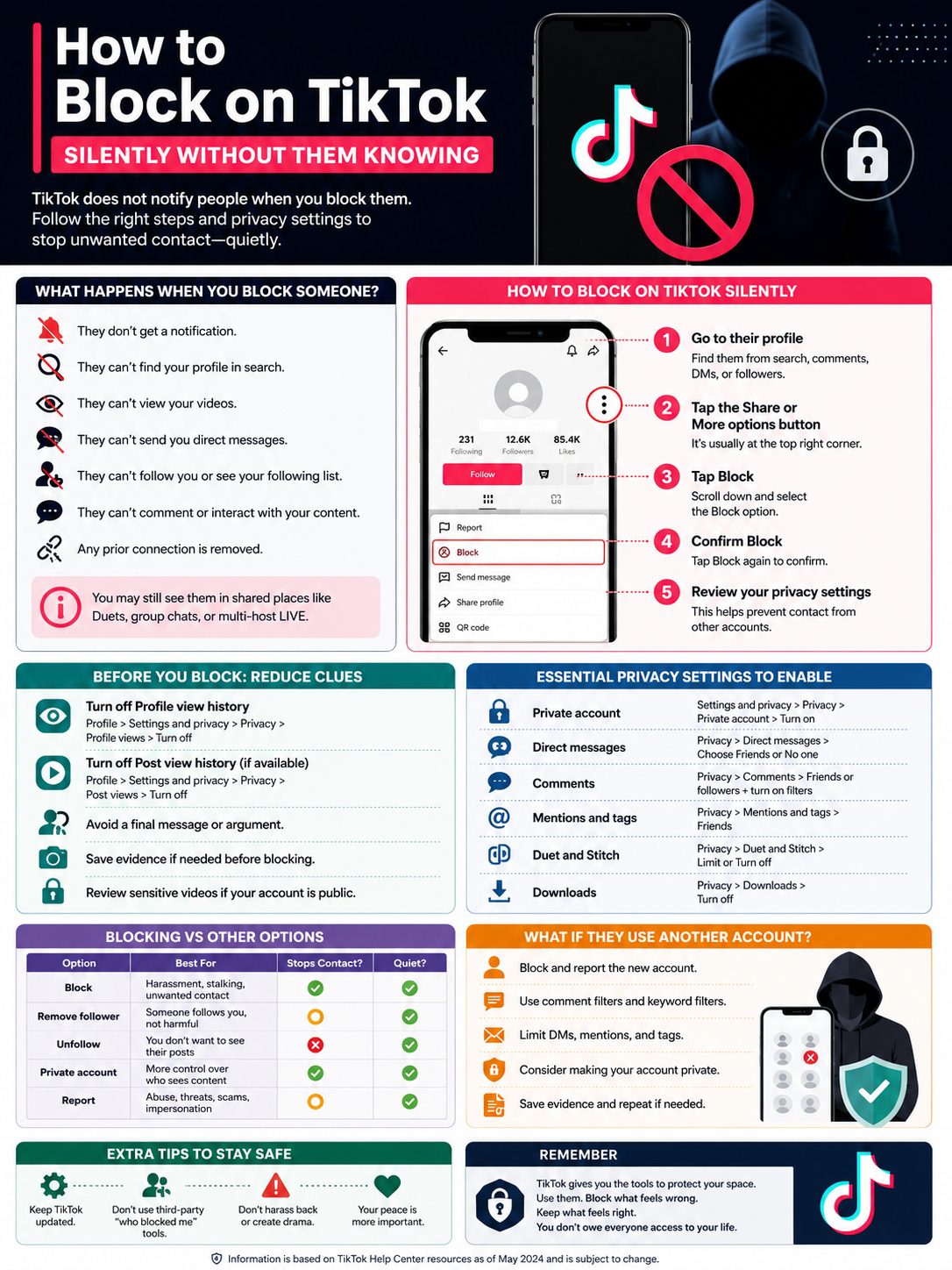
Blocking is powerful, but it’s not the only choice.
Sometimes you may not need a full block. Other times, blocking is clearly the right call.
|
Option |
Best For |
Stops Contact? |
Quiet? |
|
Block |
Harassment, stalking, unwanted contact |
Yes, from that account |
Yes |
|
Remove follower |
Someone follows you, but hasn’t crossed a serious line |
Partly |
Usually |
|
Unfollow |
You don’t want to see their posts |
No |
Yes |
|
Private account |
Broad privacy control |
Yes, for non-approved followers |
Yes |
|
Comment filters |
Rude or spam comments |
Partly |
Yes |
|
Restrict DMs |
Random messages |
Yes, for DMs |
Yes |
|
Report |
Abuse, threats, scams, impersonation |
Review-based |
Yes |
When Blocking Makes Sense
Block someone if they:
- Keep messaging after you stop replying
- Leave rude, creepy, or sexual comments
- Watch and comment in a way that feels invasive
- Mock your videos
- Send threats
- Share private details
- Create fake accounts
- Impersonate you
- Make TikTok feel stressful
You don’t have to wait until things get worse.
If someone keeps crossing the line, block them.
When Removing a Follower Is Enough
Removing a follower can work when the issue is mild.
Maybe someone follows you and you’d rather they didn’t. Maybe they haven’t done anything harmful, but you want more privacy.
The downside is simple. If your account is public, they may follow again or view your videos without following.
So if you want stronger control, block them or make your account private.
When You Should Report
Report the account if the issue includes:
- Threats
- Harassment
- Hate speech
- Sexual messages
- Scams
- Impersonation
- Doxxing
- Bullying
- Fake profiles
- Harmful content
Blocking protects your experience. Reporting asks TikTok to review the behavior.
If there’s a real-world threat, don’t rely on TikTok alone. Save evidence and contact local authorities or someone you trust.
How to Block Multiple TikTok Accounts From Comments
Sometimes one person isn’t the problem. Sometimes the whole comment section turns ugly.
If your video gets spammed or attacked, TikTok lets you manage multiple comments and block accounts from there.
|
Bulk Blocking Step |
What to Do |
|
1 |
Open your TikTok post |
|
2 |
Tap the comments |
|
3 |
Press and hold a comment or tap the filter/manage option |
|
4 |
Choose Manage multiple comments |
|
5 |
Select comments linked to accounts you want to block |
|
6 |
Tap More |
|
7 |
Choose Block accounts |
|
8 |
Confirm the action |
When Bulk Blocking Helps
Bulk blocking is useful when:
- Bots flood your video
- Trolls attack one post
- A comment section becomes hostile
- A creator page gets mass harassment
- Someone sends others to bother you
- You manage a brand, newsroom, or public profile
For creators and publishers, this isn’t just about comfort. It protects the whole comment space.
Review Before You Confirm
Bulk tools save time, but don’t rush.
Before confirming, check the accounts you selected. Make sure you’re not blocking regular viewers by mistake.
If you do block someone accidentally, you can unblock them later.
What If They Use Another Account?
This is where blocking gets tricky.
A TikTok block applies to the account you blocked. If someone uses another account, an old backup profile, or a friend’s phone, they may still try to check your content.
That doesn’t mean blocking failed. It means you need stronger privacy settings.
|
Problem |
What to Do |
|
They return with a new account |
Block and report again |
|
They keep commenting |
Use comment filters and keyword filters |
|
They keep messaging |
Limit DMs to Friends or No one |
|
They keep tagging you |
Restrict mentions and tags |
|
They view from another profile |
Make your account private |
|
They impersonate you |
Report impersonation |
|
They involve mutual friends |
Avoid public arguments and save evidence |
Don’t Feed the Cycle
Some people want a reaction.
They want you to argue. They want you to post about them. They want attention.
Don’t give it to them.
Use a simple pattern:
Block. Report. Tighten settings. Save proof. Move on.
You don’t need to explain yourself to every new account.
Use Keyword Filters
If the person keeps using the same words, phrases, names, or insults, add them to your keyword filters.
That way, those comments won’t show up unless you approve them.
It won’t fix everything, but it can make your comment section feel less exhausting.
Go Private for a While If Needed
If things feel intense, make your account private for a few days or weeks.
That gives you time to review followers, remove suspicious accounts, and calm the situation down.
For creators or media pages, going private may not be ideal. In that case, use comment filters, DM limits, mention limits, and stronger moderation first.
How to See and Unblock Accounts Later
TikTok keeps a list of blocked accounts. You can check it anytime.
|
Task |
Path |
|
Find blocked accounts |
Profile > Menu > Settings and privacy > Privacy > Blocked accounts |
|
Unblock someone |
Tap Unblock beside the account |
|
Re-block someone |
Visit their profile and block again |
|
Review safety |
Check DMs, comments, mentions, tags, and visibility |
Should You Unblock Them?
Before you unblock someone, ask yourself a few honest questions:
- Did they respect your boundary?
- Did they stop contacting you elsewhere?
- Do I feel okay with them seeing my content?
- Would I be fine if they followed me again?
- Did they make another account to reach me?
- Did they apologize without pressuring me?
If the answer feels like no, keep the block.
You don’t need to rush.
What Happens After You Unblock?
TikTok won’t notify them when you unblock them.
But once unblocked, they may be able to find your profile again, depending on your privacy settings.
If your account is public, they may see your posts. If your account is private, they’ll need approval to follow you.
Common Mistakes to Avoid When Blocking on TikTok
Blocking is easy. Blocking quietly takes a bit more care.
A few small mistakes can make the whole thing louder than it needs to be.
|
Mistake |
Why It Backfires |
Better Move |
|
Sending a final angry DM |
Creates more conflict |
Block without a message |
|
Watching their videos first |
May leave view signals |
Turn off view history first |
|
Leaving DMs open |
New accounts can message you |
Restrict direct messages |
|
Keeping account public |
They may view from another account |
Go private if needed |
|
Ignoring reports |
Harmful behavior may continue |
Report serious abuse |
|
Posting about the block |
Draws attention |
Keep it private |
|
Using third-party tools |
May risk your account |
Use TikTok settings only |
Don’t Use “Who Blocked Me” Tools
Avoid third-party apps or websites that claim they can show who blocked whom on TikTok.
Most of them are useless. Some are risky. A few may try to steal your login details or push spam downloads.
Never enter your TikTok password into a random website.
Stick with TikTok’s own settings.
Don’t Harass Back
Blocking should protect you, not start a new fight.
Don’t create a second account to watch them. Don’t send friends to comment. Don’t share their private information.
Keep your side clean. It protects your account, your peace, and your reputation.
Keep TikTok Updated
TikTok changes menus often.
If you can’t find a setting, update the app first. Then check Settings and privacy again.
Some tools also depend on your country, age, account type, or app version.
Final Thoughts
You don’t need permission to block someone.
If a person makes TikTok feel stressful, unsafe, or uncomfortable, use the tools. The best way to block on TikTok silently is simple: turn off view history first, avoid one last interaction, block the account, and review your privacy settings.
TikTok won’t notify them. But they may still guess if they test your profile from their side.
That’s why the follow-up steps matter.
Limit DMs. Filter comments. Restrict mentions and tags. Make your account private if needed. Report serious behavior.
Uncommon FAQs About Blocking Someone on TikTok
Most people only ask one thing: “Will they know?”
But a few smaller questions matter too.
|
Question |
Short Answer |
|
Will they get a block notification? |
No direct notification |
|
Can they guess I blocked them? |
Yes, if they test access |
|
Should I turn off profile views first? |
Yes, if you want extra privacy |
|
Can they see my videos from another account? |
Yes, if your account is public |
|
Can I block from comments? |
Yes, in some comment management flows |
|
Should I report before blocking? |
Save evidence first, then report and block |
Will TikTok Notify Someone When I Block Them?
No.
TikTok says people you block will not be notified. That means you can block someone quietly.
Still, they may guess later if they search for you, try to message you, or check your videos.
Can Someone See That I Viewed Their Profile Before I Blocked Them?
It depends on Profile view history.
If it’s turned on for both accounts and both accounts meet TikTok’s conditions, they may see profile visits.
To reduce that risk, turn off Profile view history before checking their profile.
Can a Blocked Person See My Videos From Another Account?
Yes, they might.
If your account is public and they use another account, they may still find your videos.
To reduce that risk, make your account private and review your followers.
Does Blocking Delete Old Direct Messages?
Blocking stops direct messaging from that blocked account.
Old message history may behave differently depending on app version, chat type, and device. If the chat includes harassment or threats, screenshot it before blocking.
Can I Block Someone Who Already Blocked Me?
Sometimes it’s hard to block someone who blocked you first because you may not be able to open their profile.
If you can still reach the account through an old comment, message, or link, try blocking from there.
If not, focus on your own privacy settings and report any harmful content you can still access.
Is Blocking Better Than Reporting?
They do different jobs.
Blocking protects your space. Reporting asks TikTok to review bad behavior.
If someone is annoying, blocking may be enough. If they threaten, scam, impersonate, harass, or share private information, report them too.
Can I Block Someone Without Visiting Their Profile?
Sometimes, yes.
If they commented on your post, you may be able to block them through comment management. If they messaged you, you may be able to block or report from the chat options.
This can help if you don’t want to leave profile-view signals.
Can I Block Someone Temporarily?
Yes.
You can block someone now and unblock them later.
But if they harassed you or ignored your boundaries, don’t rush to unblock. Give yourself time.
Can Blocked Users Still See My Duets or Stitches?
They should not be able to access your profile normally from the blocked account.
But TikTok notes that blocked users may still appear in some shared spaces, including Duets posted by other people.
If that worries you, review your Duet and Stitch settings too.
Can Someone Find Out Through a Mutual Friend?
Maybe.
If a mutual friend can see your profile and the blocked person can’t, they may figure it out.
There’s no perfect way to stop someone from guessing. The point is to avoid a direct alert and protect your space.