
For years, it was the tiny gadget that made any TV feel smarter. You opened YouTube, Netflix, or Spotify, tapped the Cast button, and the content jumped to your TV. Simple. Cheap. No big setup.
But 2026 looks different.
Google has moved away from the classic Chromecast line and now pushes the Google TV Streamer as its main living room device. At the same time, Roku, Apple, Amazon, NVIDIA, and Walmart have stepped up with better streaming boxes and sticks.
That’s why many buyers now search for chromecast alternatives 2026 before upgrading their TV setup.
The choice is better than before, but also more confusing. Some devices are great for simple streaming. Some work best with iPhones. Some suit Alexa homes. Some are built for serious home theater users, Plex fans, or people who want Ethernet and more storage.
This guide keeps things clear. No hype. No tech jargon overload. Just the best Chromecast replacements, what they do well, where they fall short, and who should buy each one.
Why Chromecast Alternatives Matter in 2026
Chromecast is no longer the automatic answer.
Google’s newer direction is the Google TV Streamer. It gives you a full TV interface, a proper remote, more storage, built-in Ethernet, and smart home support. That’s a big shift from the simple “cast from your phone” idea that made Chromecast popular.
And that shift makes sense.
Streaming devices now do much more than launch Netflix. People want faster apps, better search, live TV, free channels, 4K HDR, Dolby Atmos, smart home control, and a remote that doesn’t feel like an afterthought.
Streaming has also become a normal part of daily TV watching. Nielsen reported that streaming made up 47% of U.S. TV usage in January 2026. Parks Associates also found that 61% of U.S. internet households now use a smart TV as their main streaming device.
So the real question is not just, “What replaced Chromecast?”
It’s this: “Which streaming device makes my TV easier to use every night?”
|
Key Point |
Why It Matters |
|
Google has replaced Chromecast with Google TV Streamer |
Buyers now need to compare Google’s new device with Roku, Apple TV, Fire TV, and others |
|
Streaming is now a main TV habit |
A slow or buggy device can ruin the whole experience |
|
Apps need more space |
Devices with 16GB or 32GB storage are safer long term |
|
4K HDR is now common |
Dolby Vision, HDR10+, and Dolby Atmos support matter more |
|
Smart homes are growing |
Matter, Thread, Alexa, Siri, Google Home, and AirPlay can affect your choice |
|
Interfaces feel very different |
Roku is simple, Apple TV is clean, Fire TV pushes Amazon, and Google TV leans on recommendations |
A good Chromecast alternative should feel easy. It should open apps quickly, work with your phone, handle your favorite services, and stay out of your way.
Quick Comparison: Best Chromecast Alternatives 2026
Here’s the fast breakdown before we look at each device in detail.
|
Rank |
Device |
Best For |
Main Strength |
|
1 |
Google TV Streamer 4K |
Best overall Chromecast replacement |
Google TV, Cast support, Ethernet, smart home hub |
|
2 |
Roku Streaming Stick 4K |
Best simple 4K stick |
Easy interface, Dolby Vision, HDR10+, long-range Wi-Fi |
|
3 |
Apple TV 4K |
Best premium streamer |
Fast performance, clean interface, Apple ecosystem |
|
4 |
Amazon Fire TV Stick 4K Max |
Best Alexa-friendly stick |
Wi-Fi 6E, 16GB storage, Dolby Vision, Atmos |
|
5 |
Roku Ultra |
Best Roku box |
Ethernet, Wi-Fi 6, premium remote, Dolby Vision/Atmos |
|
6 |
NVIDIA Shield TV Pro |
Best for power users |
AI upscaling, Plex Media Server, GeForce NOW |
|
7 |
Walmart onn 4K Pro Google TV |
Best budget Google TV box |
32GB storage, 3GB RAM, Dolby Vision/Atmos, Ethernet |
|
8 |
Amazon Fire TV Cube |
Best hands-free Alexa box |
Fast processor, far-field voice control, HDMI input |
Chromecast Alternatives 2026: Top 8 Picks
Not every streaming device fits every home.
A bedroom TV does not need the same device as a main home theater setup. An iPhone user may prefer Apple TV 4K, while an Android user may feel more at home with Google TV Streamer. A Prime Video household may lean toward Fire TV, while someone who wants pure simplicity may choose Roku.
Here are the best chromecast alternatives 2026 based on real specs, daily use, app support, value, and ecosystem fit.
|
Buying Need |
Best Match |
|
Closest Chromecast-style experience |
Google TV Streamer 4K |
|
Easiest setup and interface |
Roku Streaming Stick 4K |
|
Best premium experience |
Apple TV 4K |
|
Best Amazon ecosystem pick |
Fire TV Stick 4K Max |
|
Best wired Roku device |
Roku Ultra |
|
Best for Plex and local media |
NVIDIA Shield TV Pro |
|
Best budget Google TV choice |
Walmart onn 4K Pro |
|
Best hands-free voice control |
Fire TV Cube |
1. Google TV Streamer 4K: Best Overall Chromecast Replacement
Google TV Streamer 4K is the cleanest upgrade for anyone who liked Chromecast but wants stronger hardware.
It still gives you the Google TV experience. It still supports casting from compatible apps. But it also adds a full TV interface, a better remote, 32GB storage, 4GB memory, Ethernet, Matter, and Thread support.
That makes it more than a streaming box. It can also work as part of a Google Home smart home setup.
|
Feature |
Details |
|
Video |
Up to 4K with Dolby Vision |
|
Audio |
Dolby Atmos support |
|
Storage |
32GB |
|
Memory |
4GB |
|
Network |
Wi-Fi 5 and Ethernet |
|
Smart Home |
Matter and Thread border router support |
|
Best For |
Android users, Google Home users, old Chromecast fans |
The extra storage is the biggest everyday upgrade. Older Chromecast with Google TV models often felt tight on space. With 32GB, Google TV Streamer gives you much more room for apps, updates, live TV services, and music apps.
The remote is better too. It has voice search and a remote finder. That sounds minor until your remote disappears under a blanket for the fifth time in a week.
Pros
- Closest official Chromecast replacement
- Supports Google Cast from compatible apps
- Full Google TV interface
- Built-in Ethernet
- Strong smart home support
- More storage than older Chromecast models
Cons
- Costs more than old Chromecast devices
- Wi-Fi 5 is not as strong as Wi-Fi 6 or Wi-Fi 6E
- Google TV can feel busy with recommendations
Read Also: How to Use Fitbit Without Subscription in 2026
Best for: Android users, YouTube-heavy homes, Google Photos users, Nest owners, and anyone who wants the closest Chromecast-style upgrade.
2. Roku Streaming Stick 4K: Best Simple Streaming Stick
Roku Streaming Stick 4K is the easy pick for people who just want streaming to work.
It’s small. It hides behind your TV. It supports 4K, Dolby Vision, HDR10+, and long-range Wi-Fi. The remote is simple, and the interface does not ask you to learn much.
That’s Roku’s biggest win. It feels friendly.
You turn on the TV, pick an app, and watch. No endless menus. No heavy ecosystem push. No confusing layout.
|
Feature |
Details |
|
Video |
4K with Dolby Vision and HDR10+ |
|
Design |
Compact HDMI stick |
|
Wi-Fi |
Long-range Wi-Fi |
|
Remote |
Voice remote with TV controls |
|
Interface |
Simple Roku home screen |
|
Best For |
Families, bedrooms, guest rooms, casual users |
This is one of the best chromecast alternatives 2026 for people who want less friction. It also works well for older users, guest rooms, and anyone who gets annoyed by cluttered smart TV menus.
Roku also has strong app support. You get the major streaming services, live TV apps, free channels, and The Roku Channel.
Pros
- Very easy to use
- Good 4K HDR support
- Supports Dolby Vision and HDR10+
- Strong app library
- Compact design
- Good value for most homes
Cons
- No built-in Ethernet
- Not as powerful as Roku Ultra
- Limited smart home features
Best for: Anyone who wants a simple, affordable, no-fuss 4K streaming stick.
3. Apple TV 4K: Best Premium Chromecast Alternative
Apple TV 4K costs more than most streaming devices. But once you use it, the difference is clear.
It feels fast. Apps open quickly. Menus move smoothly. The home screen looks cleaner than most rivals. And if you use an iPhone, iPad, Mac, Apple Music, Apple Fitness+, Apple Arcade, or HomeKit, it fits right into your routine.
Apple TV 4K runs on the A15 Bionic chip. It supports Dolby Vision, HDR10+, HDR10, HLG, Dolby Atmos, and up to 128GB storage on the higher model. The 128GB version also includes Ethernet.
|
Feature |
Details |
|
Video |
4K with Dolby Vision, HDR10+, HDR10, HLG |
|
Audio |
Dolby Atmos |
|
Processor |
A15 Bionic |
|
Storage |
64GB or 128GB |
|
Network |
Wi-Fi 6; Ethernet on 128GB model |
|
Smart Home |
HomeKit and Matter support |
|
Best For |
iPhone users and premium setups |
AirPlay is Apple’s version of casting. If everyone in your home uses iPhones, it can feel smoother than Chromecast. You can send videos, photos, music, and screen content to the TV without much effort.
The other big advantage is the interface. Apple TV 4K does not feel as ad-heavy as Fire TV, Roku, or Google TV. If you hate messy home screens, this alone may justify the price.
Pros
- Very fast and smooth
- Clean interface
- Great for iPhone and Mac users
- Strong app support
- Excellent video and audio format support
- Good privacy-focused reputation
Cons
- More expensive than most rivals
- Less useful for Android-first homes
- Best features work inside the Apple ecosystem
Best for: Apple users who want a polished, fast, premium streaming experience.
4. Amazon Fire TV Stick 4K Max: Best Alexa-Friendly Stick
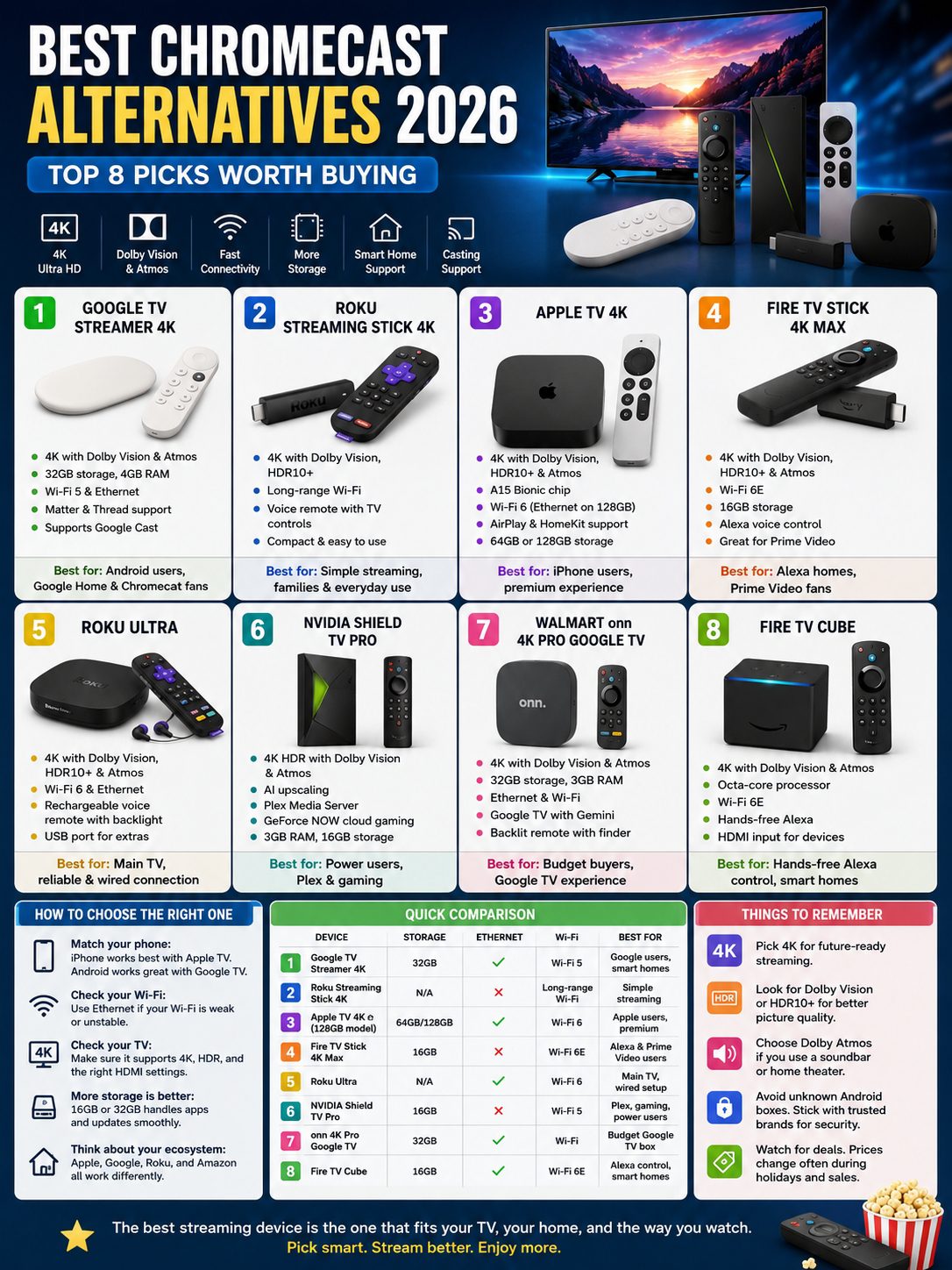
Fire TV Stick 4K Max is a smart buy for Prime Video users and Alexa homes.
It supports 4K Ultra HD, Dolby Vision, HDR10+, Dolby Atmos, Wi-Fi 6E, and 16GB storage. That storage matters because streaming apps keep getting bigger.
It also supports Amazon’s Ambient Experience. That can turn your TV into a screen for art, photos, widgets, weather, reminders, and other quick information when you’re not watching something.
|
Feature |
Details |
|
Video |
4K Ultra HD with Dolby Vision and HDR10+ |
|
Audio |
Dolby Atmos |
|
Wi-Fi |
Wi-Fi 6E |
|
Storage |
16GB |
|
Voice Assistant |
Alexa |
|
Best For |
Prime Video users and Alexa homes |
For a small streaming stick, the 4K Max feels quick. It is also easy to carry, so it works well for travel, dorm rooms, or guest TVs.
The weak spot is the interface. Fire TV puts Amazon content front and center. It also shows a lot of promoted content. Some users do not mind this. Others may prefer Roku or Apple TV.
Pros
- Fast for a streaming stick
- Wi-Fi 6E support
- Dolby Vision, HDR10+, and Dolby Atmos
- 16GB storage
- Strong Alexa voice control
- Great for Prime Video users
Cons
- Home screen can feel crowded
- Amazon content gets heavy promotion
- Ethernet needs a separate adapter
Best for: Prime Video subscribers, Alexa users, and buyers who want strong specs in a small 4K stick.
5. Roku Ultra: Best Roku Box for a Main TV
Roku Ultra is the best Roku device for your main living room TV.
It keeps Roku’s simple interface but adds stronger hardware and better connectivity. You get 4K, HDR10+, Dolby Vision, Dolby Atmos, Wi-Fi 6, Ethernet, USB, Bluetooth, and Roku’s rechargeable Voice Remote Pro.
That remote is one of the biggest reasons to pick the Ultra. It has backlit buttons, USB-C charging, hands-free voice control, and a lost remote finder.
|
Feature |
Details |
|
Video |
4K with Dolby Vision and HDR10+ |
|
Audio |
Dolby Atmos |
|
Network |
Wi-Fi 6 and Ethernet |
|
Remote |
Rechargeable Voice Remote Pro |
|
Extra Ports |
USB and Ethernet |
|
Best For |
Main living room TVs |
Ethernet is the key upgrade here. If your Wi-Fi struggles near the TV, a wired connection can make 4K streaming more stable.
Roku Ultra does not try to be a gaming console. It does not pretend to be a smart home hub. It focuses on reliable streaming. For many families, that is exactly what they need.
Pros
- Fastest Roku player
- Simple interface
- Built-in Ethernet
- Excellent remote
- Dolby Vision and Atmos support
- Strong pick for main TVs
Cons
- Costs more than Roku Streaming Stick 4K
- Not as flexible as NVIDIA Shield TV Pro
- Roku still shows promoted content
Best for: Roku fans who want a smoother, stronger device for their main TV.
6. NVIDIA Shield TV Pro: Best for Power Users and Plex Fans
NVIDIA Shield TV Pro is not new, but it still earns a place on this list.
Why? Because it does things most streaming sticks cannot do.
It supports 4K HDR, Dolby Vision, Dolby Atmos, AI-enhanced upscaling, GeForce NOW cloud gaming, Plex Media Server, and two USB 3.0 ports. It also has 3GB RAM and 16GB storage.
|
Feature |
Details |
|
Video |
4K HDR with Dolby Vision and HDR10 |
|
Audio |
Dolby Atmos |
|
Processor |
NVIDIA Tegra X1+ |
|
Memory |
3GB RAM |
|
Storage |
16GB |
|
Extras |
AI upscaling, Plex Media Server, USB ports |
|
Best For |
Home theater, Plex, gaming, local media |
The AI upscaling can improve older HD content on a 4K TV. It will not perform magic, but it can make some shows look sharper and cleaner.
Plex users also love the Shield TV Pro because it can run Plex Media Server. If you have your own movie or TV library, that is a major advantage.
This is not the right pick for someone who only watches Netflix, YouTube, and Disney+. It is too expensive for that. But for power users, it still makes sense.
Pros
- Excellent for Plex
- Strong AI upscaling
- Good for GeForce NOW cloud gaming
- USB ports for expansion
- Better for local media than most streamers
Cons
- Expensive
- Hardware platform is aging
- Overkill for casual users
Best for: Plex users, home theater fans, local media collectors, and cloud gaming users.
7. Walmart onn 4K Pro Google TV: Best Budget Google TV Box
Walmart’s onn 4K Pro Google TV is one of the most interesting budget picks for 2026.
It offers Google TV with Gemini, 4K UHD, 32GB storage, 3GB RAM, Dolby Vision, Dolby Atmos, Ethernet, Find My Remote, and a backlit remote. That is a strong set of features for the price.
If you like Google TV but do not want to spend more on Google TV Streamer, this one deserves a look.
|
Feature |
Details |
|
Video |
4K UHD with Dolby Vision |
|
Audio |
Dolby Atmos |
|
Storage |
32GB |
|
Memory |
3GB RAM |
|
Network |
Wi-Fi and Ethernet |
|
Interface |
Google TV with Gemini |
|
Best For |
Budget Google TV buyers |
The experience should feel familiar to anyone coming from Chromecast with Google TV. You get Google TV recommendations, voice search, and casting support from compatible apps.
The caution is availability. Walmart’s onn devices mainly target the U.S. market, and stock can change. Long-term software support may also not match Apple, Roku, Amazon, or Google’s own device.
Pros
- Strong specs for the price
- Google TV interface
- 32GB storage
- 3GB RAM
- Dolby Vision and Atmos
- Ethernet included
Cons
- Mostly U.S.-focused availability
- Software support is less predictable
- Build quality may not feel premium
Best for: Budget buyers who want Google TV, good storage, and Ethernet without paying premium prices.
8. Amazon Fire TV Cube: Best Hands-Free Alexa Box
Fire TV Cube is the strongest Fire TV option for people who want hands-free Alexa control.
It has a fast octa-core processor, 4K streaming, Dolby Vision, Dolby Atmos, Wi-Fi 6E, and far-field voice control. You can ask Alexa to open apps, pause shows, adjust volume, change inputs, and control compatible smart home devices.
It also has HDMI input, which can help with cable boxes and some living room setups.
|
Feature |
Details |
|
Video |
4K with Dolby Vision |
|
Audio |
Dolby Atmos |
|
Processor |
Octa-core |
|
Wi-Fi |
Wi-Fi 6E |
|
Voice Control |
Hands-free Alexa |
|
Extra Feature |
HDMI input |
|
Best For |
Alexa-heavy homes |
This is not the best choice if you only want a cheap streaming stick. Fire TV Stick 4K Max handles that job well.
But if your home already has Alexa speakers, Ring cameras, and Prime Video, Fire TV Cube fits nicely.
Pros
- Fast Fire TV performance
- Hands-free Alexa control
- Wi-Fi 6E support
- HDMI input
- Good smart home control
Cons
- Costs more than Fire TV Stick 4K Max
- Fire TV interface can feel ad-heavy
- Works best inside the Amazon ecosystem
Best for: Alexa users who want strong voice control without reaching for the remote.
How to Choose the Best Chromecast Alternative
The best streaming device is not always the most expensive one.
Think about how you actually watch TV. Do you use an iPhone or Android phone? Do you care about casting? Is your Wi-Fi weak? Do you need Ethernet? Do you hate ads on the home screen? Do you use Plex?
Those answers matter more than a long spec sheet.
|
Your Need |
Best Device |
|
Closest Chromecast-style experience |
Google TV Streamer 4K |
|
Simple and affordable 4K streaming |
Roku Streaming Stick 4K |
|
Best iPhone and AirPlay support |
Apple TV 4K |
|
Best Alexa experience |
Fire TV Stick 4K Max or Fire TV Cube |
|
Best wired connection |
Roku Ultra, Google TV Streamer, Apple TV 4K 128GB, onn 4K Pro |
|
Best for local media |
NVIDIA Shield TV Pro |
|
Best budget Google TV box |
Walmart onn 4K Pro |
|
Cleanest premium interface |
Apple TV 4K |
Match the Device to Your Phone
If you use Android, Google TV Streamer and onn 4K Pro will feel natural.
If you use iPhone, Apple TV 4K is the smoother choice because AirPlay works so well.
If your home already uses Alexa, Echo speakers, Ring cameras, and Prime Video, Fire TV makes more sense.
Check Your TV Before Buying
A 4K streamer will not turn an old HD TV into a 4K TV. Your TV must support 4K.
The same goes for HDR. To enjoy Dolby Vision or HDR10+, your TV needs to support those formats.
Also check your HDMI ports. Some older TVs need the right HDMI setting turned on for full 4K HDR playback.
Think About Wi-Fi and Ethernet
Bad Wi-Fi can make a good streaming device feel terrible.
If your router sits far from the TV, choose a device with Ethernet. Roku Ultra, Google TV Streamer, Apple TV 4K 128GB, Fire TV Cube, and onn 4K Pro are better choices for wired setups.
Do Not Ignore the Home Screen
You will see the home screen every day, so it matters.
Roku feels simple. Apple TV feels clean. Google TV feels smart but busy. Fire TV feels powerful but Amazon-heavy.
A device can have great specs and still annoy you if the interface gets in your way.
Buying Tips Before You Upgrade
A streaming device is small, but the wrong one can frustrate you every night. Check the basics before you buy.
|
Buying Tip |
Why It Matters |
|
Pick 4K if your TV supports it |
It keeps the device useful for longer |
|
Look for Dolby Vision or HDR10+ |
It improves picture quality on compatible TVs |
|
Check Dolby Atmos support |
It helps if you use a soundbar or home theater system |
|
Choose more storage |
16GB or 32GB handles apps better than 8GB |
|
Get Ethernet if Wi-Fi is weak |
Wired streaming can reduce buffering |
|
Match your ecosystem |
Apple, Google, Roku, and Amazon all feel different |
|
Avoid unknown Android boxes |
Uncertified boxes can have weak security and poor app support |
One more thing: be careful with “fully loaded” Android TV boxes from unknown sellers.
They may promise free movies, sports, or live channels, but many use unofficial apps. Some can bring privacy, security, and legal risks. Stick with known brands and certified platforms.
Final Thoughts
The best chromecast alternatives 2026 depend on your home, not just the spec sheet.
Google TV Streamer 4K is the safest pick for old Chromecast users. Roku Streaming Stick 4K is the easiest choice for simple streaming. Apple TV 4K gives you the smoothest premium experience, especially if you use an iPhone. Fire TV Stick 4K Max works well for Alexa and Prime Video homes. Roku Ultra is the stronger Roku box for a main TV. NVIDIA Shield TV Pro still serves power users. Walmart onn 4K Pro gives Google TV fans strong value. Fire TV Cube is the best pick for hands-free Alexa control.
For most people, the choice comes down to three devices.
Choose Google TV Streamer if you want the closest Chromecast replacement.
Choose Roku Streaming Stick 4K if you want easy 4K streaming at a fair price.
Choose Apple TV 4K if you want the cleanest and fastest premium setup.
A good streaming device should not make you think too much. You should press the remote, open your app, and start watching. No lag. No messy setup. No nightly frustration.
That is what the right Chromecast alternative should give you in 2026.
FAQs About Chromecast Alternatives 2026
Is Chromecast still worth buying in 2026?
Only in a few cases. If you already own one and it still works, keep using it. If you find a trusted unit at a very low price, it may be fine for basic streaming.
For most buyers, though, a newer device makes more sense. Google TV Streamer, Roku Streaming Stick 4K, Apple TV 4K, Fire TV Stick 4K Max, and onn 4K Pro offer stronger hardware and better long-term value.
What is the closest replacement for Chromecast?
Google TV Streamer 4K is the closest official replacement. It keeps Google TV, supports casting from compatible apps, and adds better hardware, more storage, Ethernet, Matter, and Thread support.
Which Chromecast alternative is best for Android users?
Google TV Streamer is the best premium choice for Android users. Walmart onn 4K Pro is the best budget choice if it is available in your market.
Which Chromecast alternative is best for iPhone users?
Apple TV 4K is the best choice for iPhone users. AirPlay works smoothly, and the device connects well with Apple Photos, Apple Music, Apple Fitness+, Apple Arcade, and HomeKit.
Is Roku better than Chromecast?
For simple TV streaming, Roku can be better. It has an easy interface, a good remote, and strong app support.
But if you rely on casting from Android apps, Google TV Streamer is closer to the old Chromecast experience.
Does Roku support Google Cast?
No, not in the same way. Roku supports some sharing and screen mirroring features, but it is not a true Google Cast device.
If casting is your main habit, choose Google TV Streamer or another Google TV device.
Which device has the cleanest interface?
Apple TV 4K has the cleanest premium interface. Roku has the easiest interface for most families.
Fire TV and Google TV offer good features, but their home screens show more recommendations and promoted content.
Is NVIDIA Shield TV Pro still worth buying in 2026?
Yes, but only for the right user. It still works well for Plex, local media, AI upscaling, GeForce NOW, and home theater setups.
If you only stream Netflix, YouTube, Disney+, or Prime Video, you can save money with Roku, Google TV Streamer, Fire TV, or onn 4K Pro.
Which Chromecast alternative is best for travel?
Roku Streaming Stick 4K and Fire TV Stick 4K Max are the best travel picks. They are small, easy to pack, and work well on hotel or guest room TVs.
Just remember that hotel Wi-Fi login pages can still be annoying.
Which option is best for weak Wi-Fi?
Pick a device with Ethernet if your Wi-Fi is weak. Roku Ultra, Google TV Streamer, Apple TV 4K 128GB, Fire TV Cube, and onn 4K Pro are stronger choices for wired setups.