
You just dropped a perfectly curated, aesthetic Story. Maybe you announced a major life update, shared a behind-the-scenes look at your business, or posted a photo you secretly hope a very specific person sees. An hour later, you swipe up to check your viewer list. You spot your ex, a rival brand, or your boss. Suddenly, panic sets in. Did they just save that image directly to their camera roll? You immediately open Google and type frantically, trying to figure out exactly who screenshotted instagram story updates on your profile.
I manage social media accounts daily, and I hear this exact question from massive brands, small creators, and regular users alike. We all crave control over our digital footprint. When you upload a piece of your life or business, you naturally want to know where it ends up. But social media platforms face a massive tug-of-war. They have to balance the total transparency creators want with the complete privacy viewers demand.
Right now, the internet is flooded with outdated advice, fake rumors, and scam apps promising impossible tracking features. Let’s cut through the noise. I will show you exactly what Instagram tracks right now in 2026, what the app actively hides from you, why they built the system this way, and how you can actually protect your content without relying on phantom notifications.
The Brutal Truth: Can You Track Who Screenshotted Instagram Story Posts?
Let me give it to you straight: as of 2026, Instagram does not notify you when someone screenshots your regular Story.
If a follower taps your Story, holds their thumb on the screen to pause it, and snaps a screenshot, the app stays completely silent. Your phone will not vibrate. No alert pops up on your lock screen. When you open your viewer list, you won’t see a secret shutter icon next to their name. From your side of the screen, that person looks exactly like every other follower who watched your update and swiped right past it.
I watch digital marketers stress over this constantly. You cannot track whether a competitor quietly saves your promotional graphics to rip off your ideas. You cannot tell if someone is archiving your daily life updates. But flip the script—if you need to screenshot a brand’s exclusive discount code or save a friend’s recipe recommendation to your phone, you can do it completely undetected. Instagram basically turned Story viewing into a fully anonymous space for capturing content.
When someone takes a screenshot, the Story just keeps playing on their end. The system counts their view for your basic metrics, but the screenshot action happens entirely locally on their physical device. Instagram never logs that specific data on their servers. Because they don’t record the action, there is no hidden database you can access later to audit your audience. People obsess over who screenshotted instagram story frames, but the reality is that the data simply does not exist on Meta’s servers.
|
User Action on Your Story |
Do You Get an Alert? |
Does the App Log the Action? |
|
Taking a standard screenshot |
No |
No |
|
Running a screen recorder |
No |
No |
|
Sending the Story via DM |
No |
Yes (Shows as a ‘Share’ but hides the sender’s name) |
|
Viewing the Story multiple times |
No |
No (Metrics only show one unique view per account) |
A Quick History of the 2018 Screenshot Alert Test
If you swear you remember getting screenshot alerts in the past, you aren’t making things up. You just have a good memory of a very short, chaotic window in 2018.
Early that year, Instagram tried something radical. They pushed out a test feature to a small chunk of their users. For a few wild months, if someone captured your Story, a tiny starburst icon appeared right next to their name in your viewer list.
The backlash hit instantly. Users absolutely hated feeling watched. Engagement numbers tanked almost overnight because people got scared to interact with anything. Think about how you actually use the app. You save workout routines, funny memes, shopping codes, and book recommendations. Users viewed screenshotting as a harmless utility, not a privacy violation. Unlike Snapchat, which built its entire brand around screenshot warnings from day one, Instagram users expected passive, relaxed browsing.
By June 2018, Instagram completely killed the project. The development team realized that causing anxiety hurts app retention. Keeping users happy and endlessly scrolling matters way more to their bottom line than giving you a clear list of who screenshotted instagram story posts. They stripped the feature out, and despite endless rumors, they haven’t touched it since.
|
Time Period |
Instagram’s Official Stance |
How Users Reacted |
|
Before 2018 |
Allowed silent screenshots on all Stories. |
Users felt relaxed; high engagement. |
|
Feb – June 2018 |
Tested shutter icon alerts for screenshots. |
Massive backlash; viewing time dropped. |
|
2018 – 2026 |
Permanently removed all Story screenshot alerts. |
App usage stabilized; screenshotting normalized. |
Why Instagram Protects the Viewer Over the Creator
You might wonder why a platform built for creators refuses to give them this basic data. It all comes down to user psychology and platform economics.
Social media apps survive on watch time and engagement. If people feel like they are walking on eggshells every time they open the app, they leave. Imagine if you got an alert every time someone looked at your profile, or every time they copied the link to your post. You would probably think twice before clicking on anything yourself.
Instagram made a calculated business decision. They realized that total transparency creates friction. When friction goes up, ad revenue goes down. By keeping screenshots anonymous, Instagram encourages users to share content organically off-platform. If someone screenshots your meme and texts it to a group chat, that keeps Instagram relevant in daily conversation. The platform prioritizes the smooth, uninterrupted experience of the person consuming the content over the tracking desires of the person creating it.
|
Platform Priority |
Why It Matters to Instagram |
The Result for You |
|
Frictionless Browsing |
Keeps users on the app longer to see more ads. |
You lose the ability to track who saves your photos. |
|
Off-Platform Sharing |
Keeps Instagram relevant in daily text conversations. |
Your content spreads, but you lose the tracking data. |
|
User Anonymity |
Prevents anxiety and encourages account stalking. |
You look like a normal viewer even if you screenshot. |
The Only Time Instagram Actually Sends Notifications in 2026
While you definitely cannot figure out who is saving your public posts, Instagram absolutely tracks screenshots in one highly specific, private area: direct messages.
Instagram draws a hard line between public broadcasting and private chats. Think of Stories, Reels, Feed posts, and profile bios as public billboards. If you put it out there, Instagram assumes you want the world to see it. But if you send content privately with the intention that it will vanish, the app steps in to protect you.
If you open a DM, tap the camera icon, and send a disappearing photo or video using the “View Once” feature, Instagram watches that specific file closely. If the person on the other end takes a screenshot, you know instantly. A small, hatched circle icon pops up next to the message bubble in your chat log. Your phone will also push a notification reading, “[Username] took a screenshot.”
Read Also: How to See Old Stories on Instagram After 24 Hours
Meta’s 2026 Push Against Digital Harassment
The same rule applies to Vanish Mode. If you swipe up in a chat to turn the screen dark and activate Vanish Mode, any screenshot taken during that session triggers an immediate alert to the other person. Throughout 2024 and expanding into 2026, Meta actually started hard-blocking screen recordings on these disappearing messages entirely for certain Android and iOS devices. They did this to fight digital harassment, sextortion, and revenge porn, ensuring that private moments stay securely off the record.
|
Type of Instagram Content |
Will Instagram Send a Screenshot Alert? |
|
Standard 24-Hour Stories |
No |
|
Close Friends Stories |
No |
|
Regular Feed Posts & Reels |
No |
|
Standard DMs (Photos kept in chat) |
No |
|
Disappearing DMs (View Once / Vanish Mode) |
Yes |
The Scam Economy: Why Third-Party Tracker Apps Lie to You
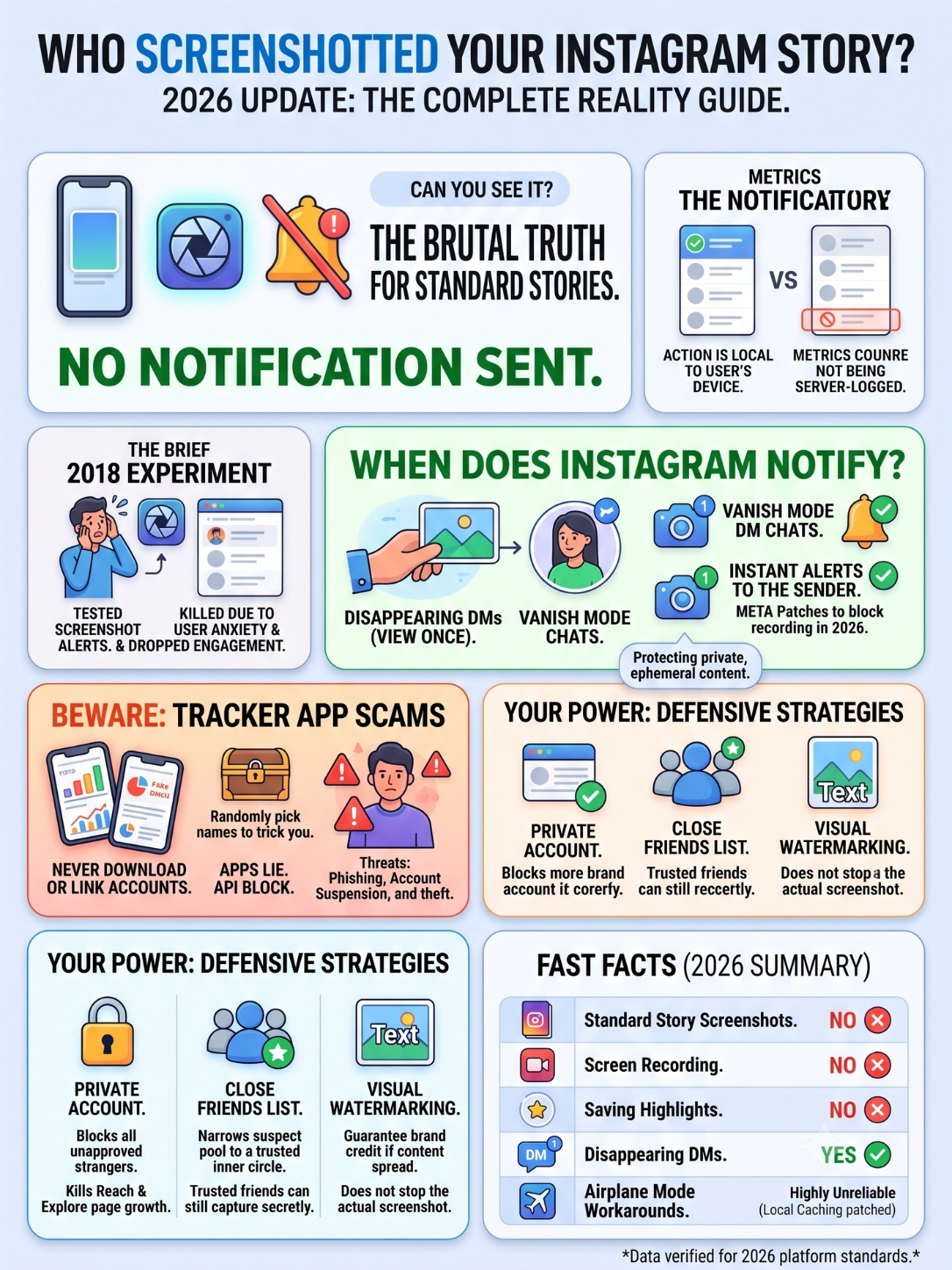
Open the App Store or Google Play right now. Search for “Story viewers” or “stalker tracker.” You will instantly see dozens of apps aggressively claiming they can reveal who screenshotted instagram story content on your account.
Do not download them. Do not pay their weekly subscription fees. Above all else, never type your Instagram password into them.
These apps operate on pure deception. Instagram’s API—the backend system that lets outside software communicate with the platform—completely blocks third-party apps from touching any screenshot data. Why? Because as we established earlier, Instagram doesn’t track that data internally either. You cannot pull data from a database that simply does not exist.
When an app promises to expose your “secret stalkers” or list your screenshotters, they are running a hustle. The most common trick works like this: the app pulls your legitimate list of Story viewers, picks three random names, and slaps a fake “Screenshotted!” label next to them. They fabricate the results to trick you into paying a premium fee. You end up accusing a friend of something they never did based on a randomly generated lie.
The worst apps in this category are straight-up phishing scams. They want your login credentials so they can hijack your account, run crypto scams, or sell your handle on the black market. Even if an app seems somewhat harmless, Instagram’s security algorithms aggressively hunt down accounts that connect to unapproved third-party trackers. You easily risk a permanent shadowban or complete account deletion just for trying to catch a phantom screenshotter.
|
App Store Claim |
The Actual Reality |
Threat Level to Your Account |
|
“See who saved your Story!” |
Fakes the data by randomly selecting real viewers. |
High (Wastes money, causes false accusations) |
|
“Unlock your secret stalkers!” |
API physically blocks this data. The claim is a lie. |
Severe (Often triggers Instagram account suspensions) |
|
“Log in to view hidden stats!” |
Steals your password and username upon entry. |
Extreme (Total account theft and lock-out) |
Defending Your Content Without Relying on Alerts
Since the app will not police your viewers for you, you have to take control of your own content. You might not get an alert, but you hold the power to dictate who gets the opportunity to view your media in the first place.
The Private Account Fortress
If you genuinely want to stop strangers from saving your updates, switch your account to private. When you flip that toggle, you create a digital fortress. Only users you manually approve get to see your feed and Stories. Internet lurkers, ex-partners, and shady competitors get locked out entirely. But I know that isn’t practical for everyone. If you run a brand page, a niche blog, or you just want to grow your follower count, going private destroys your reach. Your posts vanish from the Explore page and public hashtag feeds.
The Power of Close Friends
The best middle ground is the “Close Friends” list. This feature lets you build a highly curated list of specific followers. I see brands use this brilliantly as a “VIP Club” for their best customers. When you post a Story just to them, it gets a green ring instead of the usual pink one. Nobody else even knows the Story exists. While the people on that list can still take a screenshot without triggering an alert, you drastically shrink the suspect pool down to people you actually trust.
Visual Watermarking for Brands
If you run a business, treat unauthorized sharing differently. Watermark your original graphics. Drop a clean, subtle logo or your @handle into the corner of your designs. That way, when a competitor inevitably screenshots your graphic and shares it, your brand identity travels perfectly intact with the image. You might not stop the theft, but you guarantee the credit.
|
Privacy Strategy |
Main Advantage |
The Catch |
|
Private Account Mode |
Totally blocks unapproved strangers from viewing. |
Kills your organic growth and Explore page visibility. |
|
Close Friends Feature |
Protects sensitive posts while keeping the main page public. |
Trusted friends can still screenshot without you knowing. |
|
Visual Watermarking |
Guarantees you get credit when content is stolen. |
Does absolutely nothing to prevent the actual screenshot. |
Final Thoughts
I know it feels frustrating when you can’t just pull up a neat, organized list showing exactly who screenshotted instagram story media on your profile. We crave that level of control over our personal brands. But the reality of digital privacy today leans heavily toward protecting the viewer’s experience. Instagram clearly prioritized seamless, anxiety-free browsing over giving creators surveillance tools.
If you manage a business page, a professional portfolio, or just your personal life, you need a mindset shift. Treat every single public Story as permanent ink. If you wouldn’t want an image saved, forwarded to a group chat, or kept on a stranger’s hard drive, simply do not hit publish.
Use the Close Friends list for your vulnerable, behind-the-scenes moments. Keep standard Stories strictly for broad marketing and casual updates. Stop stressing over phantom followers saving your photos. Instead, channel that energy into the metrics that actually build your brand: link clicks, profile visits, direct replies, and building a community that engages with you openly.
|
Action Item |
Best Practice Rule |
|
Posting Publicly |
Assume everything you upload can and will be saved permanently. |
|
Protecting Ideas |
Watermark your original designs so your brand travels with the screenshot. |
|
Sharing Secrets |
Use Disappearing DMs (View Once) to guarantee screenshot alerts. |
Uncommon FAQs About Instagram Screenshots
People constantly try to find loopholes in the system. I get asked highly specific, technical questions about how these privacy mechanics operate on different devices. Let’s run through the most common edge cases people search for in 2026.
Does Instagram notify when you screen record a Story instead of taking a photo?
No. The app treats screen recording exactly like a standard photo screenshot. The creator gets zero alerts, and your name looks perfectly normal in their viewer list. It doesn’t matter if you record with your phone’s microphone on or off.
Can you track screenshots on Instagram Highlights?
No. Highlights are just old Stories permanently pinned to your profile. Because they run on the exact same code as regular 24-hour Stories, capturing a Highlight remains completely anonymous.
If I capture a Close Friends Story, do they find out?
No. Even though a green-ringed Story feels private and intimate, the backend code works exactly the same way. The creator will never know you saved their exclusive update.
Does the airplane mode trick still work for disappearing DMs?
A few years ago, you could turn on Airplane Mode, open a disappearing DM, screenshot it, and quickly log out to bypass the alert. Do not try this in 2026. Meta patched nearly all of these workarounds. The app now caches your actions locally, meaning it often sends the alert the exact second your phone reconnects to Wi-Fi. Sometimes, it even registers the screenshot while disconnected and pings the sender immediately upon reconnecting.
Can I block a specific person from screenshotting my posts without blocking their account?
No. You cannot disable the physical buttons on someone else’s phone. If they can see your public content, they can capture it. Your only real defense is restricting their access to your profile entirely or removing them as a follower.
|
Tech Workaround / Hack |
Does it bypass or trigger the system? |
|
Screen recording software |
Acts like a normal view; no alert sent for Stories. |
|
Saving a Highlight reel |
Acts like a normal view; no alert sent. |
|
Airplane mode in DMs |
Highly unreliable; usually sends the alert upon reconnect. |
|
Using desktop web browser |
Makes no difference; follows exact same notification rules. |