
Instagram Stories move fast. You post a quick photo, a funny clip, a poll, or a travel moment. People watch it for a day. Then, after 24 hours, it disappears from the Story bar.
But here’s the good part: it may not be gone forever.
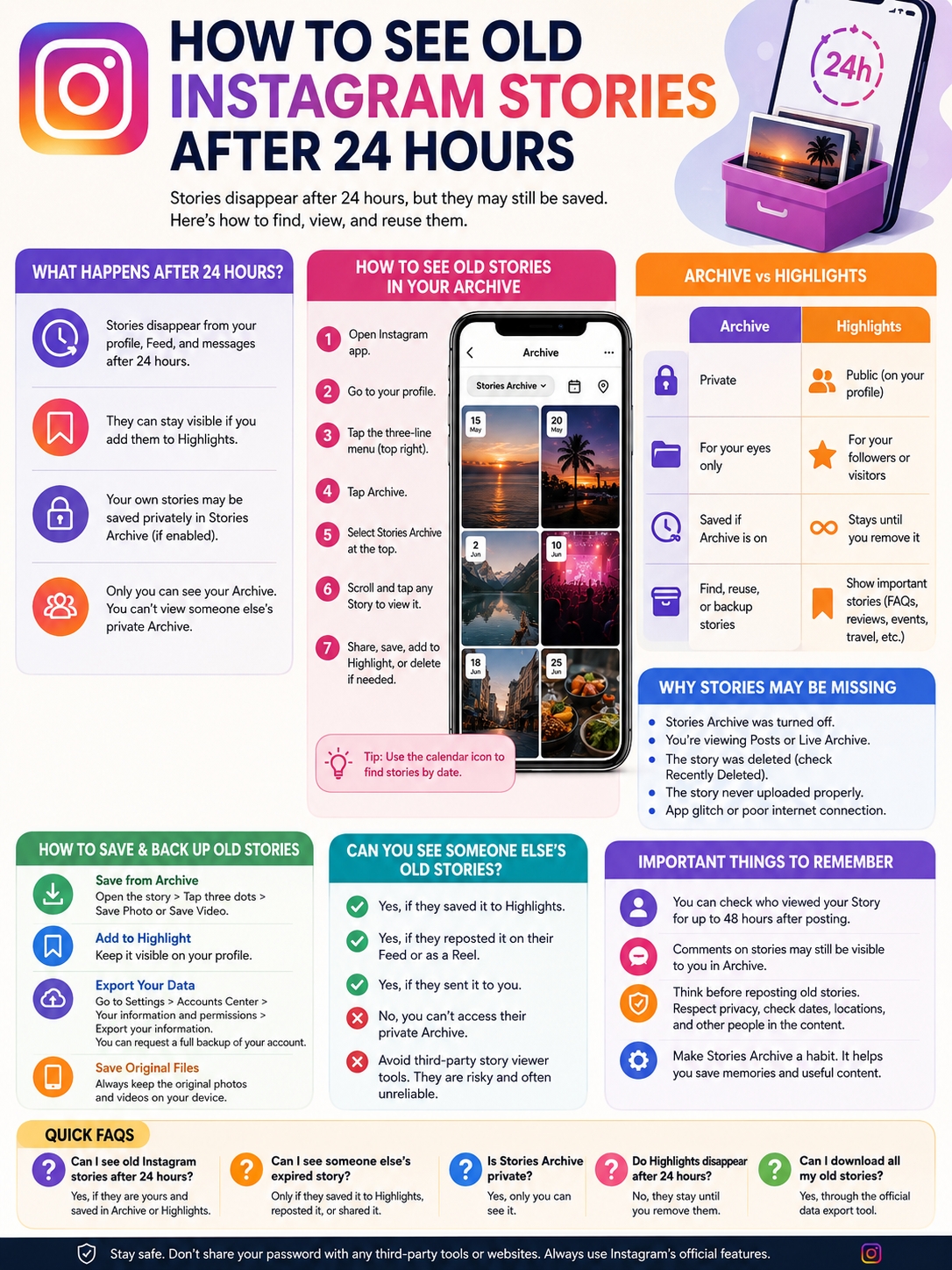
If you want to see old instagram stories, Instagram’s Archive is the first place to check. Instagram says Stories disappear from your profile, Feed, and messages after 24 hours unless you save them as Highlights. But your own Stories can still be saved privately in Stories Archive if that setting is turned on.
That means you can go back and find old birthday posts, vacation clips, customer reviews, product demos, event updates, and random memories you forgot you posted.
The only catch? Instagram’s menus change often. Archive, Highlights, Recently Deleted, and Accounts Center don’t always sit where you expect them to.
This guide breaks everything down in plain English.
What Happens to Instagram Stories After 24 Hours?
|
Key Point |
What It Means |
|
Normal Story lifespan |
24 hours |
|
Where Stories disappear from |
Profile, Feed, and messages |
|
Can a Story stay visible? |
Yes, if added to Highlights |
|
Can your own Stories be saved? |
Yes, in Stories Archive if enabled |
|
Can others see your Archive? |
No |
|
Can you see someone else’s expired Story? |
Only if they saved or reposted it |
Instagram Stories were built to feel temporary. That’s why people use them for quick updates instead of polished posts.
After 24 hours, a Story disappears from the normal public view. People can’t tap your profile photo and watch it anymore. It also disappears from the Feed and messages unless you saved it somewhere.
But Instagram gives you two main ways to keep Stories longer:
- Stories Archive
- Story Highlights
Stories Archive is private. Only you can see it.
Highlights are public on your profile, or visible to approved followers if your account is private.
Archive vs Highlights
|
Feature |
Stories Archive |
Story Highlights |
|
Who can see it? |
Only you |
Profile visitors or followers |
|
Best for |
Finding old Stories |
Showing important Stories |
|
Location |
Instagram menu |
Under your bio |
|
Time limit |
Saved privately if Archive is on |
Stays until removed |
|
Good for |
Memories and backups |
FAQs, reviews, trips, events |
Think of Archive as your private Story folder. Think of Highlights as your public display shelf.
If you only want to revisit an old Story, use Archive.
If you want other people to keep seeing it, add it to Highlights.
How to See Old Instagram Stories in Your Archive
|
Step |
What to Do |
|
1 |
Open Instagram |
|
2 |
Go to your profile |
|
3 |
Tap the three-line menu |
|
4 |
Tap Archive |
|
5 |
Choose Stories Archive |
|
6 |
Scroll through your old Stories |
|
7 |
Tap any Story to view or reuse it |
The easiest way to see old instagram stories is through your Stories Archive.
This only works for your own Stories. You can’t use your Archive to view someone else’s expired Story.
Here’s how to find it:
- Open the Instagram app.
- Tap your profile picture in the bottom-right corner.
- Tap the three-line menu in the top-right corner.
- Tap Archive.
- Check the label at the top.
- Select Stories Archive if needed.
- Scroll and tap any old Story.
If you post often, your Archive can feel huge. Don’t rush. Scroll by date and look for the period when you posted the Story.
What you can do with an old archived Story
Once you open a Story from Archive, Instagram may let you:
- Share it again to your Story
- Add it to a Highlight
- Save it to your phone
- Delete it from Archive
- Send it through Instagram messages
This is useful if you want to reuse old content.
For example, a small business can bring back an old customer review. A travel creator can repost a trip memory. A publisher can reuse an event clip or behind-the-scenes Story.
Make sure you’re in the right Archive
Instagram has more than one Archive area.
You may see:
- Stories Archive
- Posts Archive
- Live Archive
If you don’t see your old Stories, check the top of the screen. You may be looking at archived Feed posts or Live videos instead.
Switch to Stories Archive.
That simple step fixes the problem for many users.
How to See Old Instagram Stories in Highlights
|
Situation |
Can You View It? |
|
Your Story saved to Highlight |
Yes |
|
Someone else’s Story saved to Highlight |
Yes, if you can view their profile |
|
Story from a private account |
Only if you’re an approved follower |
|
Expired Story not saved anywhere |
Usually no |
|
Deleted Highlight |
Not visible |
|
Private Archive |
Only the account owner can access it |
Highlights are the public version of old Stories.
If you want to view someone else’s old Story, check their Highlights first. This is the most realistic option.
Open their profile. Look under the bio. If you see round circles, those are Highlights. Tap them and watch.
People often use Highlights for:
- Travel memories
- Product demos
- Customer reviews
- Event recaps
- FAQs
- Tutorials
- Announcements
- Personal milestones
If someone didn’t save the Story to Highlights, you probably can’t view it after 24 hours.
How to add your own Story to Highlights
You can add both active and archived Stories to Highlights.
To add an old Story:
- Go to your profile.
- Tap the three-line menu.
- Tap Archive.
- Open Stories Archive.
- Choose the Story.
- Tap Highlight.
- Add it to an existing Highlight or create a new one.
Highlights stay on your profile until you remove them.
Read Also: How to Change Instagram Story Background Color
Good Highlight ideas for your profile
If you run a business, creator page, blog, or media brand, Highlights can help new visitors understand you fast.
Good Highlight sections include:
- Start Here
- Reviews
- Services
- Products
- FAQs
- Events
- Tutorials
- Press
- Travel
- Behind the Scenes
Don’t save everything, though. Too many Highlights can look messy.
Save the Stories that answer questions, build trust, or show your best moments.
Why You Can’t See Some Old Instagram Stories
|
Problem |
What Happened |
What You Can Do |
|
Archive was off |
Instagram may not have saved it |
Turn Archive on now |
|
Wrong Archive tab |
You’re viewing Posts or Live Archive |
Switch to Stories Archive |
|
Story was deleted |
It may be in Recently Deleted |
Check quickly |
|
Story failed to upload |
It never fully posted |
Check saved media on your phone |
|
App bug |
Instagram may not load properly |
Update or reinstall the app |
|
Someone else’s Story expired |
You don’t have access |
Check their Highlights |
Sometimes you remember posting a Story, but it’s nowhere to be found.
That usually happens for one of these reasons.
Stories Archive may have been off
Instagram can save your Stories automatically, but only if Archive is enabled.
If Archive was off when you posted the Story, Instagram may not have saved it after 24 hours.
To check the setting:
- Open Instagram.
- Go to your profile.
- Tap the three-line menu.
- Open Archive.
- Look for Archive settings.
- Turn on Save story to archive if available.
Menu wording can change. But the setting usually means the same thing: Instagram saves expired Stories privately for you.
If it was off before, you may not recover older Stories. But turning it on now protects future ones.
The Story may be in Recently Deleted
If you deleted the Story, check Recently Deleted as soon as possible.
Instagram keeps deleted content only for a limited time. Deleted Stories that are not in Archive may disappear sooner than posts or Reels.
To check:
- Go to your profile.
- Tap the three-line menu.
- Tap Your activity.
- Find Recently deleted.
- Restore the Story if it’s still there.
Don’t wait too long. Once Instagram permanently deletes it, recovery becomes unlikely.
The Story may not have uploaded
This one is easy to overlook.
Sometimes a Story fails during upload. Your internet drops. The app freezes. You close Instagram too quickly. The file glitches.
If the Story never fully posted, it may not appear in Archive.
For important content, save the original photo or video on your phone before posting.
How to Download and Back Up Old Instagram Stories
|
Backup Method |
Best For |
Notes |
|
Save from Archive |
One or two Stories |
Fast and easy |
|
Add to Highlight |
Keeping Stories visible |
Good for public profiles |
|
Export Instagram data |
Bigger backup |
Official method |
|
Save original files |
Best quality |
Do this before posting |
|
Screen recording |
Personal backup |
Use responsibly |
|
Third-party tools |
Risky |
Avoid sharing your password |
If a Story matters, don’t leave it only inside Instagram.
Apps change. Accounts get hacked. Files get compressed. Menus move. It’s safer to keep your own copy.
Save one old Story from Archive
Open your Stories Archive.
Tap the Story you want.
Tap the three dots or More option.
Choose Save Photo or Save Video if the option appears.
This is the quickest method when you only need a few Stories.
Export your Instagram information
For a larger backup, use Instagram’s official download tool.
You can request a copy of your Instagram information through Accounts Center. This may include photos, videos, messages, profile information, and other account data, depending on what you choose.
A common path looks like this:
- Open Instagram.
- Go to your profile.
- Tap the three-line menu.
- Open Accounts Center.
- Tap Your information and permissions.
- Choose Export your information or Download your information.
- Select your account.
- Choose the data you want.
- Pick the file format and media quality.
- Request the export.
For most people, HTML is easier to open and read.
JSON is better for developers, researchers, or anyone who wants structured data.
|
Export Format |
Best For |
|
HTML |
Easy personal viewing |
|
JSON |
Technical use |
|
Higher media quality |
Better saved files |
|
Date range export |
Finding content from a certain period |
If you manage a brand account, export your data from time to time. It gives you a safer backup of useful content.
Can You See Someone Else’s Old Instagram Stories?
|
Method |
Does It Work? |
Notes |
|
Check Highlights |
Yes |
If you can view the profile |
|
Check Feed or Reels |
Sometimes |
They may have reposted it |
|
Ask them to send it |
Yes |
Best option |
|
Use third-party viewers |
Risky |
Often unreliable |
|
Access their Archive |
No |
Archive is private |
This is where many people get confused.
You can see old instagram stories from another person only if they made the Story available again.
That usually means they:
- Added it to Highlights
- Reposted it
- Turned it into a Reel
- Shared it as a Feed post
- Sent it to you directly
You cannot open another person’s private Archive.
Check their Highlights first
Go to their profile.
Look under the bio.
Tap any Highlight circles.
If the account is private, you need to be an approved follower first.
If there are no Highlights, check their Feed and Reels. Many creators reuse Story clips as permanent posts.
Be careful with third-party Story viewers
Plenty of websites claim they can show old Instagram Stories. Be careful.
Most of them cannot recover expired private Stories. Some only show current public Stories. Others may ask for your Instagram login, which is a huge red flag.
Don’t enter your password into random Story viewer websites.
It’s not worth risking your account.
If you really need an old Story from someone, ask them to send it.
What About Story Viewers, Comments, and Insights?
|
Feature |
What to Know |
|
Story media |
Can stay in Archive if saved |
|
Viewer list |
Available for a limited time |
|
Story comments |
May remain visible to the creator in Archive |
|
Story insights |
Available for some professional accounts |
|
Public Story view |
Ends after 24 hours unless saved to Highlights |
Seeing an old Story and seeing all its old data are two different things.
Instagram says you can check who viewed your Story for up to 48 hours after posting. After that, the viewer list is not something you should expect to access forever.
So yes, you may still be able to open an old Story in Archive.
But no, you may not see everyone who watched it months ago.
What creators and businesses should know
If you have a professional account, you may have access to Story insights.
These can include data like:
- Reach
- Impressions
- Replies
- Taps forward
- Taps back
- Exits
- Link clicks, if available
This data is useful for content planning. If a Story got strong replies or clicks, reuse that idea in a Reel, carousel, or blog post.
Can old Story comments stay visible?
Instagram says Story comments may remain visible to the creator after the Story expires if the creator views the Story in Archive.
That can help if someone left a useful reaction or comment.
Still, don’t treat Archive as a perfect analytics tool. Use it mainly to find and reuse the Story itself.
Smart Ways to Reuse Old Instagram Stories
|
Old Story Type |
How to Reuse It |
|
Customer review |
Add to a Review Highlight |
|
Poll result |
Turn into a carousel |
|
Travel clip |
Make a Reel |
|
Product demo |
Add to FAQ Highlight |
|
Event Story |
Create a recap post |
|
Q&A answer |
Turn into a guide |
|
Behind-the-scenes clip |
Use in brand storytelling |
Old Stories can do more than sit in Archive.
They can help you plan better content.
Open your Archive once a month and look for Stories that received replies, reactions, votes, or shares. Those are signs people cared.
Turn strong Stories into permanent content
A good Story can become:
- A Reel
- A carousel post
- A pinned post
- A blog image
- A newsletter section
- A customer proof section
- A product FAQ
- A Highlight category
For example, if a poll got lots of votes, turn the result into a post. If a customer praised your service, save it in a testimonial Highlight. If an event Story looked strong, use it in a recap.
Don’t repost everything
Some Stories age badly.
A flash sale from last year. A blurry video. A location tag from a private place. A post with outdated business hours.
Before you repost anything, ask:
- Is this still accurate?
- Does it help my audience?
- Is anyone’s privacy involved?
- Does it fit my current brand?
- Would I post this today?
If the answer is no, keep it private.
Privacy Checks Before Reposting Old Stories
|
Check This |
Why It Matters |
|
Faces |
People may not want to appear again |
|
User tags |
Tags can expose private accounts |
|
Location stickers |
They can reveal sensitive places |
|
Dates |
Old context may confuse people |
|
Offers or prices |
Business details may be outdated |
|
Music or branded content |
Rights and availability can change |
Old Stories can feel harmless because they already went live once.
But reposting them later can change the context.
Someone in the Story may no longer want to be shown. A tagged location may reveal a private routine. A sale price may no longer apply. A child may now be older, and their parents may not want that clip shared again.
Avoid sensitive details
Think twice before resharing Stories that show:
- Home addresses
- Children’s schools
- Private workplaces
- Client names
- Personal documents
- Medical settings
- Legal settings
- Private conversations
- Real-time travel plans
If the Story is personal, save it privately instead of reposting it.
Ask before resharing other people
If another person appears clearly in your old Story, ask before you post it again.
This is especially important for:
- Children
- Clients
- Employees
- Family members
- Private events
- Sensitive situations
Good social media etiquette is simple: don’t surprise people with old content.
Final Thoughts
|
What You Want |
Best Option |
|
Find your own old Stories |
Use Stories Archive |
|
Keep Stories public |
Add them to Highlights |
|
Save Stories forever |
Download or export them |
|
Recover deleted Stories |
Check Recently Deleted |
|
View someone else’s old Story |
Check their Highlights |
The easiest way to see old instagram stories is to open your Stories Archive. If Archive was turned on, your expired Stories should be there.
For public viewing, use Highlights. For safer storage, download your best Stories or export your Instagram information.
For someone else’s expired Story, your options are limited. You can only view it if they saved it to Highlights, reposted it, or shared it somewhere else. Their private Archive stays private.
So here’s the smart habit: keep Stories Archive on, review your old Stories once in a while, save the best ones, and be careful before reposting anything personal.
Stories may last only 24 hours in public, but the right ones can still be useful long after that.
FAQs About How to See Old Instagram Stories
|
Question |
Quick Answer |
|
Can I see old Instagram Stories after 24 hours? |
Yes, if they’re yours and saved in Archive or Highlights |
|
Can I see someone else’s expired Story? |
Only if they saved or reposted it |
|
Is Stories Archive private? |
Yes |
|
Can I recover Stories if Archive was off? |
Usually no |
|
Can I download old Stories? |
Yes |
|
Can I see old Story viewers? |
Only for a limited time |
Can I see old Instagram Stories on desktop?
The mobile app is better for this. Instagram’s Archive tools are easier to use on iPhone and Android.
Why is my Instagram Stories Archive empty?
Archive may have been turned off. You may also be viewing Posts Archive or Live Archive instead of Stories Archive.
Another reason is simple: the Story may have been deleted or never uploaded properly.
Can I recover a deleted Instagram Story?
Maybe.
Check Recently Deleted as soon as possible. If the recovery window has passed, the Story may be gone.
Can I see old Instagram Stories from a private account?
Only if you follow that private account and the person saved the Story to Highlights.
You still can’t access their private Archive.
Do Instagram Highlights disappear after 24 hours?
No. Highlights stay on the profile until the account owner removes them.
Can I download all old Instagram Stories at once?
The best official option is Instagram’s account information export tool. It’s safer than using random download websites.
Can third-party apps recover expired Stories?
Usually no.
Most third-party tools can’t access expired private Stories. Avoid any tool that asks for your Instagram password.
Does deleting a Highlight delete the Story from Archive?
Not always.
Removing a Story from a Highlight removes it from public view. The archived version may still stay in Stories Archive unless you delete it there too.
Can I search old Stories by sticker, poll, or question?
Instagram does not offer a full advanced search for every sticker type.
Use Archive scrolling, dates, Highlights, and saved backups instead.
Can I repost old Stories without losing quality?
You can repost from Archive, but quality may vary. Instagram compresses media, and old stickers or music may not work the same way.
For important content, keep the original file saved on your phone or cloud storage.