
If you use X regularly, you have probably saved posts that you planned to read later. Maybe it was a useful thread about marketing, a coding explanation, a business idea, or an industry update.
The problem is that saved posts can quickly become difficult to manage.
A few weeks of scrolling can leave you with hundreds of bookmarked posts. Finding one specific tutorial or idea later can feel almost impossible.
That is why learning how to organize bookmarks on X matters. A simple system can turn your saved posts from a random collection into a useful personal library.
X Bookmarks are designed for private saving. Unlike public interactions such as replies or reposts, bookmarks are only visible to the account owner. X also allows users to view saved posts later from the Bookmarks section.
Whether you use X for learning, research, content creation, or business, better bookmark management can help you save time and find information faster.
What Are Bookmarks on X?
|
Feature |
Details |
|
Purpose |
Save posts for later |
|
Privacy |
Visible only to your account |
|
Available on |
X mobile app and website |
|
Main benefit |
Quickly revisit useful posts |
|
Common uses |
Research, learning, ideas, references |
Bookmarks on X work like a private reading list.
When you see a post that you do not want to lose but cannot read immediately, you can save it and return later.
For example:
- A writer can save interesting headlines and content ideas.
- A marketer can collect campaign examples.
- A developer can save technical solutions.
- A student can store learning resources.
- A business owner can track industry discussions.
The value of bookmarks is not in how many posts you save. It comes from how easily you can find and use them later.
How to Bookmark a Post on X
Saving a post on X takes only a few steps.
|
Step |
Action |
|
1 |
Open the post you want to save |
|
2 |
Select the Bookmark option |
|
3 |
The post is added to your saved bookmarks |
|
4 |
Open Bookmarks later to view saved posts |
According to X’s Help Center, users can bookmark posts from their timeline or individual post pages. Saved posts can then be accessed through the Bookmarks section.
Bookmarking on Mobile
To save a post from the X app:
- Open the X app.
- Find the post you want to save.
- Tap the share icon or bookmark option.
- Choose the bookmark option.
The post will be stored privately in your account.
Bookmarking on Desktop
On the X website:
- Open the post.
- Click the share icon.
- Select “Add post to Bookmarks.”
- Visit the Bookmarks section whenever you want to view saved posts.
Read Also: How to Download Your X Archive in 2026
How to Organize Bookmarks on X
Saving posts is easy. Keeping them useful is the harder part.
The best way to organize bookmarks on X is to create a system that matches how you actually use the platform.
Without organization, your bookmarks can quickly become a long list where useful information gets buried.
Use Bookmark Folders
X offers Bookmark Folders through X Premium. These folders help users separate saved posts into categories instead of keeping everything in one large list.
A simple folder structure could look like this:
|
Folder |
What to Save |
|
Content Ideas |
Writing inspiration, post formats, creative examples |
|
Marketing |
Campaign ideas and growth strategies |
|
Learning |
Tutorials, guides, educational threads |
|
Industry News |
Company updates and market discussions |
|
Tools |
Software recommendations and useful resources |
Start with a few broad categories.
Creating too many folders at the beginning can make the system harder to maintain.
For example, instead of creating separate folders for:
- AI tools for writers
- AI tools for marketers
- AI tools for designers
Start with:
- AI Tools
You can divide it later if needed.
Build a Bookmark System That Actually Works
A useful bookmark system should make your life easier, not create extra work.
|
Habit |
Why It Helps |
|
Save with a purpose |
Prevents unnecessary clutter |
|
Use clear categories |
Makes finding posts easier |
|
Review bookmarks regularly |
Removes outdated information |
|
Store important ideas separately |
Keeps valuable knowledge organized |
Save Posts With a Clear Reason
Before bookmarking a post, ask:
- Will I use this later?
- Does this teach me something useful?
- Can this help with my work or learning?
If the answer is no, saving it may not be worthwhile.
Many users save posts because they look interesting at the moment but never return to them.
A smaller collection of useful posts is usually more valuable than thousands of random bookmarks.
Create Categories Based on Your Goals
Your folders should reflect what you need.
For example:
Content Creator Folder Setup
- Post Ideas
- Writing Examples
- Audience Questions
- Visual Inspiration
Business Folder Setup
- Competitor Updates
- Market Trends
- Product Ideas
- Customer Feedback
Student Folder Setup
- Study Resources
- Research
- Career Advice
- Learning Materials
The best system is personal. There is no single folder structure that works for everyone.
Review and Clean Your Bookmarks Regularly
A bookmark collection needs maintenance.
Over time, some saved posts become:
- outdated
- irrelevant
- duplicated
- less useful
A quick review every few weeks can keep your collection manageable.
|
Review Task |
Benefit |
|
Remove outdated posts |
Keeps information fresh |
|
Organize new saves |
Prevents clutter |
|
Move important ideas to notes |
Preserves useful knowledge |
|
Delete duplicates |
Saves time later |
Think of bookmarks like a digital workspace. A little organization keeps everything easier to use.
Best Ways to Use X Bookmarks for Productivity
|
User Type |
Useful Bookmark Strategy |
|
Students |
Save explanations and learning resources |
|
Writers |
Collect ideas and references |
|
Marketers |
Store campaigns and examples |
|
Researchers |
Track discussions and sources |
|
Entrepreneurs |
Monitor trends and industry updates |
Bookmarks become much more valuable when they support a specific purpose.
For Content Creators
X is full of conversations, examples, and ideas that can inspire future content.
Creators can save:
- strong opening lines
- interesting post structures
- audience questions
- industry discussions
Instead of scrolling endlessly when planning content, creators can revisit saved examples.
A bookmark collection can become an idea bank.
For Professionals
Professionals often use X to follow experts, companies, and industry conversations.
Useful saved content may include:
- product announcements
- expert opinions
- research discussions
- career advice
Instead of searching again later, important information stays within reach.
Bookmarks vs Likes on X: Which One Should You Use?
Many users treat likes and bookmarks as the same thing, but they serve different purposes.
A like is a quick reaction. A bookmark is a way to save something you may need later.
|
Feature |
Bookmarks |
Likes |
|
Main purpose |
Save posts for future reference |
Show appreciation or reaction |
|
Privacy |
Private to your account |
Private from public view, but works differently from bookmarks |
|
Best for |
Research, learning, saving ideas |
Engagement and interaction |
|
Creates a personal library |
Yes |
No |
X describes Bookmarks as a way to save posts and revisit them later. Saved bookmarks are private and only visible within your own account.
For example:
- You see a useful marketing thread that you want to study later → Bookmark it
- You see a post you agree with and want to support → Like it
A simple rule:
Like what you appreciate. Bookmark what you want to remember.
Common Mistakes When Managing X Bookmarks
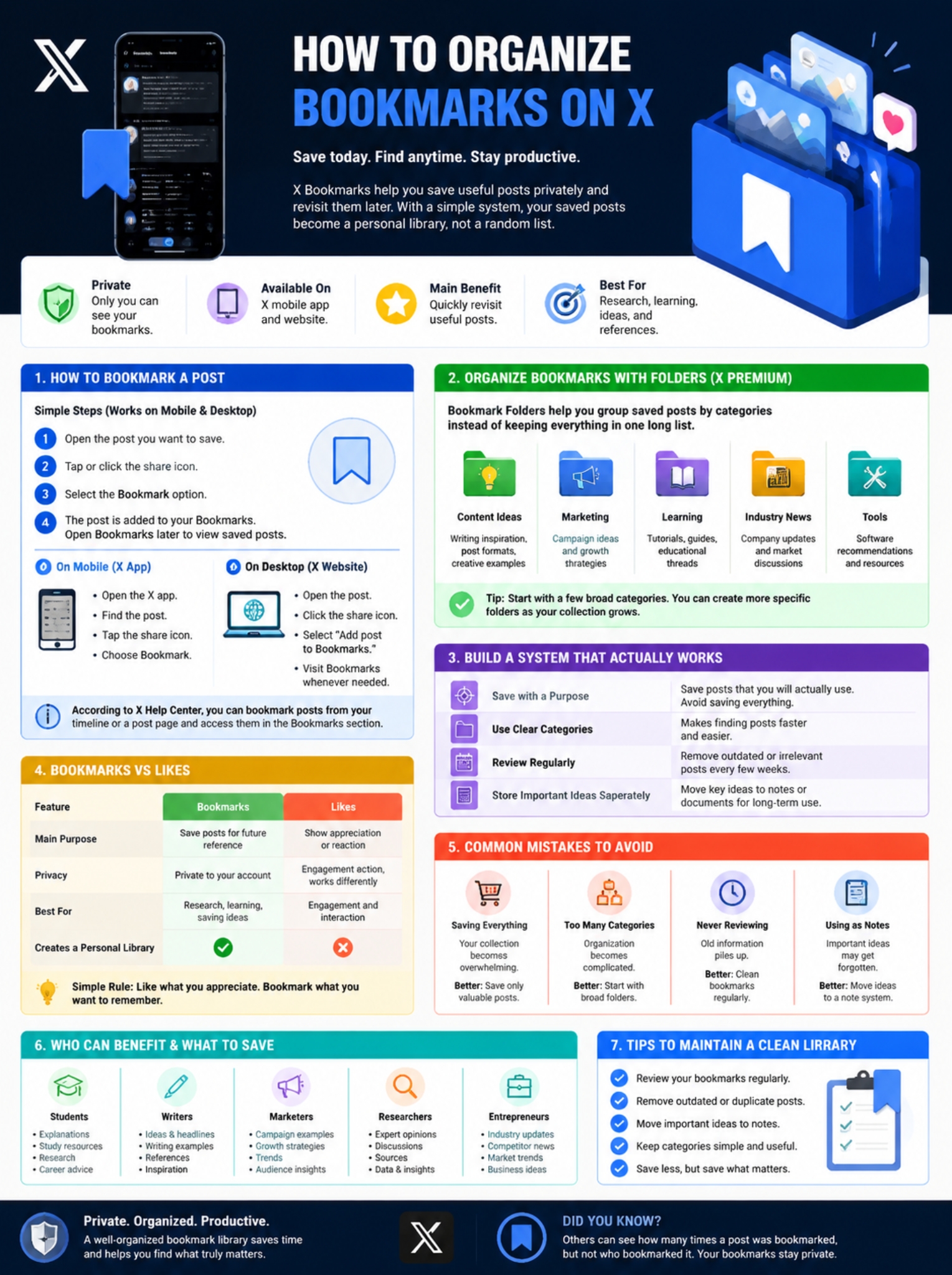
A bookmark system only works when you can actually use it. Many people save hundreds of posts but rarely return to them.
|
Mistake |
Why It Creates Problems |
Better Approach |
|
Saving every interesting post |
Your collection becomes overwhelming |
Save only valuable posts |
|
Creating too many categories |
Organization becomes complicated |
Start with broad folders |
|
Never reviewing bookmarks |
Old information piles up |
Clean bookmarks regularly |
|
Using bookmarks as permanent notes |
Important ideas may get forgotten |
Move key information to a note system |
Saving Everything
A common mistake is treating bookmarks like a “save everything” button.
Not every interesting post deserves a permanent place in your collection.
Before saving, ask:
- Will I need this information later?
- Does it help my work or learning?
- Is it something I would search for again?
If the answer is no, scrolling past it may be better.
Creating Too Many Folders
Folders can help, but too many categories can create extra work.
A simple structure is usually enough:
Good:
- AI Tools
- Marketing
- Writing
- Business
- Learning
Too complicated:
- AI Writing Tools 2026
- AI Marketing Tools 2026
- AI Design Tools 2026
- AI Research Tools 2026
You can always create smaller categories later when your collection grows.
How Creators Can Use X Bookmarks More Effectively
For content creators, bookmarks can become an idea bank.
Instead of starting from a blank page, saved posts can provide inspiration for future content.
|
Creator Goal |
What to Save |
|
Writing ideas |
Strong headlines and opening lines |
|
Social media planning |
Successful post formats |
|
Research |
Expert opinions and discussions |
|
Audience understanding |
Questions and feedback |
Useful bookmark folders for creators:
- Content Ideas
- Writing Inspiration
- Viral Examples
- Industry Trends
- Audience Questions
Before creating new content, reviewing saved examples can help identify patterns and generate better ideas.
How Businesses Can Use X Bookmarks
Businesses can also use bookmarks as a lightweight research tool.
A well-managed collection can help teams track conversations, competitors, and industry changes.
|
Business Use |
Example |
|
Competitor monitoring |
Save product announcements and updates |
|
Market research |
Collect customer discussions |
|
Content planning |
Save successful campaigns |
|
Industry learning |
Follow expert insights |
For social media teams, bookmarks can act as a private reference library.
A marketing team might save:
- competitor launches
- campaign examples
- customer complaints
- industry predictions
Later, these saved posts can support strategy meetings and content planning.
How to Organize Bookmarks on X Without Premium
X Premium subscribers get Bookmark Folders, which are designed to help users organize saved posts into categories.
However, users without Premium can still create a better bookmarking habit.
|
Method |
How It Helps |
|
Save fewer posts |
Keeps bookmarks manageable |
|
Review saved posts weekly |
Prevents clutter |
|
Write separate notes |
Preserves important ideas |
|
Remove outdated saves |
Keeps information useful |
The key is not having the largest bookmark collection.
The key is being able to find useful information when you need it.
Tips to Maintain a Clean Bookmark Library
A few simple habits can make a big difference.
1. Review Bookmarks Regularly
Set aside time to check saved posts.
Remove:
- outdated news
- old promotions
- information you no longer need
2. Move Important Ideas Somewhere Permanent
A bookmark is useful, but it should not always be the final destination.
If a post contains a valuable idea:
- add it to your notes
- include it in a project document
- save the key information elsewhere
3. Keep Categories Simple
Your system should help you, not slow you down.
A few clear folders are better than dozens of confusing ones.
Frequently Asked Questions About X Bookmarks
Are X Bookmarks private?
Yes. X Bookmarks are private and only visible to the account owner. Other users cannot see which specific posts you saved.
Can I organize bookmarks on X into folders?
Yes. Bookmark Folders are available through X Premium and allow users to organize saved posts into categories.
Do X users know when I bookmark their posts?
No. X does not reveal who bookmarked a post. Users may see the total bookmark count on supported devices, but not the accounts behind those saves.
Are bookmarks better than likes on X?
They are designed for different purposes.
Use likes when you want to react to a post. Use bookmarks when you want to save information for later.
Is there a limit to how many bookmarks I can save?
X does not publish a general public limit for standard bookmarks. X Premium documentation states that Premium users have unlimited bookmarks and Bookmark Folders.
Can I search all my X bookmarks?
X provides Bookmark organization features, including folders for Premium users, but users should not assume that every saved post can always be easily searched. A separate note system may work better for large research collections.
Can I remove multiple bookmarks at once?
Yes. X allows users to remove bookmarks from the Bookmarks section using the available management options.
Final Thoughts
Bookmarks are one of the simplest tools on X, but they become much more useful when you build a habit around them.
Saving posts is only the first step. The real value comes from organizing information so you can find it again when you need it.
A creator can use bookmarks as an idea library. A student can use them as a learning collection. A business can use them to track trends and conversations.
The goal is not to save everything.
The goal is to save the right things.
Once you learn how to organize bookmarks on X, your saved posts can become a practical resource instead of a forgotten list.