
Thinking about leaving Facebook for good? You’re not alone. In 2026, privacy concerns, distractions, and digital minimalism are pushing people to rethink their social media habits. If you want to delete Facebook permanently, it’s important to know exactly what steps to take, what data you can save, and how to avoid accidentally canceling the process.
Unlike deactivation, which is temporary, permanent deletion removes your account entirely after a short cancellation window. This guide walks you through the complete process on mobile and desktop, explains data backup options, covers Messenger, Pages, and Groups, and gives tips to make your exit clean and hassle-free.
How Do You Delete Facebook Permanently in 2026?
If you want the fastest route, here’s what you need to know. The process mainly happens through the Meta Accounts Center.
Step-by-step overview:
- Open Facebook Settings.
- Navigate to Accounts Center.
- Tap Personal details.
- Select Account ownership and control.
- Choose Deactivation or deletion.
- Pick Delete account.
- Confirm your choice.
Tip: Always download your Facebook information first if you want to keep photos, posts, or messages.
Table 1: Quick Deletion Overview
|
Step |
Action |
Notes |
|
1 |
Open Settings |
Mobile app or desktop |
|
2 |
Accounts Center |
Central hub for Meta accounts |
|
3 |
Personal details |
Where deletion options reside |
|
4 |
Account ownership |
Controls deactivation/deletion |
|
5 |
Deactivation or deletion |
Choose based on your needs |
|
6 |
Delete account |
Permanent option |
|
7 |
Confirm |
Complete deletion request |
Before You Delete Facebook Permanently, Know These Things
Deleting your account isn’t just hitting a button. Here’s what you need to consider:
- Cancellation window: Facebook allows a short period to undo deletion. Logging back in cancels the request.
- Messages: Anything you sent to others may still appear in their inbox.
- Other content: Posts by others about you won’t automatically disappear.
- Third-party apps: Any login via Facebook will stop working.
- Pages & Groups: Admin rights might need transferring before deletion.
Table 2: Key Considerations
|
Factor |
What to Know |
|
Cancellation |
Possible within ~30 days |
|
Messages |
May remain visible to friends |
|
Shared content |
Not deleted if posted by others |
|
Connected apps |
Login access will stop |
|
Admin roles |
Transfer ownership of Pages/Groups |
Deactivate vs Delete Facebook: What Is the Difference?
Understanding the difference can save you frustration.
What Happens When You Deactivate Facebook?
- Your profile is hidden from most users.
- You can return anytime by logging back in.
- Limited visibility of content remains in certain places.
What Happens When You Delete Facebook Permanently?
- Account is scheduled for deletion after the cancellation period.
- Posts, photos, videos, and profile data are removed.
- Some technical storage may retain data temporarily.
Which Option Should You Choose?
- Deactivation: Temporary break or digital detox.
- Deletion: Permanent exit for users who no longer want a Facebook presence.
Table 3: Deactivation vs Deletion
|
Feature |
Deactivation |
Deletion |
|
Duration |
Temporary |
Permanent |
|
Recovery |
Yes |
Only during cancellation window |
|
Data Removal |
Hidden but intact |
Removed after window |
|
Messenger Access |
Retained |
May be lost |
|
Best For |
Short break |
Permanent exit |
How to Download Your Facebook Data Before Deleting Your Account
Before leaving, it’s smart to save memories and important data.
What Facebook Data Can You Save?
- Photos and videos
- Posts and comments
- Messages and chats
- Friends list
- Events and activity
- Marketplace and ad history
Read Also: How to Recover a Disabled Facebook Account in 2026
How to Export Facebook Information
- Open Settings → Accounts Center → Your information.
- Tap Download your information.
- Choose categories, date range, format (HTML/JSON), and media quality.
- Request the file and wait for email or download link.
- Download before the link expires.
Smart Backup Tips
- HTML for readable archives, JSON for structured data.
- High-quality media ensures your photos/videos remain clear.
- Store securely before deleting your account.
Table 4: Data Download Tips
|
Step |
Action |
Tip |
|
1 |
Open settings |
Access via mobile/desktop |
|
2 |
Select data |
Choose only what matters |
|
3 |
Pick format |
HTML for reading, JSON for structured |
|
4 |
Request file |
Facebook prepares downloadable archive |
|
5 |
Download |
Check file before deleting |
How to Permanently Delete Facebook Account on Mobile App
Steps to Delete Facebook Permanently on Android or iPhone
- Open the app → Menu → Settings & Privacy → Settings
- Accounts Center → Personal details → Account ownership and control
- Tap Deactivation or deletion → Delete account → Continue
- Follow final prompts to confirm
Troubleshooting Mobile Issues
- Update the Facebook app.
- Search for “Accounts Center” if missing.
- Try browser version if app menus differ.
Table 5: Mobile Deletion Troubleshooting
|
Issue |
Solution |
|
Can’t find Accounts Center |
Update app or use browser |
|
App menu differs |
Search “deletion” in Settings |
|
Multiple profiles |
Ensure correct account logged in |
How to Permanently Delete Facebook Account on Desktop
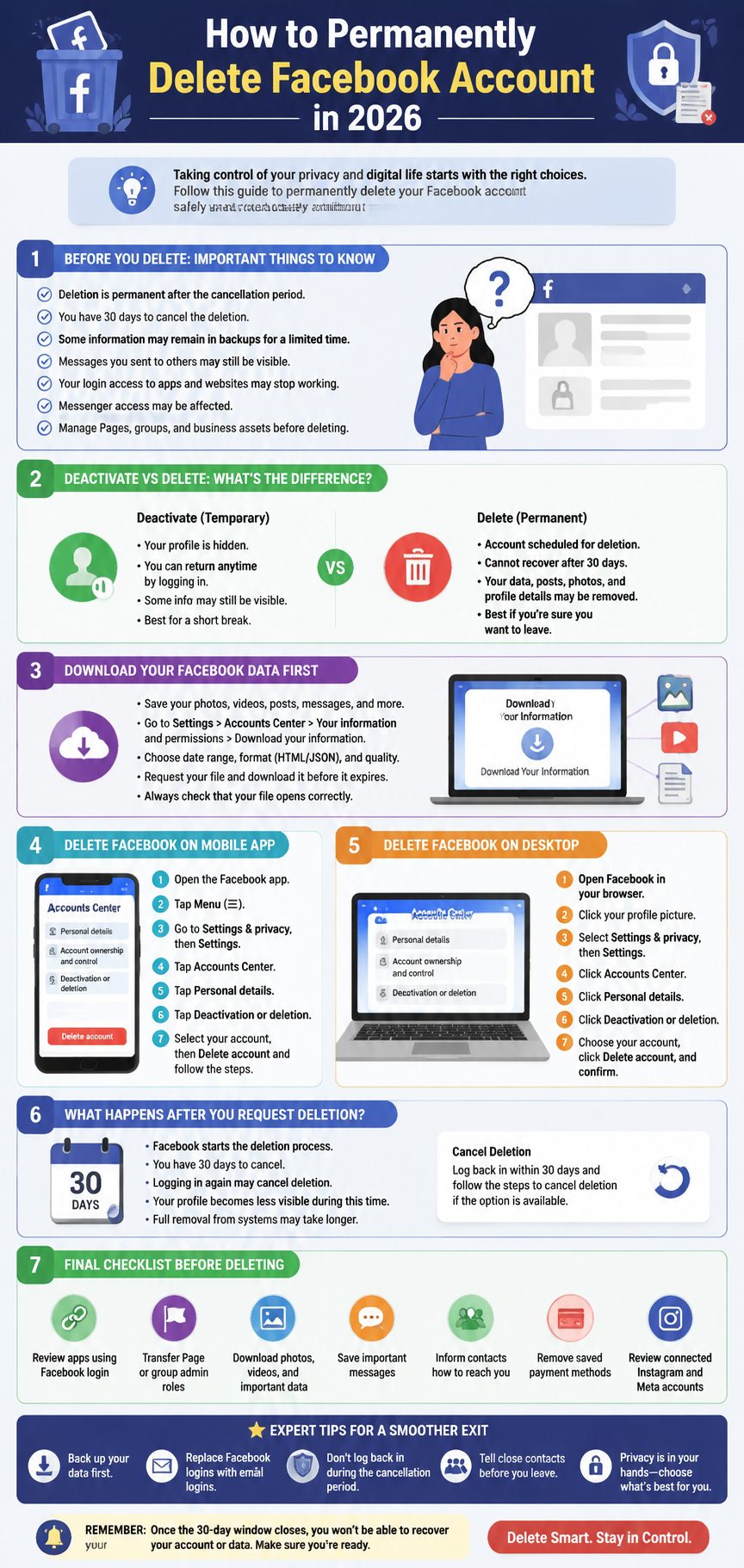
Steps to Delete Facebook Permanently from a Computer
- Log in → Profile Picture → Settings & Privacy → Settings
- Accounts Center → Personal details → Account ownership and control
- Click Deactivation or deletion → Delete account → Confirm
Desktop Layout Differences
- Menus may differ regionally.
- Older paths may exist under Your Facebook Information.
- Use search in Settings if unsure.
Table 6: Desktop Deletion Tips
|
Issue |
Solution |
|
Layout differs |
Check Settings search bar |
|
Can’t find option |
Use “deactivation” or “Accounts Center” keywords |
|
Multiple accounts |
Verify correct profile |
What Happens After You Request Facebook Account Deletion?
Deletion Process Overview
- Account enters deletion state after confirmation.
- Profile visibility reduces.
- Logging in during cancellation window cancels deletion.
- Complete data removal may take additional time.
Canceling Deletion
- Log back in within cancellation period.
- Choose Cancel deletion.
- After the period, recovery may not be possible.
Timeline for Account Deletion
- Initial deletion: 1–2 days visible changes.
- Technical removal: May take weeks.
- Backups: Some residual data remains temporarily.
Table 7: Deletion Timeline
|
Stage |
Duration |
Notes |
|
Request |
Immediate |
Profile enters deletion mode |
|
Cancellation window |
~30 days |
Login cancels deletion |
|
Full removal |
Weeks |
Technical storage may retain data |
What Happens to Messenger After You Delete Facebook?
- Messenger may stop working once Facebook is fully deleted.
- Messages sent remain in friends’ inboxes.
- Consider exporting important conversations.
Tips for Contacts
- Inform close contacts before deletion.
- Provide alternative communication methods.
- Backup essential chats if needed.
Table 8: Messenger Implications
|
Aspect |
Effect |
|
Access |
May be disabled |
|
Friends’ messages |
Remain in inbox |
|
Backup |
Recommended |
Check These Things Before You Delete Facebook Permanently
Facebook Login Connected to Other Apps
- Games, streaming, dating, shopping apps often use Facebook login.
- Change login methods to email/password before deletion.
Pages, Groups, Business Assets
- Transfer admin roles.
- Download ad account records.
- Check Meta Business Suite connections.
Photos, Videos, Memories
- Download albums.
- Backup tagged photos.
- Review private and shared media.
Table 9: Pre-Deletion Checklist
|
Area |
Action |
|
Connected apps |
Update login credentials |
|
Pages/Groups |
Add new admins |
|
Media |
Backup photos/videos |
|
Ads |
Save account info |
Common Problems When Trying to Delete Facebook Account
Forgot Password
- Recover first via email, phone, or trusted contacts.
Hacked Account
- Recover control first.
- Change password and remove suspicious sessions.
Missing Delete Option
- Update app or browser.
- Search Settings → Deactivation or Accounts Center.
Deleted App Only
- App removal does not delete account.
- Use Settings → Accounts Center.
Table 10: Common Problems & Solutions
|
Problem |
Solution |
|
Forgot password |
Recover account |
|
Hacked account |
Secure first |
|
No delete button |
Update & search |
|
Deleted app |
Must delete via Settings |
Privacy Alternatives If You Are Not Ready to Delete Facebook
Make Account More Private
- Limit post visibility.
- Hide old posts.
- Manage tags & search visibility.
Clean Up Instead of Delete
- Delete old posts & photos.
- Leave irrelevant groups.
- Adjust notifications.
Temporary Break
- Deactivate account.
- Remove app.
- Use screen time controls.
Table 11: Privacy Alternatives
|
Option |
Benefit |
|
Privacy tweaks |
Keep account, limit visibility |
|
Clean up |
Reduce clutter without deletion |
|
Temporary break |
Pause activity without losing account |
Expert Tips for a Cleaner Facebook Exit
- Download data before deletion.
- Transfer Page or group admin roles.
- Notify close contacts.
- Remove payment methods.
- Don’t log in during cancellation window.
Table 12: Expert Exit Tips
|
Tip |
Benefit |
|
Download data |
Keep memories |
|
Transfer admins |
Avoid losing group/page control |
|
Notify contacts |
Maintain communication |
|
Remove payment |
Prevent future charges |
|
Avoid login |
Ensure deletion proceeds |
Final Take
Permanent deletion is best if you’re sure you want to leave Facebook for good. For those unsure, deactivation or privacy cleanup may be a safer route. Always download your data, check connected apps, transfer Pages/groups, and follow the Accounts Center steps carefully. Once deletion is complete, the process is irreversible, so preparation is key.
Frequently Asked Questions (FAQs) About Delete Facebook Permanently
How do I delete Facebook permanently in 2026?
Use Accounts Center → Personal details → Account ownership and control → Deactivation or deletion → Delete account → Confirm.
Is deleting Facebook the same as deactivating it?
No. Deactivation is temporary. Deletion removes the account permanently after the cancellation window.
Can I recover my Facebook account after deleting it?
Recovery is possible only within the cancellation window, usually ~30 days. After that, the account is gone.
Will deleting Facebook delete Messenger too?
Messenger access may stop once Facebook is fully deleted. Messages you sent may remain in friends’ inboxes.
Does deleting the Facebook app delete my account?
No. Uninstalling the app only removes it from your device. You must delete the account via Settings.
Can I delete Facebook but keep Instagram?
Yes. Facebook and Instagram accounts are separate, but connected accounts may need review in Accounts Center.
What happens to my Facebook Pages if I delete my account?
Pages you manage may be affected. Add another admin or transfer ownership before deletion.
Can I cancel deletion after starting the process?
Yes. Log back in during the cancellation period and select Cancel deletion.