
Waking up to find you cannot log into your Meta profile can ruin your entire week. Suddenly, you lose your photos, connections, and maybe even the business pages you manage. It feels incredibly isolating. I have seen countless users panic and assume their digital life is gone forever. But if you act quickly, you can get it back. The rules changed recently, and navigating the new automated systems requires a specific approach. This guide covers exactly how to recover disabled facebook profiles in 2026. Meta has streamlined its support channels, but the margin for error is smaller than ever.
You cannot rely on old methods like blasting emails to random support addresses. Instead, you need to use the official forms, submit exact documentation, and understand the timeline. We will break down every step, from filing the appeal to protecting your account once you get it back. Let us dive into the recovery process so you can reclaim your digital presence.
Why Did Facebook Disable Your Account?
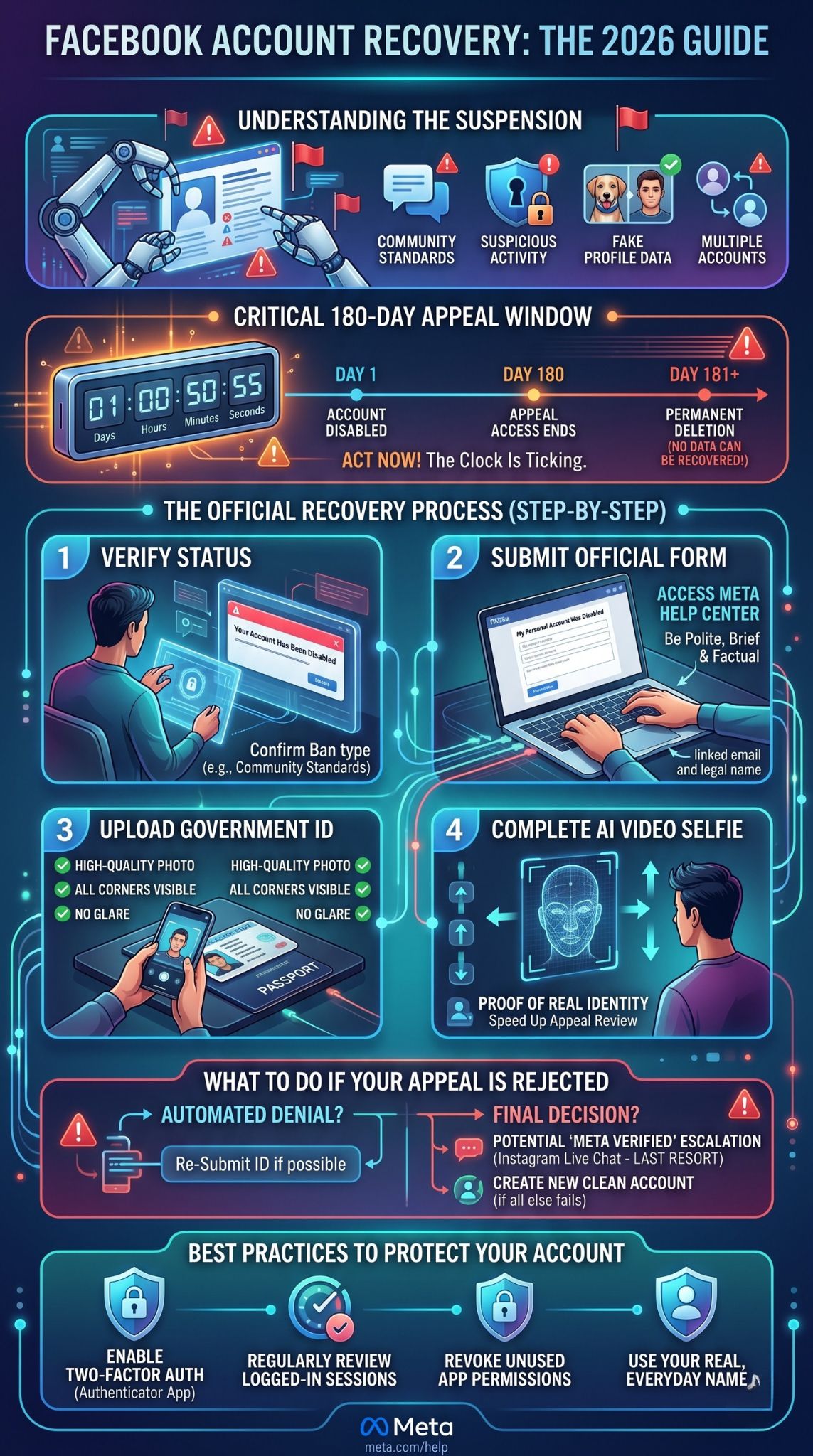
Before you fill out a single form, you need to figure out what triggered the ban. Meta relies heavily on automated systems to monitor billions of users every single day. These bots constantly scan for anything that breaks their rules or looks like a hacker. When they spot a red flag, they lock the account down immediately. Sometimes they are right, but they also make plenty of mistakes. Understanding the root cause helps you build a stronger case when you file your appeal. If you know exactly what went wrong, you can address it head-on during the review process.
Table: Common Triggers for Account Suspension
|
Reason |
Description |
Severity Level |
|
Community Standards Violation |
Posting forbidden content or harassment |
High |
|
Suspicious Activity |
Unusual login locations or bot behavior |
Medium |
|
Fake Profile Data |
Using pseudonyms or impersonating someone |
Medium |
|
Multiple Accounts |
Operating more than one personal profile |
High |
Community Standards Violations
Meta takes its community standards incredibly seriously. These rules dictate what you can and cannot post. If you share hate speech, promote illegal acts, or post graphic content, the system will flag you. Even sharing a controversial meme or making a joke that the AI misinterprets can result in an instant ban. The bots lack context, so sarcasm often gets flagged as a genuine threat. If your account was disabled for this reason, your appeal needs to clarify the context of the post or acknowledge the mistake. Repeat offenders rarely get a second chance, so keep your posts clean once you recover your access.
Suspicious Activity or Security Concerns
Sometimes the platform locks you out to protect you. If someone tries to log into your profile from a completely different country, the system assumes you got hacked. The same applies if you suddenly send out a hundred friend requests in five minutes or blast links to all your contacts. The automated security protocols freeze the account to stop the bad actor from scamming your friends. In these scenarios, it is actually quite easy to regain access. You just need to prove your identity and reset your passwords to clear the security block.
Fake Names and Inaccurate Information
You must use your real, everyday name on the platform. If you set up a profile for your dog or use a clever nickname, you run a high risk of getting banned. Meta aggressively purges fake accounts to combat spam and misinformation. Additionally, you are only allowed to have one personal profile. If the system links two accounts to your IP address and email, it will likely shut both down. During the recovery phase, you will have to provide government documentation to prove your legal name matches the account details.
The Critical 180-Day Appeal Window in 2026
Time is absolutely your biggest enemy right now. In the past, you could sometimes appeal a ban a year later and still get lucky. That is no longer the case. In 2026, Meta strictly enforces a 180-day grace period. The clock starts ticking the exact second your account gets disabled. If you do not submit your appeal before that timer runs out, the request review button vanishes forever. You must take this deadline seriously. I always advise starting the process the same day you notice the ban.
Table: The Meta Appeal Timeline
|
Phase |
Timeframe |
What Happens |
|
Suspension Triggered |
Day 1 |
Profile becomes invisible, login blocked. |
|
Appeal Window |
Day 1 to 180 |
User can submit forms and IDs for review. |
|
Final Review |
Varies |
Human or AI agent reviews the submitted case. |
|
Permanent Deletion |
Day 181 |
All data, photos, and messages are permanently purged. |
During these 180 days, your data sits in a suspended state on their servers. Your friends cannot see your profile, tag you, or message you. Any third-party apps you log into via Meta, like Spotify or Instagram, will also deny you access. It feels like you have been erased from the internet. Do not panic, but do act with urgency. Gather your documents and start the appeal. Once day 181 hits, the system automatically purges your data. ~Once the data is wiped from the servers, no amount of appealing or legal letters will bring it back~ notes a top contributor on the Meta Support Forum. You do not want to lose years of memories just because you procrastinated.
Step-by-Step Process to Recover Disabled Facebook Accounts
You need to follow the official channels perfectly to get your account back. Do not waste time trying to find a secret phone number, because Meta does not offer phone support for personal accounts. Also, ignore anyone in the comments claiming they know a hacker who can unlock your profile for a fee. Those are scams, plain and simple. We will walk through the exact, legitimate steps to file your appeal. Make sure you use a desktop computer rather than your phone, as the web forms tend to load better and offer clearer instructions.
Read Also: How to See Who Viewed Your Facebook Profile in 2026
Table: Recovery Action Plan
|
Step |
Action Required |
Expected Outcome |
|
1 |
Verify Status |
Confirm if it is a ban or just a lock. |
|
2 |
Submit Form |
Send appeal via official help center. |
|
3 |
Upload ID |
Provide clear government identification. |
|
4 |
Video Selfie |
Complete AI facial recognition check. |
Step 1: Verify the Exact Status of Your Account
First, you need to know exactly what you are dealing with. Open a desktop browser, clear your cache, and try to log in. Read the error message carefully. If it says your account is temporarily locked for security reasons, you just need to reset your password or verify a code sent to your phone. If it explicitly states that your account has been disabled, you are dealing with a full ban. The message will usually give a vague reason, like a violation of community standards. Take a screenshot of this message for your records. Knowing the exact status dictates which forms you need to fill out next.
Step 2: Use the Official Account Appeal Form
Now you need to navigate to the official help center. Search for the page titled My Personal Account was Disabled. This is the only legitimate way to contact the review team. You will need to enter the email address or phone number linked to the account. Next, type in your full legal name exactly as it appears on your government ID. There is a box for additional information. Keep your message brief, polite, and factual. Explain that you believe the ban was an error or that your account was compromised by a hacker. Getting angry or typing in all caps will not help your case.
Step 3: Prepare and Upload a Valid Government ID
To prove you actually own the account, the system requires identity verification. You need to upload a high-quality photo of a government-issued ID. A passport, driver license, or state ID works perfectly. Place the card on a dark, flat surface and ensure the lighting is good. Turn off your camera flash to avoid glare. All four corners of the ID must be visible, and the text must be perfectly legible. If the photo is blurry, the AI bots will reject it automatically, adding weeks to your wait time. Meta encrypts these files and usually deletes them after the review concludes.
Step 4: Complete the AI Video Selfie Verification
Meta introduced new verification hurdles recently to fight sophisticated bots. You might be asked to complete a video selfie check. You will need to use your smartphone or webcam for this. The screen will prompt you to turn your head left, right, up, and down. This proves to the system that you are a real, living person and not an AI-generated image. Do this in a well-lit room and follow the prompts exactly. Passing this automated check can drastically speed up your appeal, sometimes moving your case right to the front of the queue.
Recovering a Disabled Facebook Business Page
Business owners face a completely different process when their pages go dark. If your advertising account or business page gets suspended, it directly impacts your revenue. You cannot use the personal appeal form for this. Instead, you have to navigate the Meta Business Suite. The review process here is much stricter because it involves financial transactions and advertising compliance. Ensure you log in with the personal account that holds the administrative rights to the disabled page. The process requires patience and heavy documentation to prove your business is legitimate.
Table: Business Page Recovery Checklist
|
Requirement |
Details |
Purpose |
|
Admin Access |
Log in via the linked personal account |
Verifies authorization |
|
Business Details |
Provide tax IDs or business licenses |
Proves company legality |
|
Policy Review |
Check Account Quality dashboard |
Identifies specific ad violations |
|
Detailed Appeal |
Explain compliance with ad policies |
Justifies reinstatement |
Business Manager Appeal Steps
The first thing you should do is check the Account Quality dashboard inside the Business Suite. This page will explicitly state which ad or post triggered the takedown. Once you know the issue, click the Request Review button. You will likely need to upload business verification documents, such as a certificate of incorporation or a recent utility bill in the business name. In your appeal text, explain exactly how you plan to fix the violation moving forward. Do not just create a new page, as the system tracks IP addresses and will ban the new page for trying to bypass the original restriction. Ensure your language is highly professional and avoids placing blame on the automated moderation tools.
What to Do If Your Facebook Appeal Is Rejected
Sometimes, despite your best efforts, the review team denies your request. Waiting for the email is stressful, and getting a rejection feels like a massive blow. The time it takes to get a response varies wildly. A simple identity check might take two days, while a complex policy review could take a month. You need to monitor your email inbox and your spam folder closely. If the email says the decision is final, your options shrink dramatically. You need to know what steps to take next if the initial plan fails.
Table: Post-Rejection Strategies
|
Scenario |
Next Step |
Success Rate |
|
Automated Denial |
Re-submit ID if the option remains |
Low |
|
Final Decision |
Reach out via Meta Verified |
Medium |
|
Permanent Ban |
Create a new account cleanly |
N/A (Restart) |
|
Data Loss |
Download data if prompted |
High |
Escalation and Starting Over
If you receive a final rejection notice, the account is usually gone for good. The standard support team will not review the case again. However, if you are absolutely certain the ban was a mistake, there is one last workaround. Some users have found success by subscribing to Meta Verified on Instagram. This gives you access to a live chat support agent. You can politely explain the situation to them and ask them to escalate the Facebook ban to a human reviewer. It is not guaranteed, but it is currently the best backdoor available. If all else fails, you must create a new account using a completely different email and phone number.
Best Practices to Protect Your Account from Future Bans
Once you successfully recover disabled facebook access, your top priority is locking it down. You just went through a highly stressful process, and you do not want to repeat it next month. Securing your profile prevents hackers from using it to run scams, which is the leading cause of random suspensions. You also need to adjust your own behavior to ensure you do not trigger the spam filters. A few simple tweaks to your settings and daily habits will keep your digital life safe and compliant with the 2026 guidelines.
Table: Account Security Measures
|
Action |
Implementation |
Benefit |
|
Two-Factor Auth |
Use an authenticator app, not SMS |
Blocks unauthorized logins |
|
Session Review |
Log out of unknown devices monthly |
Kicks out lingering hackers |
|
Friend Requests |
Limit daily outbound requests |
Prevents spam flags |
|
App Permissions |
Revoke access to old third-party apps |
Closes security loopholes |
Implementing Strict Security Controls
Immediately turn on two-factor authentication. Do not just use text messages, as SIM swapping attacks are common. Download a dedicated authenticator app like Google Authenticator and link it to your profile. Next, go to your security settings and check where you are logged in. Click the log out of all devices option to ensure no one else has access. Finally, review your connected apps. If you gave profile access to a random quiz app five years ago, revoke that access now. Keep your posts clean, avoid joining dozens of groups in one day, and use your real name consistently.
Final Thoughts
Losing your digital connections is frustrating, but it does not have to be permanent. Understanding the exact guidelines for 2026 is the key to success. You must act fast, respect the 180-day deadline, and provide clear, accurate documentation. By following the steps outlined above, you maximize your chances to recover disabled facebook profiles successfully. Stay calm, avoid third-party scams, and use the official channels. Once you regain access, prioritize your account security to ensure you never have to go through this stressful experience again.
Frequently Asked Questions (FAQs)
How long does the review process actually take?
A basic identity verification might finish in 48 hours. However, if your account was flagged for a complex community standards violation, a human moderator must review it. This process can take anywhere from 7 to 30 days depending on their current backlog.
Can I just create a new account while I wait for the appeal?
You should absolutely avoid creating a second account while your primary one is under review. Meta tracks device IDs and IP addresses. If they catch you making a new account to bypass a ban, they will disable the new one and likely permanently reject your pending appeal.
Is there a customer service phone number I can call?
No, there is no public customer service phone number for Meta account recovery. Any phone numbers listed online claiming to offer support are scams designed to steal your data or money. All appeals must go through the official help center web forms.
What happens to my data if my appeal is denied or the 180 days expire?
If your appeal is permanently denied or you miss the 180-day window, your profile moves to a permanent deletion queue. All your photos, messages, friend lists, and posts are purged from the servers and cannot be restored under any circumstances.
Can I use Meta Verified on Instagram to fix my Facebook ban?
Yes, this is currently a popular workaround. If you pay for Meta Verified on an active Instagram account, you unlock live chat support. You can politely ask the representative to look into your disabled Facebook account, though success rates vary based on the agent you speak with.