
Hosting an online movie night with friends is one of the best ways to hang out remotely. You just hop into a voice channel, load up a movie, share your application window, and start watching together. But things rarely go that smoothly on the first try. Anyone who has attempted this setup knows the sudden disappointment of hitting the share button only to hear your friends complain that they cannot see anything. You hear the audio perfectly, and you see the movie playing on your monitor, but your viewers are staring at absolute darkness.
This annoying glitch ruins the vibe of a watch party instantly. Getting past the stream netflix discord black screen error requires an understanding of how your computer handles video rendering behind the scenes. This guide covers exactly why this problem happens and provides every possible method to force your computer to share the video feed properly. By tweaking a few simple hidden settings in your web browser, you can get your movie night back on schedule without any major technical headaches.
Why You Get a Black Screen When Streaming Netflix on Discord
Hosting an online movie night sounds easy until you actually click the share button and realize nobody can see the video feed. You might hear the opening theme playing clearly through your headphones, but your friends just see a blank, empty window. This frustrating situation stems directly from security protocols that major streaming companies enforce to protect their content from unauthorized recording. Understanding the technical reasons behind the block makes fixing the stream netflix discord black screen problem much easier.
|
Technical Cause |
Detailed Description |
Impact on Screen Sharing |
|
Digital Rights Management |
Security software embedded in the browser by streaming platforms |
Intentionally blocks screen capture software from grabbing frames |
|
Hardware Acceleration |
Offloads heavy video decoding tasks directly to the graphics card |
Creates a secure pipeline that bypasses standard operating system capture |
|
Browser Integration |
Deep system-level security ties in browsers like Safari or Edge |
Prevents third-party apps from intercepting protected video memory |
The Role of Digital Rights Management
Digital rights management technology operates quietly in the background of almost every major streaming platform today. Companies rely on systems like Google Widevine or Apple FairPlay to ensure that only paying subscribers can view their media. When you open a movie in your web browser, the digital rights management software creates an encrypted pipeline connecting the remote server straight to your monitor display. The moment you open a screen capture tool like Discord, the security protocol flags it as a recording attempt and intentionally blanks out the visual feed.
Browser Hardware Acceleration Conflicts
Modern web browsers use a feature called hardware acceleration to keep high-definition videos playing smoothly. Instead of forcing your computer processor to handle all the heavy lifting, the browser sends the video decoding tasks straight to your dedicated graphics card. While this makes the picture look incredibly crisp on your end, it completely isolates the video data. Since the video is rendering at the hardware level inside your graphics processing unit, standard screen sharing software simply cannot see the frames.
Essential Preparations Before You Start Streaming
Jumping straight into your system settings without preparing your digital environment usually leads to more frustration and dropped connections. You need to make sure your voice channel is properly configured and that you are using software capable of handling heavy video data. Setting up your server permissions correctly guarantees that your friends can actually join the channel once the video feed starts working. Preparing the right tools beforehand saves you from constantly restarting your computer while trying to troubleshoot.
|
Preparation Step |
Purpose of the Step |
Recommended Action |
|
Server Creation |
Provides a private space for your friends to gather |
Build a dedicated watch party server with restricted text and voice channels |
|
Role Permissions |
Ensures users can view and broadcast video feeds |
Grant video and streaming permissions to the appropriate user roles |
|
Browser Selection |
Improves the chances of bypassing security blocks |
Install Mozilla Firefox as a backup if Google Chrome fails to share the video |
Creating Your Discord Server or Voice Channel
You cannot host a decent watch party without a dedicated space. If your friend group does not already have a private server, you need to create one. Click the plus icon on the left sidebar of the application to build a new server from scratch. Once you create the server, set up a specific voice channel just for movies. Voice channels are completely necessary because they handle the real-time audio and video packets. You also need to check the server settings to ensure everyone has the proper permissions to join the channel and view active streams.
Choosing the Best Browser for Streaming
Not all web browsers interact with screen sharing software the exact same way. Browsers built on the Chromium engine, like Google Chrome and Microsoft Edge, feature incredibly strict security pipelines that trigger black screens almost immediately. Mozilla Firefox uses an entirely different rendering engine called Gecko. Because Firefox processes hardware-level rendering differently, it is generally much more forgiving when you try to share a protected video window. Keeping Firefox installed as your secondary backup browser saves a lot of time if your primary browser refuses to cooperate.
Step-by-Step Guide to Fix the Stream Netflix Discord Black Screen Issue
The most reliable method to get your movie night back on track involves tweaking how your web browser processes video playback. You simply need to force your computer to use its main processor for video rendering instead of handing the job off to your dedicated graphics card. This minor adjustment breaks the secure pipeline that blocks screen capture software from seeing the video frames. Follow these exact steps for your specific web browser to permanently solve the stream netflix discord black screen error.
|
Web Browser |
Settings Menu Location |
Required Action |
|
Google Chrome |
Settings panel under the System tab |
Toggle the graphics acceleration switch to the off position |
|
Microsoft Edge |
Settings panel under System and performance |
Turn off the graphics acceleration option |
|
Mozilla Firefox |
Settings menu under the General tab in Performance |
Uncheck both recommended performance and hardware acceleration boxes |
|
Discord App |
User Settings panel under the Advanced tab |
Disable the internal hardware acceleration feature |
Disabling Hardware Acceleration in Google Chrome
Since Google Chrome dominates the browser market, you will likely start your troubleshooting here. Open your Chrome browser and click the three vertical dots located in the top right corner of the window. Click on Settings from the drop-down menu that appears. Look at the left sidebar and click on System. You will clearly see an option labeled Use graphics acceleration when available with a toggle switch next to it. Click the switch to turn it off. A button will pop up asking you to relaunch the browser. Click it, wait for Chrome to reopen, and try sharing your screen again.
Read More: Netflix Removes its $10 Basic Plan in the US
Turning Off Hardware Acceleration in Microsoft Edge
Microsoft Edge runs on the exact same underlying architecture as Google Chrome, making the fix practically identical. Open Microsoft Edge and click the three horizontal dots in the upper right corner to access the main menu. Scroll down and click on Settings. On the left side of the screen, find and click the section titled System and performance. Look for the toggle switch labeled Use graphics acceleration when available and turn it off completely. You must manually restart the Edge browser for this change to actually take effect on your video playback.
Adjusting Settings in Mozilla Firefox
Firefox requires a slightly different approach to access the performance settings. Open the Firefox browser and click the three horizontal lines in the top right corner. Select Settings from the list. Stay on the General tab and scroll down the page until you find a section labeled Performance. You will see a checked box that says Use recommended performance settings. Click that box to uncheck it. A hidden option will immediately appear directly below it called Use hardware acceleration when available. Uncheck that second box as well, and then restart the browser entirely.
Disabling Hardware Acceleration in Discord Settings
If you tweaked your browser settings and your friends are still staring at a blank screen, the communication app itself might be the culprit. The desktop application utilizes its own hardware acceleration to keep menus and animations running smoothly. Open the desktop application and look for your username in the bottom left corner. Click the small gear icon right next to it to open your User Settings. Scroll down the left sidebar until you reach the Advanced section. Click it, find the Hardware Acceleration toggle, and turn it off. The app will prompt you to restart. Let it restart and launch your stream one more time.
Alternative Methods to Stream Netflix Without Issues
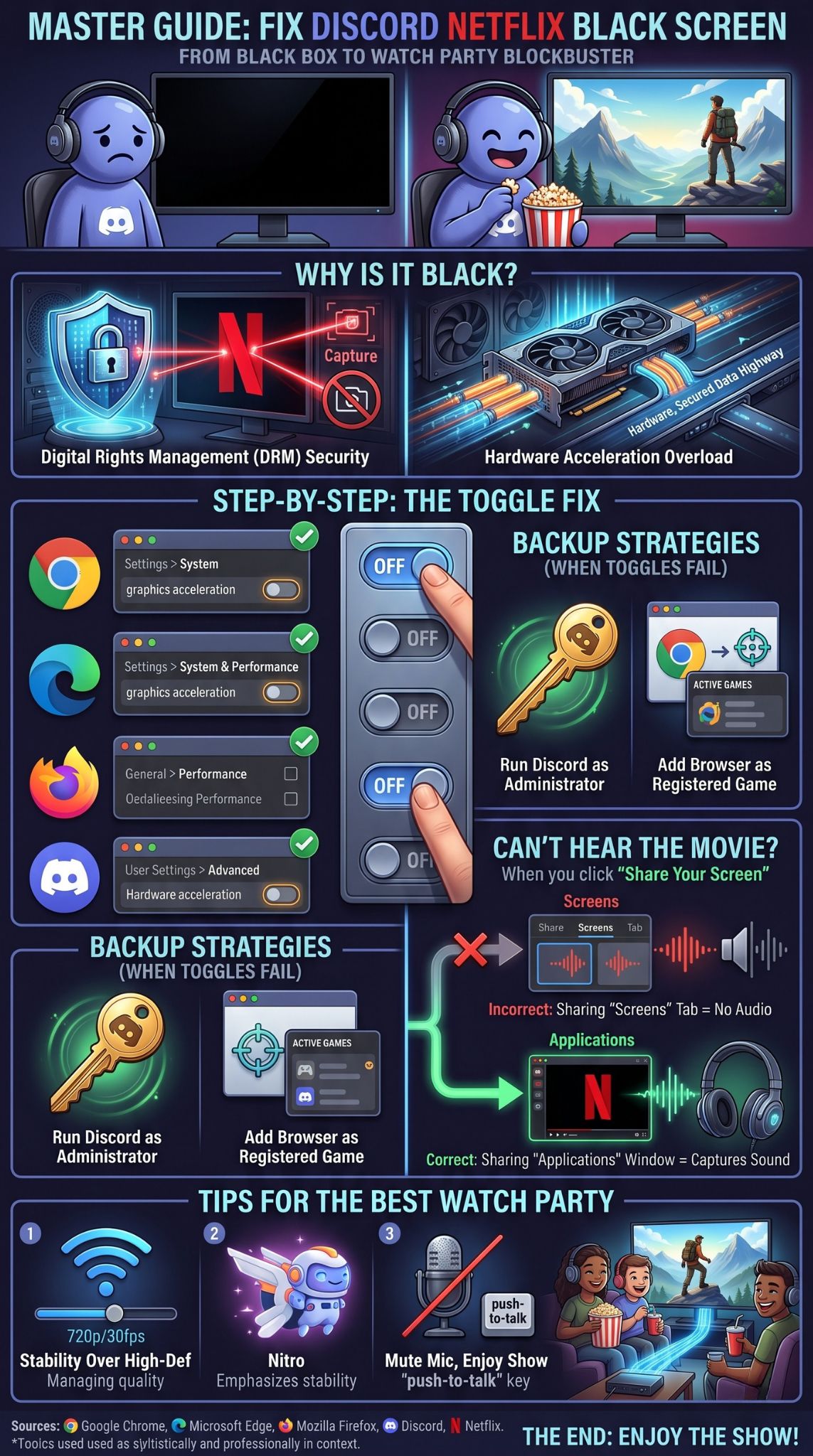
Sometimes turning off hardware acceleration simply does not work, especially if your operating system forces security compliance regardless of browser settings. If you still see a blank screen after restarting everything, you need to trick the screen capture software into thinking it is recording something else. These alternative workarounds manipulate system permissions and activity status to bypass standard broadcast limitations. They are incredibly useful backup plans when the primary fixes fail.
|
Troubleshooting Method |
Difficulty Level |
Expected Success Rate |
|
Using the Desktop Client |
Very Easy |
High success rate for general capture issues |
|
Running as Administrator |
Easy |
Moderate success rate for fixing system permission blocks |
|
Adding Browser as a Game |
Medium |
Very high success rate for bypassing browser restrictions |
Using the Discord Desktop App vs Web Version
You should never try to host a watch party by logging into the communication platform through a web browser tab. The web version of the application operates inside a sandbox environment, meaning it lacks the deep system-level hooks required to properly capture other application windows. You must download the official desktop client directly from the company website and install it on your computer. The dedicated software has the necessary permissions to grab video frames straight from your operating system.
Running Discord as an Administrator
Operating systems like Windows tightly control which programs are allowed to look at other programs. Sometimes the communication application simply lacks the administrative privileges necessary to intercept a protected video player. You can easily force Windows to grant full access. Close the application completely, ensuring it is not hiding in your system tray. Find the shortcut icon on your desktop, right-click it, and select Run as administrator. Click yes on the security prompt. This elevates the software privileges and often clears up capture errors instantly.
Adding Your Browser as a Registered Game on Discord
The entire communication platform was originally built from the ground up for gamers to share their live gameplay. The software contains heavy optimizations specifically designed to detect and broadcast video games flawlessly. You can utilize this system by tricking the application into treating your web browser exactly like a competitive video game. This method forces the software to use a different capture method that frequently ignores standard browser security blocks.
Step-by-Step Game Activity Setup
Open the desktop client and click the gear icon to access your User Settings. Scroll down the left menu until you find the Activity Settings section. Click on Registered Games. At the top of this page, you will likely see a message stating that no game is detected. Look for the small blue text below it that says Add it and click it. A drop-down menu will appear containing a list of every program currently open on your computer. Find the web browser where your movie is currently paused and select it. Click the Add Game button. Now, exit the settings menu completely. Look above your username in the bottom left corner, and you will see your browser listed there as an active game. Click the small monitor icon right next to the browser name to start sharing that specific window.
Troubleshooting Audio Problems While Streaming
Fixing the video feed completely solves the stream netflix discord black screen error, but a silent movie is just as ruined as an invisible one. Audio routing is notoriously tricky on desktop computers because operating systems separate application sound from microphone inputs. You have to explicitly tell the software which specific audio channel to grab and broadcast to your friends in the voice channel. Getting the audio right ensures everyone hears the dialogue clearly without annoying echoes.
|
Audio Issue |
Likely Cause |
Suggested Solution |
|
Completely silent stream |
Sharing the entire monitor instead of the specific window |
Stop the stream and select the Applications tab when sharing |
|
Distorted or echoing sound |
Multiple conflicting audio output devices active |
Check Windows sound settings and match the default playback device |
|
Voices drowning out movie |
Poorly adjusted application volume sliders |
Use the internal volume sliders to balance the stream audio |
Fixing No Sound Issues on Discord Streams
The most common reason nobody can hear the movie dialogue comes down to how you actually initiated the screen share. When you click the button to share your screen, a window pops up giving you two distinct tabs to choose from. One tab says Applications and the other says Screens. If you click the Screens tab and share your entire monitor display, the software will successfully broadcast the video, but it will absolutely not capture any internal computer audio. You must always select the Applications tab and click directly on the specific web browser window. Sharing an application tells the software to grab the dedicated audio channel tied directly to that program.
Selecting the Correct Audio Output Device
If you are correctly sharing the application window and your friends still cannot hear anything, the problem usually lies in your computer sound routing settings. Sometimes a computer gets confused if you have multiple audio devices plugged in at the same time, like a USB headset, desktop speakers, and a monitor with built-in audio. Open your system sound settings and verify that the web browser is sending its audio to your primary default playback device. You need to ensure the output device matches exactly what the communication software expects to capture.
Can You Stream Netflix on Discord Using a Mobile Device?
People constantly try to host watch parties from their smartphones while traveling or lounging on the couch away from their main computer. Unfortunately, mobile operating systems are built differently than desktop environments and enforce strict, system-wide rules regarding screen recording. Trying to share a protected video app from a smartphone almost always results in an immediate failure that you cannot bypass with simple settings tweaks. You really need to rely on desktop hardware for a successful viewing experience.
|
Mobile Operating System |
Screen Share Result |
Workaround Availability |
|
Google Android |
Immediate black screen on protected media apps |
None available without modifying the operating system heavily |
|
Apple iOS |
Feed freezes or blanks out entirely |
No reliable workarounds exist due to system architecture |
Android and iOS Limitations
Mobile smartphones run entirely on sandboxed architectures that prioritize security above everything else. Technologies like High-Bandwidth Digital Content Protection are hardwired directly into the mobile operating system. When you open a protected media app on an iPhone or an Android device and try to share your screen, the operating system intervenes at the deepest level to block the visual feed. Unlike a desktop computer, you cannot just open a settings menu in mobile Safari or mobile Chrome to turn off hardware acceleration. The mobile applications themselves do not allow it. If you want to watch a movie with your friends, you have to use a traditional laptop or desktop setup.
Tips for the Best Watch Party Experience
Once you completely eliminate the stream netflix discord black screen issue, you should focus on making the actual viewing experience pleasant for your group. A choppy, buffering video feed ruins the immersion of a good movie just as quickly as a technical error. Managing your network bandwidth and enforcing basic voice channel rules prevents sudden lag spikes and annoying background noise. These simple optimizations turn a basic screen share into a proper virtual theater.
|
Watch Party Feature |
Recommended Setting |
Benefit to Viewers |
|
Stream Resolution |
720p maximum |
Prevents constant buffering and dropped frames for viewers |
|
Frame Rate |
30 frames per second |
Conserves network upload bandwidth for a smoother feed |
|
Microphone Settings |
Push-to-talk enabled |
Eliminates background noise and breathing sounds during quiet scenes |
Managing Stream Quality and Frame Rate
When you initiate your stream, you get the option to select the resolution and the frame rate. If you have a free account, you are automatically locked to 720p resolution and 30 frames per second. Honestly, this is perfectly fine for watching a movie together. If you pay for a premium subscription, you might be tempted to push the stream to 1080p and 60 frames per second. Do not do this unless you have an incredibly fast and stable upload connection. High-definition streaming consumes massive amounts of bandwidth. If your network hiccups, the stream will freeze for everyone. It is always better to provide a stable 720p feed than a 1080p feed that constantly stops to buffer.
Etiquette for Discord Voice Channels
Watching a movie online with friends requires slightly different manners than sitting together on a living room couch. Desktop microphones are highly sensitive and will pick up absolutely everything happening in your room. If someone is eating crunchy snacks, typing loudly on a mechanical keyboard, or dealing with a loud fan in the background, everyone in the channel will hear it over the movie dialogue. Ask your friends to mute their microphones entirely while the movie is playing. Alternatively, have everyone switch their voice settings to push-to-talk. This requires users to hold down a specific keyboard key whenever they actually want to speak, ensuring the channel remains completely silent during the crucial parts of the film.
Final Thoughts
Setting up an online movie night should never feel like a complicated technical chore. The stream netflix discord black screen error is incredibly common, but it is also completely solvable once you understand how your browser utilizes your graphics card. By taking a few moments to dive into your settings and disable hardware acceleration, you break the security barrier that prevents your software from capturing the video frames. Remember to always use the desktop client, choose the right browser, and ensure your audio routing is correct. Following these detailed steps guarantees that your next virtual hangout goes perfectly, allowing you to focus on the movie rather than fighting with your computer system. As someone famously said, ~Technology is best when it brings people together.
FAQs
Why does the black screen problem return suddenly after a few weeks?
Web browsers constantly receive background updates to improve security and performance. Sometimes, a major version update will completely reset your customized browser flags and settings. If the browser updates overnight, it will turn hardware acceleration right back on without notifying you. If your stream fails again, always check your browser settings first.
Can I use Apple Safari on a Mac computer to host a watch party?
Using Safari on a modern Mac is incredibly difficult for screen sharing. Apple deeply integrates its own digital rights management tools directly into the macOS architecture. Older versions of Safari allowed you to toggle hardware acceleration, but recent updates removed that manual switch entirely. Your best option on a Mac is to download Mozilla Firefox or Google Chrome and follow the hardware acceleration steps outlined above.
Is it against the rules to broadcast a movie to my friends?
This situation falls into a slight gray area regarding terms of service. Streaming platforms obviously do not want users broadcasting their content to the public. However, hosting a private watch party in a locked voice channel with a handful of personal friends is generally treated as private viewing and is rarely targeted by enforcement actions. Broadcasting copyrighted movies to a massive, public server with hundreds of strangers is a direct violation and will likely get your account banned.
Why does my stream flicker green before turning completely blank?
A sudden green flicker usually indicates a handshake failure between the digital rights management software and your graphics card. The browser attempts to establish a secure, encrypted pipeline to render the video. When the screen capture software interrupts that secure pipeline, the graphics card drops the visual data, resulting in a momentary green flash before the security protocol officially blacks out the entire window.
Using a virtual private network usually affects your bandwidth rather than the visual rendering. However, some major streaming platforms use aggressive security measures that block playback entirely if they detect a known proxy IP address. If the platform blocks the video from playing on your end, you obviously cannot share it. Turn off the proxy connection to see if the video player loads normally.