
We have all been there. You are scrolling through X (which we still mostly call Twitter) and you see a clip that is either perfectly hilarious, deeply informative, or just a total “must-share” moment. You want to save it, but the platform does not make it easy. Twitter is built for sharing links, not files. While the app has changed a lot since the rebranding to X, the struggle to download twitter videos without a bunch of messy watermarks or quality loss remains a real hurdle for many.
In this guide, we are skipping the fluff. I will show you exactly how to pull those videos onto your phone or computer. Whether you are using a high-end iPhone, a budget Android, or your trusty desktop, there is a way to get a clean MP4 file in seconds. We will look at the tools that actually work in 2026, the legal side of things you need to know, and the step-by-step methods to ensure you get the highest resolution possible.
Why You Might Want to Save X Content Directly
Why go through the trouble of using a third-party tool? Most people find that the built-in options are too restrictive. If you have X Premium, you might have some download rights, but even then, it is often limited to specific creators who have enabled it. For the rest of us, we need a better way.
Preserving Digital History
Twitter moves fast. A video that is viral today could be deleted tomorrow if a user deactivates their account or if the platform removes it. Saving the file locally is the only way to ensure you have a permanent copy. This is especially useful for journalists or researchers who need to document events in real-time.
Better Sharing Options
Sending a link to a tweet can be annoying. Sometimes the preview does not load, or the person you are sending it to does not have an account and gets blocked by a login wall. If you download twitter videos directly, you can send the actual file. This means it plays instantly in a chat or on another social platform without any friction.
Key Reasons for Downloading Media
|
Reason |
Benefit |
|
Offline Access |
Watch your favorite clips on a plane or where data is spotty. |
|
Content Creation |
Use clips for commentary, educational videos, or reaction memes. |
|
Bypassing Login Walls |
Share the media with people who do not use the X platform. |
|
High Quality |
Avoid the compression that happens when you screen record your phone. |
Best Online Tools to Download Twitter Videos in 2026
Web-based tools are the most popular because they do not require you to install anything. You just need a URL and a browser. Here are the top contenders that have survived the latest API changes and still offer great service.
SSSTwitter: The Reliable Choice
SSSTwitter has been around for years and continues to be a top pick. It is fast because it does not try to be fancy. You paste the link, and it gives you three or four quality options. It is particularly good because it handles “watermark-free” files by pulling the raw MP4 from the Twitter CDN.
SnapSave: High-Speed and High-Res
If you are looking for 4K or 1080p, SnapSave is often the better bet. They have optimized their servers to handle larger files. In 2026, many creators are uploading in much higher bitrates than they used to, and SnapSave is one of the few that does not downscale your video to save space.
TWDown: The Simple Alternative
TWDown is a classic. It is a bit more aggressive with ads, but it works every single time. It also has a built-in “converter” feature if you just want to grab the audio as an MP3, which is great for saving interviews or music clips found on the timeline.
Comparing Top Web Tools
|
Tool Name |
Max Quality |
Mobile Friendly? |
Audio Extraction? |
|
SSSTwitter |
1080p |
Yes |
No |
|
SnapSave |
4K |
Yes |
Yes |
|
TWDown |
720p |
Yes |
Yes |
|
SaveFrom |
1080p |
Yes |
No |
How to Download Twitter Videos on Android Devices
Android users have it pretty easy because the operating system allows for direct file management. You can use a web tool, but a dedicated app is often much faster if you save videos frequently.
The most natural way to do this is by using an app that integrates with your “Share” menu. You find a video, hit the share button, and select the downloader app. This saves you from having to copy and paste links back and forth. It feels almost like a native feature of the phone.
Top Android Apps for 2026
There are dozens of apps on the Play Store, but you have to be careful about which ones you trust. Look for apps like “Video Downloader for Twitter” that have high ratings and recent updates. These apps usually allow you to choose the download folder and even rename the file before saving it to your gallery.
Read Also: How to Hide Likes on Instagram Posts in 2026
Mobile App Feature Breakdown
|
Feature |
Benefit |
|
Background Downloading |
Keep scrolling X while your video saves in the background. |
|
Built-in Gallery |
View your saved clips without leaving the downloader app. |
|
Auto-Detection |
The app detects links on your clipboard the moment you open it. |
|
Multi-Threaded Saving |
Faster downloads for large, high-definition files. |
The Best Way to Save X Videos on iPhone (iOS)
Apple has traditionally been strict about how files are saved, but things are much better now. You do not need to “jailbreak” or use sketchy software anymore. The built-in Safari browser handles downloads quite well.
Using Safari and Online Tools
The most common way to download twitter videos on an iPhone is through Safari. You copy the tweet link, head to a site like SnapSave, and paste it. When you hit download, Safari will ask if you want to download the file. Once finished, you tap the blue arrow in the URL bar, find your file, and save it to your “Photos” app.
iOS Shortcuts: The Power User Move
If you want to be fancy, you can use the Shortcuts app. There are community-made scripts like “R⤓Download” that allow you to download media directly from the share sheet without ever opening a browser. These shortcuts run a bit of code to find the video source and save it to your camera roll. It is the cleanest way to do it, though you might need to update the shortcut occasionally.
Comparison: Safari vs. Shortcuts
|
Method |
Ease of Use |
Speed |
Setup Time |
|
Safari + Web Tool |
Easy |
Medium |
Instant |
|
iOS Shortcuts |
Advanced |
Very Fast |
5 Minutes |
|
Screen Recording |
Very Easy |
Slow |
Instant |
Desktop Solutions: PC, Mac, and Browser Extensions
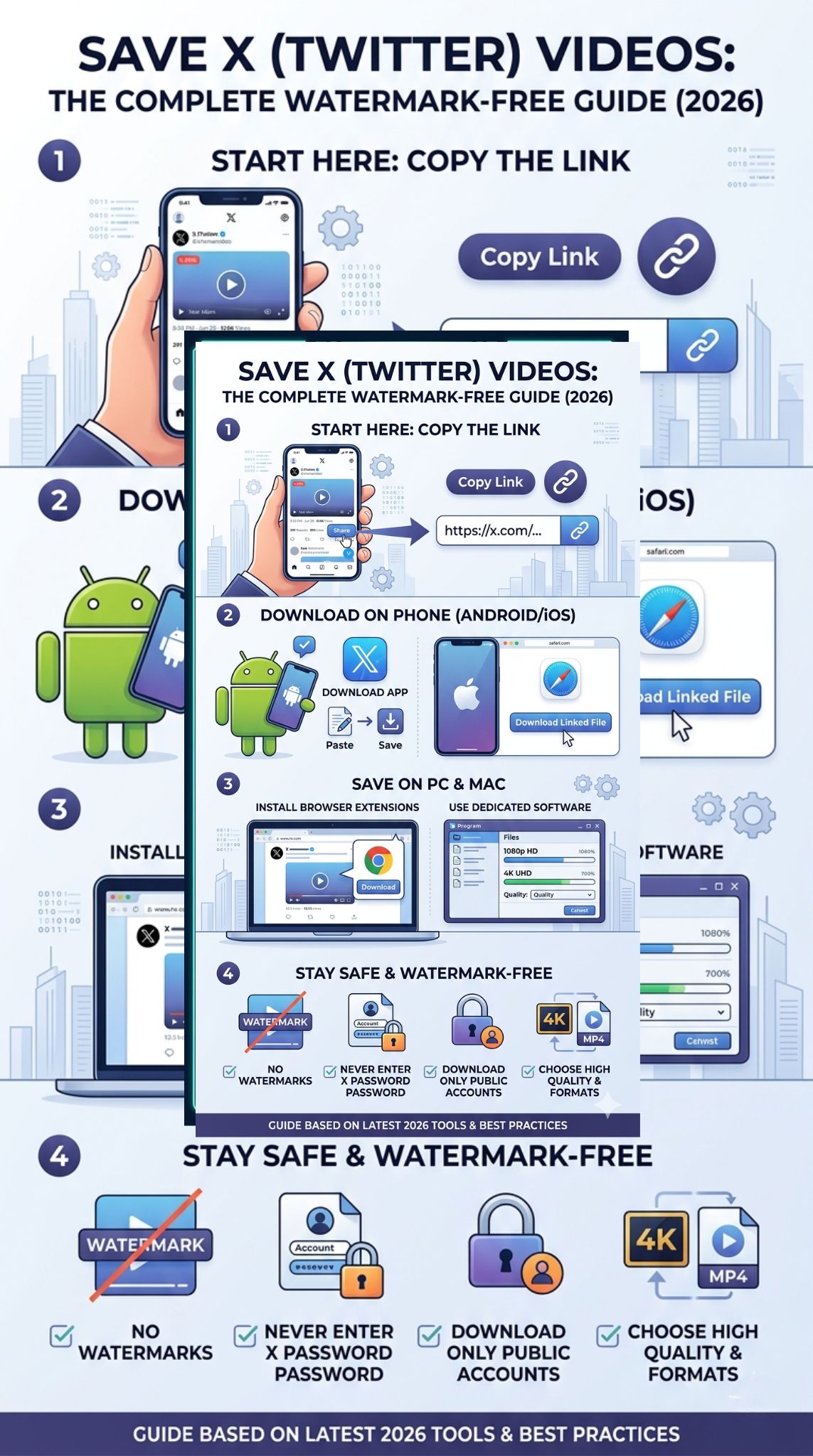
If you are on a computer, you have the most power at your fingertips. For a one-off download, a website is fine. But if you are archiving a lot of content, you should look into extensions or dedicated software.
Browser Extensions for Chrome and Edge
Extensions like “Twitter Media Downloader” add a small button right next to the “Like” and “Retweet” icons. This is the ultimate convenience. You click the button, and the video starts downloading. No extra tabs, no copy-pasting. Just be sure to check the permissions of any extension you install.
Pro-Grade Software: 4K Video Downloader
For people who need to download dozens of videos at once—maybe you are a video editor or a social media manager—dedicated software is a lifesaver. Tools like 4K Video Downloader allow you to paste a list of links and let them run. They also handle the highest possible quality without any glitches or “no audio” bugs that sometimes plague free websites.
Desktop Method Comparison
|
Method |
Best For |
Pros |
Cons |
|
Extensions |
Frequent users |
One-click ease |
Can slow down browser |
|
Desktop Software |
Bulk downloads |
Very stable, high quality |
Requires installation |
|
Web Tools |
Occasional users |
No install needed |
Ad-heavy |
Safety and Privacy: What to Watch Out For
The internet is full of tools that claim to help you, but some have hidden agendas. When you look to download twitter videos, you need to keep your personal data safe.
Avoiding “Login” Traps
A legitimate downloader will almost never ask you to log in with your Twitter or X account. If a site pops up a window asking for your username and password, close it immediately. They are likely trying to hijack your account or scrape your private data. You should be able to download any public video using just the URL.
Dealing with Ads and Malware
Most free tools make money through advertising. Some of these ads are “malvertising,” meaning they try to trick you into downloading “cleaner” software or “security updates.” Always stick to the main download button. If a new window opens that is not a video file, just close it and go back to the original page.
Safety Checkpoint
|
Risk |
How to Avoid It |
|
Phishing |
Never enter your X password on a third-party site. |
|
Malware |
Use an ad-blocker and avoid “.exe” files from downloader sites. |
|
Data Scraping |
Use “Incognito” or “Private” mode when visiting these sites. |
|
Privacy Leaks |
Only download videos from public accounts to stay within terms. |
Troubleshooting Common Download Errors
Even with the best tools, things go wrong. Sometimes you paste a link and get an error message. Do not panic; it is usually a simple fix.
The “Private Account” Issue
If a tweet is from a private account (one with a padlock icon), standard downloaders cannot see it. The tool is essentially a “guest” visiting the page, and since guests cannot see private tweets, they cannot find the video file. In this case, your only real option is to use a screen recorder while logged into your own account.
The “No Audio” Glitch
Sometimes you download a video and it is perfectly silent. This happens because X often stores video and audio in separate streams. A cheap downloader might only grab the video stream. If this happens, try a more robust tool like SnapSave or SSSTwitter, as they are designed to “stitch” the audio and video back together.
Troubleshooting Steps
|
Issue |
Potential Fix |
|
Link Not Found |
Ensure the tweet hasn’t been deleted or the account made private. |
|
Low Quality |
Try a different tool; some sites default to the lowest resolution. |
|
Slow Download |
Check your VPN; some downloader sites throttle VPN traffic. |
|
Wrong Format |
Use a tool that specifically offers MP4 conversion. |
Final Thoughts
Getting your hands on high-quality media from X does not have to be a headache. By using a trusted web tool or a dedicated app, you can easily download twitter videos and keep your favorite moments forever. Just remember to be smart about which sites you visit and always respect the privacy and copyright of the original posters. Whether you are building a meme stash or archiving important news, these 2026 methods are the most reliable ways to get the job done without the watermark clutter.
Frequently Asked Questions (FAQs)
Can I download a video from a DM?
Standard web tools cannot access your Direct Messages because they require your login credentials to see that content. To save a video from a DM, you would typically need to use a screen recording tool on your phone or computer.
Is it legal to download these videos for my YouTube channel?
It depends. Downloading for personal use is generally fine. However, using someone else’s video in your own content without permission can lead to a copyright strike. Always try to get consent or ensure your use falls under “Fair Use” guidelines.
Why do some videos have a watermark even after using these tools?
If the original creator added a watermark before they uploaded the video to Twitter, no downloader can remove it. These tools only remove the “Twitter” or “X” brand watermarks that the platform might add, not the ones edited into the footage by the author.
Will the person know if I download their video?
No. X does not send notifications for downloads. Unlike Snapchat, which notifies users of screen recordings, Twitter is currently a “silent” platform when it comes to media saving.
Can I download GIFs as videos?
Yes! Twitter GIFs are actually small video files. Most tools that allow you to download twitter videos will automatically save a GIF as an MP4 file, making it much easier to share on other apps.