
Ever get that notification saying someone viewed your profile, only to find a gray silhouette labeled LinkedIn Member? It is a common frustration for anyone trying to network or land a new job. You want to know if a recruiter is interested or if a former colleague is checking in on your progress. The truth is that the platform has a very specific way of handling linkedin profile views anonymous, and it is built around a system of mutual privacy.
In this guide, we will look at how the site masks identities and whether there is actually a way to unmask those mystery visitors. We will break down the settings, the differences between free and paid accounts, and how you can use the data you do have to boost your career. Let’s get into the mechanics of how this professional network keeps things under wraps.
Understanding LinkedIn Viewing Modes
Before you try to figure out who is hiding, you need to know the three ways someone can look at your page. The platform lets every user decide how they want to appear to others. This choice changes what you see in your analytics dashboard. Most people stay on the default settings, but many power users flip between these modes depending on their goals for the day.
Public Mode
This is the standard setting where everything is open. When a person in public mode visits you, you get their name, their headline, and their photo. It is the best way to network because it starts a conversation without either side having to say a word. If you see a full profile, that person wants you to know they were there.
Semi-Private Mode
This is the middle ground. Instead of a name, you see a general trait like “Someone at Google” or “Marketing Professional from New York.” It gives you a hint about the industry or the company without giving away the specific person. It is often used by people doing broad research who do not want to be bombarded with messages.
Private Mode
This is where linkedin profile views anonymous come from. When someone turns this on, they show up as a “LinkedIn Member.” No name, no title, no photo. It is a complete blackout. Even if you are a tech wizard, the platform does not send the identifying data to your browser, so there is no simple way to reveal them.
|
Feature |
Public Mode |
Semi-Private Mode |
Private Mode |
|
Identity Shown |
Full Name & Photo |
Industry or Company only |
Totally Anonymous |
|
Notification Sent |
Yes, with details |
Yes, with limited info |
Yes, as “Member” |
|
Reverse Visibility |
You see your own views |
You see your own views |
You see nothing (on Free) |
|
Best Use Case |
Active Networking |
Competitive Research |
Stealth Job Hunting |
Can You Really See [linkedin profile views anonymous]?
The short answer is no, you cannot unmask a person who has chosen to be private. Many websites and tools claim they have a secret “hack” to show you these names, but they are usually scams or just plain wrong. The platform takes privacy seriously because its business model depends on users feeling safe while they browse.
The Reality of Member Privacy
When someone selects private mode, the site strips their ID from the visitor log before it ever reaches your screen. It is not just hidden with a bit of code; the information is not there to begin with. This means that whether you are using a basic account or the most expensive business tier, the “Member” label stays put.
Free vs. Premium Accounts
The biggest myth is that upgrading to Premium lets you see through the anonymous veil. That is not how it works. If you have a free account, you only see the last few people who looked at you. If you have Premium, you see a full list of everyone who looked at you in the last year ~ but only if they were in public or semi-private mode. The anonymous ones stay anonymous regardless of how much you pay per month.
|
Capability |
Free Account |
Premium Account |
|
History Length |
Last 5 visitors |
Last 365 days |
|
Anonymous Reveal |
No |
No |
|
Trend Analytics |
None |
Weekly & Monthly graphs |
|
Viewer Demographics |
Limited |
Detailed (Company/Title) |
Why People Choose to Browse Privately
It is easy to get annoyed when people hide their identity, but there are some very practical reasons for it. Most of the time, it is not personal. It is just a part of a professional strategy. Understanding these reasons can help you realize that an anonymous view is often a sign that you are doing something right.
Competitive Research and Poaching
If a manager at a rival company wants to see how you are framing your service or what your team structure looks like, they probably do not want you to know they are looking. Browsing in private mode lets them gather intel without tipping their hand. It is standard practice in the corporate world to keep tabs on the competition without making it obvious.
Read Also: How to Add Interests on LinkedIn [Best Tips 2023]
Job Hunting Discretion
If you are currently employed but looking for a new role, the last thing you want is for your current boss to see you looking at their profile or the profiles of their competitors. Job seekers often go into ghost mode so they can research companies and recruiters safely. This privacy protects their current job while they look for the next one.
|
Motivation |
Description |
Impact on You |
|
Stealth Search |
Looking for jobs without boss knowing |
Could be a recruiter |
|
Lead Gen |
Sales reps checking if you fit a buyer profile |
Could lead to a pitch |
|
Curiosity |
Former coworkers checking your progress |
Harmless social browsing |
|
Security |
High-profile users avoiding spam |
Limits your networking |
How to Change Your Own Privacy Settings
If you want to browse without leaving a trail, you can change your settings in less than a minute. It is worth noting that if you are on a free plan, turning this on will stop you from seeing who viewed your profile too. It is a “fair play” rule that the platform enforces to keep things balanced.
Desktop Walkthrough
Log in to your account and click on your profile picture at the top of the screen. Go to “Settings & Privacy.” On the left side, you will see a “Visibility” tab. Click that, then find “Profile viewing options.” This is where you can toggle between the three modes. Once you select private mode, you are invisible to anyone whose page you visit from that moment on.
Mobile App Steps
Open the app and tap your photo in the top left corner. Tap “Settings,” then “Visibility.” From there, tap “Profile viewing options.” The interface is very similar to the desktop version. You can switch back and forth as many times as you want. Some people like to stay private while doing research and then go public when they are ready to actually connect.
|
Platform |
Navigation Path |
Key Action |
|
Desktop |
Me > Settings > Visibility |
Select “Private Mode” |
|
iOS App |
Profile > Settings > Visibility |
Toggle Viewing Options |
|
Android App |
Profile > Settings > Visibility |
Toggle Viewing Options |
The Truth About Third-Party Unmasking Apps
You will often see ads for “LinkedIn Viewers” or “Profile Unmaskers” in the app store or as chrome extensions. These are almost always dangerous. There is no API or secret connection that these apps have that the platform doesn’t already provide.
Security Risks and Data Theft
Most of these third-party tools are designed to steal your login info. When you give them access to your account, they can scrape your contacts, send spam messages in your name, and even lock you out. Since the platform does not actually share the identity of linkedin profile views anonymous with any external software, these apps are literally promising something they cannot deliver.
Platform TOS Violations
Using automation or “scrapers” is a fast way to get your account restricted or banned for life. The site is very protective of its data. If their security system detects that you are using a tool to bypass privacy settings, they will flag your profile. It is simply not worth losing your entire professional network for the sake of uncovering a single name.
|
Risk Type |
Description |
Severity |
|
Account Ban |
Permanent loss of profile for TOS violation |
Critical |
|
Data Breach |
Your password and email being leaked |
High |
|
Identity Theft |
Scammers using your name to message others |
Medium |
Strategies to Use Your Visible Data
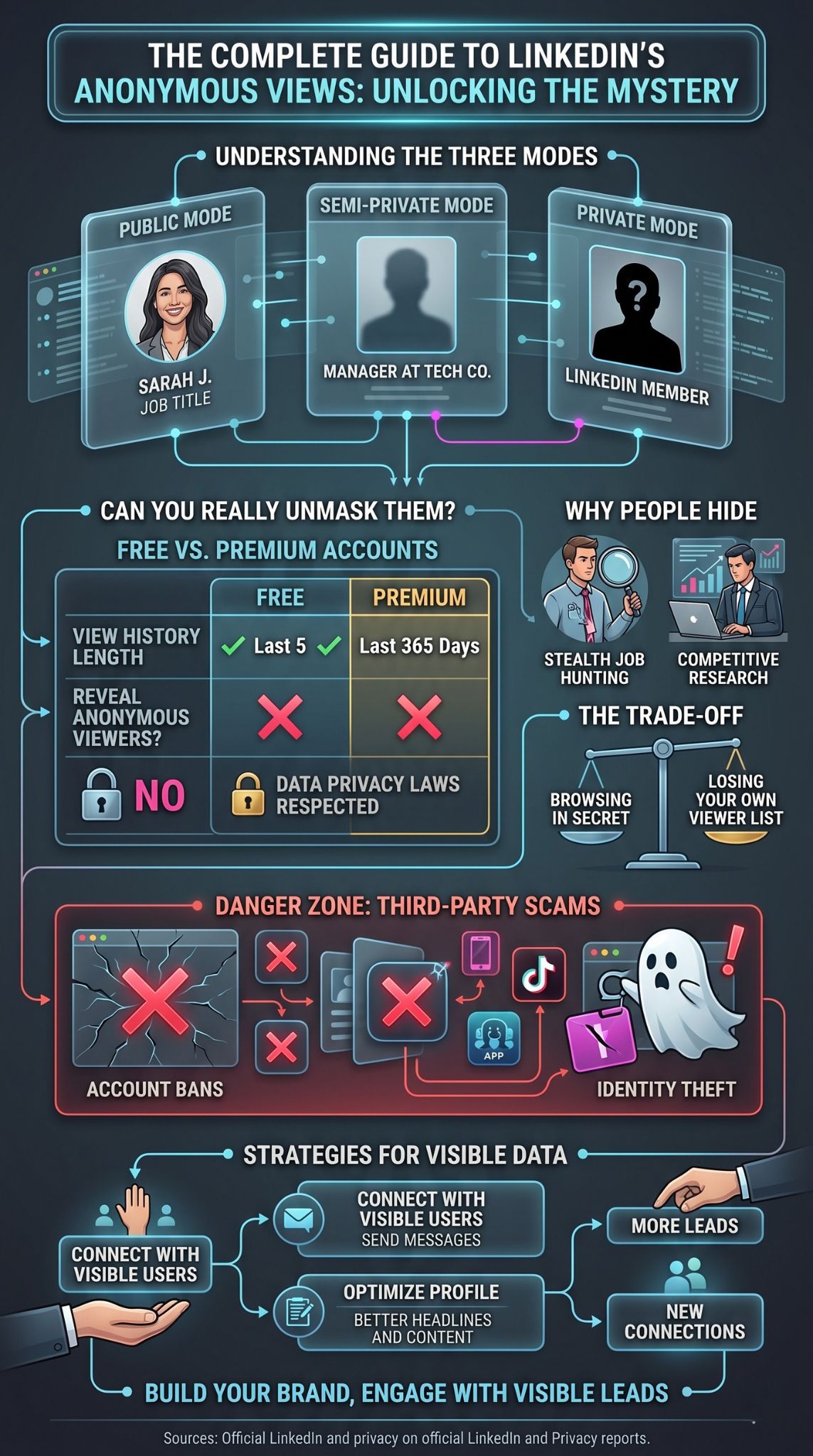
Since you cannot force a private user to reveal themselves, you should double down on the people who are visible. Every name that shows up in your “Who’s viewed your profile” list is a potential door opening. You just have to know how to walk through it without looking desperate or weird.
Turning Views into Connections
If you see someone interesting has looked at you, do not just wait for them to message you. Wait about 24 hours, then send a connection request. You do not have to say, “I saw you looking at me.” Instead, say something like, “I saw you are working on X at Company Y, and I would love to connect.” It makes the interaction feel natural rather than creepy.
Profile Optimization Tips
The more visitors you have, the more data you get. Make sure your headline is punchy and uses keywords relevant to your industry. A professional photo is a must. When your profile is high-quality, people are more likely to stay in public mode because they actually want to be associated with you. This naturally reduces the percentage of linkedin profile views anonymous that you encounter.
|
Action Item |
Strategy |
Expected Result |
|
Headline Update |
Use specific industry keywords |
More relevant visitors |
|
Content Posting |
Share thoughts twice a week |
Higher engagement rates |
|
Direct Outreach |
Message visible viewers within 48 hours |
New networking leads |
Advanced Analytics for LinkedIn Premium Users
If you are serious about your career, the Premium features are actually worth the cost, even if they don’t reveal anonymous names. The value lies in the trends. You can see whether the people looking at you are coming from “Tier 1” companies or if they are mostly recruiters.
Data Trends and Weekly Reports
Premium gives you a graph that shows whether your views are going up or down. If you post a new article and your views spike, you know that content worked. You can also see the exact search terms people used to find your profile. This is huge for SEO because it tells you if your profile is showing up for the right jobs.
Insight into Hidden Traffic
While you cannot see names, Premium does give you better “Semi-Private” info. It might show you a list of five companies where your viewers work. If you see that three people from Apple looked at you this week, you can bet that a team there is discussing your background, even if the individuals remain linkedin profile views anonymous.
|
Metric |
Use Case |
Benefit |
|
Viewer Job Titles |
See if decision-makers are watching |
Targeting accuracy |
|
Search Keywords |
See what terms bring people to you |
Profile SEO |
|
Company Insights |
See which businesses are interested |
Sales/Job leads |
Identifying Anonymous Patterns Without Names
You can actually be a bit of a detective and figure out who viewed you without needing a hack. By looking at the timing of the views and your recent activity, you can usually narrow down the “Member” to a specific group or person.
Clues from Industry and Location
Sometimes the “Member” notification will still give you a small hint, like “Someone in the Healthcare industry.” If you just interviewed at a hospital, it is a safe bet that the hiring manager was the one looking. Using context clues is the most reliable way to handle linkedin profile views anonymous without breaking any rules.
Syncing Views with Post Engagement
If you share a post and an anonymous view pops up five minutes later, look at who liked or commented on that post. Often, people will click your profile after seeing your content in their feed. If they have their settings on private, they will show up as an anonymous view, but you can guess who they are by looking at who is interacting with your updates.
|
Data Point |
Clue Provided |
Likely Identity |
|
Timing |
Right after an interview |
The Interviewer |
|
Industry Hint |
“Tech professional in Austin” |
Recruiter at a local firm |
|
Group Activity |
Post-group discussion view |
A group member |
Future of Privacy on Professional Networks
As we move further into 2026, privacy laws like GDPR and CCPA are making platforms even more careful with user data. This means that anonymous browsing is likely here to stay, and it might even become more restrictive.
Stricter Data Laws
Governments are pushing for “Privacy by Design.” This means that LinkedIn might eventually make private mode the default for everyone. If that happens, the days of seeing every visitor might be over. It is important to build a brand that is so strong that people feel the need to reach out to you directly rather than just lurking.
AI and Behavioral Analytics
The platform is starting to use AI to suggest who you should connect with based on who is looking at you. Even if they don’t show you the name of the anonymous viewer, the AI might start suggesting that person as a “Recommended Connection.” This is a subtle way the site helps you network without technically breaking its own privacy rules regarding linkedin profile views anonymous.
|
Factor |
Trend |
Outcome |
|
Regulation |
More strict privacy laws |
Less identifying data shared |
|
AI Integration |
Smart connection suggestions |
“Hidden” networking |
|
User Preference |
Desire for more control |
More users going private |
Final Thoughts
At the end of the day, worrying about linkedin profile views anonymous is a bit like worrying about a mystery caller who doesn’t leave a message. If it was important, they would have reached out. The best thing you can do is keep your profile sharp, stay active in your industry groups, and focus on the visible connections that actually want to engage with you.
The platform is a tool for transparency, but it also respects the right to move in silence. Whether you are a recruiter looking for talent or a professional looking for a new path, understanding these boundaries will help you navigate the site with more confidence. Don’t fall for the scams ~ just keep building your brand.
FAQs
Why does it say “LinkedIn Member” instead of a name?
This happens when a user has changed their visibility settings to “Private Mode.” They have chosen to hide their identity while browsing other profiles.
Can LinkedIn Premium see anonymous viewers?
No. Premium allows you to see a longer history and more details about public viewers, but it still respects the privacy of those in private mode.
Is it creepier to browse in public or private mode?
In a professional context, public mode is usually preferred as it shows transparency. However, private mode is perfectly acceptable for research or job hunting.
If I search for someone on Google, does it show as a profile view?
If you click their LinkedIn profile from a Google search and you are logged into your account, it will register as a view based on your current privacy settings.
How often should I check who viewed my profile?
Checking once or twice a week is plenty. It helps you catch interesting leads without becoming a distraction from your actual work.