
Reddit acts as a massive hub for niche communities and endless scrollable content, but sometimes you just need to unplug. As digital habits change, a lot of people want to reclaim their time, protect their privacy, or just move on to other platforms.
If you have decided your time on the site is over, you might wonder how to erase your digital footprint completely. Figuring out how to delete reddit permanently takes a few extra steps because your posts and comments do not disappear automatically. I will show you exactly what to do to close your account, wipe your history, and handle your data the right way.
|
Feature |
Description |
|
Focus |
Complete account removal process for 2026. |
|
Devices Covered |
Desktop, iOS (iPhone/iPad), and Android. |
|
Prerequisites |
Password recovery, data backup, post deletion. |
|
Estimated Time |
5 to 10 minutes (excluding manual post deletion). |
What to Know Before You Delete Reddit Permanently
Before you dive into your settings to say goodbye to your favorite subreddits, there are a few major details you need to know about the Reddit deletion process. Rushing into this without a proper plan can leave your personal content floating around the internet forever. You have to understand that your data stays active unless you take steps to clear it, and that account deletion is completely irreversible once you hit that final button. Plus, your username cannot be reused or reclaimed by anyone else down the line.
|
Consideration |
Detail |
|
Post Visibility |
Posts remain visible but lose the author name. |
|
Account Recovery |
Zero chance of recovering a deleted profile. |
|
Username Status |
The username is permanently retired from the platform. |
|
Subscriptions |
Reddit Premium does not automatically cancel. |
Your Data and Posts Stay Active Unless Deleted
This is the biggest misconception users face when they delete reddit permanently from their devices. When you delete your account, the platform does not automatically erase your posts, comments, or direct messages. Instead, your account gets deactivated, and the username attached to your previous activity is replaced with a tag that just says deleted. The actual content of the comment or post stays totally visible to anyone browsing the site or searching on Google. If you shared personal stories, photos, or identifying information, those things will still exist on the servers. If you want to scrub your presence entirely, you must manually delete your posts and comments before you even start the account deletion process.
Account Deletion is Completely Irreversible
Unlike other social media platforms that give you a 30-day grace period to log back in and reactivate your profile, Reddit plays by different rules. The moment you confirm your deletion, your account is gone for good. You instantly lose access to all your saved posts, your custom feed, your avatars, and your entire chat history. There is no customer support team you can email to reverse this decision, so you have to be absolutely certain you want to leave.
Your Username Cannot Be Reused or Reclaimed
Reddit maintains a very strict policy about usernames. Once an account gets deleted, that specific username goes into permanent retirement. You cannot reuse it to create a new account a year from now, and nobody else can claim it either. This rule exists to prevent impersonation and confusion within community threads. If you love your username and think you might want to log back in someday, you should hold off on deleting the account.
Read Also: How to Unhide Posts on Reddit: A Step-by-Step Guide for Redditors
How to Back Up Your Reddit Data Before Deleting
If you have spent a long time on the platform, you probably have saved posts, valuable chats, or long comments you might want to keep for yourself. Thanks to data protection laws, Reddit has to give you a copy of your personal data if you ask for it. It makes sense to request this backup before you take any steps to delete your profile. Requesting your data export from Reddit is a straightforward process, but it requires a bit of patience.
|
Backup Step |
Description |
|
Portal Access |
Use the Reddit privacy portal via a web browser. |
|
Data Types |
Voting history, messages, account preferences, search history. |
|
Delivery Method |
A download link sent to your registered email. |
|
Wait Time |
Can take up to 30 days to process. |
Requesting Your Data Export from Reddit
To get your data, you need to submit a formal request through the official privacy portal. Log into your account on a web browser and go to the Reddit Data Request page. You will fill out a short form detailing the date range of the data you want and the specific information you are looking for. You can ask for everything from your account preferences to your direct messages. Once you submit the request, Reddit processes it and sends a download link to your email. This process is not instant, so depending on the volume of data, it can take up to 30 days to receive your file.
Step-by-Step Guide: How to Delete Reddit Permanently
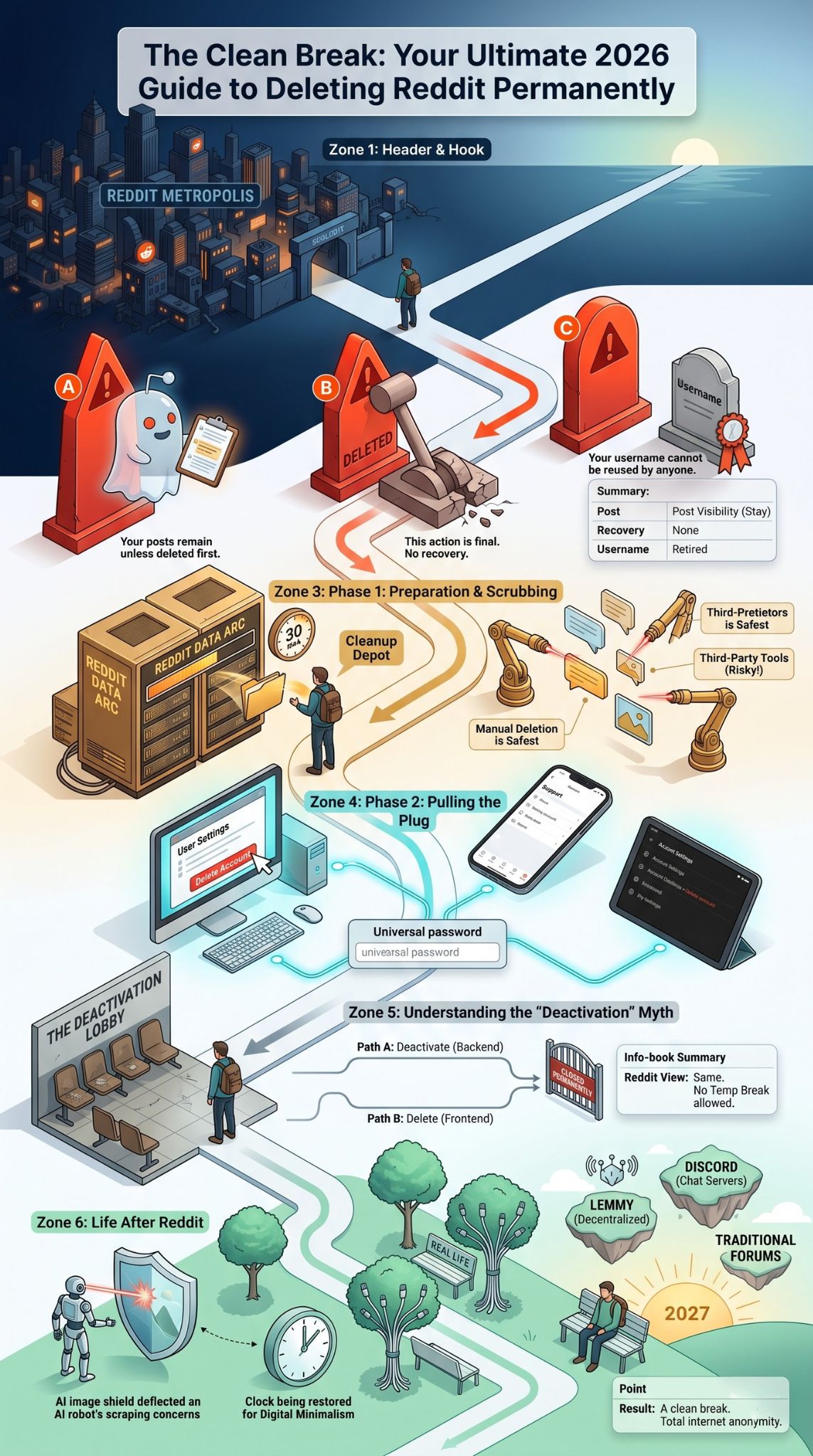
The actual process of deleting your profile changes a little depending on the device you happen to be using. Below are the exact steps for getting rid of your account whether you prefer a computer or a smartphone. I will walk you through how to delete reddit permanently on a web browser, how to handle the process on iOS, and how to delete your Reddit account on Android.
|
Platform |
Navigation Path |
|
Desktop / Web |
Profile Icon > User Settings > Account > Delete Account |
|
iOS App |
Avatar > Settings > Support > Delete account |
|
Android App |
Avatar > Settings > Account settings > Delete account |
|
Authentication |
Password or connected Google/Apple account verification required. |
How to Delete Reddit Account on Desktop (Web Browser)
Using a computer is definitely the most reliable way to manage your account settings. To get started from your PC or Mac, open your preferred web browser, head to the Reddit homepage, and log in to the account you want to delete. Next, look at the top right corner of the screen and click your profile avatar to open a drop-down menu. Select user settings from this menu, which takes you right to your account tab. Scroll all the way down to the bottom of the page, where you will spot a section labeled delete account with a red button next to it. Click that button. A pop-up window will ask for your username and password to verify your identity. If your account was made using a Google or Apple login, you will have to click a link to create a specific password first. Check the box confirming that you understand the rules, and click the final delete button.
How to Delete Reddit Account on iOS (iPhone and iPad)
If you spend most of your time swiping through the Reddit app on your Apple device, you can delete your account straight from your phone. Open the app and make sure you are logged in. Tap your profile avatar located in the top right corner of the screen. A side menu will slide out, so tap on settings at the bottom. Scroll down through the options until you hit the support section. Under this section, tap the option titled delete account. A prompt appears asking if you are sure you want to proceed. You need to enter your password for security purposes. After entering your credentials and acknowledging the permanent nature of the action, tap the confirm button to finish the job.
How to Delete Reddit Account on Android
The process for Android users mirrors the iOS method with just a few tiny interface tweaks. Open your application and tap your avatar in the upper right corner to get to the main menu. Pick settings from the list. Navigate through the menu until you locate the account settings for your specific username. Scroll down to the bottom of this page where you will find the delete account option. Tap it, and the app presents a warning screen explaining that your content will not disappear unless you remove it manually first. Type in your password to prove you own the account. Check the acknowledgment box and tap the final delete confirmation to permanently remove your access.
How to Delete Individual Reddit Posts and Comments
Like I mentioned earlier, if you want to vanish from the internet entirely, you have to delete your content before deleting your account. Doing this guarantees that your thoughts, photos, and personal stories are totally wiped from the platform servers. You have a couple of choices here, including the manual deletion process and using third-party deletion tools.
|
Deletion Method |
Pros |
Cons |
|
Manual Deletion |
Native, safe, guaranteed to work. |
Incredibly tedious for long-time users. |
|
Third-Party Extensions |
Automates the process, saves hours of time. |
Security risks, API limits, unreliable. |
|
Script Programs |
Highly customizable for tech-savvy users. |
Hard to set up, can trigger account bans. |
|
Overwriting Scripts |
Edits comments before deleting for extra privacy. |
Often broken due to recent site updates. |
The Manual Deletion Process
If you are a casual user who only has a handful of posts, doing things manually is the safest and most thorough method. Go to your profile page and hit the posts tab. Click the three horizontal dots underneath your post and select delete. You have to confirm the action. You must then head to the comments tab and repeat this exact process for every single comment you have ever left on the site. This gets incredibly tedious if you post a lot, but it remains the only native way the platform provides to pull down your content.
A Note on Third-Party Deletion Tools
For users with thousands of comments over many years, manual deletion feels practically impossible. Back in the day, users relied heavily on third-party browser extensions to overwrite and mass-delete their history. However, following the big API pricing changes a few years ago, many of those popular tools shut down. While a few open-source scripts still float around platforms like GitHub, you have to use them with extreme caution. Giving third-party applications access to your account can totally compromise your security. Furthermore, site rate limits might cause these scripts to crash or only delete a fraction of your history.
Reddit Deactivation vs. Deletion: Is There a Difference?
When you read through forums or help articles, you might notice people throwing around the terms deactivation and deletion interchangeably. When you click delete account, the platform technically calls this a deactivation on their backend because they leave your old posts up but sever the link to your login credentials. There is no temporary disable option here like you get on Instagram or Facebook. Once you trigger the process to delete reddit permanently, your account is gone forever, regardless of what the specific button says.
|
Feature |
Deactivation |
Deletion |
|
Meaning on Reddit |
Same exact thing. |
Same exact thing. |
|
Temporary Break |
Not supported. |
Not supported. |
|
Content Status |
Stays visible but unlinked. |
Stays visible but unlinked. |
|
Recovery Option |
None. |
None. |
Why People Are Choosing to Delete Their Reddit Accounts in 2026
The landscape of the internet shifts constantly, and community platforms are not immune to people packing up and leaving. There are a few major reasons why search queries for how to leave the platform stay so consistent. A lot of users are worried about privacy, upset over platform changes, or simply leaning into digital minimalism to reclaim their time.
|
Reason for Leaving |
Explanation |
|
Privacy Concerns |
AI companies scraping public forums for data training. |
|
Platform Changes |
Frustration over API pricing, ad loads, and algorithm shifts. |
|
Moderation Quality |
Departure of long-time moderators leading to spam. |
|
Digital Minimalism |
Breaking the infinite scroll habit to focus on offline hobbies. |
Privacy concerns push a lot of people out the door. As artificial intelligence companies increasingly scrape public forums to train their large language models, many users feel uncomfortable with their casual conversations being commodified and fed into algorithms. Platform changes play a huge role too. Following the protests of 2023, the platform experienced a massive shift in community dynamics. The increasing presence of automated bots, repetitive content, and aggressive monetization strategies have led some folks to seek out quieter corners of the web. Finally, infinite scrolling platforms are built to eat up hours of attention. Many users are deleting their profiles just to break the habit of doomscrolling.
Popular Alternatives to Reddit for Community Discussions
If you wipe your profile but still crave that community aspect of the internet, you have several alternatives that continue to grow in popularity. Depending on what you are looking for, you can migrate to decentralized platforms, massive chat applications, or even traditional message boards. These spaces offer different vibes, better privacy controls, and fresh conversations.
|
Platform Alternative |
Best For |
Platform Type |
|
Lemmy / Kbin |
Privacy advocates, decentralized network fans. |
Fediverse / Link Aggregation |
|
Discord |
Real-time chatting, gaming communities, tight niches. |
Voice & Text Chat Servers |
|
Quora |
In-depth answers, professional knowledge sharing. |
Question & Answer |
|
Traditional Forums |
Specific hobbies (cars, tech, sports), slower pacing. |
Standalone Message Boards |
Lemmy and Kbin operate on the fediverse, offering a decentralized approach to link aggregation and discussion. Because they are not run by a single corporate entity, they are a big hit with privacy advocates. Discord remains a massive hub for community interaction. While it functions more like a series of chat rooms than a message board, almost every niche interest has a dedicated server where you can find real-time conversation. Quora works well for users who primarily want to ask questions and read detailed answers, though it lacks the fast-paced meme culture.
Final Thoughts
Deciding to delete reddit permanently is a pretty big step toward curating your online experience and protecting your digital privacy in 2026. While the platform definitely provided millions of people with entertainment, solid advice, and community over the years, it is perfectly normal to outgrow a website or decide you just want a cleaner digital slate.
|
Summary Point |
Key Action Required |
|
Preparation |
Request a data backup if you want to keep your history. |
|
Content Removal |
Delete your posts and comments manually before closing the account. |
|
Final Deletion |
Use your account settings on desktop or mobile to pull the plug. |
|
Moving On |
Explore alternative platforms or enjoy the digital detox. |
Remember that the most crucial step in this whole journey is handling your personal data before you pull the plug. Take the time to request your data export if you want to keep your memories, and dedicate an hour to scrubbing your old posts and comments if you want total internet anonymity. By following the detailed instructions laid out in this guide, you can confidently delete reddit permanently, ensuring a totally clean break from the platform with zero digital loose ends left behind.
Frequently Asked Questions (FAQs)
When you decide it is time to leave, you probably have a few lingering questions about how everything works behind the scenes. Below are some uncommon and frequently asked questions regarding the deletion process, content visibility, and troubleshooting errors.
|
FAQ Topic |
Quick Answer |
|
Account Recovery |
Absolutely impossible after deletion. |
|
Post Deletion |
Posts stay up unless manually deleted first. |
|
Processing Time |
Deletion is instant, but full data scrub takes up to 90 days. |
|
Login Errors |
Usually caused by missing passwords on Google/Apple logins. |
Can I recover my Reddit account after deleting it?
No, you cannot recover your account under any circumstances. Once you finish the deletion process, your username, profile, and login credentials get permanently erased from the active user database. The site administrators do not have a magical button to restore your access.
Does deleting my account delete my posts and comments?
No, deleting your account only removes your profile and disconnects your username from your content. Your posts and comments stay completely visible on the site, but the author name displays as deleted. If you want your content gone, you have to delete each post and comment manually before you delete the account itself.
How long does it take for Reddit to delete my account?
The basic deletion process is completely instantaneous. As soon as you enter your password and click the final confirmation button, you get logged out, and your profile becomes inaccessible to you and everyone else. However, the backend processing to remove your data fully from their active servers can take up to 90 days.
Why is Reddit not letting me delete my account?
If you are running into errors, the most common issue is an incorrect password. Even if you are already logged in, you have to type your current password to authorize the deletion. If you created your account through Google or Apple, you have to use the platform settings to disconnect the connected account and generate a specific password first. Also, sometimes server glitches or browser cache issues make the button unresponsive, so clearing your cookies usually fixes the problem.
Does deleting the app delete my Reddit account?
No, uninstalling the app from your iPhone or Android device does not delete your account. Removing the app only takes the software off your phone. Your profile, subscriptions, and posts remain completely active on the servers until you log in and go through the formal deletion steps.