
We have all been in that spot where the internet just quits on us. Maybe you are stuck on a plane for ten hours or sitting in a subway station with zero bars. In those moments, having your favorite videos saved directly to your device feels like a lifesaver. But the internet is a confusing place filled with sketchy websites and “free” tools that usually come with a side of malware. If you want to know how to download youtube legally 2026, you need to understand that the rules of the game have shifted recently.
The platform has become much more protective of its content creators while also offering more official ways to watch offline. Saving a video is no longer just about clicking a button; it is about respecting the people who make the content and staying on the right side of the law. This guide breaks down the updated 2026 policies, the safe tools you can actually trust, and the difference between breaking a website rule and breaking an actual law.
The Core Conflict: Terms of Service vs. The Law
Before we get into the “how,” we have to talk about the “why.” When you use any major video site, you are basically signing a contract. Most people just click “I Agree” without reading a single word, but that document is what governs your behavior on the site. In 2026, the rules are clearer than ever about what you can and cannot do with a video file.
Understanding the Platform’s Terms of Service
The Terms of Service (ToS) is a private agreement between you and the company. It clearly states that you are not allowed to download any content unless there is an official download button or link provided by the service. If you use a third-party website to “rip” a video, you are technically in breach of contract. While the police are not going to show up at your house for this, the platform has every right to ban your account or block your IP address if they catch you doing it consistently.
The Reality of Copyright Law
Copyright law is a different beast entirely. This is the federal law that protects the people who filmed and edited the video. If you download a video for personal use, you are mostly in a gray area. But the second you share that file, re-upload it, or use it for a business, you have crossed into illegal territory. Understanding how to download youtube legally 2026 means knowing that your right to watch offline does not give you ownership of the creator’s hard work.
|
Legal Concept |
Definition |
Potential Consequence |
|
Terms of Service |
A private contract between user and platform |
Account suspension or IP ban |
|
Copyright Law |
Federal protection for creators |
Fines or legal action for redistribution |
|
Personal Use |
Watching a file you saved yourself |
Generally ignored but technically a ToS breach |
|
Commercial Use |
Using saved video for profit |
Serious legal liability |
The Gold Standard: YouTube Premium in 2026
If you want the easiest, safest, and most ethical way to get videos onto your device, there is only one real answer. The subscription model has evolved significantly over the last few years. It is no longer just about removing ads; it is a full-service media management tool that ensures creators get paid even when you are offline.
New Features in the 2026 Premium Tier
The standard Premium subscription now offers higher bitrate 1080p and 4K downloads, which look significantly better than the compressed files you get from free websites. One of the best updates this year is the Smart Downloads feature, which uses a light AI to predict what you want to watch and downloads it automatically when you are on Wi-Fi. This means you always have a fresh queue of videos ready for your commute without having to remember to save them manually.
The Expansion of Premium Lite
For those who found the full subscription too pricey, the Lite version has been revamped. In 2026, Premium Lite now includes the ability to download videos in 720p. While you do not get the music app or the highest resolution, it provides a legal path for casual viewers to save content for travel. This is a massive win for users who want to follow the rules without breaking the bank.
|
Feature |
Premium Standard |
Premium Lite (2026 Update) |
|
Max Download Quality |
4K / 8K |
720p |
|
Ad-Free Viewing |
Yes |
Yes (Limited on some devices) |
|
Smart Downloads |
Included |
Manual Only |
|
Price Point |
Higher |
Budget-friendly |
Creative Commons: The “Free” Legal Path
Not every video on the internet is locked behind a strict “do not touch” copyright. Many creators actually want you to use their work. This is where Creative Commons comes in. If you are a student, a teacher, or a fellow creator, this is the most important section for you to understand.
Identifying Creative Commons Licenses
When a creator uploads a video, they can choose to use a Creative Commons (CC) license. This effectively tells the world, “You can download and use this as long as you follow my rules.” Usually, the only rule is that you have to give them credit. You can find these videos by using the built-in search filters on the platform. It is a 100% legal way to obtain video files for your own projects or offline viewing.
Public Domain Content
The public domain is a treasure trove of historical footage, government recordings, and old films. Since nobody owns the copyright to these, you can download them using any tool you like without feeling guilty. In 2026, more classic content is entering the public domain than ever before, making it a great resource for researchers and history buffs.
|
License Type |
Can You Download? |
Requirements |
|
Standard License |
No (officially) |
Requires creator permission |
|
CC-BY (Attribution) |
Yes |
Must credit the creator |
|
CC-NC (Non-Commercial) |
Yes |
Cannot use for profit |
|
Public Domain |
Yes |
No requirements |
Fair Use and Educational Exemptions
There is a lot of talk about “Fair Use” in the digital world. People often use it as a shield to justify downloading anything they want, but the law is actually quite specific. If you are using a video for a very specific reason, you might have a legal right to a copy, even if the platform’s rules say otherwise.
The Four Pillars of Fair Use
Judges look at four things when deciding if your use of a video is fair: why you are using it, what kind of video it is, how much of it you are using, and if you are hurting the creator’s ability to make money. If you are a teacher downloading a small clip to show a class, you are likely protected. If you are downloading a whole movie just to avoid paying for it, that is definitely not fair use.
Classroom and Research Use
Education is one of the few areas where the law is a bit more relaxed. In 2026, many regional laws have been updated to allow “digital shift” for educators. This means if a teacher needs a video for a lesson plan in a place with no internet, they have a stronger legal argument for saving that file. However, this is still a case-by-case situation and does not give a green light for bulk downloading.
|
Fair Use Factor |
High Protection |
Low Protection |
|
Purpose |
Education / Commentary |
Entertainment / Profit |
|
Nature |
Factual / News |
Fictional / Creative |
|
Amount |
Small Snippet |
Full Video |
|
Market Impact |
No effect on sales |
Replaces the original view |
Safe Tools for Desktop Users
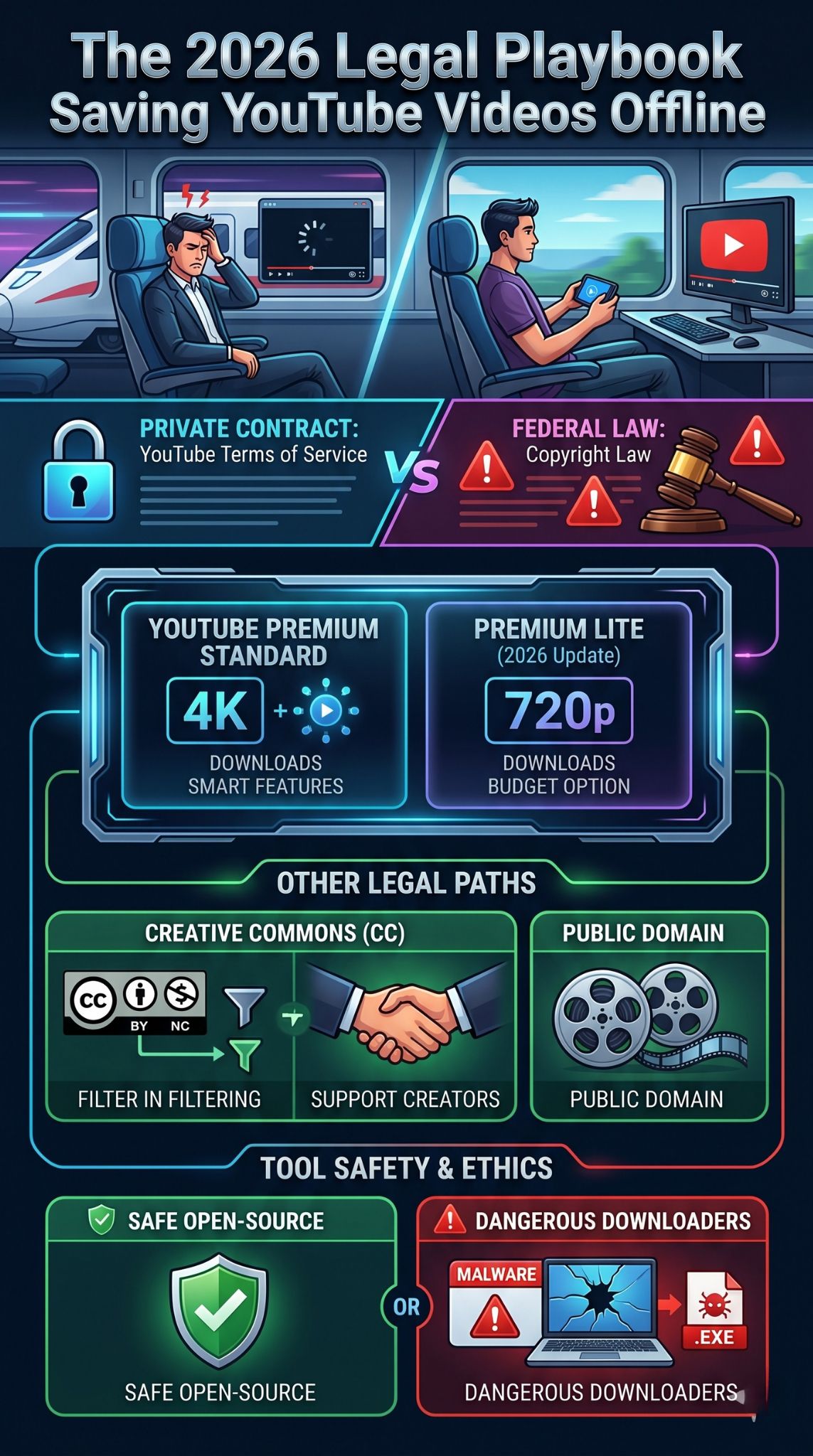
If you are downloading a Creative Commons video for a project, you need a tool that won’t infect your computer with a virus. The “download youtube legally 2026” search often leads to the most dangerous corners of the internet. You should stay away from any site that asks you to “allow notifications” or download an .exe file to get your video.
The Power of Open Source Software
Open-source tools are generally the safest because their code is public. Anyone can check it for malicious scripts. Tools like yt-dlp (for advanced users) or VLC Media Player are the gold standard. Most people do not realize that VLC has a hidden feature that allows you to stream a link and save the raw file directly to your hard drive. It is clean, fast, and contains zero ads.
Avoiding the Malware Trap
The biggest red flag in 2026 is a website that looks too good to be true. If a site promises 8K downloads for free but shows you five pop-ups before you even paste the link, close the tab immediately. These sites often make money by tricking you into installing “media players” that are actually data-stealing software. Stick to well-known, reputable software that has been around for years.
|
Tool Type |
Safety Level |
Best For |
|
Official App |
Maximum |
Personal offline viewing |
|
VLC Media Player |
High |
Single file extraction |
|
Open Source (yt-dlp) |
High |
Advanced users / Archive |
|
Online Converters |
Low |
Emergency use only (Dangerous) |
The experience of saving a video is completely different depending on what device you are holding. Mobile phones are like walled gardens; they are very safe but very restrictive. Desktop computers are like the open ocean; you can go anywhere, but there are sharks everywhere.
The iOS and Android Struggle
On an iPhone, you basically cannot download a video from a browser and save it to your camera roll without a lot of headache. This is a security feature by Apple. Most “downloader” apps in the App Store are fakes or get deleted within weeks. On Android, you have more freedom to sideload apps, but that also makes it easier to accidentally install a virus. For mobile users, the official route is truly the only stress-free option.
Desktop Freedom and Responsibility
Your computer gives you the ability to manage large libraries of files. This is great for people who want to archive their own content or keep a collection of educational videos. But with that power comes the risk of accidental copyright infringement. Just because you can download a 50GB channel backup doesn’t mean you should. Always keep your downloads organized and remember that these files are for your eyes only.
|
Platform |
Ease of Use |
Security Risk |
|
iPhone (iOS) |
Difficult |
Very Low |
|
Android |
Moderate |
Medium |
|
Windows PC |
Easy |
High |
|
Mac (macOS) |
Moderate |
Low |
The Ethics of Downloading: Supporting Creators
We have spent a lot of time on the “how,” but the “who” is just as important. Behind every video is a person or a team who spent time, money, and energy to make it. When you download a video illegally, you are essentially cutting off their paycheck.
How Ad Revenue Works
Creators get paid based on the ads that play during their videos. When you download a file via a third-party site, those ads never run. In 2026, many middle-class creators are struggling because of the rise of ad-blockers and illegal ripping sites. If you love a channel, the best thing you can do is watch their videos through the official app so they get the credit they deserve.
Alternative Ways to Support
If you absolutely must have a video offline and cannot afford Premium, consider supporting the creator in other ways. Many have Patreons where they offer direct download links to their supporters. Others sell their documentaries or courses as digital downloads. This is the ultimate “legal” way to download because you are getting the file directly from the source with their full permission.
|
Support Method |
Benefit to Creator |
Benefit to You |
|
YouTube Premium |
Recurring revenue |
Official, high-quality downloads |
|
Patreon / Member |
Direct payment |
Exclusive content & files |
|
Official Store |
High profit margin |
Permanent ownership of file |
|
Watching with Ads |
Small revenue |
Free to use |
Future Trends: What is Coming After 2026?
The technology for streaming and downloading is not standing still. We are already seeing shifts in how media is consumed that will make traditional “downloading” feel like using a VCR.
AI-Compressed Streams
By the end of 2026, we expect to see more “AI-reconstruction” in streaming. This means the platform will send a very tiny, low-quality file to your phone, and your phone’s internal chip will use AI to “fill in the blanks” and make it look like 4K. This will make the need for massive offline downloads less common, as you will be able to stream high-quality video even on a very weak 3G connection.
Blockchain and Digital Ownership
There is a growing movement to give users actual ownership of the digital things they buy. In the future, you might buy a “digital key” for a video that lets you download it on any platform, forever. While we aren’t there yet, the conversation around digital rights is moving toward giving the power back to the fans, which could eventually lead to a more open but still legal downloading ecosystem.
|
Trend |
Estimated Arrival |
Impact |
|
AI-Upscaling |
Late 2026 |
Better quality on slow data |
|
Enhanced Lite Tiers |
2026 |
Cheaper legal downloading |
|
Universal Licenses |
2028+ |
Download once, watch anywhere |
|
Satellite Video |
2027 |
No more “dead zones” |
Final Thoughts
Figuring out how to download youtube legally 2026 does not have to be a headache. If you stick to the official Premium tools, you are doing the right thing for yourself and the creators you enjoy. If you are an editor or a student, the world of Creative Commons and Public Domain is open and ready for you to explore—just make sure you are using safe, open-source software to get the job done.
At the end of the day, the internet works best when we respect the effort that goes into making the content we consume. Be smart about your digital footprint, keep your devices updated to avoid malware, and enjoy your offline viewing knowing you have done it the right way.
FAQs
Is it legal to download a video if the creator gives me permission in a comment?
Yes. A direct grant of permission from the copyright holder overrides the general rules of copyright. However, it still technically violates the platform’s Terms of Service. If you have a screenshot of that permission, you are legally safe from a copyright lawsuit, but the platform could still take action against your account if they choose to.
Can I use a “screen recorder” to save a video legally?
Screen recording is a common loophole. Legally, it falls under the same category as personal archiving (like a VCR). It is generally considered fair use as long as you do not share the file. However, it often results in much lower quality and is a very slow way to “download” a long video.
Are there any countries where downloading is always legal?
Some countries have “private copying” laws that allow citizens to make copies of any media for their own personal use, even if they don’t own it. However, most major platforms use international agreements to enforce their Terms of Service regardless of where you live.
Why does my downloaded video disappear after 30 days in the Premium app?
The app needs to check in with the server to make sure your subscription is still active and to report your views to the creator. This ensures the artists get paid for the time you spent watching their work offline.
Can I download 8K videos in 2026?
Yes, but only through the high-end Premium subscription and on supported devices. Most third-party “8K” downloaders are actually just upscaling lower-quality files, which makes them look blurry. For true 8K, you need the official source file.