
We have all been there. You are in the middle of a workout or following a recipe, and a loud, unskippable ad ruins the flow. It feels like every time you tap a video, you have to sit through thirty seconds of stuff you do not care about. By 2026, the push for more ads has made the mobile experience feel cluttered and annoying. This is exactly why so many people are looking for ways to block youtube ads mobile without resorting to shady downloads.
Getting rid of ads is not just about convenience. It is also about saving your mobile data and keeping your battery from draining too fast. When your phone has to load high-res video commercials before the actual content, it works overtime. In this guide, we are going to look at the most reliable ways to get a clean viewing experience. We will skip the dangerous unofficial apps and focus on smart settings and browsers that already live on your phone.
Using your device the way it was intended, but with a few clever tweaks, is the safest path forward. We will break down everything from network settings to browser tricks that help you bypass the constant interruptions. Whether you are on an iPhone or an Android, these methods will help you reclaim your screen time. Let’s get into how you can finally watch what you want without the constant commercial breaks.
Why the Ad Crackdown is So Aggressive in 2026
The way we watch videos has changed because the companies behind them are hungry for more revenue. A few years ago, you might see one ad at the start of a ten-minute video. Now, you are likely to see two ads at the start, three in the middle, and another at the end. This shift happened because platforms are trying to force users toward paid subscriptions. They make the free version just annoying enough that paying for a “premium” experience starts to look like a good deal.
The Shift to Server-Side Ad Injection
|
Factor |
Description |
Impact on User |
|
Ad Placement |
Ads are now baked into the video stream itself. |
Harder for basic filters to catch them. |
|
Frequency |
Average ads per 10 minutes increased by 40% since 2024. |
Constant interruptions during content. |
|
Detection |
Improved AI scripts detect traditional browser extensions. |
Simple “blocker” extensions often fail. |
|
Data Usage |
HD ads consume up to 50MB per minute of footage. |
Faster data plan exhaustion. |
The War Between Platforms and Blockers
Engineers are constantly writing new code to stop people from skipping ads. They have started using server-side injection, which basically blends the commercial into the video file you are trying to watch. In the past, your phone could tell the difference between the “content” and the “ad” because they came from different places. Now, they look identical to most software. This is why standard methods that worked in 2022 do not always work today. You need a more modern approach to block youtube ads mobile effectively.
What Does “Without an App” Actually Mean?
When we talk about avoiding commercials without an app, we are talking about staying away from unofficial “modded” versions of the video player. These apps are often found on random websites and promise free premium features. While they might work for a week or two, they are usually a nightmare for your privacy. They are not checked by security teams, and they can easily steal your login info or track your location without you knowing.
Security and Stability over Shortcuts
|
Feature |
Official Browser/Settings |
Unofficial Modded Apps |
|
Data Privacy |
High (Uses your phone’s native security) |
Low (Unknown developers) |
|
Account Safety |
No risk of being banned |
High risk of account suspension |
|
Battery Life |
Normal |
High drain due to background processes |
|
Ease of Use |
Set it and forget it |
Requires constant manual updates |
Protecting Your Digital Footprint
By using built-in phone settings or trusted privacy browsers, you keep your data safe. You do not have to worry about a random developer in another country having access to your Google account. Choosing to block youtube ads mobile through legitimate channels like DNS settings ensures that your phone stays fast and your information stays private. It is about being smart with your technology rather than just looking for a “hack” that could backfire later.
Read Also: How to Download YouTube Videos Legally in 2026
Method 1: Change Your Phone’s DNS Settings
One of the cleanest ways to stop ads is at the network level. Every time your phone connects to a website, it uses a Domain Name System or DNS. You can think of this like a phonebook for the internet. By default, your phone uses your mobile carrier’s DNS. However, you can switch this to a private DNS that acts like a bouncer. When an ad tries to enter your phone, the DNS sees it on a “blocked list” and simply refuses to let it load.
How to Setup Ad-Blocking DNS on Android
|
Step |
Action |
What Happens |
|
1 |
Go to Settings > Connections |
Opens your network management. |
|
2 |
Select “More Connection Settings” |
Finds the hidden network options. |
|
3 |
Tap “Private DNS” |
Opens the manual entry box. |
|
4 |
Enter dns.adguard-dns.com |
Connects you to the ad-filtering server. |
|
5 |
Save and Restart |
Activates the filter across all apps. |
DNS Configuration for iPhone Users
Apple makes it slightly different. You usually have to go into your Wi-Fi settings and manually configure the DNS for each network you join. You will want to look for the “Configure DNS” option and change it from Automatic to Manual. Then, add the IP addresses for a service like NextDNS or AdGuard. While this does not always stop every single video ad due to that server-side injection we mentioned, it does stop the tracking and the pop-ups that surround the video player.
Troubleshooting DNS Conflicts
Sometimes your internet might feel a little slow after switching your DNS. This usually happens if the server you chose is too far away. If that happens, you can try a different provider or switch back to “Automatic” to see if the speed returns. Most modern DNS providers have servers all over the world, so this is rarely a big issue. It is a small price to pay for a much cleaner experience when you block youtube ads mobile at the source.
Method 2: Watch via Privacy-Focused Browsers
If you do not want to mess with your phone’s deep settings, the easiest way to block youtube ads mobile is to stop using the official app. The mobile web version of the site is actually very good. When you use a browser like Brave or Firefox with the right settings, the browser itself cuts the ads out before they can even play. This works because browsers have “shields” that sit between the website and your screen, catching the ad scripts before they execute.
Comparison of Popular Ad-Blocking Browsers
|
Browser |
Ad-Blocking Strength |
Best Feature |
User Privacy |
|
Brave |
Excellent |
Shields on by default |
Very High |
|
Firefox |
Good |
Supports uBlock Origin extension |
High |
|
Opera |
Moderate |
Built-in VPN and blocker |
Medium |
|
Safari |
Low (Native) |
Requires 3rd party extension |
High |
Why Brave is Often the Best Choice
Brave is built on the same engine as Google Chrome, so it feels very familiar. The big difference is that it has a massive “Shields” button right in the URL bar. When you go to watch a video, Brave automatically stops the trackers and the commercials. The best part is that it often allows you to keep the audio playing even if you switch to another app or lock your screen. This is a feature usually locked behind a paywall in the official app, but it is free when you use a privacy browser.
Setting Up Safari for Ad-Free Viewing
If you are an iPhone user and love Safari, you can still get an ad-free experience. You just need to download a “Content Blocker” from the App Store. Once you install it, you go to your iPhone settings, find Safari, and toggle the extension to “On.” This tells Safari to use a specific list of rules to hide commercials. It is a native way to block youtube ads mobile without having to learn a completely new browser interface.
How to block youtube ads mobile using the Desktop Site Trick
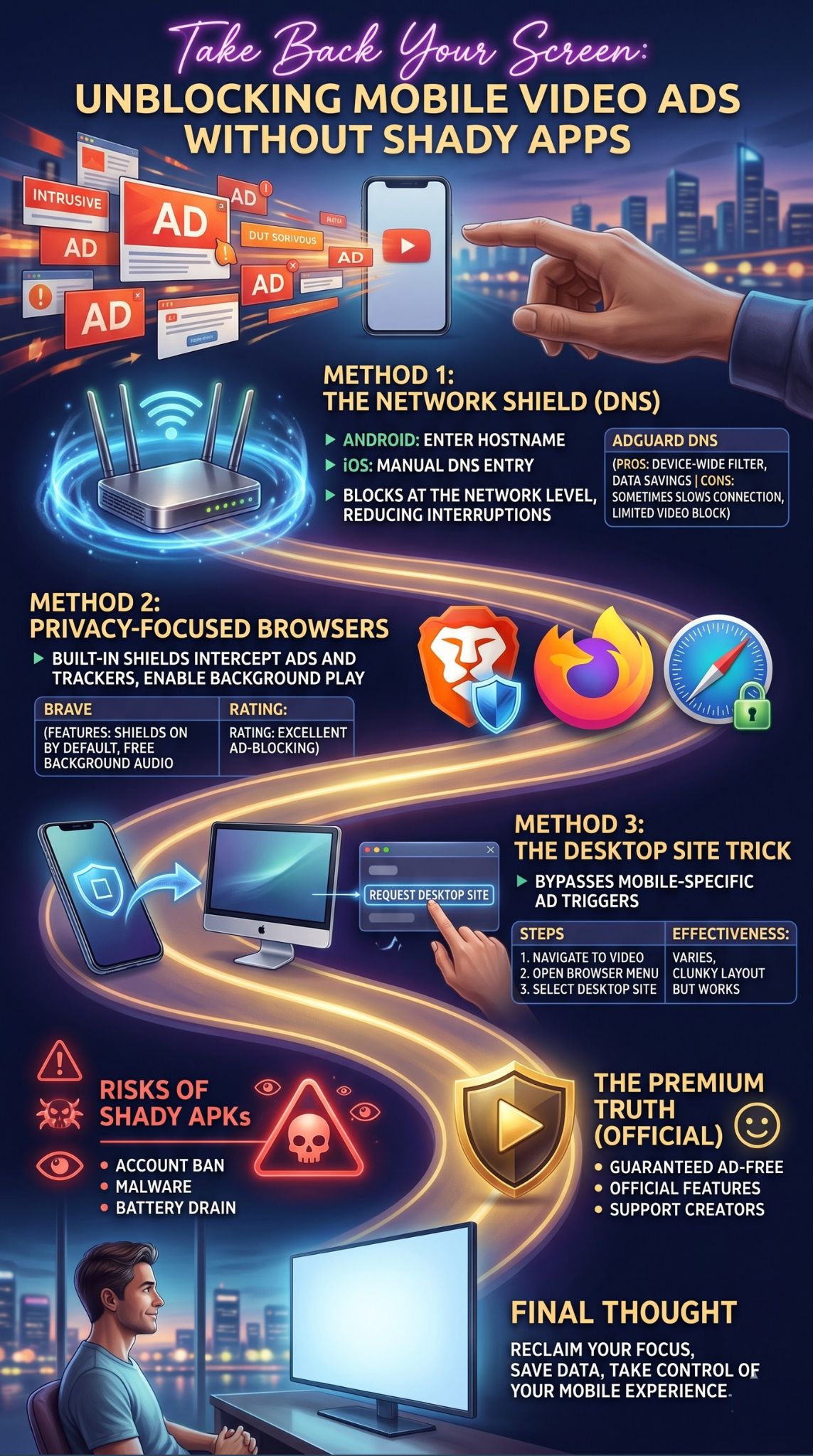
This is one of the oldest tricks in the book, and surprisingly, it still works quite often in 2026. Websites serve different versions of themselves depending on if you are using a phone or a computer. The “mobile” version is packed with ads that are specifically designed for touchscreens. By forcing your phone to load the “Desktop” version of the site, you sometimes bypass the mobile-specific ad triggers that the platform uses to interrupt your viewing.
Steps to Force Desktop Mode
|
Browser |
How to Activate |
Result |
|
Chrome (Android) |
Three dots > Request Desktop Site |
Page reloads in PC format. |
|
Safari (iOS) |
Tap “aA” icon > Request Desktop Website |
Switches to full site view. |
|
Firefox |
Menu > Desktop Site toggle |
Bypasses mobile-only ad scripts. |
The Benefits of the Desktop View
When you are in desktop mode, the video player behaves differently. You might notice that the ads are easier to skip, or in some cases, they do not appear at all because the mobile ad-tracker cannot find the “mobile” player it is looking for. It also gives you access to features like “Theater Mode” and better comment filtering. If you find yourself stuck with a video that won’t stop playing ads, switching to the desktop view is a quick five-second fix that can save your sanity.
Handling the Layout Challenges
The only downside to this trick is that everything gets very small. Since your phone is pretending to be a big computer monitor, you will have to pinch and zoom to hit the “Play” button. However, once the video starts, you can usually just hit the full-screen button and enjoy the show. It is a bit of a clunky workaround, but it is a very effective way to block youtube ads mobile when other methods are being stubborn.
Are VPNs a Good Alternative?
Many people think a VPN is a magic button that stops all ads. That is not exactly how it works. A VPN, or Virtual Private Network, primarily hides your location and encrypts your data. However, many modern VPN services now include a “Blocker” feature. When you turn this on, the VPN server filters out known advertising domains before they even reach your phone. It is very similar to the DNS method but often more powerful because it covers your entire internet connection.
Top VPN Features for Ad Blocking
|
VPN Service |
Ad-Blocking Name |
Efficiency |
Extra Benefit |
|
NordVPN |
Threat Protection |
High |
Blocks malicious sites too. |
|
Surfshark |
CleanWeb |
High |
Works on unlimited devices. |
|
ExpressVPN |
Threat Manager |
Moderate |
Focused on privacy and speed. |
Using Location to Your Advantage
In the past, people used VPNs to change their location to countries where ads are less common or where the premium subscription is cheaper. While the platforms have gotten better at stopping this, it still works occasionally. By connecting to a server in a country with different advertising laws, you might find that the number of mid-roll interruptions drops significantly. Just keep in mind that this can sometimes make your connection a little slower because your data has to travel halfway around the world.
When to Use a VPN for Ads
If you already have a VPN for work or privacy, checking the settings for an ad-blocker is a no-brainer. It is an easy way to block youtube ads mobile across your whole device without needing extra software. But if you are buying a VPN only to stop ads, you might be better off using a free privacy browser or a custom DNS first. A VPN is a great tool, but it is usually a paid solution for a problem that can often be solved for free.
The Dangers of Sketchy APKs
We have to talk about the “modded” apps you see on forums. You might hear about things like “Advanced Tube” or “Video Pro Max.” These are applications that have been taken apart by hackers, changed to remove ads, and then put back together. While they sound perfect, they are the biggest risk to your phone. Because these apps are not in the official store, there is no one checking to make sure they aren’t stealing your passwords or reading your text messages in the background.
Risks of Unofficial Video Apps
|
Risk Category |
Potential Outcome |
Severity |
|
Account Security |
Your Google account could be banned or hacked. |
Critical |
|
Malware |
Spyware could be installed on your phone. |
High |
|
Performance |
Massive battery drain and phone overheating. |
Medium |
|
Legal |
Violation of terms of service leads to loss of access. |
High |
Why “Free” Isn’t Always Free
If a developer spent hundreds of hours making a “free” ad-blocking app, they are probably making money somewhere else. Often, that “somewhere else” is selling your browsing data to advertisers or using your phone’s processing power to mine cryptocurrency. It is a classic trap. You think you are saving time by skipping an ad, but you are actually giving away your privacy. Sticking to the browser method is much safer because the browser is made by a real company with a reputation to protect.
Protecting Your Main Account
The biggest danger is losing your email. If you log into a modified app with your main Gmail, and the platform detects you are using “unauthorized software,” they can shut down your entire account. That means losing your emails, your photos, and your documents. To block youtube ads mobile safely, you should never have to provide your password to a third-party app that isn’t from the official store. If an app asks for your login to “remove ads,” walk away.
The Ultimate Unbiased Truth: The Premium Route
We have looked at a lot of workarounds, but we have to be honest: the easiest way to stop ads is to pay for the official premium service. For some people, this is a non-starter. But for others, the time saved is worth the cost of a couple of cups of coffee a month. When you pay for the official version, you get a 100% guarantee that you will never see an ad on any device, whether it is your phone, your TV, or your tablet.
Premium vs. Workarounds: A Quick Look
|
Feature |
Workarounds (DNS/Browser) |
Official Premium |
|
Ad-Free Reliability |
80% (Sometimes ads slip through) |
100% Guaranteed |
|
Background Play |
Yes (Via browser tricks) |
Yes (Natively in app) |
|
Offline Downloads |
Difficult / Requires 3rd party |
Easy and built-in |
|
Creator Support |
No (Creators get $0) |
Yes (Creators get paid) |
Supporting the Content You Love
One thing people often forget is that ads are how your favorite creators pay their bills. When you use a blocker, the person who made the video doesn’t get a penny for their work. The premium subscription solves this by sharing a piece of your monthly fee with the creators you actually watch. It is a way to block youtube ads mobile while still making sure the people making the content can keep doing it. It turns the “annoying” relationship with ads into a supportive one for the community.
Is It Worth the Money?
If you only watch one or two videos a week, the premium price is probably too high. In that case, the browser or DNS methods are perfect for you. But if you spend two hours a day watching tutorials, documentaries, or vlogs, the cost starts to make more sense. You get high-quality audio, the ability to download videos for a flight, and total peace of mind. It is the only “set it and forget it” solution that works perfectly every single time without any technical tinkering.
Final Thoughts
Reclaiming your viewing experience in 2026 doesn’t have to be a headache. Whether you choose to dive into your phone’s DNS settings, switch to a privacy-first browser like Brave, or use the desktop site trick, you have plenty of ways to block youtube ads mobile safely. The key is to avoid the “too good to be true” apps that put your personal data at risk.
By using the methods we talked about, you can save your data, protect your battery, and finally watch your favorite videos without a loud commercial scaring you every five minutes. Technology should work for you, not the other way around. Try out the DNS method first for a global clean-up, or just keep a privacy browser handy for those times when the official app becomes too frustrating to use.
FAQs
Can I block ads on the official mobile app without paying?
No, the official app is designed to bypass most external blockers. To block ads in the official app, you almost always need a premium subscription. This is why using a mobile browser like Brave or Firefox is the preferred “no-app” workaround.
Will these methods work on both Android and iPhone?
Yes. Changing DNS settings and using privacy browsers works on both platforms. Android users have a bit more flexibility with system-wide DNS, while iPhone users often find that browser extensions for Safari or using the Brave browser are the most effective paths.
Does blocking ads use more battery?
Actually, it usually saves battery. Ads are often high-resolution videos that require extra processing power to load and play. By blocking them, your phone doesn’t have to work as hard, and your screen stays on for less time, which helps your battery last longer.
Is it safe to use “YouTube Vanced” or similar clones?
Most of the original “Vanced” clones have been shut down. Any new ones you find today are often “fakes” created by unknown developers that may contain malware. It is much safer to stick to browsers and DNS settings rather than downloading a modified file from a random website.
Why do some ads still show up in my browser?
Ad-blocking is a constant game of cat and mouse. If a platform changes its code, the blockers have to update their filters. If you see an ad, try clearing your browser cache or checking if your browser needs an update.