
A Fitbit should help you move more, sleep better, and understand your health. It shouldn’t make you feel forced into another monthly bill.
The good news? You can still use fitbit no subscription in 2026.
You don’t need to pay just to track your steps, sleep, heart rate, workouts, calories, or basic health trends. Those core tools still work through the free Google Health experience, as long as your device supports them.
But Fitbit looks different now.
The Fitbit app has moved into the Google Health app. Fitbit Premium is now Google Health Premium. Google has also added Google Health Coach, an AI-powered coaching tool built with Gemini.
That sounds like a big shift. For everyday users, though, the choice is still simple.
The free plan tracks your health and fitness data. Premium gives you more coaching, plans, and guidance.
This guide breaks down what you can use for free, what sits behind Premium, how to set up Fitbit without paying, and how to get more value from your device in 2026.
Can You Use Fitbit Without a Subscription?
Yes, you can use Fitbit without a subscription in 2026.
You need a compatible Fitbit or Pixel Watch, the Google Health app, and a Google Account. You do not need Google Health Premium unless you want extra coaching, guided plans, deeper sleep help, workouts, and mindfulness content.
For most people, the free version covers the basics well.
|
Question |
Quick Answer |
|
Can I use Fitbit without Premium? |
Yes. Core tracking works without a paid plan. |
|
What app do I use in 2026? |
Google Health, formerly the Fitbit app. |
|
Do I need a Google Account? |
Yes. Google Account access is required. |
|
What is free? |
Steps, calories, distance, sleep, heart rate, readiness, cardio load, HRV, SpO2, and logging. |
|
What is paid? |
Google Health Coach, adaptive plans, deeper insights, workouts, and mindfulness sessions. |
|
Best move for most users |
Start free. Try Premium only if you need coaching. |
Think of it this way.
The free plan shows what happened. Premium helps explain what to do next.
If you only want to track steps, sleep, workouts, and heart rate, you can stay on the free plan and still get plenty of value.
What Changed for Fitbit in 2026?
Fitbit had a major software shift in 2026.
The Fitbit app became the Google Health app. Fitbit Premium became Google Health Premium. Google also introduced Google Health Coach, a paid coaching feature built with Gemini.
This is why older Fitbit guides may feel confusing now. They often mention the old Fitbit app or older Premium setup. In 2026, much of that experience now sits under the Google Health name.
|
2026 Change |
What It Means |
|
Fitbit app became Google Health |
Your Fitbit dashboard now appears under Google Health branding. |
|
Fitbit Premium became Google Health Premium |
Paid features moved under the new subscription name. |
|
Google Account is required |
Older Fitbit users need to move to a Google Account. |
|
Google Health Coach launched |
Premium users can access AI-powered coaching in supported regions. |
|
Free Base plan remains |
Basic tracking still works without a paid subscription. |
Why This Matters
A lot of users search for “fitbit no subscription” because they worry Fitbit has become useless without Premium.
It has not.
The free version still gives you the main numbers most users care about. You can track your movement, sleep, workouts, heart-rate trends, and health logs without paying.
Premium is more about guidance. It can suggest workouts, explain sleep habits, answer health and fitness questions, and build plans around your goals.
That may help some people. But it is not required for basic Fitbit use.
Fitbit No Subscription: What You Get for Free
The free Google Health experience is better than many people expect.
When you pair a supported Fitbit tracker, Fitbit smartwatch, or Pixel Watch, you can use many health and fitness tools without Google Health Premium.
That makes fitbit no subscription a solid choice for casual users, walkers, beginner runners, gym users, and anyone who wants simple daily health tracking.
|
Free Feature |
What It Tracks |
Why It Helps |
|
Steps |
Daily step count |
Helps you move more. |
|
Calories |
Estimated daily burn |
Gives a rough view of energy use. |
|
Distance |
Walking or running distance |
Useful for outdoor goals. |
|
Cardio load |
Workout strain |
Helps you avoid sudden training spikes. |
|
Readiness |
Recovery signals |
Shows if your body may be ready for harder effort. |
|
Sleep score |
Sleep quality |
Gives a simple view of your night. |
|
Sleep stages |
Light, deep, and REM sleep |
Helps you spot sleep patterns. |
|
Heart rate |
Resting and active heart rate |
Shows fitness and recovery trends. |
|
HRV |
Heart rate variability |
Helps track stress and recovery patterns. |
|
Breathing rate |
Breaths per minute |
Adds another overnight health signal. |
|
SpO2 |
Blood oxygen estimate |
Shows oxygen variation during sleep on supported devices. |
|
Wellness logging |
Weight, water, food, mood, cycles |
Helps connect daily habits with health trends. |
What Should Free Users Check Daily?
Don’t open every chart. That gets old fast.
Instead, check the numbers that actually help you make better choices.
Start with these:
- Steps
- Active minutes or workout time
- Sleep score
- Resting heart rate
- Readiness
- Cardio load
These give you a quick picture of your day. Did you move enough? Did you recover well? Did your sleep support your routine?
That is usually enough.
What Should Free Users Check Weekly?
Weekly trends matter more than one random bad day.
Look at:
- Average sleep duration
- Resting heart rate trend
- Step average
- Workout consistency
- Cardio load pattern
- Weight trend, if you track it
- Water or food logs, if you use them
One poor sleep score does not mean your health is falling apart. A repeated pattern tells a better story.
What You Don’t Get Without Google Health Premium
Premium adds useful features, but you may not need them.
Google Health Premium includes Google Health Coach, Ask Coach, adaptive fitness plans, deeper sleep insights, proactive guidance, workout content, and mindfulness sessions.
The difference is simple.
The free plan tracks your data. Premium gives you more advice around that data.
|
Premium Feature |
What It Does |
Do You Need It? |
|
Google Health Coach |
Gives personalized health and fitness guidance |
Helpful, not required |
|
Ask Coach |
Lets you ask health and fitness questions |
Useful if you want explanations |
|
Adaptive fitness plans |
Builds plans around your goals |
Good for structured training |
|
Detailed sleep insights |
Gives deeper sleep advice |
Helpful for sleep improvement |
|
Proactive insights |
Suggests actions based on your data |
Useful if you like nudges |
|
Workout library |
Offers guided workouts |
Optional if you use free workouts elsewhere |
|
Mindfulness sessions |
Adds breathing and relaxation content |
Optional for stress support |
Who Can Skip Premium?
You can skip Premium if you:
- Want simple step tracking
- Track sleep casually
- Already follow a workout plan
- Use YouTube or gym programs
- Do not need coaching
- Prefer basic charts and trends
- Want to avoid another subscription
Read Also: How to Pair Apple Watch with New iPhone
For these users, fitbit no subscription is the smarter starting point.
Who Might Like Premium?
Premium may be worth testing if you:
- Want a plan built around your data
- Need help improving sleep
- Like guided workouts
- Want AI coaching inside the app
- Feel lost when looking at health charts
- Prefer one app for tracking and advice
Try Premium only if you plan to use it. Don’t pay just because the app keeps offering a trial.
How to Set Up Fitbit Without Paying
You can set up Fitbit without Premium in a few simple steps.
The main thing is to avoid starting a paid trial unless you actually want to test it.
Use the Google Health app, pair your device, set your goals, and build your dashboard around the free tools.
|
Step |
What to Do |
Why It Matters |
|
1 |
Install or update Google Health |
Fitbit now runs under Google Health branding. |
|
2 |
Sign in with your Google Account |
Google Account access is required. |
|
3 |
Move your Fitbit account if asked |
Older Fitbit accounts need migration. |
|
4 |
Pair your Fitbit device |
This sends tracking data to the app. |
|
5 |
Skip Premium offers |
Free tracking works without subscribing. |
|
6 |
Turn on key permissions |
Bluetooth and background access help syncing. |
|
7 |
Set realistic goals |
Small goals help you stay consistent. |
|
8 |
Clean up your dashboard |
Keep only the stats you use. |
How to Avoid Accidental Premium Charges
Some Fitbit devices and Google Health offers may include a free Premium trial. That can be useful, but it can also renew automatically.
Before starting any trial, check:
- Trial length
- Renewal date
- Monthly or yearly price
- Where the plan is managed
- How to cancel
- Whether billing runs through Google Play, Apple, or Google Store
Set a reminder two or three days before the trial ends. That gives you time to cancel before you get charged.
Which Permissions Should You Allow?
For smooth syncing, your phone may need a few basic permissions.
These can include:
- Bluetooth
- Internet access
- Background App Refresh on iPhone
- Cellular data, if you sync away from Wi-Fi
- Notification access, if you want alerts
- Location access, if you use GPS features
If your Fitbit stops syncing, check Bluetooth, internet, battery, app updates, and paired device settings first.
Premium does not fix a syncing problem. Setup does.
Best Fitbit Features to Use Without a Subscription
The best free Fitbit features are not flashy. They are practical.
Steps help you move. Sleep score helps you rest better. Resting heart rate helps you spot long-term changes. Cardio load helps you avoid doing too much too fast.
Together, these tools can support better habits without a paid plan.
|
Free Feature |
Best Use |
Simple Habit |
|
Steps |
Daily movement |
Set a step goal you can actually reach. |
|
Sleep score |
Sleep quality |
Keep a steady bedtime. |
|
Resting heart rate |
Fitness and recovery trend |
Watch weekly changes. |
|
Readiness |
Recovery signal |
Take it easier when recovery is low. |
|
Cardio load |
Workout balance |
Avoid sharp jumps in training. |
|
HRV |
Recovery and stress trend |
Compare it with sleep and workload. |
|
Water logging |
Hydration |
Log water after meals. |
|
Nutrition logging |
Food awareness |
Track patterns, not perfection. |
|
Weight logging |
Long-term progress |
Weigh at the same time each week. |
Use Fitbit as a Habit Tool
Fitbit works best when you use it to build better routines.
Try this:
- Walk for 10 minutes after lunch.
- Set a bedtime reminder.
- Check your sleep score after waking.
- Track short workouts too.
- Review weekly trends every Sunday.
- Raise your step goal slowly.
Do not chase perfect numbers. Use the data to nudge your habits in the right direction.
Use Sleep Data Without Stressing Out
Sleep tracking can help, but it can also make people anxious.
Do not panic over one bad sleep score.
Look for patterns instead.
Ask yourself:
- Do I sleep worse after late caffeine?
- Do heavy meals affect my sleep?
- Do workouts help me sleep better?
- Does weekend sleep throw off my rhythm?
- Does screen time push my bedtime later?
Use sleep data as feedback. Not as a grade.
Best Fitbit Devices for No-Subscription Users
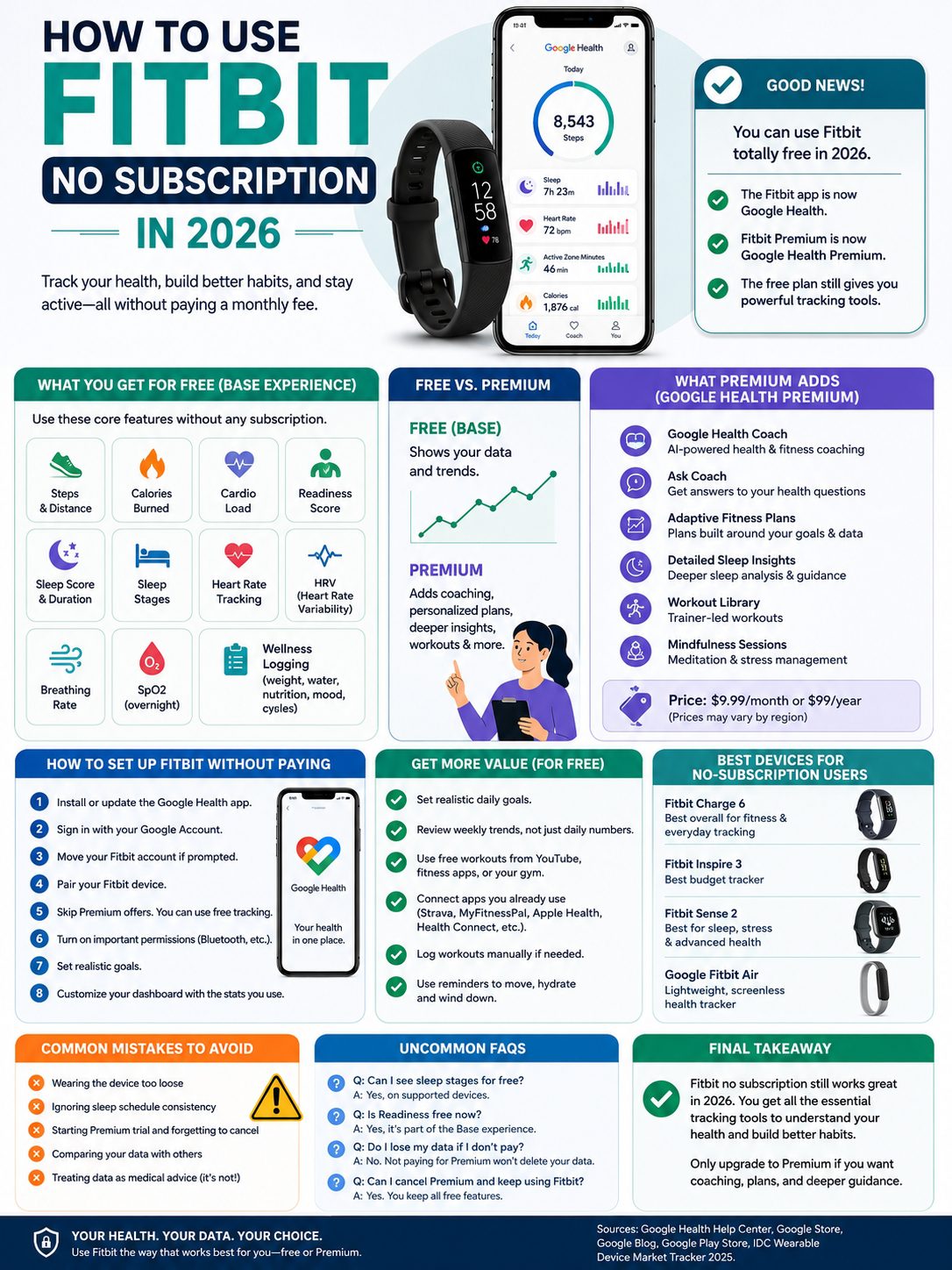
You do not need the most expensive Fitbit to enjoy the free plan.
If you want simple tracking, a basic band may be enough. If you want more fitness tools, a larger display, or extra health sensors, a higher model may make sense.
|
Device |
Good Without Subscription? |
Best For |
|
Fitbit Inspire 3 |
Yes |
Budget users who want steps, sleep, and heart rate. |
|
Fitbit Charge 6 |
Yes |
Fitness users who want a compact tracker with stronger features. |
|
Fitbit Versa 4 |
Yes |
Users who prefer a smartwatch-style screen. |
|
Fitbit Sense 2 |
Yes |
Users focused on stress, sleep, and health signals. |
|
Google Fitbit Air |
Yes |
Users who want a light, screenless tracker. |
|
Pixel Watch models |
Yes |
Users who want a full smartwatch with Fitbit-style health tracking. |
Best Overall Pick for Free Users
Fitbit Charge 6 is a strong pick for many no-subscription users.
It gives you a good mix of fitness features, health tracking, and daily wearability. It also keeps the compact tracker design, which many people still prefer over a full smartwatch.
Best Budget Pick
Fitbit Inspire 3 is a smart option if you mainly want steps, sleep, heart rate, and long battery life.
It is simple. It is light. It covers the basics without pushing you toward features you may not use.
Best Minimal Pick
Google Fitbit Air may suit users who want a screenless tracker.
It focuses on comfort, sleep, heart rate, and fitness tracking through the Google Health app. It is a good fit if you want fewer distractions on your wrist.
How to Get More Value From Fitbit Without Premium
You can make Fitbit more useful without paying by using the free tools well.
Set better goals. Clean up your dashboard. Connect the apps you already use. Review trends once a week.
The free plan gives you enough data. The trick is knowing how to use it.
|
Free Strategy |
How It Helps |
|
Set realistic goals |
Makes consistency easier. |
|
Customize your dashboard |
Removes clutter from the app. |
|
Review weekly trends |
Shows real progress. |
|
Use free workouts |
Replaces Premium workout videos. |
|
Connect third-party apps |
Brings more data into one place. |
|
Log missed workouts |
Keeps your history accurate. |
|
Export data when needed |
Helps with backup and review. |
|
Use reminders |
Builds movement and sleep habits. |
Connect Apps You Already Use
Google Health can connect with other health and fitness services. Options may vary by country, phone, and device.
Useful connections may include:
- Health Connect on Android
- Apple Health on iPhone
- Strava for running and cycling
- MyFitnessPal for food logging
- Withings for smart scales
- Peloton for workouts
- Other supported fitness apps
Do not connect everything. That just creates clutter.
Connect only the apps you use often.
Use Free Workout Content
You do not need Premium workout videos to stay active.
You can use:
- YouTube beginner workouts
- Free walking plans
- Bodyweight routines
- Running plans from trusted fitness sites
- Gym programs from a trainer
- Free yoga and stretching videos
Fitbit can track the workout. The free content can guide the session.
That is a simple way to keep costs down.
Fitbit Free vs Premium: Which One Should You Choose?
The free plan is best for tracking. Premium is best for coaching.
That is the clearest way to decide.
|
User Type |
Free Plan Enough? |
Premium Worth Trying? |
|
Casual walker |
Yes |
Usually no |
|
Beginner runner |
Yes |
Maybe |
|
Gym user |
Yes |
Maybe |
|
Weight-loss beginner |
Yes |
Maybe |
|
Sleep-focused user |
Yes |
Maybe |
|
Data-focused user |
Yes |
Maybe |
|
AI coaching fan |
Maybe |
Yes |
|
Home workout user |
Maybe |
Yes |
|
Budget buyer |
Yes |
Usually no |
Choose Free If You Want Tracking
The free plan works well if you want to know what happened.
You walked 7,000 steps. You slept 6 hours and 40 minutes. Your resting heart rate changed over the month. Your cardio load jumped after a tough workout week.
That kind of tracking does not require Premium.
Choose Premium If You Want Advice
Premium makes more sense if you want help deciding what to do next.
It can guide your workouts, explain your sleep patterns, and give more personal suggestions.
If you want coaching, Premium may be worth a trial. If you just want your numbers, stick with free.
Common Problems When Using Fitbit Without Subscription
Most free Fitbit problems are not subscription problems.
They are usually caused by setup issues, syncing errors, loose device fit, or wrong expectations.
|
Problem |
Likely Cause |
Fix |
|
Fitbit won’t sync |
Bluetooth or internet issue |
Restart Bluetooth, check internet, and update the app. |
|
Sleep stages missing |
Loose band or weak heart-rate signal |
Wear the band snugly and charge it before bed. |
|
Trial keeps showing |
App promotion |
Skip the offer or manage subscription settings. |
|
Data looks wrong |
Loose fit or missed sync |
Adjust the band and sync again. |
|
App asks for Google login |
Account migration requirement |
Move your Fitbit account to Google. |
|
Premium features are locked |
Paid feature |
Use free tracking or start a trial only if needed. |
Sleep Stages Not Showing? Try This
Sleep stages may not appear if your Fitbit cannot read your heart rate well.
Try these fixes:
- Wear the band higher on your wrist.
- Keep it snug, not tight.
- Charge the device before bed.
- Sleep long enough for tracking.
- Avoid wearing it too loose.
Short naps may not show full sleep stages. That is normal.
Syncing Not Working? Start Simple
Try these steps first:
- Turn Bluetooth off and on.
- Make sure your phone has internet.
- Restart your phone.
- Update Google Health.
- Charge your Fitbit.
- Remove old unused Fitbit devices.
- Pair the device again if needed.
Do not assume you need Premium just because syncing fails.
Privacy and Health Data: What Free Users Should Know
Health data is personal. Treat it carefully.
Google says Fitbit health and wellness data is not used for Google Ads. Users can also manage, delete, or export health data through app settings and Google Account tools.
Still, it is worth checking your settings.
|
Privacy Step |
Why It Matters |
|
Review connected apps |
Limits unnecessary data sharing. |
|
Remove old devices |
Keeps your account cleaner. |
|
Check Google Account settings |
Helps manage health data and privacy. |
|
Export data if needed |
Gives you a backup. |
|
Delete old data if wanted |
Gives more control over your history. |
|
Avoid public screenshots |
Health metrics can reveal personal details. |
Don’t Treat Fitbit Like a Doctor
Fitbit can show useful health signals. It cannot replace medical care.
Heart rate, SpO2, HRV, readiness, sleep score, and ECG-style features may help you spot patterns. But device accuracy can vary. Fit, movement, skin contact, device model, and region can all affect results.
If you have chest pain, fainting, breathing trouble, irregular heartbeat concerns, or any serious symptom, get medical help.
Use Fitbit as a wellness tool. Not as a diagnosis tool.
Final Thoughts
You can use fitbit no subscription in 2026 and still get plenty of value.
The free Google Health experience covers the tools most people need: steps, calories, distance, cardio load, readiness, sleep score, sleep stages, heart rate, HRV, breathing rate, SpO2, and wellness logging.
That is enough for daily movement, better sleep habits, casual workouts, walking goals, and long-term health awareness.
Google Health Premium can help if you want coaching, AI guidance, adaptive fitness plans, deeper sleep advice, workout videos, and mindfulness sessions. But you do not need it for the core Fitbit experience.
Start free. Use your tracker for 30 days. Watch your weekly trends. Notice what changes your sleep, energy, and activity.
If you find yourself wanting more guidance, then test Premium. If not, keep using the free plan.
A Fitbit should make your routine easier. It should only become another bill if it truly helps you.
Uncommon FAQs About Fitbit No Subscription
These questions often come up after users try the free plan for a few weeks.
|
FAQ |
Short Answer |
|
Can I see sleep stages for free? |
Yes, on supported devices when enough sleep data is available. |
|
Is readiness free now? |
Google lists readiness under Base activity-tracking benefits. |
|
Can I use Google Health Coach free? |
No. It is part of Google Health Premium for eligible users. |
|
Does Fitbit work without a phone? |
Setup and syncing need the app and phone access. |
|
Can I use Fitbit on iPhone? |
Yes, through Google Health, if your device is supported. |
|
Does Premium improve sensor accuracy? |
Premium adds coaching and insights, not better hardware sensors. |
Can I use Fitbit without Google Health Premium?
Yes. You can use Fitbit without Google Health Premium. The free Base experience includes core tracking features when paired with a compatible watch or tracker.
Can I use Fitbit without a Google Account?
No, not in the same way as before. In 2026, you need a Google Account to use the Google Health app. Older Fitbit users must move their account to Google to keep using app features.
Does Fitbit track sleep without Premium?
Yes. Free sleep tracking includes sleep score, sleep schedule, sleep duration, and sleep stages on supported devices. Premium adds deeper sleep coaching and more personal guidance.
Does Fitbit track heart rate without Premium?
Yes. Heart rate tracking is part of the free experience on supported Fitbit and Pixel Watch devices.
Is readiness available without Premium?
Google lists readiness under Base activity-tracking benefits in Google Health when paired with a watch or tracker. Availability may still depend on your device and region.
Can I cancel Premium and keep using my Fitbit?
Yes. If you cancel Premium, your Fitbit still tracks core activity, sleep, and health metrics. You lose paid coaching, Premium content, and deeper guidance.
Is Fitbit worth it without a subscription?
Yes, for most casual users. It is worth it if you want daily activity, sleep, heart-rate, and wellness tracking without paying every month.
Should I start a Premium trial?
Start a trial only if you plan to test the coaching tools. Add a reminder before the renewal date so you do not pay by accident.