
A smart doorbell should do more than show you who pressed the button. It should catch deliveries, warn you about movement, record useful clips, and help you answer the door even when you’re not home.
That’s why choosing the best smart doorbell 2026 takes a little thought. The sharpest camera is not always the best one. A 4K doorbell can still miss a package sitting too close to the mat. A cheap doorbell can cost more later if every useful feature sits behind a monthly plan.
The real question is simple: what do you need at your front door?
Some homes need a battery doorbell because wiring is not possible. Some need a wired model that records all day. Some buyers want Alexa support. Others want Google Home, Apple HomeKit, or local storage with no cloud fees.
This guide cuts through the noise. Here are the top 7 smart doorbell cameras worth buying in 2026, based on current specs, real use cases, storage options, smart alerts, privacy features, and long-term value.
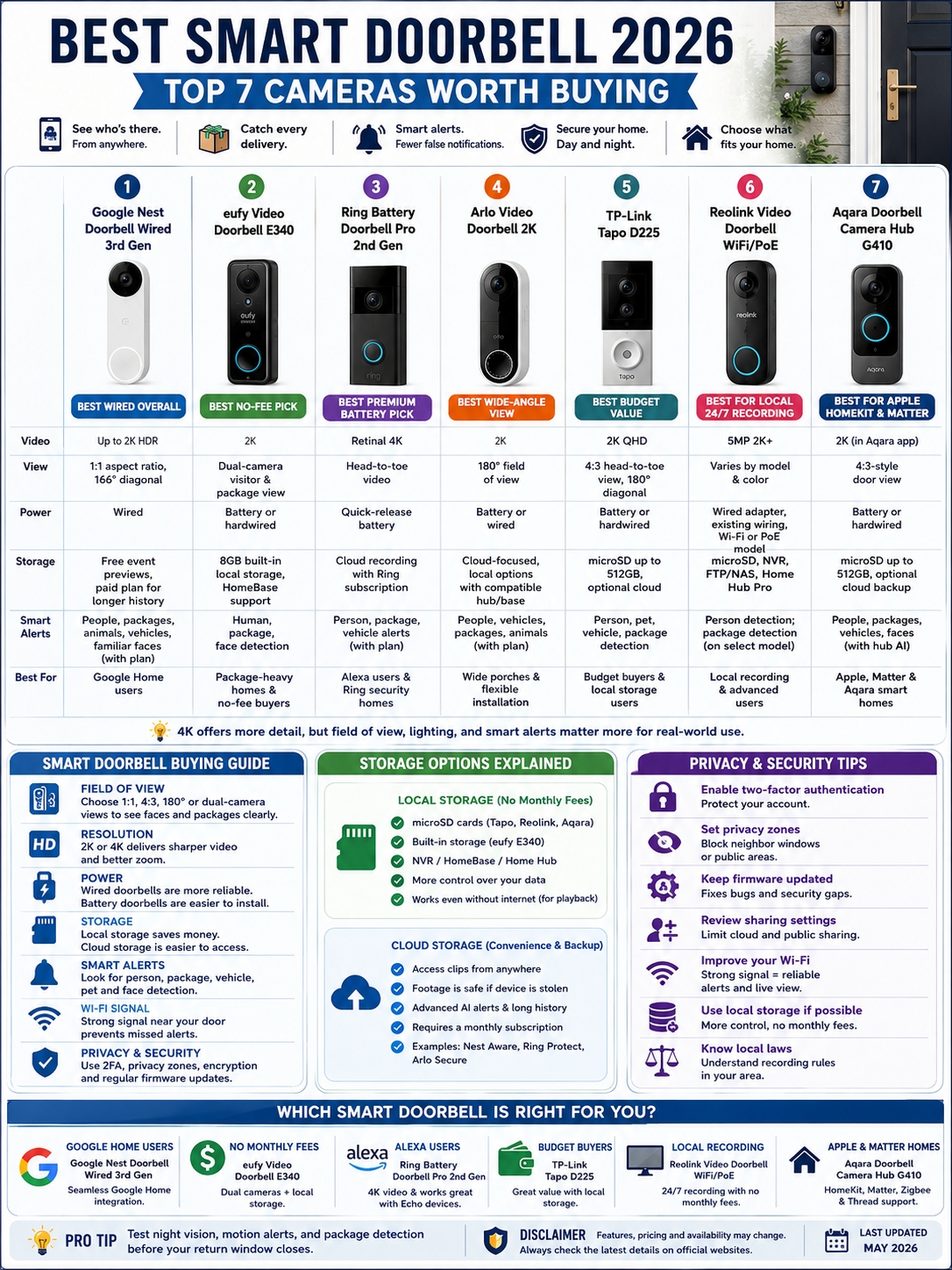
Best Smart Doorbell 2026: Quick Comparison
Start here if you want the fast answer. These seven models cover the main types of buyers: Google users, Alexa users, package-heavy homes, budget buyers, and people who want local recording.
|
Rank |
Smart Doorbell |
Best For |
Power Type |
Main Strength |
|
1 |
Google Nest Doorbell Wired 3rd Gen |
Best wired pick |
Wired |
2K HDR, smart alerts, Google Home support |
|
2 |
eufy Video Doorbell E340 |
Best no-fee pick |
Battery or wired |
Dual cameras and local storage |
|
3 |
Ring Battery Doorbell Pro 2nd Gen |
Best premium battery pick |
Battery |
Retinal 4K and Alexa support |
|
4 |
Arlo Video Doorbell 2K |
Best wide-angle view |
Battery or wired |
2K video and 180-degree view |
|
5 |
TP-Link Tapo D225 |
Best budget value |
Battery or wired |
2K video and microSD storage |
|
6 |
Reolink Video Doorbell WiFi/PoE |
Best local 24/7 recording |
Wired, Wi-Fi, or PoE |
No-fee local recording |
|
7 |
Aqara Doorbell Camera Hub G410 |
Best for Apple and Matter homes |
Battery or wired |
HomeKit, Matter, Zigbee, and Thread support |
If I had to pick one wired doorbell for most Google-friendly homes, I’d start with the Nest Doorbell Wired 3rd Gen. If I wanted to avoid monthly fees, I’d choose the eufy E340. For Alexa homes, the Ring Battery Doorbell Pro 2nd Gen makes the most sense.
How We Chose These Smart Doorbells
A video doorbell sits in a hard-working spot. It deals with rain, glare, night scenes, weak Wi-Fi, delivery drivers, visitors, and random movement all day.
So this list does not rank products by resolution alone. A good smart doorbell needs to be useful in real life, not just impressive on a spec sheet.
|
Buying Factor |
Why It Matters |
What We Looked For |
|
Video quality |
Helps identify faces, clothing, and packages |
2K or 4K video, HDR, strong night view |
|
Field of view |
Shows people and parcels clearly |
1:1, 4:3, 180-degree, or dual-camera view |
|
Storage |
Controls long-term cost |
Local storage, fair cloud plans, or free clip access |
|
Smart alerts |
Cuts down useless notifications |
Person, package, vehicle, pet, and face alerts |
|
Power type |
Affects setup and reliability |
Wired, battery, PoE, or hybrid power |
|
App quality |
Shapes daily use |
Fast live view, clean history, useful alerts |
|
Privacy tools |
Protects your footage |
Two-factor login, privacy zones, encryption, local options |
A cheap doorbell can become expensive if it needs a paid plan for saved clips. A premium doorbell can feel frustrating if the app is slow. And a high-resolution camera won’t help much if it misses the lower part of your doorstep.
That’s why the best smart doorbell 2026 has to balance video quality, storage, power, app design, privacy, and real-world value.
1. Google Nest Doorbell Wired 3rd Gen: Best Overall Wired Pick
The Google Nest Doorbell Wired 3rd Gen is one of the strongest wired video doorbells for 2026. It fits best in homes already using Google Home, Nest speakers, Nest displays, or other Google devices.
It records in up to 2K HDR and uses a 1:1 aspect ratio. That square view is more useful than it sounds. It helps you see both the visitor’s face and more of the doorstep area, which matters when packages arrive.
Because it’s wired, you don’t need to charge a battery. That makes it more reliable for daily use. The trade-off is simple: renters or homes without existing wiring may need a different option.
|
Feature |
Details |
|
Video |
Up to 2K HDR |
|
View |
1:1 aspect ratio, 166-degree diagonal field of view |
|
Power |
Wired |
|
Storage |
Free event previews, paid plan for longer history |
|
Smart alerts |
People, packages, animals, vehicles, familiar faces with plan |
|
Best for |
Google Home users and wired front doors |
Why It Works Well
The Nest Doorbell feels polished. Alerts are easy to read. Live view opens cleanly in the Google Home app. If you use a Nest Hub, you can see who’s at the door without reaching for your phone.
Google’s smart alerts are also useful. They help separate people, packages, animals, and vehicles. With a paid plan, familiar face alerts can add another layer of convenience.
Pros
- Sharp 2K HDR video.
- Tall square view helps with packages.
- No battery charging.
- Strong Google Home support.
- Clean app experience.
Cons
- Wired only.
- No local storage.
- Best history and AI features need a paid plan.
- Not ideal for Apple HomeKit users.
Read Also: Google Home Won’t Connect to WiFi: Complete Fix
Best For
Choose this if your home already runs on Google Home and you want a reliable wired smart doorbell that feels easy to live with.
2. eufy Video Doorbell E340: Best No-Subscription Smart Doorbell
The eufy Video Doorbell E340 is the best pick for people who don’t want another monthly bill. It has two cameras: one for visitors and one pointed downward for packages.
That second camera makes a real difference. Many smart doorbells say they detect packages, but they still miss boxes placed close to the door. The E340 gives you a better view of the mat, so it’s easier to see deliveries.
It also records locally. You can use its built-in storage and expand the setup with a compatible HomeBase if needed.
|
Feature |
Details |
|
Video |
2K |
|
View |
Dual-camera visitor and package view |
|
Power |
Battery or hardwired |
|
Storage |
8GB built-in local storage, HomeBase support |
|
Smart alerts |
Human, package, and face detection |
|
Best for |
Package-heavy homes and no-fee buyers |
Why It Works Well
The E340 solves two common problems: missed packages and subscription fatigue. You get local storage, package alerts, and flexible power without being forced into a paid plan for basic recording.
It can run on battery or wiring, so it fits more homes than a wired-only model. The removable battery also makes charging easier.
Pros
- Dual cameras give better package coverage.
- No required monthly fee for core features.
- Battery or wired setup.
- Built-in local storage.
- Great for homes with frequent deliveries.
Cons
- No Apple HomeKit support.
- Uses 2.4GHz Wi-Fi only.
- Bigger than some slim doorbells.
Best For
Pick this if you want the best smart doorbell 2026 without paying monthly cloud fees.
3. Ring Battery Doorbell Pro 2nd Gen: Best Premium Battery Doorbell
Ring is still one of the easiest brands to recommend for Alexa homes. The Ring Battery Doorbell Pro 2nd Gen is its premium battery model, and the generation matters here.
Older Ring Battery Doorbell Pro models used lower-resolution video. The newer 2nd Gen model moves to Retinal 4K, which gives it a stronger place in the 2026 lineup.
It also offers head-to-toe video, 10x enhanced zoom, 3D motion detection, two-way talk, and a quick-release battery. If you already use Echo Show, Ring Alarm, or other Ring cameras, it fits right in.
|
Feature |
Details |
|
Video |
Retinal 4K |
|
View |
Head-to-toe video |
|
Power |
Quick-release battery |
|
Storage |
Cloud recording with Ring subscription |
|
Smart alerts |
Person, package, and vehicle alerts with plan |
|
Best for |
Alexa users and Ring security homes |
Why It Works Well
Ring’s app is simple and fast. You get quick alerts, easy live view, and smooth Alexa support. You can ask an Echo Show to display the front door, which is handy when your hands are full.
The catch is the subscription. Ring works best with a paid plan. If you want saved clips, video history, and advanced alerts, you’ll need to factor that cost into your budget.
Pros
- Sharp 4K video on the 2nd Gen model.
- Excellent Alexa support.
- Strong Ring ecosystem.
- Quick-release battery is convenient.
- Good motion detection tools.
Cons
- Subscription needed for full value.
- Cloud-first setup may not suit privacy-focused buyers.
- Higher upfront price.
Best For
Buy this if you already use Alexa or Ring and want a premium battery-powered video doorbell.
4. Arlo Video Doorbell 2K: Best Wide-Angle View
The Arlo Video Doorbell 2K is a good choice if you want to see more of your entryway. Its 180-degree field of view helps capture visitors, packages, and movement around the door.
It works with battery power or wiring, so installation is flexible. The 2K video looks clear enough for most front-door needs, and the built-in siren adds a small but useful security boost.
Arlo’s main downside is the cloud plan. You can use the doorbell without paying, but the best alerts and saved video history need Arlo Secure.
|
Feature |
Details |
|
Video |
2K |
|
View |
180-degree field of view |
|
Power |
Battery or wired |
|
Storage |
Cloud-focused, local options with compatible hub/base |
|
Smart alerts |
People, vehicles, packages, and animals with plan |
|
Best for |
Wide porches and flexible installation |
Why It Works Well
Arlo gives you a broad view in a neat package. It’s useful for porches where deliveries land off to the side or where visitors do not stand directly in front of the door.
The app is clean, and the doorbell performs well for everyday alerts. It is also a safer choice than unknown cheap brands with weak security records.
Pros
- Wide 180-degree view.
- Clear 2K video.
- Battery or wired setup.
- Built-in siren.
- Good smart alerts with a plan.
Cons
- Best features need Arlo Secure.
- Local storage is not as simple as Reolink or Tapo.
- Long-term cost can rise with subscriptions.
Best For
Choose Arlo if you want a wide front-door view and don’t mind paying for cloud features.
5. TP-Link Tapo D225: Best Budget Smart Doorbell
The TP-Link Tapo D225 gives you a lot for the money. It offers 2K QHD video, a 4:3 head-to-toe view, a 180-degree diagonal field of view, local microSD storage, and smart detection for people, pets, vehicles, and packages.
That’s a strong feature set for a budget-friendly doorbell.
The big win is local storage. Add a microSD card, and you can save footage without paying for cloud storage. If you hardwire it, the D225 can also support 24/7 continuous recording. One note: continuous recording mode does not work with the existing chime.
|
Feature |
Details |
|
Video |
2K QHD |
|
View |
4:3 head-to-toe view, 180-degree diagonal field of view |
|
Power |
Battery or hardwired |
|
Storage |
microSD up to 512GB, optional cloud plan |
|
Smart alerts |
Person, pet, vehicle, and package detection |
|
Best for |
Budget buyers and local storage users |
Why It Works Well
The Tapo D225 is practical. It gives you clear video, useful alerts, flexible power, and local storage without a premium price.
It does not feel as polished as Ring, Nest, or Arlo. But if you want value, it’s one of the smartest buys in this list.
Pros
- Strong features for the price.
- 2K video with useful vertical view.
- Local microSD storage.
- Battery or hardwired setup.
- 24/7 recording when hardwired.
Cons
- microSD card sold separately.
- Existing chime does not work in 24/7 mode.
- Build and app feel less premium than top brands.
Best For
Choose this if you want the best smart doorbell 2026 on a tighter budget.
6. Reolink Video Doorbell WiFi/PoE: Best for Local 24/7 Recording
Reolink is for people who want control. It is not as mainstream as Ring or Nest, but it’s a strong pick if you care about local storage, 24/7 recording, and no monthly fees.
The Reolink Video Doorbell WiFi offers 5MP 2K+ video, dual-band Wi-Fi, person detection, local recording, and IP65 weather resistance. There is also a PoE version, which is ideal if you want stable power and data through one Ethernet cable.
It supports several storage options, including microSD, NVR, FTP/NAS, and Reolink Home Hub Pro.
|
Feature |
Details |
|
Video |
5MP 2K+ |
|
View |
Varies by model and color |
|
Power |
Wired adapter, existing wiring, Wi-Fi, or PoE model |
|
Storage |
microSD, NVR, FTP/NAS, Home Hub Pro |
|
Smart alerts |
Person detection; package detection on select model |
|
Best for |
Local recording and advanced users |
Why It Works Well
Reolink is not trying to be the prettiest app on your phone. It is trying to give you control over your recordings.
That makes it a great pick for homeowners, small offices, and anyone already using Reolink cameras. The PoE model is especially strong for a more serious security setup.
Pros
- No required monthly fee for local recording.
- 24/7 recording support.
- Flexible storage options.
- Dual-band Wi-Fi on Wi-Fi model.
- PoE option for stable installs.
Cons
- Setup may feel technical.
- App is less polished than Ring or Google.
- Package detection depends on the model.
Best For
Buy this if you want local recording, 24/7 footage, and more control over your front-door video.
7. Aqara Doorbell Camera Hub G410: Best for Apple HomeKit and Matter Homes
The Aqara Doorbell Camera Hub G410 is not just a doorbell camera. It also works as a smart home hub. That makes it different from most products on this list.
It supports Apple HomeKit, Matter, Zigbee, Thread, Alexa, Google, and SmartThings. That’s a big deal if you’re building a connected smart home and want one device to do more than record video.
It can run on battery power or wiring. It also supports local microSD storage through the hub setup. In wired mode, it can support 24/7 recording.
The main warning is weather exposure. This is a better choice for covered porches, apartments, and sheltered doors. If rain hits your door directly, choose a tougher outdoor model.
|
Feature |
Details |
|
Video |
2K in Aqara app |
|
View |
4:3-style door view |
|
Power |
Battery or hardwired |
|
Storage |
microSD up to 512GB, optional cloud backup |
|
Smart home |
HomeKit, Matter, Zigbee, Thread, Alexa, Google, SmartThings |
|
Best for |
Apple, Matter, and Aqara smart homes |
Why It Works Well
Most doorbells only watch the door. The Aqara G410 also helps run other smart home devices. That makes it useful for Apple HomeKit users and people who want Matter support.
Good HomeKit doorbells are still limited, so Aqara stands out here.
Pros
- Excellent smart home support.
- Works as a hub.
- Local storage support.
- Battery or wired power.
- Strong Apple HomeKit fit.
Cons
- Not ideal for exposed rain.
- Bulky design.
- Some features work best inside the Aqara app.
Best For
Choose this if you use Apple HomeKit, Matter, or Aqara devices and your front door is covered.
Smart Doorbell Buying Guide: What Actually Matters
A smart doorbell looks simple, but the wrong one can annoy you every day. Before buying, check these points.
|
Feature |
Better Choice |
Why It Matters |
|
Door view |
1:1, 4:3, 180-degree, or dual-camera |
Shows faces and packages better |
|
Resolution |
2K or 4K |
Helps with detail and zoom |
|
Power |
Wired when possible |
Reduces charging hassle |
|
Storage |
Local or fair cloud plan |
Keeps long-term costs under control |
|
Wi-Fi |
Strong signal near the door |
Stops slow live view and missed alerts |
|
Smart alerts |
Person and package detection |
Cuts false notifications |
|
Privacy tools |
2FA, privacy zones, encryption |
Protects your footage |
Battery or Wired?
Battery doorbells are easier to install. They’re great for renters or homes without doorbell wiring.
Wired doorbells are usually more reliable. You don’t need to charge them, and some support stronger features like 24/7 recording.
If you own your home and already have wiring, wired is the better long-term choice. If you rent, battery is simpler.
Local Storage or Cloud Storage?
Local storage gives you more control and can save money. Cloud storage is easier to access and protects clips if the camera gets stolen or damaged.
If you hate monthly fees, start with eufy, Tapo, Reolink, or Aqara. If you prefer polished apps and don’t mind paying, Ring, Nest, and Arlo are good options.
Don’t Ignore Field of View
A wide camera is not always better. For doorbells, vertical view matters more. You want to see faces and packages.
Look for head-to-toe video, 1:1 view, 4:3 view, 180-degree coverage, or dual cameras.
Check the Subscription First
This is where many buyers get caught.
Some doorbells let you watch live video for free but charge for saved clips. Some charge for smart alerts. Some charge for longer history.
Before buying, check what works without a plan. Then calculate the real cost over three years.
Privacy and Security Tips for Video Doorbells
A smart doorbell records real people. That includes visitors, delivery workers, neighbors, and people walking past your home.
Use it responsibly.
|
Privacy Step |
What to Do |
Why It Helps |
|
Turn on two-factor authentication |
Use it in the app |
Protects your account |
|
Set privacy zones |
Block neighbor windows or busy streets |
Reduces over-recording |
|
Keep firmware updated |
Enable updates |
Fixes bugs and security gaps |
|
Review sharing settings |
Limit cloud and public sharing |
Protects private clips |
|
Improve Wi-Fi |
Strengthen signal near the door |
Prevents missed alerts |
|
Use local storage if needed |
Choose microSD, hub, NVR, or HomeBase |
Gives more control |
|
Check local rules |
Know recording laws in your area |
Avoids legal trouble |
Aim the Camera Carefully
Your camera should cover your doorway, not someone else’s private space. Use an angled mount or privacy zones if needed.
Test Night Footage
Many doorbells look good during the day and struggle at night. Test the camera after dark. Check faces, motion alerts, and package visibility.
A simple porch light can improve video quality a lot.
Secure the Account
Use a unique password. Turn on two-factor authentication. Do not reuse your email or banking password for a camera app.
It sounds basic, but it matters.
Final Thoughts
The best smart doorbell 2026 depends on your home, not just the spec sheet.
|
Buyer Type |
Best Pick |
|
Best wired overall |
Google Nest Doorbell Wired 3rd Gen |
|
Best without subscription |
eufy Video Doorbell E340 |
|
Best for Alexa |
Ring Battery Doorbell Pro 2nd Gen |
|
Best wide-angle view |
Arlo Video Doorbell 2K |
|
Best budget value |
TP-Link Tapo D225 |
|
Best local 24/7 recording |
Reolink Video Doorbell WiFi/PoE |
|
Best for HomeKit and Matter |
Aqara Doorbell Camera Hub G410 |
If you want the best wired option for a Google Home setup, choose the Nest Doorbell Wired 3rd Gen. If you want to avoid monthly fees, eufy E340 is the smarter buy. If Alexa runs your home, Ring Battery Doorbell Pro 2nd Gen is the cleanest fit.
Budget buyers should look hard at the Tapo D225. Power users who want local recording should choose Reolink. Apple and Matter users should consider Aqara, especially if the door is covered.
My advice is simple: don’t buy by resolution alone. Check the view, power type, storage rules, app quality, subscription cost, and privacy controls. A good smart doorbell should make your front door easier to manage, not become another bill you regret.
Uncommon Smart Doorbell FAQs
These questions come up often after people start comparing doorbells.
|
Question |
Quick Answer |
|
Can a smart doorbell work without Wi-Fi? |
Usually no, except limited local recording features |
|
Is 4K always better than 2K? |
No, view and lighting matter too |
|
Do doorbells record all day? |
Only some wired models support 24/7 recording |
|
Can I avoid subscriptions? |
Yes, with eufy, Tapo, Reolink, or Aqara |
|
Is battery or wired better? |
Wired is more reliable; battery is easier |
Which smart doorbell is best without monthly fees?
The eufy Video Doorbell E340 is the best overall no-subscription pick. Tapo D225 is the best budget option. Reolink is best for advanced local recording.
Which smart doorbell is best for Google Home?
The Google Nest Doorbell Wired 3rd Gen is the best fit for Google Home users. It works smoothly with the Google Home app and Nest displays.
Which smart doorbell is best for Alexa?
The Ring Battery Doorbell Pro 2nd Gen is the strongest pick for Alexa homes. It works well with Echo Show devices and Ring security systems.
Which smart doorbell is best for Apple HomeKit?
The Aqara Doorbell Camera Hub G410 is the best option in this list for Apple HomeKit and Matter homes. It works best in a covered location.
Is 4K video necessary for a smart doorbell?
Not always. 4K helps with detail and zoom, but a good 2K camera with HDR and a tall view can be more useful at the front door.
Can a smart doorbell replace a security camera?
No. A doorbell camera covers the front door only. It will not cover the driveway, garage, backyard, or side gate. For full coverage, add outdoor cameras or floodlight cameras.
Do smart doorbells work during power cuts?
Battery models can keep running if your Wi-Fi and internet stay on through backup power. Wired models usually stop when the power goes out unless your home has backup power.
Can someone steal a smart doorbell?
Yes. Most brands use security screws, tamper alerts, cloud clips, or replacement support. Still, install it firmly and keep important footage backed up.