
A Snapchat username can feel harmless when you first create it. Then a few years pass, and suddenly that old handle starts looking awkward. Maybe it has random numbers. Maybe it sounds childish. Maybe it no longer fits your name, work, content, or personal brand.
The good news is that you can change Snapchat username 2026 directly from the app. The important catch is this: Snapchat only lets you change your username once every 12 months. So yes, the steps are easy. The choice needs a little care.
This guide walks you through the latest Snapchat username change rules, the exact steps, common problems, and what happens after you update your handle. It also explains when you should change your Display Name instead, because that option is much more flexible.
If your current handle feels outdated, hard to share, or too personal, changing it can be a smart move. Just don’t rush it.
Change Snapchat Username 2026: What You Should Know First
Snapchat does allow username changes in 2026. You don’t need to delete your account or create a new one. You can make the change from your profile settings inside the Snapchat app.
But Snapchat keeps a firm limit. You can change your username once every 12 months. If you make a typo or pick something you regret, you may need to live with it for a full year.
That limit matters because Snapchat is still one of the biggest social apps in the world. Snap reported 956 million monthly active users and 483 million daily active users in Q1 2026. Your username is often how friends, followers, customers, or contacts find you.
|
Quick detail |
What it means |
|
Username change allowed |
Yes |
|
Change limit |
Once every 12 months |
|
Where to change it |
Snapchat app settings |
|
New account needed |
No |
|
Friends affected |
No |
|
Best alternative |
Change Display Name |
Can you change your Snapchat username in 2026?
Yes. Snapchat lets you change your username from the app.
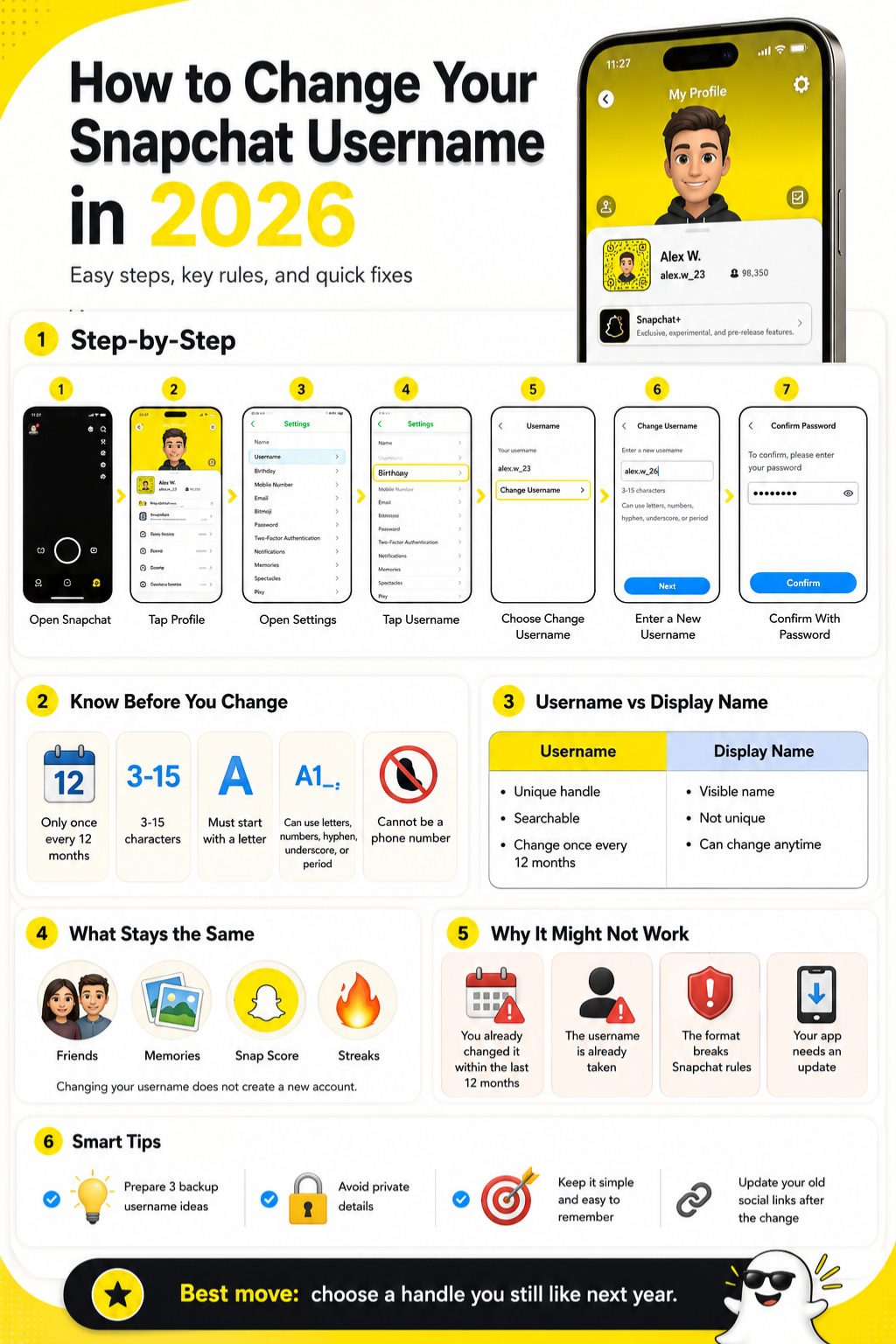
You need to open your profile, go to Settings, tap Username, choose Change Username, enter a new available username, and confirm it with your password.
If you changed your username less than 12 months ago, Snapchat won’t let you change it again yet.
Why should you think before changing it?
Because this is not like changing a profile picture. A Snapchat username works like your account handle.
People may use it to search for you, add you, or recognize your account. If you use Snapchat for content, business, or public networking, a messy username can make your profile look less trustworthy.
Before you confirm the change, check the spelling, privacy, and long-term fit.
What should you prepare before opening the app?
Write down three to five username ideas first. Your first choice may already be taken.
Keep the options short and clean. Avoid long number strings, too many symbols, or anything that looks like a spam account.
Also make sure you know your Snapchat password. Snapchat may ask for it before saving the new username.
Snapchat Username vs Display Name: Don’t Mix Them Up
Many users think they need to change their Snapchat username when they only want a new visible name. These are two different things.
Your Snapchat username is your unique account handle. Your Display Name is the name people usually see in chats, profiles, and other parts of the app.
If your handle is the problem, change your username. If your visible name is the problem, change your Display Name. That choice can save you from wasting your once-a-year username change.
|
Feature |
Snapchat Username |
Display Name |
|
Must be unique |
Yes |
No |
|
Used as account handle |
Yes |
No |
|
Can be changed anytime |
No |
Yes |
|
Change limit |
Once every 12 months |
Any time |
|
Best for |
Updating your handle |
Updating visible name |
|
Example |
samira.snaps |
Samira Khan |
What is a Snapchat username?
Your Snapchat username is your unique handle on the app. No two accounts can normally use the same username.
Snapchat checks availability before it saves your new handle. If another account already has it, you need to pick something else.
Think of your username as your Snapchat address. People use it to find your account.
What is a Snapchat Display Name?
Your Display Name is the name people see more casually inside Snapchat. It can be your real name, nickname, creator name, or brand name.
It doesn’t need to be unique. Many users can have the same Display Name.
Snapchat lets you change your Display Name anytime, so it’s better for small edits, nicknames, spelling fixes, or temporary changes.
Which one should you change?
Change your username if your old handle is outdated, embarrassing, too personal, or hard to share.
Change your Display Name if you just want your profile to look different to friends.
A simple way to decide: if people search for you with it, it’s probably your username. If they mainly see it after adding you, it’s probably your Display Name.
Snapchat Username Rules You Need to Follow
Snapchat has clear rules for usernames. Your new username must be available, clean, and formatted correctly.
A valid Snapchat username must be 3 to 15 characters long. It can include Latin letters, numbers, and limited punctuation such as a hyphen, underscore, or period.
The username must start with a letter and end with a letter or number. Snapchat also says usernames cannot include or be a phone number.
|
Username rule |
Requirement |
|
Length |
3 to 15 characters |
|
First character |
Must be a letter |
|
Last character |
Letter or number |
|
Allowed punctuation |
Hyphen, underscore, period |
|
Phone number |
Not allowed |
|
Availability |
Must not be taken |
You can only change it once every 12 months
This is the rule you need to remember. Snapchat lets you change your username once a year.
That means 12 months to the day since your last username change. If you change it today, expect to keep it for the next year.
So don’t use this feature just to test a random handle. Make the change only when you’re sure.
Your new username must be available
Even if your username follows the rules, Snapchat still needs to check if someone else already has it.
Short names, common nicknames, and creator-style handles are often taken. That’s why backup ideas help.
Try a clean variation before adding random numbers. One dot or underscore can work better than a long string of digits.
Read Aklso: How to Unblock Someone on Snapchat
Your username should not look suspicious
Avoid usernames that impersonate someone else, copy a brand, or look like spam.
This matters even more for creators, businesses, and public profiles. A confusing handle can make people hesitate before adding you.
Choose something clear, readable, and easy to remember.
How to Change Snapchat Username in 2026: Step-by-Step
The actual process is simple. You can do it inside Snapchat settings in a few taps.
Before starting, update Snapchat from the App Store or Google Play Store. This helps you avoid old settings screens or missing options.
Also check that you’re logged into the right account. If you manage more than one profile, this step matters.
|
Step |
What to do |
|
1 |
Open Snapchat |
|
2 |
Tap your profile icon |
|
3 |
Tap Settings |
|
4 |
Tap Username |
|
5 |
Tap Change Username |
|
6 |
Enter a new username |
|
7 |
Tap Next |
|
8 |
Confirm with password |
Step 1: Open Snapchat
Open Snapchat on your iPhone or Android phone.
Make sure you’re using the account you actually want to update. This sounds basic, but it’s an easy mistake if you have more than one account.
If the app hasn’t been updated in a while, update it first.
Step 2: Go to your profile
Tap your Bitmoji or profile icon in the top-left corner.
This opens your profile page. You’ll see your account details, Snapcode, Public Profile tools, and settings options here.
Take one quick look to confirm this is the right account.
Step 3: Open Settings
Tap the gear icon in the top-right corner of your profile screen.
This opens Snapchat Settings. You’ll find your name, username, birthday, email, phone number, privacy settings, and other account details here.
If the screen looks different from what you expect, close the app and reopen it after updating.
Step 4: Tap Username
Find the Username option under your account details and tap it.
You should see your current Snapchat username. If your account is eligible, you’ll also see the option to change it.
If the option does not appear, you may still be inside the 12-month waiting period.
Step 5: Tap Change Username
Tap Change Username to begin.
Snapchat may show a warning that usernames can only be changed once a year. Read it before moving forward.
This is the moment to slow down. Don’t tap through it without checking your new handle.
Step 6: Enter your new username
Type your new username carefully.
Snapchat will check whether it follows the rules and whether it’s available. If the name is taken, try one of your backup options.
Keep it clean. A simple username usually works better than a clever but confusing one.
Step 7: Confirm with your password
Tap Next after entering a valid username.
Snapchat may ask you to enter your password. Type it carefully and confirm the change.
Once the change is saved, your new username should appear on your profile.
What Happens After You Change Your Snapchat Username?
Changing your username does not create a new Snapchat account. It only updates the handle tied to your existing account.
Your friends, chats, Snap Score, Streaks, Snapcode, and Memories should stay with your account. Snap has said username changes do not affect those account features.
The big change is search. Going forward, people should use your new username to find you.
|
Account feature |
What happens |
|
Friends |
Stay connected |
|
Chats |
Stay in the account |
|
Snap Score |
Should not reset |
|
Streaks |
Should remain |
|
Memories |
Stay with the account |
|
Search handle |
New username appears |
Your friends stay connected
You don’t need to re-add everyone after changing your username.
Your account remains the same. Your friends stay connected, and they should still be able to message you as usual.
This is very different from creating a brand-new Snapchat account.
Your Snap Score and Streaks stay
A username change should not reset your Snap Score or Streaks.
That’s a relief for users who care about long-running Streaks. You don’t need to warn friends that everything will start over.
Still, it’s smart to tell close friends if your new handle looks very different.
Your Memories stay in your account
Your Snapchat Memories should remain in the same account after the username change.
That said, don’t keep important photos and videos only inside one app. Save anything important somewhere else too.
It’s a simple digital safety habit.
Your new username becomes your searchable handle
After the change, people should search for your new username.
If you shared your old handle on Instagram, TikTok, YouTube, X, LinkedIn, a website, email signature, or business card, update those places.
Creators and small businesses should also post a short note so followers know the new handle is real.
Why Can’t I Change My Snapchat Username?
If Snapchat won’t let you change your username, don’t panic. The reason is usually simple.
You may have changed it within the last 12 months. Your new username may already be taken. Or the handle may not follow Snapchat’s format rules.
An outdated app can also cause problems. Start with the basics before assuming something is wrong with your account.
|
Problem |
Likely reason |
What to do |
|
Button missing |
12-month limit or app issue |
Update app and check eligibility |
|
Username rejected |
Invalid format |
Follow Snapchat rules |
|
Username taken |
Already claimed |
Try another option |
|
Password failed |
Login issue |
Reset password officially |
|
Snap Star account |
Special process |
Use official request path |
You changed it within the last 12 months
This is the most common reason. Snapchat only allows one username change every 12 months.
If you already used it, you need to wait. Regular users usually cannot bypass this through support.
In the meantime, change your Display Name if you need a quick visible update.
The username is already taken
Snapchat usernames must be unique. If someone else has your preferred username, you can’t use it.
Try a clean variation. Add one small word, a middle initial, a dot, or an underscore if it still looks natural.
Avoid handles that look like random codes.
Your username breaks Snapchat’s rules
Snapchat may reject a username if it starts with a number, ends with punctuation, includes unsupported symbols, or looks like a phone number.
The safest format is simple. Start with a letter. Use letters and numbers. Add punctuation only if needed.
A readable username is always better.
Your app may be outdated
If the username option is missing, update Snapchat first.
Then close the app fully and open it again. You can also restart your phone if settings are not loading properly.
If the option still does not appear, the 12-month limit is probably the reason.
Snap Stars may need a different process
Snapchat says Snap Stars need to submit a request to change their username.
If you have a public creator status, don’t assume the normal process will work the same way.
Public profiles should also plan the change carefully because followers may still remember the old handle.
Can You Change Snapchat Username Without Waiting 1 Year?
For most users, no. Snapchat’s standard rule is one username change every 12 months.
That may feel annoying, especially if you made a typo. But the limit helps reduce confusion, impersonation, and spam.
Be careful with websites or videos claiming they can unlock early username changes. If they ask for your password or verification code, leave immediately.
|
Option |
Safe? |
Works? |
|
Wait 12 months |
Yes |
Yes |
|
Change Display Name |
Yes |
Yes, for visible name |
|
Contact Support |
Safe |
Usually limited |
|
Third-party tools |
No |
Avoid |
|
New account |
Risky |
Only if you accept the loss |
Avoid fake username change tools
Some websites promise to change your Snapchat username before the 12-month period ends.
Don’t trust them. Many are made to steal logins, passwords, or verification codes.
Use only Snapchat’s official app and official support pages for account changes.
Change your Display Name as a quick fix
If you can’t change your username yet, update your Display Name.
This won’t change your actual handle, but it can make your profile look cleaner to friends and new contacts.
For many users, this solves the real issue.
Create a new account only if you accept the tradeoff
You can create a new Snapchat account with a new username, but that should be a last resort.
A new account can mean rebuilding your friends list, losing account history, and confusing people who already added you.
For most people, waiting is the better choice.
How to Change Your Snapchat Display Name Instead
If you only want your profile to look better, change your Display Name instead of your username.
Snapchat lets you update your Display Name anytime. It can use letters, numbers, emojis, and most special characters, but it must be 30 characters or fewer. It also can’t include a phone number.
One detail is worth knowing. People who already added you may still see the name they saw when they first added you. New friends should see your updated Display Name.
|
Display Name detail |
Current rule |
|
Can be changed anytime |
Yes |
|
Must be unique |
No |
|
Character limit |
30 characters or fewer |
|
Emojis allowed |
Yes |
|
Phone number allowed |
No |
|
Changes username |
No |
When should you change your Display Name?
Change your Display Name if you want a new nickname, cleaner visible name, small spelling fix, or temporary style update.
It’s also useful if you’re testing a new creator name or brand name.
You can try the name first before using your once-a-year username change.
Steps to change your Display Name
Open Snapchat and tap your profile icon.
Tap the Settings gear, then tap Name. Enter your new Display Name and tap Save.
That’s it. Your username stays the same.
Display Name limits to remember
Your Display Name is flexible, but it still needs to follow Snapchat’s rules.
Don’t use phone numbers, spammy phrases, misleading names, or anything that violates community guidelines.
If you use a Public Profile, keep the name clear and easy to read.
How to Pick a Better Snapchat Username in 2026
A good Snapchat username should be easy to read, easy to say, and easy to remember.
Don’t make people work too hard to find you. If a friend hears your username once, they should be able to type it without asking three times.
This matters even more for creators, small businesses, journalists, bloggers, and public profiles. A messy handle can make a real account look fake.
|
Username style |
Example format |
Best for |
|
Real name |
firstnamelastname |
Personal profiles |
|
Creator style |
name.creates |
Content creators |
|
Brand style |
brandname.media |
Business pages |
|
Nickname |
nickname.snaps |
Casual users |
|
Initial format |
initialsname |
Short handles |
|
Avoid |
name_929_xxx |
Hard-to-read handles |
Keep it simple
Simple usernames work better.
Avoid long number strings, repeated punctuation, strange spellings, or phrases that look like passwords.
A clean username is easier to remember and easier to share.
Pick a name that can age with you
A joke username may feel funny today and embarrassing next year.
Since Snapchat limits username changes, choose something you can live with for at least 12 months.
Your future self should not hate the handle.
Think about privacy
Don’t put private details in your Snapchat username.
Avoid phone numbers, full birth dates, school names, private locations, or workplace details unless they are part of a public brand.
A username is searchable, so treat it like public information.
Keep your branding consistent
If you use Snapchat as a creator or business, try to match your username with your other social platforms.
If your Instagram, TikTok, YouTube, and website use one handle, keep Snapchat close to that name too.
Consistency helps people find the real you faster.
Common Mistakes to Avoid Before Confirming
Most username regrets happen because people rush.
The app makes the process quick, but the yearly limit makes the decision important. A few extra minutes can save you from a bad handle for the next 12 months.
Before confirming, check spelling, privacy, readability, and old profile links.
|
Mistake |
Why it matters |
|
Misspelling the username |
You may be stuck with it |
|
Using random numbers |
Hard to remember |
|
Adding private details |
Bad for privacy |
|
Copying another creator |
Confuses people |
|
Ignoring old links |
People may search the wrong handle |
|
Using third-party tools |
Puts your account at risk |
Don’t rush the spelling
Type the username in a note first.
Read it slowly. Look for missing letters, extra dots, wrong numbers, and awkward spacing.
A username typo is harder to fix than a Display Name typo.
Don’t use private information
Avoid details you wouldn’t share with strangers.
That includes phone numbers, full birthdays, private locations, school names, and personal ID-style details.
A good username helps people recognize you without exposing too much.
Don’t copy another person or brand
A handle that looks too close to a celebrity, creator, company, or public figure can confuse people.
It can also make your account look fake.
Choose something that clearly belongs to you.
Don’t forget to update old links
After changing your username, update it everywhere you shared it.
Check your social bios, websites, author pages, email signatures, business profiles, media kits, and old public posts.
A new username only works if people can still find you.
Snapchat Username Change Checklist
Before you change Snapchat username 2026, run through this quick checklist.
You don’t need to overthink the process. You just need to avoid the simple mistakes that are hard to fix later.
If every item checks out, you’re probably ready to make the change.
|
Checklist item |
Status |
|
I’m logged into the right account |
Check |
|
I understand the 12-month limit |
Check |
|
I checked the spelling |
Check |
|
I prepared backup usernames |
Check |
|
I avoided private information |
Check |
|
I know this is different from Display Name |
Check |
|
I’ll update old links |
Check |
Check your account first
Look at your Bitmoji, friends, Memories, and profile details.
Make sure you’re not inside an old account or backup profile.
This small step can prevent a very annoying mistake.
Prepare backup username ideas
Your first choice may be taken.
Prepare at least three options before starting. Good backup names should still look clean and intentional.
Don’t settle for something messy just because your first choice is unavailable.
Confirm only when you’re sure
Once you confirm the new username, expect to keep it for 12 months.
If you feel unsure, wait a day. Ask a friend. Try the name as your Display Name first.
A slower choice is usually a better choice.
Is Changing Your Snapchat Username Worth It?
Changing your Snapchat username is worth it when your old handle no longer fits you.
Maybe it feels embarrassing. Maybe it’s hard to spell. Maybe it includes personal information you no longer want to share. Maybe you now use Snapchat for content or business, and your old handle looks unprofessional.
But if you only want a cleaner visible name, changing your Display Name is usually enough.
|
Situation |
Better choice |
|
Old handle feels embarrassing |
Change username |
|
You want a nickname |
Change Display Name |
|
You changed your brand name |
Change username |
|
You want a temporary style change |
Change Display Name |
|
You changed username recently |
Wait |
|
You want better privacy |
Change username carefully |
Best reasons to change it
A username change makes sense if your current handle is outdated, confusing, too personal, or hard to share.
It also makes sense if you’re building a public identity. A clean username helps people find and trust your account.
For creators and brands, your handle should match your wider online presence as closely as possible.
When you should wait
Wait if you’re changing your username because of a joke, trend, or temporary mood.
Also wait if you haven’t checked whether the new username matches your other social profiles.
A username change should make your account clearer, not more confusing.
Final Thoughts
Changing your Snapchat username is easy, but it’s not something to do carelessly. Snapchat gives you the option inside settings, but the once-a-year limit means your choice needs to hold up.
If your current handle feels old, awkward, too personal, or hard to share, updating it can make sense. Just check the spelling, follow Snapchat’s username rules, avoid private details, and update your old links afterward.
If you only want a cleaner visible name, change your Display Name instead. It’s quicker, safer, and easier to adjust later.
For anyone planning to change Snapchat username 2026, the best move is simple: choose a handle you won’t regret next year.
Uncommon FAQs About Snapchat Username Changes
Some username questions don’t come up until after people make the change.
That’s why it helps to think a little deeper before confirming. A username change affects search, old links, branding, and how people recognize your account.
These answers cover the smaller details users often overlook.
|
Question area |
Main concern |
|
Old username |
Can you get it back? |
|
Profile link |
Does it need updating? |
|
Snapcode |
Will it still work? |
|
Capitalization |
Can you change only the case? |
|
Emojis |
Can usernames use them? |
|
Support |
Can Snapchat change it for you? |
Can someone else take my old Snapchat username?
Don’t assume your old username will always stay protected after you change it.
If the current handle is valuable, recognizable, or tied to your brand, think carefully before giving it up.
It’s safer to treat the change as permanent.
Does changing my username change my Snapchat profile link?
Your profile link or add link may use your current username.
After changing your handle, update any public links where you shared your Snapchat profile.
Check websites, bios, emails, media kits, and business profiles.
Will my Snapcode still work after a username change?
Your account stays the same, so your Snapcode should still point to your account.
Still, update any old graphics, printed materials, or screenshots that show your previous username.
The code may work, but the visible text should also be correct.
Why do some friends still see my old name?
They may be seeing your old Display Name, a saved phone contact name, or cached app information.
That doesn’t always mean your username failed to update.
Ask them to open your profile directly or update Snapchat.
Can I change only the capitalization of my Snapchat username?
Snapchat usernames work as account identifiers, so a capitalization-only change may not work the way you expect.
If you only want the name to look different, change your Display Name.
That gives you more freedom without using your yearly username change.
Can I use emojis in my Snapchat username?
No. Snapchat usernames cannot use emojis.
Display Names are more flexible and can include emojis if they follow Snapchat’s rules.
Use your username for clarity. Use your Display Name for personality.
Can Snapchat Support change my username for me?
For most users, Snapchat Support can’t change a username outside the normal process.
If you are a Snap Star, Snapchat says you need to submit a request to change your username.
Regular users should use the in-app method and wait if they already used their yearly change.
Is changing your username the same as deleting your Snapchat account?
No. Changing your username keeps the same account.
Deleting an account is a much bigger step. It can affect access, friends, conversations, and stored data.
Don’t delete your account just to get a new username unless you fully accept the tradeoff.