
At first, it feels light. A quick Snap. A funny filter. A streak with a friend. A few Stories before bed. Then one day, you realize the app is taking more attention than it deserves.
Maybe you’re tired of notifications. Maybe streaks feel like homework. Maybe you want to clean up your online life. Or maybe you just don’t use Snapchat anymore and don’t want your old account sitting there with your chats, Memories, location history, and login details.
That’s where this guide helps.
If you want to delete snapchat permanently in 2026, you need to do more than remove the app from your phone. Deleting the app only clears it from your device. Your Snapchat account can still exist online.
To actually delete your account, you need to use Snapchat’s official account deletion process. It starts with deactivation. Then, after the waiting period ends, Snapchat moves the account toward permanent deletion.
Let’s walk through it step by step.
Can You Delete Snapchat Permanently in 2026?
Yes. You can permanently delete your Snapchat account in 2026.
The process is simple, but the timeline matters. You log in to Snapchat’s account portal, choose “Delete my account,” enter your password, and confirm the request.
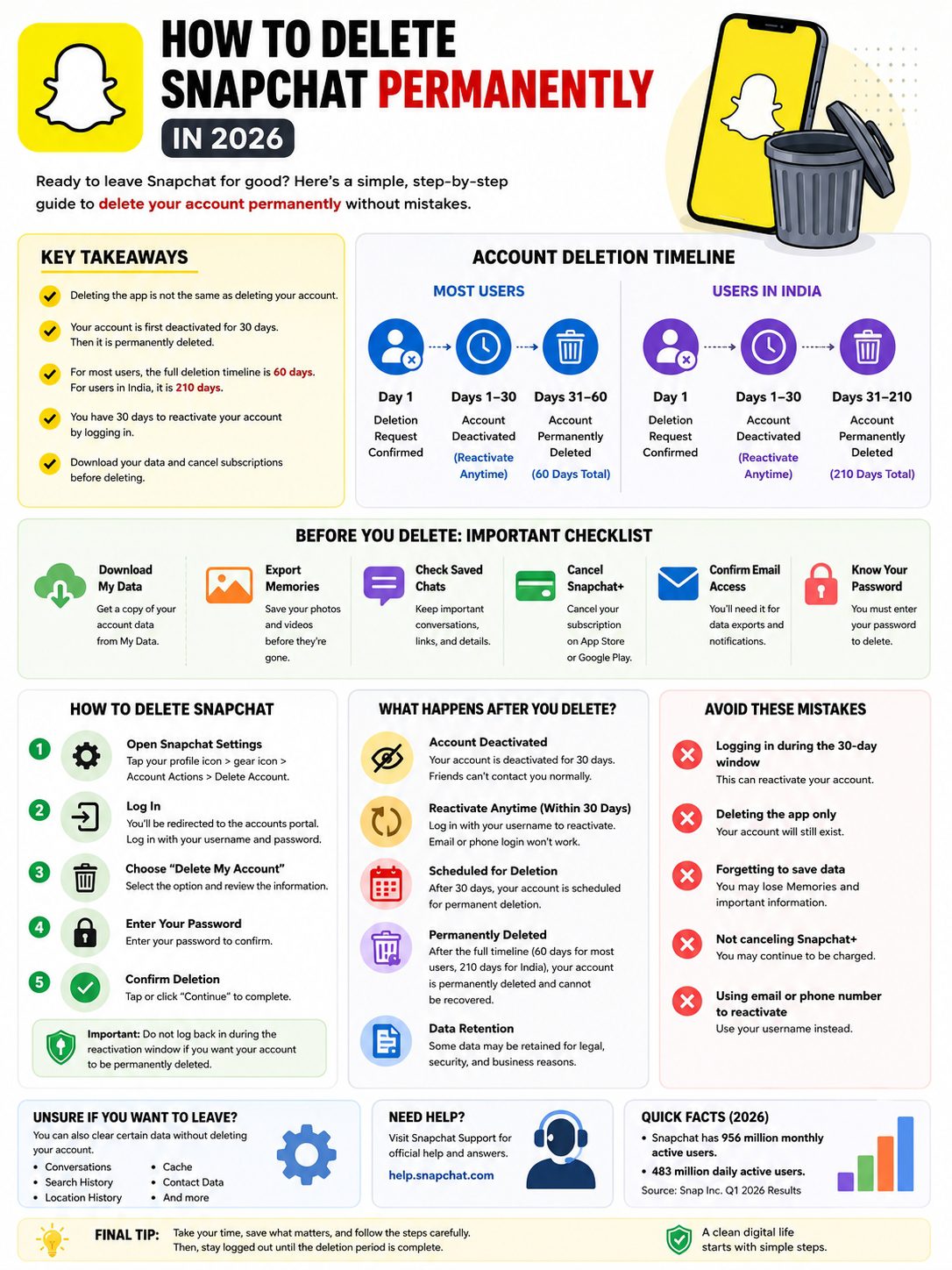
For most users, Snapchat first deactivates the account for 30 days. During this time, you can still bring the account back by logging in again. If you don’t log in, Snapchat keeps moving the account through the deletion process. After another 30 days, the account is permanently deleted.
So, for most users, the full process takes about 60 days.
There’s one big exception. If you’re in India, Snapchat says the account stays deactivated for 30 days, then gets permanently deleted after 180 more days. That makes the full timeline 210 days.
|
Key Detail |
What It Means |
|
Deleting the app |
Only removes Snapchat from your phone |
|
Deleting the account |
Starts the official deletion process |
|
First stage |
30-day deactivation period |
|
Standard full timeline |
60 days total for most users |
|
India timeline |
210 days total |
|
Can you reactivate? |
Yes, during the first 30 days |
|
Best first move |
Download your data before deleting |
Delete, Deactivate, and Uninstall Are Not the Same
This is where people often get confused.
Uninstalling Snapchat means you remove the app from your phone. That’s it. Your account can still exist.
Deactivating Snapchat means your account enters the first stage of deletion. It becomes inactive for a limited time.
Permanent deletion happens later. Once Snapchat permanently deletes the account, you can’t get it back.
So, if your real goal is to leave Snapchat for good, don’t just delete the app. You need to delete the account.
Why People Delete Snapchat Permanently
People leave Snapchat for all kinds of reasons.
Some want better privacy. Some want less screen time. Some don’t like the pressure of streaks. Some created the account years ago and no longer use it. Others simply want fewer apps tracking their habits.
And Snapchat is still a massive platform. Snap Inc. reported 956 million monthly active users and 483 million daily active users in Q1 2026. That means millions of people still use the app every day, but it also means a lot of old accounts hold years of personal data.
Your account may include Memories, saved chats, friends, Bitmoji, purchase history, login records, Snap history, location data, and search history.
If you don’t use the app anymore, keeping all of that online may not make sense.
|
Reason |
Why It Matters |
|
Privacy |
Snapchat may hold years of account data |
|
Less screen time |
The app can become a daily habit |
|
Streak pressure |
Some users feel forced to check in |
|
Old account cleanup |
Unused accounts can become security risks |
|
Location concerns |
Snap Map and location history may worry users |
|
Digital decluttering |
Fewer accounts mean less online clutter |
|
Security |
Old passwords can expose unused accounts |
Privacy Is a Strong Reason to Leave
Snapchat gives you tools to download your data, clear some data, control privacy settings, and delete your account. That’s useful.
But you should still understand what deletion can and can’t do.
Deleting your account removes your Snapchat account through Snapchat’s own system. It does not erase screenshots, saved files, or messages that other people may have stored outside your account.
So, if someone saved a photo, screen-recorded a video, or kept a screenshot, deleting your account won’t remove that copy.
Less App Noise Can Feel Good
Snapchat is built to pull you back.
Streaks, Stories, Spotlight, Snap Map, chat alerts, Discover content, and filters can make the app hard to ignore. You may open it for one message and lose 20 minutes.
I’ve seen this happen with many social apps. The app isn’t always the problem. The habit is.
If Snapchat keeps pulling your attention away from work, sleep, study, or real conversations, deleting it may be the cleanest fix.
Before You Delete Snapchat Permanently
Don’t hit delete too fast.
A Snapchat account can hold more than you remember. Photos, videos, saved chats, friend lists, location history, purchase records, and login details may all sit inside your account.
Once the permanent deletion period ends, you should not expect to recover the account.
So take a few minutes and save what matters.
|
What to Do First |
Why It Helps |
|
Download My Data |
Keeps a copy of your Snapchat records |
|
Export Memories |
Saves photos and videos |
|
Check saved chats |
Keeps important messages or links |
|
Cancel Snapchat+ |
Avoids billing confusion |
|
Check your email |
Snapchat may send export links there |
|
Confirm your password |
You need it to delete the account |
|
Save contacts |
Friends may lose your Snapchat contact |
|
Review linked devices |
Helps secure the account before deletion |
Download Your Snapchat Data
Snapchat lets you request a copy of your data through “My Data.”
You can do this from Snapchat Settings or through the Snapchat accounts portal. From there, you can choose the data you want, pick a date range, confirm your email, and submit the request.
Snapchat sends the export as a ZIP file. You’ll need software that can open ZIP files.
This is not always instant. Snapchat says it aims to send data within 7 days, but large downloads can take longer. So request your data before starting deletion.
What Can You Get in Snapchat My Data?
Your Snapchat data download may include:
- Login history
- Account information
- User profile data
- Public profile data
- Snap history
- Saved chat history
- Memories
- Purchase history
- Shop history
- Snapchat Support history
- Friends
- Location data
- Search history
- Bitmoji
The exact file can vary by account. It also depends on what Snapchat still has available.
Save Your Memories Separately
Memories are the part many people regret losing.
You may have old photos and videos saved only inside Snapchat. Maybe they’re not in your phone gallery. Maybe you forgot they existed.
Before you delete Snapchat, export your Memories. Snapchat lets you request a Memories-only export, and you can download individual Memories or all of them.
Don’t skip this step if your photos matter.
How to Delete Snapchat Permanently: Step-by-Step
Here’s the main process to delete snapchat permanently in 2026.
The menus may look a little different depending on your phone, country, and app version. But the basic process stays the same.
You log in, choose delete, enter your password, and confirm.
|
Step |
What to Do |
|
1 |
Open Snapchat Settings or the accounts portal |
|
2 |
Choose “Delete Account” or “Delete my account” |
|
3 |
Log in if Snapchat asks |
|
4 |
Enter your password |
|
5 |
Tap or click “Continue” |
|
6 |
Stay logged out during the reactivation period |
|
7 |
Wait for the deletion timeline to finish |
How to Delete Snapchat on iPhone
On iPhone, you can usually start inside the Snapchat app.
- Open Snapchat.
- Tap your profile icon.
- Tap the gear icon to open Settings.
- Scroll to “Account Actions.”
- Tap “Delete Account.”
- Log in to the Snapchat accounts portal.
- Tap “Delete my account.”
- Enter your password.
- Tap “Continue.”
After this, your account enters deactivation.
How to Delete Snapchat on Android
On Android, Snapchat usually sends users through the accounts portal.
- Open a browser.
- Go to Snapchat’s accounts portal.
- Log in to your account.
- Select “Delete my account.”
- Enter your password.
- Tap “Continue.”
Read Also: How to Use Snapchat AI Effectively in 2026
This is normal. Snapchat uses the portal for sensitive account actions.
How to Delete Snapchat on a Computer
A desktop browser can make the process easier.
Use this method if the app is glitching, your phone screen is too small, or you want to download your data first.
- Open the Snapchat accounts portal.
- Sign in.
- Choose “Delete my account.”
- Enter your password.
- Confirm by selecting “Continue.”
Once you do this, don’t log in again unless you want the account back.
What Happens After You Delete Snapchat?
Snapchat does not usually erase your account the second you hit delete.
First, it deactivates the account.
For most users, deactivation lasts 30 days. During that time, you can reactivate your account by logging back into Snapchat with your username.
If you stay logged out, Snapchat continues the deletion process. After another 30 days, the account is permanently deleted.
|
Timeline |
Most Users |
Users in India |
|
Day 1 |
Deletion request confirmed |
Deletion request confirmed |
|
Days 1–30 |
Account is deactivated |
Account is deactivated |
|
Reactivation allowed? |
Yes |
Yes |
|
Next stage |
30 more days before deletion |
180 more days before deletion |
|
Full timeline |
60 days total |
210 days total |
Can You Reactivate Snapchat After Deleting It?
Yes, but only during the reactivation window.
Snapchat gives most users 30 days to reactivate a deactivated account. To do that, you need to log in through the Snapchat app with your username.
Two things matter here.
First, use your username. Snapchat says you can’t use your email address or phone number while the account is deactivated.
Second, Snapchat Support can’t bring back a permanently deleted account. Once it’s gone, it’s gone.
What Happens to Your Data?
After you deactivate or delete your account, Snapchat says you have 30 days to download your data.
If you don’t log in or download it during that period, Snapchat says the data is permanently deleted after 60 days for most users.
For users in India, that full data deletion timeline is 210 days.
Snapchat may still keep some records for legal, security, or business reasons. For example, it may retain purchase records or proof that you accepted its Terms of Service and Privacy Policy.
That’s common across many online services.
How to Avoid Reactivating Snapchat by Mistake
This is the easiest part to mess up.
You delete the account. A week later, muscle memory kicks in. You open Snapchat. You log in. Suddenly, the account comes back.
If you really want to delete snapchat permanently, don’t log back in during the reactivation period.
Remove the app after you submit the request. Delete saved login details from your browser or password manager. Remove Snapchat shortcuts from your phone.
Make it harder to open by accident.
|
Common Mistake |
Better Move |
|
Logging in out of habit |
Delete the app right away |
|
Using password autofill |
Remove saved Snapchat login details |
|
Checking if it worked |
Keep proof instead of logging in |
|
Giving in to FOMO |
Tell friends where to reach you |
|
Forgetting the timeline |
Add a calendar reminder |
|
Losing data |
Download your data first |
|
Forgetting Snapchat+ |
Cancel paid plans separately |
Don’t “Check” the Account
It’s tempting to test the login after a few days.
Don’t.
If you log in during the reactivation window, you may bring the account back. Instead, keep a screenshot of the deletion confirmation page. You can also save any confirmation email or account notice from Snapchat.
That’s enough proof.
Tell Friends Before You Leave
If Snapchat is your main contact app, tell close friends first.
Share another way to reach you. That could be WhatsApp, Messenger, Instagram, phone number, email, or another app.
This avoids confusion. It also stops people from thinking you blocked them.
What to Do About Snapchat+ and Paid Features
If you pay for Snapchat+, check your subscription before deleting the account.
This part is easy to forget.
Deleting your Snapchat account may not cancel a subscription managed by Apple or Google. App-store subscriptions often need to be canceled through the same store where you started them.
|
Platform |
Where to Cancel |
|
iPhone or iPad |
Settings > Apple Account > Subscriptions |
|
Android |
Google Play > Payments & subscriptions > Subscriptions |
|
Direct billing |
Check Snapchat or your payment provider |
|
Not sure? |
Check email receipts and bank statements |
Why Canceling Separately Matters
Your Snapchat account and your subscription billing may not be handled in the same place.
If Apple or Google manages the charge, you should cancel it through Apple or Google. Don’t assume account deletion will stop future payments.
Take one minute and check. It’s worth it.
What If You Only Want to Delete Snapchat Data?
You may not need to delete the whole account.
Maybe you still use Snapchat, but you want to clean old data. Snapchat lets users clear several types of account data from settings.
You can delete things like conversations, contact data, search history, scan history, sticker searches, autofill, shopping history, top locations, and cache.
|
Data Type |
Why Clear It |
|
Conversations |
Removes old chat records you control |
|
Contact Data |
Reduces synced contact information |
|
Search History |
Clears past searches |
|
Scan History |
Removes scan-related records |
|
Sticker Searches |
Clears small activity logs |
|
Autofill |
Removes saved form details |
|
Shopping History |
Clears commerce-related activity |
|
Top Locations |
Reduces location-based history |
|
Cache |
Frees space and refreshes app data |
How to Clear Some Snapchat Data
You can do this inside the Snapchat app.
- Open Snapchat.
- Tap your profile icon.
- Tap the gear icon.
- Go to “My Privacy & Data.”
- Under “Manage My Data,” tap “Clear Data.”
- Choose what you want to delete.
This is a good middle ground if you want more privacy but don’t want to lose the whole account.
When Data Cleanup Is Enough
Full deletion may be too much if you still use Snapchat.
Instead, you can:
- Turn off contact syncing.
- Review Snap Map settings.
- Limit who can contact you.
- Clear old conversations.
- Delete old Memories.
- Adjust ad preferences.
- Change app permissions.
- Turn on login verification.
This gives you more control without cutting off the account completely.
Common Problems When Deleting Snapchat
The process is usually simple, but small problems can pop up.
Maybe you forgot your password. Maybe the delete option isn’t showing. Maybe the account portal won’t load. Maybe your data export is taking longer than expected.
Most of these issues are fixable.
|
Problem |
What to Try |
|
Forgot password |
Reset it before deleting |
|
Can’t find delete option |
Use the Snapchat accounts portal |
|
Portal won’t load |
Try desktop, another browser, or another network |
|
Wrong account |
Check the username before deleting |
|
Data export delay |
Wait, especially for large exports |
|
Wrong export email |
Check My Data and recent export requests |
|
Locked account |
Recover access first |
|
Subscription still active |
Cancel through Apple or Google |
If You Forgot Your Password
You need your password to delete your account.
If you forgot it, reset it first. Make sure you still have access to the email address or phone number linked to the account.
Once you regain access, download your data and start the deletion process.
If the Delete Option Is Missing
Snapchat menus can move around. App updates change layouts.
If you can’t find the delete option in the app, use the Snapchat accounts portal in a browser. That’s often the easiest path.
Also make sure you’re signed into the right account. Many people have old Snapchat accounts tied to different emails or phone numbers.
If Your Account Is Locked
If Snapchat locked your account, you may need to recover access before deleting it.
Follow Snapchat’s account recovery steps first. Once you can sign in, you can delete the account from the portal.
Privacy Checklist Before You Leave Snapchat
Before you leave, run through this quick checklist.
It saves you from the classic “I wish I saved that” moment.
|
Privacy Step |
Why It Helps |
|
Download My Data |
Keeps your own archive |
|
Export Memories |
Saves photos and videos |
|
Save important chats |
Keeps useful links and details |
|
Cancel Snapchat+ |
Prevents billing issues |
|
Remove saved login |
Stops accidental reactivation |
|
Review Snap Map |
Checks location settings |
|
Turn off contact sync |
Limits contact sharing |
|
Save deletion proof |
Gives you a record |
|
Uninstall the app |
Removes temptation |
Think Beyond Snapchat
Deleting Snapchat is a good privacy step, but it’s only one piece of the puzzle.
If you’re cleaning up your digital footprint, check other old accounts too. Look at Instagram, Facebook, TikTok, Reddit, Discord, X, old email accounts, cloud storage apps, shopping sites, and gaming accounts.
Unused accounts can become weak spots. If you don’t use an account anymore, secure it or delete it.
Secure the Account Before Deleting It
If you think someone else accessed your Snapchat, change your password before downloading data or deleting the account.
Also turn on login verification if you still plan to use the account for a while before deleting it.
This helps make sure no one else controls the account during the process.
Final Thoughts
Deleting Snapchat is easy. Doing it carefully takes a little more thought.
The biggest mistake is deleting the app and thinking the account is gone. It isn’t. The account stays unless you use Snapchat’s official deletion process.
The second mistake is forgetting to save data. Download your Snapchat data. Export your Memories. Save important chats. Cancel paid subscriptions.
The third mistake is logging back in too soon. If you want to delete snapchat permanently, stay out of the account during the reactivation window.
For most users, Snapchat takes about 60 days to fully delete an account. In India, the process can take 210 days.
So take your time. Save what matters. Confirm deletion. Remove the app. Don’t log back in.
That’s the cleanest way to leave Snapchat in 2026.
Uncommon FAQs About Deleting Snapchat Permanently
Some questions don’t show up in basic guides, but they matter.
|
Question |
Short Answer |
|
Can I delete Snapchat without a password? |
Usually no |
|
Can I reactivate after 30 days? |
Usually no |
|
Can Snapchat Support restore it? |
No, not after permanent deletion |
|
Does deleting the app delete the account? |
No |
|
Can I save Memories first? |
Yes |
|
Does deletion erase screenshots? |
No |
|
Should I cancel Snapchat+ separately? |
Yes |
Can I delete Snapchat permanently without logging in?
Usually, no.
Snapchat needs to confirm that you own the account. That normally means logging in and entering your password.
If you can’t log in, recover the account first.
Does deleting Snapchat delete saved messages on both sides?
Not always.
Deleting your account does not guarantee that saved messages, screenshots, downloads, or screen recordings disappear from someone else’s device.
If someone saved something outside Snapchat, your account deletion won’t remove it.
Can I delete Snapchat and keep Memories?
Yes, but only if you export them first.
Download your Memories before you delete the account. After permanent deletion, you should not expect to access them through Snapchat again.
Can I reactivate with my email or phone number?
No, not during deactivation.
Snapchat says you need to log in with the username of the deactivated account. You can’t use your email address or phone number while the account is deactivated.
Will my Snapchat username become available again?
Don’t count on it.
Snapchat does not promise that deleted usernames become available right away. If your username matters to you, think carefully before deleting the account.
Can I stop deletion after starting it?
Yes, but only during the reactivation window.
Log in with your username before the window ends. Once Snapchat permanently deletes the account, you can’t restore it.
Is Snapchat account deletion instant?
No.
For most users, Snapchat deactivates the account for 30 days first. Then it permanently deletes the account after another 30 days. That makes the full timeline 60 days.
For users in India, the full timeline is 210 days.
Should parents delete a child’s Snapchat account?
It depends on the situation.
If there are safety concerns, review the account first. Save evidence if needed. Report harmful users or content before deleting anything. Also check subscriptions, screen-time settings, app permissions, and privacy controls.
For serious cases, don’t rush. Deleting the account may remove access to useful records.