
One day they connect instantly. The next, they refuse to show up, drop audio mid-call, or act like they’ve never met your phone before.
When that happens, a reset airpods pro 2 is often the fastest way back to normal.
It sounds technical, but it’s not. It’s basically giving your AirPods a clean restart so they forget old connections and start fresh.
In most cases, this simple reset fixes random disconnects, pairing failures, and one earbud going silent.
In this guide, I’ll walk you through the exact reset process that actually works, what the lights mean, when you should do it, and what to try if nothing changes after resetting.
No fluff. Just the steps that matter.
Quick Way to reset airpods pro 2
If you’re in a hurry, this is all you need.
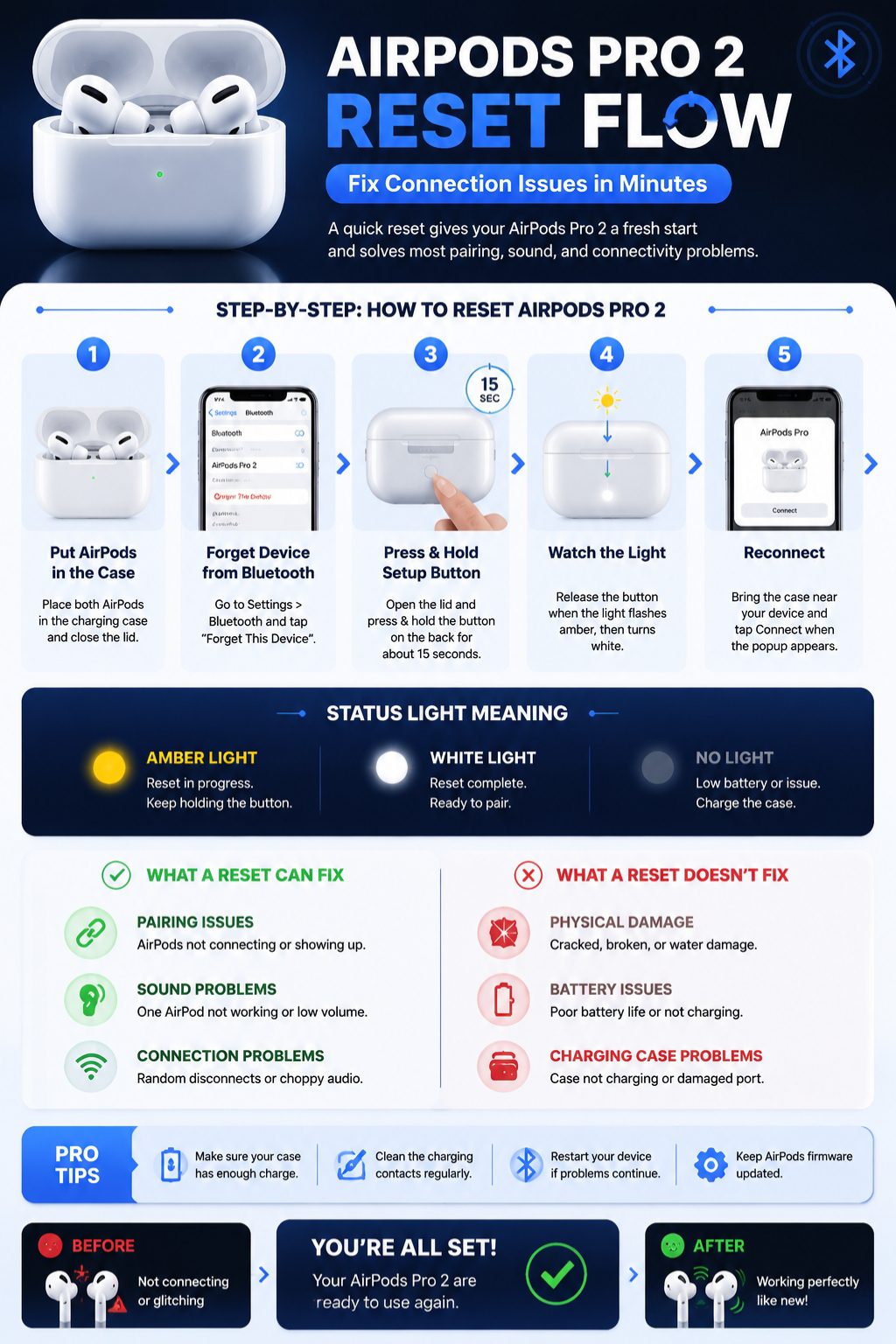
Fast reset steps
- Put both AirPods inside the case
- Close the lid for about 30 seconds
- Go to Bluetooth settings and forget the AirPods
- Open the case lid
- Press and hold the button on the back
- Keep holding for around 15 seconds
- Wait for amber light, then white
- Reconnect when your phone shows the popup
What’s really happening here
Your AirPods are wiping old Bluetooth memory. That’s it.
It clears confusion between devices and gives you a fresh pairing session.
Quick reset breakdown
|
Step |
What you do |
Why it matters |
|
1 |
Place AirPods in case |
Prepares system |
|
2 |
Forget device |
Clears old pairing |
|
3 |
Hold button |
Starts reset |
|
4 |
Watch light |
Confirms reset |
|
5 |
Reconnect |
Fresh start |
When you should reset AirPods Pro 2
Resetting is useful, but not always the first step.
When they won’t connect
If your AirPods don’t show up or keep failing to pair, something in the Bluetooth memory is stuck. A reset usually clears it instantly.
When sound feels off
One side quieter than the other? Or audio cutting in and out? That’s often a sync issue between the earbuds.
Resetting helps them “talk” properly again.
When noise cancellation feels weak
If ANC or transparency mode suddenly feels weird, a reset can bring back default tuning.
When you’re giving them away
Before selling or gifting, a reset keeps things clean. But don’t forget to remove them from Find My too.
Should you reset?
|
Problem |
Reset needed |
|
Won’t connect |
Yes |
|
One ear silent |
Yes |
|
Dirty earbuds |
No |
|
Low battery |
No |
|
Selling |
Yes |
Step-by-step reset airpods pro 2 (full method)
Let’s go through it slowly. This is the method Apple actually expects you to use.
Step 1 — Put them in the case
Both earbuds must be inside. If one isn’t sitting right, the reset may fail.
Step 2 — Close and wait
Close the lid. Wait around 30 seconds. It gives the system a moment to settle.
Step 3 — Forget AirPods from Bluetooth
Go into settings and remove AirPods Pro 2. This clears the old connection.
Read Also: AirPods Not Connecting to iPhone: 8 Quick Fixes
Step 4 — Open the lid
Keep it open while resetting. Don’t rush this part.
Press and hold the small button on the back of the case.
Don’t let go too early. This is where most people go wrong.
Step 6 — Watch the light
- Amber flashing → reset is happening
- White flashing → ready to pair again
Step 7 — Reconnect
Bring the case near your phone. Wait for the popup. Tap connect.
Light meaning made simple
|
Light |
Meaning |
|
Amber |
Reset happening |
|
White |
Ready to pair |
|
No light |
Battery or issue |
Reset AirPods Pro 2 on iPhone, Mac, and Android
The reset is the same everywhere. Pairing is where things change.
iPhone or iPad
This is the smoothest experience. A setup animation usually appears automatically.
Mac
You’ll need to go into Bluetooth settings and connect manually.
Android or Windows
No Apple popups here. Just standard Bluetooth pairing.
What to expect by device
|
Device |
Experience |
|
iPhone |
Automatic |
|
Mac |
Semi-manual |
|
Android |
Manual |
|
Windows |
Manual |
What reset airpods pro 2 actually does
A reset doesn’t repair hardware. It clears digital confusion.
It wipes old pairing data
Your AirPods forget every device they’ve been connected to.
It resets internal settings
Controls and noise settings return to default.
It doesn’t remove Apple ID
Find My can still be linked unless removed separately.
What changes after reset
|
Feature |
Result |
|
Bluetooth history |
Gone |
|
Settings |
Reset |
|
Apple ID link |
Still there |
|
Hardware issues |
Unchanged |
If reset airpods pro 2 doesn’t work
Sometimes things don’t go smoothly.
Charge the case first
A dead case = failed reset.
Check earbuds seating
If one isn’t charging, reset won’t complete.
Clean contacts
Dust can block detection.
Wait for full amber → white transition.
Restart your phone
Bluetooth glitches can block pairing.
Why resets fail
|
Issue |
Fix |
|
No light |
Charge case |
|
No reset |
Hold longer |
|
No pairing |
Restart device |
|
One ear missing |
Clean contacts |
Problems a reset airpods pro 2 can fix
A reset is surprisingly effective for everyday issues.
Pairing problems
Fixes stuck Bluetooth memory.
Random disconnects
Stops unstable connections.
One AirPod not working
Re-syncs both earbuds.
Sound and ANC issues
Restores default calibration.
Real-world fix rate
|
Issue |
Chance of fix |
|
Pairing failure |
High |
|
Audio glitch |
Medium |
|
ANC issue |
Medium |
|
Hardware fault |
Low |
Before you sell or give them away
Don’t skip this step.
Remove from Find My
Otherwise, they stay linked to your Apple account.
Clean them properly
Wipe earbuds and case carefully.
Transfer checklist
|
Step |
Done |
|
Reset |
✔ |
|
Remove from Find My |
✔ |
|
Clean device |
✔ |
|
Test pairing |
✔ |
reset airpods pro 2 vs restart vs unpair
People mix these up all the time.
Restart
Quick refresh. Nothing deleted.
Unpair
Removes AirPods from one device only.
Reset
Full clean slate.
Simple comparison
|
Action |
Level |
Use case |
|
Restart |
Light |
Small glitches |
|
Unpair |
Medium |
Switching devices |
|
Reset |
Full |
Serious issues |
Final thoughts
If your AirPods Pro 2 start acting strange, don’t overthink it.
A proper reset airpods pro 2 usually brings them back to normal in minutes.
Just follow the steps: charge, forget device, hold the button, wait for amber then white, and reconnect.
If nothing changes, the issue is likely deeper than software.
But in most cases, this simple reset is all it takes.
FAQs
Why won’t my AirPods Pro 2 reset?
Usually low battery, dirty contacts, or not holding the button long enough.
Can I reset without an iPhone?
Yes. The reset works directly from the case.
What does amber light mean?
It means reset is in progress.
Does reset fix mic issues?
Only if it’s a software issue.
How long does reset take?
About 15–30 seconds.