
Now you’re staring at the Chat screen, trying to read a tiny icon like it’s a secret code. Was it opened? Did they actually read it? Are they ignoring you? Or is Snapchat just slow to update?
That’s exactly why people search for see if read snapchat. The wording may sound odd, but the question is common. Snapchat gives you clues when someone opens a Snap, views a Chat, watches your Story, replays something, or takes a screenshot.
But here’s the catch.
Snapchat doesn’t tell you what someone thinks. It doesn’t prove they read every word. It doesn’t explain why they didn’t reply. It only shows what happened inside the app.
So, let’s break it down in plain English.
Can You See If Someone Read Snapchat?
Yes, you can check it, but the answer depends on what you sent.
If you sent a Chat message, Snapchat can show when the Chat was viewed. If you sent a photo or video Snap, it can show when that Snap was opened. If you posted a Story, you can check who watched it by swiping up on the Story.
Still, “opened” doesn’t always mean “carefully read.” It means the person opened the Snap or Chat inside Snapchat.
That’s the part many people miss.
|
Snapchat Content |
Can You Check It? |
Where to Check |
What It Means |
|
Text Chat |
Yes |
Chat screen |
The Chat was viewed |
|
Photo Snap |
Yes |
Chat screen |
The Snap was opened or viewed |
|
Video Snap |
Yes |
Chat screen |
The video Snap was opened or viewed |
|
My Story |
Yes |
Story screen |
You can see who viewed it |
|
Public Story |
Yes |
Public Profile Insights |
You can see views and engagement |
|
Chat Preview |
Partly |
Notification only |
Preview text doesn’t mark it opened |
|
Group Chat |
Partly |
Group conversation |
Status is less clear with many people |
The simple rule is easy to remember.
For private messages and Snaps, check the Chat screen. For Stories, check the Story viewer list.
How to See If Read Snapchat in Chat
The Chat screen is your best starting point.
Open Snapchat, then swipe right from the Camera screen. This takes you to your conversations. Find the friend or group you messaged. Under the name or beside the message, Snapchat shows the latest status.
You may see words or icons like Sent, Delivered, Opened, Viewed, Pending, Replayed, or Screenshot.
|
Step |
What to Do |
What to Look For |
|
1 |
Open Snapchat |
Start from the Camera screen |
|
2 |
Swipe right |
Go to the Chat screen |
|
3 |
Find the friend’s name |
Check the latest status |
|
4 |
Read the icon or label |
Look for opened, viewed, pending, or screenshot |
|
5 |
Open the conversation |
Check saved messages, replies, or reactions |
Text Chats
For a normal text Chat, Snapchat can show when the message has been viewed.
This is the closest thing Snapchat has to a read receipt. If the Chat shows viewed, the person opened the conversation and the message became visible inside the app.
But don’t overread it.
They may have opened the Chat quickly. They may have skimmed it. They may have got distracted. They may have planned to answer later and forgot.
So yes, it’s a useful clue. But it’s not a full story.
Photo and Video Snaps
Photo and video Snaps work a little differently.
Snapchat shows whether the Snap was sent, delivered, opened, or viewed. A Snap without audio and a Snap with audio use different icon colors. The design can feel confusing at first, but the meaning is simple.
If it says delivered, they haven’t opened it yet. If it says opened or viewed, they did.
So if you want to see if read snapchat, don’t only wait for a reply. First, check whether the Snap or Chat was opened.
Saved Chats
Saved messages stay inside the conversation.
If a message has a gray background, it was saved in Chat. That can happen when you or the other person saves it.
But saved doesn’t always mean fully read. It only means the message was kept in the conversation.
Saved Chats are useful for plans, addresses, reminders, and anything you don’t want to disappear too fast.
What Snapchat Icons and Statuses Mean
Snapchat icons look tiny, but they say a lot.
Once you understand them, the app feels less confusing. Snapchat uses different states to show whether something was sent, delivered, opened, viewed, replayed, screenshotted, or stuck as pending.
|
Status or Icon Type |
Meaning |
What You Should Assume |
|
Sent |
Your Snap or Chat left your account |
Snapchat tried to send it |
|
Delivered |
It reached the other person’s account |
They may not have opened it |
|
Opened |
They opened the Snap or Chat |
Strong open signal |
|
Viewed |
They viewed the Snap or Chat |
Strong view signal |
|
Pending |
The message hasn’t fully gone through |
Friend status or privacy may be involved |
|
Screenshot |
Someone captured it |
They may have saved a copy |
|
Replay |
Someone replayed your Snap |
They watched it again |
Delivered vs Opened
Delivered does not mean read.
It only means Snapchat delivered your Snap or Chat to the other person’s account. They may not have opened the app yet. They may have notifications off. They may be busy.
Opened is stronger. It means they opened the Snap or Chat inside Snapchat.
That difference matters.
A delivered message sitting there for hours doesn’t always mean someone is ignoring you. Sometimes they simply haven’t seen it.
Opened vs Replied
Opened also doesn’t mean replied.
This is where Snapchat can mess with your head. Someone may open your message, read it, and not reply. But that can happen for many reasons.
Maybe they were in a hurry. Maybe they didn’t know what to say. Maybe they planned to respond later. Maybe they just tapped too fast.
Opened tells you the app registered the action. It doesn’t explain the person.
Pending
Pending means the Snap or Chat hasn’t fully gone through.
This may happen if the person hasn’t added you back, changed privacy settings, removed you, or if your app has a connection issue.
If a message stays pending for a long time, check whether you’re still friends with that person. Also check your internet connection before assuming anything.
Read Also: How to Unblock Someone on Snapchat
Screenshot and Replay
A screenshot icon means someone took a screenshot of your Snap or Chat.
A replay icon means someone replayed your Snap. It may mean they wanted to see it again. It doesn’t always mean something deeper.
Also, remember this: disappearing messages are not fully private. Someone can always use another phone to capture the screen.
How to Check If Someone Viewed Your Snapchat Story
Stories are easier to check than private messages.
If you post to My Story, open your Story and swipe up. Snapchat shows who viewed it. It can also show screenshot activity.
For My Story, Snapchat shows the names of up to 200 people who viewed it. After that, it may show the number of views instead of every name.
|
Story Type |
Where to Check |
What You Can See |
|
My Story |
Open Story, swipe up |
Viewer names up to Snapchat’s limit |
|
Private Story |
Open Story, swipe up |
Viewers from your selected audience |
|
Shared Story |
Open Story, swipe up |
People connected to that Story |
|
Public Story |
Public Story or Insights |
Views, replies, screenshots, swipe-ups, and other data |
My Story Viewer List
To check your My Story viewers:
- Tap your profile icon.
- Tap My Story.
- Open the Snap you want to check.
- Swipe up.
- Look at the viewer list.
This is one of Snapchat’s clearest signals. If someone viewed your Story and Snapchat lists their name, they watched it.
But again, don’t overthink it.
Some people tap through Stories fast. A view doesn’t always mean they watched every second.
Public Story Viewers
Public Stories offer more data.
If you use a Public Profile, Snapchat can show views, replies, screenshots, swipe-ups, interactions, average view time, and short-term trend data.
This helps creators, publishers, and brands understand what people engage with.
For casual users, the normal My Story viewer list is usually enough.
Story Views Are Not Chat Reads
This is important.
A Story view does not mean someone read your private message.
People often tap through Stories without checking Chats. Someone can watch your Story and still miss your message. They can also read your Chat and skip your Story.
Treat Story views and Chat reads as separate signals.
Snapchat+ Clues: Useful, But Not Proof
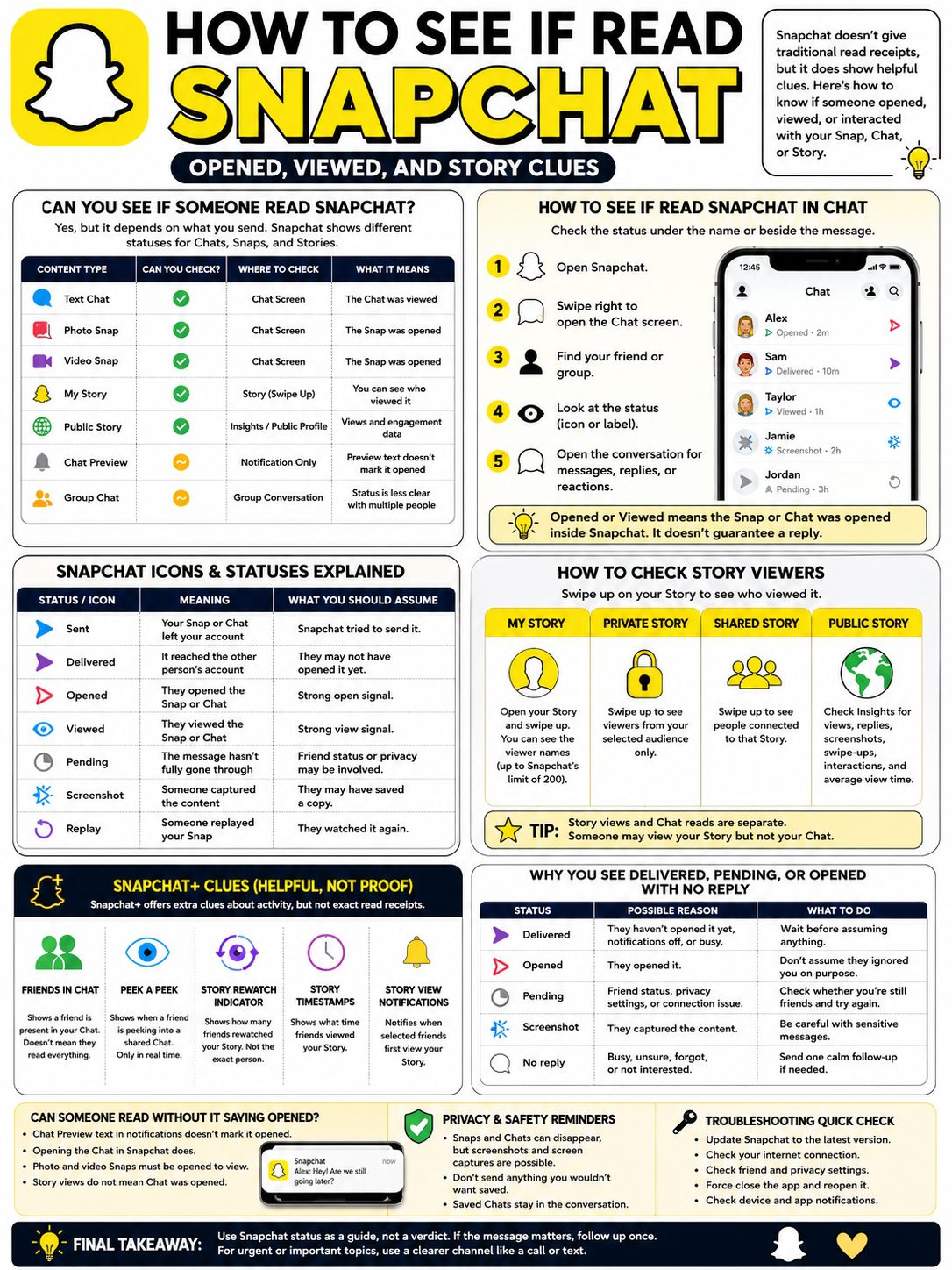
Snapchat+ gives extra clues, but it doesn’t turn the app into a full read tracker.
Some Snapchat+ features show when a friend is in a Chat, peeking into a conversation, viewing your Story, or rewatching your Story. These features can help you understand activity, but they still don’t prove someone read every word.
|
Snapchat+ Feature |
What It Shows |
What It Doesn’t Prove |
|
Friends in Chat |
A friend is present in your Chat |
That they read everything |
|
Peek a Peek |
A friend is peeking into a shared Chat |
That they fully opened or replied |
|
Story Rewatch Indicator |
How many friends rewatched your Story |
Which exact friend rewatched it |
|
Story Timestamps |
What time friends viewed your Story |
Why they viewed it |
|
Story View Notifications |
When selected friends first view your Story |
That they read your private Chat |
Friends in Chat
Snapchat+ can show when a friend is present in your Chat from the Chat feed.
This is helpful if you’re both active at the same time. But it’s not the same as a read receipt. Someone may be inside the Chat and still not read every message carefully.
Peek a Peek
Peek a Peek lets Snapchat+ subscribers see when a friend is peeking into a shared one-on-one or Group Chat.
But timing matters. You only see it if you’re looking at the Chat feed or inside the Chat at the same time.
So, it’s a live clue. It’s not a full history log.
Story Rewatch Indicator
Snapchat+ also has a Story Rewatch Indicator.
You may see an eyes emoji under your Story. It shows how many friends rewatched that Story.
But it doesn’t show exactly who rewatched it. So don’t use it to prove one specific person is interested. It’s better for general engagement.
Why Snapchat Says Delivered, Pending, or Opened With No Reply
This is the part that causes the most stress.
A message says delivered. No reply.
A Snap says opened. Still no reply.
A Chat says pending. Now you’re wondering if something went wrong.
Each status has a different meaning.
|
Status |
Possible Reason |
What to Do |
|
Delivered |
It reached their account, but they haven’t opened it |
Wait before assuming anything |
|
Opened |
They opened or viewed it |
Don’t assume they ignored you on purpose |
|
Pending |
Friend status, privacy settings, or connection issue |
Check whether you’re still friends |
|
Screenshot |
They captured the content |
Be careful with sensitive messages |
|
Replay |
They viewed the Snap again |
Treat it as engagement, not proof of intent |
|
No reply |
They may be busy, unsure, or not interested |
Send one calm follow-up if needed |
Delivered Doesn’t Mean Read
Delivered only means the message reached their Snapchat account.
They may be offline. They may not have opened Snapchat yet. They may have notifications muted. Or they may simply be busy.
So don’t treat delivered as a read signal.
Opened Doesn’t Mean They’ll Reply
Opened means they opened or viewed your Snap or Chat.
That’s it.
It doesn’t mean they owe you a reply right away. People open messages while walking, working, studying, eating, or half-paying attention. Sometimes they forget to respond.
It’s annoying, but it’s normal.
Pending Needs a Closer Look
Pending usually means the message hasn’t been delivered properly.
It can happen when someone hasn’t added you back, removed you, changed contact settings, or when Snapchat has syncing issues.
If it stays pending, check the basics first. Are you still friends? Is your internet working? Is Snapchat updated?
Can Someone Read Snapchat Without It Saying Opened?
Sometimes, yes, but only in limited ways.
Snapchat’s Chat Preview feature can show preview text in a notification. Snapchat says preview text does not mark a Chat as opened.
So someone may see part of your text message from a notification without opening the Chat.
That said, photo and video Snaps are different. To view those, the person normally has to open them in Snapchat.
|
Situation |
Does It Mark Chat as Opened? |
Notes |
|
Opening the Chat in Snapchat |
Yes |
This is the normal opened or viewed signal |
|
Viewing Chat Preview text |
No |
Preview text doesn’t mark it opened |
|
Reading a phone notification preview |
Not always |
Depends on device and settings |
|
Opening a photo or video Snap |
Yes |
The Snap must be opened to view it |
|
Watching a Story |
No for Chat |
Story views and Chat reads are separate |
Notification Previews
Phone notifications can show part of a message, depending on device and app settings.
This can explain why someone seems to know what you said, even though the Chat doesn’t show opened yet.
It’s not magic. It’s just notification preview behavior.
Airplane Mode Tricks
You’ll find plenty of “read Snapchat secretly” tricks online.
Most involve airplane mode, clearing cache, logging out, or reinstalling the app.
I wouldn’t rely on them.
Snapchat changes often. Phone systems change too. These tricks can fail, confuse you, or create wrong assumptions. If you want accurate advice, stick with what Snapchat actually shows inside the app.
Privacy, Screenshots, and Message Deletion
Snapchat feels private because content can disappear.
But disappearing doesn’t mean impossible to save.
Snapchat says many Snaps and Chats delete after being viewed or after they expire. Unopened Snaps usually expire after a set period. Chats can also delete based on the conversation settings.
Still, screenshots and screen captures can happen.
|
Privacy Point |
What It Means |
Practical Advice |
|
Snaps can disappear |
Many Snaps delete after viewing or expiry |
Don’t use Snapchat as long-term storage |
|
Unopened Snaps expire |
Old unopened Snaps don’t stay forever |
Don’t expect them to sit permanently |
|
Chats can delete |
Chat settings control how long messages stay |
Save important messages when needed |
|
Screenshots are possible |
Snapchat may show a screenshot icon |
Avoid sending sensitive content |
|
Other capture methods exist |
Someone can use another device |
Send only what you can live with being saved |
Saved Messages
Some messages can be saved in Chat.
Saved messages are useful for plans, addresses, times, and important details. But they also make the message stay visible longer.
If you’re sharing something sensitive, Snapchat may not be the best place for it.
Screenshots
Snapchat can show when someone takes a screenshot.
That’s helpful, but it’s not perfect protection. Someone can still take a picture of the screen with another phone.
So here’s the honest rule: don’t send anything you’d panic about if it got saved.
Troubleshooting: When Snapchat Status Looks Wrong
Sometimes Snapchat doesn’t update right away.
Before you assume someone ignored you, check the simple stuff. Weak internet, old app versions, privacy settings, and app glitches can all affect message status.
|
Problem |
Likely Cause |
Simple Fix |
|
Stuck on Sent |
Weak connection or sync issue |
Switch networks and reopen Snapchat |
|
Stuck on Delivered |
They haven’t opened it yet |
Wait and check later |
|
Pending |
Friend status or privacy issue |
Check whether they added you back |
|
Chat not loading |
App glitch or old version |
|
|
Snaps not clearing |
Sync delay |
Force close and reopen the app |
|
Notifications missing |
Phone or app settings |
Check Snapchat and device notification settings |
Update Snapchat
If Snapchat acts weird, update the app.
Old versions can cause bugs with Chat, Stories, notifications, and status updates.
Check Your Internet
A weak connection can delay sending and status updates.
Switch from Wi-Fi to mobile data, or mobile data to Wi-Fi. Then close Snapchat and open it again.
Check Friend and Privacy Settings
If a message stays pending, the problem may not be your phone.
The person may not have accepted your request. They may have removed you. Or their settings may block messages from people outside their friends list.
Check your friend status before jumping to conclusions.
Smart Ways to Follow Up Without Looking Pushy
If the message matters, follow up once.
Not five times. Not with a row of question marks. Not with an angry emoji.
One calm message works better.
|
Situation |
Better Follow-Up |
|
You need a reply |
“Hey, did you get a chance to check my last message?” |
|
It’s time-sensitive |
“Can you let me know by tonight?” |
|
It’s important |
“Sending this here too so you don’t miss it.” |
|
They opened it but didn’t reply |
“No rush, just checking when you can.” |
|
It’s serious |
Move to text, call, or email |
Snapchat is great for casual chats, jokes, quick updates, and Stories.
It’s not always the best place for urgent plans, work details, or serious conversations. If the message really matters, use a clearer channel.
Final Thoughts
Learning how to see if read snapchat is really about understanding the app’s signals.
For private messages, check the Chat screen. For photo and video Snaps, look for opened or viewed icons. For Stories, open the Story and swipe up. If you use Snapchat+, treat extra features as helpful clues, not proof.
Most importantly, don’t let one tiny icon control your mood.
Opened means opened. Viewed means viewed. Delivered means delivered. Pending means something may be delaying the message.
None of those statuses tells you exactly what someone feels or why they didn’t reply.
Use Snapchat status as a guide, not a verdict. If the message matters, send one calm follow-up. If it’s urgent, serious, or important, use a clearer channel like a call, text, or email.
That’s the healthiest way to use Snapchat without turning every icon into a mystery.
Uncommon FAQs About Snapchat Read Status
People ask a lot of small Snapchat read-status questions. Some answers are not as obvious as they should be.
|
Question |
Short Answer |
|
Can someone preview my Chat without opening it? |
Yes, preview text may not mark the Chat as opened |
|
Does opened mean they read every word? |
No, it only means it was opened or viewed |
|
Can Snapchat+ show exactly who rewatched my Story? |
No, it shows a count, not the exact friend |
|
Can I see the exact time someone viewed my Story? |
Snapchat+ Story Timestamps may show view times |
|
Does Story view mean they opened my Chat? |
No, those are separate actions |
|
Does pending mean I’m blocked? |
Not always, but friend status or privacy settings may be involved |
|
Can someone save my Snap after opening it? |
Some Snaps can be saved, and screenshots are possible |
|
Is there a normal setting to turn off read receipts? |
Snapchat doesn’t offer a simple universal read receipt toggle for Chat |
Can Someone See My Chat Preview Without Opening It?
Yes.
Snapchat’s Chat Preview feature can show preview text in a notification. That preview does not mark the Chat as opened.
The person still has to open the Chat in Snapchat to trigger the normal opened or viewed status.
Can Snapchat+ Tell Me Who Rewatched My Story?
No.
Snapchat+ can show how many friends rewatched your Story, but it does not show the exact person.
That’s a big difference.
Why Did They View My Story But Not My Message?
Because Stories and Chats are separate.
A person can tap through Stories without opening private messages. It may feel personal, but often it’s just how people use the app.
Can I See If Someone Read a Snapchat in a Group Chat?
Partly.
You can see activity, replies, saved messages, reactions, and sometimes Snapchat+ presence clues. But group chats are harder to read because several people are involved.
If one person’s answer matters, message them directly.