
You open Instagram. Everything looks normal. Then you notice it. The follower count dropped. And just like that, the question hits you. how to see who unfollowed you on Instagram.
It’s a small thing, but it doesn’t feel small. Especially if you post regularly, run a brand, or just care about your audience. One unfollow can make you curious. Ten can make you overthink.
Here’s the truth, straight and simple. Instagram does not show you a direct list of people who unfollowed you. There is no button for it. No alert. No history screen.
But that doesn’t mean you’re stuck. You can still figure it out. You just have to do it a bit differently.
Let’s break down what actually works, what doesn’t, and what’s worth your time.
Can You Really See Who Unfollowed You on Instagram?
Short answer: not directly.
Instagram only shows who follows you right now. It doesn’t keep a visible log of who left.
That’s it.
So instead of giving you a neat “unfollowers list,” Instagram pushes you toward current engagement and content performance.
What you can see
You can still check:
- Your current followers
- Who you’re following
- Engagement on posts
- Basic insights (if you use creator tools)
What you can’t see
You won’t get:
- A list of unfollowers
- Notifications when someone leaves
- A timeline of follower changes
Quick breakdown
|
Feature |
Available? |
|
Current followers |
Yes |
|
Unfollow history |
No |
|
Unfollow alerts |
No |
|
Insights (business/creator) |
Yes |
How to See Who Unfollowed You on Instagram (Manual Way)
This is the most reliable way, even if it’s a bit old-school.
No apps. No logins. Just Instagram itself.
Check your followers list
Go to your profile → Followers → search the username.
If they don’t show up anymore, they’re likely gone from your followers list.
Simple, but effective.
Check their profile
Open their profile → tap “Following.”
If your name isn’t there, they probably unfollowed you.
Look at past interactions
This doesn’t confirm anything, but it helps:
- Old likes
- Comments
- Story replies
If everything disappears, something changed.
Quick comparison
|
Method |
Effort |
Reliability |
|
Search followers |
Low |
High |
|
Profile check |
Medium |
High |
|
Engagement history |
Low |
Medium |
How to See Who Unfollowed You on Instagram Without Apps
This is where things get smarter.
Instead of chasing instant answers, you build a simple tracking habit.
Take follower snapshots
Every week or month:
- Screenshot your followers list
- Or copy it into notes or Sheets
That’s your baseline.
Read Also: How to Recover Deleted Instagram Messages
Compare over time
Later, do the same again.
Now compare:
- Who is missing?
- Who is new?
That difference tells the story.
Use a simple spreadsheet
Nothing fancy.
Just two columns:
- Old followers
- New followers
Then scan for missing names.
Why this works better
- No password sharing
- No risky apps
- No hidden data tracking
- Full control stays with you
Summary
|
Method |
Safety |
Accuracy |
|
Screenshots |
High |
Medium |
|
Sheets comparison |
High |
High |
|
Manual memory |
High |
Low |
Instagram Data Download Method (Official Option)
Instagram actually lets you download your account data. It’s buried in settings, but it’s real.
How to get it
Go to:
Settings → Accounts Center → Your Information → Download Your Information
Request your Instagram data and wait for the file.
What it helps with
It gives you a snapshot of:
- Followers
- Following
- Account activity data
Now here’s the trick.
If you download this data at different times, you can compare it. That’s how you detect changes.
What to expect
- It’s not user-friendly
- You’ll likely need a spreadsheet
- It takes time to process
Quick view
|
Step |
Difficulty |
|
Request data |
Easy |
|
Wait for file |
Medium |
|
Compare lists |
Medium |
Are Unfollower Apps Safe?
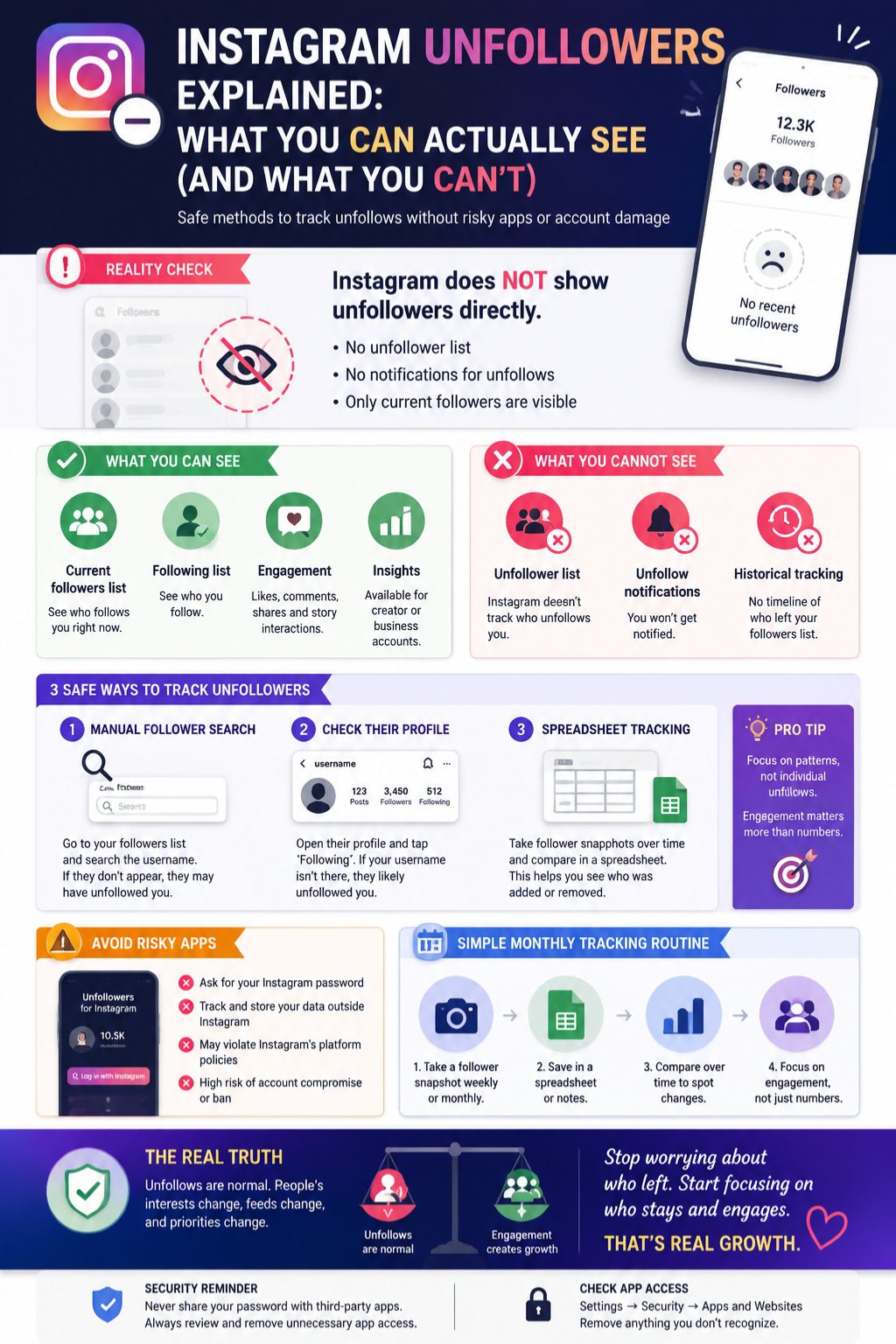
This is where people get into trouble.
A lot of apps promise:
“See who unfollowed you instantly.”
Sounds great. But reality is messier.
Why people use them
- Fast results
- Automated tracking
- Simple dashboards
The problem
Some apps:
- Ask for your Instagram login
- Store your data externally
- Stop working after Instagram updates
- Violate platform rules
Not all are bad, but many are not worth the risk.
A safer way to judge apps
Only trust apps that:
- Don’t ask for your password
- Use official login systems
- Have clear privacy policies
- Let you revoke access anytime
Quick reality check
|
Factor |
Safe apps |
Risky apps |
|
Login method |
Secure |
Password-based |
|
Transparency |
Clear |
Vague |
|
Safety |
Medium |
Low |
Remove Third-Party App Access (Important)
If you’ve ever tried these apps, check your account.
When to clean things up
- You forgot which apps you used
- You see unusual activity
- You no longer trust old tools
How to do it
Go to Instagram settings → Apps and Websites → Remove anything suspicious.
Then:
- Change your password
- Turn on two-factor authentication
Simple checklist
|
Action |
Why it matters |
|
Remove apps |
Stops data access |
|
Change password |
Resets control |
|
Enable 2FA |
Adds protection |
Why People Unfollow on Instagram
Not every unfollow is personal. Most aren’t.
People just change.
Common reasons
- Interests shift
- Content feels repetitive
- Too many promotional posts
- They clean their feed
Content issues
Sometimes it’s simple:
- Posting too much
- Posting too little
- Changing style suddenly
- Losing consistency
Platform behavior
Instagram also:
- Removes bots
- Cleans inactive accounts
- Adjusts feeds through its algorithm
So drops are not always about you.
Breakdown
|
Reason type |
Example |
|
Personal |
Changed interests |
|
Content |
Too promotional |
|
Platform |
Bot cleanup |
What to Do After Someone Unfollows You
Honestly, most people react too strongly here.
It’s better to zoom out.
If you’re a casual user
Let it go. People come and go.
If you’re a creator
Look for patterns, not people:
- What content dropped engagement?
- What posts worked best?
- What format feels right?
If you run a business
Focus on:
- Engagement
- Clicks
- Saves
- Leads
Not just follower count.
Quick focus shift
|
Focus |
Better metric |
|
Followers |
Engagement |
|
Unfollows |
Content feedback |
|
Numbers |
Real interaction |
How to Reduce Unfollows
You can’t stop them completely, but you can reduce them.
Stay consistent
People follow for a reason. Don’t confuse them.
Mix your content
Balance helps:
- Educational posts
- Entertainment
- Personal updates
Don’t over-sell
Too many promotions push people away fast.
Summary
|
Strategy |
Effect |
|
Consistency |
High |
|
Value content |
High |
|
Balanced posts |
Medium |
Final Thoughts
If you came here searching how to see who unfollowed you on Instagram, here’s the honest answer.
There’s no direct list. No secret button. No hidden feature.
But you’re not stuck either.
You can still:
- Check manually
- Track changes with simple tools
- Use official data downloads
- Avoid risky apps
At the end of the day, unfollows happen. Always.
What matters more is not who left, but who stays and engages with what you share.
That’s where real growth is.
FAQs
Does Instagram tell you who unfollowed you?
No. Instagram doesn’t notify or list unfollowers.
Can I check unfollowers without apps?
Yes. Manual checks and spreadsheets work fine.
Why did my followers suddenly drop?
It could be unfollows, bot removal, or inactive accounts.
Are unfollower apps safe?
Some are okay, many are risky. Always check permissions carefully.
Can someone know I checked their profile?
No. Instagram doesn’t track or notify profile views.
Is tracking unfollowers important?
For most users, no. For creators, it can help spot content patterns.