
Going live on TikTok feels different from posting a normal video. A short clip can get views. A live stream can build trust.
People can ask questions. You can reply in real time. You can sell products, teach something, host a chat, or simply show your face and connect with your audience.
That’s why so many small creators search for tiktok live without 1000 followers in 2026. They want the LIVE button before they hit the usual follower count.
But here’s the part many viral “hacks” skip: there’s no magic button that unlocks TikTok LIVE for every account.
TikTok says creators must be at least 18 years old and meet a local minimum follower threshold. It doesn’t list one fixed follower number for every country on its public LIVE help page. For many users, the common threshold is still 1,000 followers. But rules can vary by region, account type, and TikTok feature access.
So yes, some people may go live with fewer than 1,000 followers. But it usually happens through a real eligibility route, not a secret trick.
Let’s break down what actually works, what doesn’t, and how to get ready for LIVE without putting your account at risk.
Can You Go LIVE on TikTok Without 1,000 Followers?
Yes, but only in some cases.
Most regular creator accounts still need around 1,000 followers before the LIVE button appears. That’s the number many current TikTok guides mention, and it’s still the common benchmark.
But TikTok’s official wording is more flexible. It says you need to meet your local minimum follower threshold. That means the rule may not look the same in every country.
Some accounts may get LIVE earlier because of regional rules, TikTok Shop setup, seller binding, beta testing, or account-specific access.
Still, you shouldn’t count on a shortcut. If the LIVE button is missing, your account probably doesn’t qualify yet.
|
Key Point |
What It Means |
|
Minimum age |
You must be at least 18 to host TikTok LIVE. |
|
Follower rule |
TikTok uses a local minimum follower threshold. |
|
Common number |
Many creators still need 1,000 followers. |
|
Guaranteed bypass |
No safe universal bypass exists. |
|
Best move |
Check your account and use official routes only. |
What “Without 1,000 Followers” Really Means
This phrase can be misleading.
It doesn’t mean you can force TikTok to unlock LIVE. It means some accounts may qualify before 1,000 followers because TikTok gives them access through another approved path.
For example, some TikTok Shop creator accounts may go live without the normal follower count if they’re officially bound to a seller account. This depends on the market, creator type, seller setup, and TikTok’s risk checks.
So the better question isn’t, “How do I beat the system?”
It’s this:
“Does my account qualify through any legal TikTok route?”
That’s the safest way to think about it.
TikTok LIVE Requirements in 2026
TikTok LIVE is not the same as posting a video. It happens in real time. Viewers can comment, react, ask questions, send gifts, and sometimes join as guests.
Because of that, TikTok keeps stricter rules around LIVE.
The basic rule is simple: you need to be old enough, eligible in your region, and in good account standing.
|
Requirement |
What You Need to Know |
|
Age |
TikTok says you must be at least 18 to go LIVE. |
|
Followers |
You must meet your local follower threshold. |
|
Region |
LIVE features can vary by country. |
|
Account health |
Policy violations can limit access. |
|
App access |
The LIVE button only appears when your account qualifies. |
Age Comes First
TikTok is strict about age for LIVE.
If TikTok can’t confirm that you’re at least 18, your LIVE access may be blocked. You may also run into problems later if you try to use LIVE Gifts, TikTok Shop, subscriptions, or creator payout tools.
Don’t use fake age details. It’s not worth it.
Wrong account information can cause more trouble later, especially if TikTok asks for verification.
LIVE Access and LIVE Gifts Are Different
A lot of creators mix these up.
Going LIVE is one thing. Making money from LIVE Gifts is another.
You may get access to LIVE before you get access to every monetization feature. TikTok has separate eligibility rules for LIVE Gifts and Diamonds. These can depend on age, location, account standing, feature availability, and TikTok’s payment rules.
So don’t assume that unlocking LIVE means you can earn from it right away.
Switching Account Type Won’t Magically Unlock LIVE
Some videos claim that switching to a Business Account unlocks LIVE. That’s not a reliable method.
TikTok says Personal and Business Accounts may use LIVE, but they still need to meet age and follower requirements.
A Business Account can be useful if you run a brand, service, shop, or agency. But it also changes your music access because business accounts must use TikTok’s Commercial Music Library for commercial content.
So only switch if it fits your actual goal.
Don’t switch just to chase the LIVE button.
tiktok live without 1000 followers: Safe Options That May Work
There are a few legitimate ways to try tiktok live without 1000 followers in 2026.
None of them involve fake followers, VPN tricks, spam reports, or lying to support.
|
Option |
Can It Work Below 1,000? |
Best For |
Risk |
|
Check if LIVE is already available |
Sometimes |
Any creator |
Low |
|
Report a missing LIVE issue |
Only if eligible |
Accounts with a real issue |
Low |
|
Join another creator’s LIVE |
Yes, if accepted |
Small creators |
Low |
|
TikTok Shop creator binding |
Possible in supported markets |
Sellers and brand accounts |
Medium |
|
Buy followers |
Bad idea |
No one |
High |
|
Use VPN tricks |
Bad idea |
No one |
High |
Option 1: Check Whether LIVE Is Already Available
Start with the simple test.
Open TikTok. Tap the + button. Swipe through the camera options. Look for LIVE.
If you see it, your account has access.
If you don’t see it, your account probably doesn’t meet TikTok’s current rules yet.
Before you check again, update the TikTok app. Then close and reopen it. Sometimes app updates affect which tools appear.
Option 2: Report a Missing LIVE Feature
This option only makes sense if you believe your account already meets the rules.
TikTok has a Report a Problem option inside the app. You can use it if a feature is missing or not working.
But don’t lie. Don’t say, “I used to have LIVE and now it’s gone,” unless that’s true.
A clean message could be:
“I believe my account meets the requirements for TikTok LIVE, but the LIVE option is not showing. Can you please check if there is a feature issue or account restriction?”
That’s enough.
Keep it simple. Don’t spam support with repeated messages.
Option 3: Join Someone Else’s LIVE as a Guest
This won’t give you your own LIVE button. But it can still help.
TikTok allows hosts to invite guests or accept guest requests during a LIVE session. If you know creators in your niche, ask to join one of their streams.
You can use guest LIVE appearances to:
- Answer questions
- Give quick tips
- Review a product
- Join a discussion
- Show your expertise
- Get seen by a new audience
This is one of the safest ways to get live exposure before you can host your own stream.
Option 4: Use TikTok Shop Creator Binding
This is the most useful legal exception for some accounts.
TikTok Shop has different creator types. In the U.S. TikTok Shop system, Affiliate Creators usually need at least 1,000 followers. But Official Shop Creators may not need a minimum follower count to be bound to a shop.
TikTok Shop also says some creator-bound accounts can go live without the normal minimum follower requirement. But there are conditions.
You may still need:
- Seller binding
- A supported market
- A valid TikTok Shop setup
- Account risk checks
- Age eligibility
- Policy compliance
This path works best for:
- TikTok Shop sellers
- Brand owners
- E-commerce teams
- Agencies managing seller accounts
- Creators invited by sellers as marketing creators
It’s not a casual hack for every personal account. It’s an e-commerce route, and it depends on TikTok Shop rules in your country.
How to Check Your Account Before Asking for LIVE Access
Before you try any workaround, look at your account health.
TikTok may hide or limit features if your account has violations, age issues, incomplete setup, or regional restrictions.
|
What to Check |
Why It Matters |
|
Age details |
LIVE is age-gated. |
|
Account status |
Violations may block features. |
|
App version |
Old apps may not show updated tools. |
|
Public activity |
Clean posting history builds trust. |
|
Region |
LIVE access can vary by location. |
Check Account Status in TikTok Studio
TikTok Studio includes an account check tool. Use it to see if your account has issues.
Look for:
- Removed videos
- Warnings
- Policy violations
- Restricted features
- Content problems
If you find a problem, fix it first. There’s no point asking for LIVE access while your account is under restriction.
Make Sure Your Age Is Correct
If your age is wrong, LIVE access can get messy.
TikTok may ask for age confirmation. If your account details don’t match, you could lose access to features or run into problems with payouts later.
Use accurate information from the start.
Use Search Insights to Grow Faster
If you don’t qualify for LIVE yet, use the waiting time wisely.
TikTok’s Creator Search Insights can help you find topics people are already searching for inside TikTok. That’s useful because search-based videos can bring more targeted viewers.
Instead of guessing, make videos around real questions.
Good examples include:
- “how to go live on TikTok”
- “TikTok LIVE requirements”
- “TikTok live button not showing”
- “how to get 1000 followers on TikTok”
- “TikTok Shop creator requirements”
These topics attract people with clear intent.
That can help you grow faster than posting random trends.
What Not to Do When Trying to Unlock TikTok LIVE
This is where many creators hurt their accounts.
A viral “TikTok LIVE hack” may look tempting, but most of these tricks are weak, outdated, or risky.
Sometimes people try a random method and get LIVE soon after. That doesn’t mean the method worked. Their account may have already qualified.
|
Risky Move |
Why It’s a Problem |
|
Buying followers |
Fake followers don’t engage. |
|
Using VPN tricks |
Region signals can get messy. |
|
Lying to support |
False claims can hurt trust. |
|
Spamming reports |
Repeated reports may look abusive. |
|
Ignoring LIVE rules |
Violations can remove access. |
Don’t Buy 1,000 Followers
Buying followers sounds like the fastest fix. It usually creates a weaker account.
Fake followers don’t watch your videos. They don’t comment. They don’t buy products. They don’t join your LIVE. They don’t help your community.
They can also make your engagement rate look terrible.
A small real audience beats a fake 1,000-follower count every time.
Don’t Use VPN “Country Unlock” Tricks
Some creators try to use a VPN to change regions and unlock LIVE.
That can backfire.
TikTok looks at many signals, not just your IP address. Your SIM card, device, login history, language, phone number, payment method, and location may all matter.
If those signals don’t match, your account may look suspicious.
This can also create problems with TikTok Shop, LIVE Gifts, Diamonds, and payout tools.
Don’t Lie to TikTok Support
Support tickets are for real problems.
If you say you had LIVE before when you didn’t, you’re making a false claim. That may not help your account.
Keep support messages honest, short, and specific.
Don’t Forget Brand Disclosure
If you promote a product, brand, service, affiliate offer, or TikTok Shop item during LIVE, use the right disclosure tools.
This matters even more if you’re going live for sales.
Viewers should know when content is commercial. TikTok also expects creators to label promotional content correctly.
How to Reach 1,000 Followers Faster Without Tricks
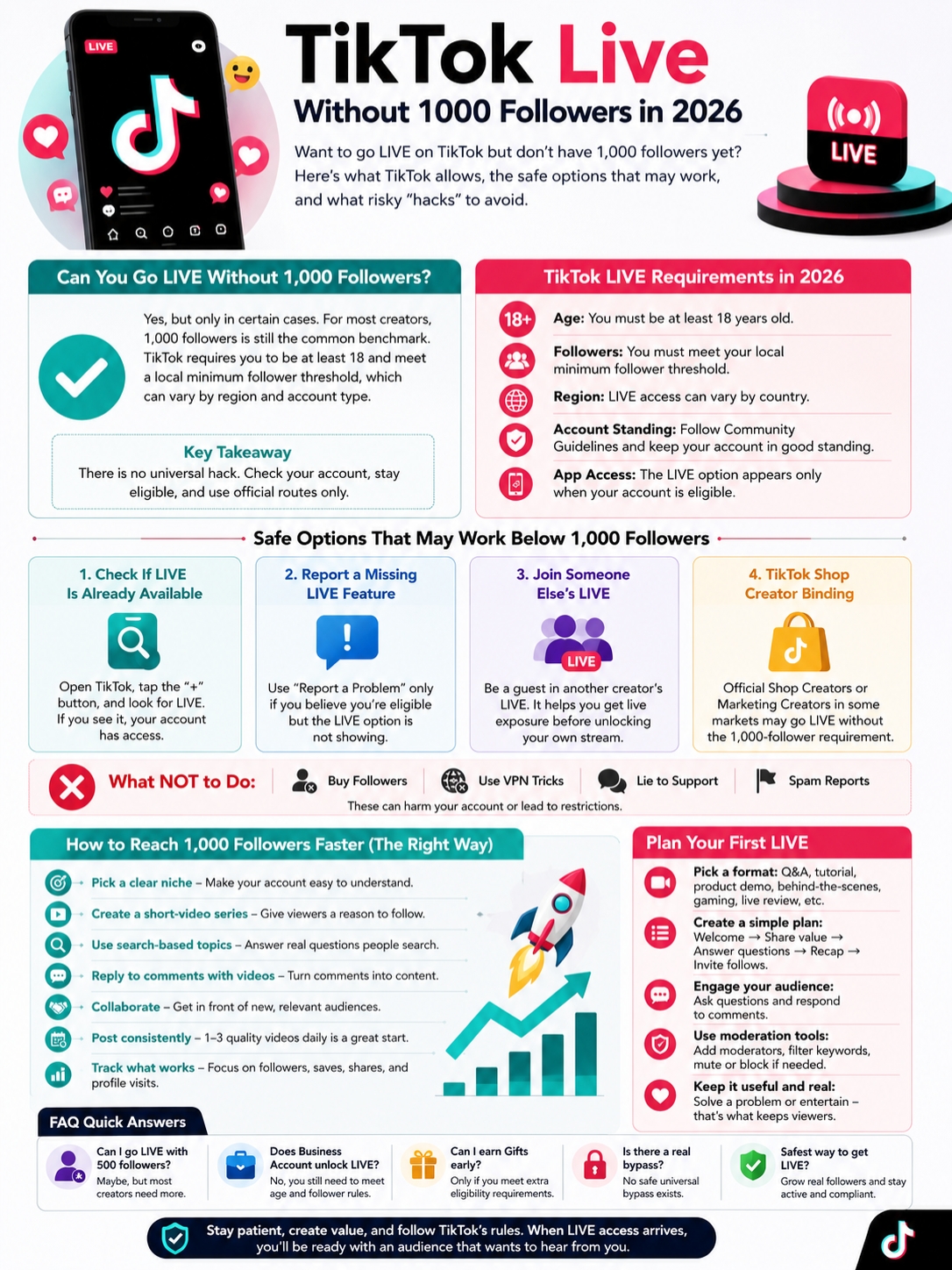
For most creators, the safest path is still to grow to 1,000 real followers.
That may sound slow. But it’s very doable if your content has a clear angle.
TikTok is still one of the biggest social platforms in the world. People use it for entertainment, shopping, tutorials, product discovery, news, reviews, and answers to everyday questions.
You don’t need everyone.
You just need the right people to understand why they should follow you.
|
Growth Method |
What to Do |
|
Pick one niche |
Make your account easy to understand. |
|
Build a series |
Give viewers a reason to return. |
|
Use search topics |
Answer questions people already ask. |
|
Reply with videos |
Turn comments into new posts. |
|
Collaborate |
Get seen by related audiences. |
Pick One Clear Niche
A random account is hard to follow.
If one video is about skincare, the next is about gaming, and the next is about finance, viewers won’t know what they’re signing up for.
Pick one lane at the start.
You could focus on:
- TikTok growth tips
- Budget travel
- Home cleaning
- Gaming clips
- Fitness for beginners
- Tech tutorials
- Local food reviews
- Product demos
- AI tools
- Parenting tips
You can expand later. First, make your account easy to understand.
Build a Short Video Series
Series content gives people a reason to follow.
Try ideas like:
- “30 days to grow a small TikTok account”
- “10 mistakes new creators make”
- “7 product demo ideas for TikTok Shop”
- “5-minute TikTok tips for beginners”
- “Behind the scenes of building a small brand”
Each video should stand on its own. But it should also make viewers want the next one.
That’s how you turn one view into a follow.
Use Search-Based Video Ideas
TikTok search is powerful.
People search inside TikTok for tutorials, product reviews, local tips, tools, recipes, fixes, and creator advice.
Use that behavior.
Instead of only chasing trending sounds, make content around questions people already ask.
For this topic, examples include:
- “Why can’t I go live on TikTok?”
- “How many followers do you need to go live?”
- “Why is my TikTok LIVE button missing?”
- “Can TikTok Shop sellers go live early?”
- “How to grow to 1,000 followers on TikTok”
These videos may not always explode overnight. But they can bring steady, useful traffic.
Reply to Comments With Videos
This is one of the easiest growth moves.
When someone asks a question, answer it with a video. It shows that you listen. It also gives you content ideas directly from your audience.
A comment reply video feels personal. It also encourages more comments because viewers see that you respond.
That helps your account feel active and human.
Use a Simple 30-Day Growth Plan
Don’t overcomplicate it.
Try this for 30 days:
- Post one search-based video daily.
- Post one personal tip or example daily.
- Reply to one comment with a video.
- Track which videos bring profile visits.
- Repeat the formats that bring followers.
The goal is not just views. Views are nice, but followers matter more if you want LIVE access.
Look at saves, comments, shares, profile visits, and follow rate.
Those numbers tell you what’s working.
Plan Your First LIVE Before You Unlock It
Many creators fight to get LIVE access, then freeze when they finally get it.
They go live with no topic. No structure. No hook. No reason for viewers to stay.
Don’t do that.
Plan your first few LIVE sessions before the button appears.
|
LIVE Element |
What Works Best |
|
Title |
Say what viewers will get. |
|
Topic |
Focus on one clear idea. |
|
Setup |
Use good light and clear sound. |
|
Opening |
Explain the value fast. |
|
Chat |
Ask easy questions. |
|
Moderation |
Block spam before it takes over. |
Choose a Strong LIVE Format
Not every LIVE needs to be a big production.
Simple formats work well when they have a clear purpose.
Try one of these:
- Q&A session
- Product demo
- Mini tutorial
- Behind-the-scenes stream
- Study-with-me session
- Work-with-me session
- Gaming stream
- Live review
- Live audit
- Weekly community chat
Avoid “Ask me anything” if your audience is still small. Most new viewers won’t know what to ask.
Give them a reason to stay.
Use a 30-Minute LIVE Plan
A short plan can save your stream.
Here’s a simple structure:
Minute 0–3: Welcome viewers and explain the topic.
Minute 3–10: Share your first tip, demo, or story.
Minute 10–20: Answer comments and questions.
Minute 20–25: Recap the best points.
Minute 25–30: Ask viewers to follow and tease your next LIVE.
This keeps your stream from feeling random.
Prepare Your Chat Tools
LIVE chat can move fast. Even small streams can attract spam.
Before you go live, learn how to:
- Add moderators
- Filter keywords
- Mute viewers
- Block rude users
- Report harmful behavior
- Keep the chat on topic
TikTok allows creators to manage chat and block certain words or phrases. Use those tools early.
A clean chat makes viewers feel safer. It also helps you stay focused.
Common Reasons the LIVE Button Does Not Show
If you don’t see the LIVE option, don’t assume your app is broken.
Your account may simply not qualify yet.
|
Reason |
What You Should Check |
|
You’re under 18 |
LIVE needs eligible age confirmation. |
|
Not enough followers |
You may not meet your local threshold. |
|
Account restriction |
Check TikTok Studio. |
|
Old app version |
Update the app. |
|
Regional limit |
LIVE can vary by market. |
|
Shop setup missing |
Seller-bound routes need proper setup. |
Your Region May Have Different Rules
TikTok’s own language matters here. It says creators must meet a local minimum follower threshold.
That means your friend may get LIVE earlier than you, even with fewer followers.
It doesn’t always mean they found a secret trick. Their account may be in another region, tied to a shop, included in a test, or simply eligible under different rules.
Your Account May Need More Trust
New accounts do not always get every feature quickly.
TikTok may look at your activity, posting history, content quality, violations, and account signals.
Before you ask support for help, strengthen your account.
Do this:
- Post original videos
- Avoid copied content
- Keep your account clean
- Follow Community Guidelines
- Don’t spam comments
- Don’t mass-follow people
- Use accurate account details
- Keep your app updated
Small steps add up.
Final Thoughts
Trying to unlock tiktok live without 1000 followers in 2026 makes sense. LIVE can help you build trust, answer questions, sell products, and create a stronger bond with your audience.
But don’t chase fake hacks.
TikTok’s real rule is based on age, account standing, region, and a local minimum follower threshold. For many creators, that still means reaching about 1,000 real followers.
Some TikTok Shop setups may offer a legitimate route below that number. Guest LIVE appearances can also help you get live exposure before you host your own stream.
Start with the basics. Check if the LIVE button already appears. Update your app. Review your account status. Keep your content clean. Build a clear niche. Post videos people actually want.
When LIVE access finally arrives, you’ll be ready.
Not just with the button, but with an audience that wants to hear from you.
FAQs About TikTok LIVE Without 1,000 Followers
Here are the questions many creators ask when they’re trying to unlock tiktok live without 1000 followers.
|
Question |
Quick Answer |
|
Can 500 followers work? |
Only if your account already has access. |
|
Does Business Account help? |
Not by itself. |
|
Can guests join LIVE? |
Yes, if the host allows it. |
|
Can TikTok Shop help? |
In some supported seller setups. |
|
Can you earn Gifts early? |
Only if you meet extra rules. |
Can I go LIVE on TikTok with 500 followers in 2026?
Maybe, but don’t depend on it.
Some accounts may get access below 1,000 followers. But most regular creators still need to meet TikTok’s local follower threshold, which is often around 1,000.
Does TikTok still require 1,000 followers to go LIVE?
For many creators, yes. The 1,000-follower benchmark is still widely used.
But TikTok’s official wording says “local minimum follower threshold.” So the exact number may vary by region or account setup.
Can a Business Account go LIVE without 1,000 followers?
Not automatically.
Switching to a Business Account does not guarantee LIVE access. You still need to meet TikTok’s age, follower, and account requirements.
Can TikTok Shop creators go LIVE without 1,000 followers?
In some TikTok Shop setups, yes.
Official Shop Creators or Marketing Creators may get e-commerce LIVE access through seller binding. But this depends on country, seller status, account checks, and TikTok Shop rules.
Is the “Report a Problem” trick real?
Not as a bypass.
Reporting a problem can help if you are already eligible and the LIVE button is missing. It won’t magically unlock LIVE for every account.
Can I go LIVE from TikTok Studio or OBS without 1,000 followers?
No, not unless your account already has LIVE access.
Streaming software does not remove TikTok’s eligibility rules.
Can I earn money if I unlock LIVE early?
Not always.
LIVE Gifts and Diamonds have extra rules. You may need to meet age, location, account standing, and feature eligibility requirements.
Why does my friend have LIVE with fewer followers?
Their account may be different from yours.
They may live in another region, have TikTok Shop binding, be part of a feature test, or meet a local threshold you don’t meet yet.
Should I buy followers to unlock TikTok LIVE?
No.
Fake followers can hurt your engagement and trust. They also won’t help you build a real LIVE audience.
What is the safest way to get TikTok LIVE faster?
Grow with useful content. Pick a clear niche. Use search-based video ideas. Reply to comments. Join other creators’ LIVE sessions. Check TikTok Shop options only if they fit your account.