
TikTok is still the king of short-form content in 2026. Whether you are a creator or just someone who loves scrolling, you have probably wanted to keep a video for later. But that bouncing logo is a real pain. It covers up text, ruins the aesthetic, and—most importantly—hurts your views if you try to share it on other platforms. If you want to save tiktok without watermark, you are in the right place. This guide covers every single working method for this year, from quick web tools to hidden phone tricks.
Why the Watermark Matters More in 2026
In the current social media climate, cross-platform posting is the only way to grow. Instagram and YouTube have updated their algorithms to be even stricter. If they see a TikTok logo, they bury your video. Removing it is not just about looks anymore; it is about making sure your content actually gets seen.
Why You Need to Save TikTok Without Watermark in 2026
Content creators are working harder than ever to stay relevant. When you spend hours editing a video in the TikTok app, you want to be able to use that same video on Reels or Shorts without looking like you just “copy-pasted” it. A clean video looks professional and original. Beyond creators, many people want to save tutorials or recipes to their personal archives. Having a clean version makes it much easier to read on-screen instructions that the logo might otherwise block.
The Impact on Social Media Algorithms
By 2026, AI-driven detection on platforms like Instagram has become incredibly fast. They can spot a watermark in milliseconds. When the system detects a competitor’s logo, it classifies the content as “unoriginal” or “low effort,” which limits its reach to only your existing followers.
Professional Branding Needs
If you are building a brand, consistency is everything. Having a TikTok logo on your professional portfolio or your brand’s YouTube channel looks messy. It tells the audience that you didn’t keep your master files. Learning how to save tiktok without watermark allows you to maintain a high-quality, branded look across every corner of the internet.
|
Key Reason |
Impact Level |
Benefit |
|
Algorithm SEO |
High |
Increases reach on Instagram/YouTube |
|
Visual Clarity |
Medium |
Stops text from being blocked |
|
Brand Image |
High |
Professional and clean look |
|
Personal Archive |
Low |
Better for long-term storage |
Top Online Web Tools to Save TikTok Without Watermark
Web tools are the most popular choice because they don’t require you to download any sketchy software. In 2026, these sites have become faster and more reliable. Most of them follow a simple “copy and paste” logic that takes less than ten seconds. You just grab the link from your TikTok app, paste it into the search bar of the tool, and hit download.
SnapTik: The Reliable Choice
SnapTik has remained the industry leader for a reason. It is free, works on any browser, and doesn’t bombard you with quite as many ads as the newer sites. It processes the video on its own server, strips the watermark layer, and gives you a high-definition MP4 file.
Read Also: How to Delete a TikTok Account Permanently in 2026
SSSTik: Fast and Simple
If SnapTik is having a slow day, SSSTik is the next best thing. It is known for its “no-nonsense” interface. It focuses heavily on speed. One of the best things about SSSTik in 2026 is that it offers multiple server options, so if one is busy, you can just click another.
SaveTik: High Quality Downloads
SaveTik is the go-to for people who care about resolution. While some tools compress the video and make it look grainy, SaveTik tries to maintain the highest bitrate possible. It is perfect if you are planning to edit the video later in a professional software suite like Premiere Pro or CapCut.
|
Tool Name |
Best For |
Speed |
Device Compatibility |
|
SnapTik |
General Use |
Very Fast |
All Devices |
|
SSSTik |
Backup/Speed |
Fast |
Mobile/PC |
|
SaveTik |
High Resolution |
Moderate |
PC/Mac |
Best Apps for Mobile Users (iOS & Android)
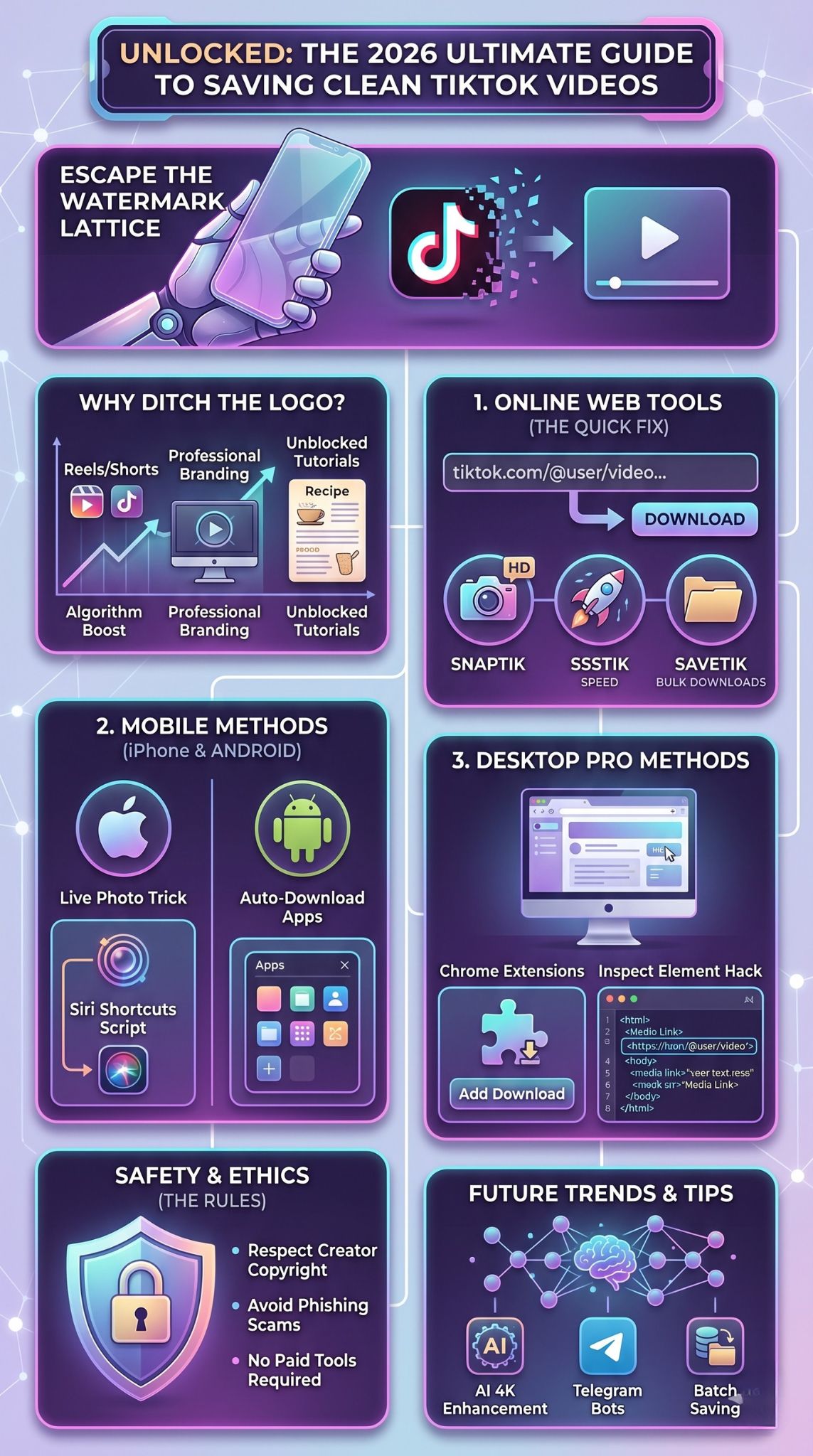
Sometimes you don’t want to open a browser every time you find a cool video. For power users, having a dedicated app is the way to go. On Android, this is pretty easy because the system allows for direct file downloads. On iPhone, it is a bit trickier because of Apple’s security, but there are still some very clever workarounds that work perfectly in 2026.
Top Android Downloader Apps
Android users have dozens of options in the Play Store. The best apps now include “Auto-Download” features. When you copy a link in TikTok, the app detects it in your clipboard and starts the download in the background. You don’t even have to switch apps. Look for “Video Downloader for TikTok” apps with high ratings and 2026 updates.
iPhone Shortcuts and Tricks
For iOS, the best method is using the “Shortcuts” app. You can find “TikTok Downloader” scripts online that run directly within your share sheet. Another classic trick is the “Live Photo” method. You save the video as a Live Photo, then go to your gallery and “Save as Video.” This removes the main watermark, though you might need to trim the last second of the clip.
Tablet and iPad Optimization
If you are using an iPad for editing, you can use the same browser-based tools or specialized iPadOS apps. The larger screen makes it easier to manage folders and move your clean videos into editing apps like LumaFusion.
|
Platform |
Best Method |
Ease of Use |
Reliability |
|
Android |
Dedicated Apps |
5/5 |
High |
|
iOS (iPhone) |
Siri Shortcuts |
3/5 |
Medium |
|
iPad |
Web Tools |
4/5 |
High |
Step-by-Step Guide: Save TikTok Without Watermark on Desktop
If you are a social media manager or a video editor, you probably do most of your work on a PC or Mac. Downloading on a computer is actually the most stable way to save tiktok without watermark. You have better control over where the files go, and you can download dozens of videos at once without your phone getting hot or running out of battery.
Using Chrome Extensions
In 2026, there are several browser extensions that add a “Download” button directly onto the TikTok website interface. This is the ultimate “lazy” way to do it. You just scroll through your feed on your computer, and every video has a small button next to it. One click, and it’s in your downloads folder without the logo.
The Manual Browser Hack
If you don’t want to install extensions, you can use the “Inspect” tool in your browser. Right-click the video, go to the “Network” tab, refresh the page, and look for the largest “Media” file. Open that in a new tab, and you can save the raw video file. This is the cleanest version of the video possible because it hasn’t been re-processed by a third-party site.
Bulk Downloading for Teams
For marketing teams, there are now software options that allow you to put in a username and download every single video from that account at once. This is a massive time-saver for anyone doing historical research on a brand or competitor.
|
Desktop Tool |
Type |
Cost |
Best For |
|
Chrome Ext. |
Extension |
Free |
Speed |
|
Inspect Tool |
Manual |
Free |
High Tech Users |
|
4K Download |
Software |
Paid/Free |
Bulk Downloading |
Is It Legal to Save TikTok Without Watermark?
This is the “gray area” that everyone asks about. Technically, downloading a video is fine for personal use. However, the legal trouble starts when you try to monetize someone else’s work. If you take a video, remove the watermark, and post it as if you made it, you are violating copyright laws. TikTok’s terms of service also have specific rules about how their content should be shared.
Understanding Intellectual Property
Just because the watermark is gone doesn’t mean the ownership has changed. The person who filmed the video still owns the rights to it. In 2026, copyright detection is better than ever. If you use someone’s video for a commercial or an ad without their permission, you are likely to get a “cease and desist” letter or have your account banned.
Responsible Content Sharing
The best way to stay safe is to use the save tiktok without watermark method for your own videos or for “fair use” cases like news, commentary, or education. If you are reposting a cool video, it is good etiquette to tag the original creator in the caption. This builds community and keeps you out of legal hot water.
|
Legal Status |
Condition |
Risk |
|
Personal Use |
Keeping for later |
Zero |
|
Educational |
Fair Use |
Low |
|
Commercial |
Using in an ad |
High |
|
Reposting |
Giving credit |
Low |
Troubleshooting Common Download Errors
Sometimes things don’t go according to plan. You paste a link, and the site gives you an error or a “video not found” message. Don’t worry, it usually isn’t a permanent problem. In 2026, the most common issue is TikTok updating its security code, which temporarily breaks the downloader tools until the developers can patch them.
Handling Private Videos
If an account is set to private, a downloader tool cannot “see” the video. The tool basically acts like a guest visiting the site. If a guest can’t see the video, the tool can’t either. The only way to save a private video is to use a screen recorder, but the quality will be much lower.
Fixing Server Connection Timed Out
If you get a connection error, it usually means the tool’s server is overloaded. This happens a lot during peak hours when everyone is online. The quickest fix is to switch to a different tool (like moving from SnapTik to SSSTik) or turn on a VPN. Sometimes, your internet provider might block these sites, and a VPN helps you bypass that block.
Issues with Link Formatting
Make sure you are copying the “clean” link. Sometimes when you share a video, TikTok adds a bunch of tracking text at the end of the URL. If the downloader is confused, try deleting everything after the “?” in the web address. This usually leaves you with the direct link to the video itself.
|
Error Message |
Likely Cause |
Solution |
|
Video Not Found |
Private account |
Use screen record |
|
Server Busy |
High traffic |
Try a different tool |
|
Invalid Link |
Extra tracking text |
Clean the URL |
Hidden Features and Future Trends in TikTok Downloading
As we move through 2026, we are seeing new ways to interact with video content. It isn’t just about downloading anymore; it is about what you can do with the file once you have it. AI is playing a huge role in how we save and edit these clips.
AI Video Enhancement in 2026
Some new downloaders now offer a “one-click enhance” button. When you save tiktok without watermark, the AI automatically upscales the video from 1080p to 4K and sharpens the image. This is amazing for creators who want their old TikToks to look like they were shot on a professional camera.
Telegram Bots for Video Grabbing
Telegram has become a massive hub for “downloader bots.” You just send a TikTok link to a specific bot, and it instantly sends the video back to you as a file. This is often faster than using a website because there are zero ads and it works perfectly on mobile data.
Discord Integration
For those who live on Discord, there are now server bots that automatically strip watermarks from any TikTok link shared in a channel. This makes it easy for friends to watch high-quality videos together without having to leave the app.
|
Trend |
Technology |
Benefit |
|
AI Upscaling |
Machine Learning |
4K Quality |
|
Telegram Bots |
API Scripts |
No Ads / Fast |
|
Batch Saving |
Cloud Computing |
Saves entire profiles |
Final Thoughts
Learning how to save tiktok without watermark is a essential skill for anyone who spends time on social media in 2026. Whether you are doing it to keep your own content clean or to save a favorite memory, the methods we discussed are the most reliable ones available today. Always remember to respect other people’s work and give credit where it is due. With tools like SnapTik and the newer AI enhancers, you can keep your video library looking professional and high-quality without much effort.
FAQs
Can I save a TikTok without the watermark if the “Save” button is disabled?
Yes. When a creator turns off the “save” option, they are only disabling the built-in button. Third-party tools like SnapTik bypass this because they access the video’s public URL directly.
Is there a way to remove the watermark from a video I already saved?
It is much harder to do it that way. You would have to use an AI “object remover” or crop the video, which lowers the quality. It is always better to download it cleanly the first time using the tools mentioned above.
Do these tools work for TikTok Stories?
Yes, most of them do. However, since stories are temporary, you have to grab the link before the 24-hour window closes. Once the story is gone from TikTok, the downloader won’t be able to find it.
Why is my downloaded video silent?
Sometimes, TikTok mutes videos due to copyright issues with the music. If the sound is gone on the original TikTok, it will be gone in your download too. If there is sound on the app but not in your file, try a different download server.
Is it safe to use my credit card on these sites?
No. You should never have to pay for a simple TikTok download. If a site asks for your payment info, it is likely a scam. The legitimate ones make their money from the ads you see on the page.