
You open the app, go to a profile, and tap that follower number. You want to see who just joined their network. Maybe you are checking up on a competitor’s brand growth, or maybe you are just feeling a little nosy about a friend. We have all been there. But when the list pops up, the names are completely scrambled. The newest people are not at the top, and the oldest people are nowhere to be found. It is a frustrating experience for anyone trying to track social media growth.
If you want to see recent followers instagram algorithms usually get in your way. You are left staring at a random list of mutual connections and familiar faces, wondering where the actual new data is hiding. Do not worry. While the platform has made it harder to track this information directly, there are still practical, working methods to get the data you need today. Let us break down exactly how you can bypass the confusion and track those lists effectively.
The Mystery Behind the Instagram Follower List Order
Anyone who used social media back in the day remembers how simple it was. You clicked a number, and you got a perfectly chronological timeline of people. Today, that timeline is gone. The list you see is a carefully curated feed designed to show you what the system thinks you want to see. This change did not happen overnight, but it completely shifted how we interact with profile data. You have to understand the logic behind the app before you can figure out how to beat it. The system is no longer a simple database. It is a predictive engine.
The Old Days of Chronological Sorting
A few years ago, the follower list was basically a digital receipt. Every time a user clicked the follow button, their name went straight to the top of the pile. This made it incredibly easy for marketers to track competitor campaigns. If a rival brand ran a big giveaway, you could just refresh their page and watch the new accounts roll in minute by minute. It was simple, transparent, and completely fair.
Why the Shift Happened in Recent Years
Things changed when the platform realized people were using these lists to scrape data. To protect privacy and keep users engaged with content rather than lists, developers scrambled the order. They stopped treating the list as a timeline and started treating it as an extension of the news feed. The goal was to show you accounts you might actually interact with, rather than random strangers who just happened to click a button a second ago.
|
Era |
Sorting Method |
Primary User Experience |
|
Pre-2020 |
Strictly Chronological |
Easy to track newest accounts at the top |
|
2021 to 2024 |
Hybrid Sorting |
Mutuals at top, followed by random timelines |
|
2026 |
Pure Algorithmic |
Heavily weighted by interaction and shared networks |
Why Instagram Does Not Show Followers Chronologically by Default
The app is built to keep your eyes on the screen. Showing you a chronological list of strangers does not help them achieve that goal. Instead, the developers wrote code that analyzes your behavior and rebuilds the follower list every time you open it. The system looks at who you talk to, who you like, and who you share friends with. It takes all of that heavy data and pushes the most relevant profiles right to the top of your screen.
The Role of the 2026 Engagement Algorithm
The current algorithm is obsessed with interest graphs. It is no longer just about who you follow, but what topics you spend time watching. If you look at a sports brand’s profile, the system will highlight followers who also like sports content you engage with. It builds a customized list just for you. This means two different people looking at the exact same profile will see completely different names at the top of the follower list.
How Mutual Connections Disrupt the Order
Mutual friends are the biggest disruptors of a clean timeline. The app assumes that if you and the target profile share five friends, you probably want to see those five friends first. It forces mutual connections to stick to the very top of the list, pushing any brand new followers deep down into the middle. Unless you are willing to scroll past hundreds of mutuals and suggested accounts, you will never spot the new additions.
Read Also: How to Hide Likes on Instagram Posts in 2026
|
Factor |
Impact on List Position |
Visibility Result |
|
Mutual Friends |
Extremely High |
Always pushed to the very top |
|
High Interaction Rate |
High |
Appears near the top for the viewer |
|
Time of Follow |
Very Low |
Completely ignored by the default mobile app |
Method 1: Using the Web Browser Version of Instagram
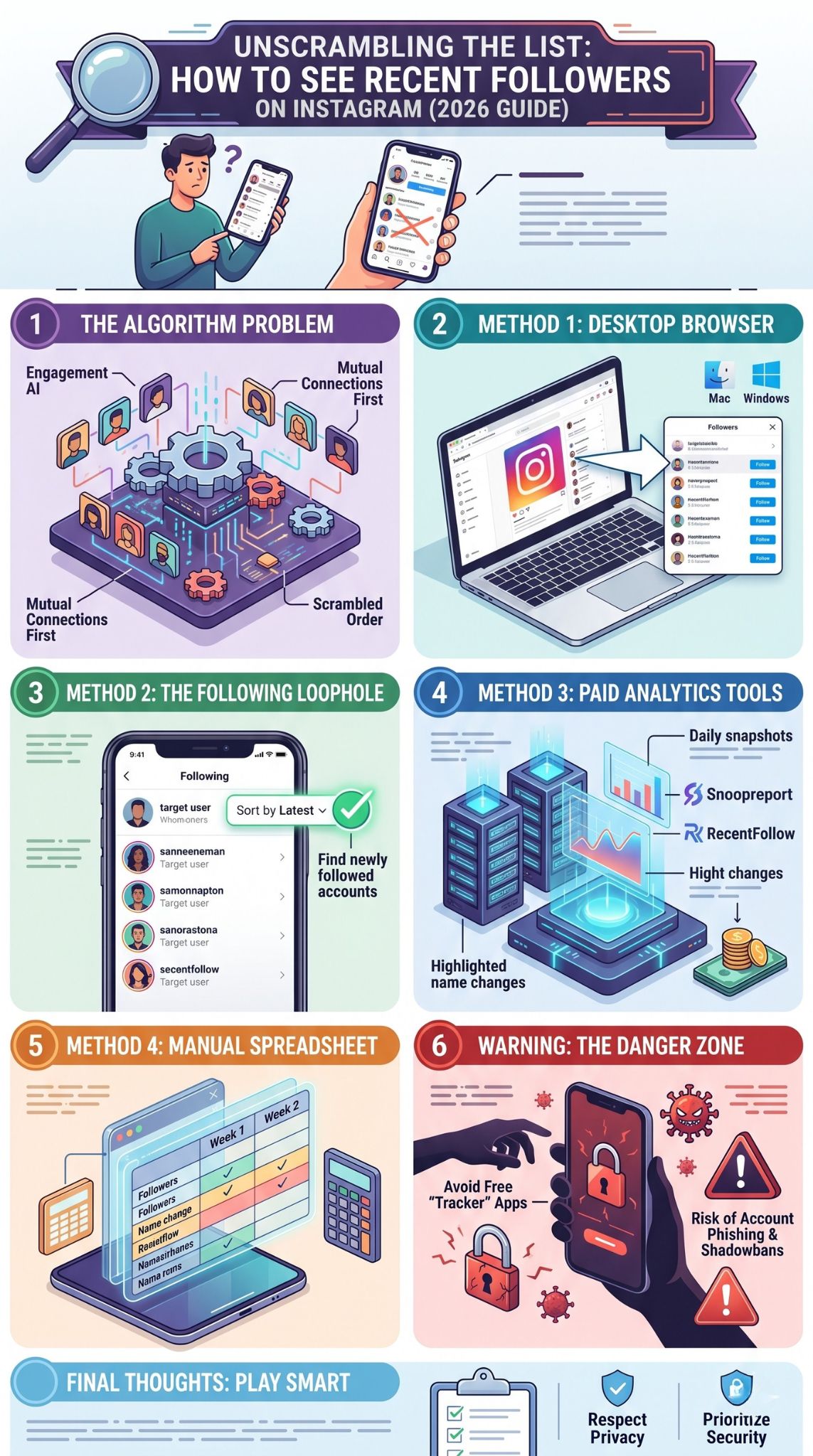
When you are stuck fighting the mobile app, the best move is to change your environment. The desktop version of the platform runs on a slightly older, less aggressive architecture. Because the web browser does not track your mobile usage habits as deeply, it often strips away the heavy algorithmic sorting. This gives you a much cleaner, more raw look at the data. It is the easiest first step for anyone trying to see recent followers instagram hides on mobile.
The Desktop vs Mobile App Experience
Mobile apps are heavily optimized for endless scrolling and deep engagement. Desktop browsers are generally treated as secondary platforms by social media developers. Because of this, the desktop website does not always bother loading the complex engagement algorithms for simple tasks like viewing a list. Many users report that looking at a profile on a laptop gives them a list that looks much closer to a true timeline.
Step-by-Step Desktop Checking Process
Fire up your laptop and open Safari, Chrome, or Edge. Log into your account and navigate straight to the profile you want to check. Click on the follower number to trigger the popup window. Scroll through the first twenty or thirty names. While it is not perfectly guaranteed, this batch usually contains the people who most recently interacted with or followed the account. It is a fast, free way to bypass the mobile headache.
|
Feature |
Mobile App |
Desktop Browser |
|
Algorithmic Sorting |
Maximum interference |
Minimal interference |
|
Mutuals Pushed Up |
Yes, heavily |
Yes, but less aggressively |
|
Chronological Chance |
Almost zero |
Moderately high |
Method 2: Sorting the Following List Instead of Followers
If you cannot break the code on the main follower list, you need to flip your perspective. Do not look at who is following them. Look at who they are following. The platform treats these two data sets very differently. The outbound list is much easier to control and sort. By watching who a person or brand chooses to connect with, you can easily reverse engineer their recent social activity and figure out who is new in their orbit.
The Difference Between Following and Followers
The incoming list is massive and hard to manage, so the app scrambles it. The outbound list is usually smaller and represents deliberate choices made by the user. Because it is a list of their active choices, the platform gives you actual tools to sort it. This is a massive loophole for marketers and researchers. You get the sorting power that is completely missing from the other side of the profile.
Using the Default Sorting Options Effectively
Open the mobile app and go to the target profile. Tap on their following number. Right at the top, you will usually see a sorting icon that looks like two arrows pointing up and down. Tap it, and select the option to sort by latest. You now have a perfect, down to the second chronological list of the newest accounts they decided to connect with. If they just followed five new people, it is highly likely those people recently followed them back.
|
List Type |
Sorting Tools Available |
Best Use Case |
|
Followers |
None |
Finding mutual connections |
|
Following |
Sort by Latest |
Identifying recent network additions |
|
Following |
Sort by Earliest |
Finding their oldest connections |
Method 3: Using Third-Party Tracking Tools Safely
Sometimes manual tricks just do not cut it, especially if you are managing a business or tracking a massive competitor. This is where professional software steps in. There is an entire industry dedicated to social media analytics. These tools use server side connections to pull data automatically, taking the guesswork out of the process. If you seriously need to see recent followers instagram metrics provide, this is the most reliable path forward.
How Tools Like Snoopreport and RecentFollow Work
These platforms operate by taking digital snapshots of public accounts. A tool like Snoopreport does not log into your account. Instead, it uses clean, public web scraping to grab a list of a target profile every single day. It then compares Monday’s list to Tuesday’s list and highlights the exact differences. It hands you a clean report showing exactly who arrived and who left, completely bypassing the scrambled app interface.
Assessing the Value of Paid Analytics
Good tools are rarely free. Building servers that take daily snapshots costs money, so legitimate companies charge a subscription fee. You have to decide if the data is worth the cost. For a casual user checking on a friend, spending ten bucks a month is probably overkill. For a social media manager trying to map out a competitor’s influencer strategy, that same ten dollars is an incredible bargain that saves hours of manual spreadsheet work.
|
Tracking Tool |
Primary Focus |
Account Requirement |
|
Snoopreport |
Activity and like tracking |
No login required |
|
RecentFollow |
Chronological timeline sorting |
No login required |
|
FollowMeter |
Personal account analytics |
Requires login |
Method 4: Manual Monitoring for Smaller Accounts
You do not always need a fancy piece of software to get the job done. If the account you are watching only has a few hundred connections, you can act as your own tracking server. It takes a little bit of patience and a basic understanding of data entry, but it is completely free and one hundred percent accurate. This old school method is perfect for tracking local businesses or micro influencers in a very specific niche.
Setting Up a Tracking Spreadsheet
Open up Google Sheets or Microsoft Excel. Create two columns. Label one column for this week and the other for next week. Open the desktop browser version of the profile you are tracking and literally highlight, copy, and paste the entire list of names into the first column. Do the exact same thing a week later in the second column. Use a simple duplicate highlighting tool to see the names that do not match.
Establishing a Weekly Review Routine
Data is only useful if it is consistent. “A simple routine can be weekly, not hourly.” ~ SecuritySenses. Pick a specific day and time to run your spreadsheet check. Friday mornings are usually great for capturing a full week of business activity. By doing this regularly, you remove the emotion and frustration from the process. You are no longer guessing who is new. You have hard, written proof sitting in your spreadsheet.
|
Day |
Action Item |
Expected Result |
|
Monday |
Copy list to Column A |
Baseline data secured |
|
Friday |
Copy list to Column B |
New data secured |
|
Friday |
Run compare function |
Isolated list of newest accounts |
Why You Should Avoid Free Follower Tracking Apps
If you search your phone’s app store right now, you will find hundreds of free apps promising to show you hidden follower data. They have flashy icons and thousands of fake reviews. You need to ignore all of them. The digital security risks associated with these free downloads are massive. Handing over your credentials to a random developer in exchange for a scrambled list of names is the fastest way to ruin your social media presence.
The Hidden Dangers of Phishing
When you download a free tracker, the first thing it asks for is your username and password. The moment you type that in, you are giving a stranger full control over your digital life. These apps take your credentials and use your profile to automatically like photos, follow spam accounts, and send direct messages without your permission. They turn your personal profile into a zombie account for their own marketing campaigns.
The Risk of Getting Shadowbanned
The platform’s security team is constantly hunting for unauthorized third party apps. If their system detects that your profile is logging in through an unapproved tracker, they will immediately flag your account. You might get a warning, or you might get hit with a shadowban. A shadowban kills your reach completely. Your posts will vanish from hashtags, and your organic growth will drop to zero. It is never worth the risk.
|
App Warning Sign |
What It Actually Means |
Danger Level |
|
Requires your password |
They will steal your account |
Critical |
|
Promises hidden private data |
They are lying to get you to download |
High |
|
Completely free with no ads |
You are the product being sold |
High |
Privacy Settings and Their Impact on Your Search
All the tricks and tools in the world mean absolutely nothing if you hit a privacy wall. The platform gives users the ultimate power to shut the door on tracking. Understanding how privacy settings dictate data flow is critical before you start spending time or money on analytics. You have to know the rules of the game, and the rules change drastically depending on what type of account you are trying to analyze.
The Mechanics of Public Accounts
A public account is basically an open book. The data is freely broadcasted to the internet. Even if the mobile app scrambles the list, the underlying data is still sitting on a public server waiting to be read. This is why desktop tricks and snapshot tools work so well on business profiles and public creators. The system allows anyone to ping the server and pull the names.
Private accounts are a completely different story. When a user toggles the private switch, their data is instantly locked behind a secure firewall. Only approved connections can see the list. No desktop trick will bypass this. No paid tool can scrape it. If you want to know who is connecting with a private account, you have to send a request and wait for them to let you in. Period.
|
Account Status |
Data Accessibility |
Tracking Options |
|
Public Creator |
Fully Open |
Desktop, Sheets, Paid Tools |
|
Public Business |
Fully Open |
Desktop, Sheets, Paid Tools |
|
Private Personal |
Fully Closed |
Manual checking only if approved |
Ethical Considerations of Tracking Followers
Just because you can track someone does not mean you always should. The tools we discussed are incredibly powerful, and with power comes a need for basic common sense. There is a very fine line between conducting smart competitive research and crossing over into digital harassment. It is important to step back and evaluate why you are putting so much effort into finding out who clicked a button on a screen.
Professional Market Research vs Personal Snooping
If you run a media company and you want to see which influencers a rival publisher is talking to, tracking is just good business. You are monitoring public trends to stay competitive. However, if you are using spreadsheets to monitor an ex partner’s weekend activity, you are heading down a dark path. Using data for business intelligence is smart. Using data to feed personal anxiety is a recipe for disaster.
Setting Healthy Digital Boundaries
You have to know when to log off. Staring at lists all day completely ruins the actual fun of social media. “Follower behavior is shaped by first impressions.” ~ SecuritySenses. Focus on building your own profile and making great content. Do not let the obsession with someone else’s numbers distract you from your own digital life. Put the phone down, close the spreadsheet, and remember that social media is just a tool, not reality.
|
Tracking Motive |
Health Check |
Recommended Action |
|
Business Competitor |
Healthy |
Use paid tools for efficiency |
|
Industry Influencer |
Healthy |
Monitor weekly trends |
|
Ex Partner or Friend |
Unhealthy |
Log off and take a break |
Final Thoughts
Figuring out the order of a social network should not require a degree in computer science. Unfortunately, the days of simple, chronological lists are long gone. The platform wants to control what you see to keep you scrolling longer. But as we have covered, you are not entirely out of luck. If you really need to see recent followers instagram simply requires you to work a little smarter. Switch to your laptop browser to dodge the heavy mobile algorithms. Take advantage of the sorting tools built directly into the following tab. If you have the budget, let a professional tool like Snoopreport do the heavy lifting for you. And if you are watching a smaller account, never underestimate the power of a simple spreadsheet.
Above all else, protect your own digital security. Never hand your password over to a free app that promises magic results. Stick to the proven methods, respect the privacy boundaries of private accounts, and keep your tracking habits strictly professional. With the right approach, you can cut through the algorithmic noise and get exactly the data you are looking for.
Frequently Asked Questions (FAQs)
Does the order of likes on a photo follow the same algorithmic rules as the profile list?
Yes, the list of people who liked a specific post is also sorted by the algorithm. It prioritizes showing you your mutual friends and accounts you interact with frequently right at the top of the likes list, rather than showing who liked it most recently.
Can a verified blue checkmark account hide its follower list completely from the public?
No. Verified accounts, whether they pay for the subscription or earned it organically, cannot hide their list of followers if their profile is set to public. The only way to completely hide the list from non-followers is to make the entire account private.
If I block someone and then unblock them, do they show up as a new connection on my list?
If you block someone, they are forcefully removed from your network. If you unblock them, they do not automatically rejoin your list. They would have to actively choose to connect with your account again, at which point they would register as a brand new addition.
Why do some third-party tracking tools only update once every twenty-four hours?
Most legitimate tools update daily because of strict rate limits imposed by the platform’s API. Pinging a server too many times in one hour looks like bot behavior and can get the tracking tool banned. Daily snapshots are the safest way to pull data without triggering security alarms.
Can someone use a tracking spreadsheet to see if I view their public stories?
No. Spreadsheet tracking and public scraping tools can only monitor permanent actions like clicking the follow button or leaving a comment. Viewing a story is a temporary action that is not broadcasted to the public web, so external tools cannot track it.
Is it possible to export my own profile’s data to see exactly when everyone joined my network?
Yes. If you go into your account settings and request a data download, the platform will email you a complete archive of your account history. This file contains a raw, chronological list of every person who has ever connected with you, complete with exact timestamps.