
If your tiktok sound not working issue showed up out of nowhere, it usually feels worse than it is. Most of the time, nothing is broken. It’s just a setting, a connection, or a small app glitch hiding in plain sight.
I’ve seen this happen for something as simple as Bluetooth still being connected or the phone switching audio output without warning.
The good news? You can usually fix it in a few minutes without reinstalling anything or losing your drafts.
Let’s go step by step.
Why TikTok sound not working happens
TikTok audio depends on a few things working together: your phone, the app, and the sound source itself. If one part fails, everything feels silent.
Sometimes it’s your device. Sometimes it’s TikTok. And sometimes the sound simply doesn’t exist anymore.
Common reasons this happens
|
What’s wrong |
What you notice |
|
Volume is low or muted |
No sound on any video |
|
Bluetooth is connected |
Audio goes somewhere else |
|
App glitch |
Videos play silently |
|
Weak internet |
Sound doesn’t load properly |
|
Mic permission blocked |
No recording voice |
|
Sound removed |
Video becomes silent |
Most of the time, it’s something basic. Not a serious bug.
1. Check your phone volume first
This sounds obvious, but it’s the most common reason behind tiktok sound not working.
TikTok uses media volume, not ringtone volume. So your phone can ring perfectly and still stay silent on TikTok.
What to do
- Turn up media volume while a video plays
- Make sure silent mode is off
- Check Focus or Do Not Disturb
- Test another app like YouTube
Quick check
|
Step |
Result |
|
Raise media volume |
Sound comes back |
|
Turn off silent mode |
Fixes full mute |
|
Test other apps |
Confirms issue |
This one catches people off guard.
Your phone might be sending sound somewhere else without you realizing it.
Earbuds. A speaker. Even your car.
Fix it fast
- Turn off Bluetooth completely
- Disconnect any paired device
- Reopen TikTok
- Play a video again
What usually happens
|
Situation |
Real cause |
|
No sound at all |
Audio sent to Bluetooth device |
|
Low sound |
Weak connection |
|
Delayed sound |
Sync issue |
3. Restart TikTok and your phone
A quick restart solves more problems than most people expect.
TikTok runs a lot of background processes. Sometimes they freeze.
Read Also: How to Hide Your Liked Videos on TikTok
Do this
- Close TikTok fully
- Remove it from recent apps
- Wait a few seconds
- Open it again
- Restart your phone if needed
It resets temporary glitches that often cause tiktok sound not working problems.
4. Check your internet connection
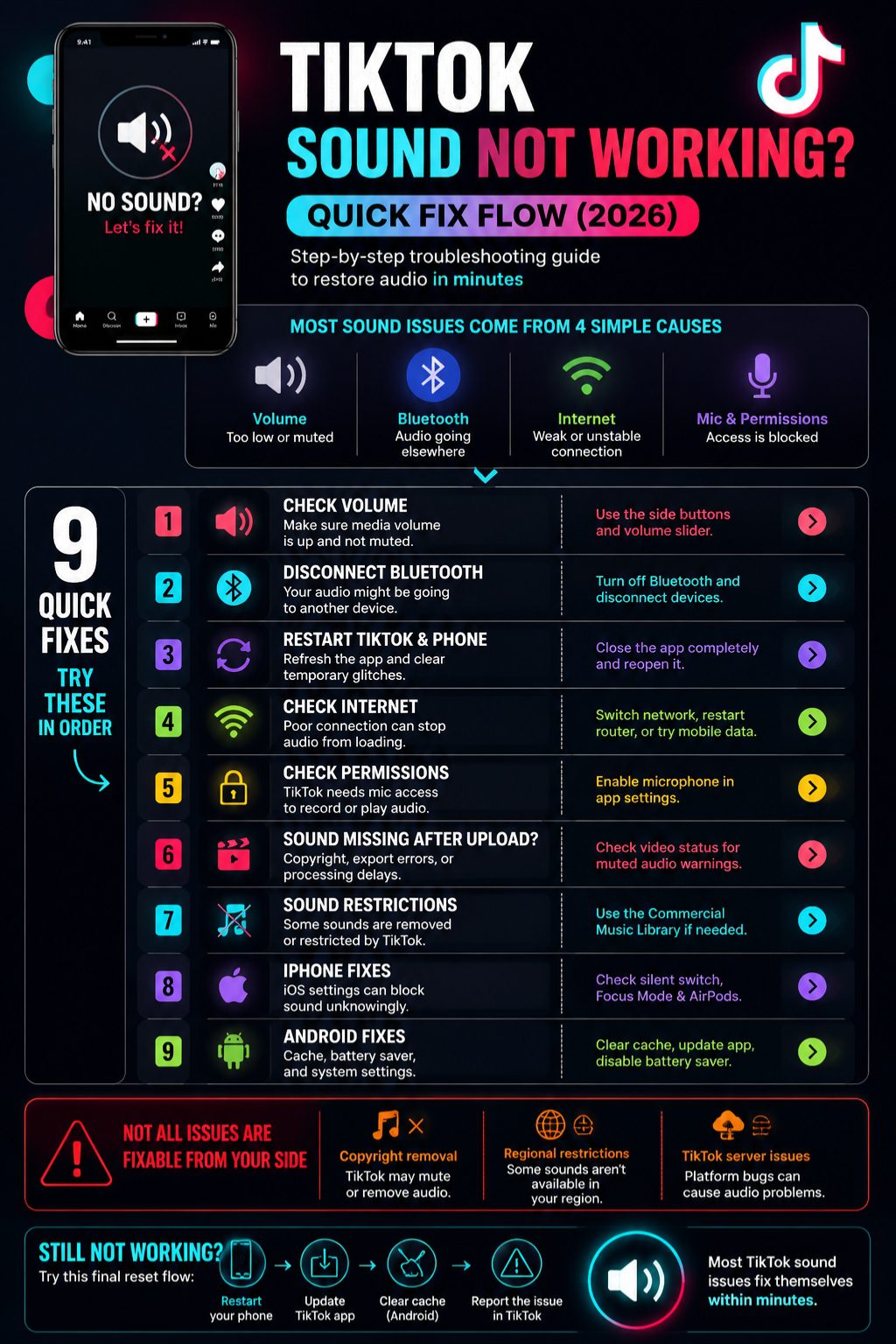
TikTok streams everything. If your connection is unstable, audio can fail while video still plays.
That’s why you sometimes see silent videos even when nothing else seems wrong.
Try this
- Switch Wi-Fi to mobile data
- Restart your router
- Toggle airplane mode
- Turn off VPN if you’re using one
Quick network check
|
Fix |
What it does |
|
Change network |
Refreshes connection |
|
Restart router |
Fixes slow loading |
|
Disable VPN |
Removes delay issues |
5. Check microphone and app permissions
If sound is missing during recording, this is usually the reason.
TikTok needs permission to access your mic for voice, Duet, Stitch, and LIVE.
iPhone
Settings → TikTok → Turn on Microphone
Android
Settings → Apps → TikTok → Permissions → Allow Microphone
What it affects
|
Problem |
Cause |
|
No voice recording |
Mic blocked |
|
Silent Duet |
Permission missing |
|
LIVE audio issues |
Mic disabled |
6. Sound missing after uploading? Here’s why
This is a big one for creators.
You hear everything while editing, but after posting, the sound disappears.
What’s really happening
- Copyright rules remove audio
- TikTok mutes restricted music
- Export errors strip sound
- Video is still processing
TikTok does this automatically. It’s not always a bug.
What to check
- Open the posted video details
- Look for muted sound warning
- Check original file before uploading
Upload issues
|
Problem |
Reason |
|
Muted video |
Copyright rule |
|
No sound after post |
Export error |
|
Missing audio |
Processing delay |
7. TikTok sound restrictions you should know
Not every sound stays available forever.
Some disappear quietly.
Why sounds vanish
- Music license expires
- Creator deletes original sound
- Region restrictions apply
- Business accounts have limited music access
TikTok also pushes creators toward its Commercial Music Library for business content.
What that means
|
Reason |
Outcome |
|
Copyright issue |
Sound removed |
|
Region limit |
Sound hidden |
|
Business account |
Fewer music options |
8. iPhone fixes for TikTok sound not working
iPhones usually have simple but sneaky settings that affect sound.
Try this
- Switch off silent mode
- Turn off Focus Mode
- Disconnect AirPods
- Check TikTok microphone access
- Restart your phone
iPhone checklist
|
Step |
Effect |
|
Silent off |
Restores sound |
|
Bluetooth off |
Stops routing issues |
|
Focus off |
Allows playback |
9. Android fixes for TikTok audio issues
Android devices vary, but the core problems are usually the same.
What to try
- Raise media volume
- Turn off vibrate mode
- Clear TikTok cache
- Disable battery saver
- Update the app
Android quick fix table
|
Issue |
Fix |
|
No sound |
Volume check |
|
Glitches |
Clear cache |
|
Lagging audio |
Update app |
10. When TikTok itself is the problem
Sometimes it’s not you at all.
It’s TikTok.
Signs
- Many users report the same issue
- Sound fails on multiple devices
- Recent update causes glitches
- Audio library doesn’t load
What to do
- Wait for a fix
- Update the app when available
- Report the issue
- Don’t rush into reinstalling
Final thoughts
Most tiktok sound not working problems are simple. Not serious. And definitely not permanent.
It usually comes down to volume settings, Bluetooth connections, or a small app glitch that clears up quickly.
If that doesn’t work, move deeper step by step—cache, permissions, network, and upload issues.
Keep it simple. That’s usually all it takes.
FAQs
Why is TikTok sound not working even with volume up?
Bluetooth routing, Focus Mode, or a small app glitch is usually the cause.
Why is there no sound on some TikTok videos?
The sound may have been removed or restricted due to copyright rules.
Why did TikTok mute my video?
Copyright detection or licensing issues can automatically mute audio.
Why can I hear other apps but not TikTok?
The issue is likely inside TikTok, such as cache or app bugs.
Why is TikTok microphone not working?
Microphone permission is probably turned off in your settings.
Why are TikTok sounds missing?
They may have been deleted, restricted, or removed by TikTok.
Do business accounts have music limits?
Yes, they must use TikTok’s Commercial Music Library.
Should I reinstall TikTok to fix sound issues?
Only try it after checking basic fixes like volume, Bluetooth, and cache.
What’s the fastest fix?
Check volume, turn off Bluetooth, and restart the app.