
Now TikTok says you have to wait 30 days before changing it again. That’s the part that makes people panic, especially if the account belongs to a business, creator brand, shop, or public page.
Many users search for how to change tiktok username without waiting 30 days because they want a fast fix. Some made a spelling mistake. Some picked a handle too quickly. Some are rebranding. Others want the same username across TikTok, Instagram, YouTube, Facebook, and X.
Here’s the honest answer.
TikTok does not offer a normal, safe, guaranteed way to change your username again before 30 days. The rule is real. Once you change your username, TikTok usually locks it for 30 days.
But that doesn’t mean you’re stuck doing nothing.
You can still clean up your profile, reduce confusion, contact TikTok support for real problems, and prepare the right username for your next change.
This guide breaks it all down in plain English.
Can You Change TikTok Username Without Waiting 30 Days?
For most accounts, no.
TikTok’s official rule says you can change your username once every 30 days. After you save a new one, the timer starts. You usually can’t change it again until that period ends.
That may feel annoying, but it’s important to know the truth before trying random “hacks” from TikTok videos or forums.
|
Key Question |
Straight Answer |
|
Can you change your TikTok username before 30 days? |
Usually, no |
|
Is there an official bypass? |
No public official bypass exists |
|
Can TikTok support help? |
Sometimes, but only for real issues |
|
Can you change your display name instead? |
Yes |
|
Should you use third-party tools? |
No |
The key thing to remember is this: your username and your display name are not the same.
Your username is your @handle. It is unique. It also affects your profile link.
Your display name, also called your nickname, is the name people see on your profile. You can change that more often.
So, if your username is locked, your best short-term move is to fix your display name and bio while you wait.
Why TikTok Uses a 30-Day Rule
TikTok usernames work like account IDs. They help people find you, tag you, mention you, and share your profile.
If users could change usernames every few hours, the app would become messy fast. Scammers could pretend to be someone else. Followers could lose track of creators. Shared links could break all the time.
The 30-day rule helps TikTok keep things more stable.
|
Reason |
Why It Matters |
|
Reduces impersonation |
Stops people from switching names too quickly |
|
Protects profile links |
Keeps shared TikTok URLs more stable |
|
Cuts spam |
Makes username abuse harder |
|
Helps followers |
Makes accounts easier to recognize |
|
Supports brand safety |
Protects creators, shops, and public pages |
For creators and brands, the rule can feel strict. But it also protects identity. Your username is not just a decoration. It’s part of your public footprint.
How to Change TikTok Username the Official Way
If your 30-day wait is over, changing your username is simple.
|
Step |
What to Do |
|
1 |
Open the TikTok app |
|
2 |
Tap Profile |
|
3 |
Tap Edit profile |
|
4 |
Tap Username |
|
5 |
Type your new username |
|
6 |
Check if it’s available |
|
7 |
Tap Save |
Before you save it, slow down. Read the username twice. Say it out loud. Check the spelling.
One small typo can leave you stuck for another 30 days.
TikTok Username Rules You Need to Know
TikTok usernames can include:
- Letters
- Numbers
- Underscores
- Periods
TikTok usernames cannot include:
- Spaces
- Emojis
- Hyphens
- Most special symbols
- A period at the end
|
Works |
Doesn’t Work |
|
@travelwithmaya |
@travel with maya |
|
@maya.travels |
@maya-travels |
|
@maya_travels |
@maya!travels |
|
@maya2026 |
@maya. |
If the username is already taken, TikTok will ask you to choose another one. You can try a small variation, but don’t make it messy.
For example, @mayatravels is better than @maya_travels_2026_777.
Clean handles look more trustworthy.
What Happens After You Change TikTok Username?
When you change tiktok username, TikTok updates more than your @handle.
Your profile link also changes.
That matters if you have shared your TikTok link outside the app.
|
What Changes |
Why It Matters |
|
Your @handle |
People see a new username on your profile |
|
Your profile URL |
Your TikTok link changes |
|
New mentions |
People need to tag the new handle |
|
Old links |
Some old links may become outdated |
|
Brand materials |
Media kits, bios, and QR codes may need updates |
This is a big deal for creators, influencers, small businesses, affiliate marketers, coaches, and online shops.
If your TikTok link appears on your website, Instagram bio, YouTube description, Facebook page, Linktree, email signature, media kit, or digital ads, update it after the username change.
Can You Get Your Old Username Back?
Maybe. But don’t count on it.
A username you give up may not become available right away. Someone else may also take it later.
That’s why you should not change your username just to “test” something. If your current handle matters, think carefully before giving it up.
A good username is hard to replace.
Safe Things to Do If You Can’t Wait 30 Days
If your username is locked, your goal is damage control.
You may not be able to force a new username, but you can still make your profile clear and professional.
|
Safe Fix |
Best For |
Why It Helps |
|
Change display name |
Typos or rebrands |
Shows the right name on your profile |
|
Update your bio |
Brand confusion |
Explains what happened |
|
Pin a video |
Active creator pages |
Tells followers directly |
|
Contact TikTok support |
Bugs, typos, impersonation |
Uses TikTok’s official route |
|
Update other platforms |
Cross-platform branding |
Keeps followers informed |
Change Your Display Name First
Your display name is the fastest fix.
Let’s say your username is stuck as:
@fitnesstpsdaily
But your real brand is:
Fitness Tips Daily
You can set your display name to:
Fitness Tips Daily
You can also add a small note if needed:
Fitness Tips Daily | New Handle Soon
That tells visitors they are in the right place.
Do not make the display name too long. Keep it clean. A short, clear name looks better than a messy explanation.
Read Also: How to Hide Your Liked Videos on TikTok
Add a Short Bio Note
Your bio can calm the confusion.
Use one short line.
Good options:
- “Username update coming soon.”
- “Same creator. New handle soon.”
- “Official account of Fitness Tips Daily.”
- “Rebrand in progress. You’re in the right place.”
Avoid writing a long story in your bio. Most users scan profiles quickly. Short lines work better.
Pin a Quick Update Video
If you already have followers, post a short update and pin it.
You don’t need a dramatic announcement. Just be clear.
You can say:
“Quick update: I’m rebranding this TikTok account. My display name is already correct, but TikTok only allows username changes every 30 days. The handle will be updated soon.”
That’s enough.
It answers the question before followers ask it. It also keeps your account looking active and honest.
Should You Contact TikTok Support?
Yes, if you have a real problem.
But don’t treat support like a secret shortcut. TikTok does not publicly promise that support will remove the 30-day rule for normal username regret.
Still, support may be worth trying if you made a clear mistake or have an account safety issue.
|
Reason |
Should You Report It? |
What to Include |
|
Username typo |
Yes |
Current username, correct username, screenshot |
|
App bug |
Yes |
Device type, app version, screenshot |
|
Brand impersonation |
Yes |
Fake account link and proof |
|
Trademark issue |
Yes |
Business proof or IP details |
|
Simple regret |
Low chance |
Short, polite explanation |
How to Report the Problem
Use this path in the TikTok app:
Profile → Menu → Settings and privacy → Report a problem
Pick the closest topic. If you see a “Need more help?” option, use it.
Keep the message short. Be polite. Explain the issue clearly.
Here’s a simple example:
“Hello TikTok team, I accidentally changed my username because of a spelling mistake. My current username is @dailyfitnesstps, but the correct username should be @dailyfitnesstips. I understand TikTok has a 30-day limit, but I’m asking if this typo can be reviewed. Thank you.”
Do not send the same report again and again. That usually does not help.
Avoid Fake Hacks, Date Tricks, and Username Tools
You may see videos claiming you can change your phone’s date and unlock the username box.
Don’t rely on that.
TikTok’s username rule is tied to your account. Changing your phone date does not mean TikTok’s system will accept another username change.
|
Method |
Safe? |
Why |
|
Changing phone date |
No |
It is unreliable and not official |
|
Using a VPN trick |
No |
It does not remove the account rule |
|
Third-party username tools |
No |
They can steal login details |
|
Buying a username |
Risky |
Scams and policy issues are common |
|
Contacting TikTok support |
Yes |
It is the official route |
Never give your TikTok password to a website that claims it can unlock username changes.
If a tool asks for your login, close it.
A wrong username for 30 days is annoying. A stolen account is much worse.
Username vs Display Name: Don’t Mix Them Up
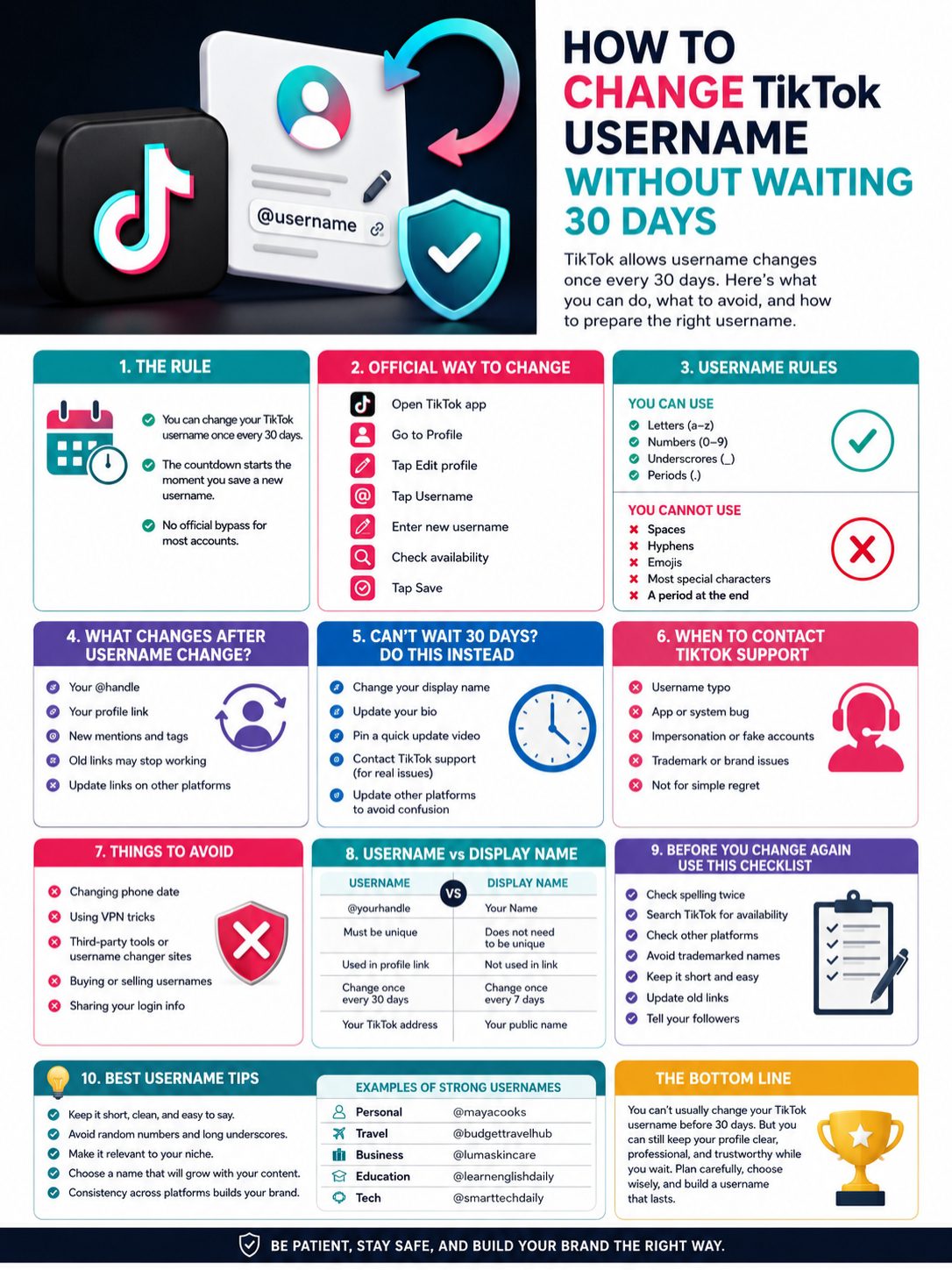
A lot of users get stuck because they confuse username and display name.
They are different.
|
Feature |
Username |
Display Name/Nickname |
|
Example |
@dailytechguide |
Daily Tech Guide |
|
Must be unique |
Yes |
No |
|
Used in profile link |
Yes |
No |
|
Change limit |
Once every 30 days |
Once every 7 days |
|
Best use |
Account identity |
Public-facing name |
Your username is your TikTok address.
Your display name is your profile name.
If you cannot change your username yet, change your display name first. It won’t fix your profile link, but it can make your page look correct while you wait.
When Display Name Is Enough
A display name fix works well when:
- Your username has a small typo
- You are changing your brand name
- Your niche has shifted
- Your current handle is temporary
- Your followers already know you
For example, if you changed from beauty content to lifestyle content, your username may not match yet. A clean display name can help bridge the gap.
Before You Change TikTok Username Again: Use This Checklist
Do not rush the next change.
A TikTok username affects your brand, search visibility, links, and follower trust.
|
Checklist Item |
Why It Matters |
|
Check spelling |
Prevents another 30-day mistake |
|
Search TikTok first |
Confirms if the handle is available |
|
Check other platforms |
Keeps your brand consistent |
|
Avoid trademarked names |
Reduces legal and account risk |
|
Keep it easy to say |
Helps people remember it |
|
Update old links |
Prevents lost traffic |
|
Tell followers |
Reduces confusion |
Check Other Platforms First
A strong username works across platforms.
Before saving your next TikTok handle, check:
- YouTube
- X
- Threads
- Your website domain
- Link-in-bio tools
A matching handle looks more professional.
Example:
- TikTok: @greenhomeguide
- Instagram: @greenhomeguide
- YouTube: @greenhomeguide
- Website: greenhomeguide.com
That is simple. People can remember it. Brands can trust it.
Avoid Names You’ll Outgrow
Do not trap yourself in a narrow username unless you are sure about your niche.
For example:
@budgetphones2026
That may work if you only cover budget phones. But what if you later cover apps, laptops, AI tools, or smart home devices?
A broader name gives you more room.
Better option:
@smarttechdaily
That still fits tech content, but it gives you space to grow.
Best TikTok Username Ideas for Creators and Brands
A good username is short, clear, and easy to spell.
It should fit your account now and still make sense later.
|
Account Type |
Username Style |
Example |
|
Personal creator |
Name + niche |
@mayacooks |
|
Travel page |
Niche + brand |
@budgettravelhub |
|
Local guide |
Location + topic |
@dhakafoodguide |
|
Business |
Brand name |
@lumaskincare |
|
App or SaaS |
Product name |
@trybrandapp |
|
Education page |
Topic + value |
@learnenglishdaily |
Simple Username Tips
Use these rules before you save:
- Keep it short.
- Avoid random numbers.
- Skip long underscores.
- Make it easy to spell.
- Say it out loud.
- Keep it close to your niche.
- Don’t copy another creator.
- Avoid slang that may feel outdated soon.
Bad username:
@best_food_love_2026_777
Better username:
@foodwithnina
Simple wins. It looks cleaner in comments, videos, collaborations, bios, and brand deals.
What Businesses Should Do During the 30-Day Wait
For a business, a wrong TikTok username can hurt trust.
But you can manage the waiting period well.
|
Business Action |
Why It Helps |
|
Update display name |
Shows the correct brand name |
|
Add website link |
Proves the account is official |
|
Pin a rebrand video |
Explains the temporary handle |
|
Update other social bios |
Keeps followers informed |
|
Avoid deleting the account |
Protects followers and content history |
Do not rush into creating a new TikTok account unless your current one has little value.
If your account already has followers, comments, saved videos, or good engagement, starting over may hurt more than waiting 30 days.
A temporary handle problem is easier to fix than a lost audience.
When a New Account Makes Sense
A new account may make sense if:
- The current account has almost no followers
- The username mistake is serious
- The account has no useful videos
- You are launching a totally new brand
- The old account has a confusing content history
For most creators and businesses, though, waiting is the smarter move.
Common TikTok Username Problems and Fixes
Sometimes TikTok rejects a username even when it looks fine to you.
Here are the common reasons.
|
Problem |
Likely Reason |
What to Do |
|
Username unavailable |
Someone already has it |
Try a clean variation |
|
Username rejected |
Invalid character |
Remove spaces, symbols, or hyphens |
|
Save button disabled |
30-day limit is active |
Wait or contact support |
|
Old username unavailable |
It may be held or taken |
Try again later |
|
Verified account concern |
Username change may affect verification |
Check before changing |
What If Someone Has Your Brand Name?
If someone is pretending to be you or your business, report the account.
Collect proof before reporting.
Useful proof includes:
- Your official website
- Your official social profiles
- Business registration details
- Trademark records, if available
- Screenshots of the fake account
- The fake account’s TikTok URL
Do not fight with the account in comments. Use TikTok’s official reporting tools.
If the issue involves a trademark, include clear ownership proof.
Final Thoughts
If you want to change tiktok username without waiting 30 days, the truth is simple.
TikTok usually won’t let you do it.
There is no safe official shortcut for most users. The 30-day rule exists, and random hacks are not worth risking your account.
But you still have good options.
Fix your display name. Add a clear bio note. Pin a short update video. Contact TikTok support if you made a real mistake or face an impersonation issue. Avoid shady tools, fake hacks, and login-stealing websites.
Most importantly, be careful before your next username change.
Check the spelling. Check other platforms. Make sure the handle fits your brand, your niche, and your future content.
A strong TikTok username should not just look good today. It should still feel right months from now.
Uncommon FAQs About Changing TikTok Username
|
Question |
Short Answer |
|
Can you change it early? |
Usually, no |
|
Can support help? |
Sometimes, but not guaranteed |
|
Can display name help? |
Yes, as a temporary fix |
|
Can someone take your old username? |
Possibly |
|
Are third-party tools safe? |
No |
Can I change my TikTok username twice in one day?
Usually, no. Once you save a username change, TikTok applies the 30-day waiting rule.
Can TikTok support change my username before 30 days?
Support can review account issues, but TikTok does not publicly promise early username changes. It is worth trying only if there is a typo, bug, impersonation issue, or brand problem.
Can I change my TikTok display name instead?
Yes. Your display name can be changed more often than your username. It is the best safe workaround if your username is locked.
Does changing my username delete my videos?
No. Your videos should stay on your account. Your profile handle and profile link change, but your content remains.
Will my old TikTok profile link still work?
Your profile link changes when your username changes. If you shared the old link on websites, bios, emails, or ads, update it.
Can someone take my old TikTok username?
Yes, it may happen. TikTok does not guarantee that a released username will remain available for you. If your old handle is valuable, don’t give it up casually.
Can I use hyphens in a TikTok username?
No. TikTok usernames can use letters, numbers, underscores, and periods. Hyphens and spaces are not allowed.
Can a verified TikTok account change its username?
A verified account should be careful. A username change may affect verification status and may require the account owner to reapply.
Is it safe to use a TikTok username changer website?
No. Avoid any site or tool that asks for your TikTok login. These tools can put your account at risk.
What should I do if I made a typo?
Change your display name, add a short bio note, and contact TikTok support with a clear message. If support cannot help, wait until the 30-day period ends.