
You open Snapchat, tap the camera, and look for that one filter everyone is using.
Nothing.
Your friend has it. Someone just used it in a Story. It’s all over TikTok. But on your phone, it’s gone.
That’s what makes unavailable snapchat filters so annoying. They don’t always disappear for one clear reason. Sometimes the filter is location-based. Sometimes it was part of a short campaign. Sometimes it’s a Lens, not a normal filter. Sometimes your app just needs a quick fix.
And sometimes? The filter is gone for good.
The good news is simple. You can often find missing Snapchat filters without doing anything risky. You don’t need a fake GPS app. You don’t need a modded Snapchat APK. And you should never give your login to a random “filter unlock” website.
Let’s walk through the safe ways to find missing filters, unlock hidden Lenses, fix app issues, and know when it’s time to stop chasing one effect.
Snapchat changes its filters and Lenses all the time. That’s part of the app’s design. What shows up today may disappear tomorrow.
But before fixing the problem, you need to know what you’re actually looking for.
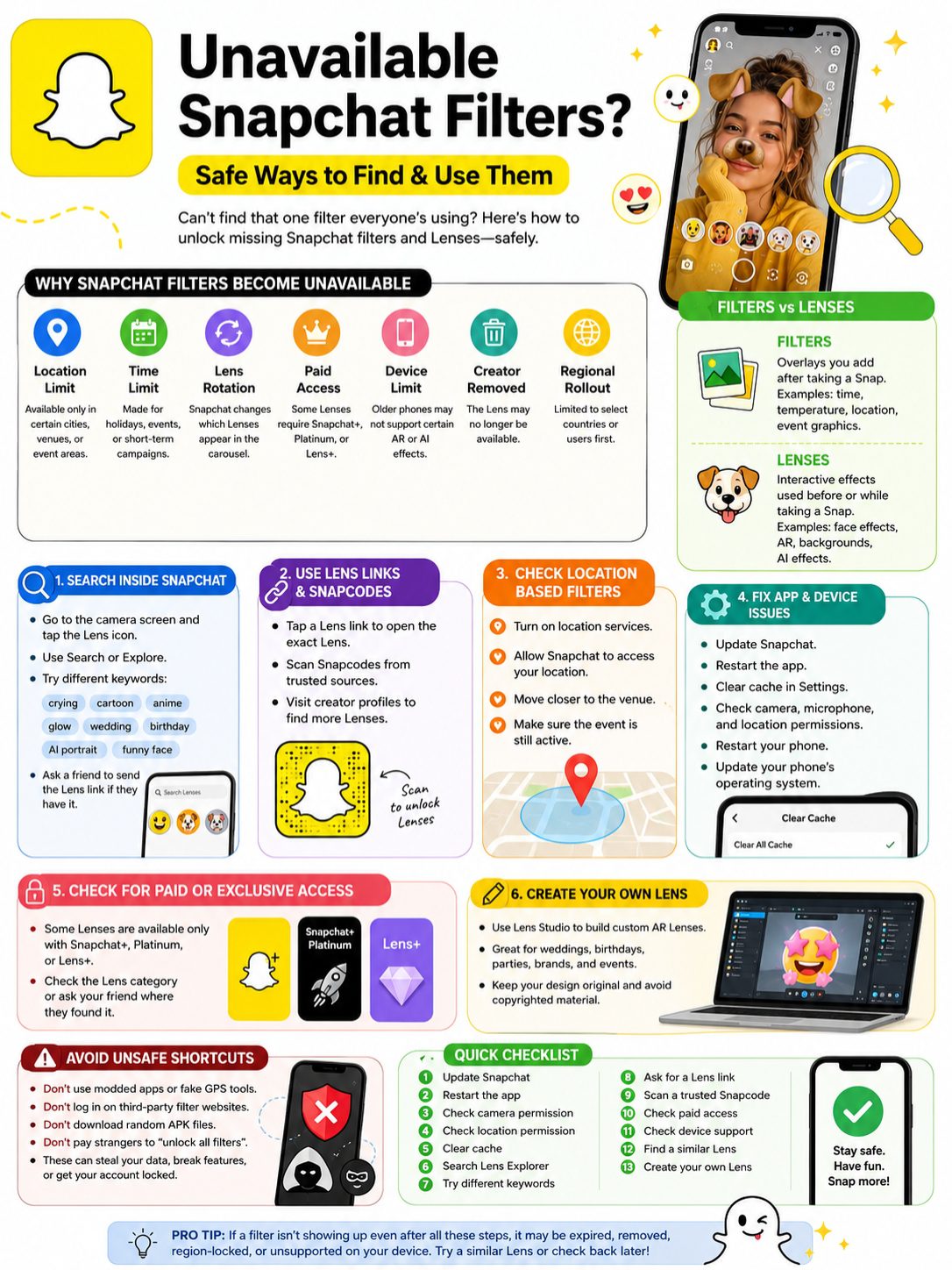
Most people call everything a “filter.” Snapchat doesn’t.
A Filter is usually an overlay you add after taking a Snap. It can show your city, time, weather, event graphics, colors, or other simple design layers.
A Lens is more interactive. It uses the camera before or while you take the Snap. Lenses can change your face, add AR objects, create AI effects, alter the background, or react to your movements.
So when people talk about unavailable snapchat filters, they often mean missing Snapchat Lenses too.
|
Why It’s Missing |
What It Means |
What You Can Do |
|
Location limit |
The filter only works in a certain place |
Check location settings |
|
Time limit |
The filter was temporary |
Search for a similar one |
|
Lens rotation |
Snapchat changed the carousel |
Use Lens search |
|
Paid access |
It may require a subscription |
Check Snapchat+ or Lens access |
|
Device limit |
Your phone may not support it |
Update app and phone |
|
App glitch |
Snapchat may not load it properly |
Clear cache or restart |
|
Creator removed it |
The Lens is no longer public |
Usually nothing |
|
Regional rollout |
It may not be available in your country yet |
Wait or search later |
Filters and Lenses Are Not the Same
This small detail matters.
If you take a Snap first and swipe left or right afterward, you’re using Filters.
If you tap the camera screen and pick an effect before taking the Snap, you’re using Lenses.
For missing Filters, check location, time limits, and permissions.
For missing Lenses, search inside Lens Explorer, ask for a Lens link, scan Snapcodes, or visit the creator’s profile.
The best place to start is Snapchat itself.
Open Snapchat. Go to the camera screen. Tap the Lens icon or tap the screen to open the Lens carousel. Then use the search or Explore option.
Don’t search like a machine. Search like a real person.
If the Lens makes someone cry, try “crying,” “tears,” or “sad face.” If it makes your face look animated, try “cartoon,” “anime,” “3D,” or “avatar.”
|
Search Method |
Search Example |
Best For |
|
Exact name |
“Crying Face” |
Viral Lenses |
|
Simple keyword |
“cartoon” |
Similar effects |
|
Style keyword |
“glow,” “retro,” “soft” |
Beauty filters |
|
Event word |
“wedding,” “birthday” |
Event filters |
|
Creator name |
Lens creator’s name |
Creator-made effects |
|
Brand name |
Product or campaign name |
Sponsored filters |
|
AI keyword |
“AI portrait,” “dream” |
AI-style effects |
Try Different Names
Snapchat Lenses don’t always use the names people use online.
A TikTok creator may call something the “sad filter,” but Snapchat may list it under another name. That’s why one search is not enough.
Try short words first:
- crying
- tears
- cartoon
- anime
- dog
- old face
- big eyes
- glow
- green screen
- wedding
- birthday
- AI portrait
- funny face
- retro
- beauty
If you saw the effect in a friend’s Snap, ask them to send you the Lens link. That saves time.
Save Lenses When You Find Them
When you find a Lens you like, save it or favorite it if Snapchat gives you that option.
This makes it easier to use later. But it doesn’t mean the Lens will stay forever. A saved Lens can still disappear if the creator removes it or Snapchat changes access.
Use Lens Links and Snapcodes to Unlock Hidden Effects
A Lens link is one of the easiest ways to get a missing Snapchat Lens.
If your friend has the Lens, ask them to share it. When you tap the link, Snapchat should open the exact Lens.
Snapcodes can also help. These are scannable Snapchat codes. Creators, brands, influencers, and event pages often share them online.
|
Method |
How It Helps |
Safety Tip |
|
Lens link |
Opens the exact Lens |
Use links from trusted people |
|
Snapcode |
Unlocks a linked Lens or profile |
Scan only trusted codes |
|
Creator profile |
Shows public Lenses |
Check the creator’s other effects |
|
Brand page |
May host sponsored filters |
Use official pages |
|
Friend share |
Fastest way to find a viral Lens |
Ask directly |
How to Open a Lens Link
Tap the Lens link on your phone.
If Snapchat is installed, the app should open. If it opens in your browser first, choose the option to open it in Snapchat.
If nothing happens, update Snapchat and try again.
Avoid random websites that ask you to download another Snapchat app. That’s a red flag.
Read Also: How to See If Someone Read Your Snapchat
How to Scan a Snapcode
Open Snapchat and point your camera at the Snapcode.
Press and hold on the code if Snapchat doesn’t scan it right away. If the Snapcode is valid, Snapchat should open the linked Lens, profile, or action.
Again, trust matters. Don’t scan codes from shady download pages.
Fix Location-Based Snapchat Filters
Many missing filters are location-based. Snapchat may show them only when you are in a certain city, venue, campus, restaurant, concert, wedding, or event area.
That means you may need to be physically there.
Being “nearby” is not always enough. Some geofilters use small boundaries.
|
Location Problem |
What It Means |
Fix |
|
Location is off |
Snapchat can’t detect your area |
Turn on location services |
|
Permission is blocked |
Snapchat can’t use your location |
Allow location access |
|
Weak GPS |
Your phone can’t find you clearly |
Move outside or use stable data |
|
Small geofence |
The filter covers a tiny area |
Move closer |
|
Event ended |
The filter expired |
Search for similar filters |
|
Region lock |
It works only in one country or city |
Use it only where available |
Check Location Permissions
On iPhone, open Settings and find Snapchat. Check Location permissions.
On Android, open Settings, go to Apps, choose Snapchat, then check Permissions.
You may also need camera and microphone access for some Lenses. If those permissions are blocked, certain effects may not work.
Don’t Fake Your Location
Fake GPS tricks are popular online. They sound easy. They are not worth it.
They can break Snapchat features, cause suspicious account activity, or violate Snapchat’s rules. Some fake GPS apps and modded Snapchat versions also carry privacy risks.
The safer path is boring but smart:
Use the filter when you’re actually there. Ask someone at the location to send you a Snap. Or search for a public Lens that looks close enough.
Update Snapchat and Fix Missing Lens Problems
Sometimes the filter isn’t unavailable. Your app is just stuck.
Snapchat relies on app updates, camera access, location settings, internet connection, phone performance, and cached files. If one thing goes wrong, filters or Lenses may not load properly.
|
Fix |
Why It Helps |
Effort |
|
Update Snapchat |
Newer effects may need the latest app |
Easy |
|
Restart Snapchat |
Refreshes the Lens carousel |
Easy |
|
Clear cache |
Removes stuck temporary files |
Easy |
|
Check camera access |
Needed for most Lenses |
Easy |
|
Check microphone access |
Needed for sound effects |
Easy |
|
Check location access |
Needed for geofilters |
Easy |
|
Restart phone |
Fixes quick device bugs |
Easy |
|
Reinstall Snapchat |
Resets the app |
Medium |
|
Update phone OS |
Helps with AR support |
Longer |
Clear Snapchat Cache
Snapchat stores temporary files to make the app load faster. Over time, those files can cause glitches.
Open Snapchat settings and look for the cache option. Clear the cache, then restart the app.
This should not delete your Memories or saved Snaps in normal use. Still, make sure important Memories are backed up before reinstalling Snapchat or clearing deeper app data.
Check Your Phone
Some AR Lenses need newer hardware. If your friend’s newer phone shows a Lens and your older phone doesn’t, your phone may be the reason.
This happens more with advanced AR, AI effects, 3D objects, and camera-heavy Lenses.
Try searching for a lighter version of the same effect. Many creators make similar Lenses that work on more devices.
Some Snapchat effects may not be free for every user.
Snapchat has added more paid features over time. Some Lenses or creative tools may be tied to Snapchat+, Snapchat+ Platinum, Lens+, or other exclusive access depending on region and current rollout.
So if your friend has a Lens and you don’t, it may not be a glitch.
|
Access Type |
What It Means |
What to Do |
|
Free Lens |
Most users can access it |
Search and save it |
|
Exclusive Lens |
Limited to paid users |
Check plan details |
|
AI Lens |
May need special access |
Search the exact name |
|
Creator Lens |
Made by an individual creator |
Use creator profile or link |
|
Sponsored Lens |
Brand campaign effect |
Use while campaign is live |
|
Test feature |
Available to limited users |
Wait for wider rollout |
Ask Where the Lens Came From
Before wasting time, ask your friend one question:
“Where did you get that Lens?”
Their answer tells you what to do next.
If they got it through a link, ask them to send it.
If it came from a paid section, you may need that access.
If it appeared at an event, it may be location-based.
If it was in their carousel, search for the name or style.
Don’t Buy “Premium Filter Unlocks” from Strangers
Some people claim they can unlock every Snapchat filter for money.
Don’t trust that.
They may ask for your login. They may send unsafe files. They may disappear after payment. And in most cases, they can’t do what they promise.
Only use Snapchat’s official payment options inside the app or through trusted app stores.
Create Your Own Snapchat Filter or Lens
If you can’t find the exact effect, you can make your own.
Snap offers Lens Studio, a free platform for creating Snapchat Lenses. It supports face effects, world effects, 3D objects, try-on experiences, AI-assisted tools, and custom AR projects.
For simple needs, Snapchat also has easier creation and ad tools. You don’t always need to be a developer.
|
Tool or Option |
Best For |
Skill Level |
|
Lens Studio |
Custom AR Lenses |
Beginner to advanced |
|
Easy Lens tools |
Simple personal effects |
Beginner |
|
Lens Web Builder |
Ad campaign Lenses |
Beginner to marketer |
|
Templates |
Fast event-style filters |
Beginner |
|
Creator Marketplace |
Hiring Lens creators |
No technical skill |
When Creating Your Own Makes Sense
Making your own Lens is a good idea for:
- weddings
- birthdays
- graduations
- parties
- restaurants
- shops
- product launches
- campus events
- local campaigns
- branded social media posts
Keep the design clean. Use your own images, graphics, and text. Don’t use celebrity faces, brand logos, copyrighted characters, or music unless you have permission.
Avoid Unsafe Ways to Get Missing Snapchat Filters
This is the part that matters most.
One filter is not worth losing your account.
Avoid any tool, website, or app that says things like:
- “Unlock all Snapchat filters”
- “Download Snapchat++”
- “Use any geofilter from any country”
- “Log in to unlock premium Lenses”
- “Install this APK for hidden filters”
- “Get deleted Snapchat filters back”
|
Risky Method |
Why You Should Avoid It |
|
Modded Snapchat apps |
They can steal data or trigger account issues |
|
Fake GPS tools |
They can break features or violate rules |
|
Login-based websites |
They can steal your account |
|
Random APK files |
They may contain malware |
|
Third-party plugins |
They may be unauthorized |
|
Paid unlock sellers |
Many are scams |
|
Browser extensions |
They may collect data |
Use This Simple Safety Rule
If it asks for your Snapchat password outside Snapchat, don’t use it.
If it asks you to install a modified Snapchat app, don’t use it.
If it promises every filter from every country, don’t trust it.
Stick with safer options:
- Snapchat search
- Lens links
- Snapcodes
- creator profiles
- official subscriptions
- official Lens creation tools
That’s the clean way to deal with unavailable snapchat filters.
Quick Checklist for Missing Snapchat Filters
Before you give up, run through this checklist.
|
Step |
What to Do |
Why It Helps |
|
1 |
Update Snapchat |
Fixes old app issues |
|
2 |
Restart the app |
Refreshes filters and Lenses |
|
3 |
Check camera permission |
Needed for camera effects |
|
4 |
Check location permission |
Needed for geofilters |
|
5 |
Clear cache |
Fixes stuck files |
|
6 |
Search Lens Explorer |
Finds hidden Lenses |
|
7 |
Try different keywords |
Lens names vary |
|
8 |
Ask for a Lens link |
Opens the exact effect |
|
9 |
Scan a trusted Snapcode |
Unlocks linked effects |
|
10 |
Check paid access |
Some effects are exclusive |
|
11 |
Check device support |
Some Lenses need newer phones |
|
12 |
Find a similar Lens |
Best fallback |
|
13 |
Create your own Lens |
Best for events or brands |
If none of this works, the filter may be expired, removed, region-locked, paid, or unsupported on your device.
Final Thoughts
Missing filters can be annoying, especially when everyone else seems to have them.
But most unavailable snapchat filters fall into a few simple categories. They are hidden, expired, location-based, paid, removed, region-limited, or unsupported on your phone.
Start with the safe fixes first.
Search inside Snapchat. Try different keywords. Ask for the Lens link. Scan trusted Snapcodes. Check location permissions. Update the app. Clear the cache. Look for paid access. Try a similar Lens if the original one is gone.
And please, don’t risk your account for one effect.
Skip fake GPS apps, modded Snapchat downloads, random APKs, and websites that ask for your login. They promise shortcuts, but they can create bigger problems.
The safe route may take a little longer, but it protects your account, your Memories, and your privacy.
Why does my friend have a Snapchat filter that I don’t?
Your friend may be in another location, using a newer Snapchat version, using a different phone, or accessing the Lens through a direct link. They may also have paid access or be part of a limited feature rollout.
Can I get old Snapchat filters back?
Sometimes. Search the Lens name, creator name, or effect style. You can also ask someone to share the Lens link. But if the creator removed it or Snapchat stopped supporting it, you may not be able to use it again.
Not reliably. Many location-based filters depend on your phone’s location data, not only your internet location. A VPN also won’t fix expired filters, paid Lenses, or device limits.
Are Snapchat Filters and Lenses the same thing?
No. Filters are usually overlays added after taking a Snap. Lenses are camera effects used before or while taking a Snap. People use the word “filter” for both, but Snapchat treats them differently.
Why do some Snapchat filters disappear after one day?
Some filters are made for holidays, events, campaigns, or daily rotations. They are not meant to stay forever.
Can I save a Snapchat Lens forever?
You can save or favorite some Lenses, but that doesn’t guarantee permanent access. The Lens can still disappear if the creator removes it or Snapchat changes availability.
AI Lenses may depend on your country, device, app version, subscription plan, or rollout stage. Update Snapchat and search the exact Lens name. If it still doesn’t show up, it may not be available to your account yet.
Does clearing Snapchat cache delete Memories?
Clearing cache should mostly remove temporary files. It should not delete backed-up Memories in normal use. Still, check that your important Memories are backed up before reinstalling the app or clearing deeper app data.
Can someone send me a Snap using a filter I don’t have?
Yes. They can send you a Snap made with that effect. But that doesn’t always mean you can use the Lens yourself. Tap the Lens name if it appears and see whether Snapchat lets you open it.
Can I make a Snapchat filter for a private event?
Yes. You can create custom Lenses or filters for events, brands, and personal use through Snapchat’s official tools. Keep the design original and avoid copyrighted material unless you have permission.